Problems? See this thread at archive.org.
Based on the suggestions here, the tables are already going to get a bit of an upgrade.How does this look?
You may have noticed that I constrained the width of the table -- this is the maximum width that I can see on my low-res 1280x800 notebook with the browser window maximized. Should I extend the table's width all the way across the post, or does it look better this way?
Intel Chipset Device Software
Important Information
- Notebook chipsets are compatible with this installation package even though Intel's website notes that only desktop motherboard chipsets are supported.
- To ensure that all device drivers are updated, extract the package and execute the Setup.exe file using the -overall parameter.
Current Releases OS Support Version Date Posted Download Link Windows XP x86/x64
Windows Vista x86/x64
Windows 7 x86/x649.1.1.1020 10/01/2009 http://downloadcenter.intel.com/dow...a08/INF_allOS_9.1.1.1020_PV.exe&DwnldId=10884 Previous Releases OS Support Version Date Posted Download Link Windows XP x86/x64
Windows Vista x86/x64
Windows 7 x86/x649.1.1.1019 09/03/2009 N/A 9.1.1.1015 07/30/2009 N/A
-
Looks great!
I would use the official date of the driver as an easy way to check if it is later than the one currently installed. -
If the driver description has a release date, let's use that. But I think that a posted date would also be good for our what's new log, I mean one can check the posted date to know what are the news. Both are useful...
One last thing: if a driver has an accessible "what's new" file or change log (like HP's SPs do with html files on the ftp), can you also add that link? So before downloading the new driver a user could also check for that and decide if it's the case to update. Or you can just put the update log in the notes field. -
Linking to the documentation is a good idea; I will add that. However, if I add the documentation links, would posting the driver release dates even be necessary? The main reason I ask is because the documentation usually contains the date of compilation and release. (Also, my available table room is running out.)
Edit: Or an alternative could be to use the date I posted the driver, AND post the documentation link where you can find the driver compilation and official release date (in most cases). -
That's a good compromise...let's post the posted date and link to the doc where we can find the official release date.
-
The speakers work fine and it says the device is working fine.
This just started a few days ago. I don't know if the issue is the headphones or if the laptop/windows 7 just randomly decided that the audio quality thru headphones must be horrible now.
Anyways I'm trying to upgrade the IDT driver but I don't know how to do it. I clicked on the link on page 1 and I know the folder where its at but I have no clue how to get Windows 7 to actually do anything with it. -
Few Thoughts:
1. This thread definitely should be a Sticky. Mods, please sticky this because the info is extremely valuable.
2. I've been using most of these drivers on my dv7t (dual core). The title of the thread seems to be pretty specific to those devices, but most of these drivers apply to dv5t, dv7t, etc. so you might want to add them to the list.
3. I like the new look of the tables you suggested above
4. Is there any instructions as to how to install the Intel Chipset Device Software? So I downloaded it and it extracted and the readme came up, but I can't figure out how to install the software. I checked C:\Program Files (x86)\Intel\InfInst but only 2 txt documents are in it. Where are the files and setup.exe located so I can install it?
5. Does anyone know if DigitalPersona fingerprint software 4.11.3805 works with the new FF 3.6 beta?
Thanks -
1. The mods have made it clear to me that the driver threads will not be posted as stickies. The main reason is because they already have the maximum amount of stickies allowed for the HP/Compaq forum (four). But thanks for the thought.
2. The reason why I am restricting the driver thread to these notebooks is because there are a number of models outside of the ones that I have specified that have a good many different components, and thus different drivers (although this gap may be closing). Plus, I don't want the thread to be over-saturated with a lot of different models -- the thread is tailored for notebooks with a similar, particular build.
3. Thanks! I will be adding a couple of other things to it such as documentation very soon.
4. The setup file you download on the original post is the one that you extract. Extract it to somewhere, so that you can find it easily. Open the directory with the extracted contents, and then run the Setup.exe file with the "-overall" parameter (without the quotes). You can do this using the Run command or Command Prompt if you wish.
5. Not sure about that -- anyone else who can provide an answer to this question? -
All right, so this is the final version pretty much of the table.
I had to expand the table back to 100% width due to room issues but I think this will be fine for most users. I will be updating within the next few days -- if anyone wants to help me find previous driver information for the last couple releases of any driver, it is most certainly appreciated.
Important Information - Notebook chipsets are compatible with this installation package even though Intel's website notes that only desktop motherboard chipsets are supported.
- To ensure that all device drivers are updated, extract the package and execute the Setup.exe file using the -overall parameter.
Current Releases OS Support Version Date Posted Documentation Download Link Windows XP x86/x64
Windows Vista x86/x64
Windows 7 x86/x649.1.1.1020 10/01/2009 http://downloadcenter.intel.com/dow...a08/INF_allOS_9.1.1.1020_PV.exe&DwnldId=10884 Previous Releases OS Support Version Date Posted Documentation Download Link Windows XP x86/x64
Windows Vista x86/x64
Windows 7 x86/x649.1.1.1019 09/03/2009 Release Notes http://downloadcenter.intel.com/download.aspx?url=/18052/a08/infinst911_autol.exe&DwnldId=18052 9.1.1.1015 07/30/2009 N/A Last edited by a moderator: May 12, 2015 -
Just a small suggestion, but you might want to put the changelog in a code box, so it uses a bit less space and its scrollable instead of a wall of visible text.
Color coding's nice though... -
I'm not sure if I'm missing something but when I download that file, it's an .exe file. I run it and it extracts (doesn't tell me where) and then a setup program comes up. I agree to the terms, click next, see a readme file, click next, and it says it's Finished.
What am I doing wrong?
Thanks -
You manually extract the exe file, you don't run it. The executable is a self-extracting one; it contains even more contents in it including another exe (the Setup.exe file that I mentioned).
-
All right -- looking at the sheer amount of work that I have to do for the tables, I have decided that it might be time to axe Windows XP support on the original post.
I have been thinking about doing this for a while now -- digging up previous versions of the drivers have been difficult enough and keeping track of Windows XP driver components just isn't going to make the work any easier. Since Windows XP is no longer in mainstream support, most users should be on Windows Vista and/or Windows 7 at this point -- so it makes looking for XP drivers more or less pointless now. (Also the original post gets much longer too despite the tables.)
If users need Windows XP drivers for a certain component, links may be posted in a reply. -
Intel Chipset Software v9.1.1.1023 WHQL has been released: http://files.laptopvideo2go.com/chipset/intel_chipset_9.1.1.1023.exe
Found it on LV2GO, didn't find a link on intel download center. -
Suggestions?
My audio is not sounding good when they use headphones? For some reason my headphones sound horrible when I use them in windows 7. And by horrible I mean it's extremely low, not clear, and just weird.
The speakers by themselves are fine. They produce a lot wide range of sound which goes as high as I want it to. But the headphones do not. They sound significantly worse than they did in Vista. I downloaded the "IDT" driver thru Windows Update and that didn't make any difference. -
Noob here... great discussion on various levels!
I am down to a single driver missing. In Device Manager under "Other Devices" it lists a "Multimedia Controller" that is an unknown device. It shows a location of PCI bus 5, device 0, function 0. But it doesn't give any other clues. When I try to update the driver it says "Windows cannot find a driver for the device".
I've installed every drive I believe applies from this thread, with no luck. Does anyone have an idea of what this might be?
My machine is an HDX18 with nearly every option. Thanks! -
Link don't work.
-
XP should be axed. Your table is invaluable to any HP Vista and/or Win7 owner. Thanks again.
-
The new chart format is exactly what I had in mind.......
Great execution and thanks!
On the date format, it might be worth considering using the military/european format of 2day/MON/4year (11 Nov 2009) instead of the 'slash' (/) format. Much less chance of a misunderstanding across national and cultural lines, it's also (potentially) easier to parse in a more consistent way. -
Hey guys, do you know what driver i need to download to get the touch cd/dvd drive eject button to work in Windows 7? Any help would be great!!
Thanks,
Keith -
Sorry to be a pest, but I still need help
Good News: I finally got it extracted properly. I typed "INF_allOS_9.1.1.1020_PV -a -a -p c:\extract\INF" in a command prompt from the desktop. It extracted all the files to that directory.
Bad News: There is no setup.exe in the folder. There isn't any exe at all. In the INF folder are two folders, "All" and "WIN7". In those folders are just "Security Catalog" and "Setup Information" files.
What did I do wrong now??
EDIT: What a minute... I was doing some research and it appears that the Intel Chipset Software Installation Utility actually doesn't contain any drivers.
http://www.intel.com/support/chipsets/inf/sb/CS-030865.htm
So there's really no point in installing this, right?
BTW, it appears that INF_allOS_9.1.1.1020_PV.exe is for desktop boards only and has been pulled from the main intel downloads section. The latest on their site is Ver:9.1.1.1019
http://downloadcenter.intel.com/Detail_Desc.aspx?agr=Y&ProdId=816&DwnldID=18052&lang=eng
But once again, according to that first link:
EDIT 2:
I'm confusing myself the more I research this...
On HP's driver page for the dv7t-3000, under the Driver - Chipset category, there are 2 items.
Intel Chipset Driver 10-2009 2.00 A
Intel Chipset Installation Utility 09-2009 9.1.1.1015 A
If what I posted about is correct, then the Intel Chipset Installation Utility is pretty pointless.
But what is this Intel Chipset Driver?
Here's more info about it: ftp://ftp.hp.com/pub/softpaq/sp45501-46000/sp45629.cva
It mentions:
This is interesting because according to the Intel link I posted about, 9.1.1.1020 is just a INF update that doesn't really do much. But according to this, it has some nice enhancements (battery life, etc.)
I'm really confused now... -
It works here...
-
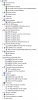
I'm thinking about the integrated tuner or the ENE CIR Receiver, but I made a screenshot (you can find it attached to this post) of almost all the devices from the device manager of my HDX18, compare it with yours and see if you can get which one's missing.
The other hint is that if you go into properties of the unknown device (or any other device) and go into the details tab you can find a Property listbox. In that, you should choose the Hardware ID option and then right click on the strings you find and copy and paste the result; this should give you a string like this USB\VID_07CA&PID_A309&REV_0200 (this is the unique identifier of the HP DVB-T TV Tuner of my HDX18).
With the VID & PID values we can find with no doubt what is the unknown device.
Attached Files:
-
-
jpz, follow these instructions:
1. download the last version here: http://files.laptopvideo2go.com/chipset/intel_chipset_9.1.1.1023.exe
2. execute the file, it's a 7zip compressed file, it will ask for a path, use c:\intel1023 and it will create a directory with 3 files in it (infinst_autol.exe, readme.txt and relnotes.htm).
3. open a command prompt (win+r, type cmd and hit enter)
4. type cd c:\intel1023 and hit enter, the path should be changed to the dir where you unpacked the files. Do a dir command to check that the 3 files are present.
5. execute this command from the prompt: infinst_autol.exe -OVERALL and hit enter; the dialog box should come up, follow the instructions.
6. If he asks for a reboot, do it; after reboot remember to delete the c:\intel1023 folder.
If you want to use the version .1020 published in this thread and not the last version, then skip the first 4 steps, and instead of infinst_autol.exe for the command, use INF_allOS_9.1.1.1020_PV.exe, it's the same executable, just an older version.
Let us know how it went and if you need further help.
-
You Rock! That was i, the TV tuner was the cuprit! Thanks for your help!
Craig -
Thank you for the steps- when I get home I will look into doing this. But did you see my info regarding what the Intel Chipset Software Installation Utility actually does?
-
The intel chipset installer just updates the inf's (information for how a hardware should work) of the devices and not the drivers (.sys files). The drivers are provided by Microsoft.
Also from intel site http://www.intel.com/support/chipsets/inf/sb/CS-030865.htm
Is an INF useful?
If a chipset is released well after an operating system, the INF allows the operating system to identify all the pieces of the chipset. Intel and Microsoft* work together to include information on both current and future chipsets in new operating systems so, in many cases, the operating system will recognize all the pieces of the chipset even without the INF.
Do I need to install the Intel Chipset Software Installation Utility then?
The best rule of thumb is that, unless you are installing an operating system, you don't need to install the Intel Chipset Software Installation Utility. If you do install the Intel Chipset Software Installation Utility after installing the operating system, and the installation program recognizes that some or all of the product names in Device Manager match the product names in the included INF files, it just won't install those INF files. -
The date format change is a good idea, I've been thinking about which date format I should be using.
I'll be updating the original post over the next couple days to transition everything over completely -- this week has been a busy one for me. I am aware of the new MediaSmart releases, and they will be up soon. -
I'm here to help...glad it worked...
-
Great post, I perfectly agree, but drivers geeks like me like to have also the descriptions perfectly updated, since the inf don't hurt anything, they merely update the strings like you reported, I always keep them updated.
-
They don't just update strings. The OS may communicate with the device in different ways before/after the inf (assuming it didn't already have the info), as the inf contains info on what the device is and what it is capable of etc.
-
Major updates to the original post. I'm almost done transitioning everything over to the current table format. It was difficult, though: I spent the last 4 hours doing the majority of the transition. A special table will exist for the BIOS releases, since there are multiple notebooks supported in this driver thread.
Please let me know if there are any mistakes on the original post; I'm almost certain that I've made a mistake.
Now, for content -- thanks to lovegl as the first user to point out a handful of MediaSmart updates.
11/06/2009
- Updated MediaSmart DVD to version 3.0.3309 for Windows 7.
- Updated MediaSmart Live TV to version 3.0.2118 for Windows 7.
- Updated MediaSmart Webcam to version 3.0.2018 for Windows 7.
- Updated MediaSmart MVP to version 3.0.3316 for Windows 7.
-
Did you open the inf files of the Intel Chipset package?
Take a look at them closely, they're just replacement strings for the name of the devices. -
Have you looked at every single chipset package release?
-
hey guys, can any of you help me get the touch eject button to work again after installing Windows 7? What do i need to download to make it work? I have all the drivers installed and all the software but it still won't work. Any help would be great!!!
Thanks,
Keith -
I have the same problem. I guess there is no solution at the moment. I hope we will get it back soon.
-
Not every single one, have you? If so, please share your findings with us...
In any case, like I said, I don't see why we shouldn't install every version of the package, I don't agree on the fact it's not a best practice; over the years, one of the things I always keep updated are the intel chipset infs and I always recommend to do the same to all my friends. -
Thank for keeping up to date drivers in this thread. I compared the drivers at this thread with list of drivers available at HP site and I noticed the following has been left out :
- HP MediaSmart SlingPlayer Software 3.0 A
- HP MediaSmart TV Software 2.20 B2
- HP Support Assitance 4.1.11.3
- HP Tone Control Utility 2.00 A
- HP Wireless Assistant 3.50.10.1
Is there any reason the above items has been left out? -
Amires, this thread is maintained with the great work of Justin plus the contribution of the users, we can't possibly update the info in real-time, so your contribution is expected.
Justin will take a look at your information and will eventually update the thread, thanks for your help. -
I have a problem, i cant get the HDMI audio to work.
I have a HDX X16 with geforce GT 130M card.
I have activated the HDMI as default audio output, put there still isnt any sound. any tips ? -
MediaSmart SlingPlayer -- now I don't know if I should put this up on the original post...I know it's part of the MediaSmart family, but is this particular utility useful to anyone? Please let me know and I'll post it should someone find it useful.
The MediaSmart TV software 2.20 B2 is the same version posted on the original post (I just posted the vendor version, that's all)
HP Support Assistant and Wireless Assistant -- Support Assistant is not important, and it's largely optional...it just provides custom HP Help and Support pages for the notebook. Wireless Assistant is largely the same; wireless can be controlled using the built-in Windows functionality instead of a third-party tool.
HP Tone Control Utility -- now this is where I am not sure again...some people have experienced problems with the Tone Control Utility, which is why it's not up on the original post. But something tells me that it could be important, so I'll also put this up only if someone finds it useful.
-
I had exactly your same doubts while reading the post.
I would only put HP Support and HP Wireless assistants, I've installed them and I think they could be useful to many users. -
Thank you for the information. So MediaSmart TV software is the same thing as MediaSmart Live TV software and as long we are using v3.0.3123 then we don't need v2.20B2. I thought they are different softwares. Thank you for clearing this out.
-
Hi Guys!
Having bit of a predicament with the bass/treble sliders.. the darn thing is not working even after installing HP Control which supposedly is to work the bass/treble Any recommendations or suggestions which you intellectuals could come up with is highly appreciated
btw have anybody tried flashing the HDX18 on Windows 7? Does it work without causing any hickups? Cuz as it seems the Winflash utility is only supported on Vista as per the download site's description on HP.
Thanks in advance
btw the OS on which I have had all the drivers installed on is Windows 7 Ultimate..
ah.. another query not related to this topic though. had my motherboard recently replaced due to a power issue. Now whenever my laptop boots up i get the message serial number not found in the bios screen. using HP Support it is not able to pick up the product number and serial number too. any ideas?
Zz -
Both issues have already been discussed before in this thread, check posts #270 to #281 (if I recall correctly); rageman also created a noob-guide specific to the bass&treble problem: http://www.hphdx.net/Forum/tabid/55/forumid/8/postid/2092/scope/posts/Default.aspx#2092
Regarding the BIOS, please read posts #320 up to #330.
btw: the bios update is recommended also to fix the bass&treble issue. Rageman, you could also put this into your guide (update to F.31 bios release) as one of the prerequirements, I wrote instructions into your guide's thread.
I know the thread is becoming difficult to search into, but please try before asking questions who have already been answered.
Justin: I think that probably a FAQ is needed, with pointers to specific posts... -
Frankly i did follow the guides including the one mentioned on hphdx too but the darn thing stil does not work. As you have mentioned i did uninstall the existing drivers and then reinstalled the one you have mentioned in your thread. Afterwards rebooted and the darn treble/bass was stil not working. did the upgrade to the latest drivers to no avail.
which was why i asked
not that i dont do a lot o hunting when it comes to queries hehe.. i feel that HP Uontrol might be having a play in this but am unsure. Is your OS Windows 7? If you d be so kind enough, please give another step by step guide with each tiny step so that i would be able to really pin onto the offending driver..
thanks man!
Zz -
ZZ,
the guide is good, but please be sure to use the versions mentioned in the guide; and please update the BIOS to last version (F.31), I told rageman to put this into the guide too.
Also, please don't use the HP Tone Control utility we still didn't understand what it's supposed to do, or better, it doesn't do what it's supposed to do, so please uninstall it.
I use Windows 7 Enterprise, and everything works correctly. -
I have installed windows 7 with all the software mentioned in this thread on my HDX18-1155. everything is working perfectly however I don't get the osd when I touch the quicklaunch buttons at the top of the keyboard. What software is responsible for the OSD?
EDIT: OSD is working only for mute and volume but not for tone control and wireless on/off. -
Amires, please read the previous 4-5 posts, we just discussed this now.
I'm starting to think that this will be the MFI (most frequent issue) of the year for these notebooks...
-
NVIDIA SOLUTION
After a clean install of Windows 7 Ultimate, the NVidia driver kept crashing - every few minutes. This happened using the Windows installation auto-installed NVidia driver. Most of the time, the screen blacks out then is restored, and Windows pops up a notification that the display driver stopped and was restarted. But at some random point, which could be shortly after booting or could be 2 hours later, the screen blacks out and all system activity stops (ie, 0 driver reads), and requires a cold start.
I followed close to the procedure in this thread of uninstalling Nvidia, rebooting to safe mode, running Drive Sweeper, rebooting to safe mode*, installing a different Nvidia driver.
* The instructions don't say the second reboot should be to safe mode, but if you don't, then after completely uninstalling Nvidia, Windows 7 on a normal mode startup will re-install an Nvidia driver from Microsoft.
I tried all of the August drivers including 91 and same problem.
Then I installed the 10-27-2009 BETA driver from Nvidia, and that worked (almost perfectly).
After first logging in, it will crash/restart once, and then not again at all, so far tested with over 12 hours uptime.
I have an HDX 18t 1100 quad-core @ 2.53ghz (9300), with Nvidia 9600M GT, 8gb RAM, Windows 7 Ultimate clean install.
[Drivers] HP dv6-2XXX / dv7-3XXX / dv8 / HDX16 / HDX18 (INTEL)
Discussion in 'HP' started by justinkw1, Jul 30, 2009.