Problems? See this thread at archive.org.
Some changes made to the original post.Thanks lovegl for the first two.
12/03/2009
- Updated HP Integrated Bluetooth Module driver to version 6.2.1.500.
- Updated links to the Validity Fingerprint Reader driver.
- Updated HP ProtectSmart Hard Drive Protection to version 4.0.4.1.
-
Lots has been updated since I last did an install back in September~
Actually, I think its time I do a new install anyway, for the new year anyway~ -
justinkw1,
Thank you for the great contribution to the HP DV owners. I don't know of a better place to find updated drivers. -
I installed the SP 45578 for the NEW BT driver. After install, the BT driver in Device Manager still showed as version 6.2.0.9000 which is exactly the same driver before the upgrade.
I then tried to manually install the new driver and after directing the upgrade to c:\SWsetup\sp45578, it says that the newest driver was already installed.
What's up? Any idea?
I do have a HD BT integrated. -
New NVIDIA drivers released - whql certified! Link for x64 http://www.nvidia.co.uk/object/notebook_winvista_win7_x64_195.62_whql_uk.html
-
sweet! they're now whql. win 7 wouldn't let me install them before because they weren't whql certified. thx.
-
what does it mean by -overall parameter for the intel chipset software? How do you apply it?
-
Just installed new nvid drivers, seem to work great.. couldnt get DiRT 2 to run prior to new driver installation, now runs great... I used driver sweeper and safe mode boot etc to install thou.. I dont care about all of the arguments either way I Still think its safer and cleaner to do un-install prior to installing new display drivers..
-
No it will not. Read the first page of the forum. it says dv6-2xxx series. Therefore it would not work.
-
Why wont you do some easy research of your own before posting here.. it'll save you tons of time.
http://h10025.www1.hp.com/ewfrf/wc/product?product=4070958&lc=en&cc=us&dlc=en&lang=en&cc=us
Found here. -
The HP package version has probably changed to address software or installation package changes, but for most users the actual driver may have not changed in this release -- that's what I'm thinking.
Extract the executable file that you download on the original post (use 7-Zip or a similar decompression utility). Then go to the directory that contains all of the extracted contents. The Setup.exe should then be executed, using the " -overall" parameter (note the space, without the quotes). You can do this in Command Prompt, the Run command, or by appending this parameter in the file's properties.
I'll be posting these soon -- thanks!
Sorry, but the original post is not entirely compatible with the first generation dv6 notebooks. However, most of the drivers should still work -- the only exception I can think of at the moment is the NVIDIA graphics driver; use the ATI graphics driver that is available on HP's website instead. -
When updating the system bios, you have to be in windows right? (I know it says "windows environment" but I am double checking) You just follow the onscreen instructions after running the program, right?
-
Good work people!

-
What the hell!!! I just installed the new Nvidia drivers and my Windows Experience Index went down to 1.0!!! hahahaha...
EDIT: HAHAHA IT SEEMS WHEN I RAN THE WINDOWS EXPERIENCE INDEX SOMETHING WENT WRONG AND IT GAVE ME THAT LOW SCORE AND EVEN TURNED OFF MY AERO, LATER I RAN IT AGAIN AND GOT FIXED BACK TO NORMAL. SORRY! ( DAMN BUGGY WINDOWS THO! )
Attached Files:
-
-
Question: I have the HDX with Windows 7 64-bit, and the Action Center is telling me to download an update to fix an issue with the HP 3D DriveGuard. So at first I downloaded it and installed it, restarted the computer, and the Action Center still tells me to click and download the same link. Did it again, same thing. Uninstalled the DriveGuard and restarted, still comes up. What's the deal with this?
-
Hah @ the 1.0
I never get any higher than a 4.8 on that score on my 18 though, 1920x1080 killing the score maybe? -
Hi all,
New to the forums and have a question.
Have just installed the latest nvidia drivers for Windows 7 64 and while trying to get into the nvidia phsyx through control panel it throws up an error Windows cannot find NvCpIUI.exe". Now is this normal as im sure i was able to get into this on the previous version of the driver
Forgot to add my laptop is the HP HDX16 1310EA with the Nvidia GT130M GPU. Current screen res is 1920x1080 and index of 5.3.
Cheers,
John. -
Same old song and dance!!!!!!!!!!!!!!!
-
Well I am dry and wet..........
Working these fields..............So long Mississippi.......So long.....Alabam......... -
I was drunk. Still jamming out; hell yes!!!!!!!!!
-
I really need help with the IDT Audio codec. The one I had was an older version and I'm trying to get the one that's on page 1 of this thread.
However all it gives me is a cabinet file. I see it right there in the folder that all my downloads go to. Yet I can't figure out what to do next. How do I get this codec installed thru Windows Update. -
I just wanted to say thanks for posting this. I had noticed that the subsystem ID listed on my card didn't match anything in the 195.62 INFs, so I was about ready to start looking into which one needed to be modified (or whether it even mattered which one was modified), but this saved me a lot of time. So, thank you!
-
you open the .cab file with WINRAR and then EXTRACT in to a folder anywhere on your computer. then, go to(use search for device manager) DEVICE MANAGER> Sound, video, and game controllers>IDT High Def Audio CODEC>Properties>Driver>Update Driver>Browse for driver on my computer >>> select the folder that you extracted the .cab file to.
BUTTTTTTTTTT: i didn't like this most recent IDT driver. i didn't see any new "equalizer", plus it wouldnt let me save my custom equalizer settings! i rolled back driver to a previous.
****EDIT:: the new driver works fine for me now, but i still don't see any new equalizer enhancements***** -
not bother to update IDT anymore lol. Sound is going out by HDMI...
-
I just did a clean install of Windows 7 from the upgrade disk and everything seems to work fine, except for one unknown device in the Device Manager:
"on Intel(r) ICH9M LPC Interface Controller - 2919"
I tried reinstalling the latest Intel chipset driver with the "-overall" option, but am getting the following error:
"Your computer does not meet minimum requirements for installing this software".
My HDX16t specs:
• Windows 7 Home Premium (64-bit)
• Core(TM)2 Duo P7450
• 4GB DDR2 Memory
• 320GB 7200RPM SATA Hard Drive with HP ProtectSmart
• 512MB NVIDIA GeForce 9600M GT
• Ultra BrightView Infinity Display (1920x1080p)
• Webcam and Fingerprint Reader
Sorry for double-posting this here and in HDX forum, getting desperate trying to solve it.
Appreciate any help! This is a great resource!
UPDATE: Fixed by installing ENE CIR Receiver driver. Still not sure why I'm getting the chipset driver error (only when using "-overall" flag). -
The new driver version got my separate headphone/laptop speaker settings working again; now Dolby Headphone comes back up when I have headphones plugged in
The only other thing I noticed is that the "Optimize Bass routing" thing goes to +24db, but I was never sure if that worked or not to start with. -
I tried that and it said that the driver I had was "up to date"....
-
Is this something that applies to us?
http://forum.notebookreview.com/showthread.php?t=443068 -
I don't think so, but I could be wrong.
IDT is not a main focal point in their discussion. That's why. -
isn't there a new BIOS update for iPod support for the dv8-quad?
Look at these links
for description:
ftp://ftp.hp.com/pub/softpaq/sp46501-47000/sp46632.html
for bios update file:
ftp://ftp.hp.com/pub/softpaq/sp46501-47000/sp46632.html -
Yeah, I just installed that last night. After you install it, though, you need to go into the BIOS settings and reset them to the defaults, save, and then boot. Until you do, the fan starts running all the time and CPU use spikes pretty high. After resetting the settings, if you need to change something like enabling hardware virtualization (which I did), you can go back in and do that.
-
Hi Kreeblah,
I have the same issue after I upgraded the BIOS driver to F.12 in Pavillion dv8t laptop. The fan keeps running all the time. Have you found a way to resolve this issue? Thank you! -
I am playing Boarderlands and every time i try and change the volume the game minimizes and i am back on the desktop, this cannot be normal.
-
I had the same issue. this is a device confliction error with your drivers, particularly the "mediasmart" keys.. try uninstalling then re-installing the driver for them.. or remove it alltogether, because the volume will still work even without the driver being installed..
one way to test this method would be to boot bascially with just the bear essential drivers necessary, then try running the game. Volume should work then without minimizing your screen. I would say try safe mode but Im not sure the game will run in safe mode.
I believe the mediasmart key app is loaded into your boot.ini file which can be loaded by typing msconfig and disable and mediasmart crap. -
This has already been discussed in this thread.
Just remove SmartMenu and the gfx that shows you the sliders won't appear anymore so it won't steal the foreground to your full-screen application. -
Go into the BIOS configuration. Under the section where you can save changes, there should be an option to reset it to the default settings. Do that, then save and boot once. After that, if you need to customize anything, go back into the BIOS and set it back to how it was before.
-
Whats the latest BIOS update for HP DV6T? Can I have the download link?
Thanks -
Hello there,
I am preparing for a new DV6-2000 Quad Edition clean installation. I have one quick question. How do you use the "-overall" parameter while installing the intel drivers. I am a newbie so any help/guidance would be greatly appreciated.
Thanks in advance
Vik -
Hi..Not sure which version of the OS you are using...Please click on the drivers link, then you're version of the OS and select the drivers to download. Hope this helps...
http://h10025.www1.hp.com/ewfrf/wc/product?product=4011366&lc=en&dlc=fi&cc=fi&lang=fi
-
Awesome. Thank you very much Kreeblah.
-
HP Quick Launch Buttons 6.50.12.1
Download : ftp://ftp.hp.com/pub/softpaq/sp46501-47000/sp46731.exe
Documentation : ftp://ftp.hp.com/pub/softpaq/sp46501-47000/sp46731.html -
Sorry everyone, was on a boat trip the past week and I had no Internet access.
I will attempt to answer as best I can.
First, regarding the Realtek HD Audio drivers...
rageman is correct, the Realtek High Definition Audio drivers should NOT be installed -- the notebooks in this thread use the IDT/SigmaTel audio drivers.
There is a new BIOS update for the dv6 Quad Edition and dv7 Quad Edition that will be posted shortly (version F.13 A).
I am also aware of the dv8 BIOS version F.12 A as well.
Thanks, will post this up too.
This has been discussed here -- please search this thread for instructions. Generally, download the exe on the original post (you can also find the zip version at the Intel Download Center). Extract the exe's contents to a directory, and go to this directory. There should be a Setup.exe file in these contents; run this file in a Command Prompt or in the "Run" window (Windows key + R) with the " -overall" parameter appended at the end. Note the space before the dash and do not include the quotes.
A suggestion that I would like to present: Maybe I should post the zip download for the Intel Chipset Device Software instead of the exe download? That could force some to extract that way. I will probably add extraction instructions to the "Important Information" section so as to help clear up any further confusion.
There's actually quite a few updates to the original post in addition to the ones just mentioned -- they will be posted shortly! -
this has been discussed here -- please search this thread for instructions.
Generally, download the exe on the original post (you can also find the zip version at the Intel Download Center). Extract the exe's contents to a directory, and go to this directory. There should be a Setup.exe file in these contents; run this file in a Command Prompt or in the "Run" window (Windows key + R) with the " -overall" parameter appended at the end. Note the space before the dash and do not include the quotes.
A suggestion that I would like to present: Maybe I should post the zip download for the Intel Chipset Device Software instead of the exe download? That could force some to extract that way. I will probably add extraction instructions to the "Important Information" section so as to help clear up any further confusion.
There's actually quite a few updates to the original post in addition to the ones just mentioned -- they will be posted shortly![/QUOTE]
---------------------------
Thanks Justin...Having a zip file that would automatically extract the .exe file with the -overall parm instructions would be real cool...It is just that I haven't had much experience playing with windows..Thanks again..I will try out the instructions. -
Quite a bit of stuff updated over the past couple weeks. It took a while to get everything straightened out but it got done.
Below is a list of the most recent edits to the original post -- thanks to everyone who had helped out!
12/12/2009
- Updated IDT High Definition Audio Codec driver to version 6.10.6249.0 (thanks lovegl).
12/21/2009
- Updated BIOS for dv6-2xxx and dv7-3xxx to version F.13 A; updated BIOS for dv8 to version F.12 A (thanks computerstriker).
- Updated HP MediaSmart MVP links (revision D, thanks lovegl).
- Updated HP Quick Launch Buttons to version 6.50.12.1 (thanks lovegl and amires).
- Updated Atheros Wireless LAN driver to version 8.0.0.238.
12/26/2009
- Updated Intel Chipset Device Software to version 9.1.1.1025 (thanks lovegl).
I also posted simple instructions on how to run the Intel Chipset Device Software using the -overall parameter. Please see the Important Information section for details (really, it's now much easier than how I had previously thought it would be).
-
Hi,
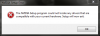
I just downloaded the Nvidia 195.62 driver from the Nvidia website. But it doesn't install. It shows up with the following error (image attached).
Any idea why?
PS: Is laptopvideo2go.com down? Can't access it.Attached Files:
-
-
I just installed the same one on my dv7t and it installed fine. Got it from Page One link of this thread.
-
Some 230m have a non standard section of code in there device id, causing the driver not to install , compare it to mine which works fine below, the section i have highlighted, if yours is different that my be the problem.
The problem has been mentioned in this thread before, maybe the have disk method of driver installation might work.
Or it could be simple that you are tried to install the desktop not the mobile version of the drivers.
PCI\VEN_10DE&DEV_0A28&SUBSYS_ 363E103C&REV_A2
PCI\VEN_10DE&DEV_0A28&SUBSYS_363E103C
PCI\VEN_10DE&DEV_0A28&CC_030000
PCI\VEN_10DE&DEV_0A28&CC_0300 -
Ooops, D/l'ed desktop driver by mistake. My bad.
[Drivers] HP dv6-2XXX / dv7-3XXX / dv8 / HDX16 / HDX18 (INTEL)
Discussion in 'HP' started by justinkw1, Jul 30, 2009.




![[IMG]](images/storyImages/jh_pic_090325_ThankYouBodies.jpg)


)