Problems? See this thread at archive.org.
just wanted to share that i am selling my DV8 I7 with bluray burner. Check out ebay (user id wolfskinbjc43) or pm me for link.
I can't post this in the market place for some reason, so i wanted to share here.
-
-
justinkw1 please update Realtek PCIe Gigabit Ethernet from 7.027 to 7.031 through here Realtek
-
What I've updated on the first post in the past week:
11/21/2010
- Updated Atheros Wireless LAN driver to version 9.1.0.328.
- Updated Intel Chipset Device Software to version 9.2.0.1015.
11/22/2010
- Updated Intel GMA / HD Graphics driver to version 8.15.10.2226 [15.17.12(.64).2226] / 6.14.0.3072 (Audio).
- Updated JMicron JMB38X Card Reader driver links.
- Updated JMicron JMB38X 1394 Filter driver links.
Thanks Z3tor for pointing some of these out!
Thanks bluedayz, I'll update this shortly. -
What about Intel Rapid Storage Technology 9.6.6.1001 WHQL and Intel WLAN driver 13.4.0.139 from Lenovo. Are they any good for HP laptops?

-
I haven't tried the updates provided by Lenovo, and right now my laptop needs to be in working order. Have you tried them? I want to post them up but only if someone can verify these as working.
-
Humm... I'm running "Intel Rapid Storage Technology driver v10.0.0.1046"... I thought I got them from here but maybe not..... wouldn't they be the latest?
-
I have Intel Rapid Storage Technology driver v10.0.0.1046 installed on my machine too. I got it from unofficial source few weeks back. Now it's officially available at Elitegroup Computer Systems website:
http://download.ecsusa.com/dlfileecs/driver/mb/chipset/RAID_Intel_18i.zip
I think RST from Lenovo can be skipped I cannot test Intel WLAN driver since i have Atheros WLAN.
-
I'm still running 9.6.2, Alan, but v.10 hadn't been posted here by Justin AFAIK.
Regards,
- - Phil -
Updated package for IDT High-Definition (HD) Audio Driver version 6.10.6292.0 coming to hp ftp.
ftp://ftp.hp.com/pub/softpaq/sp50501-51000/sp50595.html
ftp://ftp.hp.com/pub/softpaq/sp50501-51000/sp50595.cva
ftp://ftp.hp.com/pub/softpaq/sp50501-51000/sp50595.exe -
I'd like to remind that Intel Rapid Storage Technology 10.0.0.1046 is available at Elitegroup Computer Systems (ECS). Here's link to download page:
ECS Web Site
Direct download link: http://download.ecsusa.com/dlfileecs/driver/mb/chipset/RAID_Intel_18i.zip -
Just tried it and it's all working well - I'll post it up shortly.
-
Everything is now up-to-date on the first post. Recent changes are noted below:
12/03/2010
- Updated Intel WiFi Link driver to version 13.4.0.139 for Windows Vista and version 13.4.0.9 for Windows 7 (thanks Rampant Speculation).
- Updated Realtek PCIe Gigabit Ethernet Family Controller driver to version 6.243 for Windows Vista and version 7.031 for Windows 7 (thanks Z3tor and bluedayz).
12/04/2010
- Updated Intel Rapid Storage Technology driver to version 10.0.0.1046 (thanks Z3tor).
-
just ask if digital persona 5.1.0.175 work with 32bit of windows 7??
-
Yes, both 32 and 64 bit are supported.
-
well but when i'm download it it says only install on 64bit windows
look here
![[IMG]](images/storyImages/11695826.jpg)
is there any 32bit version?? -
Intel wifi driver works as expected (have old laptor with 3945ABG)
-
justinkw1 please update Intel Rapid Storage Technology driver from version 10.0.0.1046 to 10.1.0.1008 through here intel drivers pour Raid/Sata/Ata/Ahci
-
Although 10.1.0.1008 is WHQL certified, it's not officially available.
-
Here's the latest intel Wifi driver 13.4.0.9 by HP for Windows 7 32/64 bit.
ftp://ftp.hp.com/pub/softpaq/sp51001-51500/sp51121.html
ftp://ftp.hp.com/pub/softpaq/sp51001-51500/sp51121.cva
ftp://ftp.hp.com/pub/softpaq/sp51001-51500/sp51121.exe -
IDT High Definition Audio Codec 6.10.6300.0 appears again on HP ftp.
ftp://hp.com/pub/softpaq/sp51001-51500/sp51129.html
ftp://hp.com/pub/softpaq/sp51001-51500/sp51129.cva
ftp://hp.com/pub/softpaq/sp51001-51500/sp51129.exe -
Again, these are not compatible with consumer notebooks -- only business notebooks are supported in this release.
-
Oh, my bad...
-
sp50856 is probably what we're looking for
whenever they post it that is
you can also add sp50561 and 50560 to the list as well
edit: 50856 now live, works on my dv4 -
12/15/2010
- Added new links to IDT High Definition Audio Codec version 6.10.6300.0.
- Updated driver links to Intel Rapid Storage Technology version 10.0.0.1046.
An official release of Intel Rapid Storage Technology version 10.1.0.1008 should be coming soon from HP. -
How to get Bass/Treble back on the HP DV8t for windows 7 professional install?
Laptop came with win 7 home; it was reinstalled with win 7 pro. Now I cannot get bass/treble controls to work.
I installed HP quicklaunch drivers.
I also installed HP media smart (that is how I got the volume slider to show up).
Also, when I install dvd access etc. in media smart, nothing seems to happen. Only the webcam uitility install seems to have worked in media smart utilities.
Any tips? -
Try using the HP Tone Control Utility and see if this fixes your problem pertaining to bass/treble controls.
Version: 2.00 A
ftp://ftp.hp.com/pub/softpaq/sp45501-46000/sp45617.exe -
I have never gotten the bass/treble control to work. When i install the tone control utility, the osd looks all garbled. however, i have figured out that the bass and treble controls are available by right clicking the volume icon-->playback devices-->properties (for IDT Audio)-->tone controls
this isnt an easy way to do it, but if you want to set it and forget it, you can
as for media smart programs, i cannot really help you there. i only install mediasmart menu (for the volume OSD) and mediasmart webcam. every other program just duplicates functionality provided by microsoft, and not in a better way -
Thanks for the IDT pointer.
Although, I´m not sure whether thats utilizing the subwoofer, or just changing the sound profile of the usual laptop speakers
-
12/18/2010
- Updated Intel Rapid Storage Technology to version 10.1.0.1008.
- Updated Intel GMA / HD Graphics driver to version 8.15.10.2246 [15.21.2(.64).2246] / 6.14.0.3074 (Audio).
-
Intel Rapid Storage Technology 10.1.0.1008 is now also available at intel download site.
-
I removed version 2246 of the Intel HD Graphics driver because it did not support the Intel 4 series chipsets which are found in the HDX16 and HDX18.
Also, I discovered a new Synaptics TouchPad driver -- it was not posted sooner because the release notes were (and still are) incorrectly referring to HP TeemTalk.
12/20/2010
- Removed Intel GMA / HD Graphics driver version 8.15.10.2246 [15.21.2(.64).2246] / 6.14.0.3074 (Audio).
- Updated Synaptics TouchPad driver to version 15.1.16.2.
-
justinkw1 please update Realtek PCIe Gigabit Ethernet Family Controller from 7.031 to 7.034 Realtek
Thank you -
And for Vista 6.244
-
Intel Chipset driver 9.2.0.1016 available at Gigabyte
http://download.gigabyte.us/FileList/Driver/mb_driver_chipset_intel_6series.exe -
For others who may be contemplating doing a "clean install," these are the kinds of problems that almost always occur when one does a "clean install" and other more serious issues may also result. And there may be other problems that are less obvious and do not come to one's attention, but are lurking below the surface perhaps even causing degraded performance. And other functionality built in by HP may be lost such as the HP recovery manager and partition (not that that is all that valuable, imo, especially if one has burned the recovery disks before undertaking the clean install, but still it is another example of the kinds of things that are lost by doing a clean install).
Most of these kinds of issues are not too difficult to resolve, but some are more of a hassle and some may never get "fixed," depending on the experience and effort expended by the user.
The thing is, W7 is so well designed and "self optimized" that there is little, if anything, to be gained by doing a clean install, like there used to be with XP & Vista. So there is no reason to risk having these and similar problems arise by doing a clean install. In the W7 era, it's actually much better, imo, to keep the HP factory install and simply do an "upgrade" in place to whatever version of W7 one wants (for example, I upgraded my factory install to W7 Ultimate which took about 5 minutes and left everything like installed programs, settings, etc., intact). Then you can simply uninstall any programs you feel are "bloatware" or simply don't want or need and clean the registry. This way all the HP functionality, (except for apps that were deliberately uninstalled) and esoteric drivers are retained and you are much less likely to encounter issues such as the one experienced by the poster in the above quote. -
I agree, Peter.
Dexter, I have done both - bloatware removal and a "clean install" and the clean install is fraught with problems as Peter described. Bloatware removal with freeware like RevoUninstall and CCleaner is really very simple and reliable (thought it's always a good idea to make a clone of your primary drive before starting the removals). Back when there was rampant discussion here of performance advantages of one versus the other, I found neither had any advantage in performance but "clean install" was very time-consuming and generally led to some minor driver and hardware issues which were not a problem with bloatware removal.
In your case, I suggest uninstalling all HP mediasmart s/w and quicklaunch button drivers. Then run chkdsk/f and sfc/scannow to be sure you have good system files and completely solid file system entries. Then install the latest versions of drivers again, followed by the latest releases by HP of the software. That should put your DV8 back in good operational shape again.
Regards,
- - Phil -
Thanks for all the update notications Z3tor.
I did a bunch of updating and everything went well except updating with the above Intel Rapid Storage Tech driver caused the application to stop working. By that I mean that after installation and reboot, the IRST service was not running and I was unable to "see" an external hard drive connected to my esata port. I had to revert back to the previous version to get that functionality restored.
Just thought I'd mention my experience. It would be interesting to hear if anyone else has had a problem with it. -
I had previously used Justin's link to the HP sofpaq for Intel Rapid Storage Tech driver update, Peter, and it installed perfectly. All functions seemed to work fine. Here it is: ftp://ftp.hp.com/pub/softpaq/sp51001-51500/sp51273.exe
Regards,
- - Phil -
I'll try it again from that link.
Edit: No joy. . . I get an error registering one of the components when I try to install the latest version. Perhaps I'll have better luck with the next update for this app. For now, I'll continue to use the previous version which is still working for me. -
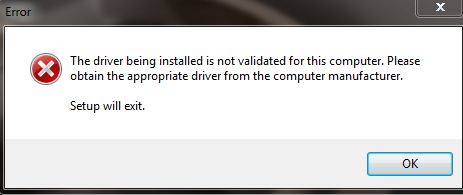
I've been trying to upgrade the Intel graphics on my comp (specs below) since I've bought it. The file you link to will begin to extract, but when the actual install begins I get an error message (image below).
My comp's specs:
Product Number WA779UA#ABA
Microprocessor 2.13GHz Intel Core i3-330M Processor
Microprocessor Cache 3MB L3 Cache
Memory 4GB DDR3 System Memory (2 DIMM)
Memory Max 8192MB
Video Graphics Intel HD Graphics
Video Memory Up to 1696MB
Hard Drive 320GB (7200RPM)
I like most just like having the most up to date software, and this one is driving me crazy. I don't know what's going on, I've even tried a reinstall and trying to install the graphics update that way, but it's still a no go.Attached Files:
-
-
are you installing the appropriate 32/64 bit version?
-
Yes, the file name of the one I downloaded from the first post of this topic is Win7Vista_64_151712.exe
-
I extracted the files from the setup file and updated the video driver manually. After doing this I was able to run the setup file. Thanks for the help.
-
Sorry to hear that, Peter! Perhaps, you need a round of therapeutic Chkdsk/f, sfc/scannow, and CCleaner, before you try again? Sort of like "take two aspirin and call me in the morning." Certainly those won't make it any worse and will fix it most of the time.
Regards,
- - Phil -
Updating on Christmas Day... hopefully you all are having a great day!
Peter: You can try the Intel Rapid Storage Technology link offered at the Intel Download Center - http://downloadcenter.intel.com/Det...apid+Storage+Technology+(Intel®+RST)&lang=eng
As for changes to the first post, thanks Z3tor and bluedayz for contributing to the following updates:
12/25/2010
- Updated Intel Chipset Device Software to version 9.2.0.1016.
- Updated Realtek PCIe Gigabit Ethernet Family Controller driver to version 6.244 for Windows Vista and version 7.034 for Windows 7.
The Intel Chipset Device Software update comes from GIGABYTE Technology, and adds further support to the upcoming Intel 6-series chipsets and 2011 Core processors. However, this version continues to support older generation chipsets as well. Please see the Important Information section regarding recommendations on how you should install this version, since it is packaged rather differently.
-
Thanks for the suggestion. Still getting an "error registering one or more components, install will exit," but fortunately the previous version still works fine so I'm not too concerned. Must be something incompatible with something on my machine. Hopefully the next version will install for me.
-
Did you try what I suggested, Peter? To wit:
Regards,
- - Phil -
I had already run scannow and my registry is automatically cleaned every three days. Have not done chkdsk/f lately, but I am doubtful that a disk error is likely to be causing this kind of error when writing something to the registry during an install. I'm pretty sure something is conflicting with what the Intel installation wants to do.
-
I can never be sure where the problem remains till I run all three. Glad for you if you know how to know that without running them. :laugh:
Mele Kalikimaka and Hau'oli Makahiki Hou!
Regards,
- - Phil -
Actually, Acronis is very sensitive to disk problems. If there are any disk problems serious enough to cause trouble, Acronis will not be able to complete its backups without erroring which the program would then inform me of. So as long as Acronis is able to complete my daily backups w/o errors, I know that my disks are almost surely in good shape.
That's vg Hawaiian. I've only been here for a few years so most of it is still Greek to me.
It's a rainy cool 76 degrees F. here ATM.
[Drivers] HP dv6-2XXX / dv7-3XXX / dv8 / HDX16 / HDX18 (INTEL)
Discussion in 'HP' started by justinkw1, Jul 30, 2009.


![[IMG]](http://img109.imageshack.us/i/11695826.jpg/)