Problems? See this thread at archive.org.
I get weird static on screen every now and then when my laptop returns from sleep, and I just got severe static when I just tried to over-clock the memory.
wth?
-
Here are some more results with 3DMark06 and I will try and get to do some 3D Vantage Marks tomorrow:
550/850
3D Mark score: 7690
SM 2.0 score: 2778
SM 3.0 score: 3486
CPU score: 2793
540/860
3D Mark score: 7681
SM 2.0 score: 2773
SM 3.0 score: 3477
CPU score: 2804
545/860
3D Mark score: 7707 <-------- Highest so far for me!
SM 2.0 score: 2776
SM 3.0 score: 3499
CPU score: 2807 -
you're overclocking too much
-
I'm not sure if it's applicable but I've skimmed through the whole thread and I haven't seen this mentioned
RBE - Radeon BIOS editor
It's the Radeon BIOS editor.
I've personally only used it on my desktop since I don't have a laptop with ATI graphics but I know that can pull the voltages that the card is capable of out as well as setting permanent overclocks. I highly recommend reading the tutorial thoroughly before doing anything though. -
how were your temps?
-
what is a free/simple program that i can use to overclock?
-
I want to make sure that everyone knows for 3DMark runs you are supposed to leave all 3DMark settings at default. It's common sense, but there's no point in comparing scores if people are changing settings or the resolution 3DMark is running at.
That being said, HP doesn't have to do anything about this, as the Mobility 5650 spec sheets list that it can run anywhere from 450MHz to 650MHz, as many people have stated. We just got the short end of the stick on this one. -
HP is not the only one to do this, supposedly Sony underclocked the 330m on the $1900 starting price z series as well.
-
I think that Sony also underclocked their 5650's on the E series.
-
Envy 14 was advertised as a premium laptop with the best components hp has to offer. So why did hp put a better component gpu 5650(550/800) in dv6ste and gave the envy 14 a weaker 5650(450/800).
It's false advertising. -
There's legally no false advertising here.
HP advertised the Envy 14 as having an ATI Mobility 5650 with 1GB of VRAM.
The Envy 14 comes with an ATI Mobility 5650 with 1GB of VRAM.
The spec sheet of the ATI Mobility 5650 lists it as running anywhere from 450MHz to 650MHz.
Was it lame on HP's part to include the lower clocked 5650 in the Envy 14? Sure, but it's not false advertising. It's still a premium notebook. -
Thanks for sharing. I downloaded it and have been trying to get my bios version, like the tutorial said, but I cant seem to get it. Winflash wont launch for me, and GPU-z says something like unknown bios version. Without saving the version to file, this editor won't wont. Anyone have any ideas?
In other news, I have managed to get my 5650 up to 525/800 without crashing in 3dmark06, and scored a 7397. I would like to get up to 8000 but I dont see how thats possible right now. 535 and 540 both crash with green lines going down the screen.
I think tomorrow ill try to get the 10.6 drivers working, and see if that helps. What do I need to get 10.6 to work again? -
lith, go from 10.3 --> 10.6 alpha --> 10.6
when you are installing alpha, your screen will go blank so just wait like 5 minutes for the driver to fully install then do a power cycle or hard restart -
From the problems I have been hearing about the envy 14 would you guys recommend something different like the envy 15,17 or the dv6t?
-
Technically, you are right, as I doubt HP is actually breaking any laws.
From a common sense standpoint, however, it is misleading and, arguably, unethical. -
All sony viao gpu are also 450mhz, and it's their premium line aswell.
-
The EB seems like a replacement for the old (in computer years) NW, with a graphics chip thrown in.
-
I am not sure about this but could the fact that the envy 14 is smaller be the reason it is 450 and not 550 like the dv6t?
-
Doubt it. The Acer 3820 is 4 pounds and has a 13.3'' screen, and it's clocked at 550.
-
I would think acer would have a better card because it was made for gaming but the fact is this is a premium brand and therefore should have everything top notch or at least the option

-
I ran a few more tests (1280x768):
575/850:
3D Mark score: 7811
SM 2.0 score: 2838
SM 3.0 score: 3531
CPU score: 2823
575/860:
3D Mark score: 7868
SM 2.0 score: 2869
SM 3.0 score: 3560
CPU score: 2815
575/880:
3D Mark score: 7947
SM 2.0 score: 2903
SM 3.0 score: 3605
CPU score: 2811
575/900 crashed, and so did 575/890. Anyone else want to try and hit 8,000?
Also, PCMark Vantage w/ stock GPU clocks: 6819
Lauzy, I'm wondering why our GPUs seem to have different tolerances. Do they vary that much in production? Anyone? -
Have you tried ATIFlash? There's a tutorial here
techPowerUp! :: Tutorial on how to use RBE (Radeon BIOS Editor)
I'm having the same problem but as soon as I find my usb drive I'll try it out. -
Almost 8k is awesome.
This is my 3rd post on this, but I figure I'll keep on yapping. The i5 is overclockable, and with the envy 14 cooling, will probably be stable.
Who doesn't want 3.2Ghz out of their 450m?
EDIT: So it seems a bit more complicated that I first thought. We need the PLL of the clock generator which can only be found by looking at the motherboard, and finding the right chip. I'm going to search for a picture of the E14 motherboard. Anyone know if the threads have any? -
Adding mine to the "6800" list. I ran the 3dMark 06 demo for an hour and then the benchmark. Result is 6807. Stock drivers/stock clocks with just bloatware removed. Amazing how cool this thing stays. No worries about throttling.
-
Has anyone figured out how to change the fan speed?
-
A little off topic:
Too my surprise baking the video card in the oven actually worked. I now don't have to install work related stuff on my new Envy and get's to keep it that way.
On-Topic:
Got my shipping confirmation e-mail today, should have my Envy by mid next week. -
I envy you Thanatos! I believe that each chip varies quite significantly in the production phase, which is why the higher quality ones are binned higher and whatnot, so either I got a mediocre chip or maybe you just got a higher quality one. I can't for the life of me 3D Mark past a clock speed of 560, i believe. I am still hoping that this is an undervolting issue. I will try to run your settings later tonight. Are you benchmarking off of the 10.3-->10.6 alpha-->10.6 drivers? and you are using MSI Afterburner right? or is there anything else you are running as well?
On a side note....I will be receiving my Bing Envy 14 on Wednesday, so I will be doing a clean install and yadada to see what the limits of that graphics card is and comparing it to yours and my other Envy 14. -
Wouldn't everyone be able to overclock more if you increased the the voltage? Is that hard? I have never overclocked in my life because my current card doesn't let me.
-
Well the main problem is that we haven't found a way to check the voltages that the video card is running at (most assume it is something like 0.9 instead of 1.0) and we also have no way to modify the voltages either, mainly because the amd overclocking application just crashes. If we were able to modify the voltages, overclocking would be A LOT easier and we would be getting much higher scores.
-
anyone with the i7-720qm Envy 14 check to see if their "quad-core" version of HD 5650 is also 450 underclocked?
-
They're probably the same. You'd honestly think the 5650 in the i7 Envy 14's would be at 450MHz to save battery life, since they have to run on the 5650 all the time...
I suppose it's worth checking, just for giggles. -
510/810
6531 3dmark06
*crash at 520 core
* haven't tried pushing the memory far
*i5 430m -
That would be ironic wouldn't it? 550MHz on i7's and 450MHz on i5's. Maybe it was just a screw up.
Either way though, it shouldn't matter really, because when using desktop stuff your video card downclocks to much lower voltage and clocks anyhow, which could be the same in this "idle" state for a 450MHz or 550MHz clocked GPU. -
That seems low. Is this running it on the laptop screen or external monitor at 3DMark06 default res of 1280x1024?
-
True, but any bit of GPU activity could cause it to ramp back up to full. I see what you're saying though.
Well, someone with an i7 Envy 14 could open up GPU-Z and let us know. (GPU-Z is working with the Envy 14, correct?) -
Forgive me if this has been answered already but do I need to download catalyst 10.6 before i overclock the gpu with msi afterburner?
best wishes,
mac -
any luck with gpu flashing??
-
Sorry about your GPU Lauzy, if indeed that's the case. I feel especially bad about it, since I don't game at all! (Chess excepted, but that doesn't exactly tax the card.) I use the GPU for photo and video editing/watching.
I'm not entirely sure which drivers I have actually. But when I go to Control Panel/Hardware and Sound/Devices and Printers/ATI 5650/Driver tab, the driver date is 3/9/10, and driver version is 8.713.0.0. I guess that's 10.3. If that's true, then maybe the older drivers work better with OC?
I'm just running MSI and monitoring temps with HW Monitor (they never get much past 70, even with heavy overclocks that fail), nothing special.
Hope someone figues out a way around this. I tried testing again at 575/890 and it failed. 580/585 failed too.
(I should also note that despite all this, I'm really happy with this computer and it's graphics capability. It's more than I need. But I just like seeing how far it can go. )
-
Only games I play are farmville and frontierville on facebook, lol. My 3-4 year old Toshiba struggles when I am on full screen and temps shoot up to the 90c every time.
I'm hoping the E14 will be able to handle this much better?
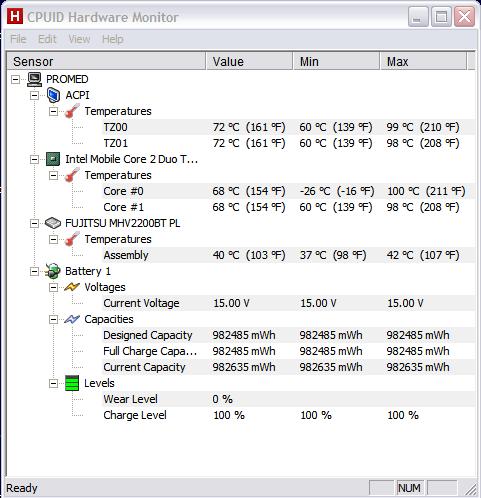
Attached a pic of my temps taken while just surfing the net.Attached Files:
-
-
Holy cow! You probably need to remove the heatsink, remove and reapply new thermal paste. Plus use some compressed air to blow out your vents. Just open the sucker up and pass a vacuum over it. Something isn't right there.
Is Farmville Frontierville even a 3D app? I don't understand how that could tax any CPU or GPU. -
the games are quite flash intensive lol
-
I7-720 here with 450/800 5650, just with more heat issues! =D
-
575/885:
3D Mark score: 7347
SM 2.0 score: 2901
SM 3.0 score: 3593
CPU score: 2017
why is mine so weak! -
So has ANYONE found a way of increasing the voltage?
-
Not yet, but I just confirmed that my 5650 is running at 0.90v
-
ok cool. So now we need to find a way to increase the voltage because I really don't want this laptop do be worse at playing games than the m11x which my friend has.
-
Thanks for the tips, I'll give it a shot after the E14 arrives and is up running.
The facebook games are just flash but they bog my whole pc down trying to keep up. -
I have intel core 2 duo 2.0GHz and when I play games like restaurant city and my empire, it uses about 80% of both my processors and they get pretty hot as well (about 60) and my GPU gets about 50 and chipset 60. So yeh I'm just saying that those flash games are pretty intense for some reason.
-
How did you check? Because the dv6t 5650 is running at 0.90V as well
-
How did you confirm? Please share.
***ENVY 14 Gaming Lounge***
Discussion in 'HP' started by 2.0, Jul 14, 2010.