 Problems? See this thread at archive.org.
Managed to add mSATA SSD (Toshiba 128GB - THNSNH128GMCT) to my Envy 17 (17-j005tx), and enable it as SRT cache.
Process is fairly easy, basically you need to follow steps listed at pages 50-53 of service manual, the hardest part was finding small screwdriver for 3 1.5x2 MM screws under battery (you might want to check if you got one before disassembling).
Btw Windows 8 (HP preinstalled) just ignored change of controller type from AHCI to RAID, no re-installation was required or even any messages displayed. Flawlessly.
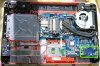
Motherboard overview:
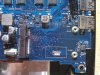
mSATA slot:
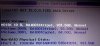
Bios 1

Bios 2

Bios 3
My article in Russian (it is more about fighting Insyde BIOS hidden settings, but...)
Google translation of article to English
-
-
Sitting at the desktop doing nothing in an air-conditioned office (~70 degrees), my cores are reporting anywhere from 36-43c.
-
Damn that's quite an improvement. I really would like to do this but I've never replaced the Wireless Card before....is it really difficult? Any more difficult than replacing the HDD with an SSD (which I've already done for my Envy 17t....)
Lastly what website should I go to in order to see what the max download/connection speed the current WiFi card inside my Envy can do? -
It's not that difficult, altho the posts where the antennas attach are fairly small, I suppose you could break them if you weren't careful.
I used a LAN speed test, there's a free little program at http://www.totusoft.com/files/LAN_SpeedTest.exe
My WAN (internet) speeds weren't improved because I'm on satellite internet which is the bottleneck.
I guess if you were on fast broadband you might find that your speeds (eg at testmy.net) showed some improvement.
wireless AC is primarily of benefit if you are streaming to your laptop from a home media server or similar. -
If your router/access point is not capable of 5GHz (assuming you will get a card with 5GHZ capabilities), then don't even bother with the wi-fi upgrade and save yourself $30. 2.4GHz is so cluttered with crap, it's really just meant for web surfing and stuff like YouTube.
-
Are you use HWmoniter ?
-
Hey, I'm considering the Envy 17 1920x1080 with matte display. I've read mixed reviews about the screen and if I understand it correctly different version of the Envy has different panels and therefore quality or am I wrong? How is the 17 inch 1920x1080 matte display? Is it IPS or as good? Appreciate help

-
Is this the right Intel Wireless AC card? It also has Bluetooth correct?
http://www.amazon.com/Intel-Network...etooth/dp/B00DMCVKMU/ref=cm_cr_pr_product_top -
Does the laptop still have the right antenna for BT if I buy it without and add the AC card later? I'd assume so, as it's probably cheaper to just have one part. Also, does it have an antenna that will work well for 5Ghz WiFi? Since there isn't an option for a 5GHz card, I wasn't sure if they designed it with an antenna that's optimal for both bands.
-
This guy: http://amzn.com/B00DMCVKMU
And yes, it has integrated Bluetooth 4.0. -
So now that some people have gotten there 15s for a while, what kind of battery life are you guys seeing ? Specifically when doing light task like word with wifi on .
-
That's the same item I posted originally but thanks for the confirmation. Now I just need to look up how to replace the WiFi card inside the Envy 17t.
However I'm having a issue at the moment with the graphics card. How do I tell which one the laptop is set to by default? I thought I had set it to the nVidia Graphics card (the 740M) and yet when I went to play an HD movie I have on iTunes it told me that I don't have an HD display which is nonsense and false. I have the Full HD 1080p display with the 740M. So I should be able to play any HD movie I want correct?
Anyways if someone could help me out to confirm what's going on here I'd be very grateful....
Message from nVidia:
GeForce 740M
This product has been detected as your primary device.
Your product manufacturer requires you to download a driver for your device from their website.
Thanks HP -
Has anyone had luck installing the current Nvidia drivers for the GT 740M on the Envy 17" with touch screen? The following error is thrown when attempting to install the 320.49 driver:
Nvidia Installer cannot continue
This graphics driver could not find compatible graphics hardware.
The current drivers from HP are really old. Whenever I launch Sim City, the screen goes black with the game music playing in the background. (plenty of links on the web...) -
You clearly didn't read the post right above yours.....as in my post.
Anyways I had the same issue when I first tried to download the most recent driver from nVidia's website directly. Then I downloaded Java and allowed the website to determine what graphics card I had and what update I should get. When it finished it gave me the message I quoted in my previous post from yesterday night.
Anyways I'm having some serious issues with this wireless card and the wireless network in my new apartment. It connects to it and then loses the connection 25 minutes later! Then it has troubles reconnecting to it. How can I get any work done or take breaks. It won't even remember the network after I've shut down the computer. I don't know if I should buy a wireless router to avoid this problem or call them first. -
I read your post. You're describing issues unrelated to my own. I'm unconcerned with the NVidia's auto detection tool, its website, or the difficulty in changing the wireless card (which I have done and is documented in the maintenance guide on HP's support site.)
The issue I was having relates to the driver install. After downloading the driver, the installer failed to detect the GPU. It was resolved using a newer BETA release so I suspect the issue was with Nvidia - not the laptop. I still can't run Sim City so I'll continue to chase that issue. -
Again the same thing happened to me. As in that is what I described above. Step by step. Except for me I wasn't comfortable installing a beta driver on a brand new notebook so I went and tried the auto detect and then settled for HP's option.
More to the point I wrote the reasoning behind why the nVidia driver was not working for you. HP is preventing us from getting straight from them (unless you choose the beta version apparently).
Anyways I'm done with it. You clearly want to be stubborn and pretend like we're not talking about the same thing here. Lastly I wasn't directing the wireless issue at you. -
Lots of criticism of the panel on the 15t. Any comments on the touchsmart screen vs. the non-touch screen?
I actually have two 15ts coming to me - one from Costco (non-touch) and one from HP (touch), about $200 difference with the costco deal linked earlier, so I'll have the answer to this question but probably not for at least a week or two. -
If I plan to eventually get an mSATA SSD drive, move Windows and all programs to it, and just use the 1TB drive for data, is there much of a point in getting the Hybrid drive? Is having the SSD cache on a data drive going to do much for me? I guess it'll figure out which data files I use most and cache that -- I could just move those 8GB worth of data to the SSD, but this would do it automatically for me, rather than needing to figure out which data files are worthy of being on the dedicated SSD..
And how much faster should I expect having the full OS and programs on an SSD vs the hybrid drive? If it's not that much of a difference I may just get the Hybrid and be done with it. -
Yesterday I bought a HP ENVY TouchSmart 15-j008ss and I'd like to know if it has a ssd slot, I've never seen a real ssd. I've taken a picture of it. Could someone tell me If I can add a SSD in my laptop?
View attachment 100968 -
Depends on what kind of SSD you get. SSD's in notebooks may use mSATA (micro SATA) which uses a unique kind of connector, and goes in the spot you labeled in your picture. Most of the time you will find people getting the normal 2.5" SSD drives that replace the hard drive in your computer. In your picture, your hard drive is the blue device with the light blue rubber housing around it.
If you would have spec'd your Envy with the "24GB mSSD" option they have, there would have been a mSATA SSD drive in that empty spot.
You can still get an SSD, it just depends on what kind. I would recommend getting a normal 2.5" SSD that replaces your mechanical hard drive, but that's just me. -
Oh Thank you!! At the moment, I'll add a mSSD and later on I'll remplace the mechanical HD.
-
The decision really comes down to how much storage you need on your laptop. (Or alternately, how much money you're willing to spend). Getting 1TB or even 500GB of SSD storage just isn't very cost effective. The advantage of going with the mSATA SSD is that you can keep your mechanical HD for storage, but still have SSD. There are more options for 2.5 SSDs, but you'll have to give up your larger internal storage drive. mSATA lets you have the best of both worlds. If you don't need much storage or are fine using external HDs, a 2.5" SSD is fine.
-
Cool. You may want to read up on this thread. I think there are people who have figured out how to install Windows onto the mSATA SSD, because I don't think it shows up as a destination device once you've installed it. I think someone else more versed in what I'm trying to describe can chime in.
-
Someone have this version? HP ENVY 15-j005ss - Tienda on-line de HP
Any review ? or pics?
Any have a cupon for hp store?
Thaks , and sorry for my english -
Anyone try steam games on this ?
I just tried to play DOTA and it lagged like hell on the start menu .
I used the high graphics option . -
I have received my ENVY 17-j004de after the first was a DOA (DVD drive did not work and exchange drive did also not work).
Is there a driver thread or an Owners thread for this new ENVY 17-jXXX series, like there is for other laptops (created by JUSTINxx/Thanks!)?
Thanks for any pointers!
Thomas -
I 'm somewhat confused about the panel on the new HP Envy 15... I've read both that it's an IPS and that it isn't.. I contaced customer support chat and they said that it's an IPS. Would appreciate if someone could confirm it
-
From HP its defiantly not a IPS
Sent from my GT-I9505G using Tapatalk 4 -
So wait a minute I can't install W8 on the msata SSD?? What's the Point with having a 128gb inside then.
-
Well my Customer support said otherwise - it's a LED panel and its pretty great at least for my Eyes.
-
I have a 240GB mSATA and I'm just waiting for my replacement Envy Touchsmart 17 to arrive - they forgot to install a touchscreen on my first delivery... But they're making up for it by doubling the memory to 16GB, including the recovery discs (which I'm only excited about because it could/should/might help with the mSATA installation), upgraded 2nd Day shipping, and letting me hold onto the non-touch system in the interim.
Inspecting the first (non-)Touchsmart, I'm really worried about getting Win8 installed on the mSATA. Getting to the mSATA slot seems to involve near total disassembly, at least on the 17-inch Touchsmart. Then, even if I get that far without destroying anything, I have to get Win8 installed on it somehow.
After installing the mSATA and rebuilding the computer, how do I get Win8 installed to the mSATA? I could use cloning software. But I'd rather do a fresh install. HP is sending me the recovery discs. But can they be used to install to the mSATA?
And then there's the whole issue of the bios not giving the mSATA as a boot drive option. Apparently, some folks here have figured out workarounds for that. But the workarounds seem to rely on your other hard drives never changing for reasons I'm not real clear on. I tend to swap mine out from time to time. But even if I didn't, I'd still be worried that if one of my 1TB drives died or got corrupted, the mSATA would no longer boot!
Hopefully, the situation isn't as dire as I'm making it out to be. I already have my mSATA. So, I'm certainly going to try and make it work. I just wish there was a consensus on the best approach to take. And idiot-proof instructions for me to follow.
-
My understanding is that if the mSATA has all four partitions of Win8 then you need to completely delete the 4 partitions from the HDD so that the BIOS only sees ONE drive with the additional partitions. The deleting can be done during the Win8 clean install or you can also take it to another PC and just delete them there and put back into the laptop.
-
I have the Envy TS 15 so I hope it's not like the 17 model that I would have to disassemble the whole thing because that would be a pain in the . Kilroywashere's solution seemed reasonable as in it would work I suppose.
See it like this you start up from your WIN8 disc/usb you format your old hdd and wipe it Clean and install Win8 on your mSATA drive. Upon configuring your Pc you format your HDD to NTFS and that should be it, your PC would see any other Boot drive other than the mSata drive -
Hmm any thoughts on this?
HP ENVY 15-j007eo Notebook PC Product Specifications HP ENVY 15-j007eo Notebook PC | HP® Support
It clearly says GDDR5 (where in most if not all other models clearly say DDR3).. Do you think this information is correct? or no?
EDIT: I searched this thread and also found it mentioned a while back here ( http://forum.notebookreview.com/hp-...-17-jxxx-notebooks-2013-a-60.html#post9291284)
I wonder if this model is truly GDDR5 or they (HP) haven't fixed the "typo" yet on this model? (Because afaik they fixed the typo on the other models to DDR3).. -
Short answer no GDDR5
-
So has anybody succeeded in installing their own mSATA drive and using it as the main Windows drive w/ this computer?
Sorry if it's already been said, but this thread is really long and I may have overlooked it. -
Hey guys, I just wanted to pass this on.
I have an HP Envy 15-j092nr and I needed an extra AC adapter. I was finally able to find one at notebookpartsonline.com
I got the 710415-001 AC adapter and it was kinda expensive at 90 bucks, but they shipped it the same day and they upgraded my shipping to 2 day shipping.
HP Envy 15 17 Series AC Adapter Slim 120W PFC 710415-001
Take a look, I had been searching for a while and it seems like they are the only place offering the AC adapter for the new HP Envy 15 and 17 models. -
I am getting my Envy 15t today and my 256GB mSATA SSD on Monday. I am going to try to install W8 on the mSATA after I try to install W7 first. I will let you know how it went.
I plan on using True Image 2014 to back up the HDD then attempt to recover it to the mSATA and see how that goes. -
I've got the Envy TouchSmart 17 and a 240GB mSATA SSD. But it seems, at least on the 17" Envy, that getting to the mSATA card slot is going to require going further than just removing the bottom cover. I'm hoping someone puts together a comprehensive guide and/or YouTube video.
Also, I'd planned on buying the extra 3rd year warranty coverage. But I'm worried installing the mSATA (because of the extensive dis-assembly) will void all warranties anyway. -
Don't worry about that. If the laptop breaks, open it up, remove the mSATA and then send it in for service. Besides, if the mSATA is user accessible (even if its tough to get to) then the warranty cannot be voided.
-
I'm VERY worried about that. From what I've read, the entire case has to be cracked apart. Even two of the rubber feet on the bottom have to be ripped off to gain access to a screw hidden under each one. So, I'm thinking HP doesn't consider it user accessible.
But, for anyone reading this in the future, don't rely on the scary things I'm saying here. This is my understanding at the moment. But I hope I'm just badly misinformed... -
Got my 15t today and I love it. Absolutely hate Windows 8 though. I will install Windows 7 even if it kills me.
-
HP mistakenly sent me a non-TouchSmart Envy 17. They made it up to me by building a new one and throwing in 2nd day shipping, recovery discs and doubled the memory from 8GB to 16GB.
So, for the next few days, I'll have both laptops. Aside from one having the touch screen and an extra 8GB RAM, they're identically configured. (They also have different webcam descriptions, though I was told they're identical units.) The TouchSmart version seems noticeably heavier, however - perhaps because it has the metal spacer in the 2nd drive bay while the non-touch laptop had nothing there? The touch version also gets better Windows Experience Scores in the graphics department, though they both have the same NVIDIA GT 740M card.
If anyone wants anything compared, just ask, and I'll do my best... -
i jus got my envy 15, pretty nice, but when i played one game the fan at max speed whistles, does anyone have same problem? its knda noisy. and so i tried undervolting with Rightmark and it cant detect cpu..nor choose the voltage da hell?
-
im getting 40C on idle and 80C max when playing game. anyone gettin these range?
-
I received my Touchsmart 15 and non-touchsmart 15 yesterday. The non-touchsmart had the i7-4700 while the touchsmart had the 4702 (lower TDP) - otherwise identical.
I returned the non-touchsmart.
The touchsmart is noticeably heavier, but both are still fairly light compared to previous Envy 15s. The screen on the non-touch seemed flimsy, though as a display it was OK - less reflective than the touchsmart screen (which does get pretty reflective).
The 4700 scored .1 higher on the WEI CPU test than the 4702, but both machines got identical battery life (under about an hour of battery bar testing) - presumably the touchscreen uses more juice but it appears that the 4702's lower TDP makes up the difference.
The touchpad is not as annoying as previous Envy 15s or Envy 17s or even last year's dm4 - I've worked with several HP laptops and the touchpad has been far and away the worst element of all of them. I don't accidentally end up clicking things on this one - it's not the most awesome touchpad ever, but as an input device it is functional and doesn't mess me up, which I like.
Installed a Plextor 256 gig mSATA and an Intel wireless AC card. Very, very easy to do on the 15 - remove the battery, remove one screw, slide in, attach antennas, done. Easiest laptop upgrade I've ever done. Followed the procedures on this board to install Win8 onto the mSATA - worked perfectly. A little frustrating having to format my Win8 USB install for FAT32 but worth the effort.
I do wish that these had the 750M and not the 740M but I'll live. Nice little machine for a grand. -
okay so i was whining about the temperatures, after updating the 740m graphics card (to the latest beta vr.) now while playin games it idels at 60~65C. so u guys should try that
-
With the 750M or the lack of this, its been a few months now, and still no 750M for the USA, does this mean it pretty much not going to be released in the US?
-
I tried to install Windows 7 from both a CD and a USB stick and both failed on the initial screen due a missing CD/DVD driver. It asks to look for the driver on a different location but it won't even recognize either a CD or the USB stick. It seems that the only drive it sees is the original C:\ drive and all its partitions. How the heck are you supposed to load the driver if it won't even give you an option to load a separate location?
BTW, this was the same issue I had on the 4-1130US. -
I finally got Windows 7 installed on my mSATA SSD drive but I am having a hard time with drivers. Most of the ones on HP are locked to Windows 8.
Anyone know of any HP laptops that have Windows 7 AND a 740M?
I got ethernet working so far and working on Windows update to see if I can find the rest but the 740M seems to be locked so far.
ENVY 15-jXXX / ENVY 17-jXXX Notebooks (2013)
Discussion in 'HP' started by justinkw1, Apr 29, 2013.


