Problems? See this thread at archive.org.
because you are not using the graphics card that intensely -___-...
why would you want the engine to run at full speed when you are standing still?
the chip automatically downclocks itself because of powerplay when not in use. turn off powerplay in CCC and you will have the clocks at 725/800 constantly, in addition to -2hrs to your battery life.
-
what is CCC sorry I'm a noob. how do I turn it off
-
Ok i found it and turned it off but its still showing 216mhz in gpuz
-
-
First Stop multi-posting
just edit you original post
Did you restart your computer? More importantly, why do you want it running at full speed/power? It will go up as needed i.e. gaming -
Result is this good? n i played crysis n it did not go up
-
When I do a scan of any sort at YouGamers (game-o-meter) I get the following message. Why is this?
EDIT:
When doing a scan it says I have "Mobile Intel(R) HD Graphics". What is going on? Why isn't it switching over? How can I get it to recognize it? -
Ran Crysis 2 and Fable 3 so far, both with very good results. However, in crysis 2 the screen jitters a bit when looking up and down. Anyone know why?
-
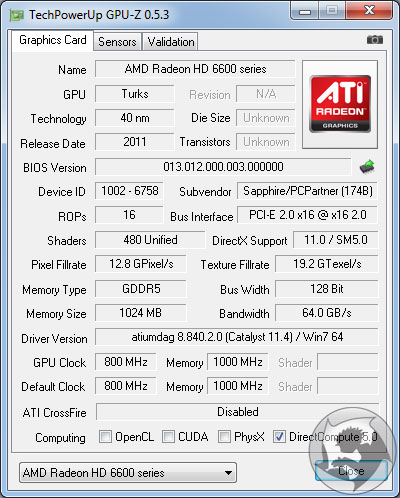
Uhm,GPU-Z cant recognise the card's memory module and it shows 216MHz instead of 800.Dont worry about it.When it shows 216MHz it's actually at 800.
-
try turning vsync on through the settings and tell me about the fps
-
One big thing I've been wondering about: What desktop card is the 6770 equivalent to? Since game specs almost always are detailed in terms of desktop cards, I'm a little surprised that I've never seen this question posed. (And, please, not to be a jerk, but if whoever replies could not simply guess. I could guess, too. It would be awesome if some expert knowledge could come into play... or, at least a link to a site where some hardcore numbers are broken down.) Thanks a bunch! (This question was the spawn of me seeing an article on IGN about the upcoming Deus Ex's specs and still having no idea if we'd be able to run it because only desktop numbers were given...)
-
its about the same as a desktop 5770
-
I get lower WEI CPU scores on the 65w adapter than on the 125w. Might be much lower without any ac adapter. I'm pretty sure turbo boost on the CPU is the first thing to go when the motherboard is running low on input watts.
-
I think its closer to a 1GB Desktop Radeon HD 6670 w/ 128bit GDDR5.
http://www.hardwareheaven.com/revie...-6570-graphics-cards-review-introduction.html
5770 has 800 shaders
6670 has 480 shaders (same as 6770M) but clocked 800/1000. -
HD 6670 GPU-Z.
Forum wouldn't let me upload within edit.Attached Files:
-
-
no you are absolutely right. somehow i got the two confused.
it is about the same as 6670. -
I have the 5770 1GB DDR3. And I have to say that I feel the 6770m is a bit more powerful the GDDR5 really kill. The games I've played (other than GTA) don't really care for a quad-core so I think it's a fair judgment, my desktop has a AMD 2.5 dual core and laptop is 2.6 max. Same resolutions I can play Crysis much higher. Although, if I was to overclock the desktop is easier to overclock and maintain and be more stable so...
Oh didn't see latest post. Sorry. But at least I have the cards and can say so... -
Tried that and it did help a bit, however I just noticed that it happens horizontally as well :/
-
NVidia: GTS 250 or 9800GTX
AMD: 4870 -
Anyone try running Cities XL 2011 with Catalyst 11.5 (non-HP)? I'm getting flickering on Cities but not on any other games. Doesn't happen with the Intel HD Graphics, either.
-
and once again this thread is dead...
-
Does anyone with a 6100 know of any games where the dynamic switching will not turn to Radeon? I wouldn't want to play even really old games on the HD 3000....
-
Why wouldn't you want to play old games on the HD 3000, it's supposed to be pretty damn good according to notebookcheck.
I'm running RIFT at 30fps in crowded cities on ultra 1366x768(with shadows on environment only setting) -
Because the 6770m is better. I'm sure I could run RIFT at 50-60 FPS on native resolution. I just don't want the onboard GPU at all really, which is why I'm very frustrated with this new switching they have in the 6100s. I bought this PC mainly for doing audio and video work (more intensive than even most games) while on battery power, not for browsing Facebook in the sun.
-
What is everyone experience with the witcher 2 my dv6q can barely play it smooth on low.
-
I'm not sure why, but there's definitely something clunky going on with performance. I tried The Witcher 2 on low settings with all blurs disabled, and Fraps gave me about 25-30 FPS - quite low for the graphics I got. I then tried the Ultra preset with all blurs disabled. Strangely enough, Fraps once again reported about 25-30 FPS.
By the way, I have the new 6100 revision (i.e. dynamic switching), and I'm getting the feeling that the graphics card doesn't use its fullest potential when it doesn't feel the need to.
The solution I guess is to set a floor for the minimum FPS, but I don't know how. Does anyone know how this can possibly be done? -
Fraps doesnt work correctly with the Witcher 2.
i am getting 30-40 fps everything maxed except blurs and ubersampling.(dv6tqe) -
Is this at 1920x1080? If so, that's pretty good IMO.
-
Yeah, that'd be nice if there was any sense to when it decided it was going to switch. There is no peeking even into the black box.
It switches to increase performance and switches back to increase battery life. That's all you need to know! Horrible decision IMHO. There at least should be more options to customize the dynamic switching. -
Do you have the 6100 revision? If so, what was your CCC update procedure? Mines was stock->11.5a->11.5b.
@GeorgeWashington: no, this was done at 1366x768 resolution. It'd be great if it were at 1080p, though
-
I understand you can assign the quality in CCC for a particular app. I'm assuming you have a 6100 series with graphics auto-switching? If not I'm at the limit of my (second-hand) knowledge.
- Qlippoth -
Ok mine is playing pretty good now on medium specs. the beginning of the game is pretty graphic intensive. I just installed the 11.5b hotfix but dont know what was on before.
how do i downgrade to the stock drivers so i can do 11.5a hotfix then 11.5b hotfix? -
No, i've got the dv6-6003ev
And i am using the 11.5 version but i got the 6770m @ 950/1050
keep in mind that i am also using the .exe from GOG and that gives me a boost of around 10 fps.
(if the game takes ages to load then you arent using the .exe from GOG) -
FYI everyone that likes to have the latest video drivers, 11.6 RC Mod was released. So update away =) Also, the first link worked for my 6770, so i don't think theres a need to use the mobility mod. Cheers
-
What is opening the .exe file from the GOG?
Also does anyone know How to install stock drivers then 11.5a and 11.5b -
Check this post out, it should help you out.
-
ok i now have 11.5. I did 3d mark vantage and my scores are very low. any one know why?
3DMark Score4258 3DMarks
Graphics Score3570
CPU Score10077
Jane Nash10 FPS
New Calico10 FPS
AI Test973 operations/s
Physics Test23 operations/s -
Ok well my computer wasnt plugged in before but the 6770 was enabled. I just ran again after restast and plugged in it. I think this is pretty high now.
3DMark Score7138 3DMarks
Graphics Score5958
CPU Score17574
Jane Nash18 FPS
New Calico16 FPS
AI Test2407 operations/s
Physics Test23 operations/s -
Those numbers are more impressive than mines! /jealous
Anyways, did anyone try out the 11.6 RC build yet? I'm reluctant to try because someone posted a while back (or on another thread?) that they had trouble with the CCC application. -
If you havent downloaded the game from GOG or Steam then you have Securom CD protection running whenever you start up The Witcher 2 and this takes a hit on your fps and your loading times.
To address these problems,you just need to download The Witcher 2.exe which comes with the GOG version of the game.
I think that there is also a patch which fixes these problems so you just have to patch the game. -
Same here. I have blurs on simply because I feel I can take the hit = close to 30 FPS when loading or going to new scene, but fine after that.
I CANNOT BELIEVE HOW GOOD THE VISUALS LOOK. Come on Skyrim you can top even this thought right?
But Seriously, this game is amazing and it's quite an underdog even now... -
Well I pirated the game to see if I like it I think I will buy it pretty soon. I am getting about 30to40 fps on almlst all low settings.
-
I have the dynamic switching graphics and I have been trying to play Minecraft but I'm getting low fps (10-20 fps).
I have tried setting minecraft.exe to both high performance and power saving but I get the same fps.
Can anybody help? thanks!
BTW: The dynamic switching does work for other games installed on my laptop. -
Can someone who's getting around P1600 in 3DMark11, on a dv6t-6000 version (manual switchable graphics), check in their CCC for the tessellation setting under Gaming -> 3D Application Settings?
Is it set as AMD optimized? Disabled? Maxed? Using application setting? -
7300 in vantage? What are the full specs of your system? I only got a 6600 in vantage.
2630qm
8 gig of ram
6770m 2 gig
(the rest of the specs are mostly irrelevant) -
I got 1601 on 3DMark 11 using 11.5b, and the box is checked next to AMD Optimized under Tessellation.
-
So I've got the dv7t-6100 with the 2 gig radeon 6770m and I'm experiencing an odd 'skip' in games every now and then.
I noticed it first in 3DMark Vantage during benchmarks and figured it might just be the stressing against everything causing some stuttering, but now that I'm in WoW I'm noticing that every 10 seconds or so it seems to skip, a little half second sutter then it goes back to playing smooth. Anyone seen this?
The rest of the specs are pretty standard fare. I have the 640gig 7200rpm hard drive, Full HD screen, i7-2630qm, etc. -
I tried it, but when it came to overclocking, i opened and was shocked! TRIXX core clock was ok but the memory clock was up to 4000MHz...so for laughs i applied it, went to GPU-Z and the memory clock was only showing 216 MHz,(my profile 1 is the default 725/800 stock clocks) so i guess it was a glitch with the 11.6 RC update, rolled back my driver back to 11.5b and TRIXX started working normally again.
So in retrospect, I would suggest not to upgrade to 11.6 RC until the bugs are sorted out, or an official release is modded like the 11.5a/b builds.
In CCC, i didn't have any problem at all, all my drivers versions updated correctly. Just TRIXX going crazy. -
cant even get one of these in canada. so lame.
Gaming - dv6tqe/dv7tqe
Discussion in 'HP' started by Bag3l, Apr 7, 2011.