Problems? See this thread at archive.org.
this is being caused because you still have drivers based on the hp 10.3 (I think)
the easiest way to fix this is sadly uh doing a clean install. otherwise you somehow, someway have to get the computer to get rid of all the ati and intel gpu drivers, which there are backups that the computer defaults back to until you get rid of them with driver sweeper, reboot windows, have windows download some intel gpu drivers alone, then install the hp 10.7 drivers (the newer hp video card drivers).
think the full version is more:
1. Are you on ati 10.8/newer? uninstall ati.
2. Reboot, note you probably will get a black screen, wait for awhile for it to uninstall everything like how you waited for awhile for the 10.8 to install before rebooting.
2a. if you want you can put the computer to sleep instead and the display should work after you wake it back up.
3. now uninstall the hp ati drivers that popped up, then reboot.
4. after rebooting go into safe mode. Don't let it get to regular windows, you need to go to safe mode immediately after uninstalling the hp drivers. Run driver sweeper and get rid of all the ati radeon stuff and the intel gpu stuff (this part is harder since I dunno what you won't want to get rid of if driver sweeper just searches for all intel drivers. I haven't used the program).
5. reboot to regular windows, hope you get to vga mode. you'll know because your resolution will be 640x480 for a bit. Then windows update should download and ask you to install newer video card drivers (for the intel gpu). It'll do that and get reset and be on the intel gpu then.
6. Install hp 10.7 drivers. these don't have the black screen issue when installing the ati 10.8 drivers so I'm going to assume it also fixes the black screen on powering up when it swaps from intel to ati.
7. ??????? (and maybe reinstall the ati 10.8 drivers if you were using them. you can get those drivers from here) https://a248.e.akamai.net/f/674/920...mobile/10-8_mobility_vista_win7_64_dd_ccc.exe
8. profit.
-
-
I never installed misc1 -misc4 should I?
What are the benefits? my computer runs pretty well as is.
If it aint broke don't fix it? -
did you do a clean install?
yes install that crap. misc1-misc4 are the extra chipset drivers and stuff (misc1)
also, the drivers for your sd card reader (misc2)
intel rapid storage drivers (misc3)
and well..misc4 is turbo boost for the intel gpu if you have an i5 or something (I think this one is mislabeled somehow...or something. it's in the video drivers on hp's driver website. confused on what it does). the i5 will naturally turbo boost for cpu stuff. -
no.
it's broken. I'd stop it from running.
all fn+b does is just up your bass and treble from something kinda low or 0, to the maximum).
it also is prone to breaking if something bad happens somehow. ...like I guess with your computer now. -
Yup, clean install.
Thanks, I will install misc1-4 when I get home. -
Hey I just popped in to see if anyone has tips for the trackpad to optimize multitouch performance.
When Engadget ran it's HP 14 article someone in comments said that the trackpad was only good after installing some other software or something so I don't know what they were talking about :s -
http://forum.notebookreview.com/6762675-post406.html
this is a nice summary of touchpad stuff. -
Yeah sorry ><;
I posted that question then did my own research. I need to stop doing things in that order D;
Downloaded reil's program and it works magnificently *_* I'm actually surprised how quick the scrolling works now. -
I just bought a HP Envy 14. What should my Windows Experience score be right out of the box? I bought the dual core i540 processor with the radiance screen and 500 GB HDD.
Also I'm having an issue where the touchpad will NOT scroll after I wake it from sleep. It does not matter whether I have the 1-finger scrolling set (along the side) or the 2-finger scrolling. I have even gone into the Synaptics software to reset the touchpad. The only thing that seems to work is restarting the entire computer. Will the software in the post above mine address this?
Thanks. -
I'm having the same problems as you. I will often have the internal speakers turn on when using external and have to reboot for them to shut off. Also have tons of problems getting the mic to enable when using meemo or gchat. I assume it is bad drivers and hopefully there will be an update.
-
Hi everyone!
I have an HP envy 14 with i7 720 and 6GB of RAM and Windows 7 64-bit.
The thing is, Windows 7 is reporting 4GB as "Hardware reserved" and only 1,9 as usable.
I tried to check and unchek the max memory boxe in Msconfig, among other things. Nothing....
Hp support tells me "nothing is wrong with my system and at least not with their hardware!" This is just something Win 7 does, and the reserved memory really isn't reserved, it is usable if needed. Yeah right... I have not been able to get Windows to use ANY of it during games or programs, everything just runs slow. with 0 MB of free RAM.
Also I see that they have installed RAM from two different manufacturers. Is this ok?
Any input on the issue? -
maybe try disabling those speakers (right click on the speaker icon, pick playback devices, right click on independent headphones, disable it).
it could be programs are trying to check for a headphone in the rear jack/the other speakers/whatever and it's breaking things. -
He he...
I think you just replied to my post in the "gaming lounge". The above post is a whole other story... sigh... -
If it's the Rapid Storage Technology stuff that you're referring to, the HP driver is here: HP Software and Driver Downloads
-
Actually the SATA driver is part of intel RST but found in Device Manager under 'storage controllers' > Intel(R) ICH8M-E/ICH9M-E/5 Series SATA RAID Controller, or whichever version that HP installed on the E 14. If you updated the driver you can 'rollback' to an earlier version or uninstall and update directly from within device manager. BTW the newest version is 9.6.4.1002.
-
Hm, I don't think I have a section called "storage controllers"?
Also, does anyone know what this means? I got this warning in event viewer:
Code:The description for Event ID 1002 from source hpdskflt cannot be found. Either the component that raises this event is not installed on your local computer or the installation is corrupted. You can install or repair the component on the local computer. If the event originated on another computer, the display information had to be saved with the event. The following information was included with the event:
-
It could be ok, but sometimes it's not ok. Maybe you could try removing one of the memory modules and booting the computer and see how much ram it is using then. It's generally advised to NOT install 2 different manufacturer's memory modules (I'm suprised HP doesn't know this) Though you can do this, because of different timings and things of that nature sometimes they do not work right. Only 200 mb is reserved for hardware on my envy so 4 or more GB being reserved is really excessive (HP's support staff should know this). Which BIOS are you running?
@Virtuous That is for the HP mobile data protection sensor, since you are using an SSD you should either disable that or remove it. SSD's don't need it and I am pretty sure it can cause issues with the SSD's. -
For Skype you could go into the Options -> Audio Settings -> Ringing and set it to "Selected Speaker". That way it will always go to the correct speaker or headphones.
I am not sure about other applications. -
Here's some info that might help, from a ZDnet article. Note the last few paragraphs:
-
For any other Australian Envy 14 owners in need of warranty assistance, let me tell you now not to bother with the online contact forms. It didn't matter what I did (and I tried six times), I kept getting replies saying I had reached the wrong part of HP, and to try again at a new URL. Using the new URL led to the same response every time!
Rang the 13 10 47 number that came in the box and they have, after a bit of lengthy "i-guess-they-have-try-it "diagnostics", they agreed it was a hardware issue with the keyboard and have arranged to pick the Envy up, repair it, and return it to me. Hopefully all goes through as they have said it will.
If the keyboard is all good then I'll be very happy with my Envy. -
Are there really as many problems with the Envy as it seems in this forum? I really want one and was going to order one tomorrow. I am a little nervous.
-
According to the poll on page one, you have a 58% chance of getting a good not messed up Envy 14. 42 percent chance of getting anywhere from small imperfections to complete RMA for all the problems. This is out of 299 votes. I've enjoyed mine so far, but only time will tell about the computer's longevity. I'm hoping it will last awhile.
-
Eh, it doesn't matter if you mix and match manufacturers, the only drawback is that you won't get dual channel, but if you've got different sized sticks it makes no difference. RAM timings will just match the speed of the slower RAM but this shouldn't make any difference in 99% of use cases.
-
I am running BIOS F13.
I called HP once again, and the same ordeal started.
"Please make sure the max memory box is unchecked". And this was even after I told them I had done that exact thing the last two times I talked to support, without any change! Still they made me do it to proceed...
They really don't want to listen or accept that this is a problem.
What kind of set up do they have going on over there at hp? One of the persons I talked to had some other tech guy telling her what to ask me and what to say over the intercom or something. I could hear him in the background and all my "tech" girl was doing was repeating his exact words + adding an impossible to understand Arkansas accent to it all!
Why not talk to the real tech guy directly?
I'm going to go buy one of those small screwdrivers now and then change swap the RAM sticks around.
Eric -
opening and closing lid works some times but not always
-
Ok, so I switched the RAM around, and Hardware reserved ram went down to 2115 MB. Still high compared to others. Could it be that one of the RAM slots is not functioning?
One stick is 4 GB from Samsung and the other 2 GB from some company with an "M" logo. -
Guys I have a quick question for ya'll ...
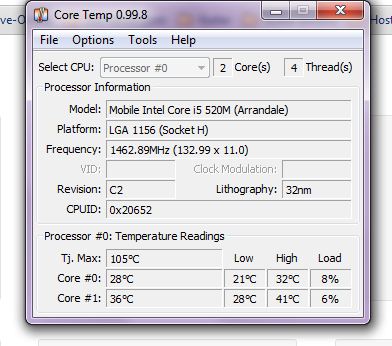
I am getting strange cpu readings from coreTemp lately ...
Manly: one core is like 5 to 10 degrees celsius hotter then the other!
Here is a screenshot that I took ....
Is this something to worry about?Attached Files:
-
-
Thanks, I changed that setting, and found what I think to be equivalent settings in QQ, Google Talk, and Burnout Paradise as well. Given the wackiness of the IDT drivers, I just assumed it was something on their side. Now we'll just have to see if those settings changes do the trick.
-
its normal
-
Is there any downside to updating the bios to BIOS F13? i remember someone earlier saying they wanted to go back to the old version. thanks for the help in advance.
-
I just received my exchange unit (4th one) and I checked the BIOS....its version f06.... the one I had before came with f13...do you think HP sent me an old envy that was returned by a previous person? I ordered with a radiance screen...and when I called to replace it, it was like a day or 2 before they pulled it from the site.
-
No one will know. However when did the warranty start according to the BIOS?
-
the warranty started 10/1/10 according to BIOS
-
The warranty starts when the laptop is booted for the first time. I don't think somebody could receive the laptop, then send it back to HP, then HP sends it to you within two days. So HP either reset it (did you find any usermarks?) or you just received some 'old' stock (note: the F13 bios has only been out a couple of weeks) because of the Radiance screen.
Did you finally receive an Envy in good condition (apart from the F06 bios)? -
thats not the case with my laptop .its warranty starts on 23/9 , the unit was 1st switched on 8th october .
-
The left hinge is not centered, idk how to explain it, but you can see the metal peg, touchpad is a bit depressed and the letter "G" on the keyboard has a small bump which i cant seem to rub off.
-
I got an envy 14 from work and I realize there is no PCMCIA or Express card slot. Has anyone found a solution around that. It seems that for a premium product with a high tag, it shouldn't be missing some basic ports found on much cheaper computers. (paid ~3k). Mine is Core i7 840, 8 GB Ram, 1 GIG ATI Beats Edition.
I still can't part with my Lenovo T60. -
i just got mine on the 8th of this month and it came with f06 too, is that necessarily a bad thing? and btw mines has a radiance display as well.i would hate to think its an old build if there was any recent optimization to the manufacturing process, but then again mines did'nt come with any of the build issues people complained about so who knows maybe having gotten the old bios version isn't so bad....

-
Don't worry about the optimization to the manufacturing process. There doesn't even seem to be a any big improvement from HP Envy 14 10XX to 11XX, they just tossed in some newer CPUs and ditched the Radiance. Enjoy your Envy
-
Thanks man i needed that
-
It appears that F.06 A is the latest BIOS version under which you can recover the system to its factory state using the system recovery disks. It is possible, however, to revert back to F.06A from F.13 A if you feel you need this functionality. I've been running F.13 A for a while and haven't noticed any problems with it; but then I didn't really have any problems with F.06 A either.
-
i am having trouble installing ati drivers
http://forum.notebookreview.com/hp-envy-hdx/524487-envy-14-video-driver-problem.html
may be its the f13 bios -
downside of updating to F12 or F13: recovery partition and recovery discs stop working. (gen 1 envys, 1000 and stuff. not sure 'bout 1100 envys)
-
It does seem that since the hardware reserved ram is almost exactly the amount of ram installed in a particular slot that something is going on with that slot. Since it actually reserves the ram I wouldn't say it's a bad slot, but that just seems excessive. HP could have dedicated one of the ram slots to video RAM. On my old HP DV8 it had a ridiculous amount of RAM set aside to aide the video card, kinda like how yours is now. I had 8 gigabytes installed and about 3.8 GB was set aside out of the 8 gigabytes. Maybe they have done this on this computer as well. Maybe just leave it with the 4 GB installed the way it is so you can use more of your ram. I only have 1dimm 4GB installed on mine, perhaps someone with 2 dimm memory could comment on their setup and how much is dedicated to the hardware reserve.
@iofthestorm It's still pretty shoddy of HP, they obviously just used ram that was laying around, and if I built the system, I wouldn't make a silly mistake that could cause problems down the line like using mismatched ram manufacturers. It may not cause problems, but it also can and it's just easier to buy matched pairs of ram from the same manufacturer. -
Have you tried disabling HP QuickWeb in your BIOS?
I've done almost the same as you: clean install (Windows 7 home premium), remove all partitions except Windows C partition, F.13 A BIOS, and installed the video drivers from sp50027 which I downloaded from HP support drivers website. Everything worked well for me during the install -- although I had previously disabled HP QuickWeb in BIOS. -
^^ all default. now it seems a hardware problem to me . there is also a hissing sound . For the pass 3 days i have tried all the possible combinations i can think of . Tommorrow i will try downgrading the BIOS
-
hey guys could anyone post the .icc file again because the original link is not valid anymore. thanks
-
I would seriously considering disabling HP QuickWeb in the BIOS, leaving all other settings at their default values. With a new machine, Quickweb appears to want to run some software on your system to perform its setup work. If you've done a clean install it may be missing some of what it needs and get hung up, hence the blank screen. I was getting a blank screen initially when I tried configuring my machine even before the clean install. Disabling HP Quickweb solved the problem.
-
Here you go, MarcusDraco reposted it a few days ago.
Did you receive your Envy yet ? Any news on the keyboard? -
yes i received it today! and i ordered a keyboard from convena thanks to you! they said it will take 20-25 working days but thats okay. in the meantime i switched the 'z' and 'y' keys as well as the underscore and '?' keys
thanks for the link btw. also did anyone ever solve the pink webcam issue? mine was working perfectly until 5 minutes ago :S
*HP ENVY 14 & Envy 14 Beats (1XXX series) Owners Lounge, Part Deux*
Discussion in 'HP' started by 2.0, Jul 22, 2010.