Problems? See this thread at archive.org.
Has anyone noticed that after flashing the F.23 BIOS BatteryBar doesn't show the "Battery Wear" anymore? It always shows 0% wear now.
-
Rant of the day:
Dropped my Envy on its lid side and now it has a dent. Still working fine, but sad!
-
You can download Windows 7 from here You should also back up your activation key using ABR. You can read about it in this thread
-
If u want to make the recovery discs and then do a clean install....it will take abt 3-4 hours.....
-
Hello Everybody.
My HP Envy w/ Radiance screen is for sale. Specs include i5-560M, 6GB Ram, and 640GB Hard-drive. It will be shipped on Feb 1st. Let me know of any offers or questions. Thanks. [email protected]
-Drew -
Instead of doing a clean install, can i just use REVO UNINSTALLER PRO with advanced scans and take out bloatware or useless stuff?
-
how much faster are we talking. difference between a clean install and one without.. i mean isnt the envy a powerhouse already..?
-
I'm jealous--your screen didn't crack.
-
How would i go about getting rid of the envy background on login? I would like the original windows 7 background. I've already uninstalled stardock if thats what it is? Any help is appreciated.
-
i really cant make the Fn=B to work... this is there anyone who can point me to the right driver of the beats audio? im using this one and i cant make it to work.. ( the beats logo on the center of the screen when you press the Fn+b )
-
U will see a the difference in battery life, snappier performance, fresh feel etc....as most of the owners have seen the difference after the clean install but its up to you......and yeah uninstalling all the bloatware also helps.....and then again its all up to you
-
U can use Tune Up Utilities to change that or even Tweak.com's Logon Changer.....i hope this will help....
-
I really woudn't recommend using that. its just an HP marketing scam that turns the bass all the way up and treble all the way down. but if you want here is the driver thread. look for the IDT audio card driver
I'd personally recommend using these tweaks to get better sound -
Change and customize Windows 7's Logon screen wallpaper | TechRepublic
Regedit-
HKEY_LOCAL_MACHINE\SOFTWARE\Microsoft\Windows\CurrentVersion\Authentication\LogonUI\Background
turn OEMBackground to "0" instead of "1."
lock your computer, and the default wallpaper should automatically show. -
holy , meaning after your BSOD your gpu got fried??
where do i get revo and the latest driver?? -
Hey guys, I was wondering if you could help me out.
For some reason, my envy has become super slow to turn on/log in/ get ready to start launching apps.
I don't have many startups besides rainmeter, and there're roughly 70 processes running...
Once it IS "prepped", it works pretty quickly, but I dunno why it's become so slow.
I've run defrag, and an AV scan, both of which displayed nothing of note.
Maybe it's my HDD? It's not even completely full, it has ~50 gigs free. -
Hi all,
I will be receiving envy 14 with radiance screen anytime soon since it is shipped today. I am thinking of returning this, but since many are interested in getting radiance screen, if anyone is interested in buying this before I return it, let me know either pm or email at [email protected]
The spec is listed below:
HP Envy 14
• Genuine Windows 7 Home Premium 64-bit
• Intel(R) Core(TM) i5-580M Dual Core Processor (2.66GHz, 3MB L3 Cache) with Turbo Boost up to 3.33GHz
• 1GB ATI Mobility Radeon(TM) HD 5650 switchable graphics [HDMI] - For Dual Core Processors
• 4GB DDR3 System Memory (1 Dimm)
• 500GB 7200RPM Hard Drive with HP ProtectSmart Hard Drive Protection
• No Additional Office Software
• Two 8 Cell Lithium Ion Batteries (standard)
• 14.5" diagonal HD+ HP Radiance Infinity LED Display (1600x900)
• SuperMulti 8X DVD+/-R/RW with Double Layer Support
• HP TrueVision HD Webcam and Dual Digital Integrated Microphones [For Radiance Display]
• Intel Wireless-N Card with Bluetooth
• Backlit Keyboard
• Adobe(R) Photoshop(R) Elements 8 & Adobe Premiere(R) Elements 8
• HP Home & Home Office Store in-box envelope
Thanks! -
I think its nice you are offering it here on sale to NBR members. Many have wanted this. You should have no problems selling it. Good luck to you and the buyer.
KJ
-
Thanks. Yes I figure that will be helpful to those who wants it rather than sending it back to hp. Hopefully it comes perfect from hp, get it sold soon otherwise I have to return it within the 21 days return period, and have a new happy owner. It looks like I will receive this on 2/7/11, next Monday.
-
I notice quite a few people bought the Radiance with the intent to resell it at a profit ...
That's very sad considering the bunch of people that really wanted it got cancelled or could not buy it within the timeframe it was available.
IMO The only exception would be for people that act as intermediary to overseas buyers. -
Email sent
-
Guys,
Just ordered mine (Beats Edition with the 6 cell slim fit battery). I'll post a nice HD video of it; seeing as there are no good videos of the slim fit battery.
One question though; does the HP logo on the back of either of the Envy's (Regular & Beats) light up like the lower end DV models? -
Not on the Beats Edition. The regular does.
-
Thanks for clearing that up mate. Can anyone shed any light on the "VIP treatment with exclusive HP ENVY dedicated customer support" that HP is marketing for the Envy's?
I understand that warranty support for most HPs is only local unlike Dell, but has anyone run into any problems while on an extended overseas stay and is there any chance of getting it fixed under warranty overseas?
Any international warranty options? -
When you call for tech support, there is a dedicated menu option for Envy laptops. Presumably this means that you are either getting shorter wait times or people with more advance knowledge of the Envy line, but I'm not sure. I do know that when I've called, the wait times have been very very short. You also get next day shipping for both pick-ups and returns if you have to send in your Envy for warranty repair. Sounds good, except HP is atrocious about keeping parts on hand for repairs, so your repair may take a long time regardless. I recently sent my Envy in for repair on the 23rd of Dec., was told it would take about 3 days, and then roughly a week later was given a new date of Jan 8, and then was subsequently given a new date of Jan 21, all because of parts unavailability. If that's VIP treatment, then I'd hate to see what regular HP customers get.
-
There is a special Envy number, well, its the same number to call if you have either an Envy or an HDX. The couple times I've called the english speaking reps are very friendly and knowledgable to the best of their ability.
KJ
-
That sounds terrible! HP's product support has always been below par. I've owned 2 HP laptops in the past and they were both nightmares. The first one, I can't remember and the second was the first generation TX1000 series. They both died a few days after the warranty expired and no amount of time spent at the service center could have them working for longer than 10 days. Ever since then I've used Dell and their products and serivce have always been exemplary till date. Too bad none of their laptops have a flare for design.
I've been eyeing the Envy for sometime now and finally pulled the trigger. I'm going to be spending a lot of time overseas over the next few months and I sure hope this thing doesn't die out on me like some of our NBR members have reported. There is no way I can send it back to the US for a fix and that would be a huge disaster if something went wrong. -
To be honest with you, the "VIP" treatment is just giving you a North American tech support agent instead of one from India. You still got to mail your system back to their service center for repairs in Tennessee and they do take their time to fix it (~ one week turn over). Otherwise, it is no different than the Pavilion technical support in terms of actual repair services. They just get someone over the phone from India to make the case. You get someone from Dallas really.
-
Actually close. The side of the lid cracked off, so the display itself isn't completely fastened in. Doesn't look pretty at all.
-
1. Use MSCONFIG to take out some of your startup apps that you don't need.
2. You can also run a boot optimize using the Windows Performance Toolkit IF you have an HDD-
How to speed up boot process under Windows Vista or Windows 7 - MSFN -
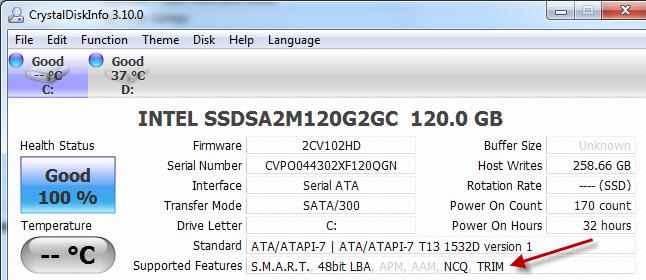
How do I check if my x-25m has trim enabled and is working? I dont want it to degrade over time..
Thanks. -
Well I was intending to get it for myself, but now I am actually looking for Acer 4820TG since it is cheaper with similar spec except the screen, bluetooth, lighted keyboard, solid metal frame, which I decided to live with. I will return it to HP regardless.
Since I know this is in high demand especially from people who frequent this forum, I would let people here buy it from me at cost of what I am paying plus the shipping&insurance and the paypal fee. I will only wait for a week after I receive it and return it to hp if no one is interested.
Anyway back on topic, the HP Envy 14. -
Hello,
3 days ago I received my HP ENVY 14 Beats Edition
i5 450M 4GB DDR3 500Gb 7200rpm
I have some questions about the laptop speakers and audio setup,
the audio tweak from forum - altough it does the trick of amplifying the sound ( I also use a flat curve cause with the one provided the sound seems too distorted ) it doesnt agree with my Traktor DJ Pro setup
When using external speakers or headphones the sound from Traktor is great, but using Traktor with the laptop speakers isnt that good at all ( I know its not really intended for that, but anyways )
So, if any one has some tips and tricks about setting up Traktor on this beautifull machine I would appreciate it... -
Oh, awesome, I tried the MSCONFIG and there were a few programs that I really didn't need.
But when I tried to do the 6 cycle reboot thing, it turned off, and then needed to do startup recovery to boot properly?
Yes, I Do have a HDD instead of a SSD -
Use Crystal Disk Info Downloading CrystalDiskInfo
Attached Files:
-
-
I just purchased a 14-1111nr from the Microsoft store. They come with the signature image, which is pretty cool, except I can't get the intel graphics card to be recognized. I've read through these threads, but I'm confused on a few things:
1. I've completely uninstalled the ATI driver, all the way back to the 800x600 VGA driver thats on the OS by default. I've tried both the current driver and the earliest driver that's posted on the drivers thread.
2. In both cases, unplugging appears to not change anything and there is no option in the desktop right click menu to switch graphics cards.
3. I've also noticed my brightness keys do nothing, but I understand from previous threads this is due to the latest ATI driver.
4. I've checked the version of the chipset drivers and they seem to be current.
5. I dont see anything special to change in bios.
Is there anything else I'm missing to engage the graphic card switching? Perhaps another piece of software I need to install or some weird software switch that turns on the intel driver?
Thanks to anyone who can help.
EG -
i think you hav to download and install HP's drivers first and then you can update the drivers with ATI
-
Thanks - I pulled the drivers from the HP site and I also tried the drivers from the Drivers thread. I havent installed any directly from ATI. In both cases, the drivers listed as "installs Intel driver in Notebooks that have switchable graphics", BUT... in both cases, it seemed like only an ATI installer ran.
Does anybody have this working on one of these "Signature" images from the Microsoft store?
EG -
Well, they're giving me 80% of my money back. I considered going with the 14" EliteBook, but the graphics card is a serious downgrade and all things considered, I'm done with HP for now. I think I'll just hold on to the money until all the Sandy Bridge based laptops start rolling out and decide at that point which direction to go.
-
The Elitebook is really well built and their corporate warranty is top-notch vs. the shenanigans of the Envys. However, if you are looking for a GPU-Enhanced 14" laptop, I do agree that the 8440w doesn't bring a whole lot of punch in that department.
Good luck in your search though. I am sure some other OEM at the moment can give you something more worthwhile!
-
I also have the Microsoft "Signature" as well seeing as I got mine from the MS. I have not really encountered the problems you are having although sometimes switchable graphics seem a little fussy. I havent used the laptop away from its power much but I remember once I could not get the graphics to switch to intel when I was on battery and had to restart for it to work. Also, the other night my brightness keys werent working but that was also fixed after a restart. I wish I could help. Good luck with fixing the problem
-
Everyone says the same thing about the EliteBook... I really don't game with this laptop much at all, and I have another laptop I can use if I really want to game, maybe I will ask what spec they would offer for the EliteBook before I commit to getting only 80% of my money back.
-
That shouldn't happen. For me, it just reboots 6 times.
But you shouldn't try it again if you needed to do a startup recovery to make it boot properly... -
Thanks for responding. At least I know it's not a general problem in the signature image. I dont even have the "switch graphics configuration" screen option in the menu, so I really think something is just messed up. I'll keep on beating on this and worst case, take it in for them to look at. Thanks.
-
I'm guessing you don't have ccc (catalyst control center) under programs?
-
Yes, I have the CCC everytime I reinstall the driver, but there doesnt appear to be anything in there regarding graphics switching.
BTW - since my last post, I've:
Update bios to f.23
Installed the HP Power Software and chose the recommended plan.
Uninstalled the ATI driver
Ran CCLeaner to get rid of all ATI stuff
Installed the driver from the HP updates page. (both 10.07 and 10.09)
No luck - I see no indication of gpu switching available.
I even tried turning off PowerPlay, but that doesnt seem to help.
I tried booting while on battery.
I think at this point, my only choice is to return it. I dont know what else to do.
EG -
its the i5 for sure right?
-
Yep - i5 M460.
I'm really stumped on this one and I'm usually pretty good finding my way around these systems... -
Hey guys, as promised, I am here to update about the full refund that HP promised. It came in the mail a couple of days ago. $1200 back for both the Envy+ADP. That is a 100% refund.
Now, anxiously waiting for those new SB i5 beauties! -
Good for you! Next time remember to buy the warranty before you drop your laptop
*HP ENVY 14 & Envy 14 Beats (1XXX series) Owners Lounge, Part Deux*
Discussion in 'HP' started by 2.0, Jul 22, 2010.