Problems? See this thread at archive.org.
Do you have any links to those? Thanks
-
\
Revo-Uninstaller
its only a thirty day trial but it is very useful
HPQL -
Thanks. Does the trial have any limitations or just the duration of use?
-
Its a 30 day free trial
-
Okay!
I'm sorry for the trouble, but could you please provide me with a link to the drivers for the wireless? I appreciate it!
-
no prob, Always Glad to help
Network Drivers -
Thank you very much!
-
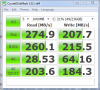
As I noted in a separate thread, HP is now putting the SATA II OEM version of the C300 in the Envy 14. Interestingly, my benchmark is quite a bit higher than the one above. I have done the JJB tweak, but even pre-tweak my benchmark scores were higher, which seems strange. Here are my post tweak results using the same settings as above:
Attached Files:
-
-
Just in case anybody's following this:
After doing everything I could think of, I called HP. They didnt have any further answers, so I restored to the HP image. Even after that, the Intel card didnt show up, so I took it into the Microsoft store and they replaced it with a new PC. I booted up in the store and the Intel card shows up - so this was limited to this notebook and not related to the signature image or anything. The brightness keys also work on it. -
Hey guys, my right fan isn't working properly. There's barely any air output. Is there a way I can fix it?
-
Wow i bet that is a relief man. glad you finally can sit down and enjoy your envy.
-
You wanna trade laptops. my fan is loud, and shoots out air like crazy
-
It does that even when you run power hungry softwares ? (like 3d games and benchmarks).
On my side, the fan is pretty slow when I do simple stuff like web surfing while in power saving mode.
When I go in high performance and run games like left 4 dead, it churns much more air out.
If you have a doubt; load hwmonitor and see your temperatures while idle and at full load.
At least you don't have to worry about overheating xD -
![[IMG]](images/storyImages/Untitled-1.jpg)
After 5 minutes on Dragon Age.
I place my right hand right near the fan when I use the mouse and it usually gets real hot, but not anymore. I feel like it's not running at all.
EDIT: after another 5 minute, the GPU temp went up to 84. Looks like that's the temp it stays at when I'm doing something graphics intensive -
wow it's getting really hot. At these temps it should be churning hot air thru the right vent.
Your fan has a problem for sure. The CPU will not last long at these temperatures.
I never got past 80C on the CPU cores and 65C for the GPU. But I only tried Left 4 Dead, 3Dmark06 and passmark performance test.
3Dmark is supposed to be pretty intensive as it crashes the video car if I OC it too much (where most games don't)
I am curious to see what other people get , as my temps could be unusually low (however I have an i7-920 desktop and it doesnt get much hotter than 82C at full load)
Ill try to install Crysis tomorrow and some other intensive games. -
is there something i can actually do about it? the last thing I want to do is send it in... as I'm not in the states right now :/
-
Your i5-540M should be idling around the ~30's. ~50's on idle is way too high and your Maximum is definitely out of the range of normal values for an i5. You can try to apply a fresh coat of TIM (Arctic Silver 5) and reseat the heatsink. Mostly likely it is the heatsink not fitted properly with the CPU and GPU.
-
Try opening the bottom and spinning the fan around manually. There might be some stuff stuck in the fan, causing it to spin slowly. It's only ~5 screws to open the bottom cover off, see page 1 for the manual.
-
good tip, Ill keep that in mind when dedusting time comes. Thx
-
Man, I just opened it this morning to see if something was out of place but didn't think to check the actual fan. Time to get out the screwdriver again.
Also, how do you reseat the heatsink? Is it.. safe? I'm a relative newb when it comes to computer internals so I don't wanna risk breaking anything, but I'll do it if there's a chance I can save my comp!
And realistically speaking, how urgent is it that I get this fixed as far as the hardware is concerned? -
wow, that s bad.
Anyone else notice that his 5650 is running at 1v instead of .90? -
i have the radiance 1600x900, my question is which is better?
watching 720p videos or 1080p videos? would the 1080p be overly compressed likewise would the 720p be overly upscaled? -
My solution: Go to bios and enable fan alway on. Then go to you power profile and change the the cooling from passive to act
-
1080p videos are better because while 720p needs to be upscaled to 900 and will not retain the clarity that you would get pixels are copied to fit the screen. 1080p when it goes down to 900p will still have each pixel completely different and the clarity will look much better.
Hope I helped -
Key on the BOTTOM of the laptop? Nope not on the stupid HP envy 14. In fact HP didn't even provide me with a key. Isn't that illegal? Hunk of junk.
-
Inst The key is located under the battery.
-
Wait, it's supposed to be .90? How did this happen
-
mine usually runs at .90 maxed at .95
the i5 should be running at 30 on idle?? i'm just using browsing the internet and using itunes and it shows 50? is that somehting to be worried about? -
Well not 30C exact, but more around the mid 30's to mid 40's idle. 50's is already a bit steep in my opinion.
-
I uninstalled all the HP bloatware and my OSD for sounds and brightness went away. I saw in the first post how to download the 3RVX program to get my sound OSD back, but how can I do the same for brightness? Anyone know the HP program which is associated with it?
-
If I were to reinstall windows 7, would I be able to use the key on the bottom again?
Also, would the firmware be re-downgraded?
Or would it be the same
-
After running crysis, the CPU cores got at 79C max and the GPU at 76C. CPU Idle temps are around 30-34C and GPU 34C
-
So it looks like it's mainly my CPU that's running hot. I figured as much, as I noticed increased lag especially in CPU intensive games.
My main fan definitely isn't spinning. I tried the "always on" fan setting in the BIOS and theres still no air pumping out. It's gotta be a hardware problem... -
Lag means your CPU is throttling, it's a safety mechanism that slows down the CPU to prevent it from overheating (usually near 100C).
I suggest you open your laptop and visually inspect the fan, it isn't hard. Something might be stuck in it (dust or pet hair).
Regardless, for good maintenance practices, ANY laptops and desktops should be dedusted every few month. -
Hey guys, after 2 months of waiting I finally received my replacement ENVY with the radiance display. As far as I can see everything is in great shape, besides the touchpad being slightly raised.
Speaking of the touchpad, out of the box, it did not come with two finger scroll driver ect. Does anyone know where I can find the driver that helps with the mouse jumping around when you have two fingers on the touchpad for clicking?
Thanks! -
Is it possible to remove the individual keys? It's not really a big deal but my keyboard is pretty dirty already; I can see alot dust and gunk stuck under the keys.
-
Not sure if that is a easy or good thing to do...but here are some ideas...
1. you can get an air can blower at most computer stores, radio shack maybe, etc..... with a fine nozzle to spray out with high air pressure all the junk.
2. also, you can get the cotton tips and dab in light rubbing alcholol and swipe through the spaces... hope that helps... just don't soak it, very lightly damp.... or even just warm water. Good luck
KJ
-
I recommend the suggestions KJ made. Removing the keys could break the delicate tabs under them. I don't personally suggest removal unless you really need to. I have broken a few Envy 15 Keyboard keys that way.
-
Go to page 1 of this thread. I personally use "reil's" and love it. The 1st page of this thread has anything you could possibly need for this beautiful machine. Let me know if you have any problems.
-
Does anyone have the original HP envy beats wallpapers? I forgot to back them up before my clean install.
-
I was wondering this as well...
-
Here you go..............
Envy 14 Wallpapers.rar
Here are the HP Envy wallpapers -
Any link to the beats theme?
-
http://forum.notebookreview.com/hp-envy-hdx/503246-hp-envy-14-gpu-clock-undervoltage-poll-35.html
Last post, it seems that the 5650 in the i7 Envy is capable of multiple voltages. Not sure about the i5, but according to that pic i5's can also run at higher voltages. -
But they aren't the envy beats wallpaper...
-
Hey guys, I found It!!! Envy Beats Wallpaper
-
Is it just me or do the SEVEN recovery dvd's that I'm burning taking an unusually long time to burn?
-
no, it takes about 4hours
-
Sorry if this is n00bish, but why would you want to undervolt? Better battery life?
-
I feel like this is just a waste of my time.. Do I need these even if i dont plan on deleting the recovery partition?
*HP ENVY 14 & Envy 14 Beats (1XXX series) Owners Lounge, Part Deux*
Discussion in 'HP' started by 2.0, Jul 22, 2010.