Problems? See this thread at archive.org.
Software here seems to help with the palm hitting touchpad issue SOMEWHAT.
http://tpp.desofto.com/
-
that works. 'course it locks down the mouse too (so turn it off while gaming or something).
also I didn't like it for some reason since I couldn't find a good ms to set it to. -
Huh? It has settings?
What the....it doesn't show any for me.
I'm an idiot. It doesn't work after all. It doesn't block scrolling. -
Tried to install the envy touchpad and it sent my touchpad crazy! what are the recomended settings?
-
Paradisoft Touchpad Locker - Lock the touchpad while typing
This one seems to lock the touchpad down while typing. YES!!!!!!!
Now my one last issue that's been pissing me off lately: Screen hitting the keyboard. I haven't noticed any scratches, just smudges. I'm going to see whether my microfiber cloth and screen cleaner reveal any permanent scratches. If not, I'm keeping my machine for the full 3 years for the rest of my warranty and beyond if possible.
YEAHHHHHHHHHHHHHHHHHHHHHHHH! -
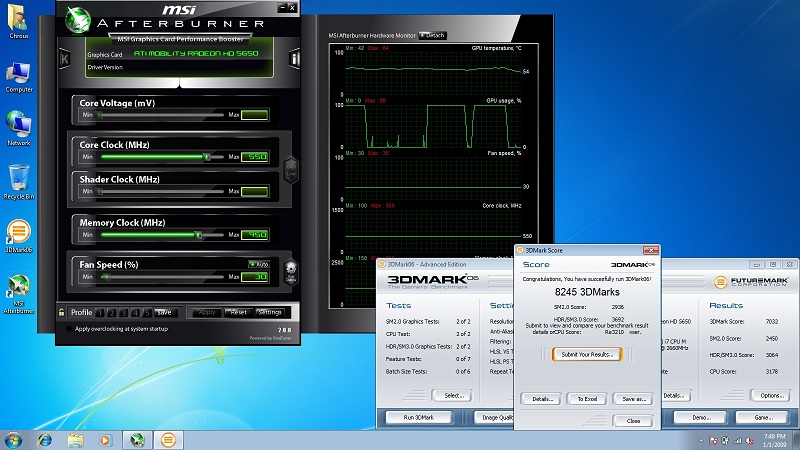
Did not get a chanse to test and do benchmark yet will do. So far it's working grate paste is "AS5 video and cpu". Temps went down a bit after 4 runs of 3d mark max temp in msi after burner is 64 video at 550 mem at 950.
Attached Files:
-
-
Ok I got my Envy 14 today
 ... only prob I am having... It appears my FN key does not work...is this a issue? or do I just not know how to work it?
-
@Zeth006 also;
Doesn't the E 14 touchpad have the 'tap to diable' feature ?? And the orange LED embedded in the upper right of the touchpad ? Should just be able to double tap the led to disable the touchpad and again to reenable it.... No brianer if your having trouble when you type, just disable it and use the arrow keys to move your cursor while typing. -
I have tried OC'ing the 540M with the FSB app and same clock generator as that works on the 450M. No luck, it just freezes up when you set the FSB.
If you have any success figuring it out for the i5 540M please PM me with the details.
Thanks in advance. -
It's friggen annoying. When I'm using OneNote, I really need to be able to move my cursor around or type. I shouldn't need to take an extra step that often times requires tapping 4 times.
-
BTW, has anyone figured out what the Bios version 12 changes besides the security feature?
-
it breaks things.
one dude had his embedded controller and his sound card and windows being all "screw it I'm going electronic buzzing in your ears all the time now."
also it breaks the recovery discs for some reason. -
So any touchpad fixes? and I keep gettin a Blutooth tray couldn't open error BTT
-
Guess I'm sticking with the current version.
-
What about the new video drivers?
-
those should be fine. but may not update the intel gpu's graphics card 'cause well...black screen glitch (10.3 drivers say hi...and then bye)
-
Does anybody know what program allows me to show/hide my desktop and taskbar when i double-click?
-
This was answered a pages ago (i asked the same question lol). It's called Fences.
-
Haha yes i tried to backtrack a few pages and used the search but failed so asked here xD Thanks bro!
-
Well this is awesome.
I just noticed that the powerplay bug fixed itself with the 10.8 drivers.
no more underclocking to 300/300 when plugged into the wall after swapping to the IGP and back. -
Great news! Looks like my Envy 14 just got shipped and just left from Shanghai, CN. Looks like the laptop is flying over the ocean headed my way!
-
is there another program that can hide my windows gadgets and desktop icons by double-clicking?
fences does the job of hiding the desktop icons but not the gadgets.. -
Maybe downgrade to f.06? does it do this on hibernate, or just sleep? I recieved an ACPI error about the bios incorrectly comminucating with the EC in the Event Viewer, maybe check the Event Viewer for any relevant entries. Another thing you can try is open up an administrator command prompt and type powercfg -energy. It will give you a detailed report about things that could be causing issues with sleep on your computer.
-
It gives you an option to disable lan powersaving and have you NIC show up instead of deep sleeping/green LAN.
-
![[IMG]](images/storyImages/pulp_fiction-bible.jpg)
English.... -
have you got a link for 10.8 drivers mate? Should I uninstall 10.3 and 10.7a?
-
You remember how we were having problems installing the wired network card drivers 'cause it was asleep?
you can make it not be asleep ever with that bios update. So it won't be a pain to install the drivers on a clean install. -
OIC.
Now if HP can fix the new problems it created.... -
Is this after the new Catalyst drivers? When were they released? Last time I tried updating them, I had major problems.
EDIT: Found the guide. Looks like they were updated well after I tried updating with the buggy ones.
Hot diggity. After I reinstalled the stock HP drivers, for some strange reason, my previous problem (Sometimes being unable to switch from default ATI to integrated) disappeared. I'm wary of updating and finding new problems, but I'd also like to know my notebook is working to its full potential.
I'll probably try updating them this weekend when I have time. -
I really wonder if a lot of our problems we end up having with the computer could be fixed by HP giving us a real BIOS instead of a crippled menu of crap that dosen't do anything. Most solutions to Windows 7 problems I have read about involve access to parts of the BIOS that are unavailable on their joke of a BIOS. Really frustrating when trying to fix something. Are these boards actually built/designed by HP or do they use off the shelf stuff?
-
Welcome to the world of mainstream laptops. I can't say any of my former laptops (this is number four for me, spread over three brands) have had any more BIOS access than this one.
And as a pre-emptive counterpoint to the "this is a premium laptop, not a mainstream laptop" argument, it's a premium mainstream laptop - it's not designed to cater to any enthusiast niche, but rather to consumers who want a versatile (mainstream) laptop that's better than other versatile (mainstream) laptops. I'm not saying that I'm 100% satisfied with everything (the 450/800 5650 bugs me, and I'd prefer the dual-battery setup to get me through a 9-hour workday with a bit less squeezing), but, in keeping with its design, it's good or very good at most things, without being great at any. -
I wasn't gonna argue just a little more personal control over the personal computer would be nice. I guess there's just too much someone could screw up with too much access which would cause HP many headaches.
-
So how many screens can you hook up to this little beast? I was thinking of buying 3 screens (1 large one in the middle and smaller ones on the sides) and set it up like that for gaming. But I think you can only have 2 hooked up and I'm sure the gaming performance would drop heaps with 3 wouldn't it? Any suggestions on this?
-
2 external displays
-
Ok I did some tests.
In the eventviewer I only saw that the computer got an unexpected shutdown.
I couldn't get any good info out of that.
But .. then I did the powercfd -energy and It gave me a shedload of critical problems that may be solved by updating the bios.
So ok ... Let's get back to .06.
But ... I won't update. I have even extracted the winFlash and run the .exe in there, but still nothing.
It just shuts down, and that's it
What am I doing wrong?
I have the HP_Tools partitions.
I even ran the hp bios flash utility.
I did do a clean install, but the hp manual says that if I installed the hp flash utility and then tryed to flash the bios it would work ...
So ehm
What am I doing wrong again? -
how long does it take for bing to give you the cashback?today is my last day of waiting (0 days left).
-
I just moved back down to F.06, and I'm having the same problem I did before when I was on it. Strange CPU usage on Idle.
-
I'm wondering the same...
-
Did some test's temps are around 35 to 40C up to 57 on prime95 turbo boost top 3.298ghz.
-
Can someone please point out where I may find the intel IGP info in the registry or the driver info in device manager? I can't find anything.
Just loaded a new sensor app (HWinfo32) that shows that my IGP has a temp reading and it's running higher than my CPU cores Very strange because the E 15 does not have switchable graphics, just the 5830. If my i5's IGP is active and producing heat then I'm thinking it must be enabled and just idling and wasting energy while doing nothing.
Any ideas how to confirm if the IGP is enbled/active? -
I just don't get it, WHY do OEMs always artificially limit options in the BIOS? I honestly don't see the point of this, it only frustrates power users.
-
yeah but it also stops the general end user from breaking things horribly
-
I wish someone here could write a custom EFI BIOS. I do know for the Sony Z, some guy made a EFI InsydeH2O BIOS with all the options unlocked.
-
I'm planning to do a clean Windows 7 install including wiping all partitions from my drive (160GB SSD) then creating only one C: partition for Windows and another partition for Linux. I have a few questions:
1. To upgrade to future versions of the BIOS, without the HP_TOOLS partition, is it sufficient to download the appropriate SPnnnnn service pack file from the HP support website (to C:\SwSetup?), extract it to this directory using 7-Zip, extract the winflash.exe file to the same directory using 7-Zip, Run as Administrator the InsydeFlash.exe file?
2. The method described on Page 1 involves editing the platform.ini file created in the second extraction and changing ALL=0 to ALL=1 in the [ForceFlash] section. Is this step really necessary, or was it just for people who had trouble upgrading to F.05A? It appears to force the installer to overwrite protected areas of the BIOS. If this were necessary wouldn't it already be set in the config file? I'd rather not touch the config file if I don't have to.
3. Am I losing any other functionality by not having an HP_TOOLS partition? I don't think I need any of the files in SystemDiags; the diagnostics seem to run from the boot menu, just without the pretty screens. I think I can update the BIOS as I just mentioned above. But what about BIOS recovery? Do I lose the ability to detect and recover from a corrupted BIOS? Anything else? -
Personally, I just left my HP_TOOLS partition as it is just in case since I'm not going to use more than 1 partition. Right now, all I have is the main windows 7 partition (got rid of Windows 7 default "system" partition), and HP_TOOLS partition.
-
What does the SYSTEM partition actually do? And when I do a clean install, am I correct in assuming that partition will no longer exist? If so, is there any functionality I'll be losing?
-
Cool! Nvmm.. found it
-
try Shaolinx's method on page 1, it's supposed to work for clean installs.
-
So after my PC wakes up from sleep, and I right click on the desktop, the screen flashes black (As if it were switching graphics cards). This only happens once when I wake it up from sleep.
It only happens after I boot my computer up from sleep. Any ideas? Its not annoying or anything since it only happens once after booting up and never again til I put it back to sleep and turn it on again but Im just wondering what it is. -
It used to happen to me, but it stopped doing that for some reason. I don't know what changed or anything, but I had the screen blank when resuming too.
*HP ENVY 14 & Envy 14 Beats (1XXX series) Owners Lounge, Part Deux*
Discussion in 'HP' started by 2.0, Jul 22, 2010.