 Problems? See this thread at archive.org.
Set aside about 15-20 minutes tomorrow and call the Envy customer support line. Say that it was pricey, the battery life was too low, and the colors are too tacky. Negotiate a $80 if not $100 discount.
-
I got mine two weeks ago and just sent it back today. It just didn't seem worth $1200 to me. There was absolutely nothing wrong with it - the Radiance screen was nice, the whole package was decent. I guess I just expected more from a >$1k machine.
-
Things like Wireless ASSisstant and Quick Launch don't save/make them any money, those cost them money to develop. Money not well spent I might add. Though I have to say that Mediasmart is actually not bad software. IMHO it's better than Apple's iLife bundle. I just wish these OEM's wouldn't give Macheads ammo for "oh just get a Mac" by installing software that does things that Windows 7 pretty much already does. Win 7 is a lot better than Snow Leopard if it dosen't have bad/unneccessary programming installed, and the OEM's do it a disservice.
-
The guy I chatted with while getting my RMA today offered me a $60 discount - I'm pretty sure if I countered with $150 or so he would have settled for $100.
-
Wait a minute, if you call in and complain they give you money back!?!?!?!!??!
This is something I might consider since the Radiance screen screen is so high!
I was thinking of waiting till black friday or cyber monday to buy this bad boy, but with ~$100 back it seems worth it.
How secure is this cash back thing?
How do you bring it up? -
im curious too. i paid quite a bit canadian for it, and got the slim new xbox with it, which i sold to a friend for $200. Canadian tax was like $200 on it, so it was still above like $1500 i believe.
i bought it at bestbuy, and i dont think they'd let me return it since it's opened. or at least theyd charge me a restocking fee. if the static thing is not normal maybe i could try exchanging it for a different one, if they let me. i'd rather not ship it away over it. but, to be honest, i wouldnt mind returning it. since there was the promo with the free xbox though, im not sure if i'd be able to. i can get the xbox back, as it was to a friend, but im not sure best buy would take it back. -
Cashback? Bing cashback's dead...unless you're using another cashback method like fatwallet or big crumbs. It's a hit or miss IMO. You have to contact them if it doesn't go through.
As for getting money back from HP, it's easy as pie. Make up 1-2 excuses, say you paid too much, etc. Make sure you still have a few days remaining in your return period. I got $70 back that way.
EDIT: Doubt BestBuy does this. HP does because they have a generous 21-day return policy. -
The CSR dude brought it up in my chat - he said something to the effect of "Since you don't think it's worth the money, lets save us both some time and effort and knock some $$ off your purchase". He started with $60, which is 5% of my purchase - YMMV of course.
And yeah, I doubt you'll be able to get money back from BB. HP has always had a pretty decent return policy - was the same for my HP DLP TV a few years ago. They paid shipping both ways if I wasn't happy! -
Final thoughts:
After using the notebook for about a month, I have to say I've fallen in love with it. I don't mean to deliberately objectify women. But if the Envy 14 is a person, it's that really pretty chick who worries her bad skin or being a complainer. After you spend enough time with her, you barely notice those flaws because they're just not important!
I'm practically the only guy in my entire incoming grad school class with an Envy and no one and I mean NO ONE in my section has a laptop with a better screen. The Radiance display is simply WAYYYYYYYY better than all the Macbook Pro screens. As the bloggers often say for the Envy, the brightness is the best and the colors really do pop out at ya! Simply unbeatable! The pixels and dimensions are just about perfect. I don't have to keep on zooming in/out nearly as much as I did when I had the Macbook Pro. Kudos to HP for doing their homework and REALLY working on the hardware aspects where it mattered!! Unless HP comes out with a screen that (somehow) beats this one, which I don't see happening for a while, I'm keeping this baby for all 3 years of my SQ warranty! The only downside to this screen is it doesn't come with anti-glare protection, which really isn't a problem since this laptop's a pure study one.
The build construction is right about where it needs to be and the flex really isn't a problem at all. The lid could be sturdier, but it really isn't a problem! I didn't realize how important the thinness and light weight were until I started carrying books for multiple classes. In fact, let me tell you right now: There's no way on Earth I'd be able to carry my G50VT inside my backpack alongside 2 heavy textbooks and all the supplements. I had some back pains for a couple of days from trying to carry 3 textbooks, a few supplements, and the Envy in my backpack. No way on Earth. The Envy is as light as it needs to be!
The i5-520M has its ups and downs. It's a bit buggy. I've noticed maybe once a week I'll get this problem where the clock speed hits 2.66ghz and stays there for no apparent reason. Temps go up and stay at 50s-60 even after I exit all my programs. The temps and fans calm down as soon as I reboot the laptop. Not a major problem, but I wish Intel and/or HP would fix this.
CPU problems aside, the i5 really does scream. I can open up Microsoft Word and OneNote on the fly with no lag. Chrome loads up almost instantaneously. I'm really impatient when it comes to load times and I MUST say that it was well worth waiting for the E14 to release! I don't care what the debbie downers say about the flaw behind advocating waiting for the best. I love super multi-tasking! It's a nice change from all the kernel panics and slowdowns I kept getting with the Macbook Pro's slow Core 2 Duo CPU which in this day and age is ill-suited for multitasking.
I admittedly had my frustrations with the touchpad. Reil's 2-finger scrolling software really solved the imprecisions. But the one problem that really drove me up the wall was the tendency of my palms to hit the touchpad and create inadvertent scrolling. Seems like Synaptics engineers dropped the ball by excluding the one feature we've seen come on other PC laptops for almost a decade, which is the option to disable the touchpad while typing. Thanks to Bronsky, I've been able to solve this atrocious problem by installing "touchpad locker." Yay for free software and boo to Synaptics and HP for not picking this up! Touchpad woes aside, I love being able to tap to click on the fly, tap the upper righthand deadzone to right-click, and tap the bottom left deadzone to flip a page back. Dead zones FTW!
So my verdict? It should be obvious. This one with the touchpad software installations is a winner.
Some areas to improve.
1. Include disable touchpad option while typing and fix two-finger scrolling so we don't require 3rd party software
2. Fix the random CPU upclocking issue.
3. Realign the screen positioning so that closing the notebook doesn't cause my keys to hit the screen and create imprints. I'm not sure whether this problem is common, but it's not serious. I haven't noticed any scratches.
4. Get rid of the keyboard flex. Perception is everything. If you have to get rid of the optical drive, so be it.
5. Battery life-it'll require coding new software that somehow overrides Windows's battery life management software
Note: These are all minor minor issues. I'll be staying tuned for future Envy 14/15/17 refreshes. I think HP was smart for killing off the Envy 13 line and deciding to go with 14 inches. It's a sweet spot Apple hasn't hit. -
Thnaks to the both of you. I am not planning on going through best buy. I am thinking of going through HP itself. What number did you guys call? or did you guys do the live chat thing?
~$60-~$80 back is good. I can make excusses due to battery life, gpu under powered, etc.
Seems like everyone got a little bit of money back, which seems really awesome. However I am still on the fence, not sure to pull the trigger or wait till black friday.
-
Call their phone service. Look them up on their website. I believe the HDX customers and Envy customers have the same line.
Oh, and $80 is conservative. I've heard of people getting $150. My advice: Shoot for $100.
If you're lazy:
http://welcome.hp.com/country/us/en/contact/phone_assist.html#section1
HP TouchSmart PC products
HP HDX Notebook PC products
HP Envy Notebook PC products
HP Firebird Desktop PC products 866-408-5408 24 hours a day, 7 days a week U.S.: English and
24/7. Expect a 5-10 minute waiting time TOPS. Good luck, and best wishes. I need to go to bed. -
Thanks it works! I just dont want to do this at first because I have several devices connected through BT.
I think some of the problem you have might be because of those bloatware. Probably consider clean install/minimized recovery.
You cant get much for that price. There is nothing in the market that beat what Envy 14 offer. -
I would have to agree. I waited a long time and shopped around before I pulled the trigger. It's really a good value compared to others in the same class (esp. MBP). I just wasn't "wowed" when I actually got my hands on one. The same was true when I played around with a few MBPs as well. I'm just ultra-picky, perhaps.
-
Zeth006 thank you for all that. I think I will pull th trigger tomorrow morning when I am sober, haha. If within those 21 days of the return policy I can't get at least over $50 cash back after complaining, I will probably RMA it, or keep it, depending on better life and how much I like it... which I think I will keep it regardless but I would like some $ back
I do work full time, but I also go to school full time. plus this ecomony, I probably come off greedy
-
MBP's overheat pretty badly. I'm actually enjoying this computer, though, an extra $200 would have made it not worth it I must admit...
-
What do you mean by an extra $200 not worth it?
-
You mean to say that HP does offer some $ back to customers for keeping their laptops with them instead of returning them ?
The envy 14 prices are really jacked up for new customers, even the 1010nr non radiance costs 1280 at HP, a full 135 $ over amazon but if they give a 100$ discount while returning, then the deal aint bad.
-
If I hadn't gotten the introductory price for Radiance Display, it wouldn't have been priced competitively enough with the other laptops in the same area spec wise.
-
This might seem like a stupid question but:
On the Envy-14 is it possible to swap the fn keys around?
So if I press the F3 key it responds as "F3" not as "Increase Brightness". But if I press fn+F3 it increases the brightness. At the moment to use the f-keys i need to use fn, which isn't that big of a deal, but I use the f-keys more than the other so it would be more convenient.
I would still like to be able to have access to features each button has, such as brightness control etc. -
You can disable the automatic fn in the BIOS.
-
But that completely removes the secondary function of the button right?
i.e. Can't use it for volume and brightness etc.. -
I'm not sure, I haven't done it myself, it still seems like they should work... I'll see
-
Dont think so, all it does it reverts back and gives the function keys first priority.
Probably works like in the good old days i.e. you have to hold Fn-key while changing brightness, volume, wifi on/off etc? -
Yeah, works like in the good old days.
-
Worked like a charm!
Thanks guys. -
I'm having this problem too though thought it was normal? anyone know why?:S and there is a slight whine if i really try and listen in, maybe its time to call HP AUS -
I called HP and asked about the screen price hike and the rep said its because they're running low on the screen and the people who really want it will get it, also that they're looking for a new manufacturer for it. so thats it,no typo....damn.
I also asked if theres a new envy revision in sight and she said there is something coming in the beginning of October and that i should wait. I asked if it was just the beats edition and she said no it just says hp envy 14.new synaptics track pad anyone? (and yes i took all of this with a grain of salt) -
Yes. But you must ask for it--but wait for them to offer it.
-
yea i used to have those cpu spikes and when i looked at the resource monitor, it was caused by wmiprvse.exe. Im pretty sure this is caused by HP wireless assassitant so I uninstalled HP wireless assisant and disabled HPWMISVC in msconfig. I think that fixed it. You guys should try it.
Btw after installing HP wiresless asassint, the wireless button LED doesn work. It just stays white even if i turn it off. How to fix? -
I run a clean install without any HP crap on it and find it works much better.
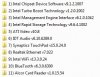
Here is what I install after clean install (plus 3RVX for OSD). I install most from device manager bypassing installers.
-
I'm ready to order *today*,and if a track pad is the only thing changing in regards to what coming in October, then that's no big deal.
If they fix the ATI 5650 issue.. now that's another story. I'd be a bit disappointed then. -
I think people who are on original win7 installed by hp have more problems then people who did clean install. Clean install on this machine is harder then minimize recovery, but after you go though it, it runs a lot better.
I havent run into big problem like white noise, freezing, etc. This laptop seems to be MORE rock solid after each updates with the BIOS/DRIVER. -
I always prefer clean install anyways. All good for me.
-
I've had my Envy 14 for a few days, and just today a problem has surfaced. The screen flickers! By that I meen sudden fluctuations of the backlight brightness. It doesn't happen all the time, but every now and then. Often enough to bother me immensely, though. It happens regardless of which GPU is active. What's strange is that it didn't happen at all in the first few days of use. I tried to search this thread, but I couldn't find anything on the topic. Has anyone experienced this issue? (I have the Radiance display.)
UPDATE: Now I haven't seen any flickering for few minutes, so it's apparently not a constant problem. I'd like to know what's causing it, though. I don't want a screen that acts up like this. -
What about battery life? Does it get any better after a clean install? I tried clean install, but went for minimized after having difficulties getting hardware working, I'm kinda lazy in this regard...
The ironic thing about the computer being more solid after clean install is that HP designs all this crap like wireless assistant to make the computer "easier" to use and it just winds up making it more difficult cuz of all the instability their crap causes. End users are trying to trouble shoot and figure out whats wrong with all their crapware... I mean can't the OEM's get it right? I guess if you want something done right ya gotta do it yourself, I will be clean installing tonight... -
AHHHHHHHHHHHHHH I wonder what it is!
The video card does not matter much to me, the touch pad yes. Maybe the envy 14 beats edition will be given radiance screen? Maybe a newer battery?
What could it be! about 3 more weeks, blah!!!!!!!!!!!!!! -
anyone remember how many months later the the original envy 15 was refreshed? i think its too early for the envy 14.I just hope the radience display isn't dropped, yes im still in pain.
-
I have a problem with the beats audio short cut key ( fn + B). It use to work, to turn beats audio on and off, but now nothing happens when I use that shortcut. Any help would be great.
Please help? -
Well, it's been fun ladies and men. I just processed an RMA for full refund to return my Envy 14. Just too many niggling issues and pathetic SSD performance for the price caused me to do it. It's been 45 days since I received my laptop, but since they were really slow to react to my questions and issues, they kept extending my return date, so finally I just said uncle.
Otherwise a VERY nice machine. It's too bad they couldn't have a slightly better performing GPU, no static in the headphones, and a better 256GB SSD for the money. I even eventually got a sporadic CPU whine. I loved the display and the metal construction but other than that it just wasn't worth it.
I wish you all the best of luck with your Envy 14. -
So you redeemed your BCB and are returning the laptop now? Genius .
-
Well, that seems to be a side benefit
I really did want to like the laptop, but the SSD left a bad taste in my mouth and issues I had with games really turned me off. I went back to my Sager and realized it still has my heart. I liked the longer battery life and screen of the Envy 14 but not worth the other sacrifices.
I'm going to wait on the Intel CPU refresh next year and see what I can get then. In the mean time I got a 64GB SSD for my laptop coupled with a Momentus XT, sacrificing the optical drive which I use like three times a year. USB DVD FTW!
-
I havent have the chance to measured the battery life since it doesnt concern me much. Most of the time I used it as my main computer, which pretty much plugged all the time.
PS:Maybe before you did the clean install, you can update the BIOS to F12 first using HP software rather with shaolinx method. Download all the lastest driver from HP website and put it on external HD or something so it will be ready after you finish doing it. Oh yeah, backup your activation too.
Considering bing as a bonus for dealing with HP tech/customer support haha. But you main issue is because that 256GB samsung SSD, I got the 160GB and its super fast! -
Well htwingnut, good luck to you. You have contributed valuable information to us Envy 14 owners.
-
Yeah, the Intel is quite nice. The drive wasn't my main issue, but part of it. If I knew it was a Samsung and/or it would be the crappy end of Samsung I would have just ordered it with the base hard drive and bought my own SSD.
Thanks. I do what I can. I do like the machine, just didn't perform as I expected. -
After HP Support Assassitant tuned up, it gave me a list of possible updates.
1. HP notebook BIOS update
2. AMD and Intel Graphic Drivers
3. IDT high-def audio Drivers
4. AMD and Intel Graphics Drivers for Windows 7
5. Intel Turbo Boost Technology
Which should i update? because i dont want to like mess up stuff and i heard people broke things after updating stuff. Also why is there two graphic update... ? -
Be aware that the HP Support Assistant wants to defrag your drive even if it is an SSD.
@ kotmul I would update all of them. Not sure why there are two graphics updates, but hopefully one is a hotfix to prevent the screen from blacking out completely when doing the driver update. -
I don't know... but installing drivers should be very straightforeward. You only need 1 video driver- the latest one. Installing the new one over the old one is unncessary.
-
Well, people do say not to upgrade to the latest BIOS...
-
Biggest issue with latest bios that I found was that you can't reinstall using the restore DVD's, otherwise it's been fine for me.
-
The latest bios prevents you from reinstalling using restore dvd's? that can't be right, it defeats the purpose of restore dvd's.
*HP ENVY 14 & Envy 14 Beats (1XXX series) Owners Lounge, Part Deux*
Discussion in 'HP' started by 2.0, Jul 22, 2010.


