 Problems? See this thread at archive.org.
That might be fine for static screen image like your desktop or MS Word but it's not going to cut it for gaming or moving high res things around without an annoying lag time from moving your mouse and waiting for the USB display to 'catch up'. There is a reason that there are no mainstream USB external displays, if it worked you would be able to buy them anywere....
-
Same here, I'm also waiting for the slice and SSD prices to drop which would be nice. I would also want the E15 over the E14 if it had everything the E14 has but improved gpu and size.
-
Those USB to VGA adapters are great. My step mom uses one for another monitor for stock trading. It IS much slower then using an HDMI port or an actual VGA port, but it gets the job done for non-moving things. For instance, the audio and video get out of sync on youtube and dvds, and gaming is a definite no go. But for browsing, or programs that dont use moving graphics/video, they are great.
-
Does anyone know what European countries the E14 will be shipped and when? At the moment, the only place I found it was amazon.de.
And is it normal to have 1300 USD vs 1300 EUR for the same machine at the different sides of the ocean? I know Apple is like that, but many other companies, like Samsung or Acer really have a competitive pricing in Europe. Is it not gonna happen with HP Envy? -
They aren't protocols although I know that one dude called them that.
-
I know this isn't the best place to ask this but since nothing is going on I figured I should
 .
.
How much more different is Windows 7 to XP? Harder/easier? Do you have a lot of compatibility issues when trying to play older games?
Question(s) goes out to anyone! -
depends on the software.
in general it works.
in some cases like quickbooks 2005 well.
that's what xp mode is for ('course that's only for win 7 pro or higher unless you wanna do some crazy work around to make it work on home premium)
edit: we seem to be moving to a new forum. wonder if this thread will be pruned a bit.
oh hey also some things that don't work in XP also don't work in vista/7 (hey system shock 2) I mean you can make 'em work if you use like two different work arounds and an updated dark engine open GL thing.
or something. -
Repeating my question.
-
...probably not.
-
Hooray For Separate Envy Subforum!
-
I SO wish I could have it shipped with a blank HDD, for installing my own copy of an OS. I got my Windows 7 Pro for cheap through the academic discount. Why should I still have to pay the price for the Home Premium edition (which I'll never use), before installing my own copy of Win7 Pro?
-
There are plenty of ways of getting 3 monitors running from a single graphics card, Eyefinity is nothing new, it just makes things a little easier. Nvidia graphics cards even have their version of Eyefinity, called "3D Vision Surround" or "Surround" if your just running in boring old 2D It was released with their latest driver update, seems to get a fairly good wrap from the press aswell.
Are you trying to run the game across three screens? or have 2 desktops on either side of the game? Because MW2 is a pain in the rear for running on multiple displays, it doesn't like being minimise or trying to interact with something on a screen its not on. -
Aah, windows XP mode...this is something new to me. So in Windows XP mode I can pretty much install/play any software which is only compatible to XP?
It only costs $29.99 to upgrade if your a student on Microsoft's website. I say "only" because I think W7 Pro costs like $200 w/o being a student so....I might upgrade. -
Thanks for the answers guys. I've gotten a lot more out of this thread than anywhere else I've looked.
-
Depends on what you mean by XP mode.
If you're referring to XP compatibility mode, it should increase your chances of running a program that doesn't like 7 natively, but it won't always cover you (in fact, it rarely will without further workarounds).
If you're referring to the Windows XP-based virtual machine that comes free with copies of 7 Pro and 7 Ultimate, then yes, it can theoretically run anything like a native XP machine, but beware that it won't use the GPU, so no 3D Acceleration.
And if you want to run even older programs, especially those that use 16-bit installers, good luck - some of them can be run thanks to updated installers from third parties, or by using DOSBox, a Win 3.1x installation in DOSBox, ScummVM, or other similar emulators, but some programs just aren't going to work on a newer computer. -
The demo they have with the Envy 17 stutters periodically so the Envy 14 will be even worse.
The Envy 14 should do okay for casual gaming (read: not dedicated) as is or when you have to reduce the resolution due to an unsupported resolution. Once you add monitors via HDMI and DisplayPort you're going to tax that "little card that could" even more and playability will get worse. Not only do you have to make sure those monitors have the aforementioned ports, the experience would be much better if they were identical which you will not have with the notebook. Not only that but not all games support multi-monitors or extended resolutions. And lets not even start with 3D. You're going to be disappointed.
If you REALLY want to game then get yourself a desktop with real hardware and be happy.
-
You could always try VMWare Player 3.1 VMware Player FAQs: Free Virtualization to Run a Virtual PC on Linux or Windows free. You can import Windows XP Mode VM and may have better luck with the performance. The VMs will be independent of each other.
-
FYI; With the intel 160GB SSD you'll get 149GB usable and there are some tweaks you can do to your Win 7 install to gain back about 8GB of the ~12GB the OS uses. Turning off hibernation saves about 4GB and reducing the amount and max size of restore points will gain up to another 2GB, also turning off page files and shadow copies etc...
The HP price is still, by far, the best deal on the intel drives available so I would suggest taking advantage of it when you order. -
You're welcome. It's on a trial basis though. Have to see how it works out.
-
Is there a link to the new 'sub' forums?
Edit: never mind, I guess I am already in it, LOL. Looks like all the threads are now consolidated under one heading. Good Job! Should make things easier to find and manage... -
Anyone know where to get a good matte screen protector?
-
You access them from the main HP subforum or links on the forum front page which lists all sections on the forum.
Sub sections are:
EliteBook & ProBook
Envy & HDX
Pavilion
Compaq Presario, G series, Mini
Drivers and Software -
I think the hp envy sub forum would look neater if you sticked all the owners lounges.
-
We're working on something like that. Have to determine which to and which not to since we can't do them all.
-
+1 its a great price for some great quality drives.
Can also "turn off" the recycle bin, and it frees up space dedicated for the bin. -
For anyone considering the intel SSD option -- I highly recommend it except now I can't stand using any of my older computers because they are so sloooow...
My startup time from pushing the power button to desktop is 14 seconds and a full restart takes 34 seconds. That's with Win 7 pro and about 48 processes loading... -
I agree. It is really hard to keep up with this and other owner's threads with so much ancillary stuff being bandied about.
-
Thanks. You're welcome.
-
For whatever reason I've decided I want to hold out for the possibility of an i5 560m. However i will need this laptop for school which starts September 27th.
Do you think I am going to wait in vain? -
Yes! You'll wait in vain until hell freezes over....
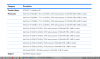
Here is the list of CPU's that 'may' be available on the E14, from the service manual, and an i5 560M is not among the options..... Unless you meant a i5 540M which you'll just wait in vain for...
-
Here's a few general tips for those of you getting an SSD and want to eek out a few more free GB. First thing to do though is see the files you're getting rid of to see how much space you're saving.
Start windows explorer (Win+E), press the 'ALT' key to bring up the menus. Select tools, folder options, click the 'view' tab. Under 'Hidden Files and Folders' select 'show hidden files and folders'. And then further down the list deselect 'hide protected operating system files'. Be careful now because it will show all files used by the OS and deleting them could be detrimental. But we'll turn that option back on when we're done so no worries.
Now on to freeing up some space:
(1) TURN OFF HIBERNATE: If you don't use hibernate then turn it off. It usually consumes same amount of hard drive space as memory you have. Here's steps to do this:
(a) Open an admin (elevated) command prompt: go to start menu, type 'cmd' (no quotes) and then presss 'CTRL-SHIFT-ENTER' or when you see cmd.exe show up on the menu right click and and choose 'run as administrator'.
(b) Now open your Windows Explorer (Win+E) and open your C drive. You should see a file called 'hiberfil.sys'. Back to your command prompt type 'powercfg -h off' (no quotes of course) and hit enter. Back in your Windows Explorer that file should be gone.
(c) That's it. Close Windows Explorer and Command prompt if you wish.
(d) Note that if you want to enable Hibernate at a later time, go through this same process, except use the command 'powercfg -h on'. Then it will be automatically enabled. Just make sure you have enough free space on your drive (equal to amount of RAM) before you enable it.
To restore Hibernation, simply follow the above except you would enter "powercfg -h on" (no quotes of course).
(2) TURN OFF OR REDUCE SYSTEM RESTORE SIZE: I don't recommend turning it off, but you can. To do either, click on your start menu, right click 'computer' and select properties. In the properties window select the 'system protection option'. Here you can turn System Restore on or off by selecting the drive, and click 'configure'. Here you can turn off system restore for the drive or change amount to use. It's hard to say what a good amount is, but 3-4GB should get you several restore points. Several users have reported 1GB is sufficient (including JJB)
If you happen to have a second drive, for instance swap out your ODD with a third party caddy that can house another 2.5" drive, then you can also have the system restore files saved on another drive. To do this open an administrator (elevated) command prompt by clicking start menu, typing 'cmd' and pressing 'CTRL-SHIFT-ENTER' or when you see cmd.exe show up on the menu right click and choose 'run as administrator'. To see the amount allocated, in the command prompt type 'vssadmin list shadowstorage'. To change the restore file location (say from your SSD on C: to hard drive on D: ) type: 'vssadmin resize shadowstorage /for=c: /on=d: /maxsize=4GB' (or just omit maxsize if you want windows to manage it).
(3) REDUCE PAGE FILE SIZE: The page file is hard disk space utilized by programs when there's not enough physical RAM. It's also a caching area. I wouldn't recommend turning it off because some programs can crash the OS or cause issues if it doesn't exist even if there is enough RAM. You can see how big the file is on your C: drive if you showed protected operating system files indicated at the beginning of this post. It is a file located on the root of your C: drive called pagefile.sys.
To change the page file size go to Start menu, right click computer, select 'properties' and in the computer properties window choose 'Advanced system settings' on the left. You will see a 'settings' button under the performance area, click that button. Click the 'advanced' tab on the 'performance option' window. Under virtual memory click 'change'.
Deselect 'Automatically manage paging files for all drives'. If you look at the bottom chances are 4GB is "currently allocated". You should be safe setting custom size minimum to 256MB and maximum to 2048MB. You can set max to 1024MB if you wish, but my experience 2GB has never given me any issues. If you have 8GB RAM it is safe to say you probably don't need a page file especially in Windows 7. But I would recommend a small amount for legacy app support (some older programs need it even if it isn't needed).
(4) TURN OFF SCHEDULED DEFRAGMENTATION: (this recommendation by JJB) With an SSD in Windows 7 it should be turned off by default. Defragmentation is not necessary for an SSD and will just cause unnecessary wear on the drive. This can easily be checked and/or turned off. Click on your Start Menu and type: 'disk defrag'. You should see the program 'Disk Defragmenter' at the top. Click on that. A new window will open and it should tell you if scheduled defragmentation is on or off. If it is on click on 'Configure Schedule' and deselect the check box 'Run on a Schedule'. Click 'Ok' and then 'Close' on the next window. That's it!
(5) REDUCE RECYCLE BIN SIZE: By default the Recycle Bin can use up to several GB of free space when full. You can quickly and easily change this by right clicking your recycle bin, choose properties, and change the size in the "custom size" box. Be sure to choose each disk and/or partition and change for each if you have more than one.
If you're really brave, you can deselect the "display delete confirmation dialog" which won't ask you if you're sure you want to delete, and it will move it directly to te recycle bin.
You can also deselect the "Don't move files to the Recycle Bin. Remove files immediately when delete." option. That means once you delete something, it's gone for good, no second chance by trying to retrieve it from the recycle bin.
Of course this all depends on your use habits. For most people ~250MB should be sufficient if all you're typically deleting are images or word documents,etc. Anything files over that size limit will delete immediately, though, but you should get an "are you sure" dialog box. I personally use recycle bin for those brain fade moments when I deleted something five minutes ago that I shouldn't have. Beyond that, it's as good as forgotten. YMMV.
(6) FORMAT and CLEAN INSTALL: One suggestion by JJB is to do a clean format and reinstall which should eliminate the 14GB+ recovery partition and get rid of all the HP crapware. Before you do this though, be sure to make your recovery disks, and backup the 'swsetup' folder on the C: drive because it contains all the drivers and software supplied by HP as they may not be readily available at their website. Not only will this free up space, it will also make your machine clean and mean and run much faster than the HP install with all the extra unneeded software.
If you do a full format and reinstall of Windows 7, be sure to review and do the above steps (1) thru (4) when done installing the OS and drivers and software you need. I will do a full "how-to" on formatting and reinstalling once I get my Envy 14. I plan on ordering this week (7/14 or later).
(7) THIRD PARTY SOFTWARE: Run Ccleaner and/or Glary Utilities on a regular basis. Both are free and they will clean out any temporary files and other junk collected on your drive that you don't need.
***IMPORTANT*** Don't forget to go back to your Windows Explorer and turn the option back on to hide system protected files as indicated at the beginning of this post.
This should free up a minimum of a few GB, and if you can recover 6-8GB that's a good 5% of your 160GB SSD that you could be using for something else.
edit: 7/21/10 - added Recycle Bin info as number (5) and shifted other two items downwards. -
The i5-560M does not exist yet. According to the below it is due Q4 so the earliest you may see them in anyone's hands is just before Christmas or next year. And of course probably not on the Envy 14 because by then they'll be working on the Envy 12 and 16.
![[IMG]](images/storyImages/5-30-10-processor-timing600-1275252656.jpg)
-
Q4 in the US is July 1, 2010 - September 30, 2010, at least that is if they are referring to the fiscal quarter.
-
The Q4 that is being referred to is Oct to Dec.
-
Hmmm this says otherwise.
http://www.sec.gov/Archives/edgar/data/50863/000115752310002015/a6247520-ex991.htm -
Post should be in the FAQ.
-
I'm sure once 2.0 gets done beating me up and raking me over the hot coals (Jack Bauer style) to make sure it won't destroy someone's PC he'll add a link.
-
Thanks, I don't have to torture myself by waiting anymore.
Has there been any word on who makes the RAM/HDD, or will that vary depending on when you buy it? -
Do you guys think I should order from Ebay (new, unopened, built on request) and get the laptop in the 1st week of august or should I wait till all the people that are waiting get their laptop in July and then someone will hopefully sell it on ebay?
I cant buy from hp as not in US. -
I'd prefer to order new but your question is 100% personal preference. If I'm buying a new laptop I'd rather configure it and get it direct from the factory (or the eBay way in your case). Otherwise someone else's grubby hands have touched your new merchandise.
Not only that if someone doesn't like it or changes their mind they have a 21 day return policy so you'd be waiting a minimum 3 weeks if someone missed the 21 day return window. -
It's unlikely you'll find a used one on eBay since most people will use HPs 21-day return policy before selling it. If they do sell it, then most likely it will be for profit with a mark up.
I'd get it new from the ebay lady if you want the laptop any time soon. -
when did you place an order at ebay?
-
It all depends on how high a priority battery life is to you.
If it's your #1 priority like me, then get the i3.
If it's important, but not that important, get an i5.
If you don't care about battery life at all, get an i7. -
I asked. They said it would be 24 hour turnaround time, and never heard back.
-
Sandy Bridge, Google it. I think it's due out in about 1 year time for desktops. Not sure about notebooks.
-
But won't I still have to pay an extra 30 bucks for the Win7 Pro? I have 6 Win7 Pro keys from the MSDN $10 student deal. I don't want to pay for yet another copy of Win7 Pro.
-
Done. But I will beat you up later... for the fun of it and since you assumed I would. Who am I to disappoint?
-
Anyone know what the 5650 can switch to? Is it the integrated Intel GPU?
-
Yes, that's why only the dual-core CPUs are switchable. The Quad-core chips have no integrated GPU.
-
I ordered a 256gb ssd, and it's supposedly shipping right now, so I will get you guys an answer as soon as it arrives. Although, my laptop's been sitting in China for the last 2 days. Doesn't shipping imply that there's actual movement involved in the product from country to country?
Unless she's on the Envy team, it's only a 15% discount for employees. If she is on the Envy team, then she could theoretically get you a free one, but if she charged you for it, she would be going against the contract she signs with HP when she receives the test product, and would face repercussions from the company. As far as I know, the best deal out there would be a return of the 25% Bing Cashback.
*HP ENVY 14 (1XXX series) Owners Lounge, Part 1*
Discussion in 'HP' started by 2.0, Jun 21, 2010.


