 Problems? See this thread at archive.org.
Thats exactly what I was thinking about doing. Still deciding if I really need the 160 gb of ssd space though. I don't use much hd space to begin with, so I could just get a ssd on newegg for around $150. idkidk decisions decisions..
-
Great. I'll hold off until I hear which SSD it is and what kind of performance it pulls in the Envy 14.
-
Exactly. An SSD that costs half the price of the laptop I'd like to know what they use. I don't think it should be a mystery or luck of the draw or have to order one just to know. I would think it would be a good selling point, unless it's a piece of crap SSD.
Unless I can get the 25% BCB, I think I'm gonna go with the 160GB Intel, but have to make the determination if I can manage my stuff in that size. -
Most people who have tried Win 7 in my circle, including myself, find it to be superior in pretty much every way. Runs faster, consumes fewer resources, more stable, looks better. And, so far, has worked with pretty much any older apps we have thrown at it.
-
Get an i3 if your that worried about turbo boost effecting your battery life.
-
my only beef with the envy 15 is the plastic bezel
-
yeah. Wait what in the world was the whole convo about security protocol's? Will it effect me? I decided not to buy workstations because there to expensive, have problems to them and I believe workstation cards suck at gaming. I need something versatile and anyway most of my work is CPU dependent so ye

-
E14 most definitely. You can check them both out at Fry's. Obviously E14 won't be there, but E13 is there, and a buncha HPs. The Lenovo's build quality is crap compared to all the HP dv-series, g-series, and even that one Compaq model that shares the same chassis(shape,quality,material). Honestly, the Compaq one isnt that bad, AND , it's Black!
-
That isn't entirely true. The i5s don't use that much more power and the dynamic clock scaling is a pretty nice feature. That said, I'm regretting not getting an i3 right now because the speed difference is pretty insignificant for a 10% power consumption difference
http://www.notebookcheck.net/typo3temp/pics/f3d52024f9.gif -
If the i5's complete the tasks quicker (which they will) they'll go into idle quicker. So while the 520m consumes more at CPU max, it's idle is (very) slightly lower than the i3's. So for power consumption I think it'll be more of a wash than the speed differences.
-
http://www.notebookcheck.net/typo3temp/pics/650ef6bf0e.gif
300 points in vantage, is that difference really gonna be significant? Its a shame they didn't graph out the power consumption over load. Maybe that's something that we can get done? -
I'm confused. The graph shows a 1000 point difference between the 520 and i3.
But they do need to show a graph between CPU and power, I'm almost willing to bet the 520 uses the same amount (maybe less?) of power doing regular activity than the i3's. -
I am thinking of the 430m, because it is the least biased test (comms suite score gets thrown because of AES instruction set which has very limited practical usage), and you'll notice that the 430m and the 520m have almost identical scores otherwise. If you look further back in the thread there's a post showing the power usage at peak and idle.
-
IMHO you should never post something like your 'turn hibernation off' instructions, without giving just as clear of instructions on how to turn it back on! That way if something goes wrong they can undo what they changed. Yeah it's being over cautious but others may not be as knowledgable with command lines etc....
Your SSD post was well done I have some addidtional things you may want to add as you see fit:
Pagefile -- I have it turned off completely and have had 0 issues after doing this on 4 machines (E15's) but all my machines have 8GB of RAM
Restore points-- You can safely reduce the disc space to the minimum of 1% (1.49GB) with no problems, it stores at least 9 restore points for me at the minimum settings and I find I delete all but the most recent every time I run CCcleaner...
Make sure auto disc defrag is OFF -- this should be done automatically when Win 7 senses an SSD but I've read of some instances after a clean install where it was running (not good for SSD's)
Gain another 12+GB if you do a clean install of Win 7 -- HP puts a 12 -14GB recovery partition on the C: drive, make a set of recovery discs (do this before a clean install) and then you can delete this partition which you just copied on the recovery discs... (size may vary on the E 14)
Also before doing a clean install make sure to make an external copy of the SWsetup folder on the C: drive, this contains all the system and hardware drivers that come with the machine, even some that are not available from HP's site for download...
If you have an SSD only, then there is no need to reinstall the 'HP Mobile Data Protection Sensor' software and drivers since there is no sensor on the SSD's only HDD have it.
And finally IMHO do not reinstall all the HP crapware that comes with the envy, like; stardock, picture viewer, media center, HP wireless assistant, HP media smart etc.. All these are just windows 7 apps repackaged in HP graphics and they run much slower. All you really need to keep is the Webcam drivers and software... and the beats (IDT) audio drivers.
Another major piece of crapware is the 'HP support assistant' which is basically HP's very intrusive version of windows update it has more popups than Norton.... Problem is that if you call tech support for hardware / software issues the first thing they want you to do is open this horrible application. I do not reinstall it after a clean install but for those who are not very tech savvy it's probably a good idea to keep it to so you can call tech support without issues...
The bottom line with HP crapware is that it all sucks and causes major slowdowns and lowers battery life due to things running in the backround that do not allow the CPU to fully idle. The E15 comes with ~78 processes running out of the box from HP and the CPU usage in Task manager never hits 0 it continually fluctuates between 1% and 5%. After a clean install my machines are running 48 processes (at bootup), and the CPU drops to 0% almost instantly after completing any task....
NOTE: The above info regarding the HP crapware is from my experience with doing at least 6 clean installs on 4 different Envy 15's. There will be minor differences in the Envy 14 crapware and some drivers that are not applicable to the E 15, but looking at the E 14 HP drivers page a lot of the crapware is the same so it will, for the most part, have the same issues and bad performance out of the box that all the E 15 owners have been dealing with for almost a year... -
That is a very old and misleading test result from notebookcheck. You have to remember that those power levels were a measure of the whole test computer that each CPU was installed in, not just the CPU, and each machine could have a significant variation on what else was actually running. That being said, I have i5 540M in my E 15 and it seems to get slightly better battery life than the 520M or 430M machines....
-
Good points JJB. True about fresh install, I think though that is something that should be done by someone who knows what they are doing. It's simple once you've done it a few times (for me its been at least several hundred) but first time around can be a bit nerve racking getting all the drivers installed properly etc. But yeah you can eliminate a lot of bloat, free up a lot of space, and greatly improve overall system responsiveness. I recommend it as well, just do it when you have free time to spare! It's the first thing I do when I get a new PC, well after creating system restore disks.
I have gone a while using no page file before, but I have heard some headaches with people who have not. I think for the safe side, page file even at 512MB won't consume much space and give enough cushion to be on the safe side. I just wouldn't blatantly say to turn it off.
Restore points at 1% is fine too. All depends on how far back you want to go. But personally, I've never used restore points. I'll update it to reflect that you can reduce to 1% and you only compromise by having a limited restore point history.
Disk Defrag off should be an absolute must it will only cause unnecessary wear on your SSD, and should be off by default, but can't hurt to check. -
You're assuming we're going to be doing tasks that end. The i3 will consume less power, perhaps not much but for people who are trying to maximize battery life it's the best option.
-
Not true. All the 35W icore CPU's (with 3M cache) use the same die and therefore are identical except for how they get sorted during testing. The higher quality dies get bumped up to the higher clocked P/N's. Therefore an i3 370M doing the exact same processing as a i5 520M will use more power because it will take more time to do the same thing. This is true with 1 thread at full turbo boost speeds or with all 4 threads at 100% loads. They are both 35W TPD parts, processing the same data. so whichever one completes the task first uses less power. If they are doing the same task at the same speed then they use the same power. And they all idle at the same 5.24W.
-
E14 has slot loading optical drive, and has the optional slice battery.
-
TDP, and that's only the maximum rated amount, not the actual amount of each individual chip.
Movies/songs arn't going to play faster on your i5, nor would you want them to. All its going to do is bump itself automatically up to a new speed and consume more power in the process. The turbo boost is going to consume slightly more power. -
ahahahahaha same here.
![[IMG]](images/storyImages/online_package_tracking.png)
-
Again not true. Same task, same chip die, same speed = same power usage!
-
Except it's not the same speed when it automatically turbo boosts itself up to a new speed.
-
Try using this tracking service, it normally gets more detailed info than the fedex tracking system: UPS Tracking - FedEx Tracking - USPS Tracking - DHL Tracking
So it will drive you even more crazy.... -
Hey all.
I just had a quick question that I couldn't find by looking at 1st page or using search. Does HP ship installation DVDs with the Envy 14, or would you advise me to create my own? -
I'm about give up, you need to read about the turbo boost tech from intels tech papers.
It is a on demand system and only kicks in if normal clock speeds get maxed out, so if you have the same task that does not need beyond the normal speeds then turbo boost does not happen. So as I said before with the i3 vs. the i5: same task, same speed = same power usage. When you have a task that hits max standard clock speeds then the turbo kicks in and the i5 will complete the task quicker than the i3 so it will use less overall power. They all idle at the same power draw so the i5 will always use the same or less power than the i3 on any type of usage. Bottom line is the i5 is more power efficient!
If you want better battery life you need to go with one of the UM or other ultra low power icores (18W or 25W TPD), but you will take a significant performance hit.
EDIT: here is a link to the intel page that compares these 2 processors side by side: HERE I noticed on this that the 370M also has a lower max IGP clock speed so it will have a little less performance when using the internal GPU (yes at the same power usage as the 520M with lower performance). -
I already have a desktop but it doesn't have eyefinity. My 2 satellite monitors are of lower resolution so I think I'd be playing my games on a lower resolution than the 1600x900 listed. Should be easier for the envy to squeeze out frames for those right? I hope it works though. 2 monitors is a pain to span fps games on.
-
A thought just popped into my mind..
I'm going to be living in a dorm in the fall, so I thought it would be wise to get LoJack (4 years). How does this work? Is it on the hard drive? Would a thief just clean out the hard drive, leaving no trace of LoJack? I'm beginning to wonder if I was ripped off $50. -
LoJack - Wikipedia, the free encyclopedia
"LoJack comes preinstalled in the BIOSes of, at least, Lenovo, HP, Dell, Fujitsu, Panasonic, Toshiba, and Asus machines.[citation needed] It is disabled by default and can be enabled by purchasing a license for Computrace; upon being enabled, the BIOS will copy a downloader named rpcnetp.exe from the BIOS flash ROM to %WINDIR%\System32 (which usually resolves to C:\WINDOWS\System32) which will in turn download the actual agent rpcnet.exe and install it as a windows service. Recently[when?], Dell, Lenovo, Panasonic and Fujitsu appear to have discontinued this method and require manual installation.[citation needed] Once enabled, Computrace cannot be disabled or deinstalled without assistance from Absolute Software, not even by reformatting or substituting the hard disk, because the BIOS keeps reinstalling or repairing it prior to loading the operating system." -
I just hope that Lojack actually does have like police go to the trace and get it for you. Supposedly there was a story with lojack in which cops looking for the laptop also came across a huge drug bust.
-
wait... its possible to get around it. There are ways. -
Would it be obvious that the notebook had LoJack unless you went explicitly looking for it?
-
Nope, its process is disguised inside of the Root Windows folder.
Here is a wonderful review from our friends here at NBR LoJack for Laptops Security Review
Im getting it, I think for 50 bucks and a 70% recovery rate, In a college environment. Its gonna be wonderful.
-
who the heck loses a laptop?
-
Not loses, but had a break-in, or god forbid, forgets about their most precious Envy 14. (Which I will never ever do.) Or gets mugged, there are a million possibilities. Better Safe than Sorry.
-
believe it or not, some people in this world like to take things from other people!
I KNOW, RIGHT?!? -
I have 2 friends who've had their laptop swiped at the library right in front of them while they were turned to the side to get something out of their backpack. It sounds ridiculous, I know, but it happens.
-
i doubt anyone loses a laptop, unless they are epic fail.
it's for people who get their laptop stolen. -
Not true. There are differences between the power usage of two identical dies. Some uses less power to turn on/off the transistor, and usually are turned into more expensive parts, so, it wouldn't surprise me if the i5 uses less power than the i3.
Example:
Intel's Core i7 870 & i5 750, Lynnfield: Harder, Better, Faster Stronger - AnandTech :: Your Source for Hardware Analysis and News
i5 750 vs. i7 870.
Same die. The i5 has less clock and have some features disabled (hyper-threading), but yet it manages to use 3 watts more than the i7 during load.
Also, you can see in overclocking forums that some chips just suck at overclocking, others do it epically. -
You want to clarify what you mean by same chip die?
-
That's my whole point, I just didn't want to get into the technical details of how the lower resistance on the higher spec'd parts use less energy and / or produces less heat with the same current. I was just trying to get through his head that the i5's are more power efficient than the i3's. That's why they are both 35W TPD parts but have different performance levels....
BTW that is a terrible example, the i5 only has 4 threads vs 8 on the i7 and with the power being for the full system (inclding the GPU) the difference of 3W over ~180W is within the margin of error.. -
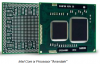
All i5 and i3 mobility CPU's (w/ 3M cache) use the exact same silicon die off the wafer, they are just tested and 'binned' by what performance range they are capable of. The faster parts have, basically, lower internal resistance so it takes less power to turn on and off the transistors, so they can be clocked higher within the same thermal envelope (CPU package).
The larger silicon 'chip' in this pic:
-
I just got my original refund credited back to my CC today. Tomorrow I'm going to attempt calling them again and try to add the 25 dollar coupon I got as credit, as well as complain more about it being stuck in China.
Two questions:
Is there still no confirmation about the slice battery being 150.00 via the parts catalog?
Any recommendations on where to get another 4GB stick of ram to go with my 1DIMM coming in the laptop? I don't like mixing brands with RAM so I almost want to use my HP coupon and get it from them. -
a bit OT, does anyone have a good way of wrapping the cables on HP's power adapters? the wire insulation on mine (5 years old) broke near the brick and I ended up using electrical tape to create a strain relief in order to prevent further damage.
-
same difference
-
You could thread a narrow spring down onto both ends at the stress relievers.
-
For anyone who has the e14 already, is it noticeably smaller than a 15.6" laptop?
-
sn_85 pretty much says it. It might be great to have SSD performance right off the bat, but you're stuck with a mediocre graphics card and a mediocre screen. If you get the Envy, you might be giddy about the screen all the time. Think of the screen! THE SCREEN!
Plus! The much better graphics card, the somewhat better processor (given the configurations you mentioned), better build quality, and the backlit keyboard.
And you can't be super-frugal if you're going to spend $1100 on a laptop. You really don't think you'll drop $200 on a SSD a year down the line?
And if all else fails:
Booooooooooooooooooo! -
It's potluck with the laptop. But if the sleeve arrives first (it almost certainly will, even if HP fixes their supply issues), does it matter?
The local post office should hold it for you for a while. -
I'd like to know this as well.
*HP ENVY 14 (1XXX series) Owners Lounge, Part 1*
Discussion in 'HP' started by 2.0, Jun 21, 2010.


