Problems? See this thread at archive.org.
i think its better that way
-
-
MagusDraco... I went with your suggestion of using the Recovery disks. This seems to be working. Unfortunately, this doesn't help me with a clean install...

-
Amazing. The Envy 14's launch reception contrasts starkly with the Envy 17's. The former with the occasional quirk and exception seems really positive and upbeat; the latter, not so much!
-
Well once you've booted into windows off of those, you can try reinstalling from there
-
i have the i5-520 and i can only hear it if i put my ear right by the keyboard. i turned off bluetooth and it seems even quieter. any more suggestions besides turning bluetooth off to make it even more quiet?
-
Is it me or am I the only one who can hear the constant fan noise even under idle?
-
I realize this is a stupid question but does it come with bt?
-
I hear the constant fan noise.
I dun care at all since it's still SOFTER than the damn helicopter fan on my Asus G1 (fan is breaking down)
edit: ok well it's not really a helicopter so much as it's a click, a loud click that happens like 20 times a second.
like the fan is hitting something. Sorta sounds like when you would put some plastic in your bike wheel and it'd make that noise when it hit the spokes. -
Very interesting, I have read reports that the IGP's power draw can have a negative effect on the CPU performance, seems like you just confirmed it. With GPU = 2.17 and with IGP = 2.04. AFAIK that test is 100% CPU based, the graphics card should have no impact on the score....
-
just got my envy
does anyone else have a rise in the keyboard tray around the F10 button? that's about the only cosmetic issue that i've noticed. this thing's a beaut.
-
Whoa, they give you the option to create a recovery "disc" on a USB flash drive now. I was really excited at first, until I realized the source file is 13.8 GB...
It would be nice not to have a bunch of DVDs hanging around (which are physically bigger, and more prone to getting ruined), but I'm not quite ready to fork over a 16 GB flash device that will just sit around and otherwise do nothing. I have a 16 GB SDHC card sitting next to me, but I paid $40 for it.
Ugh. I wish they didn't limit you to only one set of recovery media.
-
I'm so bummed.
Everyone seems like they got theirs and it's all good.
Mine came defective. GREAT -_- -
no but now that you mention it my f9 button feels extremely weak like its been used for 3 years.
-
Spacer - Yes installation went okay. Win 7 saw the drive right away. Win 7 is rating 'Disk data transfer speed' as 7.4.
After installation I realized that the drivers on the HP site are not the right drivers. Manly the trackpad driver from the site wont install. I ended up connecting the shipped drive by usb to get the driver from the sw folder. Plus, there is no wan driver up there, I suppose I would have looked at the intel site next but it was on the original drive so I just used that one.
total reload was about 1.5 hrs.
Is it possible to make it so that the buttons on the trackpad don't register mouse movement? -
By the way, gestures are available and there are options for them in the synaptics software package as well as being fully compatible with the Scrybe tech. I don't use those features but others who do say it works well. That's all I know so please no questions about it to me...
-
Btw... after reload using a fresh win 7 ultimate disc I no longer have constant fan noise.
maybe the fan died
-
No, but mine has a very slight rise at the bottom right corner (near the arrow keys). It's a millimeter at most, and hardly noticeable.
-
But see the fan speed increases exponentially when it's under load. Was playing a divx movie loaded on a dvd and the fan was loud...
-
Interesting. Is that good or bad? Does that mean HP has their own OEM software that controls fan speed alongside BIOS settings? Is the temperature control still adequate?
I have a copy of Win7 Ultimate from my work. I might try that myself later on when I'm bored. -
where can you toy with the trackpad options?
-
well yeah. But I haven't put it under enough load to make it go full blown fan.
or at least, the cinebench wasn't enough to make it go full blast.
edit: oh hey. backlit keyboard is a hardware thing. It'll turn on while booting up if you try the combo. -
Wow, you are nitpicky... now that you've mentioned it, I checked the edges of the entire keyboard tray and found not only flexing around the 12QW/UIOP area but also see some raised spots around the F8/F9 keys as well as the arrow keys...
Pros:
Beats audio is bass-heavy which is great for people who like over-extended bass.
Screen is very vivid. Gamut's wide. Eye-candy for sure.
Cons:
If you have IEMs/headphones on, you can hear a squeak or two when you have them on when you're browsing on the internet. I have no idea what causes that.
Not too fond of the rubber lining aroudn the bezel. It reminds me of ToysRus laptop. It really takes away the fluidity of the design. It's not true edge-t0\o-edge glass.
Fan is constantly on no matter what the laptop is doing. Under heavy load, the fan spins @ 10k RPMs it seems.
This is all I gathered within the first 20 mins of opening the laptop and fiddling with it... -
Just got my envy and it is beautiful like everyone else has been saying NO cosmetic issues at all. The fan is audible but not bad there is only a little keyboard flex around O and P but you have to put a good bit of force on it. Going to download the crysis demo I will post how she plays.
-
Sounds like people are having trouble with clean installs. I ordered with the SSD and I was planning to clean install regularly (boot win7 disk, delete partitions, then install). Is it better to use another method on this computer or should this work? Pretty scared hearing about black screens on boot and SSD problems.
-
Cinebench R10 with IGP Enabled.
Rendering (Single CPU): 3661 CB-CPU
Rendering (Multiple CPU): 8087 CB-CPU
Multiprocessor Speedup: 2.21
Shading (OpenGL Standard) : 1902 CB-GFX
Huh. Higher than with the radeon.
I'm gonna just go "Eh" -
bharkol1 - That is great news. Were you using a "REAL" Win7 disk or the downloaded one? I was using the downloaded version and wonder if that was my problem. The restore is almost done. I might need to go buy Win7 from Newegg and try again. thanks!
-
Has anyone else experienced the case getting very hot just to the right of the power button?
-
hmm....
lemme see mine. -
How do you check for raised keys and flexing? Do you make the keys eye leveled to check for raised keys? How do you determine flexing if it's small? Will exerting that much pressure to see flex cause damage to the keyboard?
-
Just to address what you're saying: the squeak or two is probably EMI. Most laptops I've had -- and integrated sound on desktop systems I've built in years prior -- had noisy audio output when doing "stuff" on the computer.
And if it's any consolation, the MBP also has a thin rubber "band" around the monitor, presumably to cushion the display against the machine when you close it. Truly flat, 100% edge-to-edge isn't really a good idea without some kind of buffer between the glass and the metal body. -
yeah the right front corner of my keyboard sticks up a bit.
It does not bother me though.
also my power button (and the area just to the right) is room temp. Trying to find wprime95 to test something out. -
Sorry guys i havent been on in a while. did i miss anything? anyone confirm that all the laptops have the whine?
-
Slimer?
And what games are you going to test? -
I really didn't want to get into this but.... When you install (most) new synaptics drivers you actually get 3 different versions at once, each has a different set if options in the control panel. To see if the E 14 came this way you need to open device manager > Synaptics Touchpad > update driver > Browse my computer...> Let me pick from a list...> and you will see a list like this:
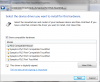
That list of 3 or 4 drivers all were installed from one updated driver package and each one listed has something different in it, normally different control setting and sometimes different features. From the image above you can click one of the lines to highlight it and then 'next' to install that driver, and after reboot you will be able to look in the Device settings options to see what is different. Yes as you can see there is absolutely no way to tell which is which so it is a mystery as to what will change between the different versions... To date I have never had any of the optional variations cause serious problems but the tough part is trying to figure out which is which, the best way to get back to the previous one you were on is to use the device manager's 'roll back driver' option (under update driver). I have no idea if the E 14 is preloaded with more than one driver but when you update to a new version you will get a list like I show above, some of thes have the actual original disable zones feature and others do not ....
EDIT: If you try to load any from your list make sure that you have a working mouse available, just in case the pad stops working and you need to 'roll back' the version... -
Slimer as in Slimer from the ghostbusters.
I'm gonna get SC2 on here in a bit and test it out.
running wprime to see if the cpu heats up the spot next to the power button (spacers is heating up) -
I was just playing the first part of the Mass Effect 2 Demo and its going pretty well.. Playing is definitely possible..!
Looking forward to play some other games soon! -
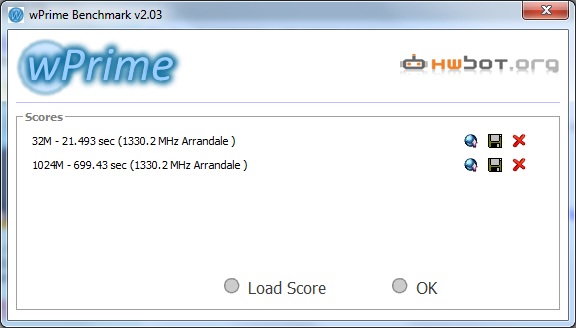
in other news wprime hates win7 64-bit and took 2 minutes to stop trying to see the hardware I have on here.
it also blasted through the quick one (32M) in 21.477 seconds.
1024M is in progress -
Ohhhhh!
I thought you were talking about the CPU/GPU still (I was thinking thermal paste)
Online SC2 or AI? -
Which ssd should I buy?
Kingston SSDNow
Newegg.com - Kingston SSDNow V Series SNV425-S2/64GB 2.5" 64GB SATA II Internal Solid State Drive (SSD)
or Intel X25-V
Newegg.com - Intel X25-V SSDSA2MP040G2R5 2.5" 40GB SATA II MLC Internal Solid State Drive (SSD) -
also while bored waiting on wprime to finish I found a weird thing with the screen.
close it mostly down and in the center there's this...what looks like a rainbow colored goop or something in the middle. you can't see it unless you're at a very odd viewing angle, like 175 degrees -
online. I have a beta key.
gotta get it installed on here in a bit, ...and then remember how to fix the patcher (it borks going to phase 2 'cause you don't get a realmlist file for some reason initially.
stupid beta things) -
should it matter then?
-
No. It's just kinda cool looking
-
managed to get a picture of it.
the monitor red shifts a lot if you look at it from the top. -
btw did you get a whine?
-
If I did, I can't hear it.
if I did, it isn't louder than the hdd and/or the fan running.
also the fan doesn't kick in full blast while benchmarking it seems and I still only get 64/65 *C for the cpus in wprime.
gpu is set to igp right now -
I really think someone should make a comprehensive youtube video in HD showing both the touchpad and the screen movements in action. You could probably go through a pretty exhaustive sampling of it's capabilities, or anyone else who had the equipment and time.
So if anyone out there gets very experienced with the touchpad, received their envy AND has a hi def camera to capture the demo, please upload something, and either shut Joanna up about the touchpad, or vindicate her. -
wow videos looks amazing the temps on the cores get to around 41-42C when watching youtube videos/surfing. left palmrest is cool to the touch..right is a little less cool but not close to warm
-
touchpad is fine after you config it.
it is really really REALLY sensitive. So you gotta put palm check to max and set the touch stuff to heavy touch (or one away from heavy touch, which is the max) -
Wprime with IGP turned on.
didn't go above 65 *C on either coreAttached Files:
-
*HP ENVY 14 (1XXX series) Owners Lounge, Part 1*
Discussion in 'HP' started by 2.0, Jun 21, 2010.