 Problems? See this thread at archive.org.
Ic.
It came with home premium.
Where do i find the key?
-
Yeah I knew the battery life would suck when I bought it. Are there any specific areas that get hot while web browsing and downloading stuff or does it remain cool throughout?
Thanks for answering my previous question btw -
well.
the key is underneath the envy.
hiding in the battery cage. I think it may be underneath the battery -
Palm rest, track pad and keyboard are fine. It gets a little warm to the right of the keyboard and on the bottom towards the screen and sometimes above the keyboard and to the right of the power button.
-
This might help you (Got this from Vaio F forum)
1.In Vaio Control Center/Display/Automatic Brightness Settings uncheck the box that says "Adjust brightness automatically" and hit Apply
2. In Vaio Control Center/Display/Color Mode Setting, check "Do not apply color mode" and hit "Apply"
3. Make sure screen brightness is set to maximum using Fn and F6 on the keyboard
4. Download the attached zip folder and extract the profile to your desktop or other easily traceable location
5. Navigate to the extracted profile on your hard drive, right click on it and choose "Install profile"
6. To verify that it installed to correct place, look in "C:Windows/System32/spool/drivers/colors. The profile should be in that folder. If it's not there you can copy and paste it into the correct folder manually.
7. Open control panel and choose "Large Icons" in the "View by" drop down menu on the top right (if you don't already have it set like this)
8. Click on Color Management and uncheck the box that says "Use my settings for this device" then click the "Advanced" tab at the top of the Window
9. Click "Change System Defaults" at the bottom left and in the new window, click "Add" near the bottom left.
10. This should bring up a list of profiles among which should be the one you downloaded called Spyder_Vaio_F_profile.icm. Highlight this profile and click OK at the bottom right. Then with your new profile highlighted in the box click "Set as default profile" toward the bottom right.
11. Toward the top of the window click on the "Advanced" tab, then check the box "Use Windows Calibration" toward the bottom left. As soon as you check this box you should see your screen change to the new profile (a bit darker, crisper, less blue) and this profile should remain in effect until/unless you change it.
oh never noticed that, thanks lol.
I'll try it once I get my E14, its still in production...but its k, because the 60 days BCB policy, I need to kill some time anyway.
For the touchpad fix, use wireless USB mouse lol. I rarely use touchpad.
Depends on the laptop cooler, I use coolermaster notepal U2, it raises the laptop about 40 degrees. You can have as many as 8 fan if you want, it come with 2 fans (you can also use the base without the fan) and the fan is really quiet. Btw, it does work.
Maybe Sony Z series? -
While I believe someone mentioned the 320 gb HDD was Toshiba, was there any word on the 500?
-
Like another poster said, Sony Vaio Z.
Best bet is get it from MicroCenter like this one:
Micro Center - Sony VAIO VPCZ122GX/B Laptop Computer - Black VPCZ122GX/B
$1699, i5-520m, 4GB RAM, GT 330m, 13.1" 1600x900, 128GB SSD, DVDRW
If you can find an old laptop with Penium 2GHz or faster you can get a $300 trade-in from Sony too.
If the Envy doesn't live up to my standard I may go this route.
Otherwise, pretty much every other laptop out there has a 1366x768 screen. So so stupid. At least offer an upgrade to 1600x900. -
After doing a clean install on Win7, does anybody know which HP driver to re-install to enable the pop-up graphic when changing the volume?
Thanks! -
Edit: Just noticed that the quote does not say what he was reffering to, It was MagusDraco's post about AMD 10.6 driver issues....
Well as I mentioned earlier (about a zillion pages ago ) The original 10.6 Alpha version showed that it supported switcable graphics, when the Beta and then the Final WHQL version came out it 'does not support switchable graphics'. So I'll make a logical guess that there was some sort of major issues with the switchable graphics stuff during WHQL testing. Also remember the E 15 does not have switchable graphics so, thankfully, all the new AMD driver updates work with the 5830.
The link for the 10.6 Alpha version is still up but if it were me I don't think I would try it after your issues with trying the final one, but if you really want to give it a shot here is the link: strags.com - Currently ATI Mobility Radeon HD Depot (very reliable source who always had the 1st early releases until they closed off his 'source')
-
Off topic, but how did you delete the partitions on windows? I wanna do a clean install on mine.
-
HP has a little thing included in the bloat that gives an alert when CAPS lock goes on and off. Seriously... WHY. It even reduces your fullscreen game windows...
I really don't wan't to do a clean install right now since I've already got everything installed and it runs fine. Guess I'm gonna have to suck it up and clean the bloat 100% sooner than later. -
I actually had a really hard time doing a clean install. When trying to boot from my Win7 DVD, the installation would load the files and then I would get blank screen and it would not progress any further.
Then I started the Win7 installation through windows, at this time I was not able to delete any partitions, only install over the already established C partition. Go ahead and do this. It looked like Win7 installed but then I got strange errors after a reboot and the computer was confused because there were two installations of Win7 now.
I cannot remember details, but I think I either booting from the DVD or selecting Win7 recovery setup allowed me to finally delete the extra partitions the HP created and start fresh.
The key is to start the Win7 installation through windows...fiddle around from there and I think you will figure it out. I cannot remember the details...too durnk at the time.
Fan noise is still driving me crazy. -
Is there a setting to not make your games minimize when you adjust the volume? Anyways the Audio Quality with the head phones is great. Make sure you have beats on fn +b anyways why would you want it turned off?
-
Are you're temps high? If you're system is running too hot then mayb thats kicking the fans in. Could probably override fan speeds somehow if you're temps are fine. (bad temps = bad system though!) -
I would not even try to reload that volume indicator, it will just frustrate you, it kicks you out of full screen mode in video and in most games. It's HP crapware, what do you expect? something that actually works
A freeware app called 3vrx 2.5 is much cleaner, has several cool skins and the best part is it does not throw you out of full screen mode.. View the read me on how to change skins it's a little screwy on how to get the 'preference panel open...
The original link from the author is dead so I just googled it and this is the first link: Freeware Files.com - Download (never used this site before, but 100's of other D/L sites to choose from also) -
My fans are quiet, even when playing games not to loud.
-
CPUID HW Monitor says:
Core #0: 32 deg C
Core #2: 35 deg C
It seems that the fan kicks on anytime it goes over 35 deg C. I don't think that is considered hot, but correct me if I am wrong. The air coming out of the vents certainly does not feel hot at all.
side note: CPUID HW Monitor identifies my 450M as the 520M. -
+1 for 3RVX. best volume change graphic thing ever :]
-
Can you tell me, are your fans ever completely off? If so, how long do they stay off when simply browsing the internet and doing nothing else? And can you tell me your specs?
My fans never stay off for more than 2-3 seconds when doing nothing but
internet.
My specs:
450M, 6GB RAM, 160GB SSD -
Thanks. I agree it's a great little app. Did you figure out how to change the graphics and move the location of the popup around? IIRC you need to open the program a second time to access the options... You can also make you own graphics to display, someone on the E 15 lounge actually made a Beats themed logo and volume graphic, can't find the link though...
-
...what is intel digital logo
google isn't helping much -
A little late to the party but I just ordered. Config is in my sig along with sleeve, wireless mouse, and HDMI VGA converter. Pretty anxious to get this thing.
-
Thanks! I downloaded this and it is quite nice!
-
by the pop-up you mean the thing that comes up when you change volume, right? You can change it under the display tab.
If you mean the thing that comes up when you click the system tray icon, I have no idea how to change where that shows up -
I believe it's the 'intel inside' icon in the intel folder in the start menu, it basically just gives you a link to the 'resource monitor' screen in Win 7.
Or maybe the 'intel proceesor ID utility' also in start menu (does nothing you don't have already) -
holy crap, just installed the samsun 256gb on my envy and it booted up in like 10 seconds! I LOVE SSDs!!!!
-
No I mean there are a lot more options that allow you to set up exactly where the popup pop's up, and change how long before it fades out and the transparency levels etc... I think you need to run the progrm a second time while it's already open to get those additional controls..
EDIT: NM I just realized I was thinking of a previous verion, the 'settings' page with all the tabs is what I meant.. -
Does no one else have a white noise 'hiss' coming from their headphone jack?
-
okay.
HP MediaSmart Smart Menu is the OSD for everything but the wireless/bluetooth AND the touchpad.
to make the touchpad turn on and off by triple tapping in the top left...well tapping needs to be enabled in the synaptics stuff. -
some of the 17s had that.
did you try muting one of the microphones, that may fix it. -
I assume these numbers are for the full machine? What sort of video card do the e15's have and how is its comparative power draw? And was this number with wifi on? Also on a 59whr battery, 15w should be approaching 4 hours which is a quite a bit.
-
I've seen this problem on other laptops as well. Line quality is likely jacked up and causing major interference. I'd say return and get a new one (but I believe you already are)
-
So ive run into an odd issue but the screen seems to lack resolution options regardless of the drivers I use I can get 1280x768 then the next setting up with 1600x900 nothing in between! You have no idea how annoying it is in certain games when 1280x768 is not full screen and 1600x900 is overkill. Any ideas would be great as ive already hit up the ATI forums at ati.com im running into walls here.
The 256GB SSD provided LACKS TRIM on HPs decision to not utilize the new trim capable firmware that samsung has provided.
Battery life is estimated to be 3-4 hours however I am unable to get any more than 2.5 with just basic web browsing.
Lastly the I tried to accomodate a BLUE RAY drive that I pulled from the USB BD drive which is the exact same one used in the envy 17 and found that the drive is too tall to fit in the bay area. -
Uhhh... You mind actually timing that, the BIOS should take ~12 seconds and an SSD should not change that then for my intel SSD another ~6 sec for windows ( to the welcome 'music').
-
I'm wondering if it and the cpu whine are related some how. Oh well - it'll be gone by early next week
-
I'm just wondering if it was 1 (or 2 cant remember) that had the 1 short rubber leg on the laptop that made it wobble.
-
No that's not for the whole machine. The 15.04W is just the minimum idle power draw from the i7 720QM only, doing absolutley nothing. This will not change even if you disable 3 cores or even just load 1 core in the sys. config. diagnostic mode. Also it remains the same when the E 15 is throttled to 7X (931Mhz) when on battery. It is an intel issue that they don't want to talk about. There have been a dozens of people much more knowledgable than me (EE's and even MS code writers) who have tried to find any way to reduce this 15.04W draw and to my knowledge there is no 'fix'.
-
Would someone mind doing a crystalmark benchmark with the 160gb ssd to confirm if the 4k reads or writes problem has been fixed?
-
Fairly common issue on the E 15's. The fix is usaully finding that 1 of the rubber feet was not placed exactly in the 'recess' in the bottom chassy so that it sits slightly higher on that foot and causes the wobble.. Just carefully pry off the adhesive backed foot and reposition it correctly
-
I wonder who will be the first to crack open their E14 and tell what the ODD interface connectors are....
-
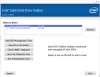
Did anyone that have 160GB intel SSD install The Intel® Solid-State Drive (SSD) Toolbox?
Intel® Solid State Drive Toolbox
If anyone does, can you post the picture? -
-
sequential read: 208.77MB/s (score: 6087)
sequential write: 101.18MB/s (4023)
random read 512k: 167.47MB/s (5349)
random write 512k: 99.59MB/s (3983)
random read 64k: 101.98MB/s (4059)
random write 64k: 90.50MB/s (3620)
if it makes any difference, I did this during a pause in creating recovery disks, with all the bloatware -
Too bad TEC uses A LOT of power and it can create condensation
-
Here what the main screen looks like, the User Guide .PDF has all sorts of screen shots IIRC. It basically just gives info on your SSD settings which mostly cannot be changed anyway, and allows for manual running of trim which is uneeded since win 7 does this in the backround automatically...
-
@JJB
I don't really remember what the E15 4k bench looked like, but can you confirm with the results above if the E14 has fixed the E15's x25m speed problems? -
for the record, i did a clean install, havent done any windows updates yet, and have installed all drivers....installing some other programs right now
have fan always on, disabled in the bios
fan IS NOT RUNNING for no reason like some of you are having the issue, its fine, the thing is dead quiet while installing programs, its lovely -
Is it safe to leave a notebook running with the lid closed or can this damage the screen making it bleed more?
-
bleed....what?
-
Are there any reviews of the slice battery for the E14? Does the slice cause the E14 to heat up since it covers up the bottom intake? Also, exactly how bulky and difficult does it make the E14 to carry around?
*HP ENVY 14 (1XXX series) Owners Lounge, Part 1*
Discussion in 'HP' started by 2.0, Jun 21, 2010.


