Problems? See this thread at archive.org.
That was just beta phase 2
otherwise known as Beta "screw you guys all your fpses are dropping by 33-50%"
phase 1 it was doable on high at stock settings. probably be doable on high without issues OCed to 550/800 if your vidcard doesn't hate you.
-
-
How will OCing effect the computer (battery life, computer life, heat, etc)?
-
Are you using JJBs modification of setting default sample to 24bit? Some equipment doesn't like that.
-
i unscrewed the 5 screws on the back, how do i get the panel off? Do I have to unscrew the hdd screw too?
-
Every one is asking me how hard the CPU is to get to so maybe I didnt push the CPU but something else. I used a PH000 size philips screwdriver. Any small one will do its the same one that i used to open the back panel. Heres a picture of what i pressed and the four screws i barely tightened
![[IMG]](images/storyImages/28b4010.jpg)
Edit: It is not the panel for the battery but the other one. Im pretty sure the battery comes off with no unscrewing. Once you unscrew the 5 or so screws just slide the panel off basically just like how you took off the battery cover -
It will definitely draw more power, how much who knows? I may do a kill-a-watt eval just for fun and see. Heat, well, in the gamers thread seems it goes up 5-8C but even then it's under 75C.
-
well. Heat will go up.
the OC can be setup to be turned on by hitting a button combo (ctrl+shift+k or whatever). You can set another profile to reset it back to stock.
battery life will go down while the radeon is OCed ('cause it's stuck at that clock of 550/800 or whatever you put in). that's why you create the other profile to swap back to in order to regain powerplay while not gaming
that being said at least one person isn't stable above 500/800. I haven't gamed much at 550/800, but I could get furmark (benchmark/stability thing that tests the card and heats it up) to run awhile at 585/885. Other people had really really iffy memory (OC it at all, crash crash crash)
it'll depend on what HP puts into your card.
either way High in Phase 1 was 46-60 fps, averaging more so at the low 50s at stock.
that should be fine in the campaign.
multiplayer you don't need much above medium since it looks nice at medium. it's low you want to avoid -
VERY GOOD PHOTO! Thanks! +1
-
seriously, once the 5 screws are out do i just pull it up? I don't wanna break anything...
-
Tee. Kay. I think there are 8 screws
-
Only reason I can think of that you can't run at what should be stock clocks is the GPU is undervolted. Figure out how to modify that, if at all, then you're in the running.
-
I think it was more of pushing the CPU in because the screws were pretty tight already and no all you have to do is take off the panel and you will see it
-
also the second back cover DOES have 5 screws.
you're supposed to slide it out (forwards/ away from you if you've got the battery and hdd half of the laptop closer to you)
it'll eventually disengage
http://h10032.www1.hp.com/ctg/Manual/c02280351.pdf
manual page 54 (or 46) or something -
Dont pull just slide it off
-
Did you touch the single screw, the one that is at the very top out of the 5 ?
That screw is the socket lock screw, it's used to secure the cpu to the socket (like the little lever on desktop motherboards). Do you recall hearing the click sound while turning that screw ? (It only moves by 90° btw I think).
You guys better not touch that screw if he didn't, jsut a warning :¨P -
Thanks for the info. Man, Now im considering returning mine (once it comes in a few days). I was under the impression that SC2 would run at High stock. There are seriously no 14inch laptops that fit the bill...
-
ah there's the trick lol, nice
now...push down the cpu? -
well it should run at high at stock but the stock got lowered by HP for some reason.
stock for the hd 5650 is supposed to be 550 but *shrugs* -
i am but dont see how that would cause one ear to go off....only when system volume (not amp volume, not itunes volume) goes down..
either way, problem gone if i keep the system volume up, just....weird... -
I can't find a baby screw driver. Anyone think its okay to use the end of a sharp knife? <_<
-
Ya i definitely didnt mess with the loner screw, only the four screws that make a box i dont know how else to put it haha
-
Yeah, that will allow you release the CPU from the socket. It turns 180° though. Also, at least in other laptops I've used, the system wouldn't boot after a CPU change, and after a lot of hair pulling (and I don't have much left to begin with), I realized I forgot to turn that screw. Unfortunately I had to remove the heatsink and everything because it was covering the screw.
So in other words I don't think your system would boot. -
I wouldn't. It's better to wait and invest in one of those jeweler's sets or "watch screwdriver" sets that cost $5 at your local hardware store, heck even at walmart probably.
-
Can anyone else they've tried this and it works?
I wonder what the ramifications of a tighter CPU are?
Also:
I can confirm that the laptop works correctly with the newest intel GMA standalone drivers. Radeon is not installed.
My wifi (6200N) works great. -
my money is on you warping the tip of your knife
-
The little round yellow thing on mine was kind of popping up, wasn't really flat on the mobo...so i pushed it down, cuz it seems like its supposed to be lol
reassembling now... -
that's your RTC battery...I think it's supposed to be attached with double-sided tape.
-
I have tried this and it doesn't work for me. Sending my lemon back to hp.
-
Alright. Ordering the Envy 14!
How much of a performance increase will I see with 8gb of RAM as opposed to 6gb? Is it worth it? I plan on doing all the overclocking/gaming I can. I'm going with the 160g SSD. -
I couldn't twist the cpu screws with my knife. ITS MADE OF DOLOMITE!?
Lol, guess I'd need some unobtainium knife to do this. -
that or a proper screwdriver
-
It was off an fresh install. Windows defaults to the GMA vga driver. The radeon is simply in a disabled state
-
Oh great I just noticed that a piece of my slice battery (top right corner if you're using the laptop) was BROKEN OFF during shipment. It's just a cosmetic piece because it works but wow...they shipped it in a thin bubble wrap and thin fed ex envelope...Brilliant.
However I can't hate when it BatteryBar estimates over 11 hours with Web Browsing/Full brightness. -
well at first I thought it was a failure, but then I realized it was just the damn dvd drive making noise. It may have worked...I need to test it for a while to see what I hear and when, but it may have worked...
The only sound I hear so far is like a buzz kind of like current passing through a wire, very subtle though and not that bad. I'll keep you updated
by the way, does anybody have a small gap around their trackpad big enough to fit a piece of paper through? -
i once had a laptop i bought on ebay shipped with nothing but deli paper and a box
needless to say it went back to the seller in a few pieces -
Yes'm,
Also my trackpad doesn't appear centered correctly as it is extra close to the chasis near the left.
This, although I'm ridiculously picky, doesn't bother me, it's hardly noticeable even if you ARE looking for it. -
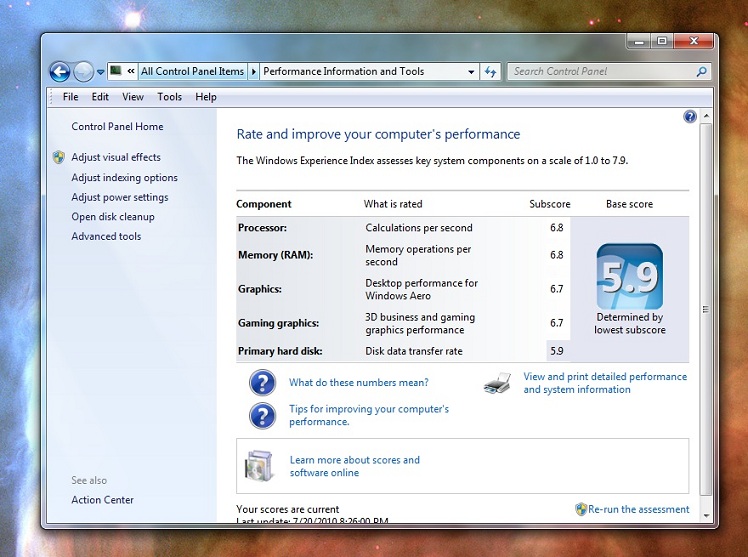
If anyone's interested, here's the Windows Experience Index after a clean install. Specs: 520m, 8GB RAM, 500GB HD @ 7200rpm
(sorry, not sure how to make it appear full size in the post)Attached Files:
-
-
SO,
I'm just going to get the guy at my work to look at this.
He is part of a company that just moved to California about a year ago and only does computer repairs.
I had no idea, but he did ALL of HP's Ontario warranty work, he was the head so XD
Here comes solutions. I'll ask him to inform me what he had to do too, so I'll let you know what he's fixed
-
With some of the questions that are being asked tonight, I think that outcome is quite likely!
-
Did you order one separate or something?
-
Yeah ordered through the parts store. Had it shipped overnight and after everything it was something like 160 although it still hasn't hit my CC yet. I'm not even going to bother returning it if it never shows up on my CC... -
hit 77ish temps overall (gpu, cpu1,cpu2) while playing sc2 beta build 1 (with the super mothership) and my 5650 OC'd to 550/800.
it stuttered a bit when the mothership arrived. but well...the mothership's cloak has always messed with stuff.
averaged 55-60ish fps at everything high (except shadows which went back down to low). not sure if it's possible to do that anymore on the game (wasn't possible in phase 2. partly since I think shadows low didn't really work all that well if the shaders were set to high think it technically was medium.)
I played for 'bout 20-30 minutes -
What company is this and do they do walk ins? I'm looking for a reputable computer technician that I can go back to for repairs and upgrades and maybe parts.
-
May I ask for a short review of it? Is it really as bulky as other people are saying? Would it be troublesome to carry around? Does it feel secure when attached? Does it block the bottom intake and cause the E14 to warm up as a result?
-
Did you try to fix the whine by tightening the screws?
I swear to god I think mine's fixed...I'm so happy lol
It's very easy...I was using like a toy screw driver haha with a yellow plastic handle, barely able to unscrew the small ones but once I was inside it was really easy, just tightened the 4 CPU screws a little bit, maybe about 180 degrees each, and it seems to have worked -
Mine were already tight. I tried tightening them even more with a wrench (not too much obv), I tried loosening them, I tried moderate tightness.
Whine is unchanged. -
I was so bored today that I actually took the time to blow out my laptop's innards and reapply thermal paste. The joy of watching my CPU/GPU temps drop from their previous highs made my day. F-M-L.
In other news, still waiting for my Envy 14 to ship by the 22nd. Hoping for no delays. -
I think a vibranium coated screw driver tip attached to an electric drill might do the trip.
-
Ugh, my build/ship date is August 2nd, it feels so far away...
-
What did you use to OC your GPU?
I tried atitool and amdtool but neither worked.
*HP ENVY 14 (1XXX series) Owners Lounge, Part 1*
Discussion in 'HP' started by 2.0, Jun 21, 2010.