 Problems? See this thread at archive.org.
THANK YOU. I installed the quick launch driver from Justin's post, but apparently the one in the SW folder did the trick. I now have a flawless clean install!
-
-
same thing on my envy. i'm not sure why either, but wifi is indeed off when you press fn+f10 (or f10 if you have the option enabled in the bios).
-
Off topic but hoping someone has a solution;
Does anyone know any way to disable the Win 7 'confirm deletion' pop ups ??
For example when deleting an item from the desktop (BTW I have disabled UAC and the recycle bin but still get the pop ups) also in IE8, Gmail, CS4 and any windows explorer / Computer / Documents / Library... pages ??
I must have to click 'yes' to confirm at least 100 + times a day when doing normal file prepping for photo processing / production / backup etc... -
Right click the recycle bin, select properties, and then deselect "display delete confirmation dialog".
You're nuts to disable recycle bin and not have confirmation though!
I would at least activate the recycle bin and set a small amount of space on it. It's not a big deal to empty it periodically. -
Not that hard to recover files you need if you accidentally remove them, even if you dont use a recycle bin. Just gota make sure you do it straight away before the data gets removed/re-written.
-
Not that easy. You have to find it on your hard drive, and not as simple as open recycle bin, right click - restore.
Even if you are trying to save space on your SSD using a few hundred MB for recycle bin could save you from a lot of "oh crap" moments. That's about the only time I use the recycle bin is for an almost immediate realization that I had horrible brain flatulance for a moment.
That reminds me, I should put that on my space saving guide. -
Regarding the wireless status on F10. There is a a BIOS call on the HP Wireless assistant software. Install that and you are good. Also allows you to turn off and on Bluetooth. I have done two clean installs to Momentus XT drives on both Envy 14's. One for work, one for home with Windows 7 32 bit Enterprise and Windows 7 64 bit Home Premium. Everything looks clean. Boot up times are now about 30 seconds on the home one and 45 seconds on the work one (security agents). So far, these laptops rock.
-
I'm at the office with an HP warranty worker having my Envy 14 in his hands.
There may be a fix for whine that I will let you know about soon.
Also, I now understand the nature of the whine for people need explaining. I did explain it a little bit before in this guide:
http://forum.notebookreview.com/6492940-post8941.html
But, I now understand it much better...Last edited by a moderator: May 8, 2015 -
I also wanted to point out that (I've concluded now that I understand the whine better) there are probably way more people with whine who just can't hear it or haven't created the right cpu output to hear it.
Also, the catalyst cpu output that causes it could be so different on a case to case basis...
I would do more explaining but I doubt people care.Last edited by a moderator: May 8, 2015 -
people do care, continue? and do you have a fix?Last edited by a moderator: May 8, 2015
-
Thanks! It took me like 15 minutes to find the recycle bin that I removed ( hid ) using some weird guide, and I didn't know that's were the option to turn off the confirmation was. +rep

Also you're correct that it's safer to leave it atcive just in case of a brain fart or finger twitch.... Even though most things I'm working on are reduntantly backed up elsewere, easier to just 'restore' if I error...
Edit: FYI (if you care) this also removes the prompts from my non OS (D: ) drive since it uses the same recycle bin, a little concerning with SSD's as I'm not sure if it actually copies the D: drive stuff to 'C:' recycle bin, causing additional R/W's on the drives, the 'properties' of the recycled items don't show the full location path. -
Anyone know what these two devices are?
PCI Simple Communication Controller
ACPI\HPQ004 HPQ004?
?
Where can i find drivers for them?
Thanks, -
Yeah, I considered getting rid of my recycle bin too, there's ways to get it with right click on desktop, etc. But it's the only icon on my desktop and it doesn't bother me and has saved my butt on a handful of occasions.
-
Just keep the recycle bin and do a shift-delete.
-
Uhg I hope so, I really don't want to RMA mine...but I honestly cannot use it for basic stuff like web browsing without wanting to throw it against the wall.Last edited by a moderator: May 8, 2015
-
CTRL+Z is your best friend
-
try here:
Unknow device acpi/hpq004/3&21436425&0 - HP Support Forum
Looks like the drive protection -
Hmm, so that will just bypass the recycle bin altogether. Thanks. Haven't used that one!
-
True.
But CTRL S saves! Amen!? -
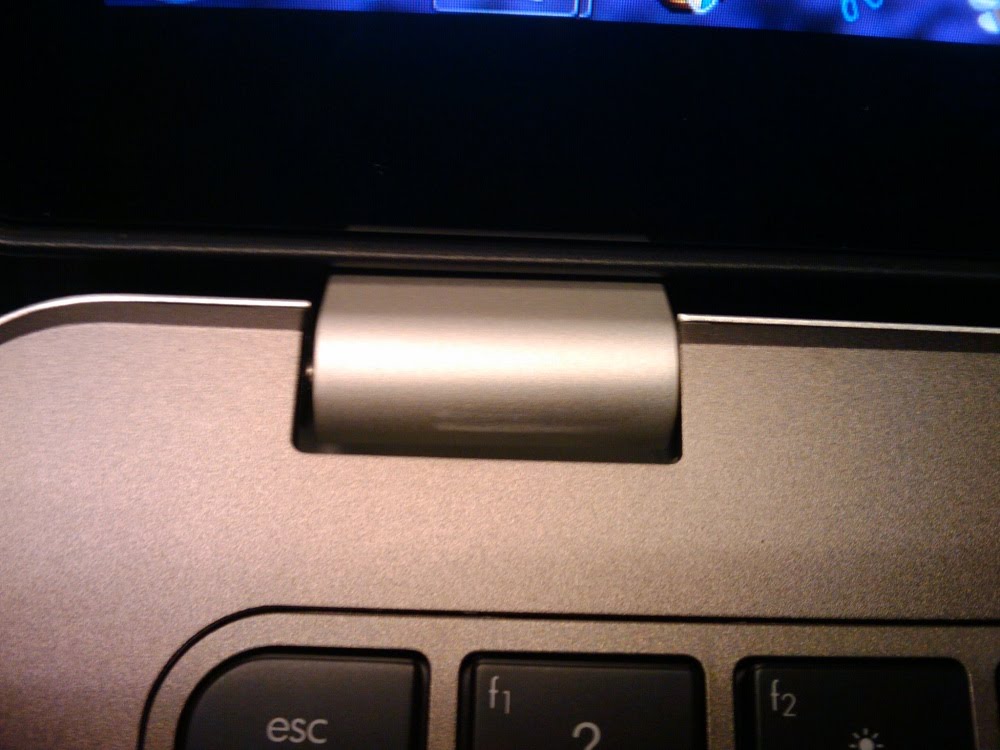
Pic of stretching
-
I don't see any. Everything seems to be in place. I'm quite happy.
Also, there's a screeching sound when you turn on the webcam (I'm assuming its the microphone though) but it's not really audible unless you are listening for it.
Oh, and the keyboard does have a bit of flex around P, but it's unnoticeable while typing. -
Wow, I let my computer run out of battery last night (this morning) and now I plugged it in, booted it up from hibernate and the screen went all funny. Now I get it to turn on but the screen shows nothing.
Holding down the power button puts it in sleep right? How the hell do I shut this thing down?
nevermind, got it to shut down. Screen seems fine..was kinda actually hoping it was messed up so I would have to return the whiner lol -
I actually found a guide on how to move it to the taskbar so it didn't show on the desktop, then I 'hid' it on the taskbar, and that's why I had so much trouble finding it again LOL I recycled the recycle bin...
-
On the E 15 you keep holding the power button for like 5 seconds
-
in windows 7 there is a way to hide it from the desktop. xp didnt have this, not sure about vista. right click desktop > personalization > desktop or desktop icons on the sidebar and then uncheck recycle bin
-
its like there is no more for the hinge to move smoothly!
-
Thanks, was aware of that and started out that way then found the taskbar option which was complicated to do but got it off the desktop, the problem was the 'icon' graphic was larger than the rest on the taskbar items so it made the bar 'taller'.... any way I hid it from there and forgot about it but still was getting the irritating 'confirm delete' popups...
Sorry way off topic here, Thanks to all for the help...... And now back to the Ludicruos speed E 14 show......... -
So just to reconfirm there's only 1 bios out right now? Yesterday I read that there were two, one from April and one that's newer. So now that's not true? I want to make sure before I attempt to install the bios I just downloaded. I also have small stretch mark on my left hinge and don't ever remember forcing it open.
=Jason- -
yeah, just goes to show you that you need to be cautious moving the screen
-
Wow, the quality of this premium laptop...
-
Apparently HP took down the newer one.
See Justin's driver thread for latest. -
Guide to Understanding the Whine:
Will be updated into my original post on how to find/test whine later,
I originally thought the CPU whine was Intel's fault, this is only somewhat true.
It is a failed cooperation but is preventable by a multiple of companies, even the mother board maker.
-What causes the Whine?
The whine is entirely caused by the energy of Piezoelectricity. The current coming from the CPU and power adapter etc. is flowing through to the USB ports, bluetooth etc. Inductor coils along your motherboard are picking up these currents electronically, this causes them to vibrate ever so slightly creating high frequency noise. Inductor coils are known to "resonate" (correct phrase) in a variety of machines, for instance I recently had a very similar noise emitting from my DVR, even when the system was off. -More explanation later-
-Why did screwing things tighter prevent the noise?
The tighter it is all held together the less chance of anything being able to vibrate. Screwing things in may have prevented some electrical current and or made something too solid to chain a vibration together. Vibrations and the electric current run through everything, being able to ground or prevent vibration of one thing may stop the current or chain. Screwing things tighter could damage something and isn't recommended, also it definitely isn't a 100% fix.
-Why does mine whine with a USB/bluetooth on, whereas person X whines with a USB/bluetooth off?
This part is interesting. The motherboard is conducting all the power and only certain frequencies will vibrate the coils at audible range. Everyones will be different depending on tightness, how well the coils are in, etc. and require different power currents to create the vibration. Perhaps your CPU needs to be idle and slowing itself down causes the vibration to come out in another place. Perhaps the current required to power the USB passes right through where the inductor coil is, it will be different form build to build. Everyone's triggering affects will be determined by the things they have plugged in/activated, and cpu usage.
-Why can't I find any information on this, smart guy?
Well, you can read tons about coil resonance online, the thing about it is there are so many different components to a computer that you could spend hours writing lists of things that could cause the whine. Information on this topic is limited, the people smart enough to know this (who aren't me, I'm just being taught) aren't generally on forums, they are people like the scientist genius who does laptop warranties in the back of my office... hes never even looked at this forum once. There are so many misunderstanding of the whines because there are red herrings and mis explanations everywhere, I believe the first google result for "fixing cpu whine" involves somebody simply turning off their bluetooth,... Imagine how many people have read that and now believe bluetooth causes the whine.
-How do I prevent the whine?
Heh wouldn't you like to know. So far, unrecommended solutions include screwing in certain pieces tighter. I will write an extensive guide on how to prevent this whine once I'm 100%, although the person helping me has ended mine.
Once we come up with a few solutions, I will list them all. It looks like mild tightening of screws and, even though this is simple, soldering or a dab of glue (NOT WITH NORMAL GLUE) will prevent the coil from resonating.
I'm at work I so shouldn't right this, will expand later.
PS sorry if I have bad grammar or spelling i wrote it in one motion -
Wow, thats awesome
-
If you update your guide with the above, I will have to delist the guide on page1.
Better bet is to make a new guide and make a new thread about it. -
Yeah I'll make it more in depth and have better info later, and make it prettier, then figure out what to do with it.
Hopefully I'll have an entire guide on stopping it, and from the looks of it it'l only take a $16 glue solution and a watch screw driver and about ten minutes. -
I await the rest of your report
btw anybody else think that this laptop is the perfect size? I do. -
same here
-
the screen is a lint magnet... anyone got any tips to keep it lint free?
-
I thought you guys would like to know that HP didn't underclock the 5650.
On ATI website there are two revisions of the 5650 one if 450mhz the other 550 mhz, hp just used the cheaper one. Or could it be possible that some future envys will have 550 stock ? dunno
Also for the plastic stretching, that's odd lol, I never knew hinges would be that stressing for the plastic. Are you sure it's not a scratch that got there with lid closed ? -
Do you think you'll have it within the next couple days?
-
You could carry a microfiber cloth.
I'm probably getting a matte screen protector. -
Then maybe they should have called it the HD 5640. At least nVidia will usually change the marketing name slightly to indicate as such, like the GT 330m or GT 335m. 100MHz GPU difference is pretty significant. Well, as long as I can get it to 550/800 I'll be fine. Everything above that will be bonus.
-
So HP went cheap on the video card in a "premium" performance laptop compared to their other line?
That's not looking too good. If Acer gets the 3820tg out in the US before HP gets my exchanged Envy to me, I might go that route... -
Iam not sure how it would get there when the lid is closed, but it could happen i guess.
Are these the cloths that the eye doctor give when you buy new glasses to clean them? -
My Envy 14 is currently at "order dropped to factory." Did anyone have their Envy ship before the estimated build date?
Yep, that's a microfiber cloth.
-
My first envy had an Estimated Build Date of July 20th, but Actually shipped the 13th and I got it the 19th.
My replacement has a build date of Aug 9th... hoping it ships out earlier than that. -
Now I have my CPU whine VERY quiet, almost inaudible but not quite, and I'm being picky and making the guy who's helping me frustrated probably haha.
I just watched the movie Inception, which I recommend, and I was wondering how terrible it would be if the idea of the whining followed me and I can hear it amplified even though it isn't that loud... -
and Acer cheaped out on a screen. I would take good quality screen over better graphics card.
-
hmmmm....
clean installed and I'm getting really hot temps at the start (60s instead of 40s)
At the moment I'm just gonna blame a few runs of windows update and/or the intel rapid storage technology.
What does that thing do anyway? -
The cloth just pushes the lint around.... Know anything that uses electrostatic or somthing to hold on the lint so we can actually take it off the screen?
*HP ENVY 14 (1XXX series) Owners Lounge, Part 1*
Discussion in 'HP' started by 2.0, Jun 21, 2010.


