 Problems? See this thread at archive.org.
hey, how are people optimizing the intel rapid deal, I heard theres a way to configure it to make it better?
-
-
My HDTV came with a cloth that is similar to a lens cleaning cloth (I believe it's also some kind of microfiber), but it works pretty well. I have it around here somewhere...
-
well this is annoying.
it's running 5+ C hotter than a stock install.
maybe that's what the energy start thing did *installs it* -
I see.
svchost keeps sucking up a thread for some reason.
the hell is it doing? -
Maybe it's the exact same card, but ATI sold it underclocked so that HP could buy the cards cheaper.
So maybe if you can overclock it you can get the exact same performance as a regular one.
This is all speculation though. -
Let me know how that works out for you. Would be nice to have it 5C cooler

-
eh. that didn't even install anything.
I think it was the HP Recommended plan.
*sighs* It keeps jumping around 41-44 C with the gpu hovering around 51/52 -
Just played some bad company 2 on the envy...it really doesnt run that well, had to lower the res for it to play and the settings are mostly on low, and it still isnt great :-/
I alt tabbed after playing for a while and everest showed 86/86 cpu temps and 82 gpu temp...now that seems hot. -
Was this with the 5650 OCed?
-
I was able to play with 20-30 fps on medium @ 1600x900. :/ (450m)
Anyways... someone please figure out how to flash our 5650's to make them the 550 version! -
1st post here and I'd like to thank everyone for all the great info. On to my issue. I downloaded CPU-Z yesterday and it showed I was running 2 cores (i5-450), but today it's only showing 1. I thought I read somewhere in this thread of a similar issue, but can't seem to find it.
-
Really? Didn't someone earlier play on mostly medium setting on a dual monitor configuration (more intensive than single monitor)? Also, I would never lower the res on an LCD, it causes distortion.
PCs, and especially laptops get hot when under load. That's just how components work. People in here seem to either overestimate the Envy's cooling system, or underestimate how hot components are designed to operate at. For example, I believe the Tjunction (maximum operating temperature before throttling) of an i5/i7 processor is 105C. Core i3s are a little lower, I believe.
I'd say those temperatures are well within normal operating ranges. -
It's probably a combination of win 7 doing it's initial indexing of the system and some of the default win 7 services that are loaded and turned on by default, but unecessary, and keeps the CPU active...
PS: There should no longer be an HP recommended plan unless you laoded back some crapware... -
Most likely.
The AC being dead isn't helping matters much.
I'll have to go turn some things off (figure out how to do that too) -
your envy must be defective. I played BC2 just fine on M11x which has lower specs and it wasn't low settings
-
FYIY I have 0 HP processes or services running at startup.
-
For Yhat its Yorth?
-
Wow, if this is true, i'm not going to be very satisfied with the Envy...
-
What's the best GPU overclock tool? AMD GPU clock tool says "no valid device found" and won't start :/
-
Yup you got it.....LOL Oops
-
This may help, the following is my list of what sevices are disabled (mostly by me) but use caution, some of your apps or features you use may require some of these. Example, I dont't need disc defrag becuase I have SSD's or I don't care about windows error reporting, you may... Had to make 2 pics becuase list is so long;
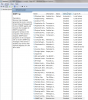
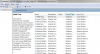
-
well. I got some good news for myself at least.
my temps have fallen back down to normal levels (40/41 for cpu, 49 for gpu)
without doing any of that stuff from your screenshots JJB
I may take a look at it in a minute though -
As others said, we can assume it was probably Windows 7 doing initial indexing and such, since it was after a clean install.
When my Envy 14 comes in, I'll likely play around with the included install, then clean install. I've always done a clean install on any computer I own, but considering almost every PC I've owned has been a desktop I built myself, well...
This will be my third notebook though (first stolen, second sold).
Edit: I'm also curious if we have any threads about Envy 14 GPU overclocking. I'm not afraid to do some overclocking if I can get a significant boost in GPU performance. Would love to see this notebook play BFBC2 on medium at 30FPS. -
I have a special .reg file pack for windows that disables/enabled services at optimal configuration for 99% of users, I used it on all my laptops and it works fine to speed up everything. Use the one reg file that got the name of your windows installation (be sure to pick the right reg if you're running 32 bit or 64 bit !).
Theres also reg files to revert back to default included.
The optimal reg files are called Safe_xxx.reg
Others are to revert to default Default_xxx.regAttached Files:
-
-
I think I was getting FPS in the 20s at full res and everything on low...20s to me is too low, I can't take that, so I lowered the resolution. The main problem was that the mouse just seemed to move around lazily and not sharp, like aiming was difficult. My 5650 is not overclocked btw. I'll play some more later and play around with the settings
btw, I just realized that the trackpad can be clicked almost in the middle of it, nowhere near the buttons. Although it doesn't actually act like a left or right click, it's just worthless. That's not a very good feature lol -
I'm curious, what drivers are you on? You were also plugged into the AC adapter, correct?
Perhaps the 10.6 alpha drivers are giving a performance boost. -
Sounds great....But who wrote it, where did it come from and is there any documentation with the items it changes?? I don't like to blindly run things with that much power to screw things up......
-
Does anyone know if I am supposed to download the BROADCOM Wireless LAN or IntelWifi driver from Justin's thread?
I seem to be experiencing slower internet on wireless connection for some reason. Maybe this SS will help?
![[IMG]](images/storyImages/21756089.th.png)
Uploaded with ImageShack.us -
you're using an intel 6200 n
so go grab this: Intel® PRO/Wireless and WiFi Link Drivers-Only for Windows 7* -
regarding mouse issue: have you tried adjusting the mouse sensitivity? it's probably a dumb question since this is the first thing most gamers adjust. also, you aren't playing with the trackpad are you?
can you elaborate on what u mean by "trackpad can be clicked almost in the middle of it"? do you have tap to click enabled? -
yea i was using a usb wired mouse, it was just like laggin, slow to get where I wanted to move it which made it hard to play...got better at lower settings i guess
With the trackpad i mean u can physically press down on it to make it click in the middle of the pad, above the actual buttons -
Aright thanks
 I've actually been searching for the right earbuds for a while, but given I already run through cheaper ones ($20-$60) it makes it hard to drop 150+... Its increasingly hard to find a pair of earbuds with that sensitivity and impedance even in the higher price range

-
hmm i installed but the same exact driver appeared after install.
-
hmm, I just tried to run 3dmark06 but it said idirect3d9::CreateDevice failed: Invalid call (D3DERR_INVALIDCALL)
what's that about? -
![[IMG]](images/storyImages/desktop.jpg)
anyone know what these two devices are and how to install them? -
unknown device is the hp data smart protect stuff.
it's not in the drivers folder.
the other one. ...not sure. -
Maybe a stupid question, but are you sure the HD 5650M is enabled? That seems like that kind of error you'd get if you were on the iGPU. I also really think BFBC2 should run on all lowest settings with at least an average of 30FPS...
Did you do a clean install? Are you on the ATI 10.6 alpha drivers? What about downloading the latest DirectX from Microsoft? -
exodus
if you got the alpha drivers to work you can install the 10.6 release drivers
edit: you may need the full file from somewhere -
What release of the ATI drivers does the Envy 14 come pre-installed with?
I haven't gotten my Envy 14 yet so I'm not entirely familiar with everything. -
Uploaded some pics my envy
Envy 14 - Windows Live -
I haven't done a clean install and am on the drivers that came with it...I assume not 10.6
3dmark worked the second time I launched it, just ran it and got 6807
the cpu really got raped in the cpu tests, 2730 cpu score though
I'm goin out now though, be back later -
I play badcompany 2 at low-medium settings, and I get anywhere from 30-80 fps. 30 is plenty enough for it to be smooth. And my temps arent nearly as high as yours, mine always stay in the low 70's, at most.
-
Are you on a clean install? What drivers?
I'd love to get this narrowed down and figured out so we can make a guide for the first post. I think many people who pick up an Envy 14 are expecting they can play games on it if they choose. -
You just have to open it with notepad to see what it changes, or open services.msc after applying lol. It comes from a friend of mine who's an informatician.
Anyway there's nothing to screw with those reg since there's the default one to revert if someone stops working because a service was shut down. -
comes with a modified 10.3 (10.3b or something) that's designed specifically for the Envy 14 (and/or dv6t with 5650).
alpha drivers are installable but things crash mid install. til you sit for awhile and it finishes installing and then you reboot manually and it comes up installed with the alpha drivers.
then you install the 10.6 release and it doesn't crash anymore -
clean install, 10.3, and slightly overclocked.. 500/800
before I over clocked, I was getting anywhere from 20-60 at the same settings. -
How did you overclock, and what temps are you getting now?
-
I'm confused by your card. It may just be stubborn and hate OCing altogether.
-
I guess I'll answer my own question here. Earlier I went into msconfig and changed the boot setting for 2 processors. That's when the problem started. For one there wasn't a noticeable difference in boot times and 2 I dropped to 1 core/2 threads. I went back in and put it back at one and it dropped to 1 core/1 thread. Finally I went back in and unchecked the box next to the processor drop down and now I'm back to 2 cores/4 threads.
I have no idea what any of that means, but I'm back to where I started, which is ok. -
Yea windows is a bit esoteric there...
some people boot on 2 cores, sometimes on one core, simply reboot and its back at 2 ?? Some other need to do the msconfig to get back their unactivated cored, and some other people like mgs couldn't get the core to work even with 4 threads listed in device managed. It's just random cause and confusing...
*HP ENVY 14 (1XXX series) Owners Lounge, Part 1*
Discussion in 'HP' started by 2.0, Jun 21, 2010.


![[IMG]](http://img268.imageshack.us/i/21756089.png/)


