Problems? See this thread at archive.org.
I looked inside and the sound is coming from the cpu
Mine is the same HP Envy-14-1000
envy 14 520m
-
Rubber buffer around the edges and plastic screen? -
Weird! I used to hear that sound pop up at a lower volume only occasionally on my Dell Vostro with its T7500. It wasn't constant at all. Smacking my laptop from the side with my fingers a few times would make it go away. M.Walker's explanation that it's caused by vibration might figure in here. My smacking the notebook might have caused the internal portions around the CPU to tighten up and prevent the vibration from being audible.
-
Yeah, chances are things were touching each other which allowed the electric current to hit the whatever was vibrating, most likely an inductor coil, causing the noise and the tapping would prevent the things from touching each other, stopping the chain.
I know 100% that that's the cause, but that's all we can do is understand it. The technician in the back of my office himself said its nearly impossible to isolate whatever is oscillating, it would be less work for him to put in a new mobo for me himself, X_X -
Sooooo...is it true this problem is limited only to the i5-520M and the i5-450M? Would I have been better off sticking with the i3-370M? Dang! I'd rather not have to RMA, but if it means I can get back the $150 difference, I might just consider it!
-
im pretty sure any i processor could get it.
-
If you have windows do its driver update it will find a driver for it online and install, sans any annoying apps.
-
Well there are two options,
1) The oscillating part comes hand in hand with the CPU, this is why there are an increased amount in the i5-520m,
AND/OR
The current required that puts the oscillating part to the correct frequency is more often emitted through the cpu. Again, the noise isn't caused by the CPU, but a large amount of power is diverted to it, the noise is determined by currents causing the frequency/vibration so it may be that the current through the i5-520 is more likely to create the catalyst current->vibration->high frequency->high pitch noise
2) They are using multiple mother boards, and for one reason or another the ones with the whining noise are being used more often for the i5-520m, such as maybe one group is making all the 520's and they are all using the same mobos. This explains why it is possible for other CPU's to have this noise but it may be more common for some. -
Can you tell me your cpu idle temps on HW monitor cpuid.
My idle temps never go below 35C on core #0(average idle temps 40C)
Everybody with no cpu whine is getting between 20C-30C on idle or internet use.
My temps are way to high on idle compared to other people with no cpu whine. -
Are you saying there's something good to be found in whining?

-
Uhm, I guess he's saying there something good to found in whining if you enjoy heat,
which a laptop doesn't :// -
I am just saying that my idle temps are 50% higher than people with no whine. -
S.M, ill test for you, A/C plugged in or nah?
-
If it's not to much trouble, could you link the guide to get it onto the superbar? thanks
-
Quick question. I just went on an uninstalling spree, and now after a restart I dont have that little graphic that comes up when you change the volume up or down. Anyone know what that program is? I would really like to have it back.
-
Plugged in
-
Just messin' with ya. I'm bored today.
-
Will do once I get my laptop back in a little.
I've heard people say this before... I had no graphic from the second I booted up my computer? Some one screen shot it for me XD -
3rd party program replacement for it posted on page 1 compliments of the mighty JJB.
-
what program are you guys using to measure temps?
-
Do you have the PCI Simple Communications Controller as a device that is missing a driver?
-
HW monitor
-
no one really knows what that thing is.
and we haven't been able to reinstall it.
instead we've just been using 3rvx 2.5 -
I did some digging and everybody with no cpu whine on idle gets 20C-30C core #0 in 70-75F room.
Mine are way too high average 40C (room temp 75F)
Maybe the cpu whine heats up the cpu on idle -
holy crap, after going into msconfig/advanced/number of processors and trying that out, my laptop is BURNING on the i3
i put it back to greyed out but its still hotter than its ever been
...system restore?
edit: system restore fixed it, holy crap i was scared -
Thanks I'll stop doing that, lol. But is it worthless to change the timeout to 3 seconds too?
-
The way to find the source of the whine is to run the laptop upside down with its service panel removed, and while using a NON-CONDUCTIVE object such as the rear of a pen (plastic) gently press down on each component. When you hear the noise change pitch that means you found the source! Remember, after you found the source don't do anything stupid like touch the motherboard with your hand, follow antistatic protocols.
Don't assume that the CPU itself is causing the noise, check everything. It could be caused by the heatpipes vibrating against the heatsink, or ceramic coil-wrapped components. -
pffft, i touch motherboards with sweaty hands all the time
-
Ummm. Ewww?! Freak.
-
I did open it up and used latex gloves and the sound is coming from the socket or the cpu.
-
A permanent fix for the CPU deserves +100 reps.
-
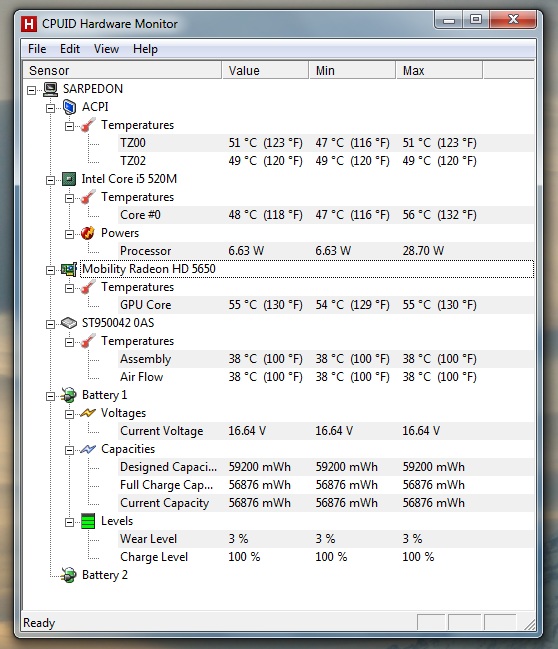
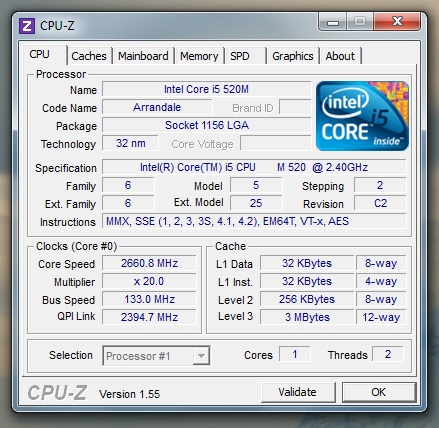
My idle temps are (I think, at least), way too high as well. Room temp is 75-80. Also, HW Monitor is only showing one core. Same with CPU-z, which is not only showing one core, but that core is constantly at 2.66Mhz, even when I'm doing nothing..
Here's the HW Monitor readout. Any ideas?
Attached Files:
-
-
i say 1000 reps for the fix of the whine.
-
Do you have the cpu whine?
People with no cpu whine are reporting 20C-30C on idle in 70-75F room temp. -
Nope! It's quiet as a.....a.....something.
-
mouse? (10char)
-
Quiet as a dead mouse!
-
i450m? (10char)
-
i520m (10char)
-
I have identical temps with an i3 and dont have the ATI on...
-
I've asked for this on several occasions just because it would help me know what to listen out for. However, the Godfather of the whine ended up taking offense to it so I quit asking.
-
Why is there only one core shown?
-
Hmmm. So 48-50c on idle is not out of whack?
Why is it at 2.66Mhz all the time? I do have the older TurboBoost drivers. I just downloaded the newest Chipset, maybe i need those too?
Any anyone know why CPU-z and HW Monitor are only showing one core? Device Manager shows all four threads. -
That ain't me BTW, 'cause I'm the Godfather of the wine. And spirits. But only on Friday and Saturday nights. Sunday afternoons also. *poof*
-
Thanatos you may have the whine but your computer is turbo boosting and actually using the CPU haha XD
I'll be on later with mo info -
Here's the CPU-z readout. Notice that the processor selection is greyed out and that the speed is 2.66MHz. I have no tasks open now except Firefox and CPU-z. Grrrrr
Edit: Maybe I'll try the new Turboboost drivers? Can't hurt I suppose, long as I delete the old ones.Attached Files:
-
-
Odd, I have the ATI card running, but gpu-z says it's the intel one running...
-
Try switching the GPU readout on GPU-z. That's what I thought at first too.
-
why wouldn't HP QC take a look at this thread?It's part of their job and probably will make their job easier for the good of the company, unless they dont care about the company... off course.
-
oh, heh I'm an idiot
*HP ENVY 14 (1XXX series) Owners Lounge, Part 1*
Discussion in 'HP' started by 2.0, Jun 21, 2010.