 Problems? See this thread at archive.org.
I'm pretty sure those lines are a part of Aero. If you drag a window horizontally, those lines will shift a bit horizontally also.
-
-
Does anyone know if it's possible to purchase extra batteries for the E14 yet? I'm still not seeing them on HP's site but I'm going to need at least one spare 8-cell shortly...
-
I'm sure you can get them somehow.
Grrr I'm a sad panda.
Either I get a new one after RMA with ZERO cpu whine,
Or I need to find a new laptop...
I love the Envy 14, it's everything I need in a laptop.
I would consider a MBP if I had a dog who **** out money, but, unfortunately I don't... -
Which file / what needs to be changed? Was it discussed earlier (page number plz
 )?
)?
-
it was discussed awhile ago.
msi afterburner.cfg
EnableUnofficialOverclocking = 0 to = 1 -
So less than 23% have heard the whine thus far.
I bet a bunch of people have it and haven't listened -
I bet a bunch of people are happy with their laptops so they don't come on this site to figure out what is wrong, and therefore 23% is high. Plus, if you can't hear it then whats the point?
-
p51 mustang, do you have computer whine?
I haven't seen a single trusted user who says they have no whine.
I really wish I could see some one's envy that "has no whine"
@cwink,
You can hear it.
Once you've heard it once, it doesn't get out of your head.
A lot of people are using their laptops for CPU extensive things. New laptop, uninstall a bunch of crap, install big games, play big games to test- they haven't let their computer simply browse yet, and haven't caught on to how annoying it will be when they do.
Also, the high frequency of it causes headaches. -
Who counts as a "trusted user?" I've been posting in the E14-related threads since before launch, and I have no whine or fan issues. Honestly my biggest gripe with the laptop is that the touchpad is -slightly- not flush with the chassis (which I can fix, just too lazy to do so right now) and my WiFi LED is always blue even when WiFi is off.
I doubt that the whine is as big of an issue as this forum is making it out to be. I mean, this place has been known to whip itself up into a frenzy over nothing on basically a daily basis
-
I'm really considering purchasing this laptop but the whine is throwing me off, will I be able to return it for a new one if it does in face have the whine?
-
you got 21 days from when it arrives at your door to return it no questions asked
-
If you could post a visual guide for the handful of people who need that fix but don't want to return their notebooks only to find a fresh batch a new problems on the RMA, that'd be great.!
-
Aw man the whine is an issue, its seriously the most annoying thing ever.
It's not even the noise, if my fan was going ape **** I wouldn't care cause its an ambient noise,
The whine is high pitch and gets in your ear and then into your brain.
Serious, half the my keyboard keys were crooked and my fan was always going nuts and it doesn't bother me at all.
The whine is a different story, I honestly think the high frequency of it will easily cause a head ache -
I think the whine would drive me nuts too. But imho looking at the CPU is looking a the wrong thing. These kinds of issues are hard if not impossible to pinpoint because you need the motherboard free but running in order to find the culprit. Which unless you're crazy enough to disassemble your laptop with the motherboard running and handle it still, you're out of luck. I'm not that crazy (yet). If HP wants to send me a freebie, I'll be happy to root cause for them. I'm good at that.
-
I may if I ever get around to doing it. It's not a universal fix; it probably won't help if your touchpad is lower than the chassis; it only helps if your problem is that it's raised up above the chassis. All you need to do is open the system and make some "spacers" out of paper and wedge them under the touchpad bracket. I did this on one side of my touchpad without even measuring, and it now sits fine on that side and my left click action is even a bit smoother (takes less force now, used to need quite a bit).
-
Wrong, u only need an active adapter if u want to use eyefinity, which is using all three monitors as one monitor. You can connect via displayport if you want to extend, clone, or replace. Im pretty sure u can also use eyefinity for just the displayport and the notebook monitor or the hdmi and the notebook monitor, just not all three. At least that's how it is for my desktop 5770
-
It's impossible I went to war with CPU whine throughout this entire thread if you go back haha.
It's not going to happen.
The guy in my office who used to work for HP warranty company said it's probably easier if I buy him a mother board and swap them out. THATS NOT EASY so, -
*shrugs*
sure it's easy to buy a new motherboard.
hp parts store
just gonna cost you probably the price of the computer. meaning yeah...not worth it
edit: half the price of the computer. 499.70 if you don't send in the old one. 360.05 if you do send in the old motherboard.
this is for the i3/i5 motherboard.
hp part store part number 608364-001
http://h20141.www2.hp.com/Hpparts/D...E69670A1F9A12EAE46&SearchInc=MultiPart&Flag=1
i7 motherboard is 608365-001, costs the same -
From what you say, you shouldn't need to listen to it. Every other post you contradict yourself. Why do you care so much about how other people's laptops are working. If you aren't pleased, RMA it or return it.
-
To fix the wifi led thing, run SwSetup\HPQL\HP Quick Launch64.msi or 32 if you changed to 32-bit.
-
a trusted user is someone who agrees with him
-
In what way is this contradictory? I care because I love the Envy 14 and want one that doesn't whine, I'm unsure if they exist. I want a user who says they have no whine so I can ensure they exist.
Here, linked on the first page is my listening for whine guide,
http://forum.notebookreview.com/6492940-post8941.html
And here is my guide on understanding the whine,
http://forum.notebookreview.com/hp-...hp-envy-14-owners-lounge-315.html#post6497873
I'm completely all over this issue to help people.
I'm not just here to complain, I've been with this forum from day 1 attempting to get a quality product, so, keep your snarky comments to yourself thanks -
does anybody know how to fix this problem that im having with my touch pad?
when i want to highlight something i click the left button and hold it and then try to drag the courser over what i want to highlight but as long as my finger is holding the left button down it wont let me move the courser, it just puts it into a scrolling mode where if i move my other finger around it scrolls up and down. How can i change this? -
the newest touchpad drivers help a little.
it gives you an area that doesn't register your finger but still lets you click.
it's kind of the outline for the button but..may be a bit lower than the line and definitely not to the edge of the line -
If it's such a big deal, return your envy. Solved. Otherwise, stop trying to make it out like the ones without an issue are somehow lying or aren't paying close enough attention. The feedback on this forum shows that only 23% experience the whine. Further, feedback shows that out of those who have problems (including whine), most (55%) aren't even returning theirs.
All I see when reading these posts are a few individuals championing this "issue" stirring those who have ordered or are thinking of ordering into a nervous panic. I'd say it's time for some perspective on the matter. -
I'm just confused. You say that once you hear it, you can't not hear it. So why would I want to go through the process to try to hear it?
You have a poll that says 70+% of users do not have the whine. Doesn't that answer your question that there some envy's don't have it? Oh, it doesn't because you don't trust the users who say they don't have it. Its a catch 22. -
Yeah you guys are right I guess, I shouldn't be scaring people away from the Envy 14, and I shouldn't doubt the people who don't have the whine.
The only reason I'm saying these things is because I want to make sure that non whining ones exist because I'm nervous myself, I guess thats no reason to scare others though.
I do try to remind people in the listening for whine guide that it is an amazing laptop and has a lot more perks than downsides.
Also, you may be right. I heard it after about 4 hours of using the Envy 14, but it was way too obvious to not be heard. It's pretty undeniable- maybe the people who have voted for not having a whine truly don't, I'm being paranoid XD -
where did you download them from
-
I was looking at the MBP refresh on cnet.com last night and it made me crack up.
NO $#@$^ing HDMI on a ~$2000 laptop, and the i7 is still a dual core. hahah Apple sure suckered people with their name.
I am still waiting for my Envy to ship and hopes to not get the whine *crosses fingers* -
No offense but all you seem to be doing is complaining. Quite frankly it's giving me a headache listening to you whine about your whine. You have made your point, you have done your research and you have a guide about posted on the first page, and you can't fix it. We get it. If you can't live with it then return it at '0' cost and get a replacement. Can't even believe your even looking at replacing the mobo, which BTW does not include the CPU... and that would void your warranty.Last edited by a moderator: May 8, 2015
-
how do I load the Envy starport on new hard drive installed my ssd and mycolors but I have no idea how load the envy theme. I liked it
-
I am confuse. Explain please! -
I now officially believe JJB doesn't have the whine
XD -
What's to explain? The mobo is not considered a user replaceable part and would void the warranty. Why even try that when he can RMA it and get a new one with full warranty at 0 cost?
PS: they would know you had a new mobo if you ever sent it in for repair because it would have a different serial number that does not match your order number in their system.... -
Maybe he just wants some cheese..
-
seriously talk about jumping through hoops for nothing. why at this point would you opt to get something fixed when you can just return it. some people just go through the extra trouble so they have a story to tell at the end of it all.
-
quality poast is quality
-
Sorry quick question, but does a clean install effect performance or does it just rid of bloatware and eliminate the hard drive partitions? Seems like people are constantly asking which drivers they need to install and how to get various programs back which they had originally. I'm just wondering because my envy comes today and I wanted to know if I should even bother doing a clean install. Thanks
-
I'm sorry but 256MB of graphics ram does not disable you from playing "TONS" of games. It is plenty for MOST games. Yes, you may not be able to play some games at the highest setting and/or resolution, but that does not stop you from playing most of them. Resolution is the biggest factor at the amount of ram you need
-
Yeah. Alright. Probably going to have to...ah... close this thread at some point. Figure 10,00 posts ought to make a good stopping point.
You know, I mean, when the next batch of Envy owners comes around, they're going to repeat the same things. I don't blame 'em. I don't. So yeah, that's ah... that's the plan.
Alright carry on then. Until you hit round about 10,000 posts.
Should be a prize or anti-prize for the 10,000th post. -
Did you divide by zero again, or just turn European all of a sudden...
spam (ten chars) --- post
spam (ten chars) --- post
spam (ten chars) --- post
spam (ten chars) --- post
spam (ten chars) --- post
spam (ten chars) --- post
spam (ten chars) --- post
spam (ten chars) --- post
10,000 posts!
I WIN! -
Depends on your needs, or on the sort of person you are. If you need to eek out every last bit of performance (and a clean install will help with that - faster boot time, somewhat faster application speed), then a clean install is the way to go. But if you're not a tinkerer, if you're not obsessive, if you really just want your computer to be functional, then just uninstall the bloatware and you're set.
-
Sounds like a good idea, as long as you transfer all your wonderful work on the first page to the new thread.....
BTW is this thread any type of record breaker at NBR? 10K in like 30 days? -
It's the new math. All the rage on college campuses these days. Which reminds me, I have a lecture on it tomorrow.
Indeed. I hope you win. I really, really do.
-
Thanks. Yeah I plan to make that transfer.
Yes it is a record. I ought to have T-shirts made up and sent to each of you.
-
Maybe, but this uber geek recommends a fresh install. Great way to learn the process and your machine better anyhow. If you screw up, do it again, or worse case, just reload from the recovery media.
My senses say ... sarcasm. Do I win the ban hammer of the day!? -
A question was posed in the e15 forum and not answered...
"Does leaving the computer plugged into AC while the battery is in have any additional degenerative effect on the battery?"
Is it better to take the battery out when on AC, or was HP smart in building something into the computer that manages this issue? -
fuggedaboutit
Just use your laptop. Don't worry. Be happy. -
It's going to degrade over time no matter what. Leaving the AC on and battery in has not been a problem for years, they design the charge circuits to turn off and just kick in to maintain a full charge as needed.
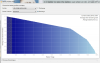
You can see the 'smart charge' stages in the graph below, the 3 stages are: Bulk = high votage and current up to 70%, Acceptance = voltage drops toward normal levels and current drops - to 90%, Equalize = final stage, like a 'float' charge, that lets the new charge level stabilize to hold it at the full charge specified level...
-
hp.com support and downloads stuff
or from the envy 14 (intel) thread on this forum)
it's version 15.0.17.4 from http://forum.notebookreview.com/hp-drivers-software-forum/496027-drivers-hp-envy-14-intel.html
I mean it doesn't help too much but if you get used to it yeah it works (you gotta have your finger only covering half of a small part of the button or something.
*HP ENVY 14 (1XXX series) Owners Lounge, Part 1*
Discussion in 'HP' started by 2.0, Jun 21, 2010.


