Problems? See this thread at archive.org.
![[IMG]](images/storyImages/image1113)
Can you take a high def picture spanning the back please?
I noticed the swirl etchings don't look like they are there.
Are they gone?? *crosses fingers*
-
-
LOL I can see the swirl in that pic, so no, the swirl is definitely there. Just buy a macbook if you dont like swirls!

-
Picasa-Webalben - Jonathan ???
Picasa-Webalben - Jonathan ??? - Envy 14 (for pictures in general)
one of the owners took some unboxing pictures (it's linked on the first page now) -
indeed. if it cant get 4 hours (3-4 less than they said) i probably will not order this.
-
well. keep in mind any estimates you see for this first discharging run are inaccurate.
Osiris requires a couple runs. -
Here are some shots from different angles, because the pattern looks different based on the lighting angle...
-
could one of the owners please check the cpu frequency on battery vs plugged in.
If it drops off even in high performance mode like the other envy's do I will seriously consider canceling my order. -
It's like a Monet, you can't see it up close. You have to take a step back.
-
Please remember, I am getting wildly different estimates depending on the task I do at the moment.. The program needs to get a good feeling for the battery first. Dont read too much into the numbers..
But my estimate is going towards the four hour mark...
Its not exactly only maximum saving mode all the time, sometimes I crank up display brightness to fully enjoy a picture etc..
I would say my setting is a pretty average usage case, I put it in standby for transport and when I was picking up my friend from the airport, some music is playing, I did some HD playback of trailers etc..
These are my readings on Battery...
![[IMG]](images/storyImages/Unbenannt.jpg)
-
I am quite sure the CPU will not run in an overclocked turbo boost mode while on battery, that's not really a flaw, how far do the other envys downclock?
-
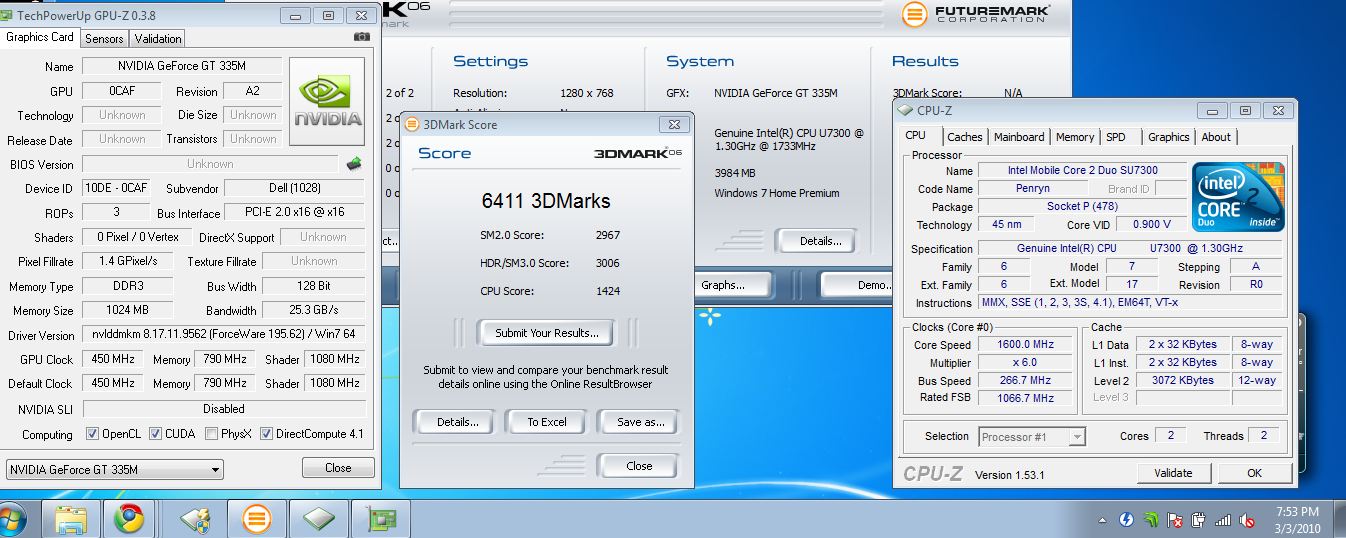
I did a quick one-time run of 3DMark6.
Everything out of the box, but antivir virscanner.
Every bloatware still on board.
Everything with standard settings in the test.
3DMark6:
![[IMG]](images/storyImages/3dm6v1.jpg)
HD5750? Seems to be an error with 3dMark6.
System says HD 5650.
...
Now back to soccer and cold beer
-
ah, sounds similar to what happend to me a few years ago
im going to buffalo later to open up a bank account. this will fix it all. -
stefan please upload the manuals when you get back, I'm dying to see those
-
yeah, i didn't expect that they would run in turbo boost mode on battery but i read somewhere in the 2000 posts in this thread that there was significant downclocking (bios level.)
-
those temps you posted, are they with the gpu on or is it switched off?
-
that downclocking was actually a battery issue on the envy 15s since they used lithium polymer or something.
-
whew! so this should be fixed on the 14 right?
-
anything else on the touchpad? really really hoping its a whole lot better than the others...hoping those gestures work better too!
-
If you don't see the ATI Mobility HD 5650 listed in HWMonitor. It is using the integrated Intel GMA.
-
yes. it was fixed in the 17 too (was using lithium ion)
-
is it easy to switch back and forth between the integrated and discrete GPUs? Just curious!
-
If it's anything like my 4820TG. It should automatically switch to the Intel GMA when you are unplugged from the outlet (you have the choice to choose between the HD 5650 or the Intel GMA in battery mode).
When you plug the power adapter back in, it should switch back to the HD 5650.
The screen will black out for a few seconds when you switch between graphic cores.
There should be a menu in ATI Control Catalyst called "configure switchable graphics", that will allow you to choose which graphics core you want to use. -
I asked an online sales agent if the graphics switch is automatic or if you need to do it manually and she said you need to do it manually but then again those agents are morons.
-
Its on battery, so unless I turn it on specifically, GPU is switched off...
-
Its right click on the screen or the task symbol and then clicking on the option.. One second later its done..
-
This kind of concerns me...when I played with the Envy 13 I found the touchpad very frustrating to use, since I like to move the cursor with my index finger and rest my thumb on the pad to click, but the touchpad still registers the slight movements from my thumb and makes the cursor really jumpy..in comparison in macbooks no matter how much i move my thumb it has no effect on the cursor
...it sounds like the envy 14 still has this problem, can you confirm? and if so, are they lots of settings to tweak? I dont know if i can accept such a problematic touchpad... -
I think I saw someone mention you can adjust the settings so you may rest your thumb on the clicker and it will not move the cursor.
-
you may be able to tweak the dead zone some to solve the problem
-
Hmm.. Like I said, you need to specifically intentionally move the thumb to get a jiggle or something in the mousemovement..
Its not going to be a big issue.. But maybe Stefan or Andreas have other opinions.. -
yeah, its in the synaptics settings under pointing / sensitivity / palm check
-
Can one of the owners comment in regards to fan noise?
-
If you get a chance erathostenes, can you please look in the bios and see if there are any advanced options such as for overclocking the cpu core voltage, ram voltage, etc. thanks!
regarding the mousepad, you are able to set the pad into a zone mode, and then can disable the zone where you rest your finger to click at, it is supposed to work very well once you do that. -
At least now on battery its barely audible..
One other issue, I think I also have the high pitched noise as the Envy 17. Its doesnt bother me now, but I will check if their solution also works here... -
It is not an issue for me now.. So I dont bother now...
-
I almost forgot the biggest question of all, is this clickpad using the new synaptics hardware? The new one is not supposed to have any kind of hinge on it and lets you click anywhere.
-
july 4 sale is already in progress, and, as you already know, envy 14 is not part of that sale.
-
For what it's worth, the high-pitched noise that my Envy 15 exhibited ended up coming from my nearby PC speakers (similar to the cell phone interference you sometimes get). When moved away from sound-producing devices, it didn't make any squeals and was very quiet.
My UL30A-A2 doesn't show this behavior at all. -
what high pitched noise do you speak of?
-
Alright,
The WEEKEND starts now. So, behave yourselves while I'm gone. I expect that there will be at least another 100 pages by the time I get back. (Those poor early recipients... :cry: )
Remember, if there's anything you think should be included on the 1st page, PM me about it. I'll get to it when I return.
To my American friends, happy 4th. To everyone else, have a great weekend. To the Envy 14 recipients, do enjoy!
Cheers.
-
Look for what Jaxxy and others posted in the Envy 17 Owners Thread.. There might even be a FAQ on the first page..
Its a high almost inaudible hum.. Not really audible unless you are in a totally silent room.. -
Random: Your English (writing) is really good. I wish I was just as fluent in another language...
-
http://forum.notebookreview.com/6347979-post1478.html
jaxxy's faq thing. You mute one of the mics (headphone jack one in this faq but you could mute the webcam one if you wanted to use the headphone jack mic instead) -
For those wondering about switching graphics, you can set the computer to automatically switch to integrated and discrete when you unplug and plug in (respectively) the charger. But in any other case, you must switch manually by right clicking on the desktop and clicking the button to switch. Now it's important to remember that you can't be running any programs that use graphics when you switch. Those have to be closed first.
-
Those idle temperatures are giving me second thoughts.
My two year old Asus has lower temperatures while I game on it :/ (let alone idle)
What the heck... -
is it possible to make the graphics switch according to what application is being run in the foreground?
-
Ambient temps are high. It's cooking here in Europe
-
since no one has mentioned it yet, thanks! Thanks for running the 3dmark06. These scores are a bit lower than I expected even right out the box. The CPU score is very impressive though, but I figured the 5650 was a bit stronger. Of course you can overclock the GPU but I like to see out of box scores. oh and + rep when I am able to again.
If anyone cares for comparison numbers, here's stock clocked 335m. The SM3.0 score is the same but the 2.0 on the 335m is higher - though not sure how big of a difference that really is. Looks like the CPU is what's helping the 3dmark06 score which is what I expected. nice nice
the 4 hours sounds a tad bit low, especially when he's just doing normal tasks I would probably be doing on a given charge. Envy 14 still looks great though, can't wait to hear more from others.Attached Files:
-
-
They may add it to the sale later on. The E15 beats limited edition initially wasn't part of the sale. It is now.
About the touch pad, does double tapping the touch pad (at any location) act as a double click? (like normal touch pads do?). If so, why is every one so concerned about resting there some on the left button? -
Can one of you post the Windows index score?
I know it really isn't that great of an indicator of a computers performance, but I just like to see them ^^
Also, THANKS SO MUCH for doing all these tests/screenshots for us not in ownership yet of this computer
-
Numerous people don't like tapping to click, and instead leave their thumb resting on the left-click button.
I, personally, almost exclusively tap to click; I hardly ever use the buttons.
It sounds like it shouldn't be a problem for either of us.
*HP ENVY 14 (1XXX series) Owners Lounge, Part 1*
Discussion in 'HP' started by 2.0, Jun 21, 2010.


![[IMG]](http://img64.imageshack.us/i/3dm6v1.jpg/)