Problems? See this thread at archive.org.
I never received an email from bing on my cashback purchase. HOWEVER it appeared under pending in my cashback account within one day. Log in select my account check it out.
-
Is the return policy 3 weeks from shipping or delivery. I received it Monday 21 so I have until july 12 or 11 to play it safe.
So far ok, I don't game and haven't used it much since I am still loading software etc.
If the new E17, I wonder if HP would swap me mine for the identical configuration with the new. the problem I read like the bcb cashback and would like to keep it for my next E17 -
funny on the hp site, it still says only 3 comments on E17, Someone says they left a comment but hp didn't put it on. Everyone sending it back should comment and warn others!
-
That was me, but I think their 72 hour delay extends through tonight, so if mine isn't on there by tomorrow, they delted it. Sad too, I wrote a lot, wasn't emotional just very to the point one what the machine can and can't do, as well as issues.
-
Once again thank you for all those that respond to my inquiries...i appreciate it!
okay so all those with the core i5...is it still tremendously hot!? i ordered my envy with the new optional core i5 450m....should that run cooler!?!? -
runs cooler for sure, especially the i5 model (i have an i7-820qm and don't mind the heat, shows you just how bad i thought the 17 heat issues were). Performance-wise the 5830 is about 15% slower than the 5850, not too bad. I had more luck overclocking the 5830 as well.
-
i had the i5-430, the problem area (left palmrest) still gets too hot to use comfortably. Again, its not the CPU as much as the HDD under the palmrest.
-
oh so if its the harddrvie...would it be better to swap the 500 gig one for an SSD?? wouuld that solve the heat problem on the leftr plam rest>
-
are there anyone having problems with the heat on the i5 540? i read in a previous post that koshin had a problem. but it would be nice if someone with i5 540 could put some temps up. if it does run noticeably cooler than the i7 720, then i dont think it'll be much of an issue as it's a dtr for me.
p.s- fedex is extremely unreliable. my laptop was actually here in my local fedex store yesterday just sitting there. i don't know why, but fedex didnt bother shipping it at all. i wasted an entire day waiting for the truck..tomoro i will manually pick it up from the fedex store... -
possibly, didn't test it.
-
Can any of you Envy17 owners tell me if your CPU is locked at a much lower speed while on battery? My Envy15 is locked at 9x multiplier and stuck at 1.2GHz while on battery power, which feels supremely sluggish at times. I'm trying to see if the Envy14 might be the same way. Thanks.
See my post here about my Envy 15. -
Hey, have any of you who ordered from amazon received your envy's yet, i just ordered mine from amazon. It was such a good deal, i was also wondering if anybody put in an ssd, and was it worth it?
-
So guys, I called HP again and I got them to upgrade me to the i7-840QM for an extra $50 over the amount that I originally paid for my Envy 17. The new processors come from the same bin and have the same TDP except that they're supposed to ruin more efficiently heat/power wise when compared to their respective counterparts.
-
Hate to be a killjoy but I really like my E17 and really want to keep it if I don't have to worry about the heat isssue.
I don't game and don't intend on gaming. So far I have been transferring files from a usb 3.0 Western Digital external drive to ss usb port and downloading files from the web. I think it was transferring at about 70mb per second on the ss usb if I remember correctly.
I wonder if I watch shows on line, if that is equivalent to gaming for the I7-720 chip, and thus excessive heat will build up or is gaming much more intensive use of the chip then viewing shows online.
I noticed heat building up somewhat under the wooden table it is on. I wonder if the heat will damage the table. I will get a chill pad to dissipate the table heat and hold the E17. Most on this site are using the Zamen [forgot the actual name] chill pad while one poster mentioned one for $49 that has adjustable fans. If someone remembers the link let me know. I don't want to reread hundreds of past posts.
What I praying for is HP will solve the problem and do a fix for the ones we currrently own. I would be willing to pay $50 for an cooler I7 chip or add some heat sink or whatever is needed.
I don't want to lose my BCB deal and need to find a way to work with HP on this.
I'll wait until early july to make up my mind. -
I think I'm one of the only ones not having any heating issues with the i5. I have played WoW for several hours and yes the left palm rest gets warm but it doesn't get "hot" to the point where I can't rest my hand on it. Am I less sensitive to heat? Maybe I dunno but the only part that gets hot to the point of not being able to touch it is the exhaust on the side and that is only after several hours of gaming.
I have an SSD also, maybe that is making the difference? Though when I popped the cover on the back to install the ram the hard drive slot isn't all the way over to the edge of the left side of the laptop, is HP routing some of the cooling over there or something? I guess I don't know how hot SSDs are supposed to get vs regular HDD?
I feel really bad for many people having problems because I just haven't had any, this laptop is perfect. -
I am praying that my Envy 14 will be like your Envy 17!
-
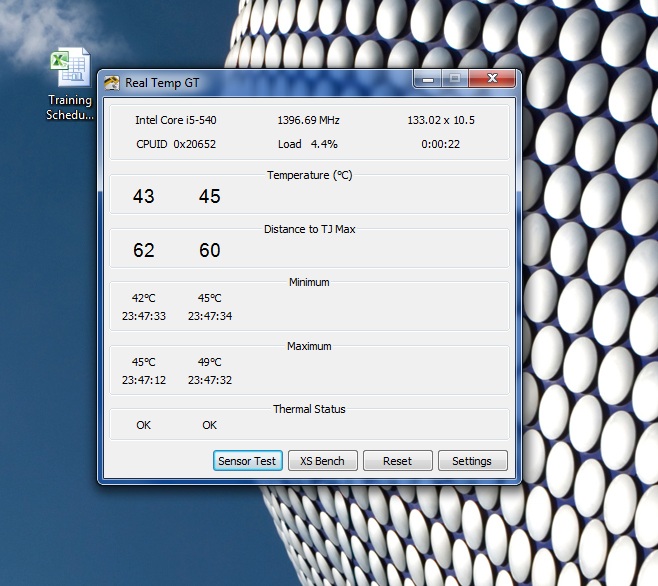
Just used real temp on my processor. Picture is below. Not sure if this is good or bad. Had the laptop on surfing for about an hour before taking this screen. Have the laptop in my lap in bed the whole time, it is not warm enough for me to want to move to a desk, bottom is warm but not "hot" as I have said before. Typing away with no issues from left palm rest. By the way I don't like heat so I'd be the first to complain if I thought there was a serious issue.
Is there a way to test SSD temps or something?
edit: I'm still using the initial BIOS that came with the laptop. F.04 I think. Will update new BIOS tomorrow or Thursday and will update.Attached Files:
-
-
Hi Can you help me with the BCB? When I go to Bing - it says only 10% cash back. But everyone is saying it is 25%.
I registered, went to bing, searched for HP.com - but it all says 10% -
go to bing dot com and search for laptop. Look for 25% HP link in the top results.

-
Can anyone tell me if its really worth it to get an HP Envy 17" because right now theres alot of negative feedback about heat issues, build quality, and some software issues. I'm really thinking of getting a macbook because of the quality of the chassis compared to HP Envy 17. Do most owners have openings or warps and wobbles or anyother physical defects on their laptop? And does anyone know the heat comparison with the macbook pro vs hp envy?
-
Ok... it was because I had my adblocker activated that is why I couldn't see the 25% off.
-
You get 21 days to test should you care to, you're the best person to tell if you should get it or not.
The Envy 17 is quite a bit hotter than the MBP on the top and side, slightly so on the bottom (comparing to GF's older 17 inch, new i7s are probably hotter but I would wager E17 still has it beat). Best bet is to go for an i5 + SSD. If that's not a viable option for you, I'd say look elsewhere.
I love the looks, but practical usability comes first. If you like osx though, I would definitely just get a MBP. I want/need windows, and MBP windows version doesn't cut it for me. -
Those temps are INSANELY low IMO, certainly gives me hope that your i5 + SSD combo could be THE trick to beat the heat issue.
And you can probably find out the temp of the SSD with something like HD Tune.
Thanks for the screenshot! -
Mine is 1002tx, sales person wasn't aware of a newer model but he will investigate for me.
-
If your SSD has a temp sensor, HW Monitor will display it: CPUID - System & hardware benchmark, monitoring, reporting
-
Envy 17 Heat Tests, Idle/Load, Flat Surface/Laptop Cooler
***********************************************
UPDATE July 1, 2010: The following post repeats these tests, but after a bios update. Most temps actually went up:
http://forum.notebookreview.com/hp-owners-lounge-forum/484905-official-hp-envy-17-owners-lounge-227.html#post6419386
***********************************************
***********************************************
Update #2
Warning: If anyone chooses to repeat this test, you must remember to reboot following the test using the three system stressing applications at the same time.
This warning was included in my first run (below with red warnings), but I was fooled after the second run and my system drive crashed. Most data was lost and a complete factory install was needed.
To repeat my original observation (below), the intense test caused explorer.exe to fail. This is normally fixed with a reboot.
In my first test, I saw the desktop disappear, so I rebooted.
In my second test, the desktop remained intact and I wrongly concluded that the bios update had resolved the problem. I ran the laptop for another 12 - 18 hours and then attempted to pair the bluetooth device. Some drivers attempted to load, but they failed and that is when the laptop crashed.
Be safe and reboot after a stress test like the kind I ran.
***********************************************
SUMMARY: My Envy 17 left palm rest is warm to hot, but this is not an inconvenience. A laptop cooler can cool the Envy 17's CPU and GPU by about 3°C/5°F at idle, and can cool about 14°C/25°F at high load. Oddly, hard drive temperatures do not directly respond to the use of a cooler, but these temperatures are modest on my Envy 17.
The peak CPU temperature under load was 87°C/188°F.
The peak GPU temperature under load was 98°C/208°F.
I am still seeking documentation that declares what a good temperature should be for the CPU and GPU.
Other reviews of graphic boards using the same GPU suggest that these temperatures are a bit high.
Sapphire?s Radeon HD 5850 Toxic Edition: Our First Fully-Custom 5850 - AnandTech :: Your Source for Hardware Analysis and News
AMD?s Radeon HD 5850: The Other Shoe Drops - AnandTech :: Your Source for Hardware Analysis and News
The laptop cooler does diminish the heat when it is needed.
The data from my tests are included in text and pictures below.
FULL REPORT:
I received my Envy 17 on June 14, 2010. I ordered it May 19 and was one of the many who experienced multiple missed ship dates. Some members here reported heat in the left palm rest, so I measured mine after 1 hour of idle activity when I first turned the laptop on. The left palm rest was 39°C/102°F.
This heat did not trouble me per se. It could be bad and only increase as I used the computer. Then again, it could be unimportant because the extra heat from using the computer would trigger the fan which would reduce the heat. After all, automobile engines continue to heat up after they are turned off. That's why modern cars have electric fans that turn on even after the engine is off and the driver has left to get the groceries.
My subjective term for 39°C/102°F is, tolerably hot. Your subjective term for this temperature is whatever you choose it to be. I decided to conduct a detailed test of this heating for my own evaluation of my computer.
In the interest of thoroughness, please forgive my stating the obvious.
Important Facts:
1) Heat is a result of combined heat sources (CPU, GPU, Hard Drive, other components) and Heat Distributors (Vents and Fans). Heat sources vary in their heat production and Heat Distributors vary in their heat distribution (the Envy's fan changes speed to address immediate cooling needs). So, configuration matters when comparing individual laptops.
2) A person's subjective interpretation as to what is "too hot" belongs to that person. He or She doesn't have to justify a decision to accept or reject a laptop because of heat to anyone else.
3) Even identically configured laptops may have different heat signatures because of variable quality in manufacturing.
With these facts in mind, please use the test results below as you wish. The results are presented in text and in pictures of the laptop screen as it displayed the data. Do note the maximum temperatures, where available. Although temperatures rose in general, they did fluctuate and a temperature at the end of the twenty minute test period was not always the maximum temperature.
Minimum and Maximum temperatures were reset with each test.
Test Description:
Envy 17 Configuration:
- Windows 7 Professional 64-bit
- Intel(R) Core(TM) i7-720QM Quad Core processor (1.6GHz, 6MB L3 Cache)
- 8GB DDR3 System Memory (2 Dimm)
- 500GB 7200RPM SATA Hard Drive
- 1GB ATI Mobility Radeon(TM) HD 5850 Graphics
- 17.3" diagonal Full HD HP Ultra BrightView Infinity LED Display (1920x1080)
- SuperMulti 8X DVD+/-R/RW with Double Layer Support
- The Factory bios was tested. A newer bios is available from HP, but is not loaded.
- NO Blueray, NO Secondary hard drive, and NO SSD.
Tests were conducted with AC power (and battery, 6 cell, flush fit to laptop case).
Testing Room Temperature: 24°C/75°F
Tools-Hardware
- Remote Thermometer (White), Integer values (nnn°), Stores Max Temp
- Remote Thermometer (Black), Integer with single decimal values (nnn.n°)
- One Flat Table
- One Thermaltake Notebook Cooler
Tools-Software
Temperature and Activity Monitors:
- CPUID-HWMonitor, CPUID - System & hardware benchmark, monitoring, reporting
- All CPU Meter (Windows Gadget), Windows Gadgets - All CPU Meter
Stress Executables
For GPU: FurMark v1.8.2
[GPU Tool] FurMark 1.8.2 Available - 3D Tech News, Pixel Hacking, Data Visualization and 3D Programming - Geeks3D.com
Test Used: Stability Test
For CPU: IntelBurn Test v2.5
IntelBurnTest v2.50 - The new CPU stress-testing program for AMD and Intel CPUs - Ultimate Filez Forum
Test Used: Stress Level=Very High, Threads=8
For Hard Drive: SeaTools for Windows
SeaTools | Seagate
Test Used: Basic Test|Long Generic
Testing Plan: Compare Idle and Load temperatures under two conditions:
- Laptop sitting on a flat table on its own feet.
- Laptop sitting on a cooler, modified to add extra air space (about 3/16 of an inch) between the fan and the laptop. This better distributes the cooler fan air to the laptop vent air intakes.
- "Idle" was defined as 10 minutes of no temperature change following what appeared to be a stable, inactive state (no keyboard or mouse inputs, CPU jumping between 1%-4%, mostly 1% & 2%.
- "Load" is 100% activity for all 8 CPU threads with heavy GPU and Hard Drive activity.
WARNING WARNING: Although each of the above software programs are described by their creators as stable, this test combining them all resulted in terminating one of the Windows explorer.exe processes. I don't know why. For those who don't know, Windows explorer.exe is more than the file manager window we all know. Explorer.exe is a part of the Windows OS itself and manages communication between drives, the kernel, and applications. When it fails, previously loaded programs can be left as inaccessible orphans or otherwise become corrupted.
Failure Symptoms:
- Autohide taskbar non-responsive
- Some taskbar icons of loaded programs disappear from taskbar (like Bluetooth, ATI Catalyst, Beats Audio etc).
- Previously loaded programs inaccessible, but visible with Task Manager.
- Microsoft Windows Key invokes Program/Shutdown Menu and Taskbar, but subsequent mouse clicks fail.
- Previously loaded programs must be closed via Task Manager
- Laptop must be rebooted via Ctrl-Alt-Delete interface
----------------------------------------------------------
Test with Desk Beneath Laptop
Temperatures After 10 minutes Idle (CPU 1%-4%, mostly 1% & 2%)
CPU`````Value``````Min````````Max
Core #0 57°C/134°F 56°C/132°F 62°C/143°F
Core #1 55°C/131°F 55°C/131°F 55°C/131°F
Core #2 58°C/136°F 57°C/134°F 58°C/136°F
Core #3 58°C/136°F 55°C/131°F 58°C/136°F
````` ````Value``````Min````````Max
GPU Core 68°C/153°F 68°C/153°F 68°C/154°F (yes, 154F--rounding)
Hard Drive ST950042AS (HP's Primary 500Gig Drive)
`````````Value`````Min```````Max
Assembly 34°C/93°F 34°C/93°F 34°C/93°F
Air Flow 34°C/93°F 34°C/93°F 34°C/93°F
External Sensors:
Exhaust Air 45°C/113°F
Palm Rest Contact 33°C/90.5°F
----------------------
Test with Desk Beneath Laptop
Temperatures After 20 minutes Heavy CPU, GPU, and Disk Activity
CPU`````Value``````Min````````Max
Core #0 79°C/174°F 56°C/132°F 87°C/188°F
Core #1 77°C/170°F 55°C/131°F 83°C/181°F
Core #2 80°C/176°F 57°C/134°F 86°C/186°F
Core #3 77°C/170°F 55°C/131°F 82°C/179°F
`````````Value``````Min`````````Max
GPU Core 90°C/193°F 68°C/153°F 98°C/208°F
Hard Drive ST950042AS (HP's Primary 500Gig Drive)
``````````Value``````Min```````Max
Assembly 39°C/102°F 34°C/93°F 39°C/102°F
Air Flow 39°C/102°F 34°C/93°F 39°C/102°F
External Sensors:
Exhaust Air 59°C/138F, max 60°C/140°F
Palm Rest Contact 34°C/94.0°F
Cool Down Issues Part 1: All temperatures began to drop immediately when the testing software was turned off, except for the Palm Rest. This temperature slowly rose for an additional 17 minutes, peaking at 36°C/96.0°F.
Once high, the Palm Rest temperature would not decrease to the level of the first reading.
----------------------------------------------------------
Test with Laptop Cooler and Raised "legs" Beneath Laptop
Temperatures After 10 minutes Idle (CPU 1%-4%, mostly 1% & 2%)
CPU`````Value``````Min````````Max
Core #0 59°C/138°F 59°C/138°F 60°C/140°F
Core #1 59°C/138°F 58°C/136°F 59°C/138°F
Core #2 61°C/141°F 61°C/141°F 61°C/141°F
Core #3 62°C/143°F 59°C/138°F 62°C/143°F
`````````Value``````Min````````Max
GPU Core 71°C/159°F 71°C/159°F 72°C/160°F
Hard Drive ST950042AS (HP's Primary 500Gig Drive)
`````````Value`````Min```````Max
Assembly 36°C/96°F 36°C/96°F 36°C/96°F
Air Flow 36°C/96°F 36°C/96°F 36°C/96°F
External Sensors:
Exhaust Air 34°C/93°F
Palm Rest Contact 35°C/94.9°F
----------------------
Test with Laptop Cooler and Raised "legs" Beneath Laptop
Temperatures After 20 minutes Heavy CPU, GPU, and Disk Activity
CPU`````Value``````Min````````Max
Core #0 71°C/159°F 42°C/107°F 72°C/161°F
Core #1 67°C/152°F 41°C/105°F 68°C/154°F
Core #2 72°C/161°F 44°C/111°F 73°C/163°F
Core #3 67°C/152°F 42°C/107°F 68°C/154°F
`````````Value``````Min````````Max
GPU Core 77°C/169°F 54°C/129°F 84°C/183°F
Hard Drive ST950042AS (HP's Primary 500Gig Drive)
`````````Value``````Min```````Max
Assembly 40°C/104°F 32°C/89°F 40°C/104°F
Air Flow 40°C/104°F 32°C/89°F 40°C/104°F
External Sensors:
Exhaust Air 45°C/113F, max 47°C/117°F
Palm Rest Contact 40°C/104.2°F
Cool Down Issues Part 2: This time, the Palm Rest temperature rose to 40°C/104.6°F in a couple minutes, but then dropped to 37°C/98.1°F after 17 minutes.
Pictures
The white thermometer reads the exhaust air. The black thermometer reads the left palm rest case. Both thermometers use a sensor at the end of a wire. The black sensor is hidden beneath the books added for weight to ensure a firm contact. The bible and writings of Augustine were chosen because they were nearby, but if you want to infer from the nature of these books that the data presented here is accurate, I won't stop you. The exact significance of the kitchen meat mallet is a bit trickier to glean, but it is heavy. (Right Click Image for Detail)
Here is the black sensor without the weights. (Right Click Image for Detail)
The white sensor is near, but not touching, the case. (Right Click Image for Detail)
The laptop cooler is modified to raise the laptop from the cooler's surface by about 3/16 of an inch. The "legs" made of tape and cord are placed to avoid the vents of the laptop. The black material on the tape is a dried latex applied like wet paint. It adds friction to the surface. (Right Click Image for Detail)
![[IMG]](images/storyImages/Envy17nTable00min.jpg)
Envy 17 on desk: Idle (Right Click Image for Detail)
![[IMG]](images/storyImages/Envy17nTable20min.jpg)
Envy 17 on desk: Loaded (CPU 100%, GPU & HD Running) (Right Click Image for Detail)
![[IMG]](images/storyImages/Envy17nCooler00min.jpg)
Envy 17 on Cooler: Idle (Right Click Image for Detail)
![[IMG]](images/storyImages/Envy17nCooler20min.jpg)
Envy 17 on Cooler: Loaded (CPU 100%, GPU & HD Running) (Right Click Image for Detail)Last edited by a moderator: May 8, 2015 -
I have the i5-540 and, while it's on a cooling pad, I haven't had a single issue with heat. The laptop is barely warm to the touch. Granted, I haven't really put it through it's paces, but I didn't buy it to game, so heat doesn't appear to be an issue at all for me.
Overall, I haven't had a single problem or reason to complain. It came with a dead 6-cell battery, but HP promptly replaced that (at no cost). The fit and finish are very good, no wobbles, no heat, no nothing other than a great laptop. Sorry guys. -
Thanksssss !!!!
YOU ARE FABOULOS !!!!!!!!!!!!!!!!!!!!!!!!!!!!!!!!
A super review of the heat question, very very well done.
Now if, when you'll have time, you can continue with benchmarking, frames per seconds, youtube video, advantages, disadvantages, vs G73JH, final thinkings, ecc. ecc. ...
For now only a word for you : MYTHIC !!!!! -
Anyone else notice if their E17 get very sluggish when not plugged in to AC power. I was doing a light testing of the battery life by just playing the sample windows video, stretched to 75% of the screen, on loop, and when not plugged in, it stopped playing fluidly and eventually stops. Clean install of Windows 7. i7 820QM. 8GB ram. 256GB SSD. There should be no reason it can't handle playing hd video just on batteries.
Aside from the heat, which I can tolerate knowing there's supposedly a lot of power under the hood, that's the top reason for me to return this and await news of the 2nd gen. -
I guess this answers my question from here...
I have an Envy 15. When running on battery the CPU is stuck at 1.2GHz because the multiplier is locked at 9x, and it feels very sluggish at times. This is designed to preserve battery life. Yes it sucks!
Can you try this, run CPUZ and a CPU-intensive program (wprime, prime95, etc), have your charger plugged in when you start, then unplug the charger while the program is running. See if your CPU speed drops. -
While on battery, I switched my power plan from Balanced to Performance and that got it back to expected speed. Duh. Now I need to recharge and restart my battery test.
When I get a chance, I'll try out some benchmarks and see if I can tolerate the heat at full load before I really decide whether to send this thing back for a revision of itself. -
What's your SSD/HDD setup? Thanks.
-
I haven't seen anyone making the connection here (and i think I've read through most pages in this thread), but the heat issue might theoretically be related to how well sealed the chassis is. That is gaps like some have reported may result in more/less heat due to changes in the effectiveness of the airflow/exhaust.
It would be interesting if people with heat issues checked if they had gaps (large or small) in their chassis or not. -
Agreed, nice temp breakdown (thought it would have been nicer to specify the CPU somewhere, ended up looking in the CPUID SS). There is definitely some varience, as the thorough ones I posted here don't lie. I believe my room was hotter than yours though (think it was 81-82 F when I started)
I definitely agree with your observance that once the palmrest heats up, it doesn't cool back down. I played another HON last night at around 11pm when it was nice and cool, and it stayed hot before, during and after, regardless how hard the fan was chugging. I do think the BIOS update makes the fan work harder though; I have noticed the fan noise a lot more lately.
I think I've resigned to myself that the E17 just isn't for me. I would like to try it with the SSD to see if that fixes the heat issue (I really do think a large part of it is the HD under my hand) but I just don't have enough time left in my return period. Gonna swing down to Microcenter today and get as much hands on with the g73jh as possible.
For those still debating, it is a beautiful laptop, and it does have power. I'd recommend the i5 + SSD combo to avoid any potential heat issues. I will be in hot environments sometimes, and I need something that's not going to be uncomfortable to use.
edit: Also, today is verdict day. My review of E17 is NOT up on HP's site, thus it has been filtered. Not surprising, I mean what company would put a review up of their own product that warned others about the product? But ya, also a reminder to ignore those reviews as they are spoon-fed bull**** -
NO SSD. Went cheap (so far) and had it built with 2 500GB HD's.
-
CPU was identified near the top of the post under:
Test Description:
Envy 17 Configuration:
Shiboe, as for your returning your Envy 17, it is your money and your time you are spending. You have a right to expect satisfaction.
Good luck. -
Bing [actually hp] decides the discount. I'm not sure how they decide and when. When I applied others told me the discount was 25% so I went into bing and shopped and lo and behold Bing/Hp was offering 25%
Maybe they wanted to stimulate sales because of all the squaking on this board -
Unexpected Keyboard Character Set - Something else Envy 17-wise to post about.
Has any other Envy 17 owner found logograms (Chinese? Japanese? Korean?) on their keyboard in addition to the standard QWERTY?
![[IMG]](images/storyImages/HP-Envy17-Keyboard.jpg)
My keyboard. (Right Click on Image for Detail)
pedromartinez's June 4 posting of pictures doesn't include the logograms on mine:
pedromartinez's Posting: http://forum.notebookreview.com/hp-owners-lounge-forum/484905-official-hp-envy-17-owners-lounge-83.html#post6321110
pedromartinez's Picture: Picasa Web Albums - J - envy arrival
Is this a case of a part taken from a factory line intended for another market to meet a shipping deadline for the US market?
The Product number/Serial number label inside the battery cavity also includes English words with logograms.
My laptop shipment was delayed three times, so this might be the explanation.
Functionality is, of course, the same. I'm just curious . . .Last edited by a moderator: Feb 6, 2015 -
-
So with basic web surfing for the past 3 hours, here are my temp readings using CPUID HWMonitor, AVG started a scan and temps jumped 10*;
Ambient room temp is 75*F
CPU high temp 88*C / 190*F (at this temp fan on high I think, but not too loud)
GPU high temp 80*C / 175*F
HDD high temp 36*C / 96*F
My config;
i7 820QM
SSD+HDD combo (no temp on the ssd)
6GB RAM
1080P screen
*** Warping at top left heat exhaust vent***
*** Right palm rest gets very warm, but not hot *** -
Just an idea of what you can do with an Envy 17 I7 w/8GB ram.
Pretty sweet set up. Running 3 VM's with various core and memory settings flawlessly. You can see the temperatures I'm getting. Palm rest is warm but not hot to the touch.
Configuration: Envy 17, SSD/Sata/i7-720QM/8GB Ram.
![[IMG]](images/storyImages/bzH5f.jpg) Last edited by a moderator: Feb 6, 2015
Last edited by a moderator: Feb 6, 2015 -
Everyone...i just got my envy 17 today and yeah it actually has every problem that people have stated... the wobble, the gaps....but mine has even more problems. they messed up my volumed keys. i loaded up some music from my old laptop, and tried to adjust it with the fn button with the f8 and f9..but they were swapped with the mute button and the wifi button..
there are definitely more cons than pros, so let me say the good stuff first:
1. super fast with my core 540
2. looks very authentic
3. feels very authentic (aluminum...and what not.)
4. nice backlit keyboard!
5. nice screen, one of the best.
cons..:
1. HEAT...as im typing this on my envy 17, my left hand feels very warm. i am processing literally nothing but i.e.
2. trackpad. my ancient dell Vostro 1500 has a much better trackpad. this trackpad has got to be one of the worst. the material it's made of is grippy, so it's hard for your fingers to smoothly glide across the pad pad isnt seperated so yeah..you guys are definitely right, about this causing all sorts of chaos. . also, the right and left click on the trackpad are extremely hard to press on. i feel like i have to knock on the button to click. plus, i finally understand what people are saying when they said that the trackpad was too big. as im typing this response, my left palm has touched the trackpad for about 5 times, causing an accidental click of the mouse, forcing me to come back and click this message box to continue typing.
3. wires. i remember watching a video on youtube about how the power cord has to sit on the right side of the laptop. it is definitely a burdon to have that cord there as i would obviously need to use a mouse.
4. cosmetics. there are gaps, but not as wide as those who have posted pics up. the hinges are also warped, but nowhere near as bad as the pictures peopel have uploaded.
5.unfortunately, the speakers. mine also has an uneven balance to my speakers. it's not bad but it's not good. to be honest, my dell vostro 1500 has clearer speakers, but not as loud.
6.HEAT!..oh wait i mentioned that already. but ill mention it again. i am doing nothing but typing this response, and it's very warm on the WASD left hand position. im only typing and the vent on the left is burning. i cant even imagine what it'll be like when im gaming..i dont game a lot, but when i do, i game for hours...ill be putting this to the test.
the performance is really great..for the price i paid. i paid 1360$ but after the 10% it was 1235$. so i think this is quite worth the money. BEWARE GUYS...this laptop is NOT USER FRIENDLY. if you're planning to get this laptop, the two major problems that i would be considering are the heat and the oversized trackpad. otherwise, this laptop is definitely an ace. be prepared to face these problems, and adapt to it.
I do not think i will return this, regardless of all the cosmetic flaws and the troublesome trackpad. i mean..where can i find a laptop that will have such peformance for 1235$??
p.s-ill try to post up some tempuratures sometime in july, as ill be away for two weeks for the shanghai expo..and ill be bringing this "heatbeast" with me! -
so whats the battery life for a core i5 450m? 3 hours...or close it it?? and i mean with full brightness
-
I just want to clarify one misconception.
Windows Explorer (explorer.exe in task manager) does not handle any system function other than providing a GUI for the end user to navigate through files on the computer. Making Windows Explorer crash will not harm the system.
However, if you are doing any sort of file transactions (only affects copy, paste, cut), then if Windows Explorer crashes, those transactions will cease before completion since the parent process for those functions was Windows Explorer (explorer.exe).
If you are installing a program and Windows Explorer crashes, you should not encounter any issues because the installer for the program would be the parent for any read/write actions for the program files.
You can safely end the explorer.exe process and restart manually through task manager as long as you are not concurrently copy/paste/cutting any files/folders at the time.
Hope this helps. Wanted to post this because someone mentioned that Windows Explorer crash would corrupt the OS. -
That looks like a beast of a computer, better than my desktop!
But the temps are a little worrying, are you considering heat paste or anything to be safe? -
why arent there any envy 17 videos!?!? i dont get it its been out for more than month!
-
Because people like me still haven't received our envy's and don't know when they will arrive, if they ever do arrive.
-
Should I remove any software I installed on the laptop before returning it?
-
Spoke with FedEx today just to see if my order from Shanghai just might be in their system since I heard people had received their Envy 17s without notice of shipment and mine being 16 days late so far for est build date and all, it wasn't. FedEx rep said he hears complaints multiple time daily about HP's poor custimer service, and that was coming from a FedEx rep! I really like HP products for quality of build, just a shame they can't step up for direct order service. I think I will stick to off the shelf purchases from HP after this experience.
-
What do you want to see? I just got a neat little 1080p camera from work the other day, if there's demand for a video I don't mind taking a few minutes to snap one together.
After microcenter today though, I think I'm definitely settling into the idea of a g73jh. Was looking at that and the AW, and the asus beast looks just as nice to my eyes, if not a bit cleaner. Won't have the polish of the E17, but cooling looks infinitely better.
*HP ENVY 17 & 17 3D (1XXX series) Owners Lounge*
Discussion in 'HP' started by L3vi, May 19, 2010.