Problems? See this thread at archive.org.
I ran that program and it said that it was aligned. I really don't know what the trouble is. Maybe the firmware install was corrupt. I am going to erase the drive with HDDErase, update the firmware, an hope that fixes it. If not I will sell this thing and get an Intel one or one that has no complaints against it. OCZ just doesn't seem to play nicely with the Envy.
-
Odd. I hope you are not having the issue Killa Joe had when he got his Envy before his good one. He had a bad SATA port on the MB and had to return for replacement. Although...I don't think his numbers were even in your ballpark.
Did you install the Intel Rapid Storage Technology? Having the SSD run off the RAID controller with the proper drivers will help as well. Odd that HP set it up this way, but it guarantees AHCI. -
There might be nothing wrong with my SSD afterall. I am looking at the specsheet for my Solid 3 on the OCZ website right now. It lists Max read as 500MB/s and write as 450MB/s. But below that it has a list for "Sequential read and write AS-SSD" with 185MB/s read and 125MB/s write, which is what I have been getting with AS-SSD and Crystal Mark.
So was I fooled by the Max speeds and is this really a slow SSD that has been working fine all along?
*EDIT*
Nevermind. Replies on Newegg say a boot time of 8 seconds. Read 450MB/s and write of 400MB/s. So I must have a problem. How do I check the controller? Under device manager I have no controllers at all. -
How did you install windows usafpj? I had several problems with a slow drive until I installed windows as posted on pg555. I think windows may have been copying over old drivers and setting from the original hard drive. Everything seemed better after doing the fresh install from the recovery disks and selecting to install just the minimum from the recovery disc menu.
-
dixonwa,
I ran the factory setting install, so perhaps that is the problem. I will reinstall windows with the minumum to see if that works. I didn't want to copy over photoshop and Tridef but if it makes my SSD work I will do it.
Do I need to format the SSD first or will it do that automatically when I restore windows? -
usafpj
according to OCZ " Windows 7 aligns partitions by default correctly, so there is no need for preparations before installing Win7. Using the install DVD its best to delete any partitions or volumes present on the disk (new disks will have none present) and just hit NEXT at the install/format screen. Windows 7 will create and format partitions on the SSD automatically, there is no need to create and format a partition UNLESS you are going to have more than 1 partition on the disk. Just hitting NEXT will result in 2 partitions on the drive, 1 around 200MB big and the other filling the remaining space on the drive...this is totally normal and the partitions are aligned."
How to set up Windows on a VERTEX - OCZ Forum Wiki -
ok. So I just have to use skype to talk to the girlfriend and then I will try the fresh minimal install. I really hope it works and that I will be running full speed. Results to come in a few hours.
-
does the new sandy bridge model still do software blu ray decoding?
-
How's the heating issues when gaming hard? For example, running starcraft 2 at max.
-
usafpj,
Most of the time you can tell if the partition is aligned correctly by going into the control panel going into System and security - Administrative Tools - Computer Management - then on the right clicking open the storage and double click the Disk Management- you will see all of you hard drives and the partitions on each you should have a 100mb - 200mb hidden partition on your ssd. windows sets this up with it sees the ssd during install. this partition gives the hd its proper offset.
One of the many things windows 7 does during a fresh install to properly set up your SSD. I believe this is why the a lot installs from images taken from hdd's fail when trying to write the image to an SSD. -
One of the many things windows 7 does during a fresh install to properly set up your SSD. I believe this is why the a lot installs from images taken from hdd's fail when trying to write the image to an SSD.
The windows version I have installed now was from recovery disks, not from an image.
Do you still think doing a minimum install will make a difference over the factory image install I have now? -
samk0814,
I have 2 Envy's one with the i7-720qm and a new one with the SB i7-2820QM and the difference is night and day between the two computers. I have played Crysis 2 for hours with much lower temps...does get a little warm but not even close to the hand burning heat of the first generation of Envy’s -
usafpj
It did for me. I tried it a bunch of different ways and the one that worked I posted here.... I went through several installs before I got everything working correctly. I think the minimum install just pulls the need files from the disk opposed to just writing the image. when you do the install maker sure to let windows create the partition. If you have a partition on the disk delete it don't just install windows into that partition. -
Thanks, I guess the heating issue is gone with the new version then.
-
It didn't work for me. Just finished the minimal install and have the exact same speeds. Maybe I have a bad SATA or something. Hopefully Fish will fix his and let me know. For now I will have to put up with 180 read speed and 100 write.
-
I got a couple of questions about this laptop:
1) Does the non-3D envy have switchable gfx?
2) How is the battery life on this laptop?
3) Is the laptop metal or plastic?
4) How are the speakers? -
1. Yes
2. WiFi surfing ~3,5h (6cell), ~5h (9cell)
3. Both, magnesium covered top, alu frame, plastic base and rest
4. Pretty good but not the best -
Wow crysis 2 really gets the temps up
 I reached 90C on one of the cores but the other three only went up to 88,84,84. So I got curious why one core is always higher then the others.
And oh, it's still awesome to see how nice the CPU works since throttling is gone, Crysis 2 runs PERFECT on max.. that's pretty amazing
And another thing, is there any new updates available that should be interesting to install or good
-
Hmm, one more issue I noticed today:
there seems to be something wrong with the AMD graphic display. When I look at a gray background on a web page, it displays as if it was JPEG compressed, i.e. lots of weird slightly colored dots. It's barely noticeable from far but when you look at the screen closely it's definitely there.
Interestingly enough, it seems to only apply to a web page whatever browser I try (IE, Firefox, Chrome), because applying the same web color to a full image background in Photoshop I don't notice this "artefact effect"...
Other interesting thing: when I switch to the Intel Graphics, it doesn't display this weird effect anymore!! Display is smooth then. So I really don't get it. Is there any AMD web compression setting or something?!
Note that when you move the browser windows the "dots" don't move with the page display but stand still, so I definitely think it's a graphic display issue and not something that has anything to do with the browser or the web page.
Did anyone notice this? (you can try there: Non Omnis Moriar • Et maintenant, où va-t-on ? for instance, this is my website and I noticed it there especially)
Also is there a method to always boot on the Intel Graphics (even plugged-in on sector) ?
Thanks.
EDIT: the only setting that seems to do anything is the Gamma one for Desktop, a bit lowering the odd effect in the web page but making it appear in Photoshop when descreasing to 95 instead of 100!! Now I'm getting really confused... -
I turbo mode...one core goes up, and that one is most likely it. Highter MHZ and higher temp
-
Okay thanks
-
On iPad now. May be able to check display later. I have tried everything and asked 5or more HP envy support reps or case managers (when on the phone with them anyway) and all say there is no means to force intel graphics to default. However, since hibernate takes as long to come back from as cold boot, you could either sleep or hibernate unit, and almost never have to change from discrete ati to onboard intel. May be the only way for now. I think the drivers for video link to both graphics cards. I even thought I'd just disable drivers for ati but no luck......they reactivated when powering up from cold boot. Tried lots of things like changing power settings to maximize battery life even when plugged in, etc.....no combination currently allows cold boot default to intel graphics.
Since your having some questions and similar interests to mine here related to ati, do you have a ticking sound emitted from graphics card area that almost "sounds like" it's funneled through combo USB 3/esata port on left side area. I get a ticking as soon as I load graphics with a hulu video, a video file stored on a hard drive or jump stick , or when playing DVD. It gets louder and faster when increasing graphics load. Tried every combination of bios, drivers, power settings and it boils down simply to:
Noise emitted from card area on board when on ati graphics
NO NOISE emitted when on onboard intel graphics. Identical source material
2100series 17 3d CTO
Typical cooling fan noises constant, separate ticking only on ati.definitely not coming from cooling fan at left by hinge, hard drive or DVD-the onlymoving parts. Anyone Experience the same to any degree....... I think mine was built around 21st week 2011
It's not absolutely ridiculously loud, but can hear in quiet settings from several feet away on noise emitting side. Concern is issue indicative of problem possibly leading to eventual failure. -
Ok, so now I'm screwed. Here is what I have done to my OCZ Solid 3 SSD over the weekend. I completely erased it, pulled out the main battery and little silver battery for a while, and then tried a minimal install with my 5 restore disks. It took well over an hour and on the first disked paused about 5 minutes at 20% before ejecting it and asking for disk 2. Then disk 5 gets put in at 70% and stops spinning from 84%-99%. It freezes at 99% for 5 minutes then spins up again for about a minute and ejects the final disk. I get the message that install is complete and the laptop reboots. But I get the "no bootable device found". I will try the factory settings restore next. And another strange thing is that I can turn the wifi button on and off and backlight keyboard button on and off on the keyboard right away when the first restore disk starts. Should I be able to do that since no drivers should be installed yet? Is there something hiding somewhere on my Envy that shouldn't be there?
I called HP support but they said I have to confirm if it is a problem with the SSD or my Envy before they will do anything. Their advice was to purchase an SSD from a different manufacturer and see if that works in my Envy. Quite an expensive test. This SSD thing is getting to be more of a hastle than it is worth. Can someone please post a list of the SSDs that have been tested and work easily. I know the Intel 320 has problems with the Envy. What is a good, reliable, SataIII SSD. From my experience I cannot recommend the OCZ Solid 3. The best I can get is 180MB/s read, 100MB/s write, and 22 second boot time. -
The Intel 510 line should work in the Envy...it is SATAIII and doesn't use encryption like the 320 line. Not the totally fastest...but stable as you could want...
-
MiRRe89, nice to see you back! Good to hear Crysis 2 works well on our Envy.
KJ
-
BTW...all Crysis 2 fans...new Direct X patch 1.9 coming out TODAY 6/27. Gonna be a 1.9 patch, DX11 patch and a Texture patch. Not sure if Crytek is going to combine all three...but last week the DX and Texture patches leaked out all over the place. Today is the day. Now you can really run the 6850 in full glory and enjoy
-
@Envy173d User1: Nope, I don't seem to have this noise you're talking about. The only "noise" I get is on the screen!
As for switching permanently to the Intel Graphics well I think I got a way to do that: You have to go to "Select switchable graphics" when you right-clic on the desktop, then untick the box that says "automatically switch to GPU battery saver when on battery" (or something like that - I don't have it in English) and then click on the Intel GPU button below. It will switch graphics and after reboot mine keeps being the Intel one. Hope this helps.
(but Intel GPU doesn't seem as "sharp" as the AMD one when it comes to graphics... so I'd like to solve my "noise" issue with the AMD GPU somehow!) -
Don't think the mobile 6850 manage to run all the new features in full resolution and details. In fact, I am pretty sure. The new textures are a huge step forward and tesselation needs pretty much performance. And our GPU still has the V1 Tesselator from the 5XXX series unlike all 6XXX deskopt cards. 68XX do have a slightly advanced tesselator and 69XX do even have a dual tesselator engine.
-
Hopefully someone can help me with this and tell me if I am making a mistake or if my Envy is jacked up. I am downloading the newest version 9.2.0.1030 of the Intel chipset. It downloads and installs fine. But when I check device manager all 4 of my chipsets show the old version 9.2.0.1015. The SMBus controller shows 9.2.0.1011. So I downloaded and tried to install version 9.2.0.1015 just to check and I get the message "Are you sure you want to install these as your drivers are newer" or something like that. So what is the problem? Why is device manager not showing the new drivers?
I called HP and they were as worthless as always. They said since the laptop is OEM I can only download drivers from HP.com
Does anybody think this has anything to do with my poor SSD performance? -
It shouldn't effect your performance. As far as the chipset drivers...most updates are for new revisions of hardware, etc. I can do the same as you and my chipset drivers won't change. Happens on my desktop x58 board as well. There are centain drivers that are maximized for your particular chipset. The 1015's are for our particular chipsets. You can try to manually install each and every update by hand (extract the Intel file to a folder)...then choose each individual peripheral...choose to update the files and point to the x64 folder in the extracted folder. MAYBE one or two things will get updated. We have the most up to date now!
What will effect your performance is the Intel Rapid Storage technology and the RAID drivers. By default, our drives do run on the raid controller...When you switched over to SSD...did you install these?
Intel Rapid Storage Technology Driver HP ENVY 17t-2000 CTO 3D Edition Notebook PC - HP Customer Care (United States - English) -
Follow-up of my "noise" issue with AMD graphics: it seems this page describes the same issue as mine: AMD Game Forums - Monitor shimmering on 30" display with 5970 and it indeed seem that adjusting the luminosity can lower the bad effect, although I have to set it very low (-37, which is too much) so that it disappears -and not even completely! It really depends on the gray color level.
So it seems AMD is very messy with its drivers. :/
Still searching... -
Thanks Bobmitch. You are helpful and quick as always. I always thought newer drivers were better. I'm always learning. I have all the HP updates so I guess I will buy that Intel 510 when it goes on sale to see if it my OCZ that is broken.
-
He should be able to use the steps in the guide to recover from the boot error.
-
I did use the guide and Win7 works fine but nothing changed with the SSD. No matter what I do my read speed is 180 and write is 100.
-
Sorry, it's been awhile since i've had a chance to read through the threads here at NBR. I saw your message and thought you were stuck at the boot error. I know others have made recommendations that I would have made so as long as you've followed them, I'm at a loss to further explain the problem too.
If you are running the latest bios on your ssd, bios on your laptop, latest sata driver for the chipset, aligned data partition, and a clean install of windows to avoid any background processes stealing attention and you can't get an acceptable reading, then something is probably wrong at the hardware layer. Either you got a bad ssd or your envy sata controller is hokey. Best bet is to try the SSD in another machine or a new ssd in your envy. Unfortunately, process of elimination requires extra parts lying around.
-
No worries Cam. I am going to ask around and see if I can find somebody that will let me use their laptop and restore disks to try the SSD on their computer. If I cannot find someone willing to do that I will have to shell out for the Intel or another brand SSD and wait for it to get to me.
-
if I may interject -- I still think it is worth asking HP for guidance on how to choose an SSD and to tell you what r/w speeds to expect. in case it matters, I would stick with Intel and I would pick an Intel device within the same family of those that are shipped with the Envy 17. Just to document your conversation with HP, ask HP to tell you what they ship -- then go find one on your own at a store that has a good return policy if it does not work.
-
just letting you know, i got a crucial M4 128gb in my sb envy 2090nr and works like a charm.
benchmarks are as expected
i didnt do a clean install, i cloned the hd (which came on a raid 0).
everything is ok, alignament included.
![[IMG]](images/storyImages/asssdbenchm4ct128m4ssd2.png)
-
Thank you Yea it works like a charm
But I can take the moment to ask, what do you guys think of newer games like BF3, MW3, Saint's Row 3, where will this laptop stand,
you think it'll handle those games on pretty high settings? I'm just curious what you'd say or think about that
-
I imagine, like most games being released today, that they will be console ports. If that is the case, you are looking at DX9...the machine will handle those with ease. I have some DX11 games like Stalker Prypiat and the machine handles it very well.
-
I finished witcher 2 at 1680x900 with most of the details set to ultra and something off plus a overclock of the gpu, a mean of 30-35 fps
-
usafpj: when you choose your test SSD keep in mind the outcome you expect, and what it means. For example. suppose you purchase a Crucial and it works well. problem solved. . But suppose the Crucial does not work? then you're into an argument with HP over after market SSDs and which ones will work and is the Envy 17 itself at fault, do you send yours back, what is HP's responsibiilty, etc. Thats the only reason I suggest getting an Intel (or whatever HP recommends) for this particular test. Once you're certain that there is nothing wrong with your Envy hardware, and you're not engaged with HP on any issue relating to the Envy itself, then certainly, go get whatever SSD is best for you. For example, fiver5 has made a great choice of TWO SSDs stripped in Raid 0, and probably has the worlds fastest I/O system known to man, on and Envy 17!
-
Oh sweet, thanks for the answer, is it good to install DX11 even if it's not being used in any game, I don't know if I have any that runs 11
-
Direct X 11 is built into Windows 7...no need to install. It is also backwards compatable, so you don't have any worries...
-
ssd in raid 0 wont have trim, not sure how much the absence of trim could influence the performance on the long run anyway
-
Oh :$ Feeling stupid ^^
But another question, I have forgotten, how much GB does the graphic card have, like 1 GB ? Hope you know what I mean
-
Not stupid at all! The HD6850M has 1 GB of GDDR5 memory...that is a good thing!
-
still i wish i had a 6970m in :\
-
Awesome I figured it was 1 GB but I wasn't sure and I didn't know where to check it ^^
-
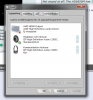
Okay I need to ask one more thing this time about sound, ehm when I started Skype for the first time on this laptop by the way ^^ ( I have experience of skype messing up sound and stuff ) But I think it wanted to use different sound sources or whatever to call it, so first I heard the sound in my headphones then all of a sudden it went out in the normal speakers, so I checked in the volume control in the right corner it was using both headphones and speakers and there should only be one right, either headphones or speakers, so I went into sound in control panel and changed and what my question really is, is this the way (picture) to have the sound set, so it doesn't decide to change what to play sound out of all of a sudden. Cos both the one that now has a green arrow and the one under was being used I guess, the one under had a telephone icon kinda and that seemed to mess it up, just wonder if anyone could clarify it for me a little
About the sound "sources" or whatever to call it
Attached Files:
-
*HP ENVY 17 & 17 3D (2XXX series) Owners Lounge*
Discussion in 'HP' started by 2.0, Mar 14, 2011.