Problems? See this thread at archive.org.
As always Thanks! Actually awhile back I had sent in my WD 500GB External Hard drive (for warranty service) and they sent me back a 2TB NAS drive, brand new in a retail box. So what WD did was replace a product of equal cost. Meaning several years ago when I bought it, it cost me about $275.00, so they sent me a product of like equal value! That's CS!. So you can imagine my happy surprise. 500GB turns into 2TB.. Thank You WD!
Welcome to Western Digital US Online Store
-
I just got this ENVY 17 2280NR from Amazon which I think comes with 2 500GB drives - took over a week to get to me as I am outside the USA. First time I switched it on it said there was some kind of RAID error ? Cannot remember - but it bypassed that and set up windows showing a 900GB++ plus C drive and a small D drive presumably with recovery info on it. Then I must have messed with the BIOS wondering about the RAID error message every boot up and now when I switch it on I get message No bootable device -- insert boot disk and press any key. I have only had it on less than 5 minutes and not made any recovery discs. Any one have any clues what to do?
Appreciate any advise guys. I'm stuck 5 minutes after taking it out the box. -
WOW and OUCH! OK, I'm not a guru, but can offer you some solid advice.. When you turn on your Envy, watch the lower left corner. As soon as you see a prompt to press the "ESC Key", press it a couple times fast. Hopefully this will bring up a menu. At this point, if you get a menu, GOOD! Than choose the enter BIOS option, which on my Envy is F10 Key. Once in the BIOS, look at the bottom of the menu screen and press the option to set to "Default" Settings, F9 Key. Than press F10 Key and select YES to save and exit. Now see if your Envy will boot...
If it does not, repeat the steps above to get back to the menu. Now press the F11 Key "System Restore", which hopefully will get you back to the out of the box experience you missed. It will use the hidden partition on your hard drives and since you have NOT had the chance to create a set of backup disc's yet, this will be your only option...
I hope this helps and Good Luck.. Report back as to what happens, I'll be monitoring... -
Before you set to default...make sure that the RAID option is "Enabled" You may have switched to disabled by mistake...that would give you that error. If it is enabled and you are getting that error, try the defaults as gunny says.
"If" by chance, you cannot get the machine up and running again because you don't have recovery disks...you can call technical support and they can "Imprint" new recovery disks. They need your model number and serial and they can do it for you and send... -
By the way, "BOB" is one of the Envy GURU Wizards! Also, when you got your Envy, did you by chance get 2 batteries or just 1? Hope it is all working out for you, so you can start to enjoy your new Envy.. In response to your hard drive question, yes you get 2 500GB hard drives setup in a RAID 0 array. Of course you can turn that off if so desired, but the advantages out weigh the disadvantages... Keep us up to date and good luck!
-
After you turn the RAID bios back on, copy down the error message and share it with us so we can help. If you do happen to get back into windows, immediately create your restore DVDs!
-
Hey guys, I currently use Microsoft Security Essentials (MSE) for my anti-virus and Malware Protection, but BofA has just provided all customers with a FREE 12 month subscription to McAfee Internet Security 2011 (Sounds like a nice offer). So I was wondering if it would be best to switch or stay with MSE. What do you guys recommend?
-
MSE is pretty good free protection but the pay-for AV suppliers offer more bells and whistles. However, the entire McAfee suite will actually slow your system down a bit if you do a full install because unlike MSE, it will install driver injectors to scan almost everything going on in the computer. This means you'll get better protection than MSE, but at the cost of system resources. Of course you can choose what services you want to run so YMMV. On a new computer, this "loss" may be barely noticeable depending on how secure you want to be.
Personally, I run Kaspersky AV on my main machines and MSE on everything else. -
So CAM121, if I'm reading you right, I would be better off using the FREE McAfee Internet Security, since my Envy is my one and only PC and I definitely do not want anything happening. My only pause, was that MSE runs so well and you never would know it is there. Plus it always seems to get great reviews among the FREE AV products. So am I reading you correctly?
BOB, Thoughts before I press the install button??
Hey "Palatkik", how's it going?? Care to provide an update?? -
You should get better protection from your McAfee offering than the MSE install. If you install McAfee but don't like it, you can always remove it and then re-install MSE.
MSE is a good free AV offering; no argument here. -
Hey Guys, does anyone know what DJ software they are using with the HP Beats commercials? OR, does any DJ software by chance come with the "Beats Edition" laptops? I've been searching, but no luck thus far... Thanks!
-
Since we have been talking about the RAID setting in the BIOS, I just checked mine for fun and noted the "RAID OROM UI" is "Disabled" by default on mine. Meaning I don't see the RAID configuration at boot up, but of course I do see it via the RAID icon in the System Tray when I get into Windows. When my HP Desktop was running, I always had it "Enabled" at Boot Up, but for what ever reason, I just left it on the defaulted "Disabled" on my Envy.
So, is it better to leave it "Disabled" or do you Guru's actually have it "Enabled", so you can view it at Boot Up? -
If you have separate drives, like I do...then it is disabled in the bios. What you see in your tray is Intel Rapid Storage Manager. That is installed by default...for it is Intel AHCI drivers running in your system...and they are installed with it. I suspect that you have two drives. I think that even single drive systems have Intel Rapid Storage Manager
-
The ONLY reason I didn't maintain Microsoft Security Essentials, is that I have a three year subscription to Kaspersky Internet Security. Given a choicd of McAfee vs. Microsoft...I keep Microsoft
-
Do you mean something like this???
ClubDJPro.com | DJ Software for mixing Audio, Video & Karaoke
There is no mixing software on my Envy 17 3D... -
Yeah BOB, my Envy has 2 500GB Hitachi SATA 3 hard drives, super fast by the way! I am loving every minute with my Envy, which by the way I spend pretty much all day on it! This baby has never even hiccuped since arrival, Love it!!!
-
Kinda sorta.. I just didn't know if the special "Beats Editions" came with the software or not, but I suspect not... Since I'm not a DJ by any step, I was just curious... iTunes is what I use for playing my music, pretty much have been using iTunes for over a decade now...
-
Hey BOB, what exactly are they investigating and more to the point, when are they going to make you right?? If it were me, I would be beside myself....
-
Check your PM
-
Thanks guys for feedback. First of all - yes Amazon sent two batteries one large and one small. I could really do with some boot discs though I think? Here's where I am at:
On power up I press Esc and using F10 to go into BIOS. Then if I press F9 Setup Defaults that turns RAID ORUM UI options to Disabled. I presume I don't want this? So I change it to enabled using F5/F6 then Save and Exit using F10.
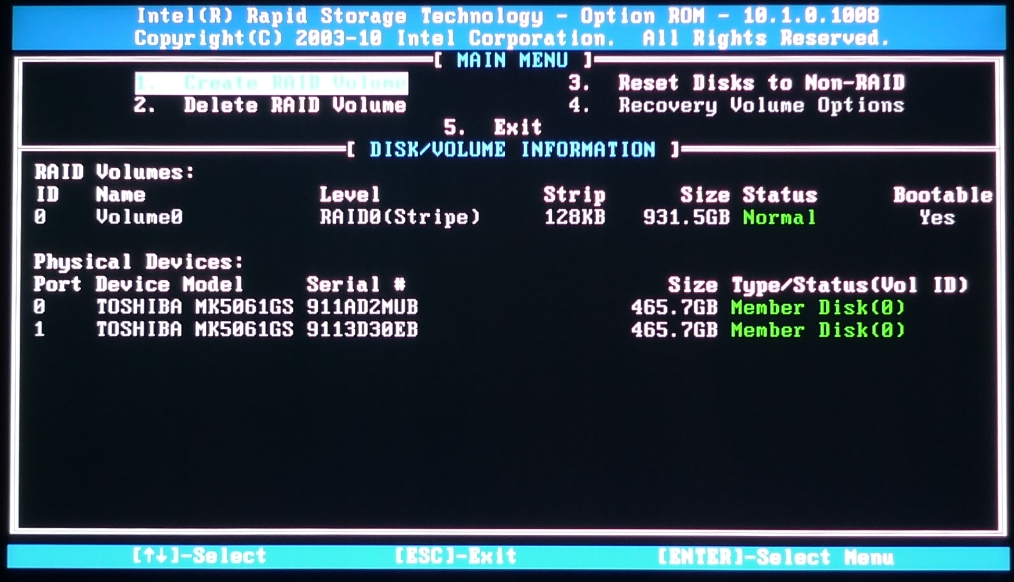
Now when I power up I get the Intel RAID display first, then if I press Crtl I quickly before it moves onto BIOS I can get into the MAIN MENU of it. I would have already DELETED RAID volume (option 2) and then Created one (option 1) (see attached where I am at now).
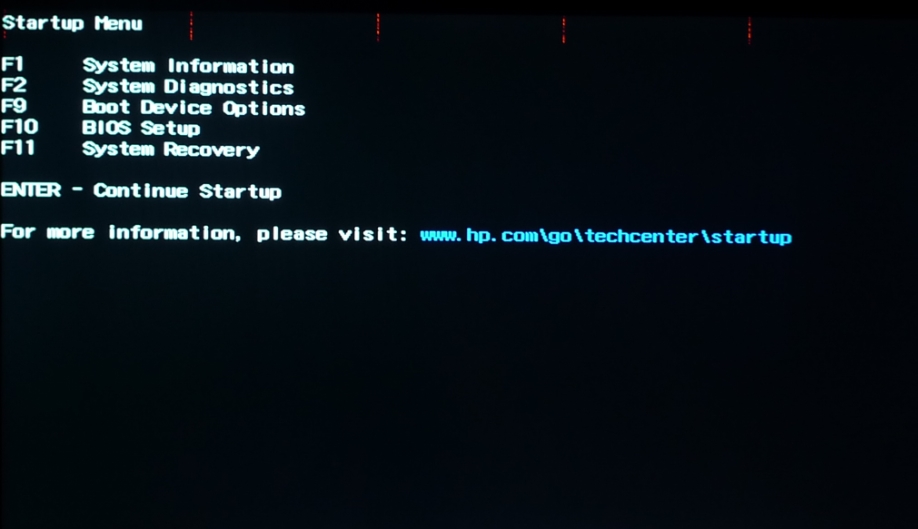
For some reason option 4 Recovery Volume Options is not selectable? Anyway if I exit and go back to Esc of power up, I can choose F11 System Recovery and the screen just hangs as attached with short red strips at top of screen. I'm not sure if it is actually doing anything, I assume not and powered off after a couple of minutes.
Any ideas welcomed?Attached Files:
-
-
If you had broken up the array or took it out of RAID mode...very likely you may have lost all the data on your drive. In RAID 0, the two drives are striped together to create one large, fast drive. If you broke up the RAID array, then all data on the disks is lost, including your recovery partition. I suggest you call Envy Concierge and explain what happened...they may send you a recovery disk set (should be 5 DVD's) at no cost...or it might cost you $20
-
Thanks.
I called Envy Concierge, they had me perform a hard disk diagnostics test which passed and now will mail out the
Model number:
657676-001 , DVD - WINDOWS 7 64B SP1 + SUPP 2 RECOVER
to me for free in US.
Since I am overseas it will take another week to reach from my US address and about 130USD Fedex fee on my account. I guess these DVD's cannot be downloaded on line? -
Another question. Must RAID be used or can I run two separate drives when the recovery DVD's come? Reason I ask is I have a spare 160GB SSD drive from a bricked ENVY 17 1010NR. That machine had no RAID. Can I expect problems switching it across to the 2280NR? Will RAID work with SSD and normal HDD together? Sorry for newbie questions but my first time on a RAID laptop.
-
You can use the SSD...but I suggest you keep my manual for breaking up RAID handy. The recovery disks will be for RAID and are tied to your serial number...but the system recovery can be done...just make sure to keep this handy:
http://forum.notebookreview.com/hp-...ay-fix-hp-envy-17-3d-pavillion-notebooks.html
It gives you a step by step way of doing the install and fixing the master boot record. Keep us posted -
No, unfortunately, the actual recovery is tied to your machine's model number and serial. If there is a mismatch, the recovery will fail. I found this out when my Envy came back with a new motherboard, and the technician put in the correct serial, but botched my model number. My recovery cannot be done...
-
For $130 you might as well buy a retail version of Win7 locally. I put Win7 Ultimate on mine right away without any HP software and it has been running flawlessly.
-
Great, thanks for that link. A pity I missed it before, so hard to find on such a long thread we have here.
-
I have a bootable Win7 Ultimate lying around I could use. Maybe I try that before the HP DVD's arrive? I thought I'd be lacking correct drivers etc so thought it not an option?
-
If you have Windows 7 available, load it up and than you can go to HP support ( HP ENVY 17-2280nr Notebook PC - HP Customer Care (United States - English)) and download your drivers!
By the way, I would go back into your BIOS and disable the RAID ORUM UI interface from starting as it is not needed, since you can access it from within Windows. By default, it is set to be disabled! The good thing is at least you have figured out whats up and can now move forward to getting your system up and running! Good Luck and keep us posted.... -
Go to the HP support website. Insert your model number and you will find drivers for everything hardware related. The only software missing for the HP Envy 17 3D is Cyberlink Power DVD, Youcam, the Adobe Premiere/Photoshop LE and TriDef 3D. You should be able to get the TriDef here:
DDD USA Inc::TriDef 3D for HP ENVY 17 3D - Welcome
Gunny has given you keys to the car with the support site for your drivers. Hopefully you can get the bad boy up and running properly. Should you choose to run the HDD's in RAID again, you are gonna need the F6 install drivers and Intel Storage Manager...get those here:
http://downloadcenter.intel.com/Sea...uct=Intel®+Rapid+Storage+Technology&OSVersion -
Speaking of PowerDVD; I was having quality issues with Blu-Ray playback and learned that PowerDVD forces hardware acceleration. Normally you would assume that's a good thing, but I guess this can cause the problems I was experiencing.
I've switched to ArcSoft TotalMedia Theatre 5 which allows disabling of hardware acceleration. The playback quality is noticeably better. -
Anyone try playing Battlefield 3 on their envy?
-
I was looking into buying this, but as I understand it, this is an Online game only, no solo play option. So since I hate going on line and playing those style games I opted out on it. If it has a solo option, please let me know!
Thanks! -
I haven't played it, or any of the BF series. A quick search shows that it does have a campaign (single player) mode though.
-
Yep it does have a single player campaign!
-
Thanks, I was unaware of that as I thought BF 3 did away with it, so I may need to take a second look. However, the first NEW game to purchase will be on Nov 11th (5 days prior to my BD). Can you guess which game this is.....
Time's up, it is the Elder Scrolls V Skyrim! Yeah, I pre-purchased this many moons ago, but can hardly wait to get me hands on it. I was going to buy the collectors edition, but with the purchase of my Envy, I will have to pass. A smart decision in my opinion, LOL!!! I have been a fan of all the Elder Scrolls games, but Skyrim looks to be on par with the Dragon Age series, graphics wise. I just wish I could import my character from Elder Scrolls Oblivion, like you can do with the Dragon Age Series, but than again, the Elder Scrolls series was never a big fan of importing characters from previous games, I guess since they are just so different, unlike Dragon Age which is a continuation. I'm also looking forward to Dragon Age 3, next year and Mass Effect 3 as well..............
Well, back to the final chapter of Dragon age Origins and than on to Awakening.... Yeah I opted to play through the whole series again, so I can tie it into Dragon Age 2 as a Wizard, which I usually play through as a Warrior.. My first complete run through as a Wizard and it has been almost an entirely new game, not to mention the graphics settings are all maxed out, thanks to my Envy.. Prior to my Envy, I was only able to use low or maybe med settings, but with very slow FPS.. Playing graphics on max settings also opens up the game like nothing else.. Man I love my Envy!! -
Well, it looks like this will be one of my Hanukkah gifts to me, from me....
-
I'm having trouble when the screen is in 3d. Whether or not I'm wearing the glasses there is a white flash on the side of the screen periodically. Is my screen FUBAR?
This really sucks, I just got a full HD 3D prosumer camera and I cant watch the videos right now.
Just tested it, and if I HDMI out to my 3D TV, it will play no problem. Next going to try different software, although I doubt that's the problem, because I've tried multiple 3d input formats in powerDVD. -
I've been playing it, yeah. It runs decently on high and pretty flawlessly on medium
 . I'm having problems with my HDMI external monitor though. And the latest driver update from AMD is from 9/28, meaning no BF3 optimization, and that one doesn't even work on mine, gave me a black screen.
Hmph. -
using corel winDVD pro did the same thing. Looks like my screen is trashed. I'll install and reinstall the video drivers to see if I can un-FUBAR it but I'm not optimistic
-
Does anyone know if the displayport mini port is the 1.2 displayport spec?
-
No it's 1.4
-
Call Envy Concierge support, if that is the case. Do you have AT HOME? I would see if dispatching a tech to your home is an option, rather than shipping to the service center
-
I have the micro center extended warranty. I dont know the details of the included 1 year warranty. Would they care I took the 2HDD raid 0 setup and added a SSD instead and used the other drive for media storage?
-
You can upgrade your machine to whatever config you want. Only caviat is that if they feel that something is software related and wanted to do a system recovery at the depot...they might want the original config back in the machine. Example..once I get my Envy 17 3D situation figured out...I intend to purchase a Crucial M4 to replace the aging X25 SSD. I will simply clone the X25 to the M4 and then remove the X25 altogether and boot to the M4. Should I have to send the machine in...I will remove M4 and reinsert X25...
You may want to do the same...have the original config backed up so you can send in IF need be... -
that was the first thing I did... Acronis true image is my favorite program. Is the home service included for the first year of the warranty?
-
Hey BOB,
I have some questions regarding the Crucial M4. Since it will be just for the OS and drivers, what size do I need to get? How much of an improvement will I see above the RAID 0 config that is in place? Is it possible to install it so only my OS and drivers are on that drive and all my my other files are on the second drive? Also, how hard is it to do all of this? Note, I do NOT have a stand alone version of Windows 7. Just the backup I created when I got my Envy..
As always, Thanks! -
Unfortunately NO! Standard warranties are one or two years with depot service. You can add At Home, after the fact...go to the HP website and purchase an extended warranty. Before you do that...call Concierge and get an idea as to what conditions are for replacing a monitor...
-
I have the older Intel X-25 and get 255 mb/s read and 112 mb/s write. Both of those scores beat RAID 0. I have two WD Velociraptors in RAID 0 in my desktop and the X-25 benches higher.
As far as M4
AnandTech - The Crucial m4 SSD Update: Faster with FW0009
This bad boy is one of the fastest, probably most reliable SSD's on the market. I want the 256 GB one, for I run most business apps and video off SSD. Only thing on HDD is games and other assorted secondary apps.
I do have my pagefile and temporary internet files on HDD as well...
Second part of the question. YES...you can put just OS, etc on the drive. You have a few options..
Using your Recovery disks...you can do a minimal install to the SSD. Then install apps as you see fit.
OR
Do a full system recovery, which may or may not require you using the command lines from my RAID manual to fix Mbr. You can selectively uninstall certain apps and move to HDD. My preference was to recover fully and remove what I don't want. Ccleaner has helped me keep my registry clear of junk and my current system is still original config, with what I removed and cleaned up. Very fast with no performance penalties...
Correction: You will be breaking up a RAID array to install a single drive with additional Data drive, correct? Then you will need this:
http://forum.notebookreview.com/hp-...ay-fix-hp-envy-17-3d-pavillion-notebooks.html -
I'm not Bob, but I'll answer from my experience with 4 different SSD models. The difference is night and day. I leave superfetch and prefetch on, put the pagefile and hibernation file on the SSD.
When you say ''all my other files on the second drive'' are you talking about installing program files or just storing documents/media?
In my opinion the best thing to do is install all programs to the SSD and put all your music, pictures, videos, isos and other giant files on the second drive. I have all my office documents and pdfs on the SSD. I have a 120GB vertex 3 (I think I got a good one because I dont have the problems the other ones have) and it still has 40-50GB left depending on how much video I'm editing before transferring it to the other drive.
You can use Acronis True image (free for a month) and take an image of your system exactly how you want it and just clone it to the SSD or save it and restore it from the backup.
*HP ENVY 17 & 17 3D (2XXX series) Owners Lounge*
Discussion in 'HP' started by 2.0, Mar 14, 2011.