Problems? See this thread at archive.org.
Alf
I pretty much do the same thing. I do keep a copy of all my documents on both drives, just in case. Things on my SSD....Adobe Premiere / Photoshop Elements, MS Office 2010, Cyberlink, TriDef, all HP software that I kept...mostly all my apps. On my D drive, I have my benchmarking tools like 3D Mark11, Heaven 2.5, games and assorted secondary apps. Even with the x-25, the performance is markedly enhanced. The difference between SSD and HDD is night and day.
-
This is perhaps the only statement I don't personally agree with. Superfetch/prefetch is intended to help speed up access to often used files normally being served off spinning media. It's redundant on a machine equipped with an SSD because load times from the storage system are comparable to those from the superfetch cache plus the performance hit of freeing memory. While superfetch may still be "faster" than serving direct from the SSD, the constant freeing of memory for application loading along with the wear and tear of reading/writing to the SSD to optimize the cache is not a good trade-off for your cash (specifically the longevity of your SSD).
I personally disable Superfetch, but I pretty much follow the remainder of the suggestions including placing my pagefile (set to a hard 2GB) on my SSD. I generally install ALL software to my SSD and only place data on my HDD and I still have 70GB free on my SSD. -
Ive got a 17 3D machine. Strangely my "brighter" "dimmer" quick keys on the keyboard have stopped working. (f2 and f3), on being pressed, up comes the brightness bar but it won't go up or down (remains a grey bar) anybody got any suggestions ? all hardware looks "happpy" in the control panel. Any idea which drivers I should reinstall ? and indeed whos version ?
-
my 17 3D machine also has taken to periodically near "freezing" withe cpu usage zooming up to 80--100%, which makes videos (e.g. youtube) stutter like crazy. I can't work out what's doing it. Anybody else experienced something similar, and any heads up how to track down the cause ?
Nothing stands out in process monitor as single handedly hogging the CPU (I have plenty of RAM free: 8gbyte), albeit the "idle" process suddenly takes 1--2 % of the machine's CPU. Anyone else experienced anything like this ? in all other ways the machine works fine. a driver issue maybe ?
Cheers- jonathan -
When you open task manager, make sure to click the button that "shows processes from all users". Then filter on CPU usage so the most active task is at the top. Also, open a windows gadget (ie. All CPU Meter) to monitor the CPU usage so you can see if both applications show similar reports. If your gadget reports a 100% usage but your task manager shows no particular process using up that resource, then most likely you have a virus (or other malware) hiding under the covers and stealing your resources. The Windows Process Explorer can be used to track these down but once your machine is infected, it's tough to clean; best response then is to wipe & restore from DVD's (or your recovery partition).
-
I don't have the 3D version, but I do remember reading in this forum, that if you upgrade your graphics driver from the AMD/ATI website, you will lose your dimming capability via the function keys. So to restore that availability, just go to the HP Support website and re-install their version of the ATI graphics driver and than you should be back to normal...
-
I concur with CAM121 statement about the possibility of a virus, so out of curiosity, what AV/Malware program are you currently using to protect/secure your Envy?
-
thank you guys ! indeed tried the cpu meter: and what I find is there seem to be 3processes usually that aresharing the usage, but no one that sticks out like asorethumb. (usually internet explorer side bar and something else, all about 15%...)
RE the virus I run AVG (I'm obsessive about keeping it's definitions up to date), superanti spyware (which I have disabled to see if that made the problem go away, which it hasn't), spyware blasters' "passive" protection (routinely updated), and spyware search and destroy passive protection too.
I keep the MIcrosoft defender definitions up to date and scan occaionally.
I run malware bytes too from time to time, "just to check".
So far I have not seen a virus on this machine: and indeed I don't do anything "risky" with it.
I've only ever had one virus, on any of my machines (in over 20 years of runnign abusiness, and doing my own IT with multiple machines used by other people), which was some weeks back at work on my XP fileserver. It was ghastly: I have removed many a virus from other people's machines, and am quite relaxed about removing them.
This one was in a different league to anythign I'd seen however, it was a boot sectorvirus, and took 36 hours to sort out, (as I kept getting to the stage of thinking I don't have a virus it must be somethign else!) as I had to delve to a level I never have had to before (resetting multiple registry stuff , file permissions across the disc etc), and eventually only Kapersky (sp?) rootkit scanner from the amazing "hiren boot CD" managed to get it, havng had 6 other viruscheckers when running from the CD missing it !!!! so I am happy with the concept just because your anti virus says it is clean it may not be. To be fair I haven't booted this machine from the Hiren Boot CD to scan it. does anyone know is it OK for a windows 7 machine ? (I am real newbie with windows 7...) I had always presumed you'd be able to find a virus from the command line, or safemode. Clearly this is not always the case.
I think I may well read up on the Hiren boot CD: and see if it is apropriate. If so take it for a whirl and I'll report back. If you haven't used it it is a simply awesome collection of utilities to get a seroiusly disabled machine up and running again.
re the dimmer buttons, I''ll reinstall the HP drivers and report back ! thanks ! -
TY! yep dim/ brighter buttons now work
 I actually reinstalled another driver from teh HP web site as well which is a 1.45 meg utility which provides the onscreen display as you usethe buttons. Interestingly the HP assistant claimed all y drivers were fine before doing this. (as did microsoft update), so I had to electively download and install the drivers.
great ! Thanks ! Be interesting to see if this has any effecton my occaional high CPU usage. I wonder if the two could be related... -
oh no ! the brightness owrks, but now exactly ythe same symptom with sound : i.e. none , and the louder softer/ mute buttons dont do anything. tried reinstalling the idt driver from the hp site, and that hasnt brought sound back. any idea ? if i hove the mouse over the icon in thetray, it says "no speakers or headphones are plugged in "!?!?!
-
You need to download the BEATS Driver as that is the one we Envy users mainly use.. The reason why your software was not reporting a driver problem, was due to the fact that your drivers were actually up to date. The problem is the ATI web site drivers are NOT configured for us Envy folks, that is why I have NOT updated any of the drivers past what HP Support center tells me...
To fix ALL of your issues, I would suggest doing a system restore from either the Recovery Partition or the Backup DVD's you created. This should get your system back to out of the box and hopefully resolve your CPU issue as well. After you do that, than use "HP SUPPORT ASSISTANT" the software on your Envy and update ALL of your software and drivers via this method ONLY. This will keep your Envy HP PURE...
Good Luck and please keep us apprised! -
Hey Guys,
I just ordered my RAM upgrade today. Will soon have the following:
Crucial - 8GB Kit (4GBx2), 204-pin SODIMM, DDR3 PC3-12800 memory module
Will this speed up up Envy a tad, since the RAM is now a equal set and 12800?? -
Rootkits, Bootsector viruses and (potentially soon) kernel level infections are the toughest to clean and be secure in the notion that the code isn't still running under the covers.
Many years ago, viruses were very devious as were the writers who programmed them. The goal at the time was to seek and destroy, causing outages or denial of local services. Of course, you also had the viruses that weren't malicious and mainly elevated bragging rights of the writers. However as OS's and AV programs got more intelligent, and these writers also grew up and abandoned the childish infections, the number of insidious viruses declined.
A new threat emerged with the advent of "social engineering" (an umbrella term that encompasses more than its original intent). It became easier to trick people into installing malware than to create loaders that propagated it via exploits. For years this worked until once again AV programs and users got smarter.
Over the years though, public and military services have become increasingly reliant on technology. Thus the insidious writers saw an opportunity here to go back to their ways and create malware that is worse than the original stuff developed 15+ years ago. No longer are they looking to seek and destroy, but to enslave and redirect (blame). The technology they employ goes to the heart of an OS in order to trick/disable AV measures. They are becoming smarter as they know they need to hide their code for maximum penetration and retention of infections. Tricky stuff, kinda scary...
I digress though... the only way to truly know you are clean from an infection is to reformat and reinstall (assuming your hardware bios is clean). Cut the network access as well. Test under these circumstances and you can be sure whatever problems you develop occur after you tether your machine to the internet and expose it to the nastiness it breads.
Are you sure your default audio device in control panel is the soundcard and not the headphones? Are any of your devices in device manager disabled or broken? -
While I agree this is a safe method to keep your Envy up to date and avoid most if not all hardware driver conflicts, HP (and others) are notorious for not pushing the latest approved software through these channels. However, the next best thing is to go to HP's support pages and download the drivers FOR YOUR SPECIFIC MODEL number. This is just as safe, though more time consuming, than using the Software Support application.
My advise is to restore the system. Use the HP support assistant to update all software it says you need. Use Windows Update to apply all patches (except graphic card drivers). Finally, visit the HP support pages for updated drivers not available through their support tool.
If you feel the need to install a driver from an OEM partner (like AMD drivers) or some other "hacked" driver installation, be warned that this is where problems tend to start. While you might be able to "eek" out a tad bit more performance from the latest non-sanctioned drivers, is it really worth the headache if things go sour? -
It's hard to say. Unless your machine is severely memory staved, you won't notice any appreciable benefit from normal usage. However, you might notice some better performance in games as well as under heavy loads (like rendering or virtualizing multiple OSs).
Right now the best bang for your buck to improve system performance is to boot from an SSD. The storage bus tends to be the first bottleneck in computers these days with memory usually second. -
just bought these ram sticks the other day, and i already installed em in. Newegg.com - ADATA XPG Gaming Series 8GB (2 x 4GB) 204-Pin DDR3 SO-DIMM DDR3 1600 (PC3 12800) Laptop Memory Model AXDS1600GC4G9-2
only problem is, cpu-z is reporting there max bandwidth is pc3-10700
yet it shows it is in fact capable of doing xmp-1600. I do have the cpu configuration with the 2820qm, which i thought was capable of the XMP Profile.
what gives? anyone know?
current bios F-16
![[IMG]](images/storyImages/120nj4j.png)
-
A big thank you to Bob and Gunny for all the tips... I've been a bit busy lately so haven't tried the new ENVY out yet with generic Windows boot discs, original back up discs should arrive next week from HP.
-
Hello all,
I bought a HP Envy 17 3D about a week ago and have been enjoying it so far. I use it primarily for work as a graphic designer (got it for the sharp and decently color accurate display which is hard to find on a laptop). I had to format it almost immediately because, for Photoshop and many adobe design applications, it's better to have 2 separate drives but mine came bundled in a RAID.
I have a clean install of Windows and have recovered almost all the software by following the excellent advice on this forum about backing up the SWSetup folder etc. It all went smooth, but I have some lingering questions, mostly pertaining to 3D at this point.
I wasn't able to find the TriDef software anywhere to reinstall, neither in the SWSetup folder or the recovery media I created. (The recovery discs I made are all bin files, there are no folders to look through). I saw the recent posts about going to DDD's site and running the TriDef HP checker but when I do that it says that it doesn't appear that my laptop is a HP Envy 3D!? Is there something software related their detection software uses to determine the laptop model that I maybe didn't install? I put everything that seemed useful back on the system, but I did avoid some of the bloatware and I didn't want some things like the assistant on it either. Does anyone know why the DDD checker might not be seeing my laptop model correctly?
Also I was wondering how you tell which model precisely that your Envy 3D is? I assume mine has to be a later model, probably a 2290 since I just bought it new... it has an i7core processor so I am guessing that at least means it's Sandybridge? How do you tell the exact version number though? When I go to HP support and enter Envy 17 3D as the model it gives me several model version numbers to choose from and I am not sure I pick the right one. Mine was not a custom built though so I don't think it would be a cto option.
The last question I have is in regards to HP MediaSmart. While poking around online about TriDef and 3d for this system I have come across several places mentioning that the MediaSmart software is needed for playing back 3D BluRay movies etc... When I go to the HP site I don't see any download for that for my model though (assuming I am picking the right one). I did read on one site though that MediaSmart was using CyberLink drivers to play 3D movies and I DID reinstall PowerDVD 10 after my clean install. Is that sufficient? I would hate to disable one of the nicer features on the system by missing the proper software and I learned long ago that it's risky not to get SOME version of the software needed to make your system work. Sometimes a year or two later those applications and drivers have a habit of disappearing...
Sorry about the lengthy post. Any assistance anyone could provide would be greatly appreciated. I do like the system quite a bit and it's working great for my primary purposes. Would just like to have the 3D around for those rainy days!
-
Many thanks to gunny and Cam for such thoughtful posts: in fact I am going to save this web page locally on my machine so i will read it again in the future
I opted to roll back using system retore, and then manually download the drivers from teh HP site. Indeed that did get all the function key thingies working, and sound came back on.
I'm loathe to roll back entirely the OS using my restore discs: feels like a real sledge hammer: maybe I will be forced to in time luckily I do find sorting these things as "learning experiences", and remember the general flow of what I have had to do, so as time goes by, my IT skills increase (usefully!) but I do liken it to "working on the car". I'm 43, and when a teenager, people still felt it was a "rights of passage" to learn how to change the brake pads, oil, touch up rust on the car etc.. As the technology has moved forward and the mean time to failure/ service has increased to the point where for most of us, it isn't worth knowing this stuff: teenagers today would never learn that stuff, short of going in to it as a job, as you'd use the knowledge too infrequently, though for those of us who do occasionally it can be useful to get you out of trouble (very occasionally!).
Computers clearly will go the same way. e.g. my iphone: has no diagnostic tools, so I can't "get under the hood" but to be fair it crashes realtively infrequently, so the need isn't half as great as the inevitably sensitive "windows" environment. As time goes by these skills will become less and less relevant, and people will be staggered as to why one should have ever learnt these skills. I think this is already beginning to appear -- for those of us who read this forum I guess, most of our mates would think of us as techy/ nerdy "geeks". but the number of geeks will slowly drop sad in some ways ! In the meantime I am very greatful for the friendly advice that geeks who are more competent than me are happy to help me out with. I hope at some point I can return the favour. It always feels an immensely friendly community on this forum
ty everyone ! I'll keep you posted if I find anything useful about why my cpu usage goes "chug chug " at times, in contrast to how snappy the machine was when new a few months back. ttfn !
-
oh one last thing
Any easy way to boot an HP ENVY 3d SB from a bootable CD ? (so I can do a "clean" virus check ?
-
Actually Cyberlink Power DVD that comes with the machine will play back movies in 3D, as well as TriDef...and you should be able to get it here:
DDD USA Inc :: TriDef 3D for HP ENVY 17 3D - Welcome
I never used HP Media Smart...one of the programs I initially removed. TriDef is pretty much for Gaming (games in 3D with shutter glasses is pretty intense when it works right)...AND TriDef has an app to also play movies in 3D and view photos as well... -
Hit Esc on bootup and you will get a menu. Choose CD/DVD and you are in. If you want it permanently, there are options in your bios for boot order. I do believe that CD/DVD is F9
-
ty ! yes -- on reflection had realised i should try a combination of "f2" "f8" "esc" and "delete" as I never remember which one does which LOL -- but one of them worked ! ty for jogging my memory though
Should anyone be interested-- Hirren boots into XP nicely on my HP ency 17 3d SB; but you can't see the C drive... so I figured it best not to risk a scan with that.. bit more googling required ! mind you whilst scanning I found 57 "ad tracking cookies", which I had I beleive as I noticed I'd unticked the "delete coookies" option in Ccleaner, so they've gradually accumulated. wether that can have any impact on CPU usage though seems unlikely.. but who knows ! mmm the delving continues !
-
I hate the restore function, but it does what's suppose to do.. Anyway, as much of a pain it may be to restore your Envy from out of the box condition, it is better to do it now and get everything right, than to further delay and have more to do when in fact you do it. Personally, I would do it right away and than you will "Hopefully" have everything working as it was out of the box! Good Luck and please keep us posted! Glad everything is sorting itself out for you as I know it can be frustrating!
-
Quick question for anyone who has it set up: will the Envy 17 with the 6850M support 2x30" external monitors @ 2560 x 1600?
Thanks. Want to be sure before I plop the money down. -
It will support 2x30" at 2560x1600 screens as long as you use the hdmi and mini displayport to connect the external monitors. However, you will have a max of 60 Hz refresh rate for each of those screens since 2560x1600 is near the edge of the bandwidth for the revision of the hdmi and displayport used in the Envy 17 3D.
-
metril,
Info is much appreciated. Yes, I do plan on taking advantage of the mini-DisplayPort and HDMI.
Plan on using it mostly for text (software development), so it shouldn't be too much of an issue. -
Hey Guys,
Does anyone know of a thread that shows the Envy 17 break out like this thread does for the Envy 15 (1st posting):
http://forum.notebookreview.com/hp-envy-hdx/455493-hp-envy-15-owners-lounge-part-2-a.html
Thanks! -
REPOST
Just bought these ram sticks the other day, and i already installed em in. ADATA XPG Gaming Series 8GB (2 x 4GB) 204-Pin DDR3 SO-DIMM DDR3 1600 (PC3 12800) AXDS1600GC4G9-2
only problem is, CPU-Z is reporting there max bandwidth is PC3-10700
I do have the Intel 2820qm, which i thought was capable of XMP.
what gives? anyone know?
![[IMG]](images/storyImages/2a977n5.png)
![[IMG]](images/storyImages/5s8yf.png)
-
It's not only the CPU that must support XMP, but also the motherboard and BIOS. More than likely, it is not enabled in the BIOS and there is no option for us to do so.
-
omg, i am going to raise hell on hp envy customer service later today.
-
I was told to post my HP ENVY 17 (non-3D) issue here. Here's the link to my original forum POST
Basically I have one internal hard drive with RAID services enabled, but I want to disable it and enable AHCI mode. I have absolutely no settings for RAID services except to enable "RAID OROM UI" in my BIOS, but when I enable it, nothing happens and I dont know how to access the UI. In windows 7 (home premium) I have Intel Rapid Storage Technology installed, but nowhere does it ask about RAID at all.
I know RAID is enabled because when I tried to transfer files from another externally eSATA connected Hard drive, Windows said I couldn't transfer the files because my primary internal drive was set to RAID and cannot perform the action at the time. Where can I disable my RAID services and switch to AHCI mode? -
Hello and Welcome,
Well, if you ENABLE the BIOS setting for "RAID OROM UI", you will see this RAID MENU pop up "During" the boot process, actually just before you see the windows 7 start to load. You need to watch for it as it can flash past you quickly. But when it does show, press "CTR I" to stop it in place and have access to it. BUT be very careful when you access it as it can cause some very serious problems for you....
Regarding the INTEL RAID software, if you see the icon in your system tray, right click it and choose to "Open the Application". If it is NOT in your system tray, but in your start menu area, select it to open and than when it opens, you will be presented with everything you need to see.
Now I don't use the "esata" port, but I do have a 2TB NAS Drive connected to my laptop and it communicates with my hard drives without a glitch and it is NOT a RAID config. I'm to new at this to understand why your not able to communicate with your RAID via the esata port, as I would think, short of making a direct copy of your RAID drive, you should be able to cut, copy and paste invisibly of the RAID config, at least that is how my NAS works. But one of the GURU's here will have to come in and give you the expert answer to that one..
Anyway, hope I helped and if not, your in the right spot to get the help you need! Good Luck and please keep us posted! -
Question Guys,
I was going through one of our threads on the forum regarding the Envy and YouTube videos. I came across "BobMitch" ushering a video by HP on Cool Sense version 2.0. Now my Envy came with Cool Sense version 1 and there is NO HP update in the Support forum for a version 2. However, I googled it and came across version 2. I subsequently downloaded it and it kinda works like version 1, but different, meaning IMO, there is more user control in version 1. SO, which is better to use on the Envy, version 1 (No Sys Tray) or 2 (Sys Tray) OR keep both, since they both will run together, but separate??? -
Mmm seem to be getting somewhere with my cpu "stuttering": (though the evidence is still sketchy....) I wondered if I might be having a thermal problem, (think I'm getting warm... get it ? lol) and ran realtemp, which seems to be "happy" with the processor temps (CPU temps 46--55 C) : but i noticed the top left of my keyboard was getting warm/ hot, running the 6850GPU. The machine is balanced on my er hem.. duvet. (albeit I am very careful to keep the fan ports clear...), and have been watching a lot of youtube vids. Tried switching to the Intel "low power" graphics processor option, and the problem has seemd to go away (and that section of the machine is a lot cooler.). Is there some way of telling what temperature the GPU is running at, and if it gets too hot, can that somehow "throttle back" the machine ? Or.. could I have some kind of driver conflict? Any ideas ... ?
-
I am trying the CTRL+I to access the menu, but I'm having issues timing it. I press the keys and I keep getting the Windows Boot Manager. I guess I must not be timing it right...I am doing it before windows boot
That is where I went and It still gives me nothing involving RAID services, Here's a snapshot of what I see...
![[IMG]](images/storyImages/IntelRST.png)
And here is a snapshot from Speccy saying my Hard Drive is in RAID mode...
![[IMG]](images/storyImages/HDDSpecs.png)
I don't understand it either, it's a brand new external hard drive I got not two months ago from newegg...
*and I thought Hard drives didnt need special requirements* <-- Sarcasm... :| -
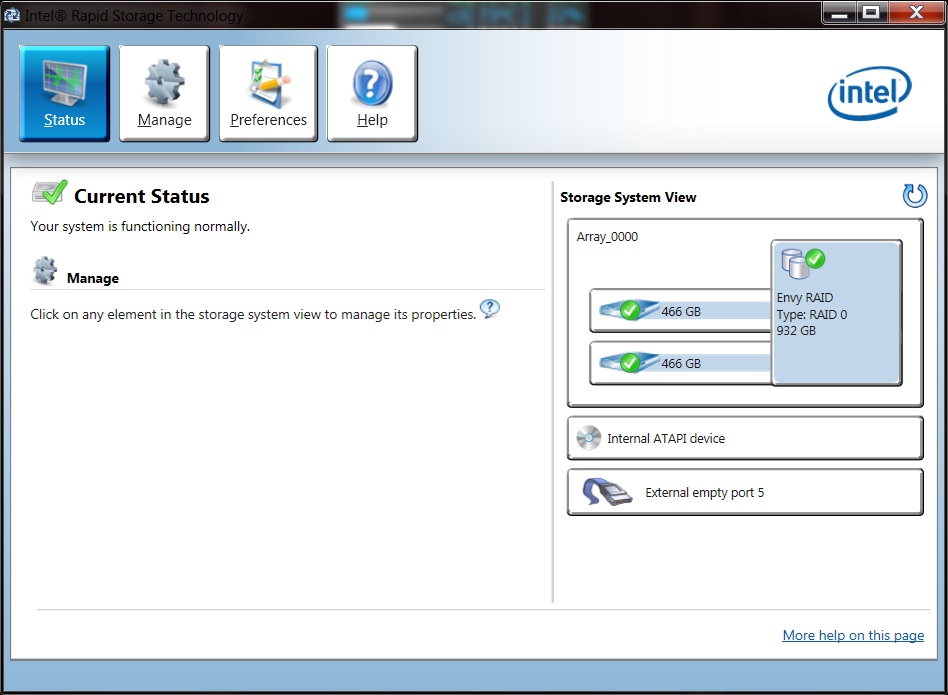
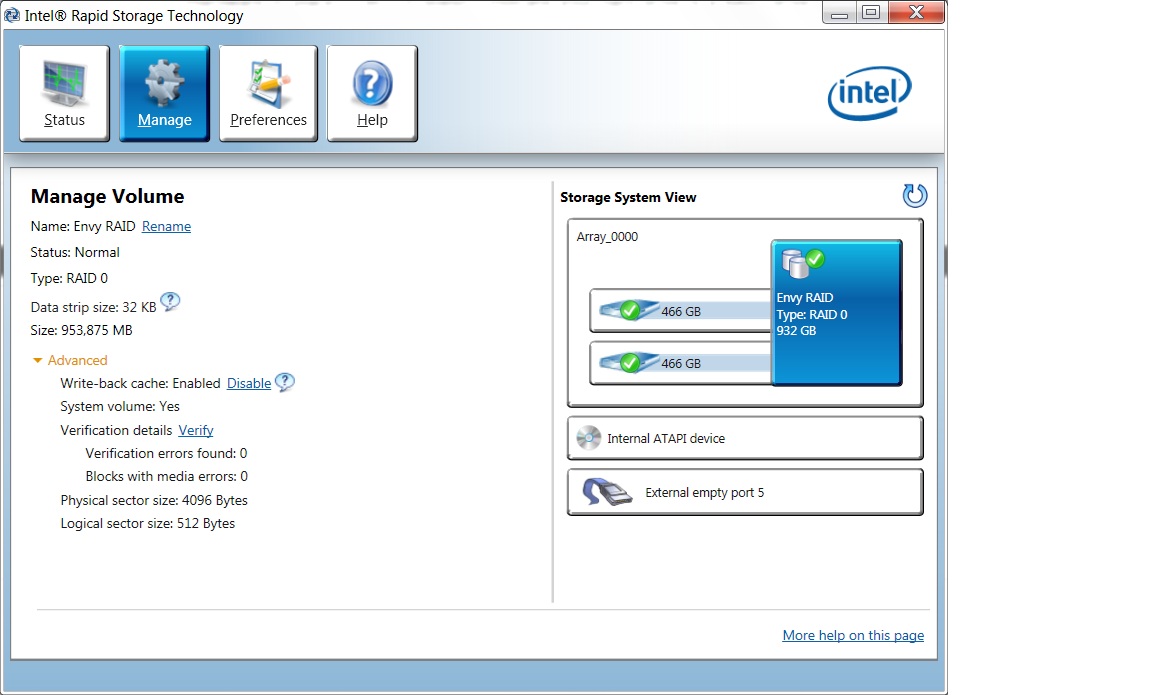
CHAPDADDY65, from what my limited experience is telling me, your hard drive is currently NOT a RAID drive.. You do have the hardware in place to run a RAID drive, BUT your current config is NOT a RAID drive. I compared it to what I have, which is the same software (maybe a different version), and my Envy clearly says "RAID o ARRAY", where yours does not...
In your second graph, it confirms what I am saying, you have the RAID Hardware in place... BUT it doesn't indicate your hard drive is a RAID drive.
The following are clips of how my Envy is displaying under the INTEL RAID software, you can see the main difference.... I hope that makes sense...Attached Files:
-
-
Here is a link to the software you requested. I use it all of the time and have the gadget version residing on my Desktop:
Core Temp
It works flawlessly!
PS: From what your saying, your temps are NOT the problem. I game 6-8 plus hours a day and my temps range between 75-84c during extensive graphics and my Envy never stutters. The max temp for your Envy is 100c and should run below it comfortably. I have actually only got into the low 90's one time and that was when I ran "Prime95" (I believe that is the name), which is a program that runs your system under the harshest conditions to see if it can handle it. I ran it for about 30-45 minutes once just to see and that was what happened via the temps, but even than my Envy never stuttered.
Question, are you using a HP program called "Cool Sense"? If so, which setting are you using and which version do you have? I use performance mode which on the desktop and coolest mode when mobile, but when you use the coolest it will throttle your Envy "BACK" not forward. By the way, I have my Envy set that it uses the 6850 GPU "Always", unless I go mobile and than it auto switches to the Intel GPU...
I still say, you need to do a System Factory Restore back to out of the box state. It will surly fix all of your issues AND if it doesn't, you will know a lot more than you do now. So go for it and get your Envy right! Just my 2 cents worth... -
Okay then, I see what you're saying. In that case, how can I confirm that my Hard Drive is in AHCI mode then? and If it's not, then where can I go inside my laptop to change it to AHCI mode, I can't find anything in my BIOS, and im not experienced enough to change settings in regedit...
-
Couple of things....
1. The RAID controller on the Envy motherboard is either on or off. AHCI runs in either mode
2. If you have the Intel Rapid Storage Manager installed...then the drivers are running AHCI
If you would like to assure yourself of AHCI...you can enable the windows through the registry...and it is NOT difficult:
1. Startup "Regedit
2. Open HKEY_LOCAL_MACHINE / SYSTEM / CurrentControlset / Services
3. Open msahci
4. In the right field left click on "start" and go to Modify
5. In the value Data field enter "0" and click "ok"
6. exit "Regedit"
Reboot and all is AHCI... -
Hello, I just added some print screens to further illustrate what I was saying, you can check those out as well. Since your NOT in a RAID, I would assume your already in AHCI mode, BUT, I am not experienced enough to take you further than I have.
It is time to call up one of the resident GURU's for a helping hand. I'm sure one will come in and help you very soon as they normally check here late at night or early morning... Please keep us posted, so I can learn this with you..
Glad I could help!
-
See I told you one of the Duty GURU's would come to your aid!! Thanks BOB!
By the way BOB, I just did all of that just to see how to do it and I take it that a value of "3" is the value for a RAID config, since that is what mine is. BUT what would the values of 1 or 2 signify? Just trying to learn while doing this little journey and Thanks again! -
Question Guys,
Why is my RAID 0 "Data Strip" set so low at 32KB? Isn't there larger settings that would give you a higher performance? I seem to remember my old HP desktop running a 128 KB Data Strip and it was using the same INTEL hardware with the same Hard Drive sizes (2 x 500GB). Isn't it better to run at the larger Data Strip?
Thoughts/Recommendations?
As always Thanks! -
ChapDaddy65, you may want to check out this link just for the info. A good read from INTEL:
http://www.intel.com/Assets/PDF/appnote/310855.pdf -
To make sure that you are in AHCI mode:
Open the command prompt and type
fsutil behavior query disabledeletenotify
If 1, is off, if 0, is on. -
My desktop is in RAID 0 and when I type
fsutil behavior query disabledeletenotify
It comes back 0 for enabled. -
Mine does as well, under that command prompt, which I have never used before.. See, come here and LEARN!
-
Don't confuse Strip with Stripe...read more here....should help you out
RAID 0 - Strip And Cluster Size -
ChapDaddy65, in regards to why you are not able to access the RAID Boot Menu with Ctrl=I, I believe that is due to the fact that although you have RAID hardware in place, you do not have a minimum of two hard drives and therefore cannot take advantage of the RAID menu, so it just by passes it. My 2 cents on it... Glad we got you sorted out... Hope we helped!
-
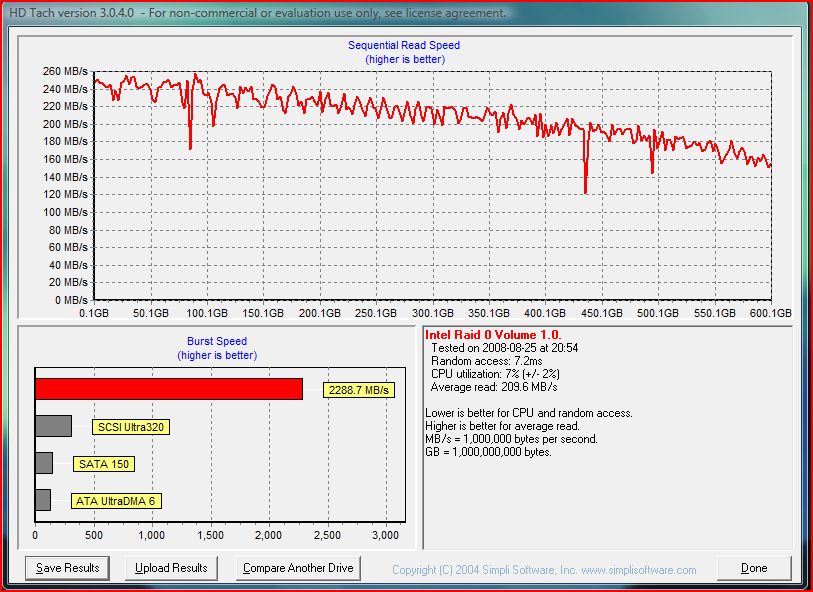
This the performance chart for my Two Western Digital Velociraptors in RAID 0 on my desktop. Note...these are 10,000 rpm HDD's with random access time of 7 ms, where normal drives are around 12-13. Biggest benefit of SSD is that random access time is like .1ms. Velociraptors will be dramatically different from Regular and laptop 7200 rpm drives...but with that said...your transfer rates on your machine will be extremely fast! Wow...just noticed I hit 1500 posts...
Attached Files:
-
*HP ENVY 17 & 17 3D (2XXX series) Owners Lounge*
Discussion in 'HP' started by 2.0, Mar 14, 2011.