 Problems? See this thread at archive.org.
well i was bored today ... so ... i installed windows 8 ... drivers worked from the start but no brightness buttons on ati same as on windows 7... i still hate win 8 i only installed it on a second partition just to see if it worked for me and aparently everything worked just as on windows 7 ...
-
Doggy you have a 2D screen right?
-
yes i have the 2D screen
-
Yer .. my platter died pretty much so I will fresh install and try beta 2 but chances are that it won't work because 120Hz panel.
Could try to force it to 60Hz .. hmmm .. there is an idea. -
when installing the screen went black ... but i let it finish and checked with a flashlight ... when it was done installing i rebooted and everything was ok no black screen no problems
-
I did manage to get beta 1 working. HP >12.1 upgrade to 13.6 beta1 ... it went black .. but when I swiched to intel and back to amd it seems to have kept the 60Hz setting (this is what I think).
After the restart it was black for me ... performed the same trick and it worked. I guess I need to try and force it.
Seems like leshcat didn't know about the different panels which is why a lot of users gave him different reports of it working + not.
On the other hand. AMD changed something during 12.10 which messed with the way brightness worked.
I will try to update him when forums go live. : /
... well at least 60Hz folk have no problems.
Also .. if you change the value for the intel card to F840 .. brightness works properly for my panel on the intel card. Down is minimum brightness (not off) max is maximum. 940 switched my display down completely on the Intel card. -
on the intel card i didn't have to change the value ... it just works by default ... minimum is off and everything ... but on the amd no value seems to work unfortunately ... i tried all of them
-
a little update, my father got a 50% discount code for windows 8 pro so he bought 2 licenses one for him and one for me for 40$ each so now i'm on windows 8 for good ... everything was working great until i installed the 8.1 upgrade ... after that ati card won't wor at all only intel card works .... waiting for leshcat to release the 8.1 driver i seen amd released an 8.1 driver on the 26'th ... hope it comes soon
 ) so if you enjoy gaming don't upgrade to 8.1 until the driver comes !
-
Did you know that to upgrade from the 8.1 preview to 8.1 final, you'll have to do a clean install?
-
you don't have to do a clean install ... you only have to reinstall your apps ... everything else stays the same
-
Man. I can't get the latest leshcat drivers to work properly. Onboard graphics is working, and I can at least go in and out of sleep mode on that. But any time I try to switch to the graphics card, it hits black. I'd be all right with switching in and out of graphic cards, and ensuring that I don't go into sleep when I'm 9gaming because I've heard these drivers are solid otherwise, but I can't even use my card period. Any ideas?
EDIT: This is not worth the headache. Wiped it all and went back to 12.1. I can go to sleep mode, and switch back and forth on graphics to my heart's content. Maybe I'll check in on drivers in six months or so! -
Hi doggydogg! i have the same laptop HP ENVY 17-2070nr!
How can i install the correct drivers on Windows 8? please help me! :hi2: -
Putting this in here because relevant:
Like already mentioned. I have updated the drivers from the "Intel Renesas USB3" to the newer Renesas USB3 but I am really tempted by the new firmware. Here are the changes: (We should all be on FW 3025)
Code:--------------------------------------------------------------------------- Version 3.0.3.4 : June 15th, 2012 --------------------------------------------------------------------------- - The following problems are fixed. 1. Fixed the USB3.0 Host Controller in D3hot didn't send the PME Message when it received any wakeup events. 2. The following issue is fixed by ver 2.1.19.0 of RENESAS USB 3.0 Host Controller Driver, but there was a possibility that this could still occur in Windows 8: [RENSAS USB 3.0 Host Controler Driver ver 2.1.19.0's history] 1. USB3.0 devices aren't detected when users perform the below steps. a) Turn on a PC. b) Enter sleep (S3 state) without connecting USB3.0 devices. c) Connect USB3.0 devices to a USB3.0 port during S3 state. d) USB 3.0 HDD isn't detected. The USB3.0 devices aren't detected after the PC resumes from S3 state. With Windows 7 or earlier, this issue only occurs with driver Ver.2.1.16.0. 3. There is a possibility that the USB 3.0 Host controller cannot notify the xHCI Driver when the Host controller receives the following contiguous Device Notification Transaction Packets: Function Wake Notification, Latency Tolerance Message (LTM) Device Notification, Bus Interval Adjustment Message Device Notification. We have never seen this problem on a real system. 4. Improved the interoperability of UAS devices in Windows 8. --------------------------------------------------------------------------- Version 3.0.2.8 : April 22th, 2011 --------------------------------------------------------------------------- -Modified "xHCI Driver yellow bang problem" reported with "Notification and product restriction information Ver1.3 (IBB-NC1-200008)". We found a very rare case that the issue occur even if the Version 3.0.2.7 is applied. --------------------------------------------------------------------------- Version 3.0.2.7 : November 30th, 2010 --------------------------------------------------------------------------- -Modified "xHCI Driver yellow bang problem" reported with "Notification and product restriction information Ver1.3 (IBB-NC1-200008)". -
My sound has recently started playing only through headphones/jack and does not play on laptop (ENVY 17 2280NR) speakers. IDT High Def Audio Codec driver 6.10.6328.0 details says driver working normal.
Strangely when I choose this driver with Skype, Skype runs the speakers OK but I cannot get any other program to use speakers now, only headphone jack.
Anyone had this problem/know the solution with IDT audio driver? -
I've been racking my brains on the no sound through laptop speakers/only headphone issue for ages, thinking the IDT driver was the problem. Reinstalled it blah blah. Then I noticed on another HP forum troubleshooter, the solution is to blow into the headphone jack port. Whatever dust had got in their had fooled the laptop into thinking the headphones were still in so the speakers stayed turned off. Now, after a good blow job, the laptop works again. I have never experienced this annoyance in any laptop I have ever owned before.
-
This is the funniest thing I have heard in some time. The Envy uses one of those multi ports where mic and headset go into one plug. I assume because the contacts are so finely squashed between each other it could create an issue with dust.
Thanks for letting us know!
on a side note. I have tried a lot of IDT drivers on a fresh Win 7 (non HP) install and only the original ones seem to work properly. The newer once found on the forum give me all kinds of headaches.
On a side Note:
Got Catalyst 13.6 beta 2 to work on the 120Hz screen.
http://forum.notebookreview.com/hp-...g-catalyst-13-6-beta-2-guide.html#post9290542
Brightness control doesn't work ... but at least the driver and switching works. -
Yes, I too have only found the IDT audio driver that comes with the laptop works. The latest listed on this forum (not found on the HP web site either) doesn't work with my ENVY 2280NR.
-
hi, sorry i was on vacation i just seen this post ... there is no special way ton install it, just get leshcats latest driver and install, if the screen goes black during installation just let it finish for a few minutes and then reboot and everything works but don't install the 8.1 upgrade because there is still no driver for it ... i have been waiting for almost 2 months for a driver) only the intel card works on 8.1
-
Hi guys I just my Envy 2070nr and I'm trying to decide whether to install win7 or win8.
Does switchable graphics work with Windows 8 yet? If not i'll have to go back to win7 -
Yes switchable works with Leshcat 13.6 beta 2 on Windows 7 & Windows 8 .. (Not 8.1)
The screen will turn black during installation but should be fine after restart. (wait for installation to finish - use external monitor or just wait).
120Hz screen now work with 13.8 (legacy intel). We haven't managed to get modern Intel driver working yet, but this shouldn't be a problem.
Again. The screen will turn black during install. Wait for it to finish. After install apply FTC values FFFF to AMD card only. Either through external monitor or Safe Mode.
Restart and voila! ... Only disadvantage for 120Hz is that brightness control & wakeup from standby hasn't been found on the AMD card. Only Intel.
60 Hz screens work fine with the value found by DoggyDogg FTC F942 (brightness control works, wake up from standby works).
If you are going for the new driver 13.8 .. I would advise you to wait for the next revision. -
Okay, great. Thanks alot! I had tried Leshcat but when the screen went black I guess I didnt wait long enough for it to finish installing.
My screen is 60Hz. So you're saying I should apply FTC F942 to AMD card only for my screen after install? How do I do that? -
There is a tool when you use the Leshcat Unifl installer called brightness resolver. Normally these FTC settings get applied from the inf file during install. But since HP never updated their drivers and had never given us a new FTC we are forced to apply it manually. Besides there drivers are made for dozens of laptops. So it is really a small issue.
The interesting thing about the blackscreen itself during install hasn't been found. It is completely down to AMD. Sometimes it goes black .. sometimes it doesn't.
Either way. This will be my last AMD + Intel configuration.
Just want to point out again that the black screen issue itself has been found through the use of a proper FTC value and through a long testing of the inf file for the 120Hz model.
60Hz: F942 AMD everything works
120Hz: FFFF screen works - no brightness control /standby on AMD
Intel is fine on both devices. -
Okay I see, thanks again. I'm going to give this a try when I finish setting up my Win7 side
-
I think I'm going to abandon this envy idea and move towards a new duo 13 for my upcoming mobile computing needs
-
There isn't much to abandon ;D.
-
yeah this computer looks DOA to me... agreed.
-
can any of you guys help me find a cheap 2nd hdd upgrade kit for my envy 17 ? i`m talking about the caddy + the flex cable thingy
)) mine came without and i was thinking about getting an ssd for my OS and games
by the way ... just two months since the last cleaning job :
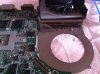
-
I thought all 2070nr's came with two hdds. I'll try to help you find one.
One more question. For Windows 7 should I stick with the same old drivers on HP's site or should I upgrade to Leshcat's drivers?
I'm not getting the gaming performance I expected and see others getting (on Youtube). I'm wondering if my ATI card is damaged. -
after clean install just install leshcat's 13.6 beta 2 they work best on win 7 ... my 2070nr came with only one 750 gb drive
-
I did a clean install of Win7 and thw screen went black. So I used my external monitor to change the FTC value and so far nothing I change it to works. What values should I use? I'm 60 Hz
Sent from my SCH-I605 using Tapatalk 4 Beta -
On a separate note, my working Win7 install with old video drivers isn't performing well. Check out my screenshot.
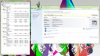
Processor number doesn't look correct to me. Performance is not what I expected in gaming at all either.
Check out my temps. The min readings are after a cold startup. When gaming GPU goes up to ~76
Here's my story. I bought the laptop from a guy who said it kept overheating and shutting down whenever he movies.
So when I got it I didn't test anything..no performance or temp reading or anything. I only booted up to check specs and never made it switch to the ATI card when plugged in.
I immediately repasted the CPU and GPU with Gelid GC-Extreme. I formatted the HDDs and deleted the HP restore partition, switched to NonRaid so I could have the HDDs separate and did a clean install of Win7.
Btw I can see that I was the first to open the laptop. All screws were brand new and tabs really tight.
I updated the bios to F.1C
For drivers, from the HP website I installed chipset, card reader, usb 3, intel management, video and audio drivers. I let HP support assistant install audio and realtek lan.
I think the only thing I allowed Windows update to install was Synaptics drivers. I'm now fully updated with SP1 btw.
What could be my problem with performance? Wrong drivers or not enough of the HP drivers installed?
Sometimes even YouTube HD doesn't perform good enough for a Core i7 and 6850m. -
Yeah the processor seems off. My 2630QM gets atleast 7,4.
Make sure you are not using CoolSense (HP program)
Make sure that power modus is on Full energy....
I honestly don't know what to recommend besides that.
CPUs should have an issue running. -
only the 13.6.2 driver will work with FTC: 942.
The newer driver 13.8 wont work with the same value. And yes .. during install your screen will turn black either way. -
that looks weird ... the cpu should get a 7+ rating ... i'm really not sure what the problem could be ... as for testing after you install 13.6 beta 2 from leshcat run a 3dmark11 ... you should get around 2000 points score
-
No, not running CoolSense. It's pretty much a clean Win7 install. The only HP software installed is Support Assistant.
And yes I always have it plugged in and run High Perfomance power mode
Yes I used Catalyst_13.6_Beta_2_UnifL. I'm staying away from the 13.8 as suggested
Use FTC: 942 for both Intel and AMD? During install do I choose Legacy Intel or...?
Yup looks really weird. I guess it's what's causing my poor performance.
I'll try a fresh install and run benchmark.
What bios are you guys on? Is there a way to get to an advanced menu. Bios options really suck as is.
I really appreciate all the help. I really would love this to get sorted out. I'd love this lappy to serve for two years at least. -
We are all on the latest BIOS I assume. Don't think anyone knows a shortcut or has a BIOS mod for extra settings.
Try modern Intel. FTC is for AMD ... you have to install the drivers first to adjust the FTC.
Not sure what is causing your CPU to fail. Was it like this prior to your reapplying the thermal compound? -
Okay.
That's the problem. I didn't test anything before I repasted... I didn't want the overheating to occur. I wish I had run a Win Experience Index and 3DMark before I repasted.
I should probably redo the paste and try again. I hope I did it correctly. I've been building gaming PCs and fixing laptops for over a decade now though. -
It could be that the board is fried. I am not sure if the heatsink attaches to the chips via one of those blue soft cushion things or not. I never took this laptop apart in that way but when it did overheat I had to get the motherboard replaced once.
Vents were also replaced on another occasion.
Sorry that we cannot help you out. Maybe someone else has more knowledge about this. : / -
Well here's some good news for the processor.
I load bios defaults and rerun the test and...

-
Well I'm going to test gaming again and see if it runs well. Windows Experience Score looks good now and 3D Mark score went up from ~1400 to 1856
-
I am very glad to hear that! Which drivers are you using .. let us know later. Stable ones like advised by DoggyDogg should be 13.6 beta 2 Unifl FTC 942 for AMD to make the brightness and Standby work!
If you want to switch to 13.8... well there hasn't been an FTC found yet.
I don't assume you have knowledge of IDA? We need someone to debug some files to find out how to calculate out the FTC.
One more question. You mentioned that you applied paste to the CPU .. let us know how the temperature goes etc. Did you have to put any copper into the laptop? .. I am curious about this since I might want to do this when I run out of warranty. -
No, I have no knowledge of IDA actually.
Me too! I'm really stoked right now. I was worried my gamble buying this laptop didn't pay off.
I'm using the old drivers right now on the 7200rpm drive.
Tonight I'll do a fresh Win7 install with 13.6 Beta 2 drivers on an old SSD and see what performance I get.
I just tested gaming and things seem to be what I expected. I tested Modern Warfare 3 on 720p with Extra high textures and got an average 42 frames.
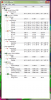
Now that everything seems to be working properly here are my temps after less than five minutes gameplay. Max was 82 C. How do they compare to you guys?
-
well since it's summer and damn hot where i live i can't really say but they look ok to me ... mine reached 94 degrees today in mass effect but like i said it's like a sauna where i live
and i play on 1080p with everything on highest settings
)
-
Yup that's what I figured. I just did about 30min of Modern Warfare 3 and my GPU got up to 95 and CPU 92. I'm in the Caribbean and it's a super hot summer. As long as I don't go above 95 I'm fine.
Sent from my SCH-I605 using Tapatalk 4 Beta -
if you get to 98 it shuts itself down anyway
))
-
If that happens I'm gonna try some more tricks. I'd mirror sand the heat sink for better contact, repaste and then use heat shield tape to reflect more heat out of the casing, like I saw someone else do
Sent from my SCH-I605 using Tapatalk 4 Beta -
you could just buy a notebook cooler with a 220mm fan and that would cool it down a bit
-
I got a high temp force shutdown last night while playing Alan wake. Gonna do some more modding in the future.
Yeah the bigger cooler would work better. I bought the Notepal mini because it has two little fans that I position directly under the CPU and hdd but they seem a bit weak
Sent from my SCH-I605 using Tapatalk 4 Beta -
try getting a 220 one with at least 800 rpm and it should do a little better than those little ones and it will be a lot quieter you won't even hear it
-
Is the heatshield tape between the heatsink and the cpu?
*HP ENVY 17 & 17 3D (2XXX series) Owners Lounge*
Discussion in 'HP' started by 2.0, Mar 14, 2011.


