 Problems? See this thread at archive.org.
Try the last Win64_152818.zip from intel site.
-
Sorry Fritz. I had a lot going on lately:
I left the resolutions like the originals on the Intel driver and only included the important stuff.
https://mega.co.nz/#!wB8SXQzJ!fJeErSiauMycaqNtnjeXVxz75ts06TVh1NgrErrGMaM -
@VonCrisp
Clean windows 8.1 install.
Everything disabled.
Enabled network and enabled the windows update search ( but not apply the updates).
Select just the intel and amd updates and apply.
( from this point, no swith)
Manually installed the windows update catalyst panel.
From this point the swith work, 120Hz to.
Amd to intel ok, intel to amd not ok.
Disable the windows certificate.
Installed the intell Win64_152818.zip driver with your changes.
Amd to intel work.
Intel to amd work.
120Hz work.
Later install my own changed catalyst 11.8 driver.
AMd to intel work
intel to amd work
120hz work.

-
Awesome!!! Good to hear!
What I do wonder about is how you got switching (AMD to Intel at least) working on the Windows drivers.
I will try to replicate it. I have heard of such reports before but switching never worked for me with unchanged Windows drivers.
You definitely mean switching through Catalyst Control Panel? .. or that manual switching through Display Properties?
Quick update!
I have Installed the latest Intel drivers (only Intel on this OS) just to try out the 120Hz. It works pretty well but seems like Intel makes you switch back to 60Hz when not on the power supply. It is a brief black screen. I think this is controlled by the FTC and can be turned off. An Intel power saving feature I guess.
Other than that .. sharp eyes dude! -
"... What I do wonder about is how you got switching (AMD to Intel at least) working on the Windows drivers.
I will try to replicate it. I have heard of such reports before but switching never worked for me with unchanged Windows drivers.
You definitely mean switching through Catalyst Control Panel? .. or that manual switching through Display Properties?
..."
CATALYST control panel. Or when you change to switch with energy power to.
No idea why.
But when you install the windows driver from windows update, the intel install together the panelto to but the amd just install the driver not the catalyst control panel.
( obs, when I write I install catalyst I mean the catalyst control panel. Not just the video card drivers).
But digging inside the AMD driver from windows update ( the one I post you), we have the ccc2_install.exe file that is the entire catalyst panel ( and catalyst driver, like video decoder, panel etc.)..
Try it. install windows from scratch.
Disable everything when installing, ( disable the updates, turn everything off) and local account.
After finish the install turn on the update search but not the update and install, just the search by update.
turn on the remote desktop to, in case of black screen.
After install both intel drivers ( the acpi one and video one) and amd driver restart the computer.
Then inside the oem driver look for "ccc2_install.exe" and install it. You will see that driver installed change and the catalyst panel show up.
OBS; 3 days ago a new windows driver was released, ( date from 3/11/2013) but just after disappear from windows update.
Now that we know this. We need just the catalyst from amd moded to recognize our card and install latest drivers and your small change from intel driver side.
bingo.
If you have any doubt let me know.. or call me in g+
;-) -
Hoo.. If you do the changes from last catalyst to from amd site 11.8 if I'm not wrong. I do a clean install to test.
-
A new windows driver ... interesting.
I definitely need to test this soon with the new driver if I can get a hold of it from win update. When I did this (as you described) when 8.1 came out it didn't want to switch. Maybe they updated drivers 3 times now.
Either way... the AMD driver is also modded with some parameters to make it work for the 6850m. ... but maybe this isn't required anymore ( or you have had traces from old drivers left on the system).
Anyway! : D Certificate should be very soon and we will be able to put these changes into the new UnifL driver! -
Hey guys,
please help me finding the error. I got an Envy 17 - 2001eg and made a new install from Windows 7 Home Premium 64-bit, the first thing i wanted to do was the 13.6 beta 2 driver by leshcat. The installation was smooth and no problem, but now the FTC F942 for the 6850m doesn't work. Knows someone a solution? -
Hmmmm very interesting issue. 13.6.2 defo worked with F942 before?
We could do a test. I have a theory on what is going on. -
Should this work on the 60hz model as well? If this works you will be more awesome than you already are.
-
No it didn´t, first i tried it with Windows 8.1 and failed also. Then i formated the SSD and made a new try with Windows 7.
-
My Intel "fix" works for 60Hz as well but I would like to know if official Catalyst drivers 13.11 9.2 beta / Windows Update AMD + Intel fix will work without any mods.
Please be so kind to try!!!!
Obviously you will not get 120Hz on a 60Hz screen... but maybe you will not need modded AMD drivers any more.
PS. Make sure to clean if you have UnifL or previous switchable drivers installed!
According to DoggyDog F942 worked only on Windows 8 with 60Hz screen.
I also have another report for 13.6.2 where F842 worked for Windows 8 on a 120HZ screen!!! -
I got a 60Hz screen, so i will try with Windows 8.
-
Windows 8 is also different to 8.1!!! Don't forget!!!
So FTC could be different but I have no confirmation since there aren't many people on UnifL with 6850m -
No idea...
My model is the 3d.
but its a card thing not a monitor thing. Why not? -
All install i'm doing are 100% from a clean windows.
100% format the hard disk.
You need to manually install the ccc2_install.exe from oem drivers from windows update. -
I got it .. for me it actually installed the CCC itself but I have had a couple of occasions where it did not.
Looks like AMD is fixing their drivers! Suddenly the 5650m is switching without issues again on the latest betas... took me 1 month to find that fix for older drivers on that card.
The reason I am so surprised about switching working on official mobility is that the PXAI parameters are not in the INF for the Manhattan series (5650/6550m/6850m). This probably means that they directly integrated them into the kernel of the driver.
However. What is strange is that Intel to AMD doesn't work without modding the Intel driver. Where as there is no need for this on the 5650 any more.
Edit: To confirm
Clean Windows 7 modded Intel Drivers + 13.11 9.2 = Working switching
I simply cannot believe that AMD has finally gotten of their lazy bums and integrated switching for this card. This is simply amazing. It is defo integrated now into the kernel and not just part of the INF which will allow UnifL to really concentrate on other problematic areas.
Of course it doesn't work properly without Display1_LVDSSetTimingControlFlags but this is ground breaking for AMD.
It only took them 2 years to fix!!!! WOW.
Okay so I guess I need to try and fix the brightness controls next. I can currently only control Intel but not AMD on Windows 7. I will also look into brightness for Windows 8.1. -
"... The reason I am so surprised about switching working on official mobility is that the PXAI parameters are not in the INF for the Manhattan series (5650/6550m/6850m). This probably means that they directly integrated them into the kernel of the driver.
..."
Or Who is doing the registry changes is the ccc and not the inf driver.
the catalyst or ccc already install the "PX Profile" program by itself..
"...
However. What is strange is that Intel to AMD doesn't work without modding the Intel driver. Where as there is no need for this on the 5650 any more.
..."
the oem driver seems specially changed to our cards.
If you force the amd catalyst driver install from start ( force I mean manually install the inf drivers) from latest beta drivers, later when you do the update search the driver that will show is another one. The oem driver will not show the "6850m"but some kind of generic AMD advanced graphics.
"... Okay so I guess I need to try and fix the brightness controls next ..."
From my knowledge. bright is not a VIDEO DRIVER side thing but an ACPI problem. If under amd its not working and intel yes. something with the ACPI table is @#%@#$#...
Under the *.nix world the bright control is 100% under control of INTEL ACPI. 0% to do with AMD. In fact its possible disable de amd card and everything will work fine.
When you do a clean and local install without the update and same after apply all the updates manually, the right desktop yellow flag show us there is 2 warnings. Seems one of them are the acpi drivers missing ( will not show under windows update search). when you do a click in both they redirect to the 2 hp pages with .exe files. One of the files is exactly the ACPI driver matrix.. Take a look.
-
The switching configuration is done by the INF (the main purpose for UnifL). At least it used to be. AMD used a new switching method for the enduro cards 7xxxm and up which was integrated into the driver kernel. The kernel would create the right parameters. Now they have implemented the same switching method as for the enduro line (it is similar in a lot of regards) into the kernel so no parameters for switching are needed in the INF since that is now done automatically.
The brightness control (and not only that) is controlled by 2 factors from the drivers point of view. Through FeatureTestControl and through the driver kernel. I could make the 6850m brightness work right now with the old FTC just by transplanting the kernel. However that would remove the purpose of new drivers. Each new kernel branch has a new FTC value that should work, but this is unknown to us mortals. Reverse Engineering knowledge is required for a calculator.
You are right in saying that Intel controls this since it is an inherent Intel registry key but which also gets uses by AMD. Depending on how you have it configured (hybrid inf/ amd + intel in one - will allow both drivers to use the featuretestcontrol if on dynamic/fixed switching for example) However, you can also have 2 different FTC values for Intel or AMD allowing one card to work but the other not.
I will look into the ACPI driver that you mention but I didn't find any problems using drivers without any extra Intel drivers on a Windows 8.1 VHD.
We can sort this out Fritz. I really believe in that!
On another note: I am working out some kinks from my trials with these new drivers. We used to be able to find FTC values that would work for the AMD card on the 6850m. I guess there is always a smarter way ... IDAPro etc. -
Yes.. Reading here from *nix viewpoint the intel have total low level control into backlit "found backlight control interface intel_backlight (type 'raw')" this mean some sort of acpi specific from intel..
And Can I give you another news? ( maybe you already know it).
If you install just the intel+amd driver from windows update and not install de ccc manually how I'm doing, The switch work 100% and 120hz to. . Just need to do some ticks..
First the windows resolution panel already show our panel being capable of 3d ( Already do a test using powerdvd 13.
Second. Inside the windows display driver ( the system) panel. If you use the button to enable/disable hardware ( the amd in case ) everything work 100% ;-)..
Maybe Windows 8.1 is walking to some sort of unified muxless mode out of box from amd or nvidia.
;-)
The gotcha now is to do the newer intel drivers ( from hd 4000, hd5000) work into our cards. lol
Just waiting the unifil driver certified.. -
I haven't played with 8.1 for the last week or so but I did notice the Intel driver forgetting about 120Hz at times. (Windows 7)
I added LVDS after the Intel install (so I didn't really mod the driver). It is working but I have seen some black screens and am trying to debug it to find out what I did wrong or right. I think I messed it up with FTC. .. Still playing with it but it works with the inclusion of LVDS after install .. just something is giving me black screens. I should really reinstall to do a full check.
You might wonder why I haven't got 8.1 as my main system (so do I)
But you are correct. 8.1 had a huge overhaul in the way drivers work. (we consider it as a new OS in terms of graphics drivers) Most of our issues with UnifL happened because of 8.1 and AMDs slow moving manner.
UnifL used to mod legacy support into new Intel drivers etc but it is a bit messy. I guess it is something to think about for the future.
Station Drivers has newer Intel drivers btw! I haven't tried them yet but there doesn't seem to be a shortage. -
Being a windows hater ( yes i'm)...
From low level side. Windows 8.1 kernel = windows Server 2003/2008/vista kernel.
windows 8.1 still the same mess from server Server 2003/2008/vista plus cosmetic changes.
And I really know What i'm speaking. lol
doing the correct change in drivers everything from Server 2003/2008/vista will work.
Most of OEM into legacy driver from 8 and 8.1 still from windows vista.
Then. Its because i'm using *nix since 1994 ;-) -
I can confirm the 13.11 9.2 switching works on top of stock HP graphic driver, however backlight doesn't work, brightness resolver is needed. It's strange that when I installed 11.11 on top of hp graphic driver, the backlight and brightness adjustment work. I wonder what went wrong in the latest driver.
-

How do you guys keep your Envy 2xxx cool?
I used to get 30C at idle when it was new,
2 years passed by the laptop is getting warmer,
I clean the fan once a week, also use a cooling pad. -
30C?
Nor using my super pure cooper heatsynk plis 2 internal coolers from my crazy almost 0.4Kilo moded hetsynk I cant get this same when idle. Maximal is 34 Celsius and when non hot day. -
Mine is all stock, of course I get 30C in the winter, and only when idle, it could still get 80+ while gaming.
-
I'm anxiously awaiting someone posting they got the switchable graphics solved in win8.x
-
Sorry I have been busy doing reports over on UnifL.
Madness with the new drivers.
Switching does work on 6850m with the mod I posted on a couple of pages back. You need to enable Test Mode / DSE off:
Replace INF in the Intel 3223 Driver with my one.
https://mega.co.nz/#!wB8SXQzJ!fJeErSiauMycaqNtnjeXVxz75ts06TVh1NgrErrGMaM
I am working out some kinks. And would like some more input to be honest.
On clean official 13.11 9.2 + 3223 Intel does FeatureTestControl F942 work for brightness control on AMD? (without the mod)
Certification process is taking a long time btw....
I am testing some more things with the 6850m. -
so brightness work perfectly just like stock on both hd3000 and hd6850m right after i install it.
but when i restart the notebook, backlight was on in the password screen but got turn off after that,
then I had to change FTC to 942 on both video cards, brightness work but half broken.
I installed 13.11 on top of stock hp driver, then install 3223 with your inf. -
hold on .. I am not too sure on what you are saying.
So when you install Vanilla Official 2992 + 13.11 9.2 =
"brightness work perfectly just like stock on both hd3000 and hd6850m right after i install it."
Then you restart it and you get:
", backlight was on in the password screen but got turn off after that,"
Then you decided to change the FTC to F942... could you please be as detailed as possible about the results of this! Very important!
Then completely unrelated to this you did this:
HP + 13.11 9.2 + Intel mod correct? .. What happened when you did this? -
I have an all hp stock envy not clean install.
I install 11.11 downloaded from amd on top of hp driver, brightness worked only through windows power option, back light was fine,
then i updated to 13.11 downloaded from amd. the back light turn off entirely, so i changed FTC to ffffff.
I saw your post, hence, I installed leshcat 3223 with your inf in it.
The brightness worked the moment when the leshcat 3223 installation was completed,
it asked me if i wanted to reboot my pc, but i played around with it before i did that.
I was able to switch from 6850m to hd3000, the backlight was working fine on both cards, I could adjust brightness with f2 and f3.
then i reboot the computer, it booted to my password screen with backlight, i entered my password, turned black.
so i use a flash light to guide myself opening brightness resolver change ftc to f942 as you suggested,
the brightness is broken, the steps jump around, i rather have nothing than have broken function on my pc
so i changed it back to ffff. Things are working fine so far, I could switch but not adjusting brightness.
When I say switch I meant disabling one or the other in device manager, CCC switching is not working.
![[IMG]](images/storyImages/XrREFup.png)
i hope this helps
Edit:
I found that after installing 3223 driver, my laptop thinks I have an external monitor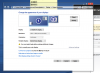
which does not physically exist, but I was able to adjust brightness on 6850m with "extend these monitor"
but not when i choose "only display on monitor 1" -
![[IMG]](images/storyImages/xIAyJBW.png)
My notebook is cool again after setting minimum processor speed to 15%,
I could still play games without lagging but much cooler keyboard.
Perhaps HP stock cooling wasn't that bad afterall.
The machine has been turned on for about 4 hours.
the lowest it got was 28C but idle at 30-35C. -
Some good reporting 021311! It reaffirms some troubles I was having. I will let you guys know on the progression of a fix.
I might have some more questions later 021311! -
Its working .. Read the posts
-
Hoo, your cpu is one i5-2410 I'm on i7-2630QM plus near 25W from I5..
-
Sad, but is true..
I'm with 3 envy 173d, Sold 2 and now just one...
And HP never more... -
Do our devices work with one of this cpus? someone can confirm?
2960XM
2920XM
2820QM
2760QM
2720QM
2715QE
2710QE
2675QM
2670QM
2635QM
2630QM -
@VonCrisp
Try to change the monitor order.
Under linux we have something similar. the XRENDER get the radeon being the primary and intel secondary. Then we have the intel like virtual display.
When we change the order everything work well. -
Extreme caution when touching the upper left side board near the monitor connector and power button connector.
The components there are bad soldered. some boards they barely are glued on the board ( bad manufacturer). -
I have the 2630QM (germany only had this CPU) In the US there was a more powerful CPU available. 2820QM maybe?
Yes I started thinking about this too!!
I want to try out if I can do this. I have also noticed that brightness control works on the AMD right after install. Some very awesome observations people! Honestly at this point I will take any help I can get to finish this.
Interesting thing to note is that on older AMD versions and laptops with 60Hz the "LVDS" fix (which is also found in the original HP INF - on the Intel side) wasn't needed on switchable drivers (modded with switchable parameters).
These laptops still encountered a black screen during setup but only needed the right FTC for that specific driver branch. I think 13.6.2 needed F942 to work.
Either way. I will try to figure out if I can move the screens somehow. -
I installed a 2670QM and a new heatsink (instead of i5-2410M) and it works flawlessly...
-
north america CTO edition use the 2630qm to ( the one i'm using just now.
I'm to try one of them..
2960XM
2920XM
2820QM WORK. but the extreme edition? Maybe? -
There is only one way to find out ; )
BTW I have been doing some short tests on swapping the monitors "around" but nothing solid yet. -
How do you install that zip driver? I've fresh installed win8 a handful of times tonight and cant figure out how to do that part.
The only way the built in display works is if I disable and uninstall the 6850 card and go with the built in graphics. -
There is an exe within that zip. Don't forget to swap out the INF files and turn on Test Mode.
-
I must have the wrong zip, the only file in the zip I got was a .inf file... whats the link to the right one?
-
AMD Enables Legacy Switchable Graphics Support? ← leshcatlabs.net
HD 3000 link from leshcatlabs: extract, Replace Intel inf file with modded 6850m inf.
Turn on Test Mode & Turn off DSE.
Install Intel and then AMD. -
For those who are still on Windows 7, I find it much better to stick with HP's stock driver and overclock it, rather than trying to get the latest updates from AMD and Intel for better performance.
I overclocked mine to 675mhz/1000mhz, temp in CPU and GPU stay about the same, but much better performance.
*HP ENVY 17 & 17 3D (2XXX series) Owners Lounge*
Discussion in 'HP' started by 2.0, Mar 14, 2011.


![[IMG]](images/storyImages/8psFr3Z.png)

