Problems? See this thread at archive.org.
We mean Very High.
Please do that, and if the FPS turned out to be below 20 try decreasing the resolution and removing AA but keeping same other settings.
Thank you!
-
-
Hey all, I've been looking for a desktop replacement, and I've narrowed it down to the Envy 17 and the Asus G73. My gut has me leaning toward the Envy, as I wasn't particularly impressed by the lower end G73 that I played with at Best Buy. Granted, If I went with Asus, I'd go for the G73SW-A1, which is a much better model, but I still think the Envy 17-2090NR is a better deal overall. Does anyone know if HP will run any good coupons in the near future, so that I can custom order direct or am I just better off going with the pre-canned 2090NR for $1549 and no tax? I'll likely swap one of the HDDs for a bootable SSD for the OS right away, so the 5400rpm twin 750gb drives really isn't a concern. Any other things to be concerned about with the 2090NR?
-
anyone wanna be a guinea pig and see if ati flash will allow you to change the bios on the 6850? none of the overclocking tools lets you change any thing
-
Hello (From Sweden
 )
)
I'm new here and I really hope I can get my question answered here since this seems to be a very good forum for laptops. Anyways.
I'm gonna buy a Hp Envy 3D 17 and I was wondering, I found the 1197 model and then I read everywhere it had heating issues and also read about a new model coming out with something called sandy bridge (I'm not a pro at these things) And I checked Hp's website here in Sweden and found a model called 2090 and it had some changes to it from the 1197, so my question is, is the 2090 the newest Envy 17 model? And what is the major changes from the 1197 model, also is the i7 CPU in the 2090 still a quad?
Hope my questions aren't to stupid and that I'm in the right place for em, thanks in advance
/Marie. -
Very High at 1920x1080, in Full Screen and AA off, Vsync Off, hovered between 16-21. It wasn't until I came down to 1280x1024 that I got 24-28 FPS.
-
As a desktop replacement I think you would be better off with the G73. I've had a G73, G53 and currently the Envy 17, and although I'm keeping the Envy it's because of the portability factor. I need a laptop to carry around with me to class on a daily basis and the G73 along with the power brick was just too much for me. But as a desktop replacement the G73 is great because of its build quality and efficient cooling. The Envy can get hot towards the left of the keyboard where the vents are, but the G73 never felt even warm anywhere on the keyboard.
-
Many thanks bro. +1
-
Is it possible to default to intel graphics on bootup?
I bought that Accel mini-dp to DL-DVI adapter to support my older 30" monitor - it works fine on the intel integrated graphics but it randomly blanks on/off when running in AMD mode.
I make the switch to intel graphics after bootup, but before it gets to that point I often have to open the lid to logon or even pull/plug the mini-dp cable just to see what's going on.
I'd like to disable the discreet GPU altogether if I could - it seems like the bulk of the stability issues I'm having are related to that AMD/intel tug-of-war going on in there. -
Yes you can use MSI Afterburner in the unofficial overclocking mode (Instructions : HOW TO: Enable UNOFFICIAL overclocking mode in MSI AfterBurner - Guru3D.com Forums) to overclock. I got over 14000 in 3dMark 06 with the settings below.
![[IMG]](images/storyImages/msiafterburnero.png)
By spartanjet at 2011-03-22 -
I have solved the problem with instalation of the SSD by next steps:
1) installed the System from recovery discs;
2) have the problem, error message "No bootable device -- insert boot disk and press any key".
3) used the Bobmitch's guide for breaking up RAID array (Thanks Bobmitch), method with first recovery disc, but I have to load the Windows from the recovery disc and after go to dos window where I was able to run the commands c:\ BootRec /FixBoot
c:\ BootRec /FixMbr
4) that fixed the problem with the boot disc, and the laptop started to boot and install Windows for the first time from SSD, but after instalation the laptop shutdown itself each time after it starts (no idea why). Have tryed different types of loading (inclusiv safe), but with the same result
At the end I have burn my MSDN Bootable Windows 7 Profesional on DVD and installed the clean Windows, after that have to install all drivers, TriDef, ...
Hope this will help smb in the same situation.
-
Another thing, does this CPU Intel® Core i7-2630QM
2 GHz, 6 MB L3-cache have Turbo Boost? I read that the 1197 model did have and if anyone knows if this has too it would be great to know since I can't find any info, and if it's Sandy Bridge in it. Of course it's about the Envy 17.
Would really appreciate to know since I'm ready to buy it as soon as I know ^^
/Marie. -
For Slotti...
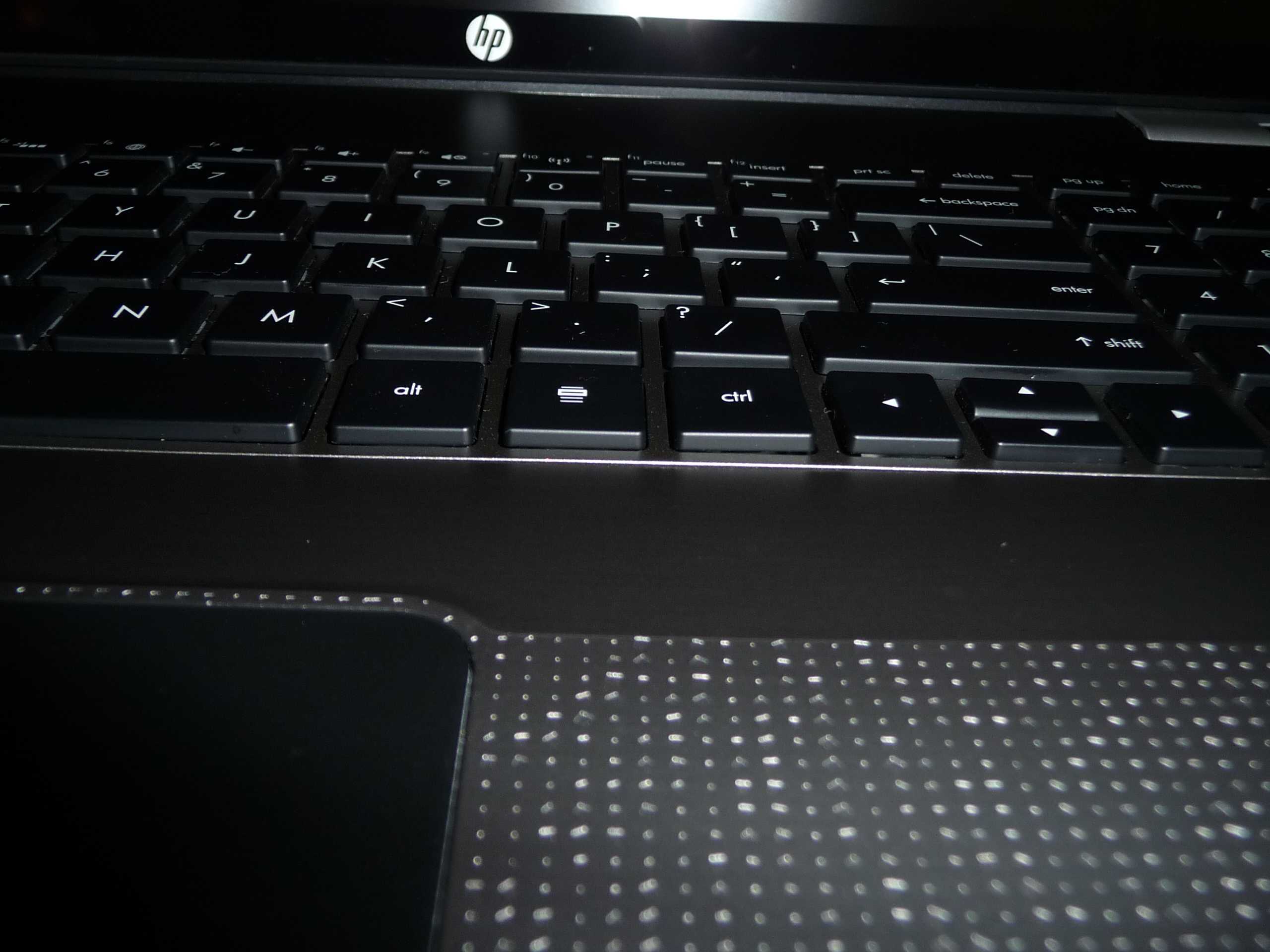
Here is a few more keyboard photos...thoughts???
Just got off the phone with Tech support...they want me to box the machine up and send in for repair. Why did I purchase a 4 year at home warranty? According to the tech...only customer replaceable parts at home. So called Customer service...who said AT HOME means at home. Then proceeds to offer me a replacement unit since the keyboard seems to get progressively worse. I sent an email to my HP contact for an opinion...but it looks like this machine may be going back to HP for a refund. Do I want another Envy...probably NOT! Do I want to deal with HP beyond this...probably NOT! Too many confilcting pieces of information and none ever seem to match up. We'll see what my Customer Relations guy says on Monday. Otherwise...sionara Envy 17 3D!!!
On the photos...note how the control key is tilting...and in front of the space bar gets a little higher each day. Wasn't this bad in the beginning...but seems to worsen slightly over timeAttached Files:
-
-
Bob could you put like earlier pics to compare?
Honestly though I'm not seeing what the terrible issue. Perhaps it will be easier to see the difference once you have earlier shots of your keyboard but judging by those last 2 it seems fine to me.... -
Check post 3413...pg 342...would like you opinion...Didn't seem as bad three days ago...
-
Yeah I just looked and they look exactly identical man....you may be looking at it too hard and tricking yourself into believing issues that aren't even there.
But depending on much time you have left to return it give it a couple more days and then post another set of pics...
But seriously if that's your one and major concern Id say stop tripping and enjoy your awesome laptop!!! -
The center of my keyboard, when pressed down, does the same thing you describe earlier. Kind of like there is a cushion underneath. Actually, it's like that at every point on the keyboard but more prominent in the middle. If I REALLY look at from the bottom side view, it's VERY SLIGHTLY raised in the middle. IMO, this seems normal and is not really an issue.
-
Oh that's right! I completely forgot about that post way back. I'll try out tonight and see if I can improve much upon P1900 in 3D Mark 11.
-
Not positive since you are using an external display, Have you tried it without it? I have mine using only Intel graphics every time I start, but I don't use external LCD.
-
Glad I posted. Mcchea said the same thing...what drives me nuts is that the entire keyboard isn't uniform. There are raised spots and some look recessed almost perfectly. As Mcchea says...almost like there is a cushion. I don't want to delude myself...but the other issue I need to deal with is that I bought a 4 year AT HOME warranty and the tech is telling me that these machines are supposed to be boxed up and sent in. Then Customer service says that the tech is wrong...so I get two different answers to one question. Hopefully my rep at HP can clarify that for me. According to the contract item 10 says that someone in the household over 18 must be there when a tech shows up...so what is it. I need to get that clarified and I will be OK. Right now...don't know who at HP is side talking...
I'll keep you posted. I had the wife look at the keyboard....she sees what I am complaining about. My pictures don't do it right...she will try something later. I have to tell you ...the LAST thing I want to do is return this machine...wireless...perfect....screen...perfect....no throttling (I tweaked this baby up with AHCI, etc....)...getting max performance out of the 6850 with a 3D Mark 11 of 1947 with the 11.4 Cats. I downloaded the new Synaptics touchpad drivers and have scroll ability...this machine could end up being that good. A little imperfection with the keyboard won't kill me but if it requires replacement at some point, I paid for in home and want in home...not some box to ship it to another city where someone wipes out my data. I use for recreational, but my business is on this machine, too. -
I just hooked up my Bose Companion 2 speakers and I'm getting AWFUL interference. Anyone else having issues plugging in speakers? It's a pulsating buzzing sound, even over the music.
Having lots of problems like this. PC even froze twice on me twice while web browsing.... -
That really PISSES ME OFF that they are offering a 2 x 7200 RPM hard drive combo now. Yea...I can return my 2 x 5400 ENVY after doing back flips to get 30% off on it but really do not want to go through the trouble...just wanted to vent...
-
I haven't been using speakers....but I have been using Senheiser ear phones and they sound great. No buzz...nada
-
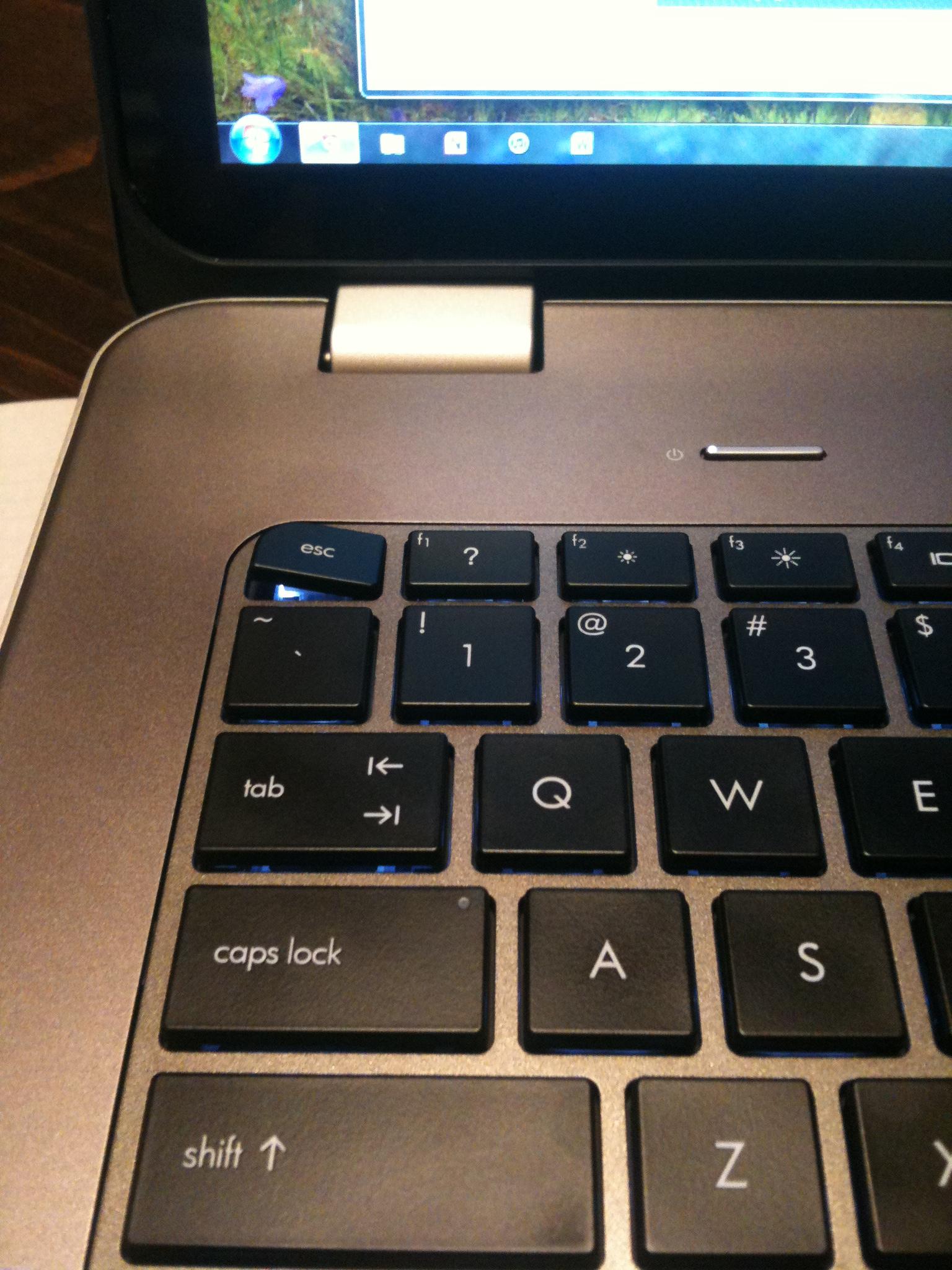
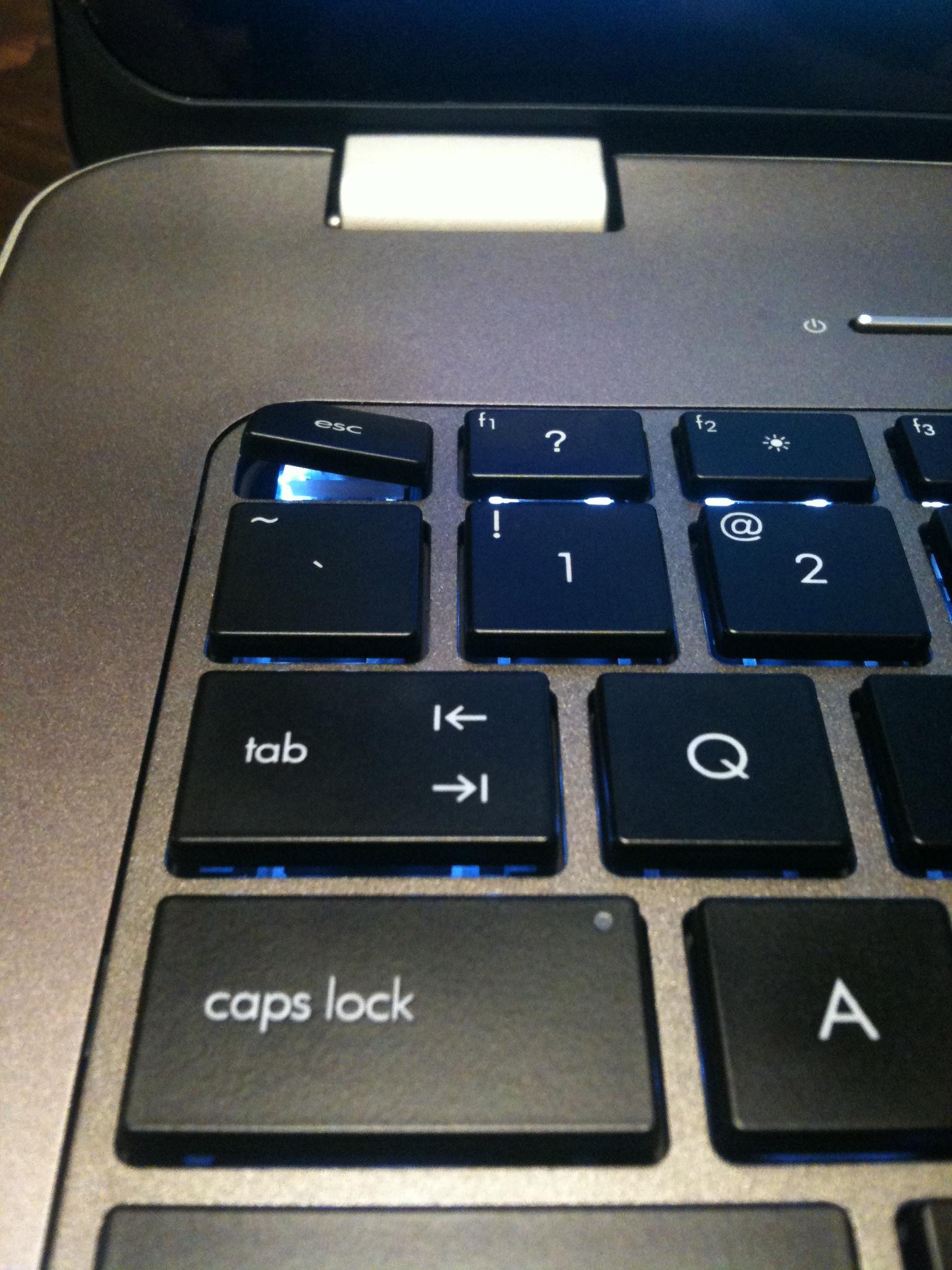
Hey guys, I think my escape key is taking its name a bit too literally:
It pops up like that when i hit it on the lower right hand corner, then I just have to press down on it and it clicks back into place. lol.
Law school finals are finishing up this week, I don't have time to send it back to be fixed/replaced, maybe next week tho. I've only had it for a week, and like bobmitch, absolutely love everything about it. Screen is amazing. 6850m is solid, plays all my games very nicely. And although it really isn't anything serious, I just don't want it actually coming off and not being able to get back on. -
The key itself almost looks like a cap that fits over a bottom piece. Wow...again...I have to ask...did you purchase the extended warranty? If you DID...call tech support and have someone come to you. Boxing up is crazy!!! Perhaps since you didn't have it all that long...even without the warranty...tell them you won't return it if they will send a tech to you and replace the keyboard...Try it...what can you lose
-
Yeah, I think I'll give em a call next week, I'll still be in my 21 days, didn't purchase an extended warranty, but obviously have the two years (+1 year on my AmEx). Maybe if I complain enough they'll just send someone over. Good call bobmitch.
-
What? That is not even funny. Seriously....it was like that from the first time you pressed ESC? If it has a broken bottom piece where it can't properly sit on, then maybe you can just order the ESC key...I'm sure it costs pennies to HP and they should not mind shipping just the ESC key, but as we know...some silly person there might say just send the laptop to get fixed! LOL
KJ
-
Eh you knew they would offer 7200 rpm options, you chose not to wait.
-
Are you saying that they are telling you you have to ship the computer in even though you PAID for in home service?? Let me know what happens there - I can't imagine that this is even a question - they should be dealing with these types of questions every single day - very odd. I am going to need someone to come out and fix my right sided USBs and mem card reader that isn't working - if I get that kind of response when I call....I'm going straight up to a supervisor and asking them if they are even bothering to put their level 1 techs through any kind of schooling before they throw them on the phones!
-
Dude..he was just venting...seriously???
-
You tell them Peaches07! Yeah, seriously, I am very surprised they told
Bobmitch to send it in.... Now I'm curious and going to see if I can find the
"fine print"..aka/terms & agreement, regarding in home service..
KJ
-
Bobmitch, here you go: HP's 4 Year In Home Care Plan
http://www.shopping.hp.com/webapp/shopping/popups/product_detail.do?CTOPopup=Yes&product_code=UN079A
In a nutshell..... "What's included:
Protection from damage caused by drops, spills, and electrical surges
Convenient technical support in your home or office if issue can't be corrected remotely
Diagnosis of the problem with an HP representative over the phone, which may include sending you an easy-to-replace part, scheduling a visit to your home or office, or, in rare instances, sending the PC to an HP-authorized repair site1
Coverage for hardware parts and labor for up to 4 years*
Round-trip shipping
Expert 24 x 7 toll-free phone, real-time chat, and e-mail support
Technical assistance with PC setup, troubleshooting, and spyware and virus issues"
Looks like you should be ok. Don't know about those rare cases, but from your pic, I don't think its one of those send the laptop back issues.
P.S. Obviously it is way cheaper for HP to tell you to send it in, then pay a qualified computer tech to go to your home and spend God knows how long to fix the issue.... You payed for the service, you better darn well get the benefit...I hope you don't have to call your contact at HP, but if you do, I sure hope some heads will role for poor call center training. Good luck.
P.S. #3 in Terms and Conditions: 3 . Dependant upon the outcome of Telephone Technical Support Authorized Service Provider reserves the right to determine whether to ship a customer-replaceable part or provide in-home repair or replacement of the product, or make arrangements for the covered product to be returned to HP for repair. Wonder how much power these Tech Support guys have vs. a customers request for in home service.
KJ
-
Guys, any chance of another big coupon like the 25% off coming up soon? I'm interested in purchasing this laptop
-
That 25% was a rare one indeed. I came here over 7 months ago because I googled for some coupons for the Envy 17 3D.... I was a few days short of that amazing $400 coupon. So that 25% even beats that! So...it could be a wait, or maybe a few months. Who really knows but HP.... If I had to guess, I'd say sure, the 25% off will come again, its just a matter or time.
KJ
-
So was I XD
-
I'm probably missing something obvious, but could you tell me how you set it to intel and not change back to the 6850 when you reboot. Is it a bios setting? I'm looking everywhere for the save-this-graphics-mode chkbox.
-
I utilized the 400 off coupon on the Envy 17, and although it's a nice laptop, i'm not pleased. the mouse sucks, my audio out is giving me static, and the laptop has locked up 3 times in a week.
Going for the new sony. -
Eh you are correct for...30% off I chose not to wait. Still pisses me and probably a good many more people off.
-
Hey guys, i just have the time to take the picture for the raised section on the bottom left through the middle. what do you guys think?Should I return it and demand a replacement?
Here's the pic :
![[IMG]](images/storyImages/IMG_0629.jpg)
![[IMG]](images/storyImages/IMG_0628.jpg)
![[IMG]](images/storyImages/IMG_0627.jpg)
![[IMG]](images/storyImages/IMG_0626.jpg)
![[IMG]](images/storyImages/IMG_0623.jpg)
-
That is the gist of what I was told. That At Home meant sending me parts to do my own repair...there was a category of things we could do...hard drive, wireless card and the like. So I asked what At Home meant and read the part of the warranty talking about having to have someone over 18 present when the tech shows up and she avoided the issue. I was inquiring...I am not even sure that my keyboard is something to worry about at this point. Her real reason for the call was that I wanted to add an additional year warranty on my son's Pavillion. Now that has depot service....used it twice...once to get his motherboard replaced and once to get a new PSU. I know the difference in the warranties I purchased.
Got off the phone with her and called Customer Service, who said that At home meant a tech would come and do a repair at my home. I am not upset about my Envy...it is an incredible machine...slight imperfections...like the keyboard thing may actually work itself out as I use the machine. I use the machine and keyboard heavily about three to four hours a day, while I am working on my desktop as well.
Long and short of it...emailed my rep, who helped me through my first ordeal...told him the story and said that I am frustrated that I can't find two people to give me the same answer for one question. He has always shot me straight...I just want the truth...otherwise I have a choice...get a refund on the warranty and do two year depot service like anyone who buys an Envy with no extension...or return the machine...which would be an anger move on my part toward HP.
Pretty much it... -
new vaio F, thanks for posting the pics. I have to say that is a new cosmetic issue. Yes, I know we had some who had the raised click pad, raised keyboards, and now raised front end plate....as well as many gaps. I'm really not sure why these laptops are being sent out if these exist.
What bothers me is that the made for Costco dv7s have no flaws that I ever experienced.... I would have thought a hand made laptop such as the Envy would have had a good look over....
KJ
-
That is what I purchased it for. Do I anticipate major issues...NO! In the four years I had a Dell Inspiron...I upgraded my own hard drive from 120 GB 5400 rpm to 320 GB 7200 and I did my own DVD-R replacement. Never had issues beyond that. I have had laptops for quite a few years...Never any issues...depends on how you care for them. I treat my machines with respect and care...that's why they last so long. I will get to the bottom of things...I think the warranty is AT HOME...much to the misquote from the tech. As far as my keyboard goes...it is not that bad. I just wanted to check that if something should happen in the future...that I could get it replaced or fixed. It works...there is the slightest of light bleed from the backlight in the spot by the space bar...but the machine is almost perfect....based on other photos I am seeing...I feel lucky! Not to someone else's misfortunes...when I see some of these photos...those are some real issues that need be addressed.
-
My machine booted back to the 6850 when I rebooted on power. I haven't tried hot swapping to see what happens but all behavior was pretty normal. When you boot up plugged in...you should automatically be on 6850. Boot up on battery you are on Intel
-
Your photos bother me! This was obviously not a well done job! Whoever built your machine didn't seat the parts properly. I wonder if a tech support person could set that straight...but with that much off...I would probably call and get a new machine...THAT"S clearly defective!
-
Think about it....How many of us experienced delays on our Envy's. Anyone who ordered in March...didn't see until Mid to late April. HP kept taking orders and nothing was getting built. So now...they are rushing to fill orders...at what cost???? Defects, sloppy work and some badly constructed machines. Notice I didn't say badly built...the parts all work...the enclosures have issues. The shortage I was told about had nothing to do with processors, hard drives, memory or such. The shortage had to do with lack of cases to build the machines into. So once the parts show up...the machines are rushed. Under normal circumstances...the machines are built and tested. Reading about throttling issues and some others...I gander to guess that the machines were never tested before shipped. The pre-builts are done in batches...much like ours...right now...with all the shortages...even Dell customers are P.O'd with some of the issues they have. Imagine...they are buying the XPS with the idea that there are four memory slots to fill. They buy 8 GB of ram and find that is all they can install, since the motherboards only have two memory slots, and not the four as touted by Dell. Dell ran short of motherboards...and started using a different model that was not up to spec in many of the XPS machines...thus...major returns...and in comparison...I will deal with HP any day of the week...Dell is taking a hard stance of replacing the motherboards...not the machines.
This is in part due to the issues in Japan, but I blame Intel for screwing up the Sandy Bridge chipset to begin with. Had the Sandy Bridge issue never happened...these machines would have been built from January. All computer makers had to set up refunds, and exchanges for good product when released. The whole issue set the computer industry back on it's ear. Places like Newegg and Tiger Direct made out like bandits...selling older inventory for top line prices. As far as Sandy Bridge B3...I still cannot find software to prove that I have the B3 revision chipset in my machine. All I have to go by about new revision is my serial number with digits higher than 108....and the fact that my machine build date was 4/8/11. Again, I will reiterate my thoughts here as well that ANY computer company shipping defective chipsets after the release of the new ones in Late Feb would be begging to be sued and die a most horrible public relations death...so I do believe NONE of us has that worry.
All in all...as things settle down...quality will again get better. The Envy I have now is about 95% of the first one I had, cosmetically. This Envy has much more technology in it (SSD & HDD) and is superior in speed. Overall...the machine is an A- due to the keyboard...but I am not sure that long term it will even get any worse. AND if it does...hopefully I get the warranty I paid for...
If this whole thing goes south on me, again...I have until 5/5 to do something about it.
Joe...your patience is something we all need to take a lesson from. As a physician, you have to be patient and not rush to judgement. You must keep a level head at all times and not let your emotions rule the day. That is why you will end up with the best machine of all! You have a great propensity to also get the rest of us back on the logical track. I am going to try to rep you again...but last time I did, I was told I repped you once too many times and had to spread it around before coming back to you. I will try and try until I succeed...
Thanks
Bob -
Right, but my dilemma is that my mini-dp to DL-DVI adapter doesn't like the 6850 so I'm looking for a way to force it to stay on intel even though I'm plugged into power. Maybe, If I set it on battery settings (power saving) all around then it will default to the integrated GPU?
-
Not sure how to tell the machine to always use the Intel graphics chip...except...either disable the 6850 in Device Manager...or you are going to have to switch to Intel each time you boot up. OR...is it possible that whatever you are connecting to isn't reseting the refresh on the 6850...by default...it refreshes at 120 HZ. Would it work with your mini-dp to DL-DVI at 60HZ?
Just some thoughts -
Good thoughts - I'll try knocking it down to 60 Hz, maybe it just can't handle the higher data rate.
-
I'll keep an eye on it for you since I haven't paid much attention to it. I do have my Envy on default power settings and only modified basic power settings like HDD shutoff times and such. I also didn't like it trying to change graphics when I unplugged it so I disabled that feature. Hopefully this helps! I am fairly positive it is not changing unless I change it. I like how cool it runs on Intel, and change it when running games.
Should mention I have been having minor issues with it freezing on startup occasionally. Seems to happen after shutting down, unplugging and then start on battery. I think it is AMD related, but need to investigate more. New drivers 11.4 seems to have helped, but LCD does not turn on now instead of freezing. -
I have not been able to enable scaling options for my LCD. Can anyone tell me how to do it? Or maybe just let me know if it is greyed out in your control panel as well? Thanks!
I hate it when they do that!!!
-
Labenri: Just started plugged in and Intel is active. I do only have 60Hz and no 3D mind you.
*HP ENVY 17 & 17 3D (2XXX series) Owners Lounge*
Discussion in 'HP' started by 2.0, Mar 14, 2011.