Problems? See this thread at archive.org.
Here is the tip that let me force Intel for plugged-in boots. In the Switchable Graphics dialog box where you select Power-saving (or Performance), you need to uncheck the box which describes switching to Power-saving on battery. That allows your selection to "stick" through reboots.
-
AHCI is the factory default...

-
Actually by Intel Storage Mgr...yes, but Windows said no. Set it and found some improvement...
-
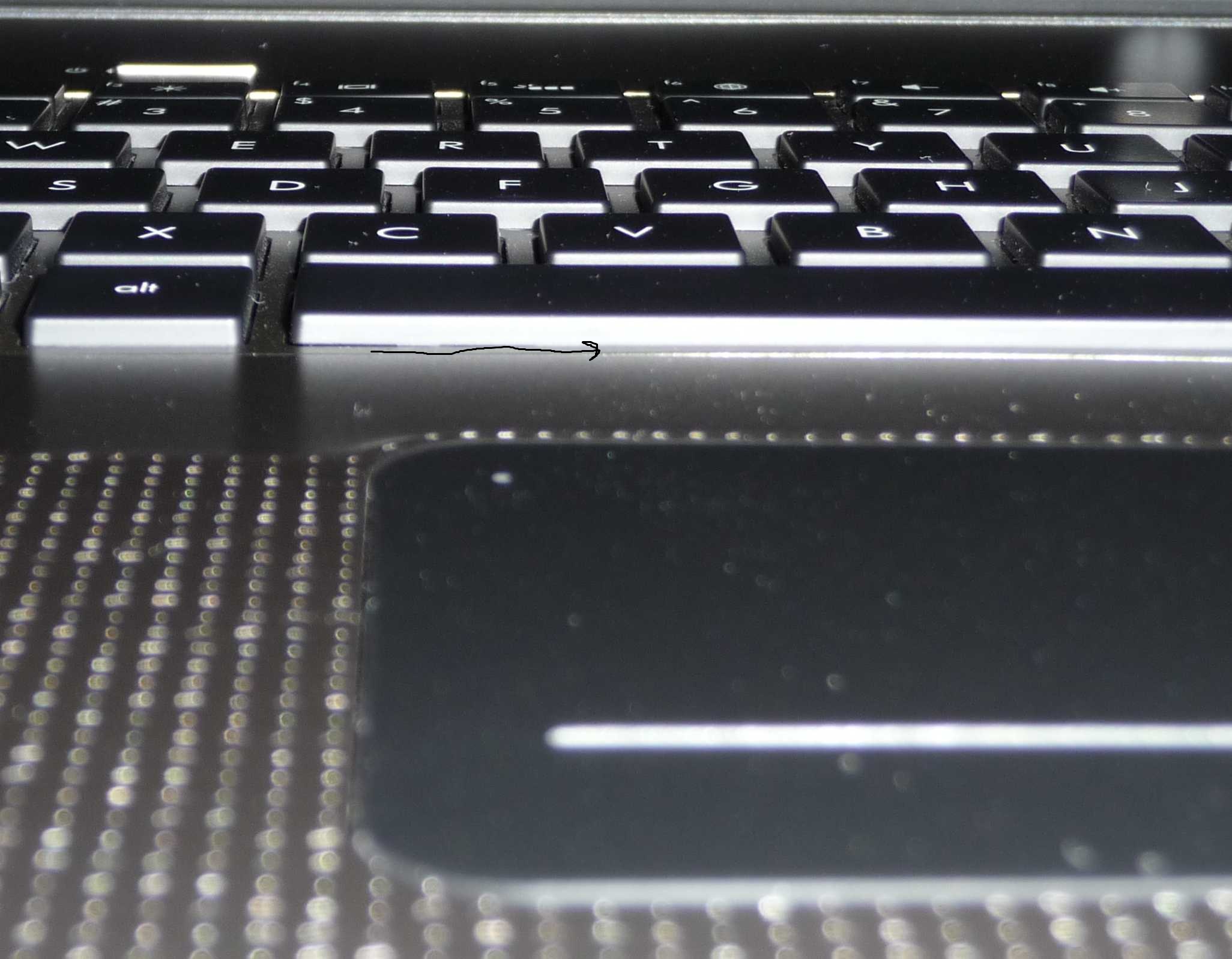
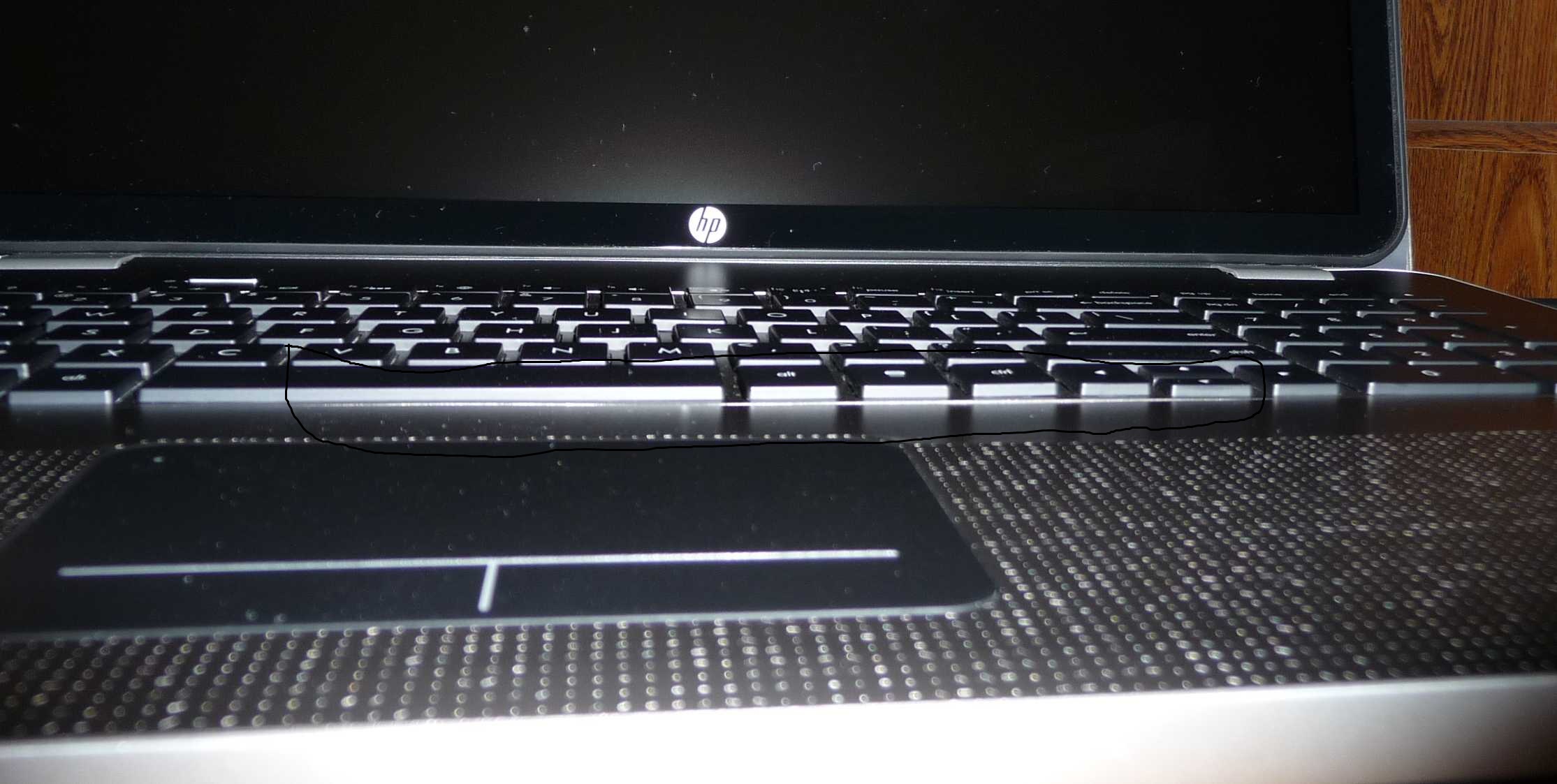
I think my wife's photos are a bit more detailed. Here is the keyboard photos...there is the rise...
Attached Files:
-
-
YES! Thank you! That was it.
Now, I boot cleanly with my external display while plugged into power. That option has a counter intuitive (or incomplete) description but it just saved me from a huge amount of frustration!
Thanks everybody! -
Hello all, I've been following the forum for a little over a month now; thanks to all of you for all the help/insight/guidance! It sure is nice knowing there are people like you who are willing to help out the rest of us! I've read the forum from Post #1 and I remember someone mentioning they were going to write up a guide to install the OS onto an SSD; is that yet available? I've got my HP ENVY 17 3D and my Vertex 3 SSD in hand, and am ready to go! I installed the SSD using newmodeus' caddy, now I just need to know the best/safest way to proceed. Also, I have the HP recovery disks ordered from HP, which I do not mind using if necessary.
Any/all help is GREATLY appreciated! Many thanks all!! -
Sorry to hear that you missed it.....but.....SWEET!!!
I've been waiting and waiting and waiting for HP to bring back the 7200's.
I'm not about 95% sure I will get an Envy 17 3D.... I'm just waiting to see if the people in the DV7 mod thread can get a back-lit keyboard to work on the new DV7's. But at this point...I think I would rather use my $500 (Sandy Bridge issue) coupon on a fully loaded Envy...instead of (knowing me) bricking a new DV7 by trying to install juice to power up a back-lit keyboard. -
I think I'm taking my Envy back and getting the new Sony CB. The experience has not been pleasant so far; the laptop has frozen while web browsing 4 times now (can't even get to Gmail without it locking up), the touchpad is too quirky (my wife won't even use it unless a mouse is hooked up), and every speaker I plug into the output has a horrible buzzing interference noise.
-
Good afternoon darling.
My guess is that since the model number starts with a "2" it should be the newer generation Envy. I can't read much Swedish except for the service manuals to my Volvo cars but if you post or PM me a link to the exact model you are looking at on the SE site I will try to help figure out what exact features are included and what the machine is.
Honestly I don't know why people stress about the heating issues, laptops get hot it's what they do. My Envy has never gotten hot enough to bother me in the least and I run plenty of other laptops that get much hotter I guess I just don't care if I'm going to complain on the internet it will be about something else. Apparently the old Envy got really hot but if I had one I don't know that I could bring myself to begin to give a crap.
Sandy Bridge is the latest architecture from Intel it is the new generation of CPU's and there are a number of performance benefits to getting a Sandy Bridge machine versus the old models.
As to your turbo boost question, all modern Intel CPU's have this capability. Unless you have some specific performance needs and money is a concern I would personally recommend to you getting the 2630 instead of the 2820. I am running a 2820 myself and it is pretty darn zippy but unless you are going to stress the machine I don't think you'd miss the power. -
Here is the guide from Bobmitch. Thank you Bob. +1
-
removed - wrong thread.
-
I am not a expert, but from what I read and learn here, Envy 17 1XXX series is the first generation, and they did have heating issues, but it seems resolved now. The Envy 17 2XXX series is the 2nd generation with Sandy Bridge processor, and yes, the 2090 model is a quad. hope this help. -
Well, these new photos show a much more pronounced lift. Since you have the in Home Service, I'd recommend calling them over to the house. I think we all heard stories of how you send the laptop in, and get it back with more issues, like dents, scratches, and God knows what! Hope they don't give you a hard time about coming to you.
KJ
-
Thanks, jd88ch. Please correct me if I am wrong, but this guide is for breaking up a RAID. I purchased my HP ENVY 17 3D with only the 5400 HDD. I bought the Vertex 3 SSD on my own and would like to install the SSD in place of the OEM HDD. I just want to make sure I install all the drivers/software correctly so I do not have any issues.
Many thanks for all of your help!! -
Thank you so much for the help!! Very appreciated, I'm ordering my 17 2090 tomorrow so thank you
-
Yes indeed, this defect bother me too. I will call them and see if I can get them to crossed ship me another envy. Everything is perfect beside this...sigh!
Yea! Envy is their premium line...should have better QC, I guess they just different material and same QC, or maybe DV7 have more "machine" process then envy, which will have less error by human.
Compared to mine, yours is much better condition..but still, this might bother you. We pay premium for this! Heck, get it fix. mind you though, I heard scary story about a tech came out (appeareantly HP use 3rd party) for their service, and just make things worse...maybe the tech dont master how to dissambeled the envy yet (Envy line is a bit different then the regular laptop).
I just checked again, they removed the 1600mhz RAM option from the website, I wonder why????They use Micron RAM on E17, 1333Mhz.
![[IMG]](images/storyImages/MemoryType.png)
-
Thank you very much for the help
Well about the 2820 thing the model I look at on the HP site says 2630 in the CPU specs I guess that's what you mean right? So is that good or bad? Says like this
Intel® Core i7-2630QM
2 GHz, 6 MB L3-cache
But will the model I'm getting I post a link to the model in Swedish : HP ENVY 17-2090eo Notebook PC - HP Store Sverige Maybe you can read the specs and will that be good enough for games, like new games? Right now I have a HP HDX 16 and I can play rather new games on it but will the Envy run them good on higher settings?
Very appreciating the help I'll be ordering the Hp envy 2090 tomorrow so I'm very glad I got some help here THANKS ♥ -
Long time reader. First time poster. To answer your question, if thats the worst cosmetic issue you have had - keep it. I have had several envy173d and have replaced for various reasons. While these are not all the reasons for replacement here are things I personally experienced.
- Bad pixels -always black in select regions
- dented lid in odd location
- white fingerprints on INSIDE layer of LCD, uncleanable
- gaps between outer silver ring and lhs ports you could slide a dime into
- raised trackpad
- long scratched on inside layers of LCD
(so white and seemingly deep you'd think it would affect display but did not)
- noise emitting from LCD in quite room at setting 7,8, 9
- currently just received unit that has +30 sec delay
After Hp logo at cold boot with blinking cursor at top left
Hp first response. Motherboard -send it in. Still reading other
Online forums and elevated in support to try to resolve without
Return
- recent unit arrived looking oil te cardboard box wa vacuum
Sealed to the laptop as you could see a distinct envy shape
Prodruding thru inner box before opening and the cloth sleeve
Has permanent-ish shape impressed into it from the laptop
- list goes on but I dont give up. The new one' battery life us way
Better than orig for light use like Internet, etc.
Love envy 3d 17 overall, lots of little annoyances like above to contend with
Or address but rockin machine.
If what you show is the worst you have, keep it or you'll end up in an infinite cycle of trading one little thing for another. I'm really critical but realitically it is very likely another little item will be evident on a replacement. Probably not worth getting something like I mentioned above and wishing you had this one back
Hope this helps -
Mine too came with 1To 5400 HDD, bought 2 750GB 7200 HDD, wanted to do a RAID0, at the end decided not to. So I reintall on one 750GB 7200 HDD using my recovery disc. The process is slightly differert then it stated on the guide, but it work.
1. Boot up with recovery disc 1 with the new HDD inside, then follow by 2-6 recovery disc 2-6. Then reboot.
2. It said no boot disc, and no command prompt to enter anything, so I reboot with the Windows repair disc that I made. There I have the command prompt to enter "BootRec /FixBoot" enter then "BootRec /FixMbr" enter.
3. Windows finally boot up and ask again to enter the recovery disc 1-6, so I did, and when it boot up again. I have almost 100% original setup there, except for the HP restore partition is gone.
I didn't care, as I have the recovery disc and my original 5400 HDD on the side for backup. Well help this could help. -
Keys probably not seated. I can't see pics. Guessing you can push down with slowly increasing pressure till you hear the metal rod snap into the plastic receiving portion of underside of key. Or if it's loose maybe you can pop one Side up and see it's not connected. I've popped a key or two off envy and other laptops for repairs -not hard to do. Just takes a gentle hand
-
Oops. Forgot to incl orig post in reply.Keys probably not seated. I can't see pics. Guessing you can push down with slowly increasing pressure till you hear the metal rod snap into the plastic receiving portion of underside of key. Or if it's loose maybe you can pop one Side up and see it's not connected. I've popped a key or two off envy and other laptops for repairs -not hard to do. Just takes a gentle hand
-
Just going to pop this one up here for you folks, more of a PSA:
Was bored at work and decided to try out a 3D movie on my envy -- so went out and picked up the new Tron - Mistake #1 - Turns out it uses a newer format..
Long story short, turns out the default installed PowerDVD software needed to be upgraded for it to work with out pauses and graphic distortion. I installed the newest PowerDVD 10 i could get off of their site, didn't help a thing. So i toyed with the settings for a few hours, no luck.
Went to PowerDVD 11 - and that seems to have fixed everything but still a slow/choppy start of the 3d blu-rays.
I didn't get the 3D Envy for the 3D side of things honestly, i just wanted a HD screen and it was cheaper to get it with the 3D than with out. So this whole problem doesn't bug me enough to complain to powerdvd about it or continue to play with it, 11 works and thats that Just thought i would share
Oh and for people asking about the 6200 vs the 6300 -- I had one crash with my 6200 and said thats enough of that and poped in a 6300. Strangely enough, maxing a 30mb down pipe from torrents didn't do it, nor did transferring off of my drobo to my laptop (~200gb, vm images, iso's, ect). What made it crash strangely enough was streaming in HD off of netflix. Replaced the card with a 6300, haven't had a problem with the wireless since
-
OK powerusers, techies and frequent readers. Can anyone help with this??? I'm hoping, dreaming,...someone can. Read every page of this forum more than once over last several months. Now have question of my own.
Received My I7-2820, dual SSD and 7200rpm HDD last Tuesday. Ordered March 10, twice delayed. Initial setup froze at screen just prior to registration screen for hours. Had to reboot. Don't suspect that is related to cause of following issue. Problem: My Envy unit has an additional bonus 25-30 sec delay at startup from cold boot that happens as follows:
- Power machine on. Few seconds to HP logo (this is normal for SSD)
- Now comes 25-30 seconds of black screen w/ blinking cusror at top left (ABNORMAL for any config SSD, HDD)
- following that exciting hold time comes windows startup screen and 18 or so sec to password screen (normal for SSD)
Next to an identically configured machine, or prior units accessible to me, the only difference between startups is the unexplained intermediate 25-30 sec delay between HP logo and windows start message with solid black screen, blinking cursor.
ONE INTERESTING SIDE NOTE: The blinking cursor and black screen IS NOT PRESENT any time I restart, only from a cold start (by cold start I mean powering up from a full powered down condition). On a restart, machine boots normally in appx 30 seconds to login screen straight from hp logo to windows start followed by login screen, instead of appx 60 sec from cold boot.
1. Have restored to factory from laptop recovery and recovery discs.
2. Have updated bios, rolled bios back
Called HP support informed them of issue and two actions above taken, they advised sending it in, possible reference to motherboard. Do not want to do that again (not my first Envy with issue, wanna work it out without return) Escalated to higher level support last Thursday and will call back into them Monday as recovery Cd's overnighted for arrival this past Friday did not reolve.
Also tried
3. Hard reset (remove battery, unplug, hold power button down)
4. Safe mode start, checkdisk, memory and hard drive tests
5. Regedit solution said to resolve similar issues more typically related to solid desktop background (not seemingly related)
6. Various command line FixMBR and similar commands said to resolve exact same issue Macusers described having - those who have windows installations. Did not work for me.
7. MSCONFIG- disabled all services, disabled all startup items (but issue seems to occur before this change would take effect, BEFORE windows starts)
8. Reviewed Event log for items causing delayed boot, etc.
9. Other various efforts made, not listed here.
Trying to enlist the help of a family whiz outside the forum. No solution found yet. We did not get too deep into it. Not sure this is as bad as it gets or if whatever's causing situation will degrade startup times or other aspects of use over time. Wanna fix and move on. Hoping not MOBO issue.
Anyone of you have any ideas?????
Cosemetically the machine is pretty good. No gaps, no scratches on LCD, fingerprints inside LCD, no constant black pixels, dents on encasement or other issues I previously have had or others have eluded to. Little lift in clickpad and top left of keyboard elevated, probably simply fixed once attention is given that area.
Anyone have ideas that can help? -
Was its free to upgrade to PowerDVD 11?
-
I have Verizon Fios 25/10 and use two routers. The Verizon router is good with LAN...but I use my D-Link DIR-655 for wireless...where it excels. Here is my consistent download speed with the 6200. I can sustain this speed as long as the host site can feed that fast
Attached Files:
-
-
Not that I know of. I get a popup asking for $59.
-
One more question for readers here. Who experiences a situation where at brightness setting of appx 7/8 a noise is emitted from the LCD backlight that is not present in settings 1-6, pops up at settign of 7 or 8 and gets quiter again at 9,10?
I have seen this on 3 units. It is more notable on battery power, less notable on wall power and managing power option and graphics card settings to try diff combinations seems to have some small effect but no combination resolves it.
BOBMITCH, you mentioned in an earlier post taht you keep your unit on appx brightness setting of 7. You're right in ballpark.
Can any other readers verify this condition?? Definitely isolated it to the LCD, backlighting. Maybe this is a power distribution crossover point/range that somehow excites the LCD backlighting. Kinda like when ballasts in flowercent shop lights hum. Different frequency and sound but that's kinda what I'd compare it to.
Note: For most users in noisy environment, likely would not notice (until someone points it out). Sit in a dead silent room working from home between 12:00am and 4:00am when the world is quiet and it can be distinctly heard. If I've seen it several times, I have to believe other users experience the same.
Anyone else verify they can or can not replicate on battery and on wall power?
Thanks................... -
Based on what you are saying...I get it...my keyboard isn't really a major issue...it's cosmetic. From what I can tell the rise in the keyboard has not worsened in the past few days. I think it's moved as far as it can. As far as a tech support person at HP telling me that my 4 year at home warranty doesn't mean at home...that is the issue that I will resolve in the next 24 hours. I sent one envy back because of a warranty snafu, and from my recollection...it was perfect in every way. However, that is no longer my case...I have another Envy and for intent and purposes...there is NOTHING to complain about except the rise in the keyboard...and it is not as dramatic as some things I have seen here. Slotti gave me a guide to fix..I am just slighly chicken. It is possible that when they put my keyboard in, they may have tightened it up too much on the sides...because that is where it is totally flush to the case. Whatever...as long as HP is willing to live up to the terms of my warranty, as stated in black and white numerous times...I will 99% keep this machine...would be crazy not to. It is pleasing to work with. Stays cool...doesn't throttle...I get hella fast Wireless speed with no lockups and on and on. Some on the board thought that I have something that I may be able to live with. Worse case scenario is the at some point the keyboard gets worse...then I get it replaced...AT HOME!!!
I still don't like the photos where the case is that off on New Vaio's machine. That is blatent sloppiness to the nth degree. You don't pay all that money to get that. When the panels don't line up...it can't be good for the integrity of the machine. Your list is a nightmare! Scratches on the screen, white smudges that cannot be removed...and more. That would make me call the Attorney General's Office in my state and show them how negligent HP was in building that machine. As consumers, we are supposed to be protected...look in the Govt pages of your phonebook, for your Attorney General and call. There are agents there to help. I would be recording all my phone calls to HP (HP records them..I know for a fact due to my first issue. They were able to pull the calls and prove the agent didn't want to help me and made me send my machine back for no reason. I got more from HP because of that)...and documenting until the cows come home. -
Just started to think since I've been reading some pages now in this thread, is there many problems with the envy? I mean mostly I've read is about problems with it and stuff not working or cosmetic issues, is it really that bad? Now I've never really made much researching before buying a laptop before this is the first and maybe I could have found just as much about the other laptops I've bought but since I really want this envy I've been searching around a lot to see that it's really matching up to the price ( most expensive laptop I've yet to buy, ordering tomorrow ) But I still get second thoughts reading all the problems. I mean I might even be in the wrong place, first I'm a girl not that it has anything to do with it but I might not be so technically good as you guys and I'm not gonna change stuff in it and so on, It's gonna be used for gaming (which I hope it's good enough for ^^) And photo editing, music and surfing of course all those basic stuff.
But is there a lot of problems with it? I mean is it more then 50-50 to get a product with any kind of defect? Cos I'm very detailed with my stuff I hate having even small small things that are wrong so, I don't know I just got thinking about it. -
Apparently some get good laptops some don't. Most actually do get bad laptops they just don't have the slightest idea because they don't use them for more the emailing.
Once you do have to RMA though be ready to go through many replacements.
I am already on my 3rd Envy with a 4th replacement coming in, which supposedly was checked by my contact. If this fails, I am going to be most displeased. -
Darn.."// I've always have used HP and never had any problems with them what so ever... Weird they send out so many bad ones, Now I'm wondering if I'm still gonna go with the order tomorrow and take a huge chance, Not in the mood at all for having to send it back several times to get a descent one.
Did try to search for any problems here in Sweden but found nothing, not that it would be any better here since they all come from the same place probably xD But anyways, Guess I'll go with buying it and just praying and hoping to get a good one...! -
MiRRed89
Please understand. 95% of all Envy owners do not come here. Most computers have slight flaws in a lot of different ways. As far as what you are reading her...these are more isolated incidents from a group of users, that are aware of this web site. Is the Envy that bad? NO! Absolutely not. Are there issues that people are suffering from...YES. Every company right now is having issues. Look at Dell and the XPS. They sell the machine as upgradable to 16 GB of Ram, yet put motherboards in the machines that only have two memory slots. There are cosmetic issues with every company. I tried out a couple of Asus machines before settling on the Envy 17 3D. An Asus G73-SW, the model with the Defective Sandy Bridge...was the first machine...All you had to do was sneeze and the backlight on the keyboard was gone. You had to jump through hoops...install a beta bios upgrade and reinstall the backlight software to get the keyboard re-lit. Imagine...a backlit keyboard that is controlled by software. So I figured let me try another model...so I did the G53-SW. Pretty nice machine...great video card (yes I am an Nvidia fan)...but the sound / speakers flat out sucked! The sound level at 100% was so low that the sound was almost inaudible. I brought that one back to the store and the entire tech department tried every other unopened box to find the same issue.
There is no correct answer. My only recommendation...HP has a 21 day return policy. All you lose, if you decide to return and not defective is your shipping! Worth the gamble??? Also...with the Envy you get North American tech support based out of Little Rock AK. If you want that from Dell...you pay about $125 per YEAR for the honor. Oh yeah...you get a discount if you purchase for four years at $400.
Read the Asus G73SW threads. Read the Dell XPS Threads. Read the Toshiba threads. Read them all..and you will come back and find that HP is no worse, but probably better...
Are there issues to be resolved. YES...I read about the Intel 6200N card...it has incompatibilities with certain Router chipsets. It can be solved by using older drivers that don't push the turbo mode so hard. The throttling issue is not specific, but random. Many of us do not suffer from this issue. Some do...it will get resolved. I posted many pages back how to maximize the speed of your processor on battery and power. Most solutions to issues here (other than major cosmetic ones) are posted throughout this thread.
My opinion, if counts for anything is this. When I first learned of the Envy last year from a friend who got an older 14" model...it is an excellent machine. When I first decided on a new laptop...I went to brick and mortar stores. Tried the Asus, tried a Toshiba (had a super Toshiba about 8 years ago...like the brand alot). I wanted a combination of power and looks...which the Envy is made for. Long story short...went to the Dell website and Designed an XPS 17 3D model, which, with warranty, came to over $2650 with shipping...and the model had a 320 GB 7200 rpm Hdd and the new Nvidia GTS 555 Video card with 3GB of DDR3 memory. I then came to the HP page and spec'd an Envy 17 3D. Added a 640 GB HDD, the AMD 6850 which is superior to the 555 and has 1 GB DDR5 memory...added the warranty and shipping and with a small discount at the time...machine came in less than $2000. The HP is made of magnesium...other companies use plastic of one sort or another.
All I can say is if you like the Envy...and it meets your requirements...try it. Order...get it home...play with it...abuse it...whatever. Don't like...make the call to Customer service and return it. Ship it back and HP credits you within 3-4 days after you shipped. They just want certification from FEDEX that it is on it's way and that you didn't intercept...and your refund goes through.
I can say a lot of things about some of the techs and Customer Service reps I have talked to. Not everyone is knowledgeable..but I will say this...every company has employed some klinkers...hopefully you never get one.
Just my 2 cents -
You're always "displeased"
I won't even blink when you find yet another fatal flaw with this 4th replacement....in fact I'm looking forward to another thread dedicated to "HP Hell Experience #3" -
Wow thank you so much, that made me so much calmer about buying it, I guess I just worried myself up to much. Now I don't have the FEDEX thing cos I live in Sweden but there's longer warranty on buying it from HP site here then on a store site, weird in my eyes but yea. So I'm buying it directly from HP and hope that if I need to return it, their support here will be good too.
I got in love with Envy without even seen it IRL, just by looking at videos of it, seeing pics and the specs and stuff so I really want it, like really want it. So I'm gonna go with it!
Ordering tomorrow, Hope it gets here during the week, Have no idea how long it takes but fast hopefully. Keeping my thumbs crossed this worry was for nothing and that I get a good one
Thanks for all the help, I appreciate it so much!!! Glad I found this forum I have to say.
-
Unfortunately I haven't been finding "other" fatal flaws, just the same fatal flaw in every single system I've received as a replacement.
So yeah I would be displeased each time, since it's the same fatal flaw.
Oh by the way the latest replacement is known producing high pitched noise/static. I think HP really didn't test the batch of motherboards they received from HP. -
Here's an oddity to share. I work in Radio. Been a broadcaster for a long time. One of my engineers taught me a long time ago about MHZ, etc. I never knew that a 100 MHZ Pentium chip could be heard by simply tuning an FM radio to 99.9 or 100.1...and placing the radio next to the computer. The chip sounded something like when the Aliens entered Earth's atmosphere in "Independence Day". If the monitor is refreshing at 120 HZ, I would imagine that it could create an audible tone of some sort...I can't imagine the human ear being able to pick it up, though...so it must be intermixing with something else like the sound card on the machine, or nearby speakers or the like I have my brightness set at 7 and hear nothing. Mind you afer years of loud music and wearing headphones...the high end of my hearing may be beginning to suffer a bit..so high pitch tone might escape me.
-
Well this audio issue also occurred in my Non 3D envy.
Also the screen refreshing at 120 hz doesn't mean it's "outputting" a type of wavelength. A processor does due to the it's nature. -
Since the back light is LED based i can't imagine any noise comeing from the led's themselves. However the control circuit for the backlight may have a slightly faluty part making the noise. You probably find that the led's are being powered by a fixed voltage and there is a circuit using pulse width modulation to turn on and off the led's at a high frequency and only leaving them on for X% of the time giving X% brightness. As you change the brightness the frequency and intesity of the switching will change. At max setting they basicly don't switch off and you wouldn't hear anything. Also the faulty part making the noise may be affected by heat making it louder as more power and heat goes though it as you bump up the brightness.
Pulse-width modulation - Wikipedia, the free encyclopedia -
There is no circuit board for the LED's, they can use 12v-24v which is what laptops typically operate at so there's no need for coils in inverters which produce the sound. The sound is 100% coming from headphones, if you guys are referring to me.
-
Repost below
-
Have found a few links related to a prior unit I had with certain noise that was like radio static, present when speakers off. Oddly this worked for me. Several other links available for other sound items on envys not included here on this post but various former owners experienced different sounds. This one was an odd "fix" that also worked for me on a prior unit. I had not utterances used microphone. Never would have thought muting mic or hovering mouse over a tab in an options pop up would work, but it did.
http://forum.notebookreview.com/6347979-post1478.html -
I think I have the dreaded throttling issue as well in my 2nd Envy. When I’m playing games I will get periods of choppiness which correspond to the processor inexplicably throttling down to 798 Mhz. I’m sure its not a heat issue since I’m running a log and the temps are as low as in the 45-50C range and its still happening.
My first clue was in 3D Mark 11. My 3DMark 11 Physics Score/ PT FPS in my 2nd envy is :
![[IMG]](images/storyImages/3dmark11score2ndenvy.png)
While my first Envy I owned about a month ago would score :
![[IMG]](images/storyImages/3dmark111stenvy.png)
For some reason the processor test (aka physics) is scoring less than half of my original Envy. It is driving me crazy I tried everything un-installing unnecessary apps, re-installed from the backup disks, and did a fresh install of Win7 with SP1 slipstreamed into it. Nothing changed the score my 2nd envy was consistently slower than my first. I used Throttlestop to log the processor speed the first time around so I remember the processor being at 3 Ghz+ but on this new machine it stays pegged at 798 Mhz throughout the entire Physics test.
![[IMG]](images/storyImages/throttle.png)
Anyway I have a favor to ask of you guys who got your Envy within the past month or so: Could you post your 3DMark11 Physics Score and Physics FPS (PT) for me. I’m really debating if I should try a 3rd time to get a decent Envy or not (I have some minor aesthetic flaws as well) but before I do I’d like to verify if it’s a throttling issue with just my machine or they changed something in the newer systems.
Thanks for the help guys. -
Can cover laptop to reduce audible noise from any component below the screen, adjust brightness hear a noise emerge at setting of 7 to 8. Not related to speakers. Further, if you cover base of laptop and put ear up to screen (not that you have to be that close to hear it, but makes it easy to verify source) you can tell its coming from the rhs/lhs of display only, where white backlight bands can be seen at screen edge.
Mostly interested in whether or not anyone can replicate the same. Whatever the cause, none of us can likely remedy it. messed around with Acer, Dell's, Apple's family members, co workers have to see if this is just inherent in some laptops. So far, only replicated in multiple Envys but hadn't repeated in other laptops so asking if others can recreate same on their envys. -
Here's mine. Result
-
Huh? mcchea, am I mistaken or your specs say 667MHz for your 6 GB ram? I thought you get at least 1333MHz....
KJ
-
DDR Memory is Double data rate...so 667 x 2=1333
-
Here is my 3D Mark 11
Result -
Did you go to control panel and adjust processor power for the HP config?
Minimum on Battery 30%
Maximum on Battery 100%
Minimum on Power 100%
Maximum on Power 100% -
Yes, I have tried adjusting the "Balanced" as well as running my power profile on "High Performance". Coolsense is on Performance and I have tried every other cool sense setting at least once lol (as well as a clean install with no CoolSense installed). Man this is frustrating not just because of the 3DMark score but the fact that it happens in games is what is really irritating.
Thanks for the replies with scores though! + rep for you guys. -
DOH! I feel like
Homer, thanks
Bobmitch, lol.
KJ
*HP ENVY 17 & 17 3D (2XXX series) Owners Lounge*
Discussion in 'HP' started by 2.0, Mar 14, 2011.