Problems? See this thread at archive.org.
Bobmitch can you elaborate on your touchpad driver experience-- you saying that you ditched the touchpad driver from HP and got an unsupported (by HP) driver from Synaptics and you like it better than the one shipped by HP?
KJ can you already see my ears perking up, lol
-
Right click on your desktop...choose personalize. Then choose display and you will see font sizes 100-150-200 Changing these should also change icon sizes...give it a try.
-
I tried 15.2.7 some time ago and I can't remember what was the deal breaker for me (it wasn't the inability to disable the touchpad, it was some other feature)
For now I am running 15.2.4.4 + paradisoft locker + reil's envy touchpad
None of the functions you described are Scrybe. Scrybe is a tool that runs in the background that lets you use a gestures to launch applications or send hotkey combinations to an application. -
It doesn't matter to the Bios from the US site that my laptop is in Swedish now? I'll just wait some days to see if I'll get it trough HP assistant first but I'll save the link thanks

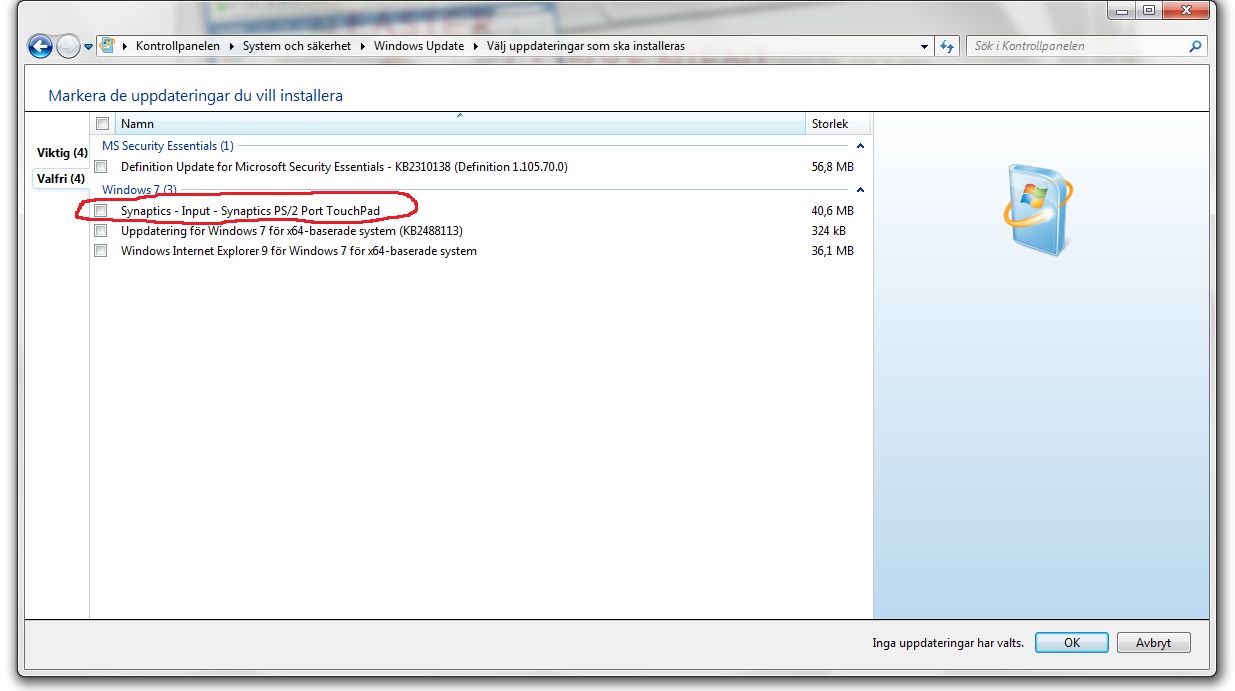
And I attached a picture of my Windows update, it's not the same synaptics in there cos there's some kind of update for it.Attached Files:
-
-
Go here:
Drivers | Synaptics
Try out the 15.2.20 drivers. On this page you will also see new functions that you get with Scrybe. The price you pay is that you can no longer turn your touchpad off...BUT... -
I'm using the 15.2.7 drivers and have the ability to turn off the touch pad by tapping the top left corner. Only difference from the HP drivers is that the on screen notification does not pop up when i disable the touch pad.
-
Is there anyway to check what drivers you have for the touchpad?
-
The eo at the end of your model specifies european. It looks to me as if f.08 is a universal flash. You should be very safe with the one I found you...it is the download section for your specific model, including the eo. U.S. models don't have that at the end. Mine for example is 17t-2000 CTO CTO means Custom To Order
-
Right click on Computer...choose properties...go to Device Manager. Listed under Mice is the Synaptics touchpad. Double click it and choose the driver tab.
BTW...new drivers that fixed bugs in 15.2.7.0. New version is 15.2.20.0 -
Oh I see Then I'll update it tomorrow, running late in Sweden again haha
Edit: out of curiosity does the t after your 17 mean anything special?
Oh I should have figured, after the Windows update with the synaptics I have 15.2.4.4. -
Has anyone found a way to enable two-finger guestures? I want forward/back when I swipe two fingers to the side. I had a hacked synaptics driver that enabled it on my old laptop, but the driver only works on x86 systems, not x64.
-
only 60Hz Tech support said 90Hz. But not mine.
-
yea, in order to get the 120HZ display in the non-3D envy is to send it back and order a 3D. or you can custom build a std ENvy 17, upgrade the display to 1080p, and pay more than you would if you had ordered a 3D!
-
Oh that's a pitty, they should keep what they say tho!
-
Anyone know any coupons that might work on the quick ship models? Or should I call up and haggle?
EDIT: Also, Notebookcheck.net says that the 6850 is similar to the 5850. Does that mean the 6850 can't support newer games in high detail? -
You should wait until at least May 22nd. You can get a free Xbox 360 with a laptop purchase.
Students, We?ve Got You Covered -
I can't, since I'm a high school student.
Also, I don't have a TV. If I could get it, I would have to sell it.
EDIT: Never mind, I can get it!!! Except I would prefer a coupon really
-
I saw that deal just now on Engadget. I wonder if it will still work if one uses a 25% OFF coupon for the Envy 17 3D (assuming that one is out at that time).
-
Hi, I'm new to posting on these forums although I have been following them for the last 200 pages or so. Thanks to everyone and all of their input, it has all really helped in the decision process. Now for the not so nice sounding part, I received my Envy 173D today (1day early!) but after just around 3 hours of enjoying it, I somehow managed to mess up the RAID 0 configuration it came with (I wish it hadn't), rendering it useless (the recovery copy I made isn't working) so now I have to wait until June 8th for them to ship me a recovery CD (the rep said since it was a new model recovery media for it was in short supply...). Make sure you have a working backup first thing after you take this fine laptop out of the box!
-
KJ....dlleno given the option for the 1080p display on the dv7QE do you still think the Envy is a better buy/product?
-
This is a follow-up from the problems I had with Envy 17 3D in April. Back then it would repeatedly turn on and off when booting up, and would never fully boot up. The suggestion was to unhook all external HDD's when booting up, which I did, and that solved the problem. Now it does the on/off thing and won't fully boot up even though no external HDD's are connected. I finally unhooked the power cord, and that did the trick. What's the deal here? I've never had a laptop that got into a boot loop.
-
Very good question. Well, if I were to choose....I'd want to know if there was any difference between the 1080p display of the dv7QE vs. the Envy. As you know the Envy 17 SB has only a 60hz refresh where as the Envy 17 3D SB has 120hz...also, I believe the 3D version has a better brightness than the regular, not sure... So you would def. need to know what the exact specs of the dv7 display are.
Of course no backlit keyboard on the dv7QE, but you get 2 x 3.0 USB ports, compared to 1 on the Envy. Also Envy has the slot loading....
I really love the outside of the Envy as well. The etching is ok with me, but the metalic shine at times, and subdued shine at others....its just sexy, what can I say, lol. Even with throttling issues I'd still go for the Envy, but hey, its not my decision here.
I know you've been around the forums for a while, so eventhough you may want to ask us...deep down you know what you want.... coughEnvycough.. Hahha, but seriously, I'm sure you'll sort it out soon. Good luck.
KJ
-
good comments KJ -- you nailed my hot button too, which is the display -- so far I haven't been able to find much about the DV7 flavor, so for me its that 300-nit brightness and 72% color gamut that I suspect will only appear on the Envy. Even on the std Envy 17, this gorgeous display is a $150 option. so while I can't confirm this I strongly suspect the DV7's 1080 and the Envy 17 1080 displays are not created equal
. HP isn't even publishing the specs for the DV7's 1080 display, and that to me is a clear signal that it is inferior to that of the Envy. It may be 1080p but I doubt its 72% color gamut (thats my opinion. unconfirmed of course!)
Also don't forget that the Envy 17 has the stronger (6850) GPU for gaming, and it can fire the display at 120Hz -- a marginal but non-zero benefit when playing movies of various frame rates and when breaking speed records with the mouse pointer lol
as for the brushed aluminum -- yes there is the cosmetic thing, but in addition I've been told by HP Sales that the DV7 has more plastic than the Envy. so there will be some long term durability advantage with the Envy.
don't forget about dual band Wifi either! Envy can live in more WiFi environments than DV7.
I really like the slot load optical drive. i just really don't like those popping-out trays! by the way, wanna know a very irritating failure mode of those silly ejecting optical trays? if the mechanism gets tired, worn, or old, they tend to pop out spontaneously and you have to keep jamming them back in. yes I have one on my old laptop thats doing this. small things amuse me I guess, but I'm all over that slot-load drive!
So, yea -- add up the display, GPU, WiFi, Chassis, backlit keyboard, slot-load optical drive, and yes I'm totally Envyeous which I can say in all honesty because I don't have one yet! I can live with only one USB 3.0 port as well. now just give me a Synaptics IS 1.5 or IS 3, and a 300GB SSD, and this hawk will quit circling and start diving in :yes:
-
My second one looks descent but the first one also had a major bump in the alu-housing on the right side where power connector and USB slots are. You could see through the gap between plastic (near keyboard) and alu.
The 3D display is much better in fact. I had both and the colors are obviously more rich and I would say that the 3D display is about 30-50% brighter. This changes A LOT in bright environments if you have a glossy display. -
There really needs to be a side by side by side by side by side comparison.
DV7QE
DV7QE (1080p)
Envy 17
Envy 17 (1080p)
Envy 17 3D (1080p)
There are pro and cons for each depending on what you are looking for.
One big question are the screens.
1. Does the standard DV7 and standard Envy 17 (non HD) share the same 1600x900 display?
2. Do the 1080p versions of the DV7 and 1080p versions of standard Envy (non HD) share the same display?
3. If you select the 1080p version on the standard Envy (non HD) do you get the same display as the Envy 3D?
I don't know about #1...but I don't think it matters because of the price gap. If you are OK with the 1600x900 screen....you might as well save several hundred dollars and get the DV7.
#2 is BIG unknown right now. If they share the same screen, the Envy has some serious competition. (However, the quickship Envy 17 2070NR with an EPP has a great price point). The DV7 1080p version is anti-glare...
#3 Seems to be a "no".
So there are at least 3 different screens....and maybe up to 5 different screens. -
has anyone found a fix to get the intel 320 series SSD working on the envy?
-
I would highly recommend your contacting Intel about this issue. It has to do with the data encryption feature on the drive and the Envy's bios not handling it. This was stated way earlier in the thread...
-
I knew you two would put me back on the right track....Envy it is then....haha. Just a few more weeks of waiting and I'll be there.
Does anyone know for sure about the new xbox 360 deal if it will allow us to use a coupon while purchasing the laptop at the same time? I really hope so. -
From the several posts I read on that thread, it seems so, of course you'll have to order on the phone, but you already know that's how you get the best deals. The only other catch is you have to a student....
Bah, you kids today are so lucky....heck, I was happy with my Atari 2600 back then, LOL. Yes, I loved the Adventure game....such old school.
KJ
-
Is it same for you others that even if your laptop isn't turned on it goes power to the USB's? When I have my laptop off and puts it on my external fan and connects it in the USB the fan starts, even if the laptop isn't on
-
Pac Man and Missle Command!
-
Yes, though it may only be a specific port or ports that retain power. It's common for travelers to power their phones off their notebooks in airports and such, but before people had to waste valuable battery keeping the laptop running. With the always-on USB, travelers can now power their portable devices without needed to waste energy on the laptop OS.
-
Oh cool, well I think I have at least to of my USB's that gives power, the 3.0 one and the one above that also says eSATA, don't know about the two on the other side of the laptop
-
Thanks again for this one fiver5! I ended up going outside recently with my laptop and couldn't see the screen well enough to increase my brightness, so I finally got around to playing with this--
If anyone is interested I did modify the console application for my use:
-Added two param, -up and -down, they check the current brightness, and what are valid brightness levels, then increment up one, or down one, depending on the param provided.
-Modified the launching behavior so it will not show up in a window when launched from AHK
I then made a short AHK script that binds -up to ctrl+f2 and -down to ctrl+f3, compiled it and tossed it into my start up...
Seems to work well for me so far, CODMW2, cs:s, wow all worked perfectly fine.
As i said if anyone is interested I'll prolly do a write up and share the files later, possibly after the rapture. -
Yes please
-
Well, I found my first issue with my Envy. I was messing around with my router and noticed that the envy is connected via the 802.11G instead of the N. I changed the routers settings to only accept N connections and the Envy could not connect.?
Any suggestions before I call support? -
There is no fix. It is a BIOS issue and cannot be fixed without a BIOS hack or update from HP (Yeah Right). If you want an intel drive go with a x25-m or 510. Both of those are supported. Good Luck
-
Bout to watch my first real 3D movie on this amazing laptop, damn this screen is beyond everything
<3
-
I have watched a few already...used PowerDVD10 for Wall-E and The Incredibles. Watched "61" with the TriDef media player
-
My case and AC/Auto/Air power adaptor came today.
Does anyone else use the HP Professional Series case inconjunction with an Envy 17? This case looks smaller then the Sony one that I returned and the Sony was a 16". The tag on the case has a picture of a laptop with 15.6" written on the screen. I though they sent me the wrong one or something but both the Part # and UPC #s that are on the tag are spot on with the website. This is a really nice case, but can anyone confirm that a 17.3" laptop will indeed fit in this case?
HP 17" Professional Series Top Load Case | HP® Official Store -
I got this one for travel...
CompUSA.com | 39107 | Microsoft 39107 MT Checkpoint Friendly Laptop Bag
Really sturdy and has numerous compartments. Will fit the brick, too! Very pleased. -
As everyone knows, definative factual information is very hard to obtain, as the marketing data isn't very detailed. I suppose thats understandable because, of all the specs we are analyzing, only resolution has some meaning to most of the buying public, and that isn't well understood either sometimes.
Anyway, after some additional thought and reading, I reminded myself that the two 1080p displays offered in the Envy 17 are very different, and indeed the 2D display is no slouch: wide viewing angle and 300-nit brightness and 72% color gamut. The 3D screen is differentiated by the following:
1. It is even brighter, at 400-nits, while the 2D panel is 300
2. it fully suports 120Hz refresh rate with the 6850 GPU, while the 2D display does not appear to (I haven't seen evidence yet that the 2D 1080p panel supports 120Hz. has anyone else?)
3. it has the built-in emitter to modulate the shutter in the 3D glasses
in my opinion: the 1600x900 screens appear to be the same for Envy and DV7. The Envy manual lists this one as a standard viewing angle (as upposed to wide viewing angle), and 200-nit brightness. this is the darkest, lowest-end screen offered on the Envy 17. I can't see HP using anything "worse" on the DV7
I agree this is still a big unknown, but I'm starting to think that these are the same as well. I can't find anything to confirm the brightness and color gamut on the DV7's 1080p but I'm starting to disagree with my earlier suggestion that "no specs published" means "inferrior specs". It occured to me that HP might not publish this level of detail because most customers don't care and would be confused anyway.
Once I realized that the Envy 17's 2D 1080p panel is a different animal compared to the 3D panel, I concluded that HP could easily offer the 2D 1080 panel as an option on the DV7 without sourcing a different part. Morever, I can't see evidence that HP threw in a "lesser than the 2D Envy" 1080p panel in the DV7, but we will probably have to wait until the replacement parts show up in the distribution channel to verify this. -
I have got the same case, it fit perfectly in it my Envy 17 3D. -
as we head into the weekend I thought I'd feed the SSD rumor mill again. I've observed that the 160GB SSD has disapeared from all of the ENvy and Pavilion DV 6 and DV 7 laptops. the only SSD available right now is the 256GB in the Envy 14.
I wonder if we will see a 256, 300, or something even larger pop up over the weekend for the Envy 17 -
Well all I can say is that it was freaking amazing. I watched SAW 3D and, even if I was skeptic about 3D before this totally blew me away, so freaking awesome, the screen makes the experience so much better LOVE THIS!
The TriDef media player, where can I get that and is it better then PowerDvd10 in your opinion?
-
I don't think that TriDef does it as well as PowerDVD. You can get it when you update your software. Remember this...DO NOT uninstall your current TriDef. Just download the new version and install. When done, your activation is still active and you will gain TriDef media player...
Get it here:
TriDef - Downloads
You want TriDef 4.5.1 -
Ah okay thanks
-
Well Fiver5 was interested, so here you go, here is the modified brightness console program and the source code
All i did is add two command arguments that allow you to increment up and down.
I used the following AutoHotkey script to bind it to ctrl+f2 and ctrl+f3.
Code:^F2::Run %A_WorkingDir%\laptopBrightness.exe -down ^F3::Run %A_WorkingDir%\laptopBrightness.exe -up
Install instructions:
- Download the application and source here
- Move the files into the same directory, such as:
C:\BHK\LaptopBrightness.exe
C:\BHK\BrightnessHotKey.exe - Vista/7 users - I didn't Sign my program, so when you first launch LaptopBrightness.exe you will have to uncheck "Always ask before opening this file" when prompted by the security warning.
- Go to your windows start up directory, make a shortcut to BrightnessHotKey in it (do not copy it there, just make a short cut to it), now every time you boot up the hotkey will activated and you should be good to go!
Blog post link for more info -
Alienware in the house. No throttling, and it's just wonderful. Worked right out of the box, with no troubles at all.
Comparison pics coming soon. -
Very cool. Nice job on killing the console window too!
I did play around last week with trying to do this with Fn+F2/F3. Both keys oddly send the same ACPI code so there is some kind of sub code that I can't trap or some other type of shenanigans at play.
AutoHotKey is a handy little toy and I'm shocked I hadn't learned of it sooner.
*HP ENVY 17 & 17 3D (2XXX series) Owners Lounge*
Discussion in 'HP' started by 2.0, Mar 14, 2011.