Problems? See this thread at archive.org.
Yes, you must uninstall Avast before installing this.
-
-
I installed this program, that went smoothly. One problem that I have is that anytime I go online now, within 1 minute the computer totally freezes up. The only way to get out of it is to hold the power button down for a reset. After several tries all with the same result, I uninstalled the program and all is well again. I do have ZoneAlarm firewall installed, do firewalls need to be uninstalled as well I wonder, or the items in the Windows security need to be turned off? (I thought those would be overwritten with this program)Just would like some advice before I try it again.
-
It's a known problem between ZoneAlarm and MSE (Microsoft security essentials). Especially in win7.
For the time being, it will have to be one or the other. Windows firewall is equally as good as ZA. Though ZA is arguably more user friendly. MSE works with Win7's firewall and checks to see if there is any unusual net activity. That's where the ZA firewall conflict comes in.
MSE also disables Windows Defender as it is superior to it.
I'm running MSE. I haven't had any issues with windows Vista or 7's firewall. Plus if you are using a router (specifically wireless) it too should have a SPI firewall built in.
If you have specific firewall configuration needs that windows firewall doesn't address, you could try Comodo's firewall. It's a highly rated free firewall.
http://personalfirewall.comodo.com/ -
Have been using MSE since its original beta - codename Morro, and yes it's great, even on netbooks, with excellent detection rates. Here is the latest about it:
Microsoft is still accepting beta testers for its "ongoing beta" of Security Essentials. Security Essentials build 1.0.1611.0 was released to the public at the end of September and Microsoft promised future updates. The beta test program offers a test build named 1.0.1676.0 for download which updates to 1.0.1743.0.
http://connect.microsoft.com/InvitationUse.aspx?ProgramID=4088&SiteID=981&InvitationID=mse-C642-77W8
-
Hi all,
I'm new to this site and have been reading the very informative and (at times) combative posts from the very first one, but couldn't make through the 500th page unfortunately , which, knowing MY luck, the answer I seek is on #502...but yet & still, at the risk of sounding like an idiot, I am going to ask this question anyways:
I bought my HDX on ebay about 6 months ago. I love it more than ANY other PC i've had before, primarily because it does EVERYTHING I need a pc to do(except send faxes directly, but that's an easy beef)...EVERYTHING, that is, BUT produce sound. It seems to have come with the F.40 bios, and it didn't have a drive, so I threw a spare 250gig drive I had in it and loaded win7RC. I can hear sound via my bluetooth headphones, AND regular wired ones, as well as via HDMI output. Why can I not hear it through the speakers? I mean, there was ONLY one time that I think I heard sound, and it was just a little "ding" when I was clicking on something to check the sound settings, but that could very well have been anything in my house.. I was able to coerce HP to send me the vista64 recovery dvd's for free & free shipping(even though the pc is WAAY out of warranty)
Can someone guide me in the right direction - is it the bios? Do I need to load the vista64(orig. OS) discs I received in order to achieve this? Has anybody else experienced this issue? Am I a complete idiot for asking this question(rhetorical, thanks)...
I enjoy listening via bluetooth, but would also like the option to show-off my 4+sub built-in stereo PC sound system to the neighbors!!
Thanks for any and ALL help you can provide! -
Control panel/Device manager.
uninstall Hi definition audio codec - be sure to check delete driver box.
Reboot.
It will put in a generic win7 driver. Then simply update the driver via device manager. It should find Sigmatel high definition audio codec. version 5511.
This should at least get you sound out of all speakers.
If you are adventurous, then you can install the 5607 driver off HP website. -
Thanks for that quick response!! I tried that, but it still does not produce sound....the version is 6.10.5511, but upon rebooting, win7 automatically replaced it with this -- and it gives me the general "windows determined....up to date" message when I "update driver software.." in device mgr...there's also a 'high def audio device' there also, should I do something with that as well?
-
Hey guys, just wondering, but when you open the thing next to the hard drives, you see the wlan module, but beneath there is a slot. Does anyone know what's the use for this slot?
-
That slot is thankfully not whitelisted. So you can possibly install any miniPCI-e device in there. I have Intel 5300 Wifi card in there.
-
You mean, in device manager under sound, you have both Sigmatel high def audio codec AND high def audio device?
If you do, that would be the problem. You should only have one. Preferably sigmatel high definition audio codec.
Uninstall and delete (check delete driver box) both from within device manager by right clicking the device if you have both. Then after reboot, update the driver and it should subsequently install the Sigmatel driver as an update. -
thanks for the respons 2.0! I was also wondering if it's worth upgrading the memory to DDR3 and if it's compatible with the hp hdx dragon 9350eb with these specifications:
Legitieme Windows Vista® Home Premium 32-bits
Intel Centrino processortechnologie
Intel Core2 Duo Processor T8300
4096 MB (2 x 2048 MB)
500 GB (2 x 250 GB) SATA vaste schijf 5400-rpm
20,1-inch WXGA+ high-definition HP Ultra BrightView breedbeeldscherm
NVIDIA GeForce 8800M GTS tot 1791 MB videogeheugen beschikbaar, waarvan 512 MB gereserveerd
IEEE 1394 Firewire-interface
Blu-ray ROM met SuperMulti dvd±r/rw dubbellaags
Bluetooth draadloos netwerk
Intel PRO/Wireless 4965AGN netwerkinterface
Tv-tuner DVB-T Dockable afstandsbediening
HP Pavilion webcam met geïntegreerde microfoon
5-in-1 geïntegreerde digitale medialezer voor Secure Digital kaarten, MultiMedia kaarten, Memory Stick, Memory Stick Pro of xD Picture kaarten
Geïntegreerde vingerafdrukscanner
Gewicht: 7,05 kg -
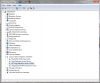
Yes, I did/do have both in my device mgr under 'sound'...I tried what you suggested, but when win7 reboots and I log in, it installs ONLY the high def aud. device. So I tried to be creative, and uninstalled both of them, then installed the 5607 from HP's website, then rebooted--how about they BOTH come back after I do that? Here's a screenshot of my device mgr(if it will help)
Attached Files:
-
-
Wow, That is a new one. Ok, have you tried disabling the Bluetooth? The mysterious audio driver could be a bluetooth device that does not have the proper driver and thus keeps going back to the high def audio codec. Try disabling the bluetooth, then restart and see what happens. Also, can you double click on the high def audio device, and under it's properties, go to details and report back here what it says under "Hardware Ids"? That will help to determine what the device is.
-
Bizarre indeed. Must be a corrupt driver cache if both keep coming back and you're not using a bluetooth audio device.
With the 5607 installed, did you select speakers as default playback device? You can find them in control panel under sound or by right clicking the speaker icon in tray and selecting playback devices. -
Hey 2.0,
yeah, I did remember to go in and change the default to 'speakers' hoping that it would just start making noise -- but alas, to no avail....
Hi Remy,
I tried to disable the bluetooth as well, but nothing happened with that either unfortunately. Here is the 'hardware ids' value shown in the properties of that phantom device:
HDAUDIO\FUNC_01&VEN_1002&DEV_AA01&SUBSYS_00AA0100&REV_1000
HDAUDIO\FUNC_01&VEN_1002&DEV_AA01&SUBSYS_00AA0100
If you guys can think of anything else, please, i'm all ears
-
Yep - works perfectly now with ZoneAlarm uninstalled. Many thanks!!
-
Do you have the ATI graphics card? Ven code is ATI. Looks like ATI HDMI audio device. Might want to update to latest ATI driver.
In the meantime, just to test, disable the device with the above properties. Right click in in device manager and disable. You should hear sound after that.
ATI drivers: http://support.amd.com/us/gpudownload/Pages/index.aspx
Choose which version of win 7(32 or 64bit) - then Radeon - then HD 2600 PCIe.
Download the catalyst suite. -
hmmm, that's interesting, i'm using the mobility radeon 2600 win7 beta driver currently....would that make a difference? should I uninstall that and install the one you suggested? Maybe that has some hand in this issue?
-
Likely does have a hand in it since whatever it is, is an ATI device given the VEN code of 1002.
Give the latest driver a go. Should hopefully solve your issue. -
DDR3 won't give you any meaningful performance boost. No RAM upgrade will. The most you can do is a 0-2% increase in performance with faster DDR2 RAM. And going to 8GB would only help you if you are nearly maxing out your 4GB now.
Processor upgrade won't give you much of a boost either since you have a T8300. T9300 will give you a ~6% boost in performance, T9500 ~8-9%, X9000 ~12%.
An SSD will also give you a very nice boost in overall performance. Hard to quantify since the boost comes from when you load OS and programs or when you write to it. With an SSD, win7 boots in ~25 secs to desktop - ready to use. Office apps come up as soon as you open them.
OCZ vertex, Agility and Summit are excellent drives and have the best support. Intel's are also but aren't win7 compliant. There are a few other ones out there too. -
2.0 Beat me to it, as I dozed off at my Dragon lol. But yes, the ATI HDMI driver should fix the issue. And my fault for not asking which Dragon you owned. hope it works mrkruz.
-
Also, the Dragon isn't compatible with DDR3, right??
-
So, I went ahead and bought 2 used UJ-220 Blu-ray burners on FleaBay, but I'm stuggling to find the right drivers for it. Can anyone help please?
CJ
EDIT: Also, where can I find a bezel the right shape for the dragon with Blu- Ray on it? Mine was one of the HD-DVD ones. -
Right, thanks. DDR3 is 204 pin, DDR2 is 200.
DDR2-800 will work but the timing will be slowed.
Best bet is faster timing DDR2-667s. 4-4-4-12. But that won't make more than a 2% overall difference. Which equals virtually no difference at all. -
Which one did you get? Are you saying it's not being recognized by the HDX? -
Your hdx bezel will fit, but of course it won't have the blu-ray logo printed on it since your original drive wasn't blu-ray. Regarding drivers, there are no special ones; Windows 7 will automatically recognize the drive as BD-RE and install it (assuming the drive is properly connected and is not faulty).
Edit: Never buy used drives from eBay and the likes without proper warranty (at least 30 days). Always use top-rated sellers: http://pages.ebay.com/topratedsellers/index.html -
Wait, so us ATI Dragon owners should have this version of ATI drivers? I currently click onto Win 7 64 --> Mobility Radeon --> Mobility Radeon HD 2000 Series and use the catalyst suite that downloads. Should I be using what you recommend instead, (not choosing *Mobility* Radeon but regular Radeon instead) and use that catalyst suite?
-
Hello all!
Maybe it has already been discussed but I found hard to get any information on upgrading possibilities of my HP Pavilion HDX 9494nr's graphics card. For me the real bottleneck is the Nvidia 8800M GTS which was an excellent card 1.5 years ago for gaming but now it's getting a bit outdated.
If any of you knows an official or unofficial way to upgrade it to one of the latest Nvidia cards would be much appriciated as I don't think buying a new CPU or faster RAM or HDD would significantly improve my gaming experience and in-game FPS.
Thanks for any tips on the matter, cheers! -
You're right, my bad. Good catch. It should be the mobility ones. If one wanted to use the Desktop version, they would need to use Driver heaven's mobility modder.
-
Nope, it's been tried and it can't be done. The 8800M GTS in the HDX is proprietary. Meaning it was specifically made for HP. Had they used a standard MXM card, then perhaps.
We had someone on here claim a friend was able to install a 9800 card in it but that friend never gave any proof.
Some believe that 3700M that's used in the 8730W might work. Likely it won't. I fairly certain it won't work having tried a 280M GTX.
In any event, if you have a T8100, then that is the bottleneck for the GPU. Move up to T9300, T9500, or X9000. Above T9300 you won't see any FPS gains in games as that CPU crosses well above the CPU/GPU bottleneck. And since games are predominately GPU dependant... -
For some reason, none of the quicklaunch controls work. Wireless, volume, eject, etc. just stopped working. I shut down and restarted the computer several times with no effect. Tried searching for a solution but couldn't find one - maybe I overlooked something. I'm using my wifes desktop to post this - help please!
Tried to reinstall Quicklaunch driver in the SW folder, got error message "HPQNT.dll not found" -
No, it's being recognised by 7 and is working fine, I just wanted to find a manufacturer specific driver for it.
Yes, the HDX bezel is on there now telling lies about what's inside.
I only bought from eBay because the seller had sold loads of these before and I bought 2 to make sure at least one was ok. As it happens, one has to go back and the other works a treat.
CJ -
Ok I was going to say...that would have been surprising. Good idea on buying two at once. Which one did you get? Also have you tested Blu Ray playback and burning yet?
-
Definitely not a good idea, to buy two if you only need one. This is a significant loss of money, considering that for the price of two used drives you can get a 100% new, never-used drive (2009 production).
-
Hmm yea, that's what I would have done, is gotten a brand new one with the 90 day or 1 year manufacturers warranty. But if he's going to get it from someone else, or used, then he'll just likely get refunded on the other drive, THOUGH not counting the shipping costs. -
Try this old school method:
Battery out, unplug the unit. Hold down the power button for about 30 secs.
Battery in, AC in, boot up. -
Can anyone recommend some good software, free or not, that converts movies to ipod format, that you know of and have used, not just by google searching?
let's say i bought my own movie, how can i convert it to ipod format? assume i have anydvd as well if that helps, or have the ability to rip to hard drive. i believe it would be vob format. -
Microsoft Windows Live Movie Maker can save movies for playback on portable devices and mobile phones.
http://download.live.com/moviemaker
![[IMG]](images/storyImages/1080p.jpg)
you want the option before the last one in above screenshot. -
Damn this thing must be so heavy i would never take it out lol, i just got the toshiba x505 and man its pretty heavy.
-
Old school worked - thank you once again, 2.0! One question: where can I find the missing HPQNT.dll if I need to reinstall the driver in the future? -
It's semi portable yes, but it's not that bad at all actually unless a person has like toothpicks for arms or something. I carry it around the house under my arm and have a Dicota case to take it outside which I have yet to do.
-
When that happens, delete the folder of the driver in Swsetup. Run the actual softpack again. In this case SP45058.exe.
-
i will look at it. mind you i have vista still, if that makes a difference. as well not sure if movie maker can convert vob files to ipod compatible files.
with all due respect, i asked for someone with experience with doing this specifically. have you done this specifically? -
Yes, I regularly use WLMM, but with wmv and avi input formats. I have never tried vob in WLMM and doubt it will open them. But if your input is in wmv, the conversion to other playback resolutions/bandwidths is straightforward. WLMM comes with a number of pre-defined profiles, including one for small screen mobile devices, and can even automatically convert and upload to youtube.
-
It's from an HP notebook, Matsh!ta/Panasonic UJ-220S with frimware 1.01. I've rooted around for newer firmware but I could only find Sony updates that won't work on The Dragon.
All types of burning tested except Blu- Ray (waiting on blank media arriving). Blu-Ray playback fine in PowerDVD 9 after the update patch.
It may be a little dishonest, but the intention was always to send one of them back once tested.
CJ -
The 's' in 220S means most likely it's a Sony pull. HP would also put a sticker with their logo on their drives--they have been doing so consistently. For Sony's 220S, the latest firmware (runs on our HP HDX) can be obtained from their support sites. Without it you will have problems running some newer interactive blu-ray titles and possibly also issues (speed or complete failure) with some burning projects/scenarios.*
*Edit: *esp. if your drive's production date is pre-2008. (You can find production month/year on the drive's sticker). -
Thanks, I have had the same problem and now all is all right !
-
Oui c'est sur mais passer de 20,1" à 15,6" il faut en avoir du courage ...
On est d'accord !
"200 ou 300 euros les deux" intéressant c'est de l'occas. j'imagine ?
Pour répondre à tes questions :
J'ai démonté entièrement mon HDX9050EF [HD2600] et mon HDX9270EG [8800M] et je peux te garantir que TOUT (plasturgie, dissipateurs, écran, son, wifi, etc.) est similaire mise à part la carte mère (même si similaire visuellement, j'imagine que le chipset ne doit pas être le même) et la carte graphique bien entendu ...
Bien pour le proc, tu l'as acheté quand, où, à combien et dans quel état (neuf/occasion version définitive(retail)/prototype(Engineering Sample) ?) si c'est pas indiscret ?
Et pour le 20" je partage le même avis !
PS : tu t'es décidé alors pour l'upgrade ? -
New GPUz .0.3.8
Has even more metrics than the previous version such as:
% GPU load
% Memory controller load
% Video engine load -
Merci pour ces précisions, ça me rassure
En effet la carte mère compatible avec la 8800m gts ainsi que la CG , c'est de l'occasion.
J'ai eu la CG sur ebay;
http://cgi.ebay.fr/Carte-Graphique-Nvidea-pour-HP-pavillon-HDX-9000-series_W0QQitemZ160383253873QQcmdZViewItemQQptZFR_GH_Informatique_Composants_Cartes_Vid%C3%A9o?hash=item2557963d71
Concernant la carte mère je vais la commander ce week end aussi sur ebay pour environ 200 euros:
http://cgi.ebay.fr/Hp-Pavilio-HDX-HDX9000-9100-9500-464591-001-motherboard_W0QQitemZ280420450650QQcmdZViewItemQQptZMotherboards?hash=item414a5c815a
Concernant le CPU T9500 je l'ai eu aussi sur ebay il y a environ 6 ou 8 mois pour environ 200 euros.Il s'agit d'une version définitive (occasion). J'ai toujours été méfiant avec les ES.
J'aimerai te donner le lien mais je ne l'ai plus.
Voila tu sais tout, j'ai hâte de tester la 8800M GTS car il parait que par rapport à une 2600 xt c'est pas mal.
Encore merci et à bientôt.
PS: Est ce que tu sais si dans ce forum, quelqu'un parle des drivers compatibles avec win7. Je voudrais passer à win 7 mais je suppose qu'il faut jongler avec les drivers
*HP HDX DRAGON Owners Lounge, Part 1*
Discussion in 'HP' started by J-Bytes, Sep 14, 2007.