Problems? See this thread at archive.org.
Happy New Years every body! SPEAKING of a new year, can anyone recommend a good Bluetooth mouse from 2009 or for 2010? Cnet rates the Logitech Performance Mouse MX highly but it's a laser mouse. What's the difference between a laser mouse and a bluetooth? Do you have to make sure the laser is pointing at the IR port? I want something that I can use on the surface of the front of the HDX like I did with my other $80 Logitech that I accidentally stepped on and ruined and now need to replace...
-
-
good question. not sure if i personally would go with a bluetooth, or one of the super small receivered mice from logitech. Happy New Year 2010!!!!!
 :yes:
Last edited by a moderator: May 8, 2015
:yes:
Last edited by a moderator: May 8, 2015 -
Nice thank you. Happy New Year to you too! Man I LOVE my HDX!
-
Personally, I use a Dell bluetooth mouse on my Dragon. Like dv7t mentioned, the "Nano" mice from Logitech are also nice, although they are typically a smaller mouse for notebooks and/or travel. Logitech also has a new receiver module, called a unifying receiver, that allows multiple compatible products to use that single receiver. The Logitech Anywhere MX mouse is one such product, and it has the new Darkfield technology, which allows the mouse to track on literally anything, including GLASS! I have used the Anywhere MX mouse and it feels very nice in the hand. If you want a normal size mouse, the Logitech Performance mouse is also a Darkfield mouse and is also a nano/unifying receiver mouse.
For me, I keep it simple. I have BT already in the Dragon, why not use it? It does seem, though, that manufacturers are not stepping up the technology of their BT mice...so you have to settle for basic functionality. No Darkfield, etc., in BT mice!
One thing to help clear something up for you...laser and BT are not competing technologies. Laser is the tracking method the mouse uses. Almost all optical mice use laser, and there are different type of laser being used, so you will see red lights, or no lights at all, depending on the type of laser light being used to track. BT is the type of communication to the host PC. Mice typically use either BT or a receiver (dongle) you plug into your PC that transmits in the 2.4Ghz range.
I doubt I helped you make any decisions, but hopefully cleared some things up for you! -
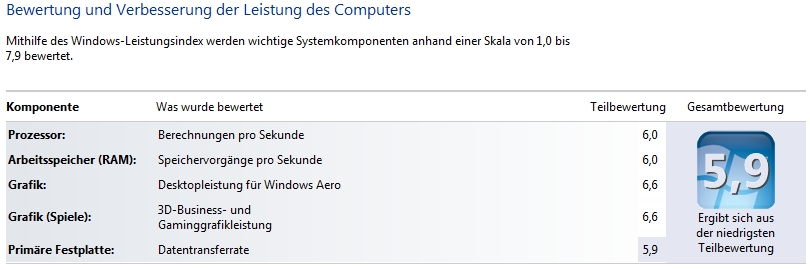
I am curious about the boot times others have and there performance index on
Win7 with a X9000 and a SSD.
My boot time, after installing most of my progs and Kaspersky Antivirus, from
pressing Enter at the OS-choice-menu until the loginscreen shows up are is
28 seconds.
See attachment for my performance index.
If everything is like that with a T8300 and a WD Scorpio Black i belive
a X9000 and a SSD would give my HDX some wings
Attached Files:
-
-
On mine, I get 19 seconds from the "Start Windows Normally" screen to the login screen. I have (as my signature shows) an OCZ Vertex SSD and an X9000.
My Windows Index is 5.6 (5.6,5.6,6.4,6.4,7.0). Obviously, something is weird since I have a faster CPU than you, and you get higher CPU and memory indexes, and
we have the same (nVidia) CPU, and you have higher Graphics indexes. Hmmm....
Anyone else with a X9000 care to share their Windows Performance index numbers?
UPDATE!! I shut down everything I could in my system tray, and reran it. This time I got WEI of 6.4 (6.4, 6.4, 6.6, 6.6, 7.0). Interesting.... -
Thanks for the input and will check them out. I'm needing it for gaming. What sucks is I JUST got Crysis on DVD (yea like a day before it went on sale ALONG WITH Warhead at Steam for $13 bucks this week:/) but the Special Edition, and broke my mouse right before it got here.. Can I use the laser mouse on the HDX surface to the left or right of the trackpad without it being a problem due to blocking the laser from being received or what not? Or does it use a dongle? This is the one I had that just broke: http://www.walmart.com/catalog/product.do?product_id=5192504. If that's the correct one it has a Bluetooth Dongle built in, which you couldpop out and use then click back into the unit itself. I really liked that about it. Which Dell Bluetooth Mouse do you have? I'm thinking the nano would be good to fit in the small space of the HDX surface? Does anyone know if you can connect the dongle into the unit like the one I had? The performance looks awesome but it's kinda big for how I want to use it..would likely be more expensive too I'm thinking.
-
@lancorp, just 6.4 for a X9000 hmm...
And if a SSD gives 7.0 points, what kind of storage is needed for 7.9... -
You simply cannot put any weight into the scores for WEI. Comparing two identical systems, like yours and mine, is one thing, but don't put too much into the actual score numbers.
Instead, looks at the posts of those who have added SSD's to their systems and the comments they make about how fantastic the performance is. Look at the benchmarks that are everywhere. You cannot go wrong with an SSD. Personally, I could care less whether the WEI disk score is 7.0, 7.9. or 99.9. They're just fast. As far as the X9000 goes, again, I'm sure the Windows 7 CPU score leaves lots of headroom for newer CPU's with quad cores, larger caches, etc...for the price I paid for the X9000, and the fun I had installing it, it was a great investment!
-
Here is my WEI:
![[IMG]](images/storyImages/WEIScore.jpg)
The SSD really did give this thing wings. It is crazy responsive now! -
@lancorp, sure its just a dynamic benchmark, but tuning and figure out which yardsticks Microsoft uses is fun
Youre right, its made for i7 CPU's i think. But that the jump between my T8300 and the X9000 is just 4 points
But i wonder what kind of HD will bring a 7.9
Did you guys had the X9000 and the SSD already under Vista? I bet there you hat the full score. -
How long did it take you to upgrade the CPU? I'm considering doing it myself but I'm scared haha. I've never done anything like that before.. I hate how the HDX's insides are so inaccessible for something like this. Since I got UDPixel to fix the stuck pixel I've had since first getting the HDX thank GOD, the only two things I may want to do is to replace the touch pad that's all scratched up (for cosmetic reasons), the CPU, and possibly the keyboard as well (for slight cosmetic reasons). If I think I could try the 3700 I may attempt upgrading to it, but I figure I'd have to get a Dremel first. I likely won't do any of this and may sell this one in order to get an HDX with top specs cto'd (and hopefully Lo Jack ctod so it's embedded in the BIOS) but we'll see.. I'd love to have a 2.8GHZ 8800GT with 120GB or 250GB SSD with Windows 7 Ultmate 64bit, a 3700 would be even better. I can still add a warranty to this one...so I'm weighing my options on if I want to do all of this to this HDX. -
+1 exactly what he said, except i am waiting for ssd pricing to go down a lot. 120gb would be the minimum based on performance vs. 64gb or lower...NOT storage, as 64gb would probably be good storage wise.
considering you can get a 640GB drive for around $120, i might pay around $200 for the privilege of SSD (at $200...still a lot more in price than the 640gb, and more than 5x less storage...that'd be more than fair i think). However as it is, it seems to cost what??? about 18x the price per GB? i'll wait til it comes down to at least 10x the price, and that'd still be generous on my part to give them my money
-
Yet another fine example of WEI not being consistent. Here, your system and my system are practically identical, yet your Graphics and Hard Disk scores are higher than mine. I'm particularly interested in why your Vertex SSD got a 7.3 and mine is just 7.0...three points is quite a bit difference for the same SSD!
Which version nVidia drivers do you run, and are you using the Intel Matrix Storage software? -
I get the same WEI score as CompT on the Vertex 120... 7.3 also same graphics score of 6.7.
Not using the Intel chipset and Matrix manager since they get in the way of the TRIM command. Just standard Microsoft drivers as supplied by win7. -
BTW, HAPPY NEW YEAR to ALL.
-
For NIVIDA I run the newest drivers NIVIDA site. Currently: 195.62
For my SSD I use the Microsoft driver to ensure that Win7 passes the Trim command (Which I have verified works) and Firmware 1.4. As for performance SSDs are still a new technology that needs a little help to keep them running at top speed. I will give a quick overview of why.
The NAND flash currently used in SSDs has an inherent problem with slowing down after being used for a while. When the drive is fresh you are writing to clean NAND flash, but after you have copied, deleted, and uninstalled a few times the drive begins to slow down. Also if you fill the drive more than 20% it will start to take a performance hit as well. Without getting too detailed the gist of what happens is that each NAND flash chip in the beginning only needs be written to, but after the dive has been used for a bit wear leveling helps spread out the usage to the whole drive. Once a NAND has been used even if the OS has been told the data is not there (which it is BTW) it needs to be cleared before it can be written to again. so now every time you write to the NAND flash the process is 1st clear the NAND, 2nd write to it. This is what Trims does for you, it clears this NAND before you ever write to it to save you the extra step when you are ready to write to it. but it is not perfect. It helps greatly but some extra help is needed to keep peak performance.
For example in my case when I first installed Win 7 I did a bench of my drive and it was 230MB/s Writes and 176MB/s reads. After 2 days of installing and configuring all my drivers, games, utilities, and other stuff I had my HDX exactly like I wanted it. I did another Bench after and my reads were 200MB/s and writes 35MB/s! My WEI went to a 5.1. Luckily I had expected this. I had done a lot of reading through the OCZ forum and many good articles so I knew what to expect and what to do to fix it.
Now there are many different methods and suggestion on what you can do. I suggest reading through the OCZ forums. There is some very useful info there:
http://www.ocztechnologyforum.com/forum/forumdisplay.php?f=186
Also look at these articles from Anandtech. At the very least read the 2nd and 4th very good detailed info about the interworking of SSDs. If you like them and have time look at the other as well.
1st article: http://www.anandtech.com/cpuchipsets/intel/showdoc.aspx?i=3403
2nd Article: http://www.anandtech.com/storage/showdoc.aspx?i=3531
3rd Article: http://anandtech.com/storage/showdoc.aspx?i=3631
4th Article: http://www.anandtech.com/storage/showdoc.aspx?i=3667
From my experience Trim works very well and for the most part it will keep your drive working fast enough in most cases that you will not notice the performance loss without a Benchmark for at least a month or more depending on how you use the SSD. But with power users that are constantly changing the information on their SSD and are more aware of performance this can be different. Best thing to do is run a bench preferably "AS SSD" (gotten here: http://www.ocztechnologyforum.com/forum/showthread.php?t=58059) every once and a while to see what it looks like. you drive can be working at 25% less and you really won't notice it with normal use. But I am sure most here are like me and want to keep that speed up. In my extensive testing of all the methods I could find I found one that works the best for me every time. "Tony-Trim" from the OCZ site.
http://www.ocztechnologyforum.com/forum/showthread.php?t=64753
This method works wonders every time and gives me performance like the drive is new again. The first time I ran it I actually got better performance than my fresh install. My plan is to run it once every 2 weeks if need. There are 2 parts to it. A defrag with consolidation and a tool that ultimately does a manual Trim that is more efficient that Windows 7 Trim. I have even done the method of filling all the free space on your drive and deleting to force a Trim of all free space. It worked and did give me most of my performance back, but this tool still did it better. Also I modified the "Tony-Trim" instructions a bit to my liking and style. I did not do a schedule I just run the Defrag manually when I want to. Also If I have lost speed but my fragmentation is minimal I only run the Trim tool. This work just as well if there is not enough fragmentation to justify a defrag.
The reason I do this only when needed is that NAND does have a life cycle and in the case of MLC NAND it is about 10000 writes. (Reads do not affect the life) Wear leveling makes this better by trying to make sure you write to all NAND before you write to another again. When you run the cleaner you are doing a write to all the free space on your SSD. Doing it occasionally will not cause a significant loss of life but if you were anal and ran this daily it would have a negative effect on drive life. lancorp try running a "Tony-Trim" and see what happens to your numbers. I bet you will be closer if not at the 7.3 mark. I hope this helps you and other SSD owners.
-
Very excellent write up, CompT.
-
Happy New Year and welcome back! Yes, I knew about the TRIM issue, and was willing to live with it, but, I think my slowness was due to a misalinged partition.
I fixed that and now have a 7.3 for the Disk WEI.
-
Ah, good to know. Usually Win 7 (along with Vista, and Server 2008/2008 R2) are very good at auto aligning the drive for you. In your case of being more than 4GB it should have been a 1024KB align. I wonder what happened? Did you let the Win 7 install do all the work or did you partition it before installing? Do you have the 100MB reserve partition at the beginning of your drive? This is created when you present the WIn7 install with a RAW drive.
-
Thanks 2.0.
I tried to give enough detail to be helpful without being to long and boring.
-
Agreed! Some very useful information. As a pioneering user of SSD's, and having done much, much learning over the past year of using them, I am aware of much of the info CT contributed.
As I just wrote, I got my WEI disk score to 7.3 by merely realigning my partition (or possibly by removing Intel's MSM...but I think it's more likely the misaligned partition). I had recently "borrowed" my HDX's Vertex to try out a new dv7t, and in reinstalling it back into my HDX, I did a disk reimage, instead of a partition reimage. Therefore, the partition was not aligined properly.
I corrected that this morning by doing a sanitary erase then a fresh Windows 7 install. Upon completion, I reimaged my HDX partition from a backup drive to the new Windows 7 partition, repaired it so it would boot, and checked for proper alignment. When all was good, I re-ran the WEI test, and got 7.3.
I must say, though, that SSD's, as fantastic as they are, require too much manual maintenance to keep that performance up (IMHO). Someday, there will be better SSD's that keep themselves running at 100% performance, but until then, I just run mine with minimal maintenance. So far, I have not really noticed the huge dropoff's in performance that others have had, so I'm happy keeping it that way! -
I actually had remimaged the Vertex with Ghost, and used restore disk, instead of restore partition.
All is good now.
-
Cool, makes sense. good to know all is good now I agree there is currently a lot of manual upkeep and a higher level of knowledge needed by the user at this time. I believe eventually we will move away from NAND and FW will get more intuitive.
I look forward to testing FW 1.5 for the vertex. It will combine GC with Trim. It will be interesting to see if this eliminates the need to run the cleaner tool or at least give you more time before you need to. Or just slows things down and I move back to 1.4 lol.
SSDs really have come far since their inception. I have not had mine very long but I bet if I never benched it I would not notice the difference for several months. Win7 Trim really does do a good job. Only reason I had the massive slow down at first was installing and uninstalling along with moving things around getting use to less space and decided what would just be put on my spinner rather than my SSD. -
Anandtech just posted a new article. Looks very promising!
OCZ's Vertex 2 Pro Preview: The Fastest MLC SSD We've Ever Tested
http://www.anandtech.com/storage/showdoc.aspx?i=3702 -
This is beautiful. Will be filing this away, hopefully never having to use it.
-
That does look interesting. The problem will be, though, that it will most likely be priced out the hands of most of us that barely want to spend what we spend now on current SSD's!
Personally, I would have thought that the pricing of SSD's would have started to come down by now, yet for $500 for a Vertex 120GB, I think, if anything, the price is just as high, if not higher, than it was a little while back!
Does anyone think that 2010 will be the Year of the SSD? -
LOL. someone should make a chinese calendar type thing Year of the ???, with computery stuff.
-
Hey,
I posted an issue I was having early last month about no sound on my dragon (#8606, pg 861) and after trying different things and some helpful suggestions by 2.0 and RemyL75, my issue unfortunately still exists ....
So i'm thinking, maybe if I roll the bios back to the previous version it may help? How would I go about doing that? -
That won't help. BIOS doesn't have anything to do with sound.
Your win7 driver database somehow got corrupted. A clean install would take care of the problem. But before you go that route, try the following as it will restore the driver database and reset everything back to default.
Insert windows 7 disc while you are logged into win 7.
Run setup
Choose upgrade.
Just follow all the onscreen instructions. This process will save all of your settings and programs as they are now. It will take about a half hour to do this. -
Definitely higher than June '08 when I got mine. I paid mid $300's for the Vertex 120's, < $200 for the 60Gb.
I'll wait for the 4th or 5th generation of SSD's before I get new ones. And that will likely be for a new system that has SATA 6. -
Hey 2.0, Thanks for that information...I had been reading through some of the older posts and saw that there were intermittent problems reported after an HDX* owner flashed to the most current bios, and I was thinking maybe that was a contributing factor - at least I don't have to worry about that, as I haven't had any other problems with the unit(for the most part)
Well, actually, this issue was occurring BEFORE I installed win7 believe it or not..but since I bought this used from eBay, the dude did say that he used an "alternate" vista OS - so I instinctively ordered the x64 Ultimate restore disks from HP just in case....i'll try that on a separate drive and see if it does the trick....I'll let ya know -
I recently used the recovery discs to reformat and reinstall. Unfortunately, when I start the system up, it goes through the bios, then the microsoft loading bar, then just a light blue screen. Any suggestions?
2.5ghz dual core, 4gb ram, nvidia 8800m gts, 2x 110gb hard drives. -
Hi friends
i want to install windows 7 on my HP HDX 9390EE, what drivers are availble for it?
thanks and sorry for my bad English;-) -
Look here at my post #8954.
http://forum.notebookreview.com/showthread.php?t=169232&page=896
those are the steps and drivers I used. -
Three quick questions:
Would this work with the HDX to stream to the Slingbox?
http://cgi.ebay.com/ws/eBayISAPI.dll?ViewItem&item=270480686353&ssPageName=STRK:MEWAX:IT
Also I was planning on getting the EX495 and they have extra discounts, presumably because they're going to discontinue it, but you think I should wait to see what they come out with for the first quarter?
Lastly, is there any news on a new HDX or what the next high performance notebook is from HP? -
First time poster long time user of the HDX, as a matter of fact, I think I was one of the first to purchase this beast way back in 2007. I've got the HDX 9000, Duo [email protected], I've got two 110 GB HDD's, 4GB ram, and the ATI 2600 XT video card. The system board ID is 30D4, KBC Version 86.17, BIO Version 68DVD/F.40
Honestly, I've never had any problems with this machine, (knock on wood), but I've finally reached the point of hard drive space issues, and video card laments. So Three questions which may have been answered in the previous 1000 pages.
1.)
a.)Will my system take advantage of the 3.0G/S hard drives?
b.)Will 7200RPM hard drives cause excess heat over the stock 5400RPM versions?
c.)Can I just swap out the primary HD with a 500GB and leave in D:'s 110 GB?
d.)Recommendations on brand and type of Hard drive in the 500GB range?
2.)
a.)Is their any option to swap out the ATI 2600 for one with more than 256Mb of memory?
b.)Is their a CMO's or Windows setting which would allow me to assign larger virtual RAM to the Video card? My Info software shows me that the ATI appears to assign 2 Gb of RAM to the ATI card. Is there an adjustment for this allowing "reserving" memory?
HP tells me this:3.) With the new hard drive, I've planning to update to Windows 7 Ultimate 64bit, and want to know the main drawbacks to doing this. What do I lose? What do I look out for?
Thanks for taking time to repsond.
P.S. I love this machine. It's been very, very good to me.
I use if for CAD and the only game I play is a custom MOD to BF2 called BOMSF.
It has always played the older game reasonably well except when lots of action occurrs nearby, specifically with partical information like smoke or explosions. Then it gets choppy. The less primary HD space I have the more choppy. The more startup programs I have running the more choppy. Which is why I want control over the memory allocation if possible. Cuz I don't think updating the video card is possible. -
Darn,
Now I've got WEI envy!
My old HDX is only at 4.3 overall with that number being my Hard drives. -
I just checked around quickly for prices on Vertex 120's, but cannot find anything as low as what you paid over a year ago. Care to share where you got such a screaming deal?
-
Does anyone here have an Optiarc BD ROM BC-5500A blu-ray drive working on his/her HDX with Windows 7 Ultimate 64 bit?
Mine doesn't read (or even recognize) blu-ray discs...
I've already tried everything... (I think...) but still can't make it work... I even restored my computer to factory settings. The problem remains...
Thanks for any help or advice you can give me! -
It was Mwave and Zipzoomfly back then.
-
1.
a. Yes.
b. No, not at all.
c. Yes, you don't have to match sizes.
d. Western digital(54oorpm), Seagate(5400,7200), Hitachi.
2.
a.YES, but you'll have to buy a new motherboard that supports both the ATI and Nvidia card, plus you'll also have to buy the Nvidia card. You can find the mobo on HP parts. System board Part #464591-001. Nvidia card must be the one used in the HDX as it is proprietary and not a standard one. I say this because if you by a standard 8800m GTS off ebay, it won't work. It has to be one made for the HDX. Its part number is 454311-001.
b. nope.
There's only an upside to going to win7. For tips on what drivers and where from, do a search of CompTrekkie's posts a few pages back. It's perfectly laid out.
I hope you have 4GB RAM. And since you do CAD, you may want to consider upgrading to 8GB RAM. As for games, the ATI 2600XT is about as strong as a Nvidia 8600M GT.
If you decide to upgrade you're mobo and video card, be prepared to spend ~$750+. -
Conceptually, it will work. Question is, will that particular device work.
Maybe they might and debut it at CES show this month. But consider that it's just a storage unit so there won't be any new "wow" features in a new one. If MIcrosoft were comig out with a new version of WHS(windows home server) then that might be worth the wait. But WHS service pack 3 irons out most issues.
HDX = RIP.
You'll have to wait until MAY for news of any such hi-pro kit. -
Thanks 2.0, that was all very helpful.
I will order the 500GB 7200RPM 3.0g/s drives.
Is one manufacture better than another? The existing ones are Hitachi.
I don't think I'll be upgrading the MoBo then, at $750, it is not quite worth it.
I'm better served getting the faster larger hard drives.
One gig of video memory would have been nice.... next laptop I guess.
I'll look up CT's threads on drivers, and meanwhile archive all my data off to my 500GB back up device.
What is your recommendation on W7? Upgrade or fresh install? -
I've never had a problem with a hard drive so I can't advise who would be better. I've had at least one HDD from all manufacturers.
I always recommend and do a clean (fresh) install. It is the best of all worlds. -
Yes mine works in WIn 7 Ult x64. I did not have to do anything special.
One note though. It has never given me any trouble reading or writing to any CD or DVD, but I do have the occasional issue where it will not read Blue Ray disc on the first go. It will read and seek for over a minute and give up. I have to open & close it a few times. It has done this since I fist got my HDX over a year ago. I knew the drive was cheap and am ready to buy a new one if this one ever decides to stop all together. -
Here's a cool little tip for those of you with Windows 7--you can create a folder in Windows 7 that when opened, contains every configuration tool available in Windows 7. It's called GodMode. To create it, just make a new folder anywhere (desktop, for instance) and name it "GodMode.{ED7BA470-8E54-465E-825C-99712043E01C}" (without the quotes). The icon will change from a folder to a control panel icon, and when opened, you will see every conceivable control available in Windows 7.
I wonder what else it does?
-
Very nice indeed!
-
Very nice!
Have it set up on Windows Vista 32 bit.
It works.
Edit:Caution: under Vista 64 bit creates this tool introduces an explorer crash!
Deletion then only in Safe Mode possible.
(Source Chip.de, no self-test)
More Canonical Names of Control Panel Items under: http://msdn.microsoft.com/de-de/library/ee330741(en-us,VS.85).aspx
*HP HDX DRAGON Owners Lounge, Part 1*
Discussion in 'HP' started by J-Bytes, Sep 14, 2007.