 Problems? See this thread at archive.org.
The ribbon. Yep, that took some getting used to. Glad Onenote 2007 doesn't have that. New version of Office (2010) has done away with the ribbon to some degree. But they mess up Onenote. Lost the ability to fully customize the menu.
On Vista's media center, haven't used it. Was using Quickplay back then and not often at that. But Win7's media center is very nice. Been using it often enough since I got an antenna to get OTA HDTV.
-
-
How do I record it then? Through S-Video or something? What about the audio? My friend mentioned something about how when you record off a box, you have to keep it on the channel you want to record on, that the Dragon can't flip through channels to record different shows.
-
Video would be through S-video in and next to it is TV audio in jack. You'll need a RCA stereo to 1/8" mini stereo cable for the TV audio in.
The HDX can flip channels using the IR remote cable that came with it. You would face the IR remote cable to the converter box's remote eye.
I tried this when I first got the HDX and it does work. Took some configuring because the channel line up didn't match exactly. And the converter box I had didn't need or have an enter button. So entering the channel would require 4 digits starting with 0. But that was using Quickplay on Vista. Haven't tried it using Media Center. Don't even know where that remote IR cable is. -
I also read that the GPU not getting enough power can do it. Is that possible on the dragon with its HUGE power brick?
I mainly run default clocks, but have moderately overclocked (600/900/1500) too to see if it made any difference and it didn't.
Strange how if effects some games, but not others though.
Does anyone have a spare ex-Dragon graphics card kicking around that they don't want then?
Does anyone know how much HP charge for a replacement 8800?
CJ -
That would be correcto. Yea the size is kinda annoying, but I think once I get a nice Blu Ray burner, I'll be able to keep free space on my server by taking to the movies and burning them to disks instead. These videos are super huge. DVD is tolerable but it still can fill stuff up.. but nothing like a Blu Ray which is ridiculous.
-
wow this explained why in the past when i uninstalled a couple times...it just kept resinstalling...i guess all the old drivers.
it took me 7 uninstalls back to december 2007, before i hit the vga driver.
by the way, the microsoft nvidia drivers would not install via the setup.exe in the folder, i had to install via the device manager.
any chance on knowing why i have a yellow triangle on the Teredo Psuedo Tunneling interface in the device manager under network adaptors. it says the device cannot start (code 10). i ignore it, but i have no idea what the heck it is. i think i tried uninstalling/disabling it a long time ago (i think)...and it didnt work.
so what version of physx should i install with this new microsoft nvidia driver? linky pleasy?
btw, i am wondering about all those successive uninstalls...was there a folder perhaps where it stored all of these that could just be manually deleted, wherein it would just take you to the vga driver instead of trying to reinstall older drivers?
anyway its done. thanks.
oops...edit-i followed those steps and rebooted but i could not and can not get fn f7 or fn f8 to work, whether i rebooted again, put it in sleep, or whatever. not that important...but wondering how you got it to work. the windows x key works. i didnt change the brightness through there though.
if the whole point is to retain the same brightness when sleep waking...it does that and has done that with the last 3 nvidia drivers, but still the f7 f8 dont work fwiw. -
Forgot about that change, which was done relatively recently. My bad. Wait is it because it's coaxial or would it work via svideo? I don't think I used coaxial to record, I only used SVideo and component. Wait now that I think of it I DID use coaxial but it wasn't digital.. Hmm. Might as well try different things to see what works. Sorry for the confusion. I've been doing things in component 1080i for a while now so I can't remember what you could and couldn't do exactly in regards to standard definition and standard def cables.
-
Weird. Did you delete the Nv_disp.inf file? That would prevent it from installing.
It's a part of IPv6 over IPv4 in Vista. You can disable it.
Phsyx should be in the cab file. If not, use 9.09.1112:
nVIDIA PhysX System Software 9.09.1112 download from Guru3D.com
It's in the driver cache. No easy way to get to it. Best way is to do what you did.
You would need to install quickplay button software and quicktouch driver to get those to work. -
Card will cost you about $300 or so shipped.
Enter part number 454311-001 in the HP part surfer; http://partsurfer.hp.com/ -
Thanks Two. Do these things have anything as ludicrous as a lifetime warranty?
CJ -
No, just a 90 day warranty AFAIK.
-
Oh-oh.........
![[IMG]](images/storyImages/HP.jpg)
CJ -
It's available and in stock in the US. You might need to call HP in the UK and see if they can arrange a shipment to the UK from US inventory.
-
thanks 2! yes i did delete that inf file. no matter it's all good now. i also disabled tunneling thingy and all is good also. i know that nvidia control panel and nvidia drivers installed (according to the add/remove programs list). not sure if trying to manually install the physx will work through that folder since it didnt for the driver (i only did try once and the message for that said nvidia could not find compatible something something). if installing from that link is same, i will do just that. incidentally, i assume this is the latest version that will work/work well with the ms nvidia version of the driver? will the newest physx work/work well with it (i know i know...if it did you probably would link that one
 ) just had to ask.
ahhh driver cache...well i did it right so all is good.
ahhh quickplay. i may have just disabled it from startup so i might have it. not sure which startup entry controls it??
otherwise is there a linky link to quickplay?
thanks! -
No it's not the latest, it's just the base Physx for that driver.
You can update it to the current found here: NVIDIA DRIVERS 9.10.0513
As for the Quicklaunch softpak:
SP45058
Can be found in the softpak library: ftp://ftp.hp.com/pub/softpaq/ -
wow quick response thanks 2.
and hot off the presses for physx apparently just released. -
There's a seller on ebay with a stock of more than 10 BN x7900's QZDX engineering sample, selling cheap at £100; the OEM goes for £150.
Intel® Core?2 Extreme Mobile Processor X7900 QZDX NEW on eBay (end time 04-Sep-10 02:29:53 BST)
Is it a bad idea to purchase an engineering sample and Can it be overclocked with Throttlestop? My model is the 9120EA.
Thanks in advance for your help. -
X7900 ES are all basically no good.
Your best bet is a normal X7900 (which will run kind of hot which means fan noise) or an X9000 ES Q174. -
I shall purchase a q174 and I'm eager for the self-upgrade; I've heard it's a 4 hour job. Can't wait.
Too bad about the temp issue, one of the best features of my HDX is the low noise level; providing that the fans get cleaned of course.
Thanks again -
Ah, me no like Quickplay, so I'll try it on Media Center when I get the stuff.
I didn't even know what that IR cable was for. I thought it was for the remote on the laptop so you could extend the range in which it worked. What you said makes much more sense.
Thanks again 2.0 -
Re: The remote control
I rarely use Windows Media Center (I don't touch Quickplay), it has been months since I've last used it. Gone through numerous Windows updates as well. Tonight I reach over to press the green button, and nothing. Tested the batteries and I'm getting 2.91 on one, and 2.95 on the other. So, it isn't dead batteries. I'm not showing any conflicts/errors in Device Manager.
My thinking is something regarding a Windows Update along the line. What file in the SWSETUP directory do I run to re-install the IrDA? I just can't seem to make sense of what's there to run the right file.
No buttons on the remote control seem to work. Looking at it through the webcam, it IS sending the IrDA flashes (again, the batteries are good). Lenses are all clean as well.
Any advice?? Thanks!!
**EDIT** -- I'm using Vista Home Premium 64-bit. At least until my wife can get a copy of Windows 7 through UGA. -
SP37925 for the IR driver.
But do you have any yellow explanation points in device manager? -
Need to know what price I can expect from a EBay sale or auction of my Dragon, specs listed below. I also have an extra power pack and the HP roller bag to throw in as well. Have decided to go with an Apple Macbook Pro and selling this will help me to get it sooner. I have not used this for almost 6 months now, as I am always on my smaller HP lappies. Thanks in advance!!!
-
Huh. I don't even seem to have ANYthing -- file or directory -- with "37925" on my system. No yellow exclamation points in device manager at all. I've got a bunch of stuff under "Human Interface Devices" -- notably, "ITECIR Infrared Receiver (CHIIP)" as well as "Microsoft eHome Infrared Transceiver".
Both "devices are working properly".
I should also note that the remote isn't working in its docking recess, nor when I point it at the IrDA lens in the front of the machine.
I'll go searching around HP's site for "SP37925".
Thanks again, 2.0. -
Found SP37925. Downloaded it. Re-installed it, still no go.
Did an uninstall and reinstall. With further testing of the remote control, I'm able to use it at about 10-12 feet distance (testing with IrDA test gear).
I'm at a loss... -
Probably $600-$800.
-
If the power/suspend button on the remote doesn't work, it might be a hardware issue. Check that the receiver lens on the HDX is clean.
-
Well, bummer. I'd have to go with a hardware problem then. Lenses are all quite clean (the first thing I did in my troubleshooting with this -- and just made sure again).
I'll mess around with this tomorrow. It really isn't that big of an issue for me, just want everything working properly.
Now, I have a meteor shower to go watch!
2.0, thank you again. Your help, expertise, and overall knowledge is greatly appreciated. -
Hi,
what temps are normal on a CPU load of arround 20% and GPU load of arround 5-10%?
My fan runs like grazy just doing office and firefox stuff.
My Nvidia says 61C and my T8300 says 62C -
CPU high 20's to mid 30's.
GPU High 30's to mid/upper 40's unless you are running dual view in which case, mid to high 50's.
Your fans need cleaning. -
Thanks 2.0
But the other think i just saw is that the fan stops even if the temps are the same. I saw if the CPU voltage is 0.95V the fan makes no noise and add 1.14V he runs.
The fans are not temp controlled? -
Ordinarily I'd say that they are temp threshold triggered. But the algorithm might also take into account of the VID. Or a combination of VID and temp.
But then again, I run HWmonitor full time. It alters the trigger points because it polls more often than the BIOS would. So in my case, as soon as certain temp threshold is met, the fans change their levels.
Like right now, VID is .95v and temp is 34 DegC for CPU and 47 DegC GPU. Fans are on lowest setting. All I have up is Firefox(5tabs), explorer, CPU-z, Word, Onenote and a few instances of windows photo viewer. -
If you say 34 DegC, do you mean per core or summary?
Core 0 is 29 DegC and Core 1 is 28 DegC.
Looks like there is no sensor for the FanSpeed - Everest shows nothing... -
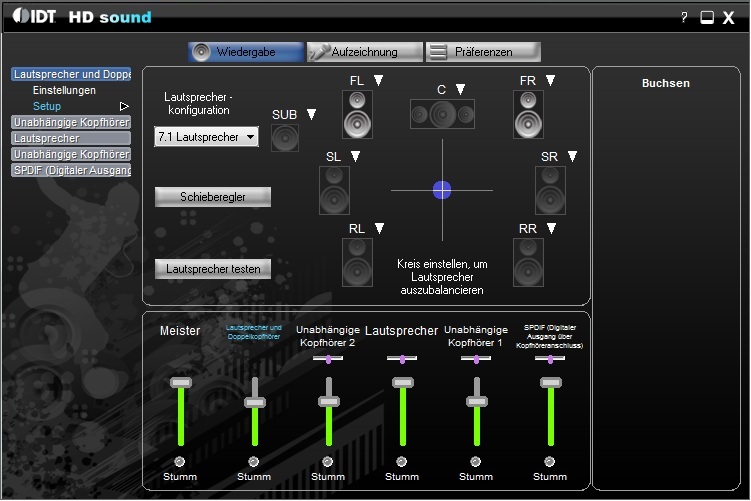
Just for info, and only for "Windows 7" users. ( Do not install on Vista!)
Who has the IDT 6.10.6289.0 installed "Windows 7", the "IDT HD Sound Control Panel" included.
Unfortunately, it can not be integrated into the Control Panel. Also the taskbar command will not work.
The best you put a shortcut on the desktop. This can then also be a new icon. (For example, "PCAudio.ico from the IDT program folder)
The path for "IDT HD Sound Control Panel" is:
Root / Programs / IDT / WDM / idtcpl64.cpl (64 bit OS)
Who has a problem with missing subwoofer, this does not resolve it.
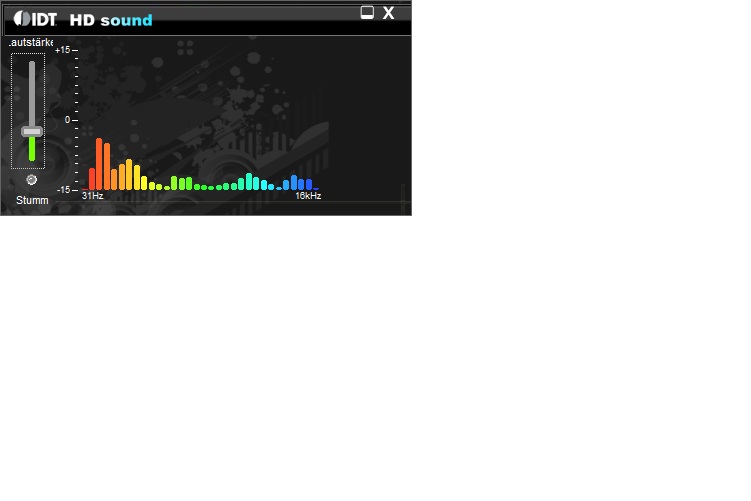
An additional animated Conrol volume is located at:
Root / Programs / IDT / WDM / idt64mp1.exe (64 bit OS)
(Of no further use)
Have fun!
Note: Install this driver is not under Vista! (You lose your subwoofer)Attached Files:
-
-
Hi, I have recently upgraded to Windows 7 which no longer recognises my AverTV DVB-T Tuner card. It Shows an AverTV in device manger but does no state which version it is! It simply states that there are no drivers installed. When I hit review solution I am guided to HP's website which prompts me to download Avermedia A301/A312/A321 TV Tuner Card Driver. I've installed this 3 times now and it still hasn't worked.
How can i get my DVB-T TV card to work? Or I have been looking at this product....HP ExpressCard DVB-T TV Tuner EC300 Express card. Is this product or any similar others compatible with windows 7?
My AverTV Card is A312
Cheers -
The original driver works. SP 37923. Install it, let the computer sit for about 5 minutes, then reboot. Make sure UAC is disabled and no antivirus running. Also run it administrator.
If you don't have it you can find it here: ftp://ftp.hp.com/pub/softpaq/ -
1st Uninstall in Device Manager, Integrated HP Digital + Analogue Hybrid TV Tuner "
Drivers to delete!
2nd Uninstall in Programs and Features:
"HP Integrated Hybrid TV Tuner xxxxxx" and
"AVerMedia MCE Encoder xxxxx"
3rd Reboot
4.Gehe to: Root / SwSetup
Put in the file: "AVerMedia.exe" on the Vista compatibility mode (Vista)
4th Start the installation from SwSetup out! (Double-click "AVerMedia.exe")
5th Reboot
Now should work your tuner.
EDIT: 2.0 accidentally gave a wrong driver package. (SP 37923)
The original is sp38987.
My explanation assumes that they have this installed already on Win7.
Only then is "AVerMedia.exe" in SwSetup. -
My Q174 is running full-time @ 4GHz max with no problems/fan over-audition (1.4625V), so I hope yours is just as good if not better. I also went with OCZ Freeze, but I'm not sure that's what keeps my temps no higher than 50-60 C during heavy use and summertime (except stress tests, and then I get max ~70). W.E.I. 7.0.....wei cool!
-
I'm not a fan of the Windows 7 taskbar as well...but there are a lot of things one can do to make it look/feel/work like older versions of Windows. I'm using Windows 7 Ultimate right now and I've made some adjustments...
![[IMG]](images/storyImages/windows7look.jpg)
Uploaded with ImageShack.us
Apologies about the poor quality of the pic, but hopefully it gives you a view of what one can do...
As 2.0 has incessantly stated, Windows 7 is indeed much more stable than Vista. While I can't say I've "fully optimized" Win 7 (i.e. with drivers, etc.), I can say its better than Vista....
...and yes, I still use Winamp...
-
Ok, after 4 hours cleaning my dragon it's much better.
I also did under-volting now (did forget that something like this exist. did it bevor some years on desk-pc's).
After 15min 100% CPU load my max is 43 DegC.
But there are two things i wonder.
First is that sometimes the fan runs even if i have just 27 DegC.
Second is that after the fan was running and the temps drop, the fan does not stop running. -
Thanks for your help chaps. I've tried both solutions but unfortunately neither have worked. Are there any other suggestions? or the HP DVB-T Tuner work?
Thanks -
The only thing i do on W7 64bit is setting the AVerMedia.exe from the SP38987 to Vista SP1 compatible and it works.
-
In my case there were no problems with "HP Integrated Digital + Analog Hybrid TV Tuner" under Win7x64.
However, installation in compatibility mode and Win7 clean install.
CompTrekkie had only problems but also - see here. These problems are healed by itself.
If the driver is installed properly (see Device Manager) and still does not work,
then see my Post between xanlexian and me "RickiBerlin". (Post 10004-10010)
Maybe this will help further.
However, these steps help really only after a hardware change and OS was Windows Vista.
Are there any other unknown devices in Device Manager?
Please compare your setup with the list of CompTrekkie! (See link above)
Good luck -
i upgraded to the latest wifi driver 13.2.1.5 for intel...it seems to have made me lose my easy ability to modify the mac address via device manager properties for the card.
is there another way besides software to manually change it? damn microsoft. -
What would be the latest and greatest NVIDIA GeForce 8800M GTS driver to use with the HDX under Win7?
-
according to 2, and what i use now...it is the microsoft one he linked for me just a few pages back. page 1141.
see page 1142 for latest physx driver that does not come with the ms nvidia driver. -
This is a question for our illustrious 2.0. Or should I say, Brigadier General Jack Ripper? Buuwwaaahhhaaaa!
Damn, do I miss Peter Sellers. Still. Someone told me Steven Wright was the ba*tard love child of Peter Sellers and Shirley Maclaine. Could be, eh?
Do I remember you, 2.0, saying in a much earlier post the internal cage and second HD isn't as good an a idea as an external drive running on eSATA? Something about you digging your Rocketfish kit? What made you say that (if you did)? Heat? PITA installing the internal drive? Or?
Hey to everyone else too. Haven't posted in a while. How's it hanging, Dom? Yes, those pixels are still dead. Man that pisses me off. My Dragon still doesn't have a scratch or scuff on it two years later ... but those damn dead pixels.
In a humorous vein: I was on a rare jaunt out into the sea of the great unwashed and someone sidled up to me at a Java Hut and wouldn't leave me alone with questions about my Dragon. So I had to go through all the bells and whistles; irritating every other laptop user in the joint when I fired up the speakers. At the end, the guy said would I take 800. bucks for it. I said, "Most assuredly not, sir." He then offered a cool grand. I thought he was spoofing, until he said, "I'll go to my bank right now and be back in twenty minutes." I said, "Sure, buddy. You go do that. I'll be right here when you get back." I left so fast my latte's foam was still in the air.
True story.
Doc -
Update!! Re: my remote control issue
I remember the user dv7t mentioning that she had to reboot a bunch of times to remove her 8800GTS driver to go back to the 195.75 driver. I just went through that entire process. Took almost two hours and eleven reboots (yes, I actually counted) to FINALLY get back to the "VGA Driver".
Games are running MUCH smoother, my display seems a bit brighter and 'crisper'. Less 'yellow'. And oddly enough, my remote control works perfectly now!
I'm quite glad I've gone through this whole process.
2.0 and dv7t, thanks to both of you for the suggestions, the processes, steps, and everything else to make the Dragon experience just all that much smoother!
And everybody else here, of course!!
--Alex -
Don't recall that. Might have been some specific configuration someone was thinking about. Anyway, 2nd internal HDD is fine. No reason not to do it.
-
Thanks, I've made some progress after your suggestion
I've reinstalled my Avermedia TV card under Windows vista compatibility mode. After checking device manager it appears that it has installed correctly.
However windows media center does not recognise the card. I checked you're earlier post between you and xanlexian however windows 7 does not have a DRM folder located in the address you have given! There is a caches folder in oot: \ Program Data \ Microsoft \ Windows \ cache but this does not have the keys "Indiv01.bla"; "Indiv01.key"; "Indiv01.tmp"
The keys in the cahe folder are.....
{3A7C5B53-748F-4CB9-9B1F-3DFE6C4114BB}.2.ver0x0000000000000001
{6AF0698E-D558-4F6E-9B3C-3716689AF493}.2.ver0x000000000000000b
{6AF0698E-D558-4F6E-9B3C-3716689AF493}.2.ver0x000000000000000c
{DDF571F2-BE98-426D-8288-1A9A39C3FDA2}.2.ver0x0000000000000001
cversions.2
My physical setup is an coaxial cable from my laptop plugged directly into a splitter (the other end is plugged into the living room TV which is working fine) which coaxial cable onto the Rooftop TV Aerial
Anymore suggestions?
Cheers
*HP HDX DRAGON Owners Lounge, Part 1*
Discussion in 'HP' started by J-Bytes, Sep 14, 2007.




![[IMG]](http://img251.imageshack.us/i/windows7look.jpg/)

