Problems? See this thread at archive.org.
Hello all,
Quick question--is there a recommended travel charger for the HDX--I remember that the Kensington slim charger was supposed to work, and also someone found a Korean charger that worked well... Is there anything that really stands out form the rest, or something that offers the best bang for buck (if that even really applies in this situation =) )?
Thanks,
Brent
-
-
awesome!

-
I have a problem with Windows 7 (and Vista too).
I try to install Win7 but I have the information "can not install Windows on that drive. Computer's hardware may not support booting to this disk. Make sure that the disk controller is integrated into the computer's BIOS menu. Do you know what's wrong? Thanks in advance for your help.
Let me add that I had two disks in laptop. Both have Win7 installed. |Everything was fine.
One drive goes on sale (the original from hdx), so it was formated (using the Partition Wizard Home Edition 5.0.0.1). I run the coputer again and saw a message that there is no system disk (or something like that). I tried to change disks in laptop but got the same effect. In the boot options I have only the choice of cd or usb. I ran the installer win7 with usb, that I used so far and I have the message "Unable to install Windows on that drive. Computer's hardware may not support booting to this disk. Make sure that the disk controller is integrated into the computer's BIOS menu" . The BIOS does not see any options on the HDD, only the boot options.
How to solve the problem?
Best regards -
Then you have not followed my instructions exactly.
Windows 7 has also granted the rights management.
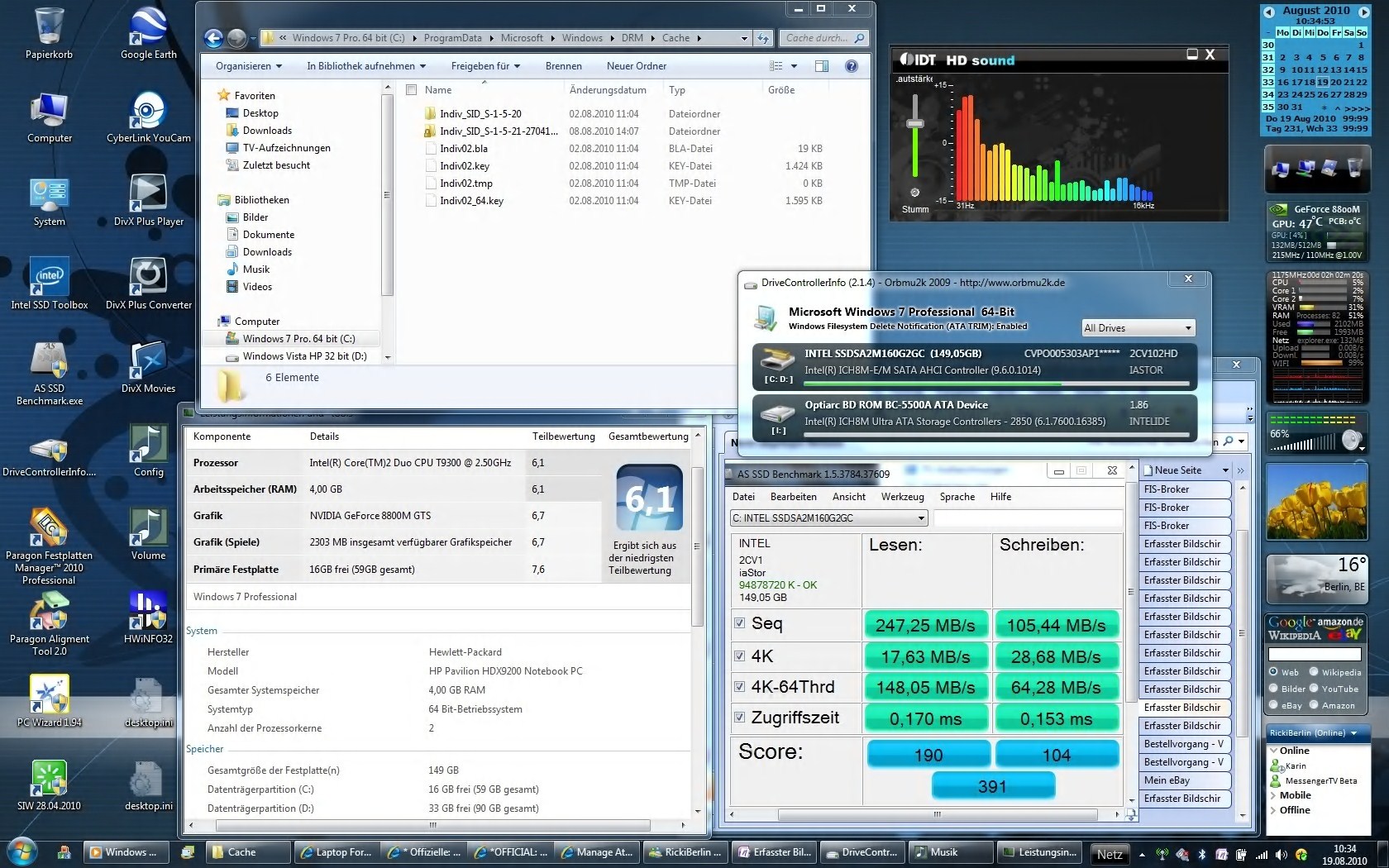
It is under the same path as in Vista. (Root \ Program Data \ Microsoft \ Windows \ DRM \ Cache) - see picture <- was still not cleared. In my case, there are 02er files since I have cloned my system.
After a fresh OS installation, this folder is empty, but it exists.
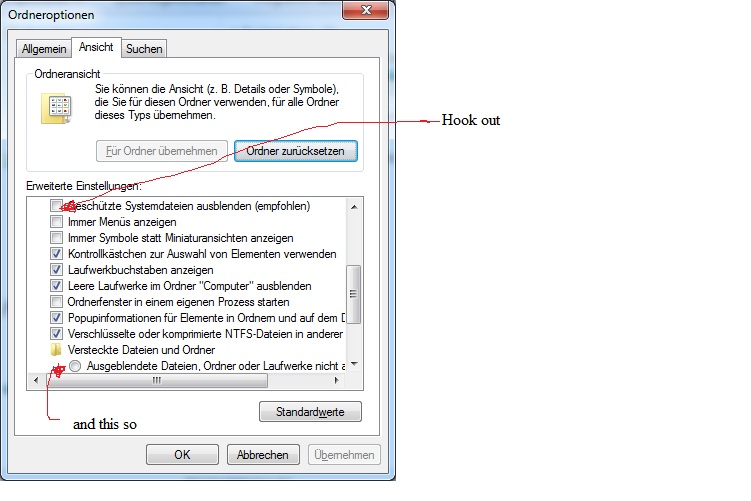
As described in my post ... Quote: "1st Folder View for protected system files and hidden files unlock." "Protected system files" hook out and "hidden files" hooks. ( See picture)
Here you must have made a mistake.
I had to delete these files but only under Vista. The reason for this was my hardware upgrade (see my signature HDX9350EG). At that time I had no Windows7.
After a clean OS installation, these steps are not necessary. Where something is wrong with you I can not judge.
Do you use Quick Play is running and your tuner there?Attached Files:
-
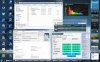
DRM Cache, AS SSD Benchmark,WinIndex, Controller Info, IDT Volume and Desktop.jpg
- File size:
- 454.8 KB
- Views:
- 162
-
-
-
Your HDD must HDD in Bay 1. This is the bay below the touchpad.
From the Bay 2 is not booting and no Windows installation possible. (Unless you use a trick)
It is also not possible from an external USB-HDD or e-SATA HDD to boot. (Unless you use a trick)).
Sorry if I misunderstood you. -
I tried Bay 1 and 2.
trick? how? -
For example, this ...
This does not solve your problem!
Did I understand correctly ... Your HDX does not recognize blank HDD and you can not install OS? -
I've got 2 HDDs
Both had win7
Everything was fine
The old toshiba was formated.
After that (I still has win7 on the second hdd) I gotSo I changed bays and still the same. So I use my usb with win7 installer and I can see partitions but can't install os.Code:"non system disk or error massage"
I also used disk part and cleaned hdd and made one active partition. But still the same.Code:"Unable to install Windows on that drive. Computer's hardware may not support booting to this disk. Make sure that the disk controller is integrated into the computer's BIOS menu"
Now I'm wondering that maybe I should use silicon image drive. Maybe it's a problem? Which one?
http://www.siliconimage.com/support/
PS. I can't install os on both hdds . The same thing. So there is no hardware problem with hdd.
If I choose boot menu (blue massage) I have only cd or usb hdd. No notebook drive option. -
@Aldam -If your BIOS boot order set correctly?
-
I set First boot usb because I have win7 installer on usb.
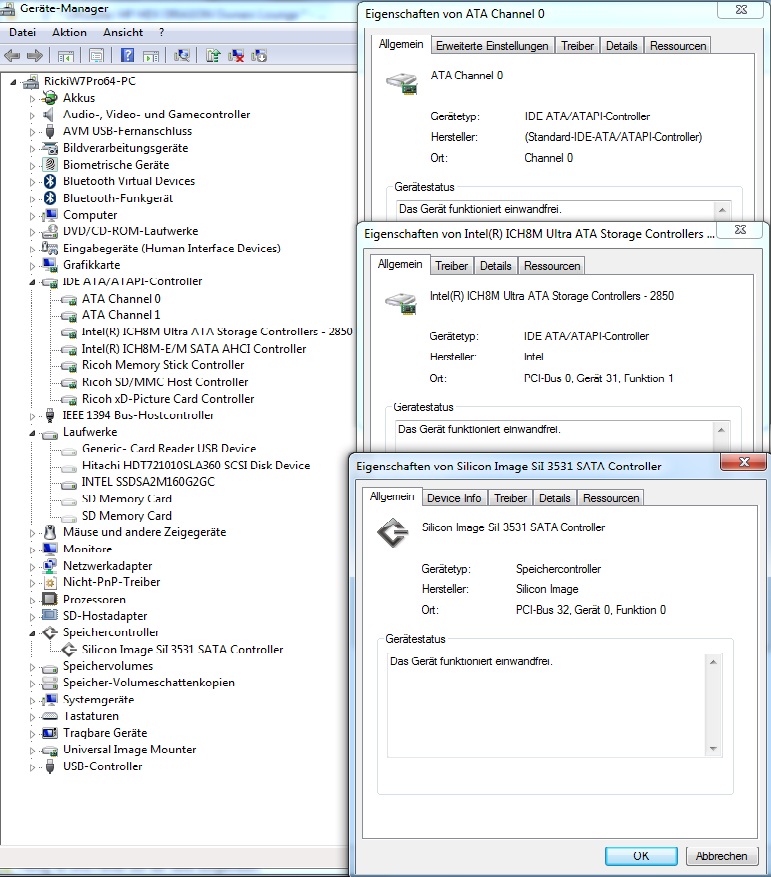
PS. Could you check in device manager which hard drive controller hdx has? -
It is not necessary for the USB device to boot first set.
Set the order back to the origin!
If you want to boot from USB device or install Win7, press F9 at startup!
Here is a temporary boot menu.
Choose where your USB device. Maybe this will help.Attached Files:
-
-
I loaded silicon driver but still the same.
It looks like bios can't see HDD . -
@Aldam
No good news.
Have you ever tried a hardware rediscovery?
1st AC disconnect
2nd Remove the battery
3rd Power button down 30 seconds
4th Reboot (of course with electricity)
If your boot order is ok, I have no idea more.
There remains no space for software problems. -
2.0 can you look at that auction and tell me if that card will fit
Najmocniejsza na allegro GF 9800M GTX 1GB SLI MXM3 (1195131070) - Aukcje internetowe Allegro
hmm, I'm wondering if it is on a single die or not and what version on MXM III it is? -
+1 rep
Thanks
-
Thanks Admittdely I did not select show protected system files so thank you. I have done this now however there is nothing in the Windows/DRM/Cache folder!
In the microsoft/windows/DRM folder there is....
blackbox.bin
drmstore.hds
v3ks.bla
v3ks.sec
I do not use Quick Player.Would this help? If so I can try it. -
ok i have vista home premium 64 bit. i thought i had my sound all good, basswise as far as a working driver, but i guess it's not.
ww2d?
i'd like a link please to what you are using as far as driver version, the sandboxie thing you are using, and any pertinent instructions for them...at your convenience of course.
-
The audio driver I'm using is from Microsoft. It's the 5511. You get it by uninstalling and deleting whatever driver you are using now from device manager. Remember to check the delete box or it just install it back again. It should then install a default driver upon reboot. Then simply choose to update that driver and it will find it from Microsoft's update catalog.
Then you install the SRS sandbox. http://www.srs-store.com/store-plugins/mall/support_sas.asp#19
Scroll down to FAQ #4 about the 64bit version. If it doesn't jump to the section, scroll down to it.
Install it.
Then in SRS control panel in your tray, click it and go to options/ preferences/ under devices select Speaker/HP and you're done. -
thanks i could not find it from microsoft, but is it the same as this from hp site?
IDT STAC9271 Audio Driver HP Pavilion HDX9000T CTO Notebook PC - HP Customer Care (Canada - English)
edit: i wasnt paying attention. i see you say it should automatically let me choose after uninstall, etc. etc. thanks. -
Probably not. After a clean OS installation, there should be no problems with the Media Center. Nevertheless, you can try it.
The program is called Quick Play (not quick player and has nothing to do with Appel)
and belongs to the initial state of the HDX.
This program is for media playback and recording, BluRay playback (if device responsible BD-present), TV playback and recording and Quick Start buttons.
(Buttons: "Start 1.QuickPlay, 2.QuickPayDVD, 3rd QuickPlayTV, 4th Drive Eject")
Was it not with you installed Vista?
Release notes and download --> here, or without other information here --> QuickPlay V.3.7.0.5620
Once installed on Windows7 please go to:
Root (your OS partition) / programs (in 64 bit OS in Program Files (x86)) / HP
sit there "QP.exe" under Properties / compatibility for all users in compatibility mode, Vista (no service pack)!
Then reboot.
Now you can start QuickPlay, and see if your TV tuner is correctly identified here.
Presumably, but the result will be the same.
But maybe it helps, I wish you.
-
HDX is working properly again!? Or have I misunderstood?
I hope you did not have to completely reinstall your OS.
Remember, if only your MBR is shot to pieces use the startup repair from the Windows disks! (Or USB)
And the BIOS boot order change never! Temporary F9-start selection ranges usually always.
Thanks for Rep. .. what ever it is to be used??? -
Just for information ..
Synaptics TouchPad Driver V.15.0.24.0 works great on the HDX.
Tested on Windows and Vistax32 Windows7x64. (Vista x64 and Win7x32 will probably be ok)
No visible differences to V.15.0.17.4.
Note: I always uninstall the old drivers before you reinstall.
Uninstalling here on Programs and Features in Control Panel. -
ok so i figured it out and did it as per above. just curious am i supposed to get bass (i tested it out and i did not get bass) after the 5511, but before srs sandbox? i figured that srs sandbox just makes it better, or is it in fact what makes the bass work?
for that matter, after i installed the srs sandbox and realized that it is a trial(no problem if it works...i'll pay for it)...BUT i got no bass afterwards as well, and i left it on default settings for the levels, when playing blues music through wmp (built in song btw).
so i am left uninstalling the srs and as well the ms sigmatel driver, and trying the stock ones again. shoot i was getting my hopes up.
thanks for your help. maybe i will try srs if i can find a working driver for the bass first.
btw, in my add remove programs list there is a program called idt audio. should i unstinstall that as well from there before i try another driver? -
ok i unsintalled srs, then uninstalled that idt audio instance i had in control panel programs list.
when i uninstalled the idt audio instance, then go to device manager, my instance there disappeared which is fine. ok so then i proceed to install the 5607 driver from hp website from search for 9494nr....and i restart and i open wmp and all is well with bass! i go ahead and reinstall the srs audio, and set it to default music setting (in trial mode not that it makes a difference)...and i dont think i notice much until i move the speaker size to at least 60hz....but then i close srs and i noticed it was a bigger difference than i thought with treble, bass and all.
so....i guess it works now and with 5607. i might try to uninstall the srs then idt audio again from cpanel, then i would have to find manually the 5511 file from microsoft, if i wanted to do that to see if it works this time.
the question is, is there something about the 5511 vs the 5607 that might make it better?
also what do you set speaker size to when you are doing various things.
basically i am wondering if it is safe to set it to 150hz, as the bass is very noticable. -
Speaker size is set to 150hz. BUt you really need to full version to get the full effect of what SRS can do.
The reason to use the 5511 is because it is "lighter in weight" tan the 5607 which results in little to no skips in audio playback. -
ok good to know. will probably try the 5511 again.
the only thing i dont like about the srs is that you need to be connected to the web to activate. yes you only need to do it once at least until a possible reimage of the drive, etc., and yes i know you would have to contact them directly otherwise, but what a pain.
what happens if they go out of business or something. i had that happen with some software and i was screwed out a lot of money, since i couldnt 'activate' it after a reimage and reinstall since they were no longer a business.
anyway...i hit buy now and it takes me to some their site but to a hal link. ? could they make it any more difficult for someone who is interested to simple maybe buy it. besides when i finally found the link to JUST the srs audio, it looked different in the picture. i have no confidence in them so far on that end...i will probably hold out until i can get this answered. besides another thing it does is mess with my mute button. i uninstall the program, restart, and i am all good again. i like to have my quicktouch mute button. its very handy. actually the mute works but it does not turn orange, it just stays blue. so the srs messes with that most certainly. there is no version number on their site, so i have no clue fwiw, what that is, no version history, no clue as to when it was last update, etc.
i guess i could use the email to ask them all these questions but seriously. -
They stopped offering SRS Audio Sandbox. Now they sell SRS HD Audio Lab which is supposed to support HD soundcards as well as the garden variety.
MA -
Sorry for the huge late response, but so far I've tried everyone's ideas and nothing works. Also, I have another similiar problem, when I leave my computer idle and the monitor turns off, sometimes (but not always) when I get back on and start using it again, when the monitor turns on the entire system locks up for about 10-15 seconds before it resumes normally, and I have no idea why. Which now leads me to believe that my hard drive might be failing, however I've run every check disk command to rule it out but everything checks out. Like I said I've exhausted every resource to which I know, so if you guys have anymore ideas please lemme know, I don't care how redundant or simple they may, or if I even already tried it, what would you do in my situation? -
If possible please write shorter sentences! Just as I do. <--- This results in fewer errors in the translation.
Where exactly will depend on the system?
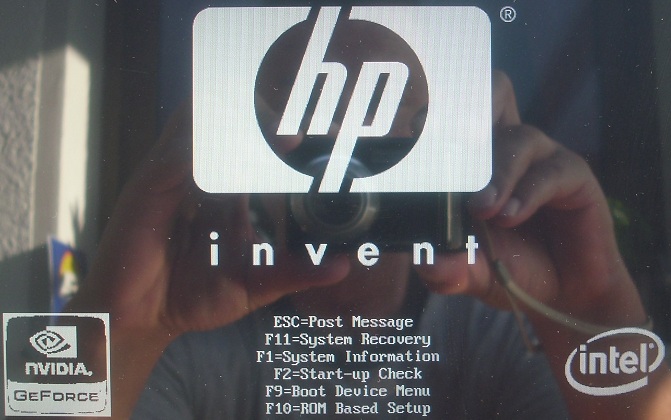
Right here: Bootscreen
or in the Windows loading screen?
Have you removed the DVD device? (Really !!??)
Monitor only shutdown or sleep mode yet? (After the wake up from sleep mode is newly recognized, among other things, the DVD Device)
Somehow this sounds after several independent errors.
Also you have not installed all the drivers, otherwise it would not have been possible a checkdisk. (Your remote probably will not work)
Anyway, what I would do with the boot problem ...
1st What I wrote.
2nd Remove AC and battery. Power button 30 sec hold. (Hardware rediscovery)
3rd turn off WLAN and Bluetooth before shutdown on QicklaunchButtons.
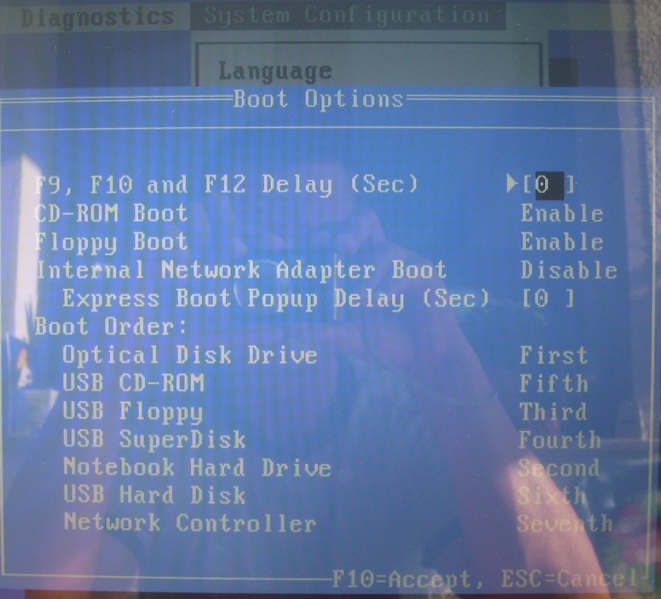
4th Check boot menu. See picture!: Bootmenü
F9, F10 and F12 Delay (Sec) is set to [0]?
All other boot options like on my picture?
5th Tentatively CD-ROM and boot floppy boot set to disable.
6th Remove HDD and start. Both HDD! (The boot screen is gone faster?)
7th If sixth yes .- can create bootable USB stick (or other system WinPE) and run. (Just to see if the boot screen disappears so faster)
If so, install experimental system fresh on other HDD. - Try to repair it so you had apparently already made.
If startup error at the time as one picture, there are not more options.
In the boot time is not yet read from the HDD. Pressures in the two minutes of stoppage time Caps Lock or Num Lock!
Lights the blue diodes for these keys?
(I do not mean the short light up immediately after pressing the Power button)
If the error in the Windows loading screen up, there are driver problems.
Edit:My points 1-7 form no order!
There is only one order that I would play through independent from each other!Attached Files:
-
-
that explains it. so is srs audio sandboxie free now? if so how do i get it? feel free to pm me. thanks.
-
Thanks one more
I've bought Hitachi 7k500 so I install fresh Win7.
Now my T9300 is waiting for being installed
I am scared a little bit before doing it
BTW What thermal paste should I use? -
@aldam
I would not use liquid metal. Even if the cooling is great.
(Example: Nanoxia Nano TF1000 ; Coollaboratory Liquid Pro / or Ultra)
The best way you see yourself after in the current test.
In many test are on the front seats:
Scythe Thermal Elixier ; Arctic Cooling MX-4 ; Arctic Cooling MX-3 ; Prolimatech PK-1 Nano aluminum;
and also the use of 2.0 "Arctic Silver 5.
choose for yourself! -
Arctic Silver 5.
CJ -
Unfortunately, I'm pretty sure the old version is not free. And I would be wary of any websites that claim that it (or many other programs) are orphan programs and therefore free. Usually these websites are designed to install spyware and worse on your computer, usually from Eastern Europe, Russia and elsewhere.
Better to shell out the bucks then to wind up with a compromised machine, which will cost more in the long run.
But you can call SRS labs at:
Phone: 949.442.1070
Toll Free: 800.243.2733
Hit 0 for operator. Better than waiting for their message to run.
Have a great day.
MA -
I'll sum up everything in detail real fast what I've done and what exactly that's going on:
The problem starts right after the bios screen and before the windows starting screen, under normal conditions there's a 2-3 second black out between those 2 screens, but it's easily over 1 minute for me. The hard drive light is dim completely during that period as well.
1. Yes I've removed the battery and conducted the 30 second thing, no go.
2. Yes I removed the cd drive and booted it up without it. still nothing.
3. My settings in the bios are exactly the same as what you shown in that pic.
4. Also tried options 5th and 6th, still nothing.
Like I said, there's nothing for me to go on to isolate the problem, every software and hardware check comes out clean, all my drivers are up to date, and I didn't do anything different prior to these problems occuring to suspect something else, other than the fact when the battery died that first time when it ran out of juice. I'll try to follow up more when I get home, but anymore ideas in the mean time? -
OCZ Freeze has no cure time like Arctic Silver, has 'no' capacitance/conductance, and lasts longer.
RickiBerlin gives great advice:Liquid metal can ruin all thermal contacts. Use only if you never plan to upgrade and have skill in this process.
The other nice process about opening the Dragon is that you may re-route several of the lines which were causing unnecessary stress points throughout the system. It's very likely that the build wasn't done by an engineer Again, only if you know what you'll be manipulating.
-
well i am trying to buy the srs audio linked. yes it would be worth it if i could buy it. that's the point. i dont think i want whatever new thing they have. sometimes old version are free i wasnt thinking russia my god. anyhow, i may call them. thanks.
-
I had assumed the BIOS screen does not disappear, but
now I'm reading ...
This is a big difference.
Now it sounds more like after Bootloader problems.
Unfortunately, I do not know your OS.
Do you have an original Windows installation DVD? (No recovery)
If so, start from this!
Here you can run the Startup Repair.
or ...
If you have a free 2 "HDD, have you can also experiment a fresh OS install. If it starts normally, HDX is ok.
Remains to consider whether your original OS HDD has a driver issue or hardware deffekt.
...then this of you...
...Refreshing short sentence!
EDIT:
sorry, I just read your old post and saw that you had Startup Repair already made and you have Win7x64.
Under certain circumstances, however, this must also be done twice.
Question: How fast it loads your original Windows 7 DVD? (or other bootable CD / DVD)
The Bios screen is indeed something in the DVD boot are longer, but then he immediately invites from the DVD. (No long stay with black screen)
........................................................................................................
Which video driver you have installed?
258.96 If, then uninstall it! (Via the device manager and delete this driver)
I'm using 257.21 on Win7. Others prefer 197.45. -
Didn't mean to scare you! I was having problems uninstalling SRS Audio Sandbox, and finally accomplished it with the help of a forum member. But SRS still has installers for Audio Sandbox, because one of SRS's tech options for me was to reinstall the program over the former install (which was invisible to Add/Remove, Revo Uninstaller, and other tools) in order to get a successful uninstall. So he linked me to the trial version of Audio Sandbox.
So...maybe you can use your charm and get the Sandbox Installer, and get a license from him.
But it's possible the new program is really better, and it's the same price. Sometimes I think you can find discount codes. This page is helpful, but doesn't apply at this moment to the HD Audio Lab.
Srs Coupon Codes - all coupons, discounts and promo codes for srslabs.com
I looked around for reviews. This English reviewer was mighty impressed, but none of the reviews compared it to Audio Sandbox. The coolest thing this reviewer said was that it made his Klipsch 2.1 external speakers sound like a 5.1 system, with surround sounds coming from everywhere.
For your viewing pleasure:
XSReviews.co.uk - Trusted Hardware Reviews - News | Review - SRS Labs HD Audio Lab
MA -
thanks mobil. the thing is not a problem getting the installer. i commented only BECAUSE i had a chance to try it. 2.0 linked it to me right from there sight just last week...so it's there. the question is about the trial, etc.
what did you use to remove it? when i uninstalled it, it seems to uninstall completely, as when i went to reintall it, i had no option to reinstall over any former.
and why did you unstinstall it? -
thanks mobil. the thing is not a problem getting the installer. i commented only BECAUSE i had a chance to try it. 2.0 linked it to me right from there sight just last week...so it's there. the question is about the trial, etc.
what did you use to remove it? when i uninstalled it, it seems to uninstall completely, as when i went to reintall it, i had no option to reinstall over any former.
and why did you unstinstall it?
EDIT: waiting for the grammer pulice to chime in. lol -
I had it on my Thinkpad, not my Dragon. When I got a set of Altec Lansing VS4121 2.1 speakers the sound was so amazing that I felt I didn't need a digital enhancement at the present time. Like almost everybody right now, where I spend money is important.
At some point I might get Audio Lab. I think SRS lets you install it on two or three PCs.
It was odd that it didn't show up in any uninstaller, which bothered me to no end, so I excommunicated it!
MA -
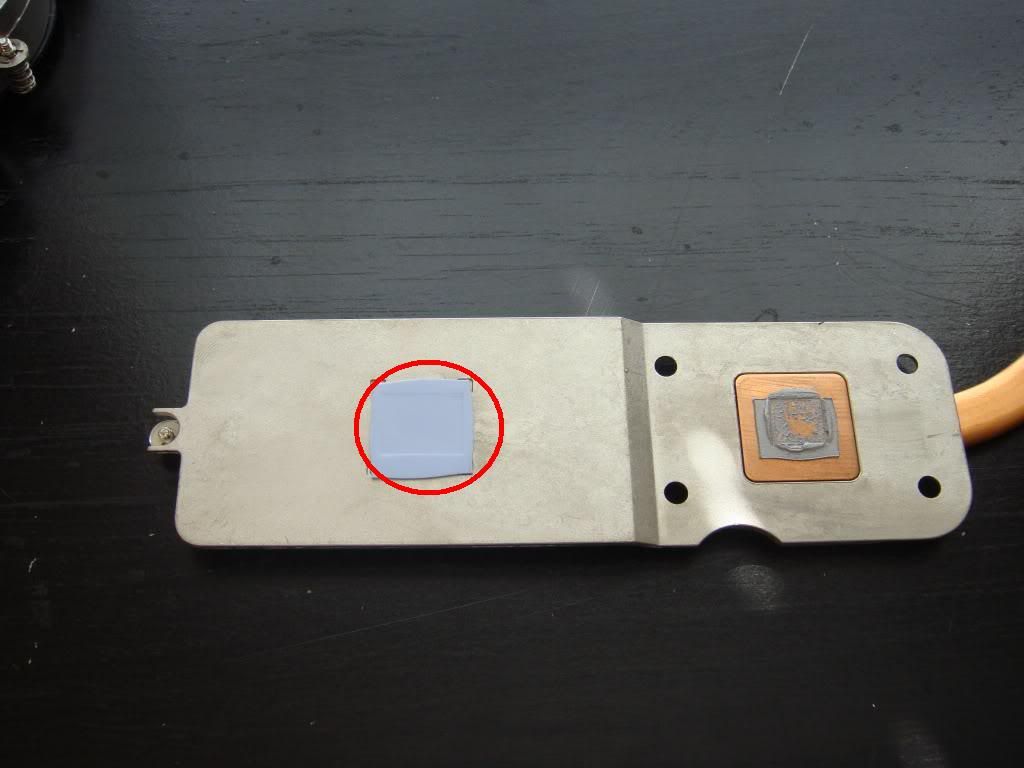
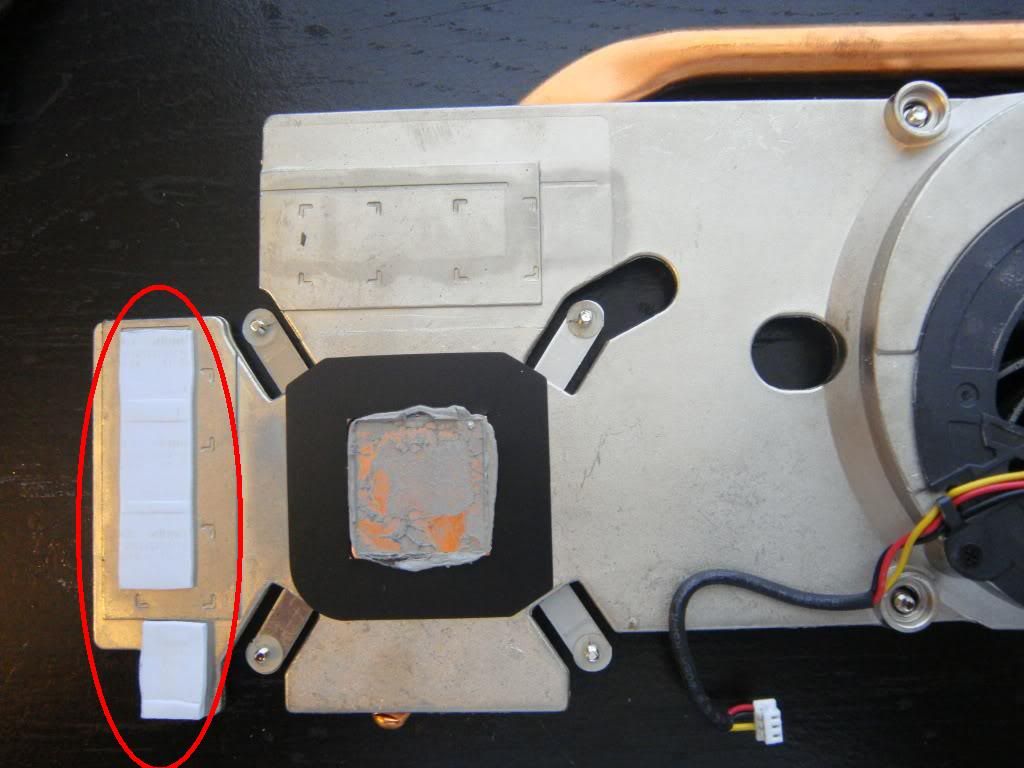
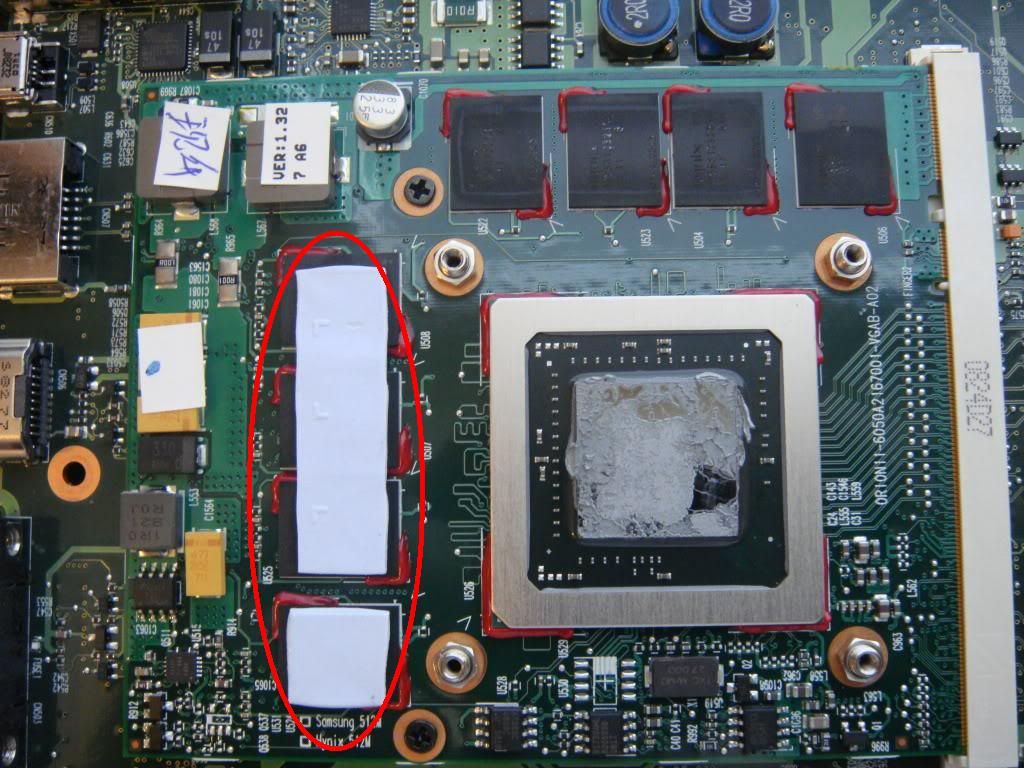
Maybe it's a good idea to change also thermal paste on chipset and gpu.
But on photos threre are thermal pads. Have you changed it into a paste or buy new pads (which ones)?
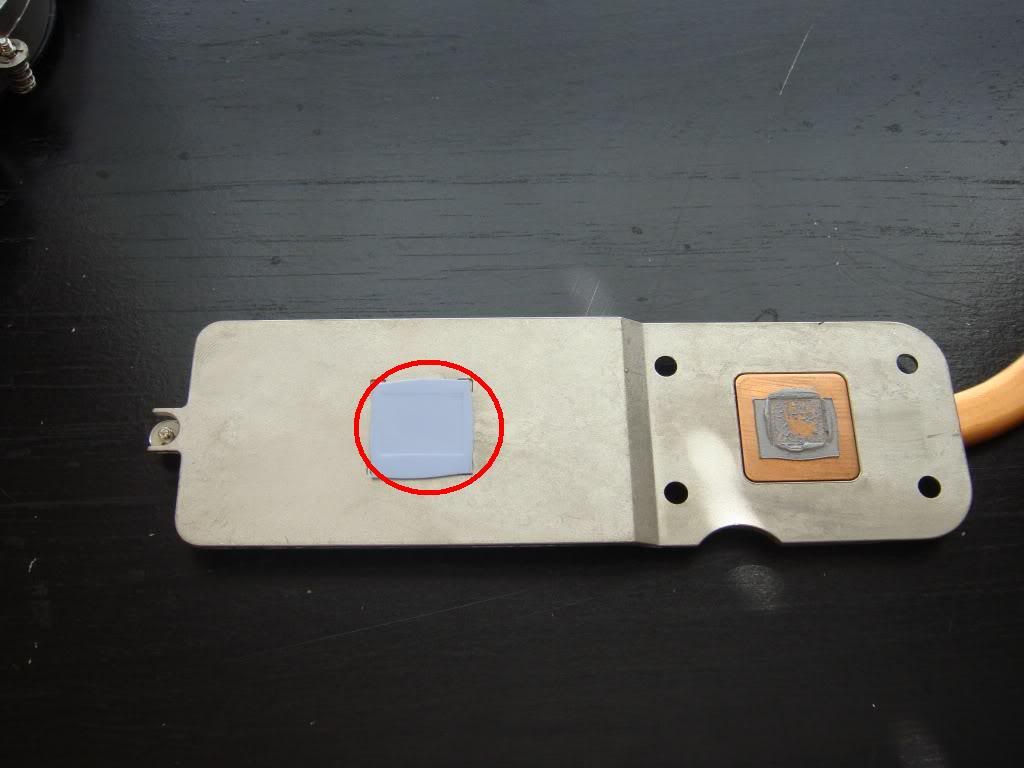
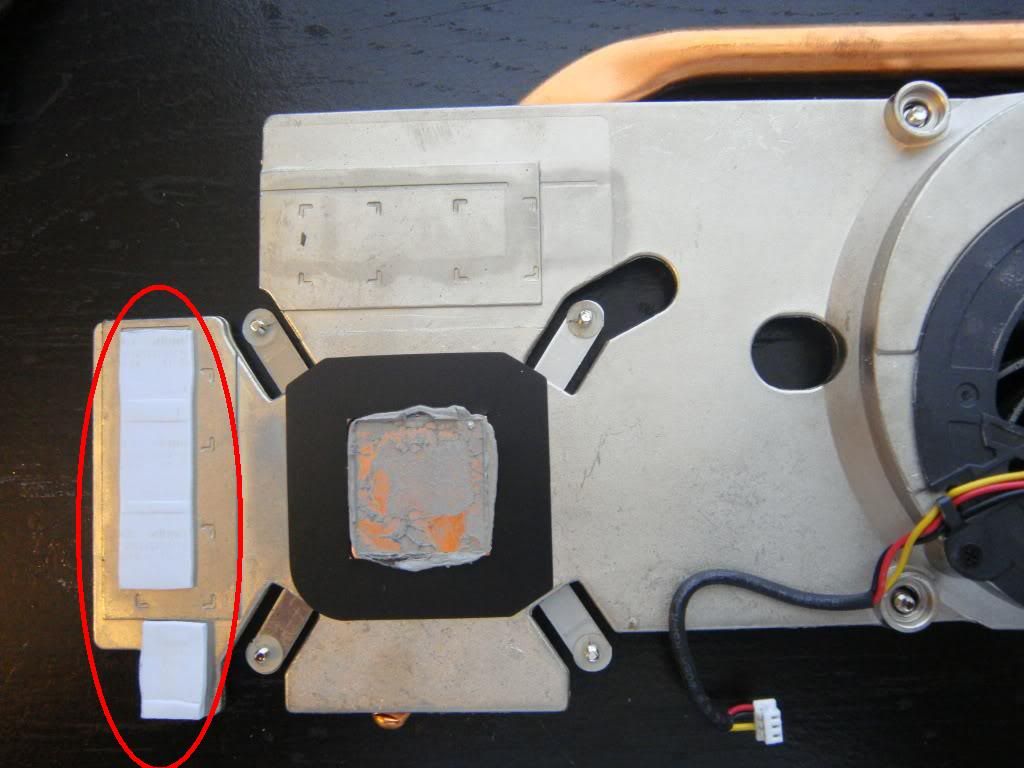
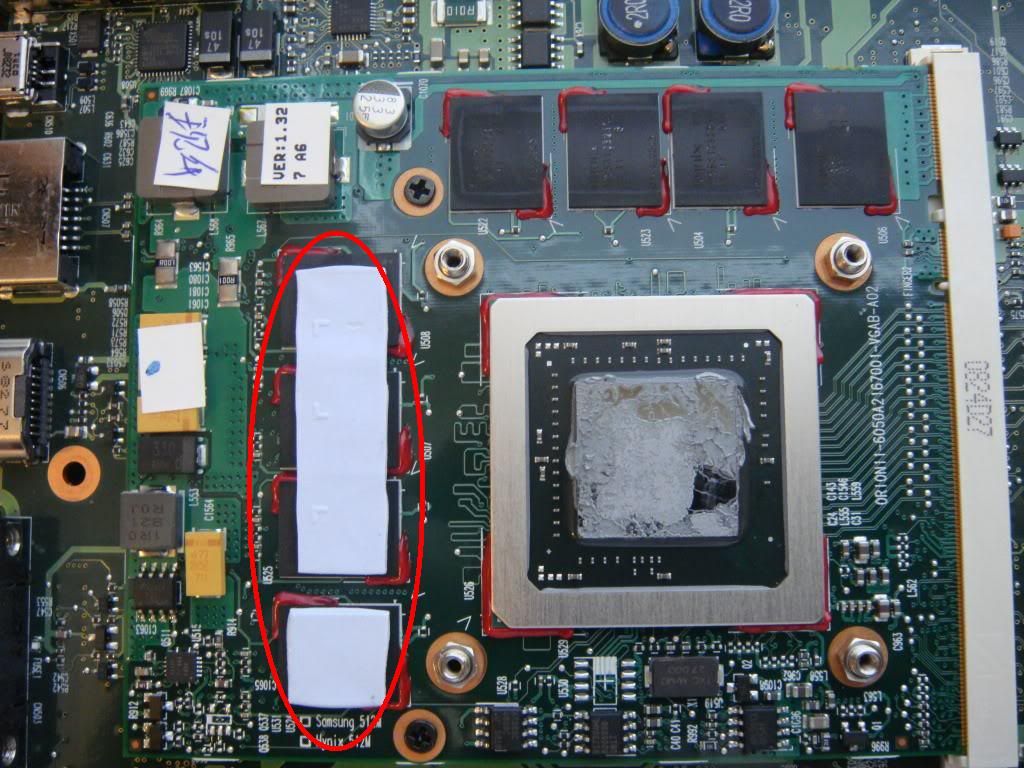
-
Leave the pads .
For everything else (heatspreaders of GPU and CPU) you can use Arctic Silver 5 or other thermal paste. -
Is it possible to play comfortable in BF BC2?
2nd question
have you tried nvidia scalling to play in lower resolution with black bars?
I'm thinking of playing new games in res. 1440x900 with black bars -
Sorry to hit you up again on this, but I'm finally down to setting this stuff up.
Can my cable box output over 2 cables? Such as S-Video and HDMI? I ask because I still want to run my tv while also(maybe not at the same time) being able to record on my Dragon.
This may just be a trial and error thing as far as the cable box goes, to see whether or not it can do this. Still, any help would be very appreciated. -
I have tried it a bunch of different ways, it still says it can't identify my remote for the IR transmitter from the Dragon. I'm not sure what to do. Any advice?
-
Never tried anything like this. But looking at my Scientific Atlanta box, that would be possible but only with composite video/RCA audio out. It doesn't have S-video out. The way to tell if yours will output via HDMI and composite or S-video is to hook both inputs to TV. Then using the TV's remote, switch between the inputs. If there's video on both input selections, then at least you can output video from the box on multiple outs simultaneously.
It was a long time ago when I experimented with it. All I did was plug the remote sensor in and then used it to change channels. But I don't know where that remote is, so I can't experiment on my end at this time.
-
OK. I tried nvidia scalling options and play with lower res. with black bars.
I tested it on CoD2
1600x900 workspace 413x232 (mm) like 18,5" LCD (16:9) 410x230 (mm)
~20% faster than standard
1440x900 workspace 371x232 (mm) like 17" laptop lcd (16:10) 366x229 (mm)
~35% faster than standard
1366x768 workspace 352x200 (mm) like 16" laptop lcd (16:9) 354x199 (mm)
~60% faster than standard -
Hmm, it's cool. I saw something on the back of my cable box that says, EXT IR In. I was thinking maybe I could connect a cable directly from my IR port on the Dragon to that port on the box. Maybe it would work then, because my media center set up thing keeps telling me it can't recognize my remote. Even when I try to teach it the IR signal, it doesn't see it.
*HP HDX DRAGON Owners Lounge, Part 1*
Discussion in 'HP' started by J-Bytes, Sep 14, 2007.