Problems? See this thread at archive.org.
Wheres the Tri-SLI mobile GTX280?
HDX 18 looks like any other standard double hinged laptop, its screen is only slightly larger than a 17", its GPU is hardly an improvement. 20.1" HDX with any minor flaws it may have is still a more unique machine, massive screen real estate, its really something special, and particularly from a design perspective.
-
LOL. Got no source on the new HDX's other than that they were coming out as a line and some of the sizes like 18.4 and 16. Word on the street is that a 13.x" is in the pipeline.
When the first HDX (Dragon) came out, there was a video interview with lead HDX project manager at the time on some blog that detailed that they were coming out with a "powerful" Nvidia option. Took 6 months.
My guess... at CES JAN 2009, you'll see refreshed model with better CPUs and GPUs. -
"unique", "massive", and "special" apparently doesn't sell--hence the reason they discontinued the Dragon.
-
The main difference performance wise the for the HDX would be (x9000) 800 MHz FSB vs. (T9600) 1066 Mhz FSB. Also if you have a mother board that can over clock the x9000 is not locked.
-
I keep the desktop @ 60/70% using FN backlight in a well lit home office. If the room is pitch black, I'll drop it to 50%. That would go for movies also.
Nvidia CP settings:
Desktop -
Brightness 37%
DV: 6%
Contrast: 30%
Gamma: 60%
Video color settings - video player settings
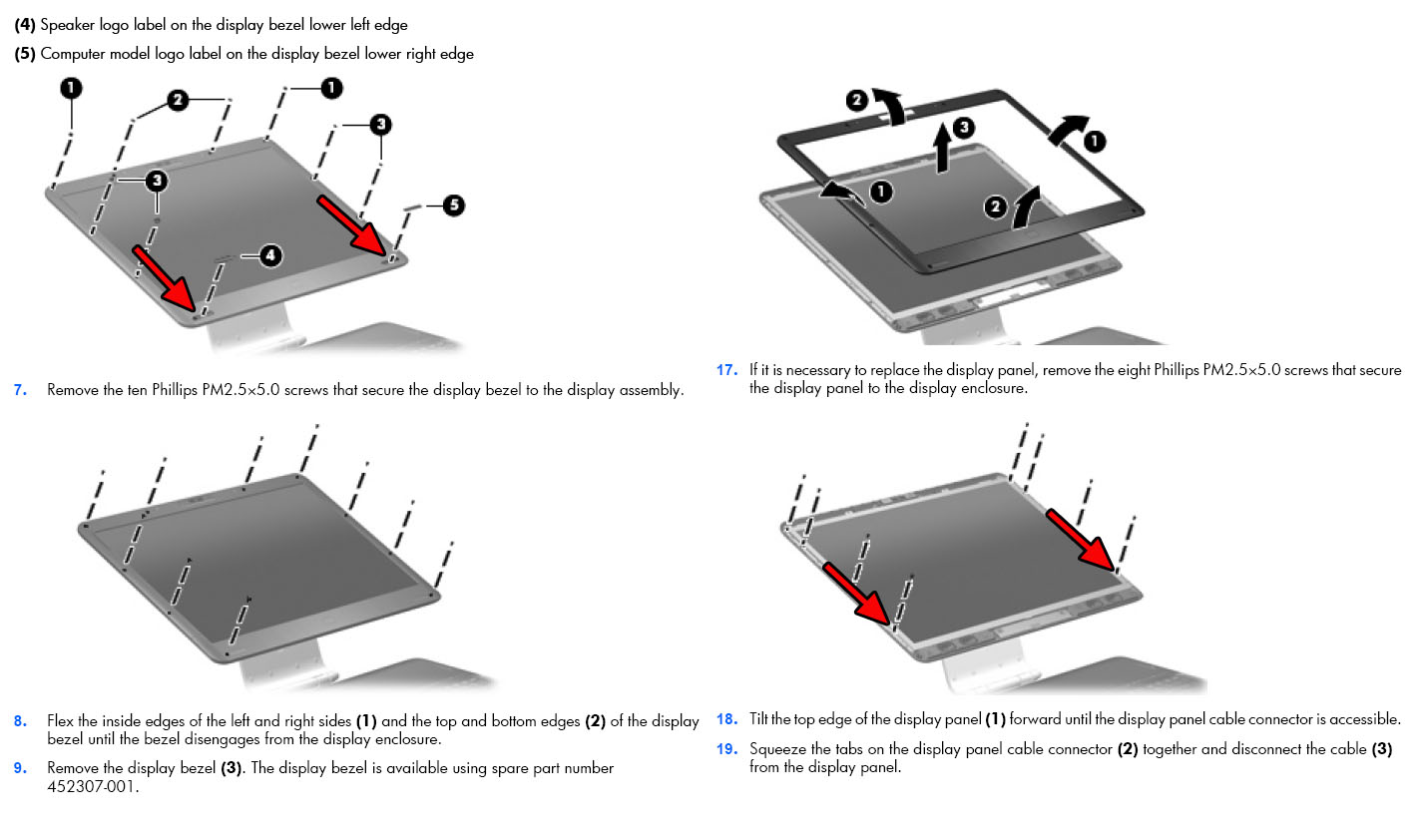
Don't know of any other service manual. The screws are behind the rubber bumper "dots". The snaps would be on all sides with the most at the bottom. There's also two screws at the back behind rubber bumpers. It starts on pg 37 of the manual concerning display disassembly.
Also, I do see a dark spot on lower corners of the screen using hash in DPT. My Dell lappies had them too but on the upper corners. -
Geez rumba, you've got another one.

-
Would it hurt you to grow up a little and get over it, whatever it is?
This thread is for discussing the Dragon, not for your personal issues with another poster. If you have something to say, take it to pm or take it up with a mod. Please?
This isn't pleasant for the rest of us.
Edit: Forgot my own advice about feeding trolls. -
So I have tried to install many of the drivers recommended at laptop2video and all seem to make the issues worse. I even get way long boot times. I have not tried the hp recommended driver that I have seen in the thread.
Now could this be because I am not uninstalling the old driver? I just run the installer from laptop2video using their modify inf files to do so. I have tried to uninstall the hp driver but it never uninstalls. I have checked the control panel and there is no uninstaller listed. So I have used device manager to right click on my display adapter and selected uninstall and nothing happens.
Don't know if that could be the issue with using the new driver. -
Why stop there? I would think the 9800 series personally.
Starborn and lancorp have very valid points, as I was on the XPS bandwagon for a few years, and am familiar with what they are talking about. But I suspect that the new config and less real estate = less efficient cooling properties for the new HDX.
You are right though, if they can feasibly put in a better card, it will probably be some months after introduction. -
If you are simply upgrading from one driver to the next sequential, uninstalling the first isn't really necessary. However, just because a driver is sequentially numbered higher, doesn't mean it's the newest or best. So for those reasons it's usually better to uninstall and use Driver Cleaner or something similar to clear out all registry entries. Then re-install new/preferred driver.
As others have said, the LV2G drivers are quirky with HP laptops, sometimes disabling some features. The INF file they use is generic to include as many GPU's as possible, rather than for specific manufacturer systems.
The HP 175.97 work like a charm for me. Others on here prefer it as well. -
It just gets sadder and sadder. Now he lies about someone (likely referring to me) ordering him to cease posting.
@rumba
Look rumba, you were once an asset to the thread. Most of us wouldn't have bothered to hunt down those dv5, dv7 and cq5 drivers to see if they would work on the HDX. You just went too far venturing into things you couldn't back up properly. What's more, over time it seemed that all you wanted was rep points as opposed to genuinely solving other poster's problems for their sake. I brought that to your attention once and you apologize to the forum if that is what it seemed.
What happened to you? This place is about learning and sharing. Not about dis-informing to make yourself look smart or important. So you said some wrong things. Big deal, it happens all over the forum to any of us and people who know counter and correct for the benefit of everyone.
I mean look, I thought the new HDX's wouldn't be out until Jan '09. But here they are. See? Big deal. I was wrong in my guess. So what. I was only right about them coming. Do I feel lesser as a person for being wrong? No. It happens.
So no worries mate. Just pick one nick and go with it and stop trying to compete. It's not a competition, it's a community where we share viable and valid information for the benefit of all. At times, any one of us can be incorrect. But someone will come along or we might ourselves correct ourselves. We all try to do the best we can.
Listen, we're not going to think less of you because you had a forum meltdown. Come back, be cool, contribute. I'll even have your back and defend you in case someone tries to dis you over what you've done recently. But we will think less of you if you continue what can be termed as adolescent trolling behavior. It diminishes you, the community, and those who might google to find answers to some of their problems. -
Ah thanks. I skimmed through the table of contents in the pdf and missed that part.
It looks like the bezel is surprisingly easy to remove. Nothing as messy as that Dell backlight page
It seems to me if pressure is the cause of the pinching in the corners, which would make sense, then it comes down to probably just the two corner screws under the Altec Lansing sticker and the HP Pavillion sticker. It may just be a simple question of loosening them a bit, could fix both the pinching and possibly even the bleeding. Can't imagine anything easier.
If not, it may be the two lower screws under the bezel, which requires a bit more work but is still quite doable for anyone who can operate a screw driver.
Taking this whole panel out and electrical taping it isn't much harder either. This is all nothing like working your way from the back of the LCD housing like the Dell monitor procedure. And there's no way for HP to really check if you voided your warranty for this bezel job. Now this is all assuming pressure on the panel is the cause and not something internal to the panel itself.
I might just try this in a bit.Attached Files:
-
-
Well said, and as far as I am concerned, should be the last that is said about it...it truly is better to ignore, rather than provide the oxygen for the flames...the behavior will stop quicker that way, IMO. That being said, I have had enough and just reported him to the MODs. That way, it takes the heat or blame off you.
-
Thanks for all the help. I have downloaded the 175.97 driver that was linked and posted. I have installed it and my boot times are still normal. I am currently at work and therefore will not be testing my games at the moment but will when I get home. I will let you all know how it goes. I might just use a drvier cleaner and load it up from scratch if that is the best thing to do.
Thanks to everyone who as been so willing to help me out. I hope I get better game performance out of this.
-
Glad to help. Also, I missed where you said you were having uninstall problems. Try going to Control Panel>Programs and uninstall nVidia drivers from there. You'll have to reboot, and best to reboot in safe mode to use Driver Cleaner from there, then reboot and install new driver. -
Forgive me if this seems like a newbie thing but I'm not sure about whether I should upgrade my Nvidia graphics drivers. I've read on the Nvidia website that GeforceM 8800gts drivers are only done through the laptop manufacturer. I'm going to assume that there is some truth to this, but you can get around it some how, since I see that everyone is upgrading their drivers. That being said, what compatibility issues have come up after using non HP drivers? For example, I'm concerned that things like Blu-ray and TV card won't work.
In any case, you can see that I'm nervous about upgrading to a non HP driver. I'm actually using the ones that shipped with the computer! Arrgh! Will someone ease my concerns and recommend a driver that works perfectly with everything on the HDX. Again, sorry for the newbieness. -
ftp://ftp.hp.com/pub/softpaq/sp39501-40000/sp39905.exe
this is where CompTrekkie and Hovercraftdriver sent me to earlier. It's HP's latest nvidia driver. -
I have gone to the control panel and there is no nvidia driver there for me to uninstall. That's why I've been trying to do it from the device manager.
-
Thank you! Should I uninstall the old ones first or can I just run the program?
-
NP glad to be of assistance.
-
Since you are installing new Official HP on top of Official HP you do not need to. If you want to be safe you can and it will not hurt, just not a requirement.
-
If you still have original HP driver(and your post indicates you do), you should just be able to do a straight install with no issues. Check the date on your current driver, if it is definitely older everything will(should) be fine. (fingers crossed, )
-
If anything happens, you guy's gotta help me out!!!
-
you can just roll back the driver if need be. Then go from there.
-
Worked like a charm guys! Thanks alot. So, in the future, where do I find these updated drivers?
-
Go onto HP's website. Click support and drivers page. Look at models DV5, DV7, compaq CQ50 for their Nvidia drivers.
It's not going to say that it's for the 8800M GTS but they have included them in the .inf file. That's why it works.
Here's the actually page the driver you used is from:
http://h10025.www1.hp.com/ewfrf/wc/softwareList?os=2100&lc=en&dlc=en&cc=us&lang=en&product=3743954#
The driver is listed as geforce 9200M GE currently version 7.15.1 1.7597
If you want to get adventurous, d/l winrar so that you can look into the softpak to read the .inf files to see if the 8800M GTS is listed. The new HDX 16/18 will have Nvidia drivers and perhaps they may be list the 8800M GTS in the .inf. -
That's a very good point; maybe being a brand new system, they will have newer drivers than the .97's, and potentially newer drivers for other components.
-
Very useful information. So I guess us original and only HDX dragon owners will have to find our drivers through other models....whatever it takes to survive, huh guys!
-
I second this statement. Just installed it now over the old drivers. Thanks for all the information.
Oh, and for the person that was wondering about the backlight bleed, I also have it - 1680x1050 screen. -
Hey check this out...
So I've been working on this for a while now and finally figured out a workaround that let's you boot off the 2nd HDD since BIOS doesn't give you the option. Process involves a USB key, an opensource program (Wingrub) and a program that HP made that makes USB keys bootable.
I like to use my 2nd HDD as a bootable backup with an OS on it. Harddrives don't last forever. I have Vista 64 on the 2nd HDD currently.
How does it work? I have it setup in such a way that all I have to do is turn on the computer or restart it with the specially prepared USB flash drive plugged in and it automatically boots off the 2nd drive. With the USB flash drive properly configured all one has to do is set the boot order in BIOS so that it looks for a bootable flash drive first.
Here's how it's all done.
WHAT YOU'LL NEED:
1. USB FLASH Drive 1MB or larger. (Yup, it can be that small)
2. WinGrub ( http://sourceforge.net/project/showfiles.php?group_id=104188&package_id=112041&release_id=272964)
3. HP Drive Key Boot Utility ( http://h20000.www2.hp.com/bizsuppor...ion.jsp?lang=en&cc=US&swItem=MTX-UNITY-I23839)
4. A nice comfy chair.
5. Screwdriver - Philips.
STEP 1:
Insert USB flash drive in any USB port. Remove all other ones so you don't frak them up.
STEP 2:
Install and RUN the HP Drive Key Boot Utility software.
Choose "format as hard drive." It will partition and format it FAT32 and most importantly, set the partition to active.
When it finishes formatting, you can exit the program without going any further. It puts a LINUX file on there called syslinux. You can delete it.
Step 3:
Run wingrub
At the start screen choose your Flash drive. Be sure to check the box "copy stage files."
Now the main part of the program comes up.
Click the TOOLs menu and click install grub.
New screen comes up. Click MBR, click the partition dropdown box. Should only be one partition choice like 2,0.
Then go down and choose the system drive which is your Usb Flash drive's letter.
LEAVE ALL THE OTHER CHECK BOXES ALONE.
STEP 3A
You should be back to the general options screen.
Click the dropdown box next to profiles, choose default.
Set time Out to 1 or however many seconds delay you want after BIOS post. The program defaults to 10.
Now right click the Menu Table box and choose edit.
Here's where things can get a little complicated.
The syntax goes like this.
Timeout x (x=number of seconds delay for grub's post BIOS boot screen to show a menu)
title xxxxx (xxxx=whatever name you want to call your bootable device)
root (hd,x,y) (x=drive number [1= 1st HDX drive, 2=second, 0=bootable USB flash], y = partition number [0=windows root, 1= recovery partition])
chainloader +1
If all you want to do is to use the USB Flash drive to boot the 2nd HD, then delete everything in the edit box and copy and paste the following:
timeout 1
title Hard Drive 2
root (hd 2,0)
Chainloader +1
Hit ok. Go to STEP 3B
If you want to make a boot menu to choose which drive to boot from, then delete everything in the edit box and copy and paste the following:
timeout 10
title Hard Drive 1
root (hd 1,0)
Chainloader +1
title Hard Drive 2
root (hd 2,0)
Chainloader +1
Hit ok.
(Note: with the choice menu above, if in 10 secs you don't make a choice, it will boot the first HD listed.)
STEP 3B
Now hit the diskette button that has the rays coming from it. This is the Save as button.
Save as "MENU.lst" Very important. and MENU should be in all caps with .lst in lower case.
Overwrite the one that's already there if there is one.
Almost done...
a. Now using explorer, navigate to the grub folder in program files (x86)/wingrub/prof.
b. Right click and Copy the MENU.lst file.
c. Paste the MENU.lst file onto the flash drive's grub folder. Choose to Overwrite.
Now you're done.
LASTLY...
But you can't test it yet as the 2nd HDD is not bootable. You either need to set the 2nd HDD as active using adminsitrative services/computermanagement/diskmanagement - right click the 2nd HDD. (it'll attempt to boot but will report no bootloader or no OS) Or you need to install an OS onto it.
Here's where the philips screwdriver comes in handy.
Flip the HDX over. Make sure it's unplugged and the battery is out before you begin. Unscrew the 6 screws that hold the hard drive cover plate. Once that's off you will see etched into the plastic in the bay the number 1 and number 2 to the lower corner of each HD. 1 is the main, 2 is the secondary. Unscrew both making note of who is who. I'd mark it by putting a piece of tape on drive 1 and labeling it with a pen.
Put drive 2 into drive 1's slot. You can leave drive 1 out if you plan to install an OS now as it's best to leave the one with the OS out when installing especially if you're doing a clean install. If not installing the OS and just want to test things out, put drive 1 into drive 2's slot. Secure the cage screws. You can leave the plate off for now. Plug in the HDX. Insert the USB key.
HIT F10 at the start screen to enter BIOS.
Set the boot order of USB Harddrive selection to FIRST.
Save and exit.
Viola, it should be booting windows in a few seconds. Yay!
Ok, OK now shutdown, unplug, batt out, flip the HDX over and put the HDDs back into their original slots. Put the plate back also.
Just remember, if you clean install a windows OS or any OS, even a recovery image for that matter onto the 2nd HDD, you have to put it in slot 1 and leave SLOT 2 empty until you're done so it doesn't detect a windows installation in SLOT 2 and mess up or fail to install the bootloader for the HDD in slot 1.
And when the USB FLASH Drive is not in a USB port, the Computer will Boot off HDD1 as it normally did.
Enjoy this complicated but sort of worthwhile endeavor.
Pardon my poor English, it's my first language.
ENDNOTES:
1. Haven't tested it with a USB Flash drive in a hub. Though it should work. -
It works on any computer with more than one HDD and is only necessary if BIOS doesn't give you the option to boot off the second or more HDDs. So long as the BIOS allows booting off a USB Hard Disk/Flash drive. Any all modern ones do, AFAIK.
-
Which computer is it from so everyone can make a note to look at the model's download page in the future.
-
Instead of linking directly, and this goes for everyone, please post the download page so that anyone can who wants to D/L can see what the file is all about and what model it's from.
-
Here we go again...
-
Yeah, I hear ya....
Anyway, that 176 driver is also on LV2G site. It is ONLY for the 8200M according to the INF. -
I think he is using the softpaq download manager to get those softpaqs and direct link may not be possible.
Here is the link for the program; I had fits loading it before success, it kept cutting the download short for some reason. Anyway it is pretty useful to plug in "YOUR" particular system and get available downloads. I haven't tinkered with it much, only installed and opened it briefly.
http://h20331.www2.hp.com/Hpsub/cache/509658-0-0-225-121.html -
HDX is not listed, not even DV5 or DV7
-
That's probably true. Like I said, I only opened it briefly, and if memory serves, it seems like it might have been geared towards business models, which may be why I didn't try it out more. I'll mess with it some when I get home. Sorry if it's not a useful tool.
-
Props though for finding it.
-
2.0,
Your the man!!
I was hoping somebody would come up with a solution to this problem, since you can't do this in the bios.
It works and now I can boot from the 2nd HDD without the "manual labor" of switching HDD slots.
This is simply outstanding!!!
Excellent job and thanks for sharing this awesome info!!!
A rep to you for sure.
Anybody else tried this? -
Ok, it's all coming back to me now...
The link I posted does seem to be for a (mostly) business machine program, as it doesn't include the popular personal lappies. As some have alreadt figured out, when you start the program, it asks if you want it to "show software for this model only", which as was pointed out doesn't include the HDX. When the business list comes up, that's where I left off and why...no use to me.
I did, however find an HP ftp site: ftp.hp.com
This site has a lot of files but would take an industrious person with a lot of time and initiative to navigate through, because of how it is structured and there are no descriptions of the files. This is probably where you need the winrar program to dig deeper. I don't have the time or need, but good luck to those that want to try...there just might be some good stuff there.
Sorry for the misinformation earlier.
BTW 2.0, that's a killer effort you put into the dual boot work around.
-
FWIW, I had two more HDX Dragons ordered the day before HP discontinued them, both taking advantage of 30% off and free Blu-ray drives. I waited and waited and was finally notified that it would be an extra 30 days before they ship. For the trouble, HP gave me two $50 off coupon codes for the HP store.
Today, I was pleasantly updated that they have acquired the needed components, and my HDX's will be shipping on or before 09/24, plus, they will be crediting me 5% back, plus they are upgrading me to free 2 day shipping!
HP's turning out to be a pretty nice company to deal with...not sure Dell would have gone that far.
Now, what to do with these two HDX's....hmmmmmm...
-
In case anyone was interested on how HP is taking the HDX series to the desktop, here is a picture of the new HP HDX Desktop PC:
http://h10025.www1.hp.com/ewfrf/wc/...0227&cc=us&dlc=en&lc=en&jumpid=reg_R1002_USEN
I know this isn't a desktop forum, so I won't elaborate or get into the features of the desktop, but thought it was interesting, given what 2.0 said was going to happen to the HDX line. (again, 2.0, you were right!) -
If anyone else got their HDX through Costco's HP website within the last 6 months give them a call. I did concerning the Free Blu Ray offer after I paid $230 for mine and they ended up refunding me $575!!!
-
Suh-weet! Always nice getting back big bucks for just a little effort!
-
i got the same message.......but instead it said 9/26 or before.....hopefully i get mine sooner
-
Just updated my "quick reference" post on page 100 adding the ftp link and 2.0's way to make the second drive bootable
(I quickly skipped thru it, understood nothing, but I trust you man... it just HAD to involve a screwdriver uh? It was stronger than you uh?)
:O -
The 8800M GTS in the HDX is unreadable. Nibitor 4.5b can't read it and nvflash 5.63 says it can't locate a supported eeprom. So no over/undervolting the gpu in this one is possible.
-
2.0,
That guide to booting to the second drive really sounds great. My question though.. is if it gives you the option to boot from the 1st drive too. (so with the USB stick always in, it's just a matter of choosing which of them I want to boot from every time the sytem is turned on)
Black Knight,
How about completing your page 100 guide with the newbie's "what to do next" kind of thing?
(like... so you've got your HDX, now... back up with the recovery disk option, backup the SWSETUP folder onto a USB stick, update the drivers with so and so and.... for an optimized system, uninstall the ff programs and turn these services off if you want, put in AVG/Avast, Spybot Search & Destroy, install this codec or media player, CCleaner perhaps? blah blah and then... make an image of your optimized OS using so and so and finally... enjoy your l33t machine as it is the last dragon! Go forth, install your favorite games, and show your friends how awesome your setup is)
*sigh* Unfortunately, my HDX is still with my aunt who helped me purchase it before it was off the shelves. Every day is torture until I get my hands on it. Reading up how you guys are enjoying it really makes me look forward to it even more.
-
There is a new HP/Compaq/Voodoo specific .INF over at LV2G site. It covers all drivers up to 177.98. I know the earlier version and the 174.74 driver worked really well for me until the newer HP drivers came out, so I have confidence this will provide good performance with the "right" driver. I will test when I get home tonite. I can't testify to Blu-ray control as I don't have it, so don't know if even the earlier INF and the 174.74 version supported it. But if it works, this should allow PhysX use for those that want to.
*HP HDX DRAGON Owners Lounge, Part 1*
Discussion in 'HP' started by J-Bytes, Sep 14, 2007.