Problems? See this thread at archive.org.
I took mine in a small suitcase for a 14 hour flight. It was a little bigger than the carry on size, but once they know it's a laptop, they let it go usually. It just has to fit in the overhead.
-
-
I've carried the HDX both in the HP Targus case and in the Dicota MG case - by far it's easier to use the Targus either as a roller case or as a backpack. It's a little harder to carry with the Dicota bag, but it's still good - just don't overload it, as you can get a lot more than you think inside that bag. Same goes with the Targus.
While both bags fit in overhead bins, unless you have short legs I wouldn't use the Dicota to fit under the seat in front of you, although it will - it just sticks out some. Having long legs it's not much of an option for me. The Targus case is too big to fit under the seat, either in 1st Class or anything else. -
i have hand carried my dragon onboard a plane a number of times using my jansport messenger bag. it fits very well on the overhead compartments of even the smaller 737, A319 and A320 aircrafts. just make sure no other passenger puts something on top of it as i really lies flat on the overhead compartment

-
Didn't mean for you to think that I thought you didn't know what a refurbished unit is - of course I know that you do.
In addition to being Resellers, places that sell HP systems online are also likely listed as HP OEM Repair/Service Centers as well for Warranty Service and Repairs. Back when I used to manage an HP OEM Support Center, we did resell some items, but that was well before the kind of online businesses that we have today, and it was only to military customers. The prices were a little out of the consumer market anyway - a replacement power supply cost about $6,000, plus change.
Not all systems needing warranty repairs/service go straight back to HP -they usually go to the nearest warranty center for most systems not having extended support because most people don't have extended warranties and have to bring them in - it costs a few bucks to send it in. Wwoods has an extended warranty, which is why it went back to HP, and his case shows the value that having an extended warranty can be in such a situation.
Systems being sold by resellers are likely units they sold originally that came back to them for one reason or another. For those systems not easily fixed, they likely replaced the unit with another one, then fixed the bad ones and put 'em back out for re-sale.
If a system is taken in to a field repair center, sometimes it will go back to HP, but most problems can be taken care of on-site - out of the 3000 systems I was responsible for, I can't remember ever having to send one to HP because it couldn't be fixed in-house. -
That is the one! However, I don't think the screen is in anywhere near the keyboard keys when in closed position, unless extreme pressure is applied to the lid.
My purpose to use it is the keys don't feel slippery due to natural oil in the fingers, i prefer the quieter and feedback of the silicone surface and best of all - the lettering on the keys will take much longer to fade. Plus its chump change
There is another US manufacturer that produces keyboard covers and they charge USD 20 each with a min. of 4 per order so no thanks
-
Who is the US maker?
Thanks -
On a general note, Microsoft will be offering free antivirus to Windows users.
http://rawstory.com/news/afp/Microsoft_to_offer_free_anti_virus__11192008.html
Cheers -
The company I contacted was Synctronics in San Diego ( www.synctronics.com) - they make custom keyboards, etc.
-
I figured as much when a couple of ads appeared over several classified sites with the same make, model and price all claiming to be NIB HDX20s with Extreme processor, 1080p screen, etc. The chances of so many high-spec machines being available in unopened boxes alone was sufficiently suspect, but selling them at $1300 or less made it blatantly obvious, especially when free overseas shipping is claimed. Sometimes, multiple ads for HDX20 laptops appear on a single site. The name of the sellers are all different but when contact is made the same email 'response' is received. This and other telltale signs convinced me to avoid these ads like the plague.
Normally, I wouldn't post about this sort of thing in an owner's thread, but there are so many of these HDX scams around now due to the EOL status of the 20-inchers. I thought it necessary to mention it to any prospective HDX owners looking for a good deal as a stern warning. Be wary, if something looks to good to be true it probably is. -
Hi everyone, this is my first post, i have been reading alot of post about the HDX and new HDX 16 - 18t. is the HDX 9320 able to been upgraded to a x9000 intel extreme and want is the max memory it can handle as there is other HDX versions available with the above CPU.
Cheers
-
I just got Fallout 3 too, The strategy guide is considerably larger then the one for Oblivion and that game was huge! I'm nervous how much of my life I'm going to lose to this game. But not nervous enough to keep me from it.
Finally something to pry me away from the black hole that is WoW.
-
What happened to 2.0? No posts since the 11th?
-
I noticed that, too.
A good man who adds real substance to this forum. -
My 9494nr already upgraded to X9000&8gb Ram. Run find no heat noticiable. But I don't know what 8gb would do to me for searching the Web. LoL
-
Hey, just wondering if it's possible to change the 256 ATI radeon HD card with a different graphics card? I know it all depends on the motherboard etc... but are there any other compatible graphics cards I can use, or even increase the GPU to 512? Thanks!
-
Easy, 2.0 is around
-
Anyone try out the new nVidia driver yet? (180.48 "Big Bang 2")
-
That would be gotten from where?
-
I think he was banned.
Nah, j/k. Really busy these days. All tied up in knots.
Thanks for asking.
@Mobile artist: Props! -
Sounds kinky!
-
HDX9000 or HDX9200 (£821 or £1056) ?
Hi folks , trying to make my mind up , got a chance to buy a 9000 or a 9200 refurbished machines but should i go for a new HDX9430 ?
just like the look of these 20", but can't make my mind up. any advice
thanks in advance -
Since HDX9000/9200/9300/9400 all seem to not really differentiate themselves from one another, what are the main differences between a 9000, 9200 and 9430?
Once we know that, maybe we can lend some insight.
Thanks. -
Have copied the specs below - the 9430 is new , not a re-furbished unit
Specs are -
Model: HDX9000
Operating System: MS Windows Vista Home Premium
Processor / Type: Intel Core 2 Duo T7500
Processor / Clock Speed: 2.2 GHz
RAM / Installed Size: 4 GB
RAM / Technology: DDR II SDRAM
Memory Clock Speed: 667 MHz
Storage Hard Drive / Capacity: 2x250 GB
Storage Hard Drive / Interface Type: SATA
Display (Projector) / Diagonal Size (inches): 20
Screen Type: WXGA+
Video Output / Max Resolution (external): 1440 x 900
Optical Drive: DVD-RW
Drive Type: Integrated
Video Memory / Installed Size: 256 MB
Graphics: Radeon HD2600XT
Audio: On board
Video Output / Interface Type: TV-Out
Optical Storage / Read Speed: N/A
Networking / Type: Adapter On board
Networking / Data Link Protocol: 1xEthernet 1xFirewire
Modem / Type: Modem (analogue)
USB: 4
Serial Port: 0
PCMCIA free: PCIe
Keyboard: UK
DIM used: 2
DIM free: 0
Mini Wireless PCI LAN: AGN
Card Reader: Multimedia
Model: HDX9200
Operating System: MS Windows Vista Home Premium
Processor / Type: Intel Core 2 Duo T9300
Processor / Clock Speed: 2.5 GHz
RAM / Installed Size: 4 GB
RAM / Technology: DDR II SDRAM
Memory Clock Speed: 667 MHz
Storage Hard Drive / Capacity: 2x250 GB
Storage Hard Drive / Interface Type: SATA
Display (Projector) / Diagonal Size (inches): 20
Screen Type: WXGA+
Video Output / Max Resolution (external): 1440 x 900
Optical Drive: DVDRW
Drive Type: Integrated
Video Memory / Installed Size: 512 MB
Graphics: GeForce 9200
Audio: On board
Video Output / Interface Type: TV-Out
Optical Storage / Read Speed: N/A
Networking / Type: Adapter On board
Networking / Data Link Protocol: 1xBluetooth 1xEthernet 1xFirewire
Modem / Type: Modem (analogue)
USB: 4
Serial Port: 0
PCMCIA free: PCIe
Keyboard: UK
DIM used: 2
DIM free: 0
Mini Wireless PCI LAN: AGN
Card Reader: Multimedia
Manufacturer - HP Pavilion
Model - CJ952EA#ABU HDX9430 - £979
Processor - Intel Core 2 Duo ( T8100) 2.1GHz 3072KB (L2 Cache)
Integrated Network - Yes
Integrated WLAN - Yes
Integrated Modem - Yes
Integrated Sound - Yes
Integrated Bluetooth - Yes
Memory (Maximum) - 3072MB ( 4096MB) DDR2
Hard Disk - 320GB ( 2 x 160GB) 5400RPM Hard Drive
Optical Drive Type - DVD±RW DL SuperMulti
LightScribe - Yes
Keyboard - Full size desktop keyboard (with separate numeric keypad layout)
Pointing Device - Touch Pad with On/Off button and dedicated vertical Scroll Up/Down pad, volume control, mute buttons, 2 Quick Launch Buttons
Monitor - 20.1ins High Definition BrightView Widescreen WSXGA+ Colours
Display Resolution - 1680 x 1050Pixels
Sound Device - 3D Sound Blaster Pro compatible sound 16 bit
Speakers - Altec Lansing Speakers
VGA Port - 1 x VGA
HDMI Port - 1 x HDMI
S-Video Port - 1 x S-Video TV Out Connector
Headphone Ports - 1 x Headphone Port
Microphone In Port - 1 x Microphone In Jack
eSATA Port - 1 x eSATA Connector
RJ-45 Ports - 1 x RJ-45
Infrared Port - 1 x Infrared Port
USB Ports - 4 x USB 2.0
IEEE 1394 (Firewire) Port - 1 x FireWire
Docking Port - 1 x Docking Connector
Removable Flash Memory Media - 5-in-1 Card Reader
MultiMedia Card - Supported
Sony Memory Stick - Supported: Memory Stick, Memory Stick Pro
Secure Digital - Supported
xD-Picture Card - Supported
Network Interface - Ethernet 10/100/1000Mbps
Wireless System - Intel PRO/Wireless 4965AGN
Bluetooth - Bluetooth
Graphics Device - nVidia GeForce 8800M GTS with 512MB
Software Included - Microsoft Works and Microsoft Office Home and Student 2007 60-Day Trial Version Microsoft Internet Explorer Windows Mail Adobe Reader Windows Media Player Windows Photo Gallery DVD Play Windows Movie Maker, Windows DVD Maker Cyberlink DVD Suite Windows Media centre, QuickPlay for Windows Digital Persona Fingerprint reader software
Operating System - Microsoft Windows Vista Home Premium (SP1)
Battery - Lithium-Ion ( 9Cells)
Power Supply - 180W AC Power Adaptor
Form Factor - Notebook
In The Box - HP Pavilion HDX9430EA Entertainment Notebook HP Pavilion WebCam with Integrated Microphone Dockable Remote TV Tuner TNT
Dimensions - 47.5cm (W) x 34.00cm (D) x 5.85cm (H) - Weight 7.05kg
Warranty - 1 year, pick-up and return, parts and labour You can expand the warranty coverage of your product and protect it against accidental damage up to 3 years for more information go to the Options and accessories web section on hp.com product
Thanks
Ste -
Looking at those, and not knowing the pricing on the 9000 and 9200, I would definitely go with the new 9430. The 9000 with the HD2600XT video is very low end video. The 9200 must be mis-spec'ed, because there was not (as far a I know) a GeForce 9200 in the HDX nor was there a 1440x900 display. There is only the ATI HD2600 or the nVidia 8800M GTS. The 8800M GTS is a much more powerful graphics adapter. So, on the HDX9200, I do not know what video card that comes with. But, if it does have a T9300, that is one of the fastest (but I would not trust the specs on that 9200 since they seem to be wrong).
The last, 9430, has an OK T8100, and a great 8800MGTS, comes with dual drives (which you can easily upgrade yourself to bigger ones) and Office 2007. The price looks decent too (after converting to US$ and comparing to prices over here).
If it were me, I would either clarify the specs on the 9200 or go with the 9430. The 9200 would have to be really inexpensive to win over the 9430.
EDIT: I see you listed the pricing for the 9000 and 9200 in your first post. Forget the 9000. Try to get the correct specs on the 9200. For that price, I would bet it has the 8800M GTS video and possibly the WUXGA (1920x1200) display (which, personally, I don't care for, but that is up to each person to decide). -
Here's one: Anyone know how to get tv-out working for a PAL tv?
-
JF,
You need to make sure that your QP settings are changed to PAL - default is NTSC.
1. Start QuickPlay, then click on the Monitor icon in the middle.
2. It should come up with the Setup Wizard - change your settings there, then finish it out. -
I'm sure LC or someone has already said that you can upgrade a 9320 to an X9000 (which BTW is a fantastic CPU for those that don't have one). We also know that it'll take up to 8gb on a 64 bit machine, but make sure you get one that was built as a 64 bit system.
-
What's the virtue of the X9000 from your experience?
-
I guess to put it more specifically, how does the X9000 differ in terms of real world performance compared to the conventional X7900 2.8ghz extreme cpu? All we know is the X9000 has 50% more cache.
-
For myself anyway, the biggest thing I've noticed in my particular configuration is pure processing speed when using multiple design programs simultaneously. You know how much the Adobe design programs need to work together as a suite - my experience with my HDX and those programs (I typically will have at least 4 or 5 programs open and running at the same time along with others - Photoshop, Illustrator, Fireworks, Dreamweaver, Acrobat Pro, and then occasionally Flash as well. Or the video / sound design programs along with other peripheral programs. No matter what's open and running, it keeps on speeding down the highway. You have to have a LOT running to see any impact on the CPU meter. I'm positive that the 64 bit architecture has a lot to do with it as well.
Remember too that I got my HDX with this configuration specifically because I intended to use it as a Desktop replacement for using my design programs, and this was the only notebook available that I felt had the power necessary to do what I normally do with a desktop without having issues. Since I've had it I've barely used my desktop. In fact, I'm already contemplating a new one that's 64 bit.
So far I've only noticed one problem, and I don't believe it's CPU related. In fact, I'm not positive what's causing it, but if you want to see what I'm referring to, turn on your CPU / RAM gadget, and then what happens after you go through a few cycles of closing the lid and coming out of sleep mode. I won't say anything but that - let's see if anyone else notices it or has the same problem I'm seeing. -
2.0's already answered this question more than once - go through his posts and you'll find it.
-
Get the driver here....
http://www.laptopvideo2go.com/drivers
and use the modified .inf file supplied on the site OR use this program...
http://www.driverheaven.net/nvmodtool.php
to modifiy your own .inf
to do the later, decompress the driver file into desired folder, open the Modder program and browse to the driver's folder, push modify.
It should then display that one .inf file has been modified. (if not, make sure the files aren't still compressed) then go to the folder and open the setup.exe
(might want to uninstall old driver first)
Somebody else mentioned this program a few pages back, and they rock.
-
How common is the nvlddmkm error with Dragon 8800m gts owners?
Thanks -
Didn't even know what it was until you mentioned it and I Googled it to see what it was, so I've never seen it.
Then again, I don't screw around with "updating" drivers that have no reason to be updated either. If it ain't broke - don't break it. -
I happened onto a Google Groups post about the HDX. A gentleman who bought the Dragon and loves it experienced a "meltdown". He said a number of NVIDIA cards have experienced that error.
So you're using the stock video and audio drivers? You think that careless updating can cause that error?
Glad no one's had that error on this forum. -
Anybody got the XP drivers anywehre?
-
Hi all,
I'm thinking about buying this huge notebook
One question for owners. Have you got any problem with this notebook?
PS. I don't know if it's truth but I've read somewhere that displays of HDX suffer from bad pixels? -
In case of any questions please always look first at the page 100 of that thread
-
If you look through all the treads here (OK, I know...who has the time?), you'll see that there are very few problems with the HDX, which is one reason for it's hightened demand since it's discontinuance.
It is an awesome design that runs very cool (temperature), hence, will tend to be more stable. It's built like a tank, too! Overall, if you are in the market for something in this class you won't be disappointed by the HDX20.
Check on ebay...there are always a few units available there, and you can save $200 using live.com cashback! -
for alphahex
i seed your firm config the 8800 gts @ 600/1400/900
you have verclocked the 8800 gts with the program? waht drivers byners you have installed? -
Likely it was fixed with Vista SP1 and higher Nvidia drivers. Was a big problem when Vista launched. Confined to the 6-8 series. Mostly 8 series.
The error could pop up with careless updating - failing to uninstall the old driver when slapping on a modded inf driver or some ocmbo of signed versus unsigned. But the likelihood is low. I've done 6 updates to the video driver, play a handful of games and haven't had any problems.
Not likely you will have to worry about it. And if you go the overclocking route, you have tell tales that let you know when you're going too far. Chief of which is artifacts. That's why it's best to overclock in small increments (25mhz) and test things out than to just jump 100-200 mhz right away. -
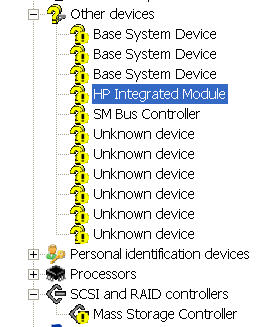
Does anyone run into this driver problem when downgraded to XP Prof 64?
I go to this http://www.hpdrivers.mercs.us/ web site to get most of the necessary driver; however, I am unable to fix these drivers problem as shown.
Any help is greatly appreciated.Attached Files:
-
-
I have yet to see anyone get XP64 running fully on an HDX. XP32 is hard enough.
-
Thanks, 2.0. Glad to see you in good form on the forum.
-
Anyone like me that's been in the computer / electronics business for as long as I have knows that many problems are caused by inexperienced users "updating" things that don't need to be updated, simply because it's an update and not for any specific reason, like a security fix, bug, etc. It's a newer version so they install it - and then scratch their head when problems start happening.
Systems are engineered with specific hardware components and software in mind, and by the time those systems hit the market they're already technologically outdated. Ocassionally there will be an official release from the 3rd party vendor of any driver or software updates, since any updates from OEM sites don't always work. That's because OEM programs are different from the licensed, modified versions that are installed in different PC's. While a lot of hardware will have generic drivers that can be obtained from anywhere, they're released as updates to the OEM versions of the hardware. It doesn't necessarily mean (and in many cases doesn't) that those updates apply to an installed, licensed version in a different system. If it doesn't, there is usually a warning notice that the update isn't for 3rd party installed components, but many people either don't see those or just ignore it. Or they're arrogant enough to believe they know better than the companies that engineered them.
Where most get into trouble is they'll install an updated driver without bothering to read the release notes or to check and see if it applies to the component installed in their system - I see that with HP systems all the time. There's a widely posted security update on all of the system support pages on the HP site, but it's not necessarily meant for all the systems whose pages it's posted on. It's up to the user to determine if it's necessary or applies to their system or not.
Of course in some cases you'll just get a bad update, but that doesn't happen that often. Drivers and firmware updates go through a pretty rigorous QA testing program (at least they used to) before being released. With literally thousands of different configurations, there's no way to test for every possible problem that might occur.
As I said before, if it ain't broke - don't break it. -
Can Anyone explain to me :
My Quick Touch (play, FF, RW etc.) buttons are inactive - what drivers or applications from webside should i install ??
I already installed the Qlaunch buttons but as i understand they activate functions hidden under regular keys like (brightness etc.) -
I'm using NVIDIA System Tools with ESA Support 6.03 together with HP 176.22 driver http://h10025.www1.hp.com/ewfrf/wc/...&dlc=en&cc=us&lang=en&os=2100&product=3841495.
-
Hello all, I have the HP HDX 9350EB Notebook PC.
This one comes with the Intel Core 2 Duo T8300 processor.
If it's possible, I'd like to upgrade the processor to a better one (maybe X9000).
CPU-Z says my mainboard is HP 30E2 (Bios firmware F.39)
Can someone tell me if this is possible or not?
Also, is it possible to upgrade from a Nvidia GeForce 8800M GTS to a Nvidia GeForce 9800M GTX? (have my doubts about this)
Greetings from Belgium
-
CPU replacement for x90000 is possible but graphics card probably is not. Even if the format of both cards will be the same, you still need to flash the laptop bios with the bios designed for 9800M GTX card.
-
Quick update of a recent Dragon experience.
My GF and I happen to go on a road trip together and each of us took our laptops.
She has an older (heavier, 7 pound ?) Dell. She also has a newer HP dv-5, but it doesn't have everything loaded on it yet, thus the Dell got taken on the trip instead of it.
I took my Dragon, of course.
She carried her laptop in a leather shoulder bag. Or I should say that I carried it for her in the air port.
I carried my Dragon in the HP roller case that I received a couple weeks ago.
Thoughts:
a) Her shoulder bag is terrible. The shoulder strap is a bit slippery and the thing slips off the shoulder frequently. I find myself always leaning and shrugging my shoulder up to keep it seated on my shoulder. And it still falls off !
b) I ***HATE*** shoulder bags. Always in the way. Always hitting on the body/hip/leg when walking. They swing out when you lean over.
c) I loved my roller bag. Who cares what the laptop weighs when you have it in a roller bag ? Its never in the way and it follows along really well. The only problem is steps, but that is what the handle is for.
So... I'll never own another shoulder laptop bag. From now on, I'm a roller bag guy.
A few more comments about the HP roller bag.
Its build quite well. Its about as small as can be for the Dragon to fit in it. I haven't used the backpad straps yet, but I would if I was going somewhere where it couldn't roll. Its a steal at $80, which is what I paid for it.
Some people bill it as an overnight laptop bag. And it is, if you travel with just a shirt, pants and a few other things. It doesn't hold enough for me on a weekend trip, but then I take workout clothes and stuff.
However, its great for carrying the laptop and a bunch of books/ papers, which is how I use it. Its quite roomy for that purpose.
It has a ton of pockets which is good and bad. Good for having lots of places to store things. But I usually lose things and thus I end up spending a lot of time looking through all those pockets finding what I need.
All in all, I highly recommend the HP roller bag. My Dragon doesn't leave home without it.
*HP HDX DRAGON Owners Lounge, Part 1*
Discussion in 'HP' started by J-Bytes, Sep 14, 2007.