Problems? See this thread at archive.org.
Wontons - That is a known issue with the DV5 Series it is most likely caused by static or heat. In order to fix the issue you must shutdown/restart the system (it also helps to take the power out and hold the power button for a few seconds if noticed) Don't worry no virus just a design issue. fortunately it doesn't happen to horribly often. Just make sure to let the computer cool and possibly clean the touch control board. (the battery thing really does help most systems have a small amount of power stored which could help hold static if thats the problem so i would really suggest pulling the battery and holding the power button AND wiping the computer down. I use some peroxide on the sound board (DO NOT USE A LOT IF YOU DO REMEMBER WET Electronics=BAD) (I usually Put it in a paper towel and then quickly dry it) since i started cleaning the board I haven't had the problem since... The Process Usage is probably a side effect of the volume controls constantly being "used" by the system. Hope this helps.
Everybody- I noted peroxide above if you decide to wipe down any part of your system with anything do so at your own risk. personally I wipe down my entire system with it every couple days (it rids the system of fingerprints like nothing else) Notice i have the Infinity Display tho which can react different than whatever option you may have and like I said be cautious when using liquids!
Eason- Didn't expect you would still be here when I started asking questions again, how goes it?
-
-
I'm curious, would the static/heat thats causing the clicking also cause the extreme use of memory that seems to be associated with this problem? It doesn't seem to me like there is a connection between heat and memory usage.
-
Wontons- Like I said the process usage could be a side effect because the volume is actually going rapidly up and down it is actually using system resources. You also could have an issue like Tal12586 had but either way i seriously doubt its a virus knowing that its a common issue with this system.. I would say it used a lot when i had the problem but i never checked because the constant clicking was so annoying i would immediately restart the system. At the same time I would always recommend upgrading to the latest drivers Below are all the audio and HP quicktouch (the touch board) drivers off of the HP site listed for the DV5T-1000 for Vista 64Bit.
For anyone that needs the Vista 64 Bit Audio or Quick Touch drivers and Software here they are.
HD Audio Codec - http://h10025.www1.hp.com/ewfrf/wc/...&dlc=en&cc=us&lang=en&os=2100&product=3744198
HD Audio Driver - http://h10025.www1.hp.com/ewfrf/wc/...&dlc=en&cc=us&lang=en&os=2100&product=3744198
HP Quick Launch Buttons Driver - http://h10025.www1.hp.com/ewfrf/wc/...&dlc=en&cc=us&lang=en&os=2100&product=3744198
HP Quick Touch Software - http://h10025.www1.hp.com/ewfrf/wc/...&dlc=en&cc=us&lang=en&os=2100&product=3744198
For Anyone Using Windows Vista 32 Bit that needs the Audio or Quick Launch Drivers and Software they are listed below.
HD Audio Codec - http://h10025.www1.hp.com/ewfrf/wc/...&dlc=en&cc=us&product=3744198&os=2093&lang=en
HD Audio Driver - http://h10025.www1.hp.com/ewfrf/wc/...&dlc=en&cc=us&product=3744198&os=2093&lang=en
HP Quick Launch Button Drivers - http://h10025.www1.hp.com/ewfrf/wc/...&dlc=en&cc=us&product=3744198&os=2093&lang=en
HP Quick Touch Software - http://h10025.www1.hp.com/ewfrf/wc/...&dlc=en&cc=us&product=3744198&os=2093&lang=en
For more drivers for the DV5t go to HP's site... possible BIOS Upgrade could help also (i think i may have had the problem more with the old overclockable BIOS than i do with the current up to date one).. There are also a few HP Software updates on the HP site that don't relate directly to Quick touch or the audio but could possibly help. also HP "Health Check" Can check your computer and install any needed Updates that are available from HP that Windows update will and has missed...
Before Installing Any Drivers Or Codecs always first uninstall the old ones and restart the system uninstall directions below.
-Audio Codec Uninstall
Start Menu type device and click device manager when it pops up.
When the permission windows appears click continue
click sound video and game controllers
click IDT HD Audio CODEC
Restart
After restart if the system trys to install drivers on it's own DO NOT ALLOW IT TOO. Continue installing the newest drivers from the HP Site.
Use all drivers, Codecs, Updates, Directions at your own risk of course. thats all of my ideas tho hope it helps.
P.S. I seriously doubt you will need to upgrade the BIOS just a "last option" idea -
Haha, still keeping it real. Got Windows 7 and XP dual booting instead of Vista, it's great on the DV5.
-
Eason - I thought about dual booting the Windows 7 beta on here but I didn't wan't to risk loosing the restore partition and I REALLY like the convenience. I have tried the 7 beta on some other machines tho and I've to say it's a beauty even more so when compared to Vista glad to hear it works on the DV5. Other issue is wether or not all the drivers including my TV tuner will work. And wether or not software that came for free (like youcam) will still be available) I will be buying Windows 7 when it comes out tho as long as they don't seriously start messing it up

Edit: Hey any chance you could tell me what kind of resources 7 uses compared to vista? does it seem to be a resource hog on the dv5 or no? if you do thanks
-
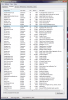
Tal12586- I got the audiodg.exe process to show up (didn't realize I didn't have all user process's showing should have known better) anyways here is a screenshot of the process. its currently 11,804Kb of ram so yeah no you have a memory leak or something. i'd suggest a driver reinstall unless you've tried that already... But yeah as you can see your process is using roughly 45 times more ram than it should.
Attached Files:
-
-
thanks for your reply and support!
well obviously it's a memory leak.. I wonder why it doesn't happen to everyone, we have almost the same computer, and besides a few adobe programs I didn't install much..
I downloaded the recent driver from HP's website, and uninstalled the old IDT driver.
but after I restarted, it suddenly gave me a message saying that windows successfully installed new drivers(?)
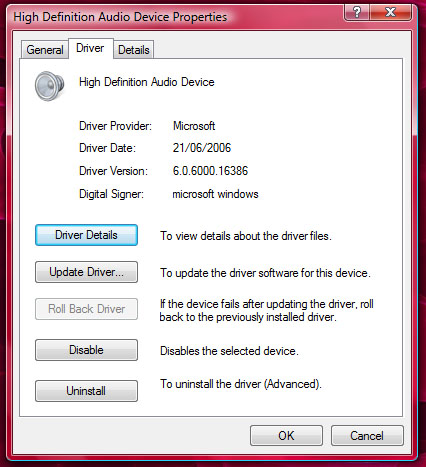
when I checked what driver it installed, here's what I got (see picture)
sound seems to be working fine, although not as clear as before..
the audiodg.exe process now stands on 10MB which seems normal.
as for now, I'm working without the IDT driver from HP's site installed.
could this cause problems?
maybe I'll try installing the new driver later today and see if the problem returnsAttached Files:
-
-
Hi, i recently got my dv5t and noticed that when starting my computer, after imputing my password and clicking continue, i get a black screen with the mouse pointer for about 20-30 seconds, after this windows starts normally. I was just wondering if this is normal, i am running vista 32bit. Also a small questions. On my previous computer, a dell e1505, while using firefox, i could open a link in a new tab by clicking both mouse buttons while on the link. I cant do this now, is there any way to configure firefox to do this. Thanks.
-
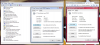
tal12586- Yeah no i'm pretty sure that's just the standard windows "default" audio driver. It should be fine to install over top of it (since windows usually pushes those default drivers) We just wanted to make sure the problem Codec was totally gone before install. to make sure that this is the windows Codec would you mind giving a screenshot of the device manager like the one i've given below (you don't need the properties page since you already gave that) I just put that there for your benifit. Also you might have the same codec just an older version because I noticed the codec version is similar and the date is far older. (Windows will sometimes pull old versions of the codec you need down off the web) But yeah it wouldnt hurt to install the IDT and it shouldnt take more than five minute. After that to make it sound better (if it doesnt already) you can always go into the sound properties
totalnewbie - I've had this problem on this computer and on others.. It's Vista (Are we really surprised?) I don't know why it does that sometimes.. the problem is that instead of showing that "loading page" it went straight to login unfortunately Explorer hasn't had a chance to start at that point. This can just happen or sometimes there are to many processes starting with the computer before login. While you're problem might actually not be the same issue i'm pretty sure it is. As for the firefox issue I use Chrome so sorry I can't be of any help there.
Edit: tal if the Device manager only ends up saying HD Audio Device don't bother getting a screen shot I just want to know if it shows anything different than the properties window -
tal12586- Sorry forgot to attach picture
Attached Files:
-
-
Hey Cammeron - I have a recent problem with the audio touch bar on my dv5t. For some reason the mute button is stuck on being orange. It works in muting and un-muting the sound, but it just wont turn white when I unmute. I have Vista64. I was told before on this board that using the touch controls does not show up on the screen, i.e. volume bar... and not even the brightness level, when I change that.
I have not check my driver version, since I'm at work. But wanted to see if you know about this problem and Vista64.
Thanks! -
Mozman - Unfortunately I have no clue why it would be stuck orange AND still work. The only time mine has been stuck on orange is when the whole board starts going out of whack and the restart/cleaning is needed... but the mute button doesn't work then. Also I did just recently find out that the Volume bar doesn't show up in the 64X version of vista which i found interesting. Lately mine hasn't been showing up on my 86X but I never liked the volume bar anyways it always got in the way. (it was huge). but yeah sorry I can't be of any help I would research the problem but i'm really busy today and tomorrow. When you get some time HP has a tech support Instant Message Chat they might be able to help you if no one can on this forum. Hope you find the solution. Later.
-
this big arse Dell 24" monitor at the same time as the native display without any problems? Is there a preferred output on the lappy to use for it?
http://accessories.us.dell.com/sna/...etail.aspx?c=us&l=en&s=bsd&cs=04&sku=320-6272
My Dragon has the NVIDIA GeForce 8800M GTS and there's a sale that ends today on this monitor.
Any help from you guys would be mucho appreciated.
And if anyone has any caveats or warnings or advice I'd, again, be very appreciative.
By the way, love the forum in spite of mainly being a lurker. I've learned a lot from y'all.
Best,
Doc Eye -
Hey guys, I think my dv5t is overheating and I don't know what's causing it. When I'm idle, the cores run at 75C and the graphics card runs at 71C. I used compressed air to clean the vents, but I still don't feel air coming out. Any advice?
-
75C and 71C wont kill your system... in all honesty the DV5 runs pretty HOT especially if you have the graphics card or CPU upgraded. How did you check your temps? i've never checked mine but the underside has been hot enough before to hurt and i could see the inside being at 75C. Also i've had Nvidia Laptop graphics cards before that commonly run at about 69C 71 in the dv5 wouldnt be surprising. also whatever youre using to read the temps could be reading them wrong. it all depends on what youre doing during these temp readings. if youre gaming 75C isnt that odd but if youre just surfing the web than that is HIGH
-
75C is just browsing the web. When I run WoW, it peaked at above 100C after only a couple of minutes. I'm using HWMonitor to get my temperature readings.
-
That is dangerous... Try buying one of these to put underneath your laptop (I have heard great reviews about it, would buy one if I had heat problems):
Awesome cooler
I know I know... It looks like speakers, but it is supposed to really work. -
I checked my temps both CPU cores sit around 57C. I'm using MS Word, Itunes, and the web (so just basic usage). GPU Core is 63C, HDD is 58C. are you sure your fan is running?
-
I don't think it's running, I'm not hearing anything. How can I check/start it back up?
-
Altho the fan is pretty quiet when the machine is idle you should still be able to hear it if you put your ear to it. My guess is your fan may be dead. I'm actually having fan troubles myself for about a month now the fan has been making a noise that i can only describe as a hard drive going bad XD oddly enough. the noise is very quiet but still noticeable. it hasn't gotten any worse but when I get the chance I will still be sending mine in for repairs.
Assuming that the fan is dead I would recommend that you DO NOT GAME or use any CPU/GPU intensive applications as you could end up frying them both. -
I've only had this laptop for a month, could the fan really be dead already?
-
You never know thats why there is a warranty im just saying there should be some movement from the fan unless you shut if off in the bios and you would have some noise with it close to your ear. (the fan normally runs a little all the time but you can shut it off in the bios and it wont come on until its at a certian temp) I'm not trying to scare you just saying its a possibility. i've only had mine since christmas and the fans already going out. Faulty parts I guess.
-
Whats up with my volume control? The mute button does not work until a restart(then press and hold power button for 10sec after removing the battery) and the volume continuously keeps increasing and decreasing...like 98->100 and then 100->98...always this always happens in increments/decrements of 2 units!
-
Just a semi-fix for the volume fluctuation that I found helpful. If it keeps going up and down and making that clicking noise, try hitting the "stop" button/light next to the fast forward light. Not really a fix, but a quick way to stop that. Hopefully that works for you.
-
I'm guessing the problem is the actual fan, I updated to the latest bios and drivers and it's still running 90C+ when I try to play any games. Anyone have any idea how long it'll take to get my machine back, and will they replace the whole thing or just the fan?
-
p1190- try cleaning the board? I honestly like i said a few posts back used to get this problem a lot. but i Updated the BIOS to F13 and started cleaning it and i use to restart and pull the plug and now it just hasnt happened in forever. I'm guessing it's Cleaning it tho altho the other 2 things could have been it too. not really sure... I know a lot of people dont want to update the BIOS because they lose the ability to overclock... when I overclocked this laptop with the 9600M GT the performance was minimal while 3Dmark showed better scores I could already play all the steam games at Full Detail at 1680X1050 Resolution. and Crysis was at medium settings and that was all before overclock after overclock the actual ability to increase game detail and or notice of FPS was minimal. so if anyone has this problem and has the old bios unless you see some game where you couldn't live without the overclock (which as i said when actually in game outside of testing is minimal) than BIOS could always help. but yeah before u upgrade BIOS look at my previous posts 3-4 pages back they might help. (now that ive ranted about the BIOS XD) anyways if you find a different fix please post i'm sure a lot of people would love to know
Youngweezy - knowing HP (and i've had to send in for warranty before with them infact its how I got my DV5 =D free upgrade because they scratched my old DV6000z) but yeah anyways knowing HP they will replace just the fan altho it is still a good idea to back up any data because they could call it a Operating system or BIOS software malfunction and end up wiping the entire system and they don't tell you when they do that you just find out when it comes back... I sent my old DV6000 in for them to repair the scratches they caused (they said they would) and for some reason they wiped the system, so yeah back up your data they don't always wipe but you never know when they will choose too... (I know wether or not they wiped it wasn't the question but I figured i'd warn you) Anyways onto your question. I seriously doubt they will replace it I had multiple issues from the fact that the speakers stopped working to the fact that when they scratched it they also broke the power button (which they fixed but i knew it was the same laptop because it still had the scratches) but yeah they don't replace an entire laptop when they can replace one part.. the fan assembly is pretty easy honestly.
Btw the fact that they scratched my laptop and broke the power button and the speakers didn't work when i got it back still is forgiven. The customer service I got was amazing (once I got to an actual representative who had any power to do anything other than call a repair they forwarded me to this person when the damages happened) anyways the Customer service was amazing he asked me to send the laptop in to have the damages fixed for free since they caused them, so I did but they didn't fix them. He then offered me the free laptop with a lot of upgrades as a trade in for the old one. HP wants there customers happy and i'm glad I choose to purchase that old DV6000 from them. What i'm saying is dont look at the above as a horror story... it will take about a week and a half depending on when you ship it. (since it only ships and they only work on weekdays i believe)
-
it wasn't the IDT driver, it was some default driver, like you said. I can't take any screenshots since I already installed the new IDT driver (the sound was pretty horrible and stopped working altogether after awhile, so I had to install the IDT driver)
but I'm happy to inform that since the install, the audiodg.exe process takes about 8-13MB yay!
-
Currently using F.11 BIOS. Thanks Deis..I'll try the next time it happens. Hi Cammeron! long time....?
-
P1990 - Hey yeah it's been a while i've been pretty busy with HS, College, and trying to find a car (think I might have found one tho
) . how have you been?
Tal12586 - Glad to hear it's working correctly now
Everybody with Quick Touch problems - It's an unfortunate fact that the HP Quick Touch board on the DV5 has this problem and I know it's effected many DV5 owners in the past. As a response to the problem I had to start a picture response. This is not to say that the DV5 is a bad laptop (its actually really nice) just that it like everything else has its flaws, and i'd rather laugh than cry since every system has its faults. Sorry to anyone having to deal with this problem I hope it's resolved soon. -
hi..i was wondering what's the best way to clean my dv5t of those fingerprints..should a cotton soaked in a bit of alcohol be fine? also im wondering..the left button on the trackpad is slight more depressed than the right button..is this normal since i click the left button more often than the right? thanks
-
if I want to uninstall norton antivirus (the one that came with the laptop), is there a special process for that? or can I simply uninstall it from add\remove programs? (because I remember seeing some post about it causing problems for other antiviruses, but I can't find it)
another question, what programs do you use for monitoring temps? I want to check mine too, but I don't want anything that runs on startup or takes a lot of cpu. what is the smallest simplest program for that?
Thanks!!! -
I'm not sure about the problems when you do a normal uninstall but to be on the safer side use the Norton Removal Tool. I used the one from here
Cheers -
tal - are you planning on using any antivirus software after you uninstaall the norton. i was planning to uninstall norton but wasnt sure what antiviris software to replace it with.
Does anyone know of any reliable software to use as a replacement for norton? -
try to use nod32...it works great for me...
anyone here knows a good way to clean the laptop? thanks -
I use Avast. It's free (for home use)
-
I am also using Avast ^ ^ love it. also I use Spybot search and destroy for spyware. but Avast pretty much cleans house. aha.
Also Sidenote. I mentioned before that I found a car. well its a truck. I may not be posting a lot again (altho still more than before) i've been working on it. I actually locked myself out of it today and had to pick the lock >.< right after i had finished installing new seats. but yeah anyways i will prob be more busy. but ill try to reply to people.
Also once again anyone know the best 9600M GT drivers XD -
Hey! What car/truck is that? Some engineering project?
-
I know people have recommended and use Avast and AVG for anti-virus protection. I used to use Zone Alarm (firewall) and AVG. But with the my new dv5t, I tried and still using Commodo. I am using their free suite - firewall, anti-virus, safe surf.
I found the firewall to be much more specific than zone alarm. A little more annoying with all the pop-ups and not always easy to figure out what program is causing it. But overall I am fine with it, once everything is initially install and used.
But I am wondering what people's thoughts are about Commodo's anti-virus? I like the all-in-one package (and free!), but would be open to use Avast or back to AVG, if people did not like Commodo's anti-virus.
Thought anyone? Thanks in advance! -
P1990 - It's a 1996 Ford Ranger (2WD, gets about 28MPG). I have replaced the seats (they were worn out plus i wanted bucket seats not bench), rewired the amp that was in it, fixed a small leak in the exaust, fixed some dead bulbs, cleaned it OUT (it was messy), replaced the front bumper with a chrome one, and soon I will be putting some struts on the bed lid since it has none, also I replaced the battery. It's taking a while because mostly because I had to torch 2 of the metal posts on the seats and shape them into the shape for the truck but now they fit and work perfect.
it isn't a work truck it's my first vehicle (i'm 18) I bought it cash for 1700 and i've put another 300 into it and other than some small things its ready to go.
All in all it's an awesome little truck (even more so since it gets like 28mpg) its well worth the 2000$ other than a few small things it still looks great. I'm glad I choose it over the Pontiac Firebird (it would have been 2800$ and it had lots of body damage plus the kid seemed kind of well untrustworthy, but yeah aha it's nice. Btw most listings will say 24MPG (before someone posts it altho i doubt someone will look it up) but the guy said and i've noticed more than that. -
is it worth upgrading the bios to f.13 from f.11?
-
Darth Bane-
F.13 - "Fixes an issue where the NumLock function does not match the status indicator after resuming from Standby mode."
F.14 -"Updates the Intel Memory Reference Code to version 2.5.
Fixes some minor typographical errors that appear in the Setup Utility (F10)menu."
Anything in quotes is from the HP site
I would say the F.14 upgrade from F.11 is worth it (since it literally only takes two minutes to upgrade the BIOS on this laptop) but the F.13 from F.11 i would only do it if you notice that numlock issue btw F.14 just came out today I believe. -
Lol, after posting I went there and saw the f.14. I will definitely be uprading.
I simply asked in case anyone got any nasty side effects. -
Oh yeah no it was clean and easy at least for me it was aha
-
Creative! I have messed around with 2-wheelers before not 4-wheelers! Would love to have a look at your Truck when its ready!!
-
Lmao, I suppose that considered high in America?
How are peoples DV5s goin, still loving mine. So glad i didnt wait around for the dell studio xps! -
lukext- no for a truck in good condition with a good engine thats 13 years old for only 1700USD that is good tho XD I guess you could say the MPG is considered Decent for the price.
lukext- I love my DV5 just gotta get the fan issue resolved lol but if it doesn't get any worse i prob wont worry about it cause in all honesty its hardly noticeable (btw if anybody wonders what Lightscribe is like it's nice the only downside is i havent found any large RW lightscribe disks if anyone knows where i can find them plz post aha)
P1990 - I'm prob going to post some pictures on flickr altho it wont be anything amazing aha gotta remember its still just a starter truck it was nice because the junk yard had a lot of cheap parts XD (the bumper in perfect condition for example was 50$)
Edit: Here are the pictures of the truck http://www.flickr.com/photos/35297127@N05/sets/72157615126543370/ i feel stupid posting them but oh well ahaha -
I've had my dv5t since early December, and so far I'm really loving it. (Must admit though, this is a replacement lappy since the first one was!!!!)
With this 2nd one, I don't have any of the overheating issues, but since I primarily use it on my lap (and often in my bed), I've learned to always try to keep the underside left-rear corner of the laptop free and clear of anything blocking the air flow -- and, even though the fan doesn't come on very often, when it does, the first thing I do is lift up the computer for a few moments, so it can cool off -- and then the fan goes right off. -
How many of you here really find the lightscribe useful?
-
P1990 - I never thought it would be that useful but about 2-3 months ago I was annoyed at all my discs either having no labels or having smudged sharpie with bad hand writing all over them. I checked prices on lightscribe discs and HP's discs arent really that expensive from walmart it was like 30 cents more for a ten pack of lightscribe than for regular CD-R. But yeah now i've already burn't copies of all my music for use in my truck and they look like the original discs (as much as they can in black and white). My mother also teaches a "Co-Op Class" that I record for her and burn to disc. since a lot of other people use the discs lightscribe made it a lot easier to read and more professional. anyways it's nice once you get use to it.
-
OIC.
Btw Cammeron,did you do a clean Vista install?
*HP dv5t (1XXX series) Owners Lounge*
Discussion in 'HP' started by Badious, Jul 22, 2008.