Problems? See this thread at archive.org.
Cammeron:
thanks for your response!
To address your proposed issues:
Virus - I managed to check the computer on safe mode, it found a virus in some old exe's I had (funlove) but I never opened them. after I deleted them the virus scan was clean, but my computer got stuck again. I also noticed a slight loss of performance (but not because of CPU load, I checked)
Hardware Malfunction - I REALLY hope this is not the case
Software Eating Resources Because of an Error - like I wrote, CPU usage was normal during freeze (when task manager managed to run)
Heat Issue - I checked my temps (but not on freeze) right now it varies from 34 to 51 C, so I don't think it's the issue either.
Possible overclocking issue - I don't overclock
Could it be just a vista issue? that vista somehow got scewed up? or maybe a driver issue? (except for audio driver, I didn't update any of the drivers since I bought this computer (if it works - don't touch it - my motto
-
Tal12586
No problem, If I was having issues I would want someone to help me. While it could be a system issue I always mess with it last since it would most likely require a re installation of the OS. Also Have you checked the RAM usage? Also GPU Usage and heat? (Use HW Monitor to check).. While like I said it could be a windows vista issue (lord knows vista has them... and i'm a windows fan boy but i cant really say vista isn't without its flaws..) You could clean the registry out but it probably wont do much if it was a system issue it would most likely just suddenly lock and not have any drop in performance before hand unless you had multiple system issues working together.. if it was hardware it would probably be a sudden issue again. I would Check drivers (update them all), clean your registry. get that HIJACKTHIS log. How long ago did this start? what antivirus did you scan and clean with?
1. Clean Registry (Just so that were not messing with registry problems as well) (CCleaner is a good program for a quick free clean)
2. Update Drivers Using Windows Update.
3. Get A Hi Jack This Log ( http://free.antivirus.com/hijackthis/ )
4. Please Give Info On What AV youre using
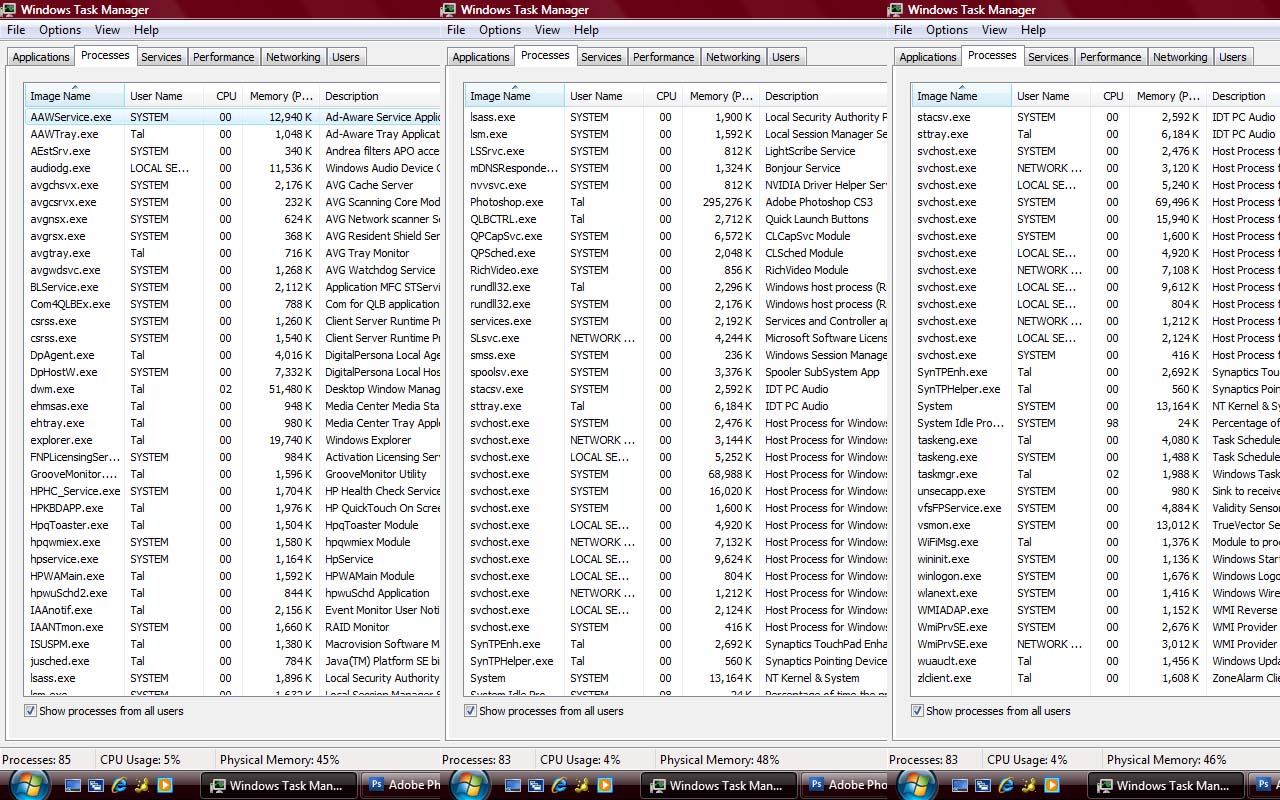
5. Please Post List Of Running processes on here. (Screenshot if possible) Win+Insert/print
6. System Specs Please?
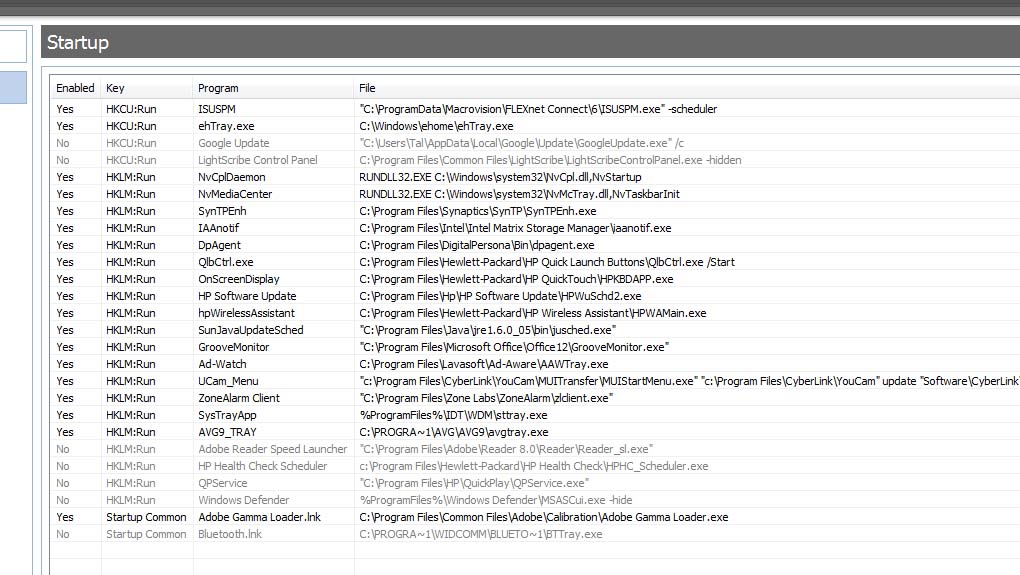
7. List of Processes that run durring start up? (Win+R then "Msconfig" then "Startup")
8. We can always try a system restore if you know when the issue started.
9. If all else fails System Restore... If that doesnt work then you've a hardware issue but I SERIOUSLY doubt it. if you had a hardware issue other than cooling you would most likely have a sudden failure if you could even boot up at all.
Sorry if i've listed anything that you already know/understand (I hate when that happens to me) just trying to make sure bases are covered
P.S. if it was a hardware issue there would be a good chance of a RAM failure which isnt to bad! Because of the ability to start up its less likely to be a cpu or gpu issue and more likely to be ram. (altho ram can also prevent boot). If it was a ram issue tho it could be replaced for a lower cost than most other hardware issues. We will cross that bridge if we come to it though. -
Cammeron-
1. Clean Registry - that was the first thing I did (with ccleaner) didn't help
2. Update Drivers Using Windows Update - I don't think my computer can handle such complex operations at this state (did I mention the performance loss? something weird is definately going on here...)
3. Get A Hi Jack This Log - attached is the log (if you understand how to read it that would be great )
4. AV - (I think you meant anti virus) I use AVG. actually, the first freeze happened right after I upgraded to AVG9 (the first scan froze)
5. List Of Running processes - attached.
6. System Specs - P8400 processor (2.26GHz), 3GB ram, nvidia 9600M GT, 320GB harddrive, fingerprint reader
7. startup processes - attached.
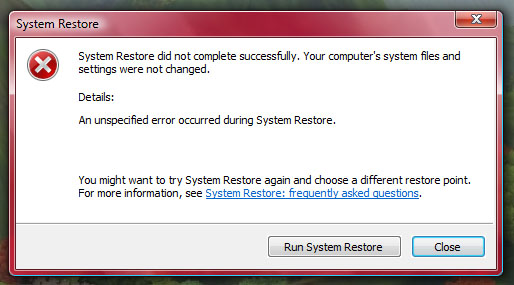
8. We can always try a system restore - tried that, but the restore itself failed (a screenshot is attached)
and thanks again for your help!Attached Files:
-
-
tal12586,
try going into HIJACK THIS (in safe mode) and fixing the file shown in the attached screenshot. Also try running a spybotsandd scan if you can. Also it's no problem I help people every day lol i've been to two peoples houses just today fixing there systems.
-CammeronAttached Files:
-
-
hehe ok
fix how? that's my homepage, just a simple html page I made with links. I don't think it's a problem, I have it for ages -
If you are sure it's not an issue than there is no need to fix it. Simply something that the Hijackthis log scanner picked up I figured fixing it back to defualt couldn't hurt but that if you had a browser page hijacker it may fix it that was all. If known for a fact that its a safe file than no need. Just spybot
-
Hey guys im thinking of getting the Dv5t and it cost 1350 USA bucks. here are the specs
PROCESSOR
Intel Core 2 Duo T9400 (2.53GHz/6MB L2 Cache)
MEMORY
4GB DDR2 SDRAM
HARD DRIVE
320GB 5400 RPM SATA Hard Drive
DISPLAY
15.4" WXGA BrightView Widescreen (1680 x 1050)
MULTIMEDIA DRIVE
Super Multi 8X DVDRW w/Double Layer
VIDEO GRAPHICS
NVIDIA GeForce Go 9600M w/webcam
DIGITAL MEDIA
5-in-1 media card reader
COMMUNICATION
Intel Wireless WiFi Link 5100 Network Connection 802.11N
KEYBOARD
Full-Size
POINTING DEVICE
TouchPad with dedicated vertical & horizontal scroll pad
DIMENSIONS
14.05" (W) x 10.2" (D) x 1.37" (min H)/1.65" (max H)
PC CARD SLOTS
ExpressCard/54 Slot
EXTERNAL PORTS
Expansion port 3 connector
HDMI 1.3 connector
Four USB (Fourth shared with eSata port)
Headphones out
Microphone in
RJ-45 (LAN)
VGA port
SOUND
Integrated Altec Lansing stereo speakers
POWER
Standard Lithium-Ion battery
OPERATING SYSTEM
Microsoft Windows Vista Home Premium (64-bit)
SOFTWARE
HP PhotoSmart Essentials
Adobe Acrobat Reader
Microsoft Works
Microsoft Windows Media Player
HP Games Powered by Wild Tangent
HP QuickPlay
HPCTO5
If not got any sugestions for other laptops i could buy? thnx
-
im sorry but for 1350 that is way to little for what you pay for,
you should spend you money on a sager n8662, asus g51 or g71, you could even get a decent m15x if you just added 150 more.
the hp has a ddr2 gfx card and that really drags it down
personally i would buy this laptop
http://www.newegg.com/Product/Product.aspx?Item=N82E16834220639&Tpk=g51 asus
beats almost all the hp components and costs a tad less -
Yeah, that laptop is not worth even close to $1,350 . . . at least not in this day and age. You should complete the FAQ in our What Should I Buy forum so we can help you out.
http://forum.notebookreview.com/forumdisplay.php?f=16 -
I agree with the other posters $1350 is too much to pay for that configuration. Granted HP no longer sells that model on their website anymore, but with the Thanksgiving and holiday sales coming, you can configure a much better laptop with an Intel i7 CPU. I would suggest save some bucks and get a better laptop.
-Moz -
I agree with those above. I was gonna sell mine a while back and the difference between that and mine is that id be selling mine with two batteries two chargers 2 years of accidental damage protection and warranty left a faster HDD and the Integrated TV tuner with remotes and attachments. but the processor right beneath that one and I still wasnt planning on selling it for any more than 12-1300. And only because of that ADP did i even consider that being a good price.
-
Has anyone tried to upgrade their computer to windows7 from vista? I don't mean to completely remove vista and then install windows7, I mean upgrade vista to windows7 (I heard there's an option to do that)
if anyone did, did you have any problems? (with drivers etc)
Is it worthwhile? is performance better? is the os stable?
I've decided that I'm going to format my harddrive and install everything again from the recovery discs. I'm thinking about switching to windows7 because vista might be the reason for the laptop freezing all of a sudden... -
Tal12586-
thats exactly what I did Wiped the drive and installed Vista 32 Bit home premium from the recovery discs then upgraded to Windows 7 32 Home Prem. Works great went realll smooth no problems... other than when Windows 7 Hijacks my keyboard and types lies talking about how "great it runs on my dv5" as if.
All Joking aside the performance and stability are much better I would say. More so the stability if i had to choose one.. Dont think ive had any crashing or freezing of any app unless it was caused by overclocking to high. The method i used was to reinstall using recovery discs then to fully Update win vista and all drivers THEN to switch over. idk if you will get different results if you dont update.
Hope it helps!
Added*
Note: After Installing my current graphics drivers I noticed that windows photo viewer does not like to be moved around the screen. It runs very quickly when not being moved tho. Drivers work great other than that 186.81 are my current drivers (they are not stock tho so not to worry 186.44 were my stock -
that's good to hear!
I wiped everything yesterday and installed vista from the recovery partition and everything works well so far (knock on wood ). So I'm guessing it was a software issue (I hope)
Restoring my system from the recovery partition was really easy and simple. (there's an option to do so in windows)
Is the option to do a system restore (to factory condition) from the recovery partition still available in windows7? (just in case I screw things over again..) -
Yes it is altho you can also make recovery discs right now from inside windows for free I would do that just incase. Also it will restore you to vista not Windows 7 just to be clear.
-
hi guys if i reinstall windows vista from recovery dvds,will it format only my C drive or my whole hard disk?
-
alright Thnx guys i think i'll go for another one. Thnx for the suggestions. I'll look at waht u guys sent me
-
Hey guys I dont know if this is good. its $830 for the same exact thing ecxept graphics card. id figured i just buy another graphics card and ask a friend to install it. heres the specs.
Product Description
PROCESSOR
Intel Core 2 Duo P8400 at 2.26GHz
MEMORY
4GB DDR2 SDRAM
HARD DRIVE
250GB SATA Hard Drive
DISPLAY
15.4" WSXGA 1680x1050, Fingerprint Reader, TV Tuner, BrightView Widescreen
MULTIMEDIA DRIVE
Super Multi 8X DVDRW w/Double Layer
VIDEO GRAPHICS
Intel Graphics X4500 w/webcam
DIGITAL MEDIA
5-in-1 media card reader
COMMUNICATION
Intel Wireless WiFi Link 5100 Network Connection 802.11N
KEYBOARD
Full-Size
POINTING DEVICE
TouchPad with dedicated vertical & horizontal scroll pad
DIMENSIONS
14.05" (W) x 10.2" (D) x 1.37" (min H)/1.65" (max H)
PC CARD SLOTS
ExpressCard/54 Slot
EXTERNAL PORTS
Expansion port 3 connector
HDMI 1.3 connector
Four USB (Fourth shared with eSata port)
Headphones out
Microphone in
RJ-45 (LAN)
VGA port
SOUND
Integrated Altec Lansing stereo speakers
POWER
Standard Lithium-Ion battery
OPERATING SYSTEM
Microsoft Windows Vista Home Premium
SOFTWARE
HP PhotoSmart Essentials
Adobe Acrobat Reader
Microsoft Works
Microsoft Windows Media Player
HP Games Powered by Wild Tangent
HP QuickPlay
HPCTO5
WEIGHT
5.83lbs
i think this is a good idea. or maybe i can get a maxed out Dv4t with like everything. Idk what di u guys think?or any other ideas for laptops? my budget ends at 1400 bucks. I dont want to get a moc though........so yea thnx for the help guys ;D -
Im not sure if this is the right topic to post that kinda stuff.
But with that kinda budget I would skip HP and go to Toshiba/Asus.
The graphic card sucks btw on that notebook.
The processor is good though.
Compare them with others:
http://www.cpubenchmark.net/cpu_list.php
http://www.notebookcheck.net/Comparison-of-Graphic-Cards.130.0.html -
you cannot replace the graphics cards in the dv series notebooks they are not "Swappable" they're simply a part of it completely integrated.
-
alright guys one of my mates brought up a good point if i buy a hp dv5t on amazon or somewerelse i wont get a warrenty on it. so im thinking of geting the dv4t heres the specs. Is it worth it? any other ideas? thnx guys.
. i was wondering if i could get the bad graphics card and then buy a good grapihs card better then nvidia G 105m. if not do u guys think this is a good confirmation? thnx. is it possible to swich the graphics card?
Espresso Black
Genuine Windows 7 Home Premium 64-bit
Intel(R) Core(TM)2 Duo Processor P7550 (2.26GHz, 3 MB L2 Cache, 1066MHz FSB)
50% OFF! 4GB DDR3 System Memory (2 Dimm)
FREE Upgrade to 320GB 5400RPM SATA Hard Drive with HP ProtectSmart Hard Drive Protection
512MB NVIDIA GeForce G 105M
14.1" diagonal WXGA High-Definition HP BrightView Widescreen Display (1280 x 800)
LightScribe SuperMulti 8X DVD+/-RW with Double Layer Support
Webcam + Fingerprint Reader
Intel Wireless-N Mini-card
HP Integrated HDTV Hybrid Tuner
HP Color Matching Keyboard
High Capacity 6 Cell Lithium Ion Battery
Integrated 56K Modem
Microsoft(R) Works 9.0
HP Home & Home Office Store in-box envelope
Targus Heat Demence
Noise canciling headphones -
Here's a thought for you burninggamer13, regarding the HP warranties: I have a dv5t, and spent mega bucks buying a 3 year extended warranty. THEN I started reading all of the horror stories other users have posted regarding terrible things that have happend to their laptops after sending them in to HP for repair. I have finally decided that buying the warranty was a complete waste of money, because I would rather pay to have my laptop repaired locally, then to take a chance on the massive damage frequently caused by HP --- which is almost never compensated for. Before you make your decision, read through some of the repair threads yourself, and you'll see what I'm talking about. Good luck!
-
i think my dv5t's screen video data connection is loose, resulting in frequent white screens especially when the laptop is moved. does anyone know of a way to open up to this connection and reconnecting it? i could figure it out myself, but im afraid of damaging stuff
-
I haven't experienced that issue with my dv5t, but HP has this notebook locked down tight. There is no way to access anything but basic components on the bottom and from looking at the service manuals, the entire laptop essentially needs to be taken apart to access the CPU and other components.
That said, if you do decide to take it apart, just keep track of where screws go and you should be okay. The service manuals should be located on HP's site.
------
In other news, I downloaded all relevant Windows 7 64-bit drivers in preparation to install Windows 7 Home Premium on my dv5t. I will report how it goes.
-
Hey guys, anyone tried playing Dragon Age: Origins in your Dv5t (9600m gt)? Trying to decide to get it on the 360 or PC..
TIA! -
I just installed Windows 7 HP 64-bit on my dv5t, everything went smoothly. All the quick launch buttons work. All the drivers I downloaded from HP's support site worked fine except for the gigabit NIC driver, which for some reason was a Vista driver only (according to the installer). It doesn't seem to have mattered; Windows installed drivers for it.
Clean installs are so nice . . .
-
Anyone know where the guide for taking the dv5t apart is available? I tryed searching the HPSite but couldnt seem to find it anyone know the link?
-
yeah i think they took it down, if u need help i'll be glad to help
-
Well I've taken apart HP laptops before I just wanted to look at the guide to see aprox how long it would take and how the heat sink is placed with the CPU/GPU wondering if thermal pads are used or just thermal paste. My guess is they used pads as they did this with the DV6000 Series (design wasnt too different) also if I had to say my guess would be thermal pads are better for laptops as there is a slight flex in laptop board durring travel and use i'm sure. if it had been thermal paste i was going to replace it. I also would just like to see the inside of my laptop and see if wiring another antenna thru the screen would be possible for better Wireless N since the DV5 carries the standard 2 and does not support the 3rd.
Also just wondering Hustheman have you tried lowering your shaders? I lowered mine to 1450 and recieved a higher boost than having them at 1600. I got a 3dMark06 score of 5600 on a p8600 with an 9600m gt and 3gb of ram. Figured id tell you there may be a possible performance boost available. altho it depends on what screen res you tested at too i guess. 630/505/1450 5600+Change
Note: Nevermind at the clocks youre running I'm sure you ran the test at either 1280x1024 or 1680x1050 I have readjusted my clocks because I had not adjusted for the new drivers when i reinstalled windows 7. new clocks are 649/1645/508 with a 3dmark06 score of 5826 at 1280x800 *i run lowest res so that i can compare the dv5 models evenly not for the higher score* anyways i can go higher than that but i start to get small artifacts if I do at 655/1650/510 i can go to about 655/1670/515 without serious issues but still the laptop is running incredibly hot at that point with a lot of artifacts and glitching.. it would be pointless and the only result if any would be damage to the card. Unfortunately my card isn't as highly overclockable as most. Either way it's still nice tho. my base without OC is 3998 my new with overclock is 5826 thats around a 1800 point increase.
Also would you have any idea why my 2d and low 3d Clocks wont hold? Its the strangest thing.. Normally its the Performance 3d Clocks that revert but lately my 2d and low 3d clocks have been reverting while 3d perf stays where i put it. -
The videos seem to have gone.
Tthough the manual's disassembly guide is fairly easy to follow.
http://h10032.www1.hp.com/ctg/Manual/c01550108.pdf
And as Charles said, label your screws. A piece of masking tape works. Let screws stick to the tape and label them as a group. -
195.xx drivers have that issue. One some models, the GPU gets stuck in 3d clocks and won't downclock. You might have to drop back to the 186.xx drivers. I'm using 186.91 on my DV5. No clock issues. Runs better than the 186.81 and 195.55beta/195.62.
-
I figured out the issue for the 2d and low 3d to stay the Shader and core clock must be synced not moved individually. Also I got way better scores with my 19X than i did with my 186X about 200 points more in 3d mark. thanks tho.
-
I am having some trouble with overclocking. I have the 186.81 drivers and am using Rivatuner to overclock. My clocks work, except that they only kick in sometimes and never when I am actually in a 3D application. Whenever I launch a 3D application, the clocks revert back to the stock performance 3D. See attached - any idea what is going on?
Attached Files:
-
-
hi guys
i would like to know if 9600m gt can be overclocked in windows 7 with riva tuner or should i stick with vista to have overclocking feature?
also does f21 bios supports overclocking of 9600m gt?
thanks
-
Charles - Wish I could help that sucks, while i'm sure you already have I've to ask did you force constant performance level? I believe the last set of drivers I overclocked with were the same as your currents. What is your Video BIOS Version under Nvidias System Information tab? Also have you tried seeing if a lower clock will hold? or if a single clock will hold if the others are left alone? I've had similar issues in the past where the clocks would only revert if one clock was moved usually the Memory Clock but sometimes it's been the core clock. Just throwing out Ideas. Good Luck
Farsang - Good News The DV5T 9600M GT Combination Is overclockable in Windows seven with BIOS F.21 and the newest non beta NVIDIA Drivers (Currently 195.62) With great results. My only issue is the sliders must remain "Locked" in sync for 2d and low 3d or else they revert. Performance 3d is allowed to unlock and move freely and still hold clocks for some reason.
*Note: I actually am getting higher graphic performance in windows seven with an overclock than i did with windows vista. -
using 186.81 drivers with NVDIA system tools 6.03 to overclock... no problems here but i prefer flashing my clocks to VBIOS... is there any way to do this in Dv5t?
-
using dv5 for 9 months. currently on f.21 bios with 195.62 driver. I overclocked it using ntune without a sweat. Windows 7 64 bit RTM.
-
How are you guys using NV System tools and Ntune to overclock the DV5? Every time i've ever tried it crashes the system. I've seen other people with the same issue. DV5 Crashes on Ntune Start. I loved NTUNE.
-
Disable all anti-virus progs, install as admin (right click executable, select run as admininstrator), and only install the performance (1st option on the list), not the other two programs.
When it's done, re-enable antivirus.
Method works with 6.03 and 6.05 on my DV5, win7 64bit. -
Hey guys. Haven't been here for a while.
I've had the dv5t for about a year and a half now. The screen just went kaput on me (computer boots, but screen does not turn on, but I'm able to use an external monitor).
Does anyone know if they are repairing these under warranty, or are they just replacing them? -
I have a weird problem with the led by the AC adapter input, when its unplugged and running on battery, that light keeps blinking quickly, even when its sleeping, does anybody know why that happens?
-
It's just an indicator that the laptop is still powered up, even though it's sleeping. Not sure if it does the same in hibernation, and I won't be able to find out (see last post on previous page).
-
My LED doesnt stay on when its unplugged at all.. Could be a sign of the battery going bad. have you run HP Battery health check?
Thanks 2.0 I may try that later. Will ntune force the CPU to overclock or is it actually locked? I know it forced the old AMD Turions to overclock in the DV6500z it even tuned them. just wonder thanks.
Using Ntune I was able to run Crysis at Minimal settings with only a little lag durring large battles sometimes. I had 128MB Graphics card and a i believe 2.1Ghz turion cant remember now.. I worked on that thing a lot and i cant remember anymore lol. Found my old receipt and it was the 128MB 8400M GS Nvidia Graphics card with a 2.0Ghz AMD Turion 64 X2. They both overclocked extremely well without generating a lot of extra heat. I wont say crysis ran amazingly but my point just being I feel Ntune does actually do a good job of tuning the system and cpu. -
Ntune won't have any effect on an Intel CPU, AFAIK.
-
Ah dang that sucks. Thanks for the info.
-
You are talking about the power light at the front of the laptop, I'm talking about the light JUST by the AC cable input (the one that turns on when you plug it in), when you unplug it, and the laptop is running on battery, that light slightly blinks rapidly all the time, and that's not right
-
You are right. THAT is not right.
-
happens in mine too......once the lappie has been on charge and you remove the cable (with the laptop on) the light above the adaptor port flickers rapidly and over a period of time, dims, ever so slowly............but still flickering...can be on for 5 minutes atleast...notice it more in a dark room
-
Does anybody else here own Mass Effect? I'm having an issue where it freezes every few minutes.. It lasts always between either 1:15 and 1:20 Seconds or 3:20 seconds. Idk why it locks up ive lowered clocks way down kept it vented and even installed the game on a different HDD. Anybody else having this issue on there dv5 that has mass effect?
-
I played through the whole game and didn't have those issues. Did you install the latest patches for the game?
I did not have my video card overclocked.
*HP dv5t (1XXX series) Owners Lounge*
Discussion in 'HP' started by Badious, Jul 22, 2008.