Problems? See this thread at archive.org.
Hi!
it's been a year and a half since I bought my dv5t and it's still great
I noticed that my computer tends to get slightly hotter than it used to before (when gaming)
I think it's time to clean the air vents..
so my question is, can I vacuum the air vents? (with a small vacuum cleaner) or is it bad for the computer?
-
tal - vacuuming the vents is a good idea. Most people try to use "Dust-Off" or other compressed air/gas methods to remove dust and debris from electronics and this is actually HORRIBLE for them. it forces smaller particles of debris further into the equipment and circuitry which can cause heat and or damage. Use a small vacuum while the laptop is off (don't try to cause the fan to rotate because this could be harmful). I noticed my DV5T actually had clumps of dust inside it behind the fan and in between the heatsink assembly so I would also recommend taking it apart if you feel confident enough to do so.
-
@cammeron johnson
this is regarding the recovery partition. try to check post#5 Is Acronis Startup Recovery compatible with Vista Startup Repair? - Microsoft Windows Vista Community Forums - Vistaheads and there is also a tutorial on the official site http://www.acronis.com/company/inpress/2007/03-15-boot-loader-3.html go half way through the page and you'll see True image "Plan B". -
works just as well, perhaps a few FPS more, but all o'that's a subjective assessment...definetly cooler at loads...married to win7.....a beautiful experience
PS...DV5T FTW...2yrs and still kickin'.....keepin me away from buying a new laptop....
-
I've noticed the same thing. My wife's, mom's and my DV5 run hotter then they used to. I bought arctic silver 5 thermal compound at a PC store and applied to my AMD processor on my lappy. What a difference! It takes 200 hours to complete break-in process but it's already noticeable. The fan is rarely kicks in while internet browsing (I turned off - fan always on option in bios). Now I have to service 2 more laptops. The original heating pad was burned. The one on GPU though looked fine, so I didn't do anything there. I also cleaned the fan and heatsinks. They weren't very dirty to my surprise though.
-
goliath6900 - Thanks for the Acronis Link! Pretty Useful Gonna have to try it.
tpaxadpom - Great to hear about the Good AC5 Performance. Would you happen to have any memory of old temp readings that you could compare to new ones? Just wondering. The C2D in mine gets warm of course as do all the dv5s and im just wondering how much of an actual difference it makes. Anything is something though. Also you mentioned the pad was burnt, does your laptops vent get blocked a lot or just occasionally (Are you the type of person who would never block it or who occasionally uses it on your lap or bed I guess im asking aha.) Just wondering what to expect if I open mine up. Also did you use Articlean with the AC5? Also was there any burning occurring on any components the heating pad contacts? Thanks! -
Hey guys,
I've had my dv5t for just about 2 years now and everything has been running fine until a few days ago. The computer boots up and everything works properly but the screen will not turn on (I just get a black/blank screen). I can connect to an external monitor and everything works. Have updated all the drivers and tried a couple of quick fix tips I found searching google.
Wondering if anyone has had experience with this problem or if someone has a solution?
I called in to HP but because I am past my warranty they want to charge me to take to them on the phone.
Thanks for the help. -
Hey guys,
I've had my dv5t for just about 2 years now and everything has been running fine until a few days ago. The computer boots up and everything works properly but the screen will not turn on (I just get a black/blank screen). I can connect to an external monitor and everything works. Have updated all the drivers and tried a couple of quick fix tips I found searching google to no avail.
Wondering if anyone has had experience with this problem or if someone has a solution?
I called in to HP but because I am past my warranty they want to charge me to talk to them on the phone.
Thanks for the help. -
OUCH DOUBLE POST
Well... it could be a couple issues. More than likely you have a bad bulb or bad inverter board. If you hold up a flash light to the display can you see anything (just barely)? If so, then it is a bad bulb or inverter. If not, then it could be either a bad display or even maybe the display connector just came unplugged (long shot).
I have had a couple notebooks fail this way and I just went ahead and replaced the display in one and the inverter/bulb assembly in another. You should be able to find these on the web and are much cheaper then sending to HP. That is if you are comfortable in taking your notebook apart. -
I agree with Rozwell. Most Def a bad bulb or inverter. Doubt it is a plug if it just suddenly completely went black without flickering but who knows.
-
Sorry for the double post.
Thanks for the help guys. I put a flashlight up to my display and sure enough, I could faintly see the screen image.
I searched online for both the problems suggested, 1. backlight bulb 2. inverter board. Both seem fairly easy to fix but some sites also cautioned that someone without much computer experience should not tinker around with the display as it can be easily damaged. Would I be best off taking this to my local laptop repair store? and would you expect them to be able to do a good job with it?
Thanks again. -
Yes, if you are not comfortable enough with taking a notebook apart I would take it to someone who is. I have not checked but I believe there a couple screws and then you have to "pry" the display housing apart. I have worked on other types of displays that where held together with all screws (much easier) but I do not thinks these are it.
Now, if you have some knowledge of taking a notebook apart or even similar electronic devices then you should be able to do this. I would recommend reviewing the dv5t service manual and then review it again.
Or finally, you could just go out and buy a new display assembly upgrade (covers and all) and just replace it. No messing around with trying to tear the display covers off. You can find the HP part numbers for the display assembly on page 18 of the service manual.
you have options... your choice...
-
hello all
i have been reading this forum for quite a while and finally decided i want to be a part of this forum i visit so frequently. anyway, i have a dv5t-1200se, dv5t special edition, basically the last dv5t they had available until they stopped making the gen 1. i love this notebook. it has been going strong for over a year and feel it will be for years to come. the 1680 x 1050 res screen is one of my favorites of this notebook. i was offered a new notebook and entertained the notion and was sent out a dv6t select edition with a 1366 x 768 res screen, but did not send my dv5t back, and was convinced to keep my dv5t. the screen real estate on a 1680 x 1050 is awesome. just wanted to express my love for the dv5t. -
Roz and Cam, Thanks for the help.
I took the computer to my local shop for a free diagnostic. Turns out a port on the motherboard is fried so I need to replace the motherboard to fix it. Not really worth it for the price so I'll probably just end up getting a new laptop. -
Does it have a blu ray drive? if so would you consider selling the drive since the motherboard is trashed anyways? Just wondering. Thanks!
Edit 9/14: Nevermind I just purchased one off ebay it was decently priced and I contacted the seller beforehand. Had to have one since redbox offers bluray now and my phone gives me daily free redbox coupons
-
Hey, wakeboard, welcome to the forum. I love my dv5t too. Got mine about 18 months ago, and so far, so good. In fact, for the most part, VERY good!!!
-
I have a HP Pavilion dv5 Core Duo Entertainment PC and recently purchased a Sony HDR FX7 camcorder.
I need to somehow get firewire on my laptop. I know there are some adapters, and have tried some that didn't fit the slot (either too small or too big and stuck out).
In an earlier forum they proposed solution was to order one from here:
Newegg.com - Expresscard to Firewire
I just need to know which one (specifically), will fit into my HP Pavilion dv5 Core Duo Entertainment PC.
Also, any other ideas are welcome.
Thanks! -
Hello everyone. It's been a LONG time since I've been to this forum. My dv5t is over two years old and going strong!
I'm thinking of upgrading my HD to a SSD. Has anyone done this to their dv5t? Does anyone have any suggestions and/or recommendations? I currently am looking at a Crucial Technology 128 GB Crucial RealSSD C300.
TIA! -
Same here. Been 2 years and its been alright. Only thing I did was swap out the HD for a bigger/faster one
-
Unfortunately I don't recall the exact temperature numbers. I do use my laptop as most people do (on my laps) and if I was to block the vents completely the fan will kick in a few minutes after. Though the difference before and after is really big. I also unvervolted my processor. My mom and my wife really appreciate the difference in heating. Windows 7 also helps as it is less CPU/memory hungry comparing to Vista. If you do the AS5 you won't regret. I want to treat all processors in all computers with AS5. The next one in line is 9700 series laptop that belongs to my mother in law.
I used toothpick and rubber alcohol. I haven't tried AC5. -
Hm... has anyone else have a problem with their battery? My battery will only go up to 86% and it seems like it dies out super quick. I already tried to calibrate it but that had no effect. Is my battery finally dead after 2 years?
-
@snake520
sounds like a battery problem. my battery lasted only 10 months. HP replaced it since it was still under warranty. after 5 months, the replacement battery died too. -
dam.. that sucks
-
My battery died with no warning a little over a year after buying my dv5t. I would've appreciated a little warning, but one minute it was working perfectly with no problems and the next minute it was dead! A word to the wise about replacement batteries --- I went onto eBay to purchase a 12 cell battery for approx $65, but unfortunately I chose a vendor in Asia who replaced my battery with one that didn't exactly fit perfectly into my laptop. Because it was too difficult (and would've taken too much time) to send my battery back to Asia and wait for a new one, (which probably wouldn't have fit right either) I just taped my new battery into the space with duct tape (very attractive --
Not!) and let it be. The good news is that the new battery works fine -- I just hate the tape!
-
my dv5t battery also died (there was some warning about needing to replace the battery but it seemed to hold its charge fine) one day without warning. i bought a 12 cell battery on ebay
12 CELL Battery For HP Pavilion dv6t dv4t dv5t G70 G50 - eBay (item 110583421770 end time Nov-06-10 10:52:30 PDT)
from a us seller novapcs and it fits perfectly and works perfectly as far as i can tell. i also tried to revive my old battery by discharging it all the way and then recharging and it came back to life (no more bad battery warning)...
-
hey guys its been about 2 years since I have been posting on this forum about my notebook i was going to buy and bought.
I can't stand this laptop lol, its in the shop more than 5x's. Maybe I just got a lemon?
So far:
bluetooth just stopped working 3 weeks ago
HDD is failing
Graphics card has been replaced by hp 5x's ( I believe thats partly nvidias fault with there bad gpus when they first released the 9xxx )
Screen failed once
Battery just Died out of know where
Power supply failed once.... I think thats it lol -
While I do not mind you posting your opinion why hop on just to share a negative opinion about a laptop that isn't sold anymore? While I do agree you may have gotten a lemon these problems are not consistent with most users i've spoken with.
With your Graphics card the DV5's 9600M GT Nvidia Geforce was not effected by the nvidia graphics scare. Also with your battery at 2 years old batteries do just randomly die. Power supply's go bad too as they are cords although normal the tip goes so I will give you this one.
Screens have gone bad before yes this is a semi consistent issue with the DV5 but at the same time easily fixable and HP will always fix any item under warranty (plus its a laptop screen they tend to break).
In all honesty with your specific Issues i speculate that your problem has to do with handling of the PC.
Nvidia Card 5 times. Could be faulty once or twice but 5 different cards in a row? that simply isnt right. Overheating or dropping of the machine is more likely.
Screen -Dropping or overheating of the backlight bulb
HDD - Overheating or dropping.
Power supply- Like i said ill give you this..
Blutooth- Ill give you this one too although blutooth has been an issue on nearly every machine ive ever used.
No offense I just find it odd that most of your problems are most comenly caused by the same two issues. -
Just thought I'd pop in and say that my original battery stopped charging/holding a charge after a little over a year. I bought a replacement battery which after about 1 month has also started having trouble charging. For now, unclipping it and reclipping it allows it to charge, but it fails inevitably at some point.
-
Thats the thing, I am a engineer. I try my best to keep this laptop in the best working condition i can get. I air it out the correct way, I bought a cooling system for it when i first got it ( cause i knew the internal temps ). Hp never replaced my graphics card though, they just normally put some new coolant on it and new wiring for it.
See another thing the thing, I treat my laptop very well. I have never dropped it once. its almost always on the cooling pad if its on wired battery. Battery just dieing is weird cause if its not charging anymore i remove it to reduce battery damage.
( i am just ranting here cause i felt like sharing my crummy system lol ) -
Eason - That sucks. Mind me asking how/if you conditioned the battery just for personal knowledge?
USwarrior1- Oh I was under the impression they had replaced the card (which would normally require an entire board replacement since resaudering (sp) a new card to the board is extremely difficult and risky). Also are you sure they placed coolant on it? Usually they just replace pads in these cases. What kind of internal temps were you getting?
On another note just so you know in newer devices such as laptops you do not need to remove the battery as it stops charging on its own once it hits a full charge.That could save you some trouble.
Sucks that your DV5 didn't come out to be the stallion mine personally has. I love the thing and I love HP for it. There Customer support has also always been great to me. I hope it doesn't sour them for you.
Edit/Note: i've had my dv5 for a while now and i currently have 2X12 cell multicharge batteries for it. Unfortunatly one is dying on me it is a little over a year old (which is the usual for my laptop batteries) and it will hit 20 Percent and then a minute or two later claim "10 percent" start going into standby and immediately die. the battery usually only holds an hours charge maybe (where as at high performance it used to do 3ish and sometimes 6-6/12 when everything was set low and underclocked/volted.
I'd say each battery has lived up to its life expectancy. and HP will still replace one of them since Ive extended warranty with it. the other was like 30 bucks on ebay.
Note to self: Start creating batteries that hold a single charge for a year and have a life expectancy of 1000 Charges. -
I was getting temp around 108 C in the laptop with 100 for the cpu and 108 for the gpu. With the cooler on it ( I have 2, 4inch fans externally ) I don't know how the thing didn't melt lol. I was using speedfan for the core temp.
yea, I have only had issues with there customer support. Only the first time I sent it in where they good to me. I don't want to go into details on how bad they treated me last couple of times lol.
I would love not to have to remove my battery after its done charging, so such a hassle remembering to bring the battery with you when doing stuff. -
Dang man 108? thats insane. Well when/if you get another setup let us know what you get and how it works out ^ ^ i've still got atleast 2 full years of warranty left on my dv5 but after that ill be buying again. (so yeah a while haha)
-
Hey all I have a simple question, can I get 6 channel surround sound out of my laptop if I connect it to a home theater through an HDMI cable? The laptop has the 9600m gt card btw.
I'm currently contemplating on purchasing a home theater system but I wanted to know this before I pull the trigger. Thanks. -
I believe so. Also your 9600M GT does not matter as it only handles graphics not audio. You're card is IDT. Generally Audio is ported out in surround format through HDMI. Also The DV5 Docking station has a "digital audio" port on it so I would assume that wouldn't be needed unless the DV5 supported MultiChannel Audio...
I'm about 95% sure you can use Surround Audio as long as you set it up correctly -
The reason I mentioned the graphics card is because on my "playback devices" list I see one that says "NVIDIA HDMI Output (high definition audio)" so I thought the 9600m had something to do with it.
But if the docking station has a digital audio port you pretty much confirmed my doubts, thanks a lot. -
EvilRyu86- Yeah I can understand that. While Nvidia does handle the HDMI output i believe the IDT CODEC is still used and then NVIDIA ports it through the HDMI. So yeah I guess the 9600 does handle audio at points including during HDMI output My bad
-
i have hp dv5 1120tx and the problem is that my laptop usb ports works fine until i plugin a usb to connect my mobile after few minutes of logging in.as i plugin the usb there is a error message that usb is not recognized and after that message all my usb based product stop working like mouse,inbuilt finger print scanner,etc..this happens every time and the only way to fix this is to shutdown my laptop and unplug the power cable for few seconds,after that everything works.i using win7 32bits and i update my driver to latest.so is this hardware or software problem?can anyone help????
-
Yes, ports on right side appear to be the ones with sufficient power to drive larger devices. Have you tried using the device in question on one of the right side ports?
I had this issue with an iPod when used on the left side USB port. Problem went away when using the first right side port. -
Hey guys I'm having a sudden problem lately. I was playing a dvd the other day using PowerDVD 10 Ultra 2 and the playback became jumpy in the middle of the movie. I thought maybe it was the disc or the pc was just being odd but even with a different disc (a bluray disc brand new) its occurring again today. Anyone else ever have this issue? if so how was it resolved?
-
Hi, I would possibly suggest finding the correct drivers for your player. I don't know what it is but I tried putting another DVD player/writer into my DVD/player cd/writer and it never worked right. I don't know what the problem was but suspect it never uninstalled the the original driver. Even after un installing and restarting. It seems to go back to the original driver and I never figured it out. OEM priority I suppose.
-
Anyway I purchased a new DV5T-1000 for my lady friend. Her grandson spilled something on the keyboard and it wouldn't work. I got it and took it apart and washed all the parts in the sink. I mean I put the sprayer nozzle to them. Let it dry and put it back together and if fired right up. I lent it to a friend to use as his was crapping out. He put Win 7 32 bit on it yesterday. We had bad weather and now he says it wouldn't come on. He has surge protectors and when you try to turn it on it comes on for just a half second then goes dark. Worked for the 2 mos. before this no problem. I suspect what? Fried MOBO?
-
I already have the correct drivers installed. the player has worked fine for a long while now. I've tried uninstalling cleaning and reinstalling drivers with no effect. uninstalled and reinstalled player as well. Issue just suddenly occured in the MIDDLE of a movie NOTHING was done no driver or option changes made. Thanks anyways though.
-
did you try this with another movie? and if so did it do the same thing? where you on battery power? -
Hi!
I have a problem syncing my ipod to my dv5t...
after syncing songs, they sound corrupted (like someone scratching a cd) when playing them on my ipod.
This problem doesn't appear when syncing the ipod through a different computer. so it's not the songs, and not the ipod. (I did many tests, I tried in every usb port, and also with my dad's ipod)
after some search I found other people who have this problem, but it's quite rare... unfortunately there doesn't seem to be any reliable solution..
so my question is.. has anyone here had this problem maybe?
besides that, just wanted to say that after 2 years together I still love my laptop and it's still the best!!!
-
Sigh... I love(d) my HP dv5t, purchased in November 2008 on a genius Black Friday + cashback deal. Ran WoW on max settings like a champ, even in Cataclysm, quick for editing in SoundForge and Photoshop, etc.
My two-year old poured a whole bottle of water into the keyboard over the holidays, and it no longer powers on. Took the whole thing apart to let it dry and didn't see anything obviously fried; backed up the hard drive via a USB enclosure, reinstalled it, tried a new battery from Amazon, no dice. A friend's work technician dismantled and reassembled it again and couldn't see what it's not back to working.
All of the parts still have their pristine HP barcodes and the thing looks great inside and out.
Before I trash it and buy a new Sandy machine, is there anything else I should look at on this one? What would be the most likely component to have shorted via water entering through the keyboard? The little LED by the power cord comes on when the AC is plugged in, but the power switch is cold and dead. Thanks for any insights. -
Guys ..!!! Proud and still a proud owner of a Dv5t- 1015tx ..
Help need on 3 points :
1. Can i replace my keyboard with a backlit one ? is there any replacement coming in the market ?
2. (may be its sounds very noobish) Can it replaced with a design where the keys have gaps (Like the apple notebooks, or for that matter all new HP lappys) ?
3. What the best option for replacement of battery for my dv5t. its a 6 cell currently. can it hold 9 a cell battery ? or Any suggestion on high capacity batteries ? -
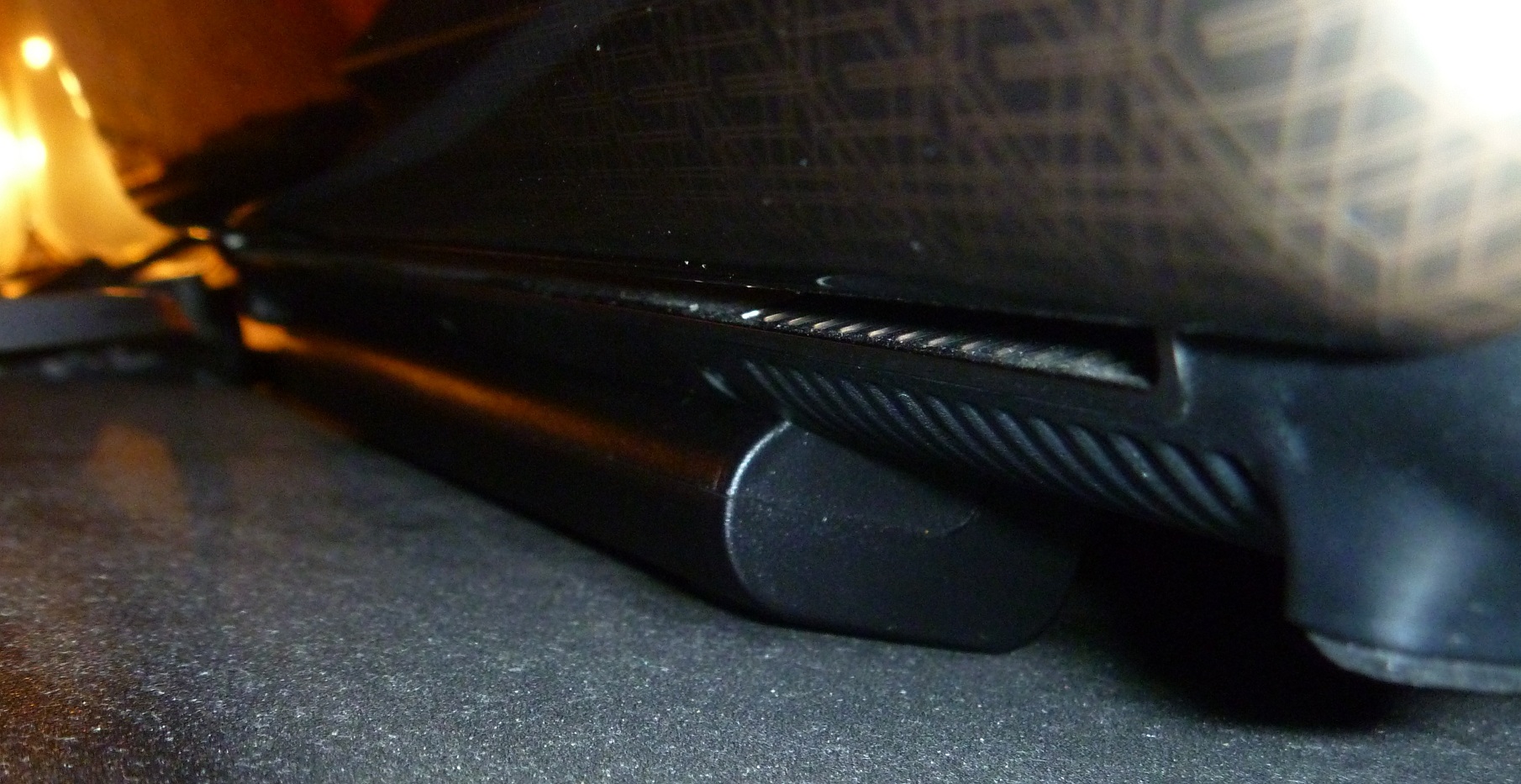
Hi, I too am still a proud owner of my DV5T! My battery bit the dust as well, I had a 12 cell in mine. I replaced it with this from Ebay back in November of 2010. So far so good. It did act a little funky at first, showing that it was plugged in but not charging. Simply re-seating the battery fixed that though. I think it was just user error, since it hasn't happened any more since. They seem to be fairly inexpensive, and a pleasant job of the transaction. So, good luck.
P.s. The other good thing about the 12 cell is it raises the back of the laptop up a bit, making for a more comfortable keyboard experience and also better cooling.
LAPTOP BATTERY FOR HP PAVILION G50 G60 G70 DV5 DV6 DV4 - eBay (item 250714192701 end time Feb-17-11 01:25:09 PST) -
Thanks Tenspeed ...!!
Just curious .. since mine came with a 6 cell preinstalled, Can i install a 12 cell battery in it ? ....
And any help on keyboard designs ?
thanks . -
It should fit.
Also, how far does the 12 cell stick out? (from below and behind the laptop) -
Here is a picture....Attached Files:
-
*HP dv5t (1XXX series) Owners Lounge*
Discussion in 'HP' started by Badious, Jul 22, 2008.