Problems? See this thread at archive.org.
I feel your pain, After market parts are pretty reasonable especially after discontinued models such as this one. I went ahead and got a used mobo but upgraded to a graphics model. I had to get the proper cooling equipment too. All told about 120.00 and the thing works fine, except for the wireless indicator wont engage. Trying to figure if it is the mobo or the cover. All I have to do is turn it on but how??
-
Thanks Tenspeed !!
Only problem nw is to find this "Rulu Model" in India. I dint trust the Ebay service of such value (appx 45 $) to reach india.
Any ideas ? .. Thankss .. -
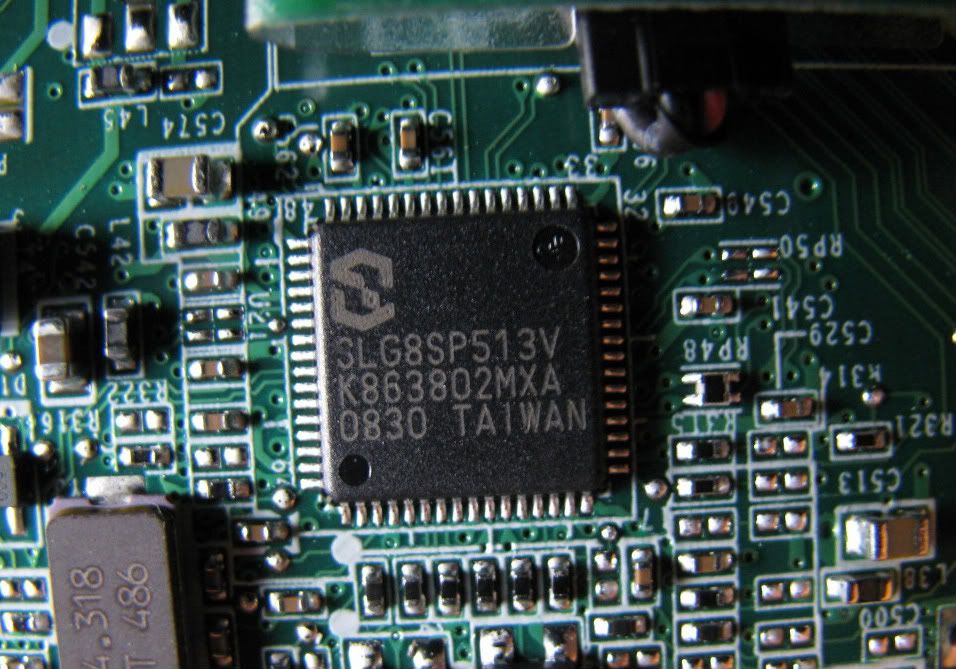
PLL for DV5 = SLG8SP513V
Pic:
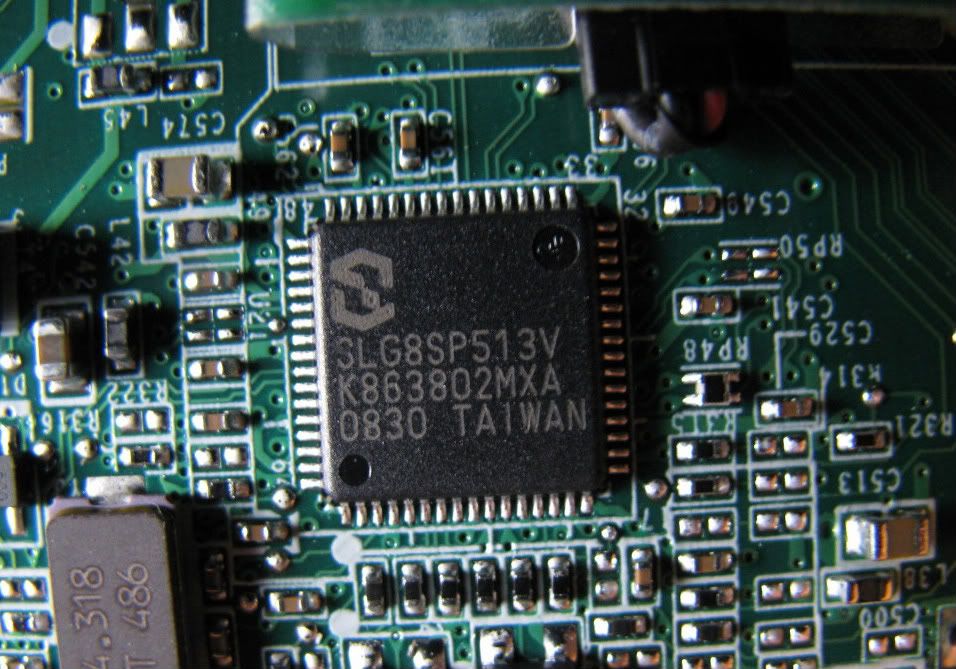
This pic is so you'll have a perspective of it's location and relative size. It's on the top side of the motherboard near the modem and Expresscard slot - under the left palmrest. You need to remove the top cover, keyboard, power cover and screen to get at it.

And it's locked. So no overclocking without a hardware mod. Could do 333mhz FSB. To do that, it looks like you will need jump pin 5 to pin4 to make a logical 1. or to do 400Mhz FSB, jump pin 5 to pin 4 and pin 64 to pin 62. But I doubt you could run 400Mhz FSB.
@333.33FSB, with a RAm to FSb ratio of 2:3, RAM would be running at 500Mhz. That's a 25% o/c on PC2-6400 800Mhz 6-6-6-18 RAM. That's a bit too fast for stability. Would need to slow RAM down by going to 7-7-7-21 or some such.
See datasheet: http://www.silego.com/resources/pdf/xSLG8SP513r10_07242007.pdf
For more on overclocking (methods, software, etc.), see this thread: http://forum.notebookreview.com/har...verclocking-methods-examples.html#post4998927 -
PUBLIC SERVICE ANNOUNCEMENT:
Modded BIOS F.21 A with EIST bit set to allow DUAL IDA overclock and also with whitelist check removed:
Download HP Pavilion dv5-1000_sp45138_INTEL_SLIC21_no_WL_no_EIST.zip from Sendspace.com - send big files the easy way
BIOS modded by TTAV134 over on MyDigitalLife forum
Insyde bios mod requests.
TESTED:
I was able to gain another .5 multiplier on a T9550 CPU using ThrottleStop. Went from 2.66Ghz(stock) to 2.8Ghz stable @ 1.075V. -
Sweet! Thanks! This should be compatible with the P8600 as well right? Might just be me but I tried throttlestop after updating BIOS. Clock Mod, Chipset Mod both cant be raised above 100% and Multiplier cant raise above 9.5 along with VID staying at 1.2. I selected turn on and save but no change. am I doing something wrong or is it just not compatible?
-
P series do not have IDA. So it won't work. Only works with T series processors.
-
Ah dang. One more question. If I picked up a T series processor mainly the T9550 would it be replaceable in place of the P8600? i've been looking to boost processor performance for a while now. I have torn apart the laptop before but I can't recall the CPU's mounting. I know theyre both 45nm what concerns me is the voltage of 25w for the p8600 and 35 for the t9550. is the voltage locked by the board or will it raise the voltage on its own with the new processor?
-
No worries. I updated from a P7350 to T9550. Fully supported voltage wise. And yes, the voltage range will be automatically changed with the new processor.
With Throttlestop, you can under or over volt as necessary. I'm running the T9550 @ 1.0875V @ 2.8Ghz fully stable. It can run stable at 1.075v but I wanted to give it a little overhead - just in case. and temps are great. Idles in mid to low 40's DegC. Operational load (80-100%) low 70's. Moderate loads in mid 50's.
The other compatible processors are T9400(2.53ghz), T9600(2.8ghz), T9800(2.93ghz). Each was sold with the DV5.
NOTE:
The other thing I've done is to add a 2nd HDD in the optical bay using an optical bay caddy. So I'm running a 60Gb Vertex SSD in main bay and 500GB WD Black HDD in optical bay.
Pics and details here: http://forum.notebookreview.com/har...e-using-optical-bay-caddy-36.html#post7025244
Note that the faceplate from the optical drive can be swapped onto the ODD HDD caddy for a seamless look. -
Thanks!
maybe ill install a T9800 when I have the spare cash. not to expensive for the increase. I've considered the Optical bay switch but I need my disc drive far to often plus my laptop is often docked anymore so i've got plenty of space.
-
@ 2.0 :
I m a noob, but regularlt follow this thread ... will the modded F.21 A work for p7350. any performance updates ? .. or is it just for T series ? -
See 4 posts up. P series do not have IDA.
-
I have a dv5t-1000, and was wondering if it's motherboard (Quanta 3603) could support 8GB DDR3 RAM (1600MHz, 2x4 sticks). I know that sounds stupid, but it's because I'm upgrading my laptop soon (coming in April) and am ordering the RAM separately, which means I will probably get the RAM first and be able to take advantage of it right away. What kind of improvements should I expect?
-
No, only DDR2-800 or DDR2-667. You won't see any meaningful improvement unless you need the RAM. Better upgrade would be a better processor and SSD.
You can use an ODD HDD caddy in the optical bay to hold a HDD. See last page or two of posts for most recent upgrades you can do. -
Sorry, I do not know the background of this statement.
Also, I do not know DV5t and how it works.
P8600 has generally IDA. (and all other P processors See PDF Link!)
PHYSICAL differ from the "P"not of the "T" processors. (TDP only sort)
Without IDA P8600 2.4 GHz.
With IDA 2.53 GHz at 9.5 multiplier.
Here is a list of Intel, with all the IDA data. "Page 10 " You'll see the P8600.
EDIT:
I have personally tested the P9500 on a DELL.
Without IDA 2.53 GHz
With IDA 2.66 GHz.
Sorry for my English. It's Google translator. -
I see. Very excellent find. So only 3 of the P series have IDA. P8400(2.26->2.4), P8600 (2.4->2.53) and P9500(2.53->2.66).
Thanks for digging up the PDF. ThrottleStop author reported that P-series didn't. Plus I know the P7350 (a common CPU sold with this system) doesn't. -
PDF is not complete.
For example, P8800, 2.66GHz to normal "to" IDA 2.83GHz x10.5 ".
There are also missing T9550 (yours), and P9600.
@ jollyboylovesu
P7350 is definitely not an "IDA"!
EDIT @2.0
Then I thought just Nando4 also had a nice list. You know the list, see here! -
If your BIOS (Modded BIOS F.21 A) is correctly installed, then you make a mistake in the operation of ThrottleStop.
Remember in ThrottleStop:
1. If changes must be disabled EIST.
2. "Turn on" (below, right ThrottleStop) must actively
3. Start dualIDA (via context menu or in options)
If you have time then read here and here!
If you have no time and still have problems, ask 2.0!
P8600 2.4GHz to 2.53GHz / equivalent to "+2 x130MHz (TDP25)
T9550 2.66GHz to 2.8GHz / equivalent to "+2 x140MHz (TDP35)
I would stick with the P8600.
And because your idea (T9800) is nowhere listed in the tables, here is my confirmation for IDA.
T9800 2.93GHz to 3.06GHz / equivalent to "+2 x130MHz (TDP35) -
@ricky berlin :: Thanks for the Info .... Just curious ..... Have you concluded your answer based on the listing in the PDF report where it says " NA" for P7350... and NA would mean "not Applicable" and not "Not available" ... Sorry for being Noobish ..
-
All with "N / A" marked processors definitely work without IDA.
What is the English translation for this acronym, I do not know. (perhaps "not / available)
You all know the English language better than me.
P7350 is definitely not IDA!
I know 100%, and not only since I had found this PDF file. -
Exactly, that's why I replaced my P7350 with a T9550. IDA was not possible with P7350.
-
Thanks RickiBerlin and 2.0
@ 2.0 and RickiBerlin, since you replaced urs sometime back... wud you suggest me soem better alternatives compatible with my config
p7350 2.0 Ghz, 3 GB DDR 2 RAM, Nvidia 9600MGT DDR 2,
Pl suggest for the following :
1. Upgrade for the processor
2. Is upgrade to DDR 3 RAM Possible ?
3. I know, i cant replace my Graphic card, but still askin the question : Is it upgradeable ? -
1. T9550(2.67mhz) best bang for the buck right now. But you could also get T9600(2.8ghz) and T9800(2.93ghz).
2. No, since it is only compatible with 200 pin RAM.
3. No since, GPU is soldered to the board. And there is no mobo with anything higher than 9600M GT.
Here's the service manual for when you get started; http://h10032.www1.hp.com/ctg/Manual/c01550108.pdf -
Thanks 2.0 ::
Will find out reliable options for buying them out in India. hope its not too expensive to buy ... -
Actually, this seems to be a good theory. But what about repasting? I bet HP did use some cheap toothpaste as thermal paste for CPU and GPU
-
thanks to 2.0 for posting the DV5T's mod. F.21 bios (SLIC removed)
i was able to get the 6300 installed and man was it worth it, even on the 2 antennas it gives me better range, speeds (subjective) and connectivity over the 5100 and the AAEB router....
only thing of note it works better if i connect the main to 2 and the AUX to 3....any ideas on anything better??? -
Hi,
My DV5T is still going strong after 2 1/2 years. I bought it in October of 2008.
However... lately I've been getting some weird artifacting going on with the screen. It will kind of fade in and out briefly for about 2 to 4 seconds, and then come back to normal. I noticed it quite obviously when I had powerpoint open. There was no presentation loaded, just the blank startup slide. When I would start the slideshow from that slide, and then advance to the end slide, which is a blank black slide, the transition from one to the other was interupted by the video fade / flakiness. (and no it was not some transition built into pp). I am running Windows 7 64bit. Has anyone had any similar problems with their displays? Let me know please. Also, I don't know if it's the driver or not, I'm going to try and update that now and see what happens. -
mine started doing something similar too..
when I change the angle of the screen it sometimes flickers a little bit -
Well, I just installed the latest Nvidia GeForce Drivers... version 267.76 and it didn't do the powerpoint problem now, so who knows. I'll keep an eye open to see if this happens again.. The drivers that were installed were from 11/09 I think, and Windows said they were the latest and greatest, ( I never take their word for it), so I went to Nvidia's site and downloaded the newest reference drivers. HP had the latest as sometime in 08, which I thought was weird as well.
-
Damn.. it just did it again while i was just browsing the web.. i was not even doing anything... it was like every other line went out for a time. it went almost to the top of the screen, from the bottom to about 7/8th to the top. i hope this damn thing isn't ready to crap out on me now.. i can't afford a new, or used computer for that matter.
-
Tenspeed -
it sounds like a hardware problem to me. I think mine does this because maybe the screen isn't connected very good.
I haven't updated any driver ever... (if it works don't touch it )
-
I had the same problem with my screen. Just open the screen and tighten up the connector. It gets loose time in probably 6-8 months on my laptop. And putting it back in place works every time. Somebody has the write up on how to do it in this thread.
-
http://forum.notebookreview.com/6157141-post5690.html
post 5690 might help you fix your problem. -
@tenspeed and bhavi_jp : Its a hardware problem for sure. This happened to me within a month of purchase (Oct 2008). I got my screen replaced for that matter, but then it was under warranty. Most probably its a connector problem. Heres a maintenance and service guide for HP DV 5t
http://h10032.www1.hp.com/ctg/Manual/c01550108.pdf -
Hi, i am about to do a clean reinstall and upgrade from Vista to Windows 7 on my dv5t. I also plan to upgrade from 2gb to 4gb of ram. I have the option to upgrade to the 32 or 64 bit versions of 7 and was wondering if there was anything i should be looking out for as I do this. Also i was wondering if there was a list of drivers available that i would need besides the one on the HP website. I looked at the driver list of the hp website i there are a lot of them and i was wondering if i just needed to d/l all of them and install them after windows 7 installs, or if there is a more compact list i could be better. thanks.
-
32 bit version is capable of handling upto 4 gb of RAM. Only if u are planning to go for more than 4 GB should u consider 64 bit OS.
For windows 7 : following link will give you all the drivers required to be installed. HP Driver links are very outdated and old.
http://forum.notebookreview.com/hp-drivers-software-forum/338874-drivers-hp-dv5-1xxx-intel.html
You can also see the pg 76 for latest updates on few drivers under my heading. -
Thanks jolly. Would there be any disadvantages to installing the 64 bit version over the 32 bit version if I'm only upgrading to 4gb of ram? Comptability or slowness issues and if it will be slower how significant will it be? Thanks.
-
Totalnewbie- It's really a personal preference issue. the advantages will only be slight as the 32bit edition actually recognizes 3.3gb (if 4 is installed) the only real need is if you're running RAM intensive applications and if you are you're going to want more than 4GB. The disadvantages are that some applications are only designed to run on the 32Bit OS and may not be compatible (as time goes on more developers are working to insure compatibility though) from my understanding your biggest issue should be drivers. just check for 64 bit editions of drivers.
-
Purchased the t9900 and 8GB of Patriot Memory (Timings 5-5-5-12) i've read a ton about timings and i still get confused haha. If anyone reads this wish me luck
Not sure if the Patriot ram will keep its timings seeing as it is 1.9v the BIOS could either raise to the ram or drop the ram timings. We will see. Hopefully it works at all. Still it cant have worse timings than my current (6-6-6-18).
Edit: I'll be returning the Ram when it comes in.. didn't notice it's 240pin. Going to return and have already ordered two hundred pin at CL-6 -
Ok, so I purchased my DV5T in Dec. 2008. No major problems with it except a mouse button failing which meant I replaced the bottom/top plastic covers. Again, no major problems for almost a year. Now I have a couple of problems:
1. The mouse faded out (ie the touchpad worked but not the buttons) and now doesn't work altogether (not even the on/off button)
2. My computer keeps installing the synaptics drivers and gives a code 24 or 10
3. My keyboard now does not wake from sleep.
The HP guys wanted to replace the mouse AND the motherboard to the tune of $400+ which I knew I could do it for cheaper.
I guess my question is, could this just be the touchpad and if not, could I replace the motherboard to the 9600 model MB and perhaps upgrade to much higher cpu? -
That depends on what a "higher cpu" is. What Processor do you currently have?
Here is a MOBO for the DV5
482868-001 * NEW * HP DV5-1000 Intel Laptop Motherboard | eBay
Not sure if its the 9600 model or not so double check the part numbers. HP also has a replacement parts section on their site
HP Parts Store - HP Computer Parts - HP Printer Parts - Compaq Parts
I'm sure you could upgrade the board and CPU.. if you do get the 9600 make sure to get the heat sink and fan that fit it as well as I believe there's two different models.
I just ordered my T9900 as you can see above and IF it works it cost 230 on ebay. next one down is around 200 I believe. So really it all just depends on what you're looking for...
Have you tryed taking it apart and checking the cables/ribbon cables that connect these pieces? I've had both my Mouse and Keyboard go before and they both just needed the ribbon reinserted. (admittedly it would be odd for both to go at once but it's free and can't hurt to do before considering replacement)
Note: If your processor is below the P8600 and you're looking for a cheap/small upgrade I can tell you it runs really well in this laptop. Quick boot times and multitasking for sure. -
Sorry, I thought my stats were showing up in my post. I have the P7350 running at 2.0ghz. I have opened up my laptop several times to take a look. The cables are all attached correctly, but the mouse cable seems to be a bit crimped.
The keyboard almost seems to be software related because I can log back into windows once. However, upon entering windows 7, the keyboard acts almost like it is off.
I looked here: http://h10032.www1.hp.com/ctg/Manual/c01550108.pdf
and it appears the motherboard I am looking for is one of the following...but I am not sure which one (or even if they are different). I think it is the one in bold...
482870-001
482867-001
482324-001
Still, I think the absolute cheapest method would be to pinpoint the issue though. I would love to have only the cable to test if that is the issue, but I cannot find just that cable.
EDIT: I opened it up and swapped the mouse and the front audio jack ribbons (mouse is way more important than audio jacks) and found that the mouse completely works still!!!
Bonus! The keyboard wakes up from sleep. I guess there must be a tie-in between the two... -
If the Keyboard works before logging into Windows it is driver related. Try uninstalling any drivers and reinstalling.
If you look around i'm sure you can find the ribbons if you know of any smaller computer shops go in and they may just give them to you. (I've done this on 2-3 occasions) Ribbon cables tend to get damaged easily especially if you take the PC apart often the cable inserts will get worn and bent.
If you do end up replacing the keyboard (since I believe the ribbon permanently attached) You can get them for 15 on ebay.
Glad to hear your mouse is up and running again though! -
Mate .i m running p7350 2.0 nd wanna upgrade. i wanted to go for t 9550 and 8 GB Ram. Can you please tell me what else do i need to order apart from mentioned and some suggessions as well ? .. And some knowledge about timing m a noob in this regard. -
The t9950 should be completely compatible with the DV5 as well as any brand of 200pin DDR2 (PC2-6400) RAM.
Ram timings go as such 5-5-5-12 (example) the only really important number in most cases is the first number or the "CAS" or "CL" number (CAS Latency) (5)-5-5-12 this number should be as low as possible. (The numbers represent the CPU cycles between actions so less cycles=more speed) That's how I understand it at least i'm still somewhat new myself.
The RAM at this link works well
Newegg.com - Patriot Signature 8GB (2 x 4GB) 200-Pin DDR2 SO-DIMM DDR2 800 (PC2 6400) Laptop Memory Model PSD28G800SK
Although I do have to say I did receive one bad stick of the two but Newegg always replaces or refunds upon request.
Hope it helps,
Cammeron -
So im going to be upgrading my windows soon. This may seem like an obvious question, but, after windows in successfully installed the first thing i should do is install the drivers, right? Is there any partiular order that i should install them in, or does the order not matter? Also, are there any good free antivirus or antispyware programs out that that anyone would reccommend, thanks.
-
Actually, I am in South Korea and there is still a slowly (on my part) falling language barrier that inhibits me talking to laptop repair shop owners. Looked up the part and then found these:
HP DV6000 DV9000 Power Button Ribbon Cable 12pins 160mm | eBay
While long, I found that this cable had all the right stats except for length. for $1, I will see if it works.
As a side note, one of the many shop owners I talked to at the nearest laptop repair places told me to just buy a mouse...I have got to learn Korean faster! -
No order needed. Avast has a great free antivirus, AVG decent as well (I prefer Avast personally with a side of comodo firewall ) If you end up deciding you want a pay for all in one solution Eset Smart Security is great
can't really go wrong for $1 There's some kind of irony in the fact that your tech support speaks the right language for the area and you don't =p. Seriously though that has to be rough. Good luck with your ribbon cable
-
Ok, I did it. Hopefully it will work. It was a bit loose, but nothing serious looking, like it was hanging halfway out or anything. But I do feel good about it.
-
No problem Tenspeed I welcome differing opinions
I do have to agree with you though Microsoft Security Essentials is a good program as well it does a decent Job and it can be installed and left alone. Security+Convenience. Thanks for the input
*HP dv5t (1XXX series) Owners Lounge*
Discussion in 'HP' started by Badious, Jul 22, 2008.