Problems? See this thread at archive.org.
HI. Good choice.
I liked mine too when I first got it. I had bought one for my niece in August, basic setup with P7350, X4500. She likes hers a lot, and it's run very well, except for the quicktouch buttons, namely the audio volume and mute buttons.
I bought mine, and I ordered one for my brother as well about a month ago.
Mine is P8400, 9200M GT card, his is same config as my niece.
Hi quicktouch seem to work fine. Mine were a big mess.
Solution: FIRST UNTINSTALL the HP quicktouch software. Then go to HP website and download the newest quicktouch software. Install, and all should be good. I did that on my nieces and all the buttons work as they should. Mine now works as it should. All is good with the quicktouch after the install of the newest software. REMEMBER: UNINSTALL first, then load the new. Others have installed the updates but still had issues.
I installed without first uninstalling, and it didn't work either.
So, unintstall first.
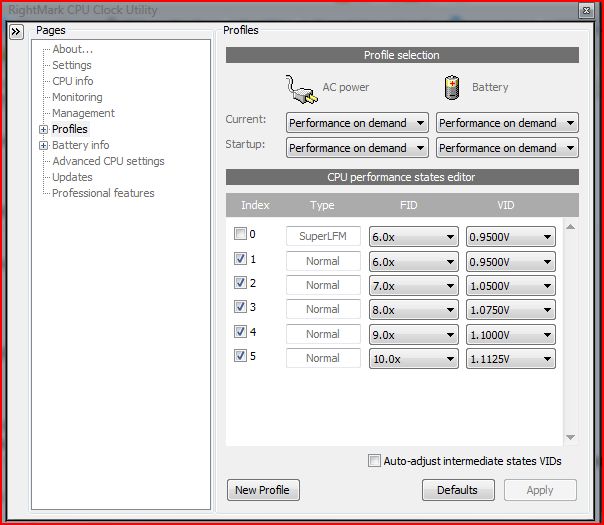
I started to not like my DV5T, but once I got everything working, I really like it now, especially with the undervolting RMclock installed.
I also added 4GB of Gskill ram to each of the 3 machines, and all love the new ram. I got it from newegg for about $60-something each.
My only concern is that I find there is something not right with the 9200M GT card on this machine. It's seems to be a decent add on card for those of us who don't do much high end gaming, and want to had an additional processor for video so that the CPU can concentrate on other things. That is why I got the 9200. However, the X4500 onboard seems to offer better performance numbers, not in gaming mode, but in overall Vista Aero performance. The DV5T's with X4500 video show a 3.8 Aero score, my
9200M GT shows a 3.2, it went to 3.3 after a new driver install, and then it went to 3.4 after I upgraded to 4GB ram from the 2GB.
Also, when using Skype, the other 2 machines with P7350 and X4500 have BETTER video output that is as smooth as the cheap HP webcam can give.
My video output is slow, freezes during the call, and is basically crap.
It looks like a webcam from a decade ago.
I'm still looking into this to see if this is related to the 9200GT card, or is it a bad webcam.
For now, I solved the problem by getting a new Logitech 9000 webcam.
The image is beautiful. It's a thousand times better in every aspect compared to the onboard HP webcam. Still, it "feels" like the 9200GT card isn't doing much for general video duties.
Oh, and the basic 6 cell and "hi-cap" 6 cell are crap.
I've read reviews claiming 2.5 hours on power saver mode just web browsing.
Well, I don't know how that can be, because all 3 DV5T's only get about 2 hours in power saver just browsing. It's quite pathetic.
Overall, I think you'll really enjoy your DV5T. It's a great machine for not too much coin.
-
Hey 10speed, what are your aero scores?
I have the same setup as you.
My scores from top:
5.2 processor
5.9 memory
3.4 aero
4.7 gaming graphics
5.3 HDD
Not bad for $833 shipped +$60 something for 4GB ram
The aero score SUCKS, especially for an extra $100 vid card, that scores lower than the on-board X4500 -
Just push in with the tip/edge of your finger.
I was very disappointed that it won't read CF cards, which is pretty much standard for high end cameras. I have a Canon digital Rebel SLR.
-
Have you noticed faster overall performance?
In what areas?
I wasn't going to, but I decided that I want to use my machine for video editing.
I know that vid editing highly recommends a 7200rpm drive. I have those on the 3 Mac and Wintel machines at work.
But, will the 5400rpm be ok for basic editing on this ltop?
My guess is, NO.
Was the 7200rpm HDD easy to install?
I am handy with hardware, but limited experience with ltops.
Is there a lot of disassembly to get to the HDD?
Thanks. -
I am thinking about getting a hp dv5t with the following specs:
I know its pretty low endCode:Processor Pentium(R) Dual-Core Mobile Processor T3200 (2.0 GHz) [B]Display[/B] 15.4" diagonal WXGA HP BrightView Widescreen Display (1280 x 800) [B]Color[/B] Onyx [B]Memory[/B] 50% OFF 2GB DDR2 System Memory (2 Dimm) [B]Graphics card[/B] Intel(R) Graphics Media Accelerator 4500MHD [B]Hard drive[/B] 160GB 5400RPM SATA Hard Drive [B]Personalization[/B] FREE Upgrade to Webcam + Fingerprint Reader from Webcam Only [B]Networking[/B] Wireless-G Card with Bluetooth [B]TV & entertainment experience[/B] No TV Tuner w/remote control [B]Primary battery[/B] 6 Cell Lithium Ion Battery
but its for school...so I don't need anything more, and I have a tight budget of $700
Price: $649 $700 after tax and shipping... right on budget
I have some questions...
Firstly... correct me if I am wrong but, I have been hearing about some flickering problems that the dv5t is having, Whats that all about? (I don't want to be buying a laptop and have to be shipping it back to fix problems right away).
Also, will the express card slot media remote come with my specifications?
How will the T3200 perform (in comparison to a T5800 (2.0GHz) or a P7350 (2.0GHz) is the ?
Will the battery life be over 3:30 (with my configuration)?
How heavy is it (less than six pounds)?
Anybody with similar specs can tell me how counter strike source runs? -
Don't worry about the screen flickering, doesn't happen to everyone, only to some people and they come here to get help/complain.
Yes, it comes with a remote.
The T3200 is crappy... try going for a core 2 duo at the least, and even better P7350. Higher than the P7350 isn't much of an upgrade after that.
No it won't last that long.
Check the website, I believe its around 6 lbs.
The 4500MHD can run counter strike source.
@ your configuration, it's rather bad. Wait for a coupon if you really want to save. Or, you can try for other laptops if you want very minimal. The dv5t's price at minimal isn't great. At better specs is when you get good price for performance. -
Yeah, I don't know if I noted this but while mine was flickering and is now fixed, my wife's laptop has been fine since we got it. Same model and configuration.
I wouldn't run away due to a few issues like this, as they could happen with any laptop. -
Do you know any other laptops that use Centrino 2 chipset and cost less than $700? I like the build quality and sound quality of the dv5t which is why I think its worth the few dollars more. I can even upgrade RAM, hard drive, battery, wireless card and maybe CPU , at a later date.
I agree with you on waiting for a coupon, hopefully it can bring the price down from a high price to less than $700 at a specific configuration.
-
As a student you will qualify for a special "APP" discount. It isn't much, but it knocks about $50 off the price.
I just configured a DV5T with:
P7350
2GB ram
Base 6 cell battery
The rest is all basic, no options but what comes standard.
The price was $$689.18 taxed and shipped.
Use coupon NB3089 and get an extra 5% off.
The stock 6 cell battery will NOT give you much time at all.
You'll probably get anywhere from 2-2.5hrs in power save mode.
If you want real battery time, then get the 12 cell. It will cost an extra $49 as an upgrade option. Use coupon code NB3089 and the total taxed and shipped cost is: $735
Very good considering how stingy HP has been on the costs for a DV5T.
So, for $735 you get:
* Genuine Windows Vista Home Premium with Service Pack 1 (32-bit)
* Intel(R) Core(TM)2 Duo Processor P7350 (2.0GHz)
* 15.4" diagonal WXGA High-Definition HP BrightView Widescreen Display (1280 x 800)
* Onyx
* 50% OFF 2GB DDR2 System Memory (2 Dimm)
* Intel(R) Graphics Media Accelerator 4500MHD
* 160GB 5400RPM SATA Hard Drive with HP ProtectSmart Hard Drive Protection
* Webcam Only
* HP Color Matching Keyboard
* Wireless-G Card
* No Modem
* SuperMulti 8X DVD+/-R/RW with Double Layer Support
* No TV Tuner w/remote control
* 12 Cell Lithium Ion Battery
* Microsoft(R) Works 9.0
* HP Home & Home Office Store in-box envelope -
hi any experts pls give some idea, in my dv 5t i have wrong memory size notification,i have used 30 gigs only but its shows 60 gigs usage, i think this is the problem with vista ,cos its happen to my other 2 frinds,my friends has dell.pls tel me how to fix this
-
Everything is the same, except for the Aero which is a 3.5 on mine. -
Thanks for the info.
I wonder if Vista 64 adds the .1?
I'm using 32.
Do you undervolt?
I do on mine and everything is set to minimum at .875, no problem at all.
No BSOD and the temps are very good.
Web surfing, flat on a desktop temps are about 82-84F.
On my lap they go up to about 90F.
More intensive webcam use with filters goes to about 100-102F. -
no, i haven't done the undervolting yet.. i'm not sure i want to. don't know about the 64 bit, it could be what's the difference. i'm still thinking about putting xp on, and also doing a clean vista install. did you do a clean install yet?
-
I tried undervolting and numbers looks good.
Attached Files:
-
-
Some folks have said that the higher capacity 5400 RPM drives have denser platters thus giving it performance similiar to a lower capacity 7200 RPM drive
-
Well today's coupons are out
(would not let me post the url)
and it looks like only a $250 off for this machine. I guess I should have pulled trigger with the $400 or 33% off coupons a few weeks back. -
At least you got coupons.
Over here the models are pre-configured (no customisation allowed) and there are no such coupons, yet they are still selling well. -
I have a question... I noticed that my CPU fan is always working on low speed, even though my CPU temperature is between 30-33 degrees and my CPU is idle. Is this happening with everyone?? and if any of you know the solution or how i can control my CPU fan please tell me.
I have the T9400 2.53 GHz CPU -
ok i went into the BIOS and there was an option next to "Fan always ON" and it was enabled... so i disabled it... and now the fan stopped. But the CPU's temperature now when it's idle is above 40 degrees... What do you think of that? is it safe that I disabled this option in the BIOS?
Thank you -
Sure, but you are wearing away your parts faster due to heat. And, did you turn the fan completely off? That's definitely bad when it intensifies.
-
nod, i wouldn't turn the fan off. i can't imagine why you'd want to. is it just too loud or something? it could be faulty. i can barely hear mine at all really.
-
When I'm loading tabs in firefox my audio tends to get choppy as if I can't load websites and play music at the same time. It's getting really annoying. I feel like it might be Vista autoallocating more resources to firefox and ignoring winamp/WMP while tabs are loading, which is exactly the opposite of what I want, since that makes my music choppy as hell. Any ideas?
-
The new NB0031 code is stackable on top of the $150 instant discount.
JohnG -
Ha, you will probably get annoyed real soon, while your fan turns on and off continuously with some light browsing.
-
Could it be internet connection? sometimes while the browser is not dl music as fast as its playing, you will get lagged a little.
-
Hi all dv5ters!
I want to do a clean install, but I've been using my laptop for a month or more. I'm not sure which driver that is necessary for me to have after the installation. There're so many drivers from HP website, I wish only download the important drivers to let my dv5t run perfectly as my ISP speed is just too slow. I'm reading the tons of pages for this lounge and until 51 pages right now but still can't find any related issue.
Can someone advice me to choose the essential drivers from HP website?
My dv5t specs as below:
HP Pavilion dv5-1039TX Entertainment Notebook PC
Genuine Windows Vista® Home Premium; Intel® Centrino2 Core 2 Duo Processor T9400 (2.53 GHz, 1066MHz FSB, 6 MB L2 Cache); 15.4 Diagonal WXGA High-Definition2 HP BrightView Widescreen Display (1280 x 800); 3072MB (800MHz) / max to 8GB* DDR2 Memory (2042 x1 pcs) &(1024 x 1 pcs); 320GB (5400rpm); Blu-Ray ROM with SuperMulti DVD±RW Double Layer; Bluetooth; 802.11 a/g/n; Integrated 10/100/1000 Gigabit Ethernet LAN; ports include 4 USB 2.0 (4th share with eSATA port), HDMI, eSATA/USB combo port, VGA, RJ-11 (configurable), RJ-45, Expansion Port 3, 2 headphone out, microphone in, IEEE 1394 Firewire, Consumer IR, Integrated Fingerprint reader (configurable), Kensington lock; comes with two omni-directional integrated microphones, configurable HP webcam; NVIDIA GeForce 9600M GT with 512MB of dedicated memory; Free Nylon Carrying Case; One year International Limited Warranty (parts/labor/carry-in) -
No, that option was to make the fan stop working when the CPU is idle and is at low temperature. But when it goes up to around 55 degrees, the fan turns on automatically.
-
No it isn't loud, I barely noticed it too. But I thought it was weird the fan was always running at low speed even though my CPU temperature was low. But oh well I will just keep it on.
-
HELP..!
I just got a HP dv5t...the problem is while playin movies or any video files it gets stuck...tht is it plays with some lag...any suggestion as to how it can be avoided??
my config is
Intel(R) Core(TM)2 Duo Processor P8400 (2.26 GHz)15.4" diagonal WSXGA+ High-Definition HP BrightView Widescreen Display (1680 x 1050)
RAM 3gb -
No this is music I already have on the computer.
-
I picked up a dv5-1157ca yesterday and the colours look washed out compared to my former Dell 600m and my Desk top. Is it a faulty 9600m nVidia or are overexposed colours a feature that can be controlled?
-
All the drivers you should need will be on the C:\ drive in a folder called SWSETUP You should burn that directory to a dvd disc to use after you do a clean install.
-
Second that.
But not necessarily all the latest drivers. You need the QuickPlay software off of SWSETUP, but pull everything else off the HP website to get the latest.
Unless you have your own software for playing blue-ray or DVDs (hey, its comes as part of your laptop so why not?)
The key one is the quick launch buttons drivers. The one off the HP website does a better job of enabling the touch sensitive buttons then the one off my swsetup folder -
Thanks I'm going to do that when I get a chance ^_^
-
great help... thx!
-
thx! ya, i hv the blu-ray but so far i haven't try on it... lol... because blu-ray disc is not easy to get in Malaysia... -
Hey guys, I've got a question about adding RAM to this dv5t.
So glad there's a forum of dv5 owners just like me
I don't know the rules or how to install RAM for laptops at all, but I want 4gb.
Right now, i've 2gb. I understand that I'll probably have to ditch the 2 Dimms inside for new sticks.
Can I get DDR3, or 1066mhz ram? Can someone help clear things up?
Thanks a lot guys.
9600mgt
P8600 2.4ghz
2gb -
The DV5T model, or at least it's motherboard does not support DDR3 ram. The best you can do at the moment is 4 GB DDR2 - 800 mhz - PC6400, as far as I have read about. Can someone confirm this as well?
-
Oh, I see. Shucks.
So, the motherboard does not support DDR3 and supports only up to 800mhz? -
Correct. Only DDR2 up to 800mhz, any higher will only downclock it to 800mhz.
-
It will support 8 GB
-
Hey guys.
If I get the P8400 @ 2.26GHz, will it be noticeably better than the P7350@ 2.00Ghz? Thanks. -
I doubt it, you only tend to notice the difference once you go past 2.50Ghz. The difference between 2.00-2.40Ghz is minimal moreso between 2.00 and 2.20Ghz. If they're charging extra just for the 2.20Ghz then I'd stick with 2.00Ghz unless you want to spend more. 2.00Ghz is still adequate these days.
-
Thanks, Blue Wolf. And no, I don't want to spend more. I'm a college student on a budget.
I notice you have the P7350, 2Ghz. Does it work fine? Smooth multi-tasking? -
No prob and yep, 2.00Ghz is fine for multitasking
I sometimes like to play WoW with my music in the background (using WMP, which is more demanding than players like Winamp) and browser tabs open so I can ALT+Tab between the them. Yesterday I tested how it ran a YouTube vid and WoW plus the background things it has running like X-Fire and the standard Vista services and it was fine, no complaints.
Runs even smoother if you have the time to tweak vista using the tips on this thread. -
ACK!!, my uncle was suposed to order my dv5t on the HP Site so he could use the coupon, but instead he called on the phone!!!
Does anybody know if he bought it just now on the phone, is there any way that he can give the code anyways and try to make them do an exception with him? -
wow, man, i would call and see. i know you can cancel an order if its not too late, and then he could re-order through the website. i know when i had a snafu with my original order i was able to cancel it.
-
hi guys,
i am buying "hp dv5 1135" , which has 1280*800 "infinity" display.
now i am worried bcz i have heard that infinty display suks as compared to normal display.colors are inacuurate and it also produces a lot of glare.
is this true as i will game a lot and i want the nice display.shoud i get normal wxga display or it is fine with infinity display. -
i just bought the dv5 1135 4 hours ago, where do you live btw? (",)
and no, you heard wrong. it's as smooth as the normal wxga. talk about glare, yes, if you're outdoor, you may feel a bit trouble. but it's all good. it looks hawt
-
Sounds like you'd be happier without Infinity.
It is very reflective if you've got any kind of light source facing the screen. I think it looks nice personally but I do find myself adjusting the screen angle a lot while I'm gaming any other time than the evening.
If you don't get Infinity and never see one on display, then you won't know what you're missing anyway.
*HP dv5t (1XXX series) Owners Lounge*
Discussion in 'HP' started by Badious, Jul 22, 2008.