Problems? See this thread at archive.org.
Beta version of ntune (current released ver: 5.05.54.00) Beta version :6.00
Anyone want to try it XD aha
Link: http://downloads.guru3d.com/download.php?det=1806
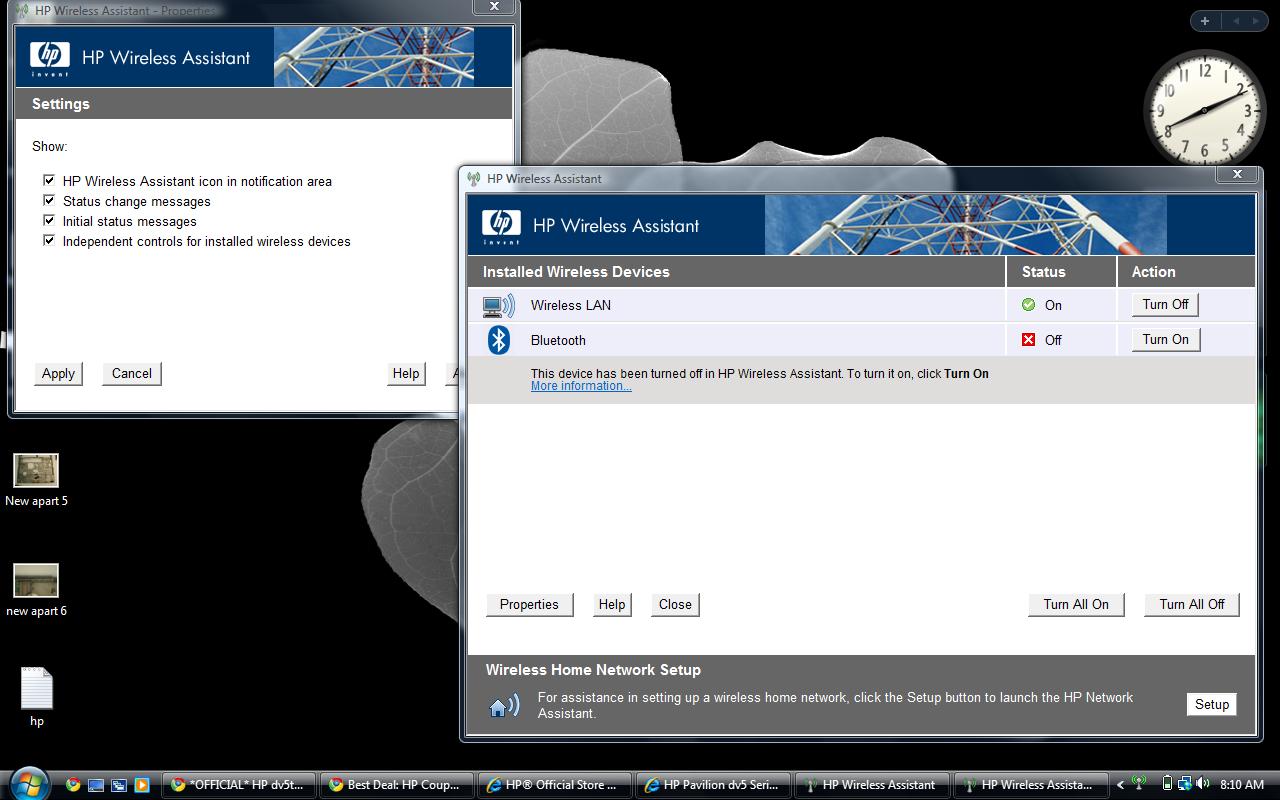
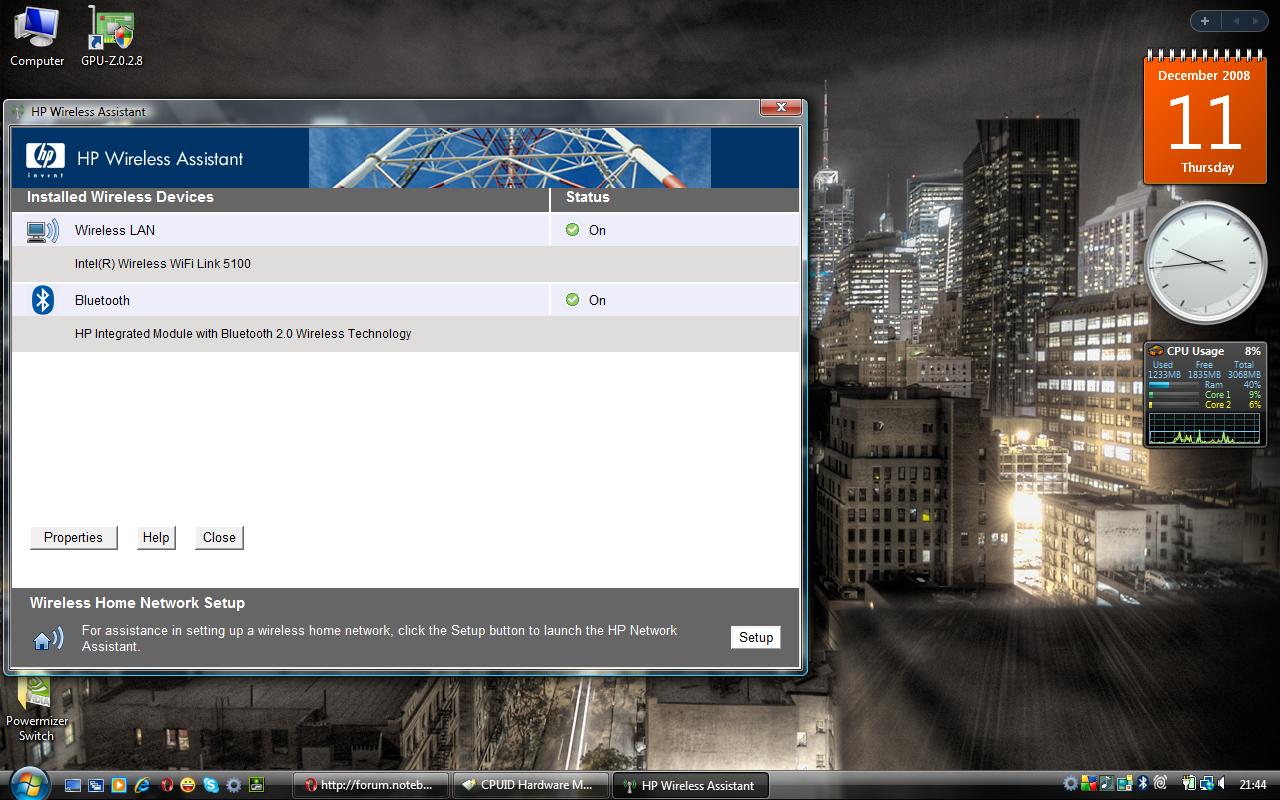
p1990 - in the hp wireless utility you checked all the box's correct? (see attached pic)... Reinstall Bluetooth drivers maybe?
-
Attached Files:
-
-
Cammeron,Take a look...
Attached Files:
-
-
Click on properties in that window and the window just like mine will come up make sure all the box's are checked. screenshot it to me with the properties window open
-
Thanks,Oh! what a fool I am...Eureka!
-
What did you notice the separate controls check box? lol. Btw whats the reason for turning it off? power saving im guessing
 thats my reason (i bought this dv6500z with bluetooth and ive never once used it)
-
Yeah!:wink:
Just turning off a component I rarely use! -
Yep the only reason I will be using it is if I buy those real nice 80$ HP bluetooth headphones cause I hate using the headphone jack I always feel like im gonna break it lol
-
Cameron thanks for responding my post about where the Vista install files may be loaded. I found a file named SysWOW64. Other than that I cant find any WAU file or folder. I searched C and D. Did you do a clean install and if so was it from a disc or from the internal file?
-
There is no WAU folder on the dv5t. Try doing this instead:
http://forum.notebookreview.com/showthread.php?t=304154 -
Stratguy - I am on a dv6500z currently my DV5t wont be here until friday or monday. I mostly refer to information ive read (im on four forums for the dv5t and 9600M GT card) and ive read every page in this forum. Sorry.
Btw just wondering but why couldnt we just write down the commands in notepad and then when the keyboard stops working copy and paste them from there? or possibly download them off the net or a burn cd? -
hi -
i'm stoked that i have 20pages of dv5t goodness to read through. i just received mine a few days ago. anyways, as i'm readying it for a relaxing life of luxury on my coffee table (read: not power user) i've noticed that i can't seem to find a good number of gigabytes of hd space.
it shipped with a 250gig harddrive, yet in vista only shows about 233 available. well, okay, i understand a few gigs can go missing (i think 12 are partitioned for an hP restore thing).
more disturbing though, looking at my C: drive i only have about 133gigs available right now. i did a quick check of how much memory is being used by everything in the folders on the C: drive and it was only 50-60gigs. so, 60+133 is only 193, and where are the missing 40 gigs?
does this make any sense? i'm not explaining it very well because that computer is at home. would a clean reinstall of just the vista OS do something positive here? I uninstalled a bunch of the bloat that came with the computer, but am really flabbergasted as to why i have so little space available to me.
so does anybody know what i'm talking about? any ideas?
thanks! -
Vista itself can take up 15GB and then its sytem restore files are allowed to take up to 15% of the disk (thats a good 35 gigs when used fully) ontop of THAT the 9 for the HP Restore partition and another 6-7 prob for formatting the disk so heres how it goes.
Vista 15GB
Vista System Restore 35GB (altho usually only has taken up about 8-9 for me)
HP Recovery Image 9GB
Formatting 7GB
Random Preinstalled software\Drivers will also take up a few gigs.
(Formatting and System restore vary depending on disc size. Formatting should take at least 3.5 gigs tho and vista restore uses at least a few gigs also)
That is 40GB btw Vista is the biggest space hog on the planet... Since system restore is allowed to take up 15% of the total HDD Space thats 15gigs for every 100 you own!
Here is a link to a more in depth view at the Vista Space Loss
Link: http://forum.notebookreview.com/showthread.php?t=167983
Note: A clean install helps to gain a lot of space back since even uninstalling bloatware can leave large pieces (sometimes whole programs) behind -
Just received my dv5t. Love it so far but for some reason the sound will cut off while i am browsing and will not come back on until i shut down and restart. Anyone have this issue?
edit: i disabled the sound device and re enabled and this brought the sound back as well. I have tried scanning through the thread but can't seem to find this issue. This is a deal breaker if i can't get this resolved. thanks in advance -
I've never heard of this audio issue before. I would call an HP Rep.
-
PLEASE! Can anyone help me out here? I'm getting annoying stuttering/frame skipping in Source (HL2 ep2, TF2, Left 4 dead) games when I use the mouse to look. If I use the keyboard, it's smooth as silk, as is talking. I've tried almost everything and I still don't know why I'm getting stuttering frame rates whenever I move the mouse. Does anybody else have this problem? If it's totally smooth when moving the mouse, could you tell me what drivers you're using, or if there's any special settings you might have checked?
-
is the mouse wireless? or bluetooth or corded or are you using the mouse pad?
-
Corded. I have two mice and they do the same thing. I've noticed that my frame rate goes *above* 60 when I move the mouse quickly, like to 73, very breifly. I have vsync on, however, I think this might be why I am getting the stutters, as the frame rate exceeds the vsync. Why does it do this, though? Why would moving the mouse allow the vsync limit to be exceeded?
-
why am i getting 1 and 2 FPS in 3dmark06 in the gpu tests?
but i can run games like crysis just fine!! -
I just tried HL2 Ep 2 without vsync, it seemed equally smooth when turning when compared to all other movements, so I do think the vsync limit being exceeded is the problem. What can I do though? RivaTuner has vsync force on, d3doverrider has vsync on, control panel has vsync on...
-
dont force vsync let the game settings do it
-
Tried that as well, didn't help any.
I'm going to test non-source games and see what happens. edit: happens slightly in HL1
-
Sorry eason wish I could help.. When my laptop gets here ill look around at all the settings on it and see if is see anything that could cause that problem
-
Cheers, just let me know if it runs smoothly. About to tear this thing apart.
-
Of course
hope you get the issue resolved. maybe its the video driver?
-
I've tried changing drivers but I'm going to uninstall, driver sweep, and reinstall a popular older driver. Maybe that will help.
-
Ok, before posting this question, I searched the whole forum and I didn't find anything. If I missed it, please let me know and sorry for re-posting.
I just got my dv5t today and it's working great with 1 exception:
If I put it to sleep, whether it is closing the lid, or it going to sleep by itself, I can not wake it up again. The screen goes completely black and no matter hat I do or press it doesn't awake. The only thing that works, hard reset.
I found some old posts in the HP website of people with this issue, and they solved it by flashing the BIOS. But those posts were 8 moths old and the BIOS "upgrade" that solved their problems is by today standards an old BIOS. I tried flashing mine with the latest version (F.11 A dated 11/2008). Problem persisted. I even tried flashing to the old BIOS that solved other peoples problems in the past (F.08) Problem persisted. I spend 3 hours with HP on the phone and they're only offering me to have the laptop sent for repairs. I insisted in them, sending a replacement but they were practically forcing me to have the laptop sent for repairs which I don't want to do, because if this is happening in the 1st day with this laptop, I just don't want to keep it.
At this point my only way out is retuning the laptop since they don't want to send me another one. I just don't wanted to be without a laptop for 2 weeks while they recive my return, credit it to my card, and the funds become available in the card so I can purchase another one. I'm just glad I paid with amex.
So, what do you guys think about this whole mess?
Dis I just get a lemon? Is a laptop "doomed" once it shows this symptoms? Should I just return it? or is there any permanent fix I can apply to solve this issue and save myself the hassle of returning and repurchasing? These annoying issue aside, I LOVE this machine, It's so sleek and beautiful, I would really like to keep it.
Just to give you more insight, these are the full laptop specs. Thanks in advance for your advice:
________________________________________________
HP Pavilion Entertainment dv5t customizable Notebook PC
* Onyx
* Genuine Windows Vista Home Premium with Service Pack 1 (32-bit)
* Intel(R) Core(TM)2 Duo Processor T5800 (2.0GHz)
* 15.4" diagonal WXGA High-Definition HP BrightView Widescreen Display (1280 x 800)
* FREE Upgrade to 4GB DDR2 System Memory (2 Dimm)
* Intel(R) Graphics Media Accelerator 4500MHD
* FREE Upgrade to 250GB 5400RPM SATA Hard Drive with HP ProtectSmart Hard Drive Protection
* Webcam Only
* HP Color Matching Keyboard
* Intel Next-Gen Wireless-N Mini-card
* No Modem
* SuperMulti 8X DVD+/-R/RW with Double Layer Support
* No TV Tuner w/remote control
* 6 Cell Lithium Ion Battery
* Microsoft(R) Works 9.0
* Mobile Stereo Earbud Headphones (1 pair)
* System Recovery DVD with Genuine Windows Vista Home Premium (32-bit)
* HP Home & Home Office Store in-box envelope -
Ok, i am stuck in limbo here. I just received my dv5t with:
- Intel(R) Core(TM)2 Duo Processor P7350 (2.0GHz)
- 15.4" diagonal WSXGA+ High-Definition HP BrightView Widescreen Display (1680 x 1050)
- FREE Upgrade to 4GB DDR2 System Memory (2 Dimm)
- 256MB NVIDIA GeForce 9200M GS
- 320GB 5400RPM SATA Hard Drive with HP ProtectSmart Hard Drive Protection
- Webcam + Fingerprint Reader
- HP Color Matching Keyboard
- Wireless-G Card with Bluetooth
- No Modem
- LightScribe SuperMulti 8X DVD+/-RW with Double Layer Support
- No TV Tuner w/remote control
- High Capacity 6 Cell Lithium Ion Battery
- Microsoft(R) Works 9.0
- HP Home & Home Office Store in-box envelope
I tend to do some gaming and video converting, so i was looking in to ordering the same setup but with the 512MB NVIDIA GeForce 9600M GT. From doing some reading it seems to run hot when gaming. But how does run while not gaming? Is it pretty comparable to the 9200 m? I dont mind it hot while gaming, but i would mind it running overly hot while just surfing. -
TheBigMac - HP has a 21 day (pretty much no questions asked) Return Policy. Tell them you don't want the laptop anymore they usually will do pretty much anything to keep you from returning it.
altho what it sounds like to me is possibly some bad RAM. its sleeping not hibernating correct? (Honestly tho as a paying customer you dont deserve problems on day one and I would tell them youre looking at returning the laptop.. if they dont accept an exchange they will probably atleast give you a few bucks back or compensate you for your time and trouble in some way.. if they refuse to give you any compensation or exchange than I would recommend returning it. Dont let them screw you over
. OH ALSO! I believe if you ask them they can have it repaired at local best buys (altho i believe you have to pay a small fee... but id fight them on that seeing as it was broken when u got it.. you will prob get a rebate covering it if not more).. but thats just what i believe from all ive read and dealt with hp.. my new FREE laptop is coming from HP because they damaged my old Dv6500z (new one is the dv5 its worth twice the price as the old) they like to keep customers happy. Just remember to treat your tech support nicely but to push and make it apparent that you dont want anything but the best and that you expect it.
Dunkan21 - Just fyi a couple things here... First you can always downclock the card (pretty simple) in rivatuner so that it doesnt run as powerful and when you do need it to run strong open rivatuner and set it back to defaults. This should keep it from running so hot. Second if you plan on gaming atleast get the p8400 (2.26ghz) your cpu will prob bottleneck you with this card if it isnt atleast the 2.26
Side Note: if this post makes no sense its late and im tired sorry aha -
Yeah, you're right Cammeron. I'm loving the laptop so far but this is no minor issue. Every time this happens I lose any unsaved work.
I'm gonna keep the laptop over the weekend. If I don't find a permanent solution by Monday, I'm just gonna return it. HP's position in not replacing the laptop for me is just silly. In not sending me a replacement and forcing me to return and re-purchase they're just giving me as a customer a window of opportunity to change my mind and purchase from another laptop maker instead. (I've heard of other people who's had issues with their laptops and hp has sent them a replacement and let them keep the faulty one in the meantime. I guess that just depends on the mood of the CSR guy you get on the phone - The guy that gave me "tech support"? We played the "what was that? could you repeat that please?" game for over 3 hours - Not fun. He was from overseas and his English was "cryptic" to say the least. Just to clarify, I'm not bashing foreign people. I'm from overseas myself. I just think if you work on the phone with American customers and your accent is really thick, you shouldn't get mad if I say "What was that?" - This guy would go ballistic every time I couldn't understand him).
Anyway, thanks for the advice man. And if anybody knows of a solution for this problem, please post it. I'll keep the laptop 'til Monday. -
^^ Did you try different drivers? Some drivers have problems waking from sleep.
As for me, I tried updating, downgrading my BIOS, changing drivers, NOTHING has stopped my stuttering when using the mouse to look in games. I'm at the end of my rope here, I'm going to start uninstalling things randomly.
edit: uninstalled synaptics touchpad, disabled all services, all startup programs... nothing helps. . -
Eason - last resort reinstall windows if that doesnt work return replace
-
My laptop is "Out for delivery" after leaving China on 12/10. Will keep you all posted about my initial experience.
-
Ello ello everyone, haven't posted here in a few months. Happy to see a lot more dv5t owners.
Anyways, I got a few questions.
I own a Samsung LN46A550 1080p LCD TV. I want to hook my dv5t to the TV via HDMI cord.
Now, after it is hooked up to the TV how do I go about getting picture? When I do have picture on the TV, can I close the laptop (with the option that nothing happens when closed) or do I need to leave it open?
Also, because my laptop is 1680x1050, do I need to make any changes to either the TV or laptop?
Another quick question...because I am far to lazy to look back over 100 pages when I used to post in here.
I have 2GB of RAM, looking to upgrade to 4GB. Which is the correcter (and best) RAM to purchase through Newegg?
Much thanks, hope everyone is enjoying their laptops!
-
can anyone help me out with this problem?
When i run 3dmark06, during the gpu tests i keep getting 1 or 2 FPS which is not normal!
but when i run games like cryis at medium settings it runs fine...
so can anyone help me out? -
just fyi for you all. the 12 cell battery works fine, and no, it doesn't have an a/c adaptor port on it. It also works well as a built in lifter-upper for the back of the laptop for helping in cooling. Never mind the obvious, where you get a longer unplugged experience.
Personally,, i've never had a noisy, or loud fan. Mine works just fine.
Bigmac... if I were you.. i would send that laptop back a.s.a.h.p. and get a new one. there's NO reason it should be doing that right out of the box. I had a problem with mine, and i got it replaced.
I also had it changed from the black to the bronze.. I like the bronze a lot. It doesn't show the fingerprints as easily, as on the Onyx flavored one. -
Is it better to stick to the official HP drivers for everything (video, network...) or it's fine to get the latest ones from the respective websites (like NVidia)? Anyone faced problems using latest version of any driver?
-
I always get the latest/newest drivers from the manufacturers site. For example, intel has newer motherboard and matrix storage drivers on their website.
-
Are you refering to the CPU tests?
-
It's normal for CPU tests to be as low as 1 fps or less. This is because all of the rendering is being done by the CPU.
-
dv5t owners - thanks for a great thread and place to call home. I'm just experimenting with my 5t machine. At native resolution (1680 x 1050), Vista / Browsers / icons / text / Office look very sharp; blacks are absolutely jet (much better than on my Inspiron 6400).
When I shift down to 1280 x 800 (same aspect ratio), text becomes fuzzy, lines lose their crisp edges, and blacks become diluted and muddy, much worse than my Inspiron at the same resolution. Is there any way to sharpen / darken things up? Am I forgetting some basic additional setting to adjust?
I'm on an nvidia 9600 if that helps. Many thanks! -
Is it possible to get the dv5t without the operating system?
-
no...why? 10 words
-
I have too many questions
:
Which would run source games and games from ~2006 better, the 9200M or the 9600M along with 4GB's RAM? (The processor I would like to stay stock [the T3200])
Also, which would be a better choice for a relatively light gamer, 32-bit Vista or 64-bit? -
Rukh,
That is the nature of LCD technology. It doesn't scale very well.
This is one major reason why I still prefer CRT technology, but you can't realistically use CRT for laptops. LOL Too heavy.
LCD looks fantastic at it's native resolution, but, deviate from that and things don't look so good.
Why do you want to decrease resolution?
Some people lower res to make lettering larger so they can read better.
You can achieve that by increasing the font size in your OS.
I use a mouse and I can easily use "command/ctrl + scroll wheel" and I can adjust font size very easily if I want to and it maintains it's crisp look.
Give it a try. -
Just got my DV5t and had a couple of questions.
1). I don't feel very comfortable doing a clean install. Seems rather complicated. I was wondering if someone could post a list of the names of all the bloatware programs that come pre-installed? I was just going to uninstall the programs one by one.
2). Is there a website or a list of free software(e.g. anti-virus) for download? -
-
Finally just got mine, it's been here for over a week but I've been away from home since it came in, this is a pretty good laptop. Just a few things, did a clean install from RTM took a while, didn't have a slipstream version of x64 ready, accidentally overwrote the disc that had that, then I had like 300MB of updates to download, lol. Anyways, couple things, lol, one I have the infinity display, there's a dust particle under the screen, location sucks, but I think I can live with it as my last laptop has a whole field of dust in the upper right corner when I first got it, and this one is just one. Two, this thing is noisy passively from what I had before (Gateway CX210X). I can hear the CPU whine when plugged in (not sure if this is common in the new P series from Intel) whereas on my previous laptop, I could only hear it when I was on battery, kinda upsetting, but I'm used to it. The next thing that bothered me is everytime I open the start menu is that I heard the hard drive working I think, like just moving the cursor in the vicinity of the opened menu would caused a continuous read from the drive. Finally, my hard drive is noisier than I expected. However, all these things are very subtle. I also have an uneven speaker bezel, but it isn't too bad, CX210X had an uneven bezel. All the cons for me are very subtle again, very workable. To an, excuse my language, amature-ish computer user, these things wouldn't even stick out honestly. Great piece of hardware so far. Still transfering my 50GB from another laptop I've been using... so wish I had a USB transfer cable.
-
hmm.. for as "subtle" as these things are, there sure are a lot of them. I think you're just trying to justify keeping it, since you had to wait for so long while it sat there, and not in your hot little hands. why do people settle all the time? stand up for what's right. it's you're money that you're talking about here in subtle-land. i would ship that puppy back in a freaking heart-beat.
i can tell you this. my laptop is pure quiet. no loudness from cpu, fan, or anything... and no, i don't have it off half the time, it runs when i use it. and no, i don't leave it on over night when im asleep. i've had it since november 15th 2008, and it runs smoothly, even after a clean install.
let's recap...
1. dust under infinity. (nasty looking at that all the time)
2. can hear cpu while plugged in. (kinda upsetting but you're used to it?)
.....dude....
3. noisy harddrive. (again... mine is quiet when i do what you did.)
4. uneven speaker bezel. (didn't know you could order it that way.)
you have 4 things that you are willing to put up with. why? because its a laptop? because you can't wait? wait a little longer and get one from HP that it correct out of the box. otherwise.. you are letting them know they can produce inferior products, and no one will care in the slightest.
how many things are you willing would have to be wrong for you to be upset? what if this was a car? or a house? what if the only way you could have a new car from the dealership down the road, was that you had to drive it off the lot with a flat tire? same thing here. but... enjoy it if you want to. i wouldn't. they are very nice laptops, and you should be happy with it. -
my quicklaunch buttons doesn't work...
someone can help me?
thx! -
I have the cpu whine problem just like he does, but i think that's the only problem/issue i have. I just can't imagine sending my lappy in cause I can't stand being away from it for a single day.
*HP dv5t (1XXX series) Owners Lounge*
Discussion in 'HP' started by Badious, Jul 22, 2008.