Problems? See this thread at archive.org.
My laptop shipped today! But after the FedEx cutoff.
SDreamer, I'm going to have to fully agree with Tenspeed. Send it back because even amateurish-computer users should not have to settle for those issues.
-
-
Finally fixed my problem! uninstall of 180.84 drivers, driver sweeper, rolled back synaptics touchpad driver, reset all driver settings, deleted my .cfgs, and NO MORE STUTTER! YES!
-
there are a few claims in this forum that the 6 cell battery last min of 3 hour + on P cpu and intel gpu. I tested mine and it last only 2 hours with 24% left.
-
Hello all,
Just received my DV5T and will be doing a clean install thanks to the walkthrough. (Will also be doing the same to my S3600Z as well !!!!)
For whatever reason, when I placed my order, it didn't occur to me to config it with BT but now I have changed my mind.
I was wondering if it's possible for me to add BlueTooth to the DV5T now that it is sitting here on my desk.
Thanks -
Eason - Awesome Congrats on fixing it.
Everyone - Laptop didnt come in friday.. ive been really busy preparing for my civics comp so i havent been on for a couple days and wont be on till atleast monday so later! -
IRT demosthenes9
I think it may be possible, don't take my word as final though. Check in the service manual (can be found on the HP site). It shows you how to disassemble and gives you part numbers etc etc. It may or may not void your warranty however. Someone else may be able to shed some light on warranty matter.... -
Sorry to hear that CJ... hope it comes in soon.. (prolly monday).
I think i just read not too far back in the thread about installing the bt card. someone bought one on Ebay, and then someone else said to make sure there was a special dv5t connector on it.... not 100% sure though. like... 99.99999%. -
You can adjust the font size as well as increasing the size of everything on the screen (and you don't lose screen real estate at all) -- it's pretty easy.
 In addition to using your scroll wheel, here's a bunch of settings to increase the size:
1. DPI - Right click on Desktop, Personalize, On Personalization Page, go to left column to: Adjust Font size – DPI, DPI Scaling: Click on Large scale (120 DPI), Apply
2. Open Internet Explorer, go to Tools, Internet Options, General, Accessibility, Select Ignore font styles specified on web pages, check boxes and click OK Apply, OK
3. Open Internet Explorer, go to Tools, Internet Options, Advanced, uncheck the following three settings:
Reset text size to Medium for new windows and tabs, and
Reset text size to Medium while Zooming, and
Reset Zoom level to 100% for new windows and tabs
4. Open Internet Explorer, click the Page button, click Text Size, and then put in the size you want (i.e. large)
5. Plus, at the bottom right corner of every web page, there's a Zoom level to increase font size. I keep mine at 125% -
Here is the video which shows you how to install bluetooth
HP Part Number: 483113-001
I used bluetooth all the time with my MS bluetooth mouse 5000 -
Well I am looking at this laptop to buy..waiting til christmas though seeing as during black friday you got a free upgrade to 4gb ram and 320gb hdd..just wondering if anyone knows of any discounts I could also find for it
.
-
I configed one last night on APP (Academic Purchase Program, about a 10% discount), a nearly maxed out config. with the 3 yr. accidental damage warranty. This morning the same config. dropped about $50. The discounts are starting with you not being able to get it by Christmas. Either will order next week or wait just a little bit more, I am still waiting a bit because of the rumor that HP will be releasing a BD reader, but, I also need a lappie very soon. I think immediately after Christmas will be like Black Friday or better as demand plummets and they want to keep selling them.
-
Misspoke, I said BD reader, I meant BD writer, pf course!
-
hey guys my colors on my hp dv5t are very washed out and rubbish
if anyone can help me change this please do
my aim is : itzyougene
my msn is : [email protected] -
Thanks for that heads up! I reconfigured my laptop and its now $30 cheaper. My laptop is in transit right now and I contacted HP. They told me to wait for it to arrive first, then call them for a price protection refund of the difference
-
Fox,
Thanks for the info !!!! Looks to be a simple enough procedure.
I was afraid that I was going to have to install an antenna or some other crazy and detailed thing. -
Another, and perhaps the best, way to buy any HP config. is via Costco. That's because you can config. it online at the Costco/HP site and once you receive the lappie, you have 90 DAYS to return it to any Costco Store, no questions asked. I've done this before with cameras and some high priced items, it's a very good deal. So, if your lappie is a dud and you don't want to screw around with it by mailing it endlessly back and forth to HP, just return it and get all your money back. Or, if some big change happens in the laptop line in 90 days and you no longer want what you have, you can simply return it, no questions asked. Costco also doubles the manufacturers warranty. It does cost $50 a year to belong to Costco, but, it has saved me a lot of money over the years, especially on computers and cameras. Just who else gives you a 90 day no questions asked return window? Nobody.
-
Hi. Great site, just discovered it today while shopping for a laptop.
2 things:
First- For those looking for deals, I suggest checking with your company to see if you have a corporate discount for HP. Or Dell even. I work for Wachovia and heard through passing conversation that we get a big fat discount with both companies. At least, it seems like a good deal. I'm about to pull the trigger on a dv5t with the following:
Vista Ultimate 64, Intel P7350, 4GB RAM, WSXGA+, 160GB HD, G w/Bluetooth, and the extended life battery for $839.
All I had to do was get an access code to the website for the pricing. Hope everybody can get the same kind of deals.
Second- I've read so many comparison postings making sure I'm getting the right machine for me it's ridiculous. But am I seeing this right, that I have to spend the extra 99 bucks for Vista Ultimate in order to get remote desktop access? That really drives me crazy. It was a given on XP. And will I have any trouble accessing my work computer that has XP through Vista?
Thanks. -
I recently received my laptop. I want to do a clean install (thanks orev), my question is, I would like to use the drivers on the hard drive (in the SwSetup folder), however, I want to use the most current version. How, can I compare the version from the driver folder on the computer compared to the ones from the HP website?
Also, has anyone used a VGA to S-video adapter and did it work? -
Do you have a NVIDIA graphics card?
If so, on the desktop, right click and go to the NVIDIA control panel. There's controls in that which can make the colors more vivid.
If not you should have a control panel for your graphics card anyway... -
yeah, i know about the company discounts, and i tried to get that with my hp as well, but they wouldn't apply it with a coupon discount as well. it was either one or the other. i was very disappointed in that. you can get a better discount if you wait for an HP coupon.
-
FINALLY I GOT A TRACKING NUMBER. Tomorrow by 10:30AM (thats a week later than my HP Case Manager Promised so its been being built/shipped for 2 1/2 weeks)
-
Can someone please list for me the programs that are considered bloatware that come factory pre installed. I want to unistall them manually. Thank you
-
is my computer supposed to shut off after a while in sleep mode?? im a new at this excuse me for the stupid questions
-
yes i have 512mb 9600gt nvidia
but idk what settings to change them to -
well,, are you having to completely reboot the system? sleep is just that... sleeping.. you should be able to just tap a key on your keyboard, or move your mouse to turn it back on or "wake" it up. also, if you have your computer set to go to "sleep" when you shut your lid, when opening the lid, it will "wake" as well. if you have to actually press your power button, and it goes through the boot up sequence, then your computer is NOT going to sleep. it's being shutdown. you may want to check your power options, in the control panel, and see what it says on the left side,, "CHOOSE WHAT THE POWER BUTTONS DO", and "CHOOSE WHAT CLOSING THE LID DOES". you may have that set to shutdown the computer, and not go to sleep.
-
I have recieved my dv5t got it at 1:41PM (it was suppose to be here by 10:30AM) I found it interesting that on the FEDEX site the "By 10:30AM" disappeared at 10:40AM as if it was never there
..
Anyways it's here and im nearly done updating and installing all my software (didnt do a clean install as there wasnt that much bloatware so it seemed pointless) once I have time (prob tomorrow) I will overclock
Side Note: It feels much stronger than the DV6500z did the DV6500z was always creaking and making noise but lots of laptops did that.. this feels pretty solid
-
Cammeron, just curious what software you installed on your new DV5t and what is overclocking?
-
hey guys. i just wanna thank the thread for helping me out so much. i bought a dv5t about two months ago. and i love it sooo much. its amazing
i got the 2.53 ghz processor because i knew i would regret it every moment i had to wait a second longer for something to load. i just wish they would have given me the option to have the 2.8 ghz processor. it really does make a difference. it all depends on if you have the money. i feel it was worth it. i got lucky on my deal, maybe you wont. so my opinion may not matter then. but i get to my desktop with the sidebar open in 50 seconds.
once you get the crapware out and tweaking vista, the computer is amazing. i can actually play crysis on enthusiast with i think water quality and post processing at gamer. its great.
my only regret is not getting a higher resolution screen. but i may just buy a monitor in a few months.
i also wanted a bigger hdd because i get tons of games, but i'll get a ssd in a year. i can live with 160gb.
one problem i'd like someone to address is the clicking noise made from touch-sensetive sound controller. it bothered me for the first month, even after tech support and reinstalling drivers. it's good now. but i always fear it'll happen again -
does anyone know what i need to connect this to my tv? theres no hdmi port on it. just s-video and the composite ones. pleaseee help
-
I asked a question about this and haven't gotten a response yet. On some laptops you can use a VGA to S-video adapter and that would work. However, I believe it only works if there is a tv-out pin on the vga port. Surely someone here has tried it? I may have to just buy one to try but would rather not if its not going to work anyways.
-
Hey, I still cant find where on the Intel website are the drivers for the motherboard, matrix storage, express root ports, etc.
We dv5t have Intel PM45, right?, if so, cannot find them...
AND: ANYONE can please tell me if it is good to get drivers from laptopt2go or not, I just upgraded mines with the ones there and mi WEI went down 0,2 points on graphics
Thanks! -
IRT skillzlikewhoa9 :
overclocking is where you raise the speed of a pc component above is normal (aka "stock") clock fequencies. Eg Like with my old 939 desktop dual core raising the processor FSB from 200MHz to 237MHz with a multiplier of 11 raises the speed from 2.2GHz to 2.6GHz. In a similar fasion, overclcoking can be performed on a graphics card too. The one of the DV5's graphics cards, the 9600M GT can be overclocked to give increased performace in games. SOme people are reporting up to a 30% gain in frame rates which for a laptop is something really special!!! Overclcoking is not for the inexperienced though as it can damage your hardware if you push the frequencies and voltages too high. No pain no gain as they say... -
Undress,
You don't have to get the latest and greatest from L2G. you can get whichever version you want. try something a little older, and see if that works better for you. -
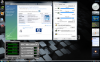
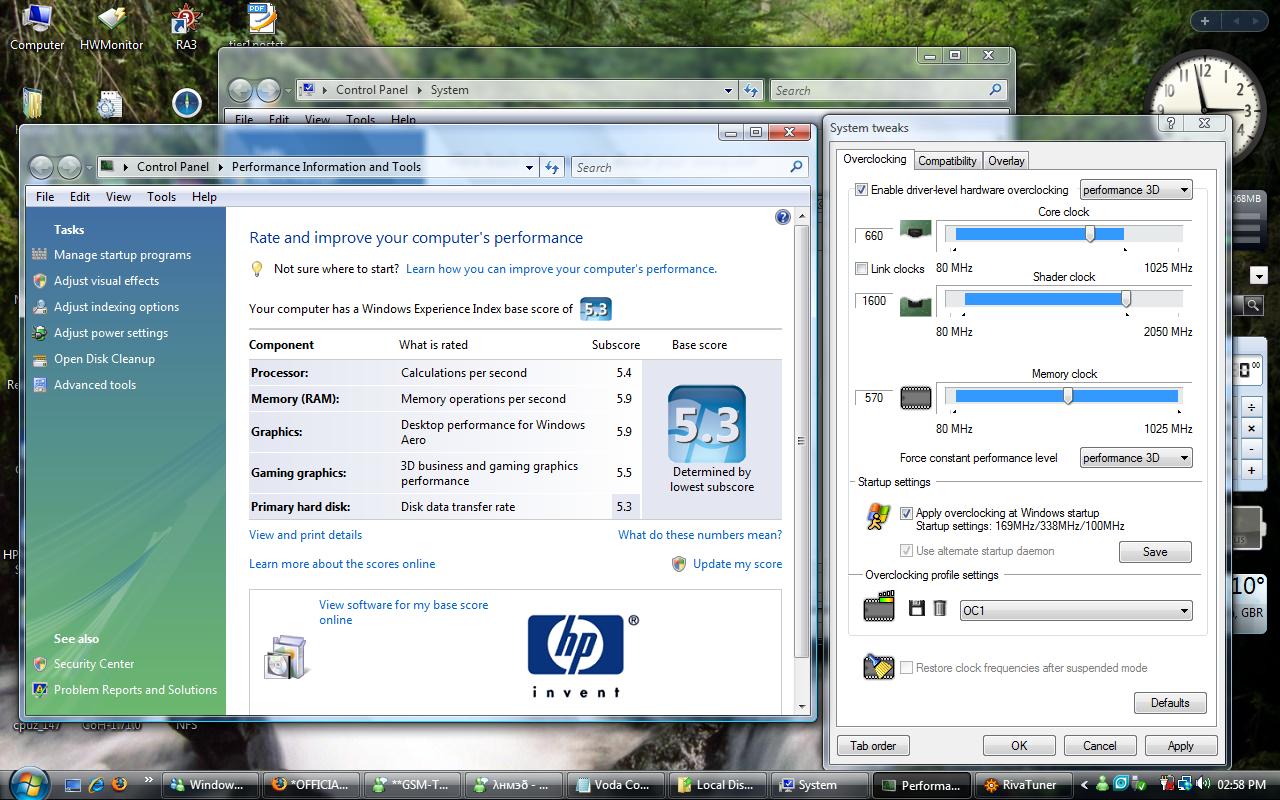
Hey I got my dv5t and heres my overclock for now. 640/1280/520 I can't take the memory up to 530 or else the display driver crashes during the WEI Test. (results of that posted in screenshot). I'm just happy to be in the 5.0 range. I have a question tho don't you have to purchase 3DMark in order to test with it? and where would I get 3dmark05? btw can i overclock the core and shader past 640/1280?
Attached Files:
-
-
Congratulations!
This is 3dmark06.
http://www.futuremark.com/benchmarks/3dmark06/download/
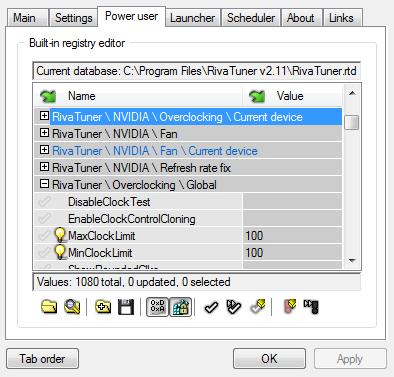
Open Rivatuner
then go to Power user,you get a warning,ignore it then...
Omg! Just a day and you are already giving the 9600 a tough time!
Desktop perf for win aero is getting a score of only 4.9 in my pc...why?
(i am running at stock clocks)Attached Files:
-
-
How about the Intel ones?
-
Regarding what?
-
Stock clocks usually only get 4.8-4.9 on Windows Experience Index Score I've already overclocked
thats how i got the 5.9
BTW thanks for giving me the solution to the overclock limit
-
Has anybody here found a way to control the fan on their DV5? Speedfan doesn't detect any.
-
Fan speeds are not controllable in the dv5. Even if you get to see the fan speed slider,its greyed out.
-
Chk mine out, I get a lil bit more thn urs in the WEI
Attached Files:
-
-
Hi all guys..
I just noticed that the HP dv5t is actually equipped with HDMI 1.3...
My question is, would it be able to run 2560 x 1600 display??
I have 2 DELL 3007WFP-HC and would like to run one of them with a laptop.. The only laptop I know that would run these giants are the Macbook Pros from Apple..
However, I read in Wikipedia that HDMI 1.3 is able to run 2560 x 1600 displays.. I needed you guys to confirm this for me..
Thank You..
-
I just got a DV5t with the Intel video. Is it possible to buy an Nvidia video card for it and install it yourself or should I return it?
Thanks! -
You cannot upgrade
Return it and fast!!! -
I am ticked with the fact that i can only overclock memory to 525... anyone have any suggestions to get it to 570? every time i overclock above 540 or so the pixels on the screen all turn to sand and start flickering out of sync... some still showing the images other random ones flickering.
-
How much laptop life was it that gets taken off when you OC with a 9600M GT?
-
Okay. The only problem is HP is not running good deals like they did when I bought it (bought it during the cyber Monday sale). All the coupons are for everything except the DV5t. Since you can't upgrade, is having 512 memory that much better than 256? Do you guys think HP will have better deals after Christmas day? -
Memory does not make a difference whatsoever...its a misconception...anyway If you game a lot then get the 9600M GT else if you are a moderate gamer,then get the 9200M GS...but if rarely game then stick to your current choice.
-
like,how do you actually calculate it?
-
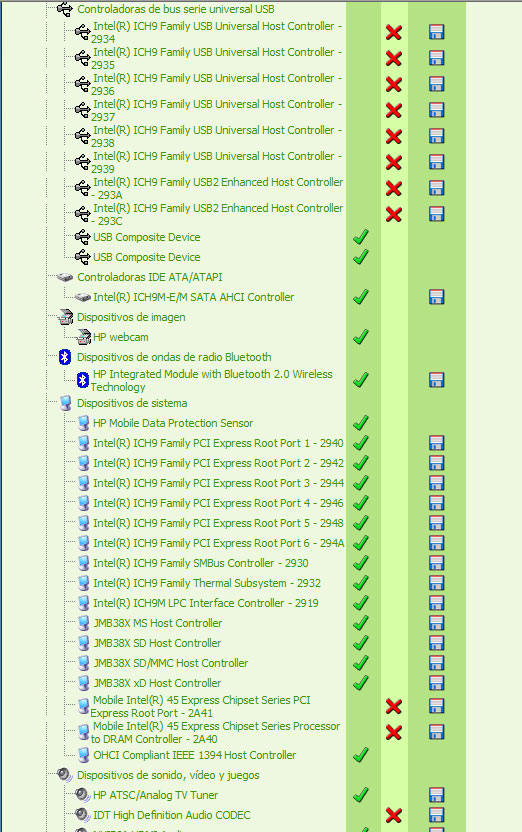
I want to have the lastest or best drivers for the Intel Chipset or whatever it is asking for here... this is a screenshot of the DriverAgent scan... Thanks!
Attached Files:
-
*HP dv5t (1XXX series) Owners Lounge*
Discussion in 'HP' started by Badious, Jul 22, 2008.