 Problems? See this thread at archive.org.
Control Panel, Administrative Tools, Event Viewer. That sounds like a reset on the HDD or some other device triggering like a power state change or similar. There are only so many moving parts inside a laptop, namely the HDD and ODD can click. About nothing else is capable of that movement. And you are certain it's not like IM friend status notices or something? Just unidentified sounds while gaming?
-
-
No it's definitely not an IM client or in game sound, the BEEP is loud and clear like the kind you hear during POST.
What should I be looking for in event viewer? I had a peek in there the last time I heard the BEEP to see if any times would coincide with the noise I keep hearing, but I really wasn't sure what to look for. -
hello all, i'm newbie here.
wanna ask something stupid.
i have pavillion dv6z 6c00 with spec AMD-Llano-A6-3420M-1.5-Turbo-2.4-Ghz, RAM 6GB DDR3, HDD 640GB, VGA ATI Radeon HD6520-512MB,
is that true if my laptop just have one graphic card? not dual grapihic like the most dv6z series.
here is the screenshot![[IMG]](images/storyImages/7679901086_4f6d27fcb3_b.jpg)
-
Best Deal: HP dv6z-6c00, HP Pavilion dv6z-6c00 Quad Edition Entertainment Notebook PC, HP dv6z-6c00 coupon
6520G only. No dedicated but still plays a lot of games. -
You can overclock that processor and emulate also NDS if you are into that like me, or, with mods, overclock it up to 3.0 GHz and emulate also PS2 games.
Current integrated graphics are actually quite powerful, you can even play DiRT 3 with very nice settings at very nice speeds. -
Yeah, even though I said I'd wait, I'm thinking about pulling the trigger on this due to the 33% discount with code NBY8552. All I'd have to do is swap my two internal SSD's and RAM out of my dv6, and then put the dv6 on eBay.
HP Pavilion dv6z-7000 Entertainment Notebook PC
Price after savings: $710.49 (plus tax, free shipping)
Windows 7 Home Premium 64-bit
AMD Quad-Core A10-4600M Accelerated Processor (3.2GHz/2.3GHz, 4MB L2 Cache)
2GB AMD Radeon(TM) HD 7730M Graphics
FREE Upgrade to 6GB 1600MHz DDR3 System Memory (2 Dimm)
FREE Upgrade to 640GB 5400RPM Hard Drive
6 Cell Lithium Ion Battery
15.6-inch diagonal Full HD Anti-glare LED-backlit Display (1920 x 1080)
SuperMulti 8X DVD+/-R/RW with Double Layer Support
HP TrueVision Webcam with Integrated Digital Microphone + HP SimplePass Fingerprint Reader
802.11b/g/n WLAN and Bluetooth(R)
Backlit Keyboard -
Damn, that's cheap. iirc a Llano A8 + 6750m +1080p cost ~$800 + tax last year with the 30% off.
-
Well, I figured out why the option to enable/disable crossfire wasn't showing up in CCC.
Apparently you need both memory slots filled for it to show up. Derp!

-
xFire doesn't work on single channel mode, or so I read.
-
expecting to get my laptop back for the second time from HP - both for overheating issues. I have a feeling the problem will not be fixed. I doubt they will exchange the laptop, and I am sick of this.
(I have a 3510MX -6750m dv6z)
What minimal mods can I do just to turn down the heat a little bit? I saw the heatsinks, and those look good - I just don't know which ones to buy to stick em on mine. I plan on undervolting it as well. (where can I find the best numbers?)
Also, I plan on putting holes in my case to let some airflow over the heatsinks. Has anyone tried just using a soldering iron and making lots of tiny holes? -
But you can get a i7+650m now in a 14" for 750+tax ~~ I mean unless you absolutely need the screen.
-
This is perhaps the first mod you should do, but only beneath the fan, just to see how effective it is (or not).
don't do a bunch of mods at the same time, because you won't know how effective each mod is by itself.
yes, you can use a soldering iron to melt small holes. I did that with my last laptop.
however, you will need an exacto knife or razor to cut away the melted plastic that will ooze out.
a tiny drill bit would make less mess.
but why is your laptop overheating? is the fan not working? did you clean out the heatsink? in my old laptops, a thick sheet of dust would form between the fan and heatsink. You couldn't see it unless you took apart the laptop, but it was blocking airflow -
I have a 3410MX working with 1600 ram @ 3.0 Ghz, I have mods yes... but when I had it at 2.6 Ghz with no mods except 770 core and 970 mem 6750m max temp was 89°C, your processor is overheating by bad thermal contact or by a defective fan (assuming of course there is not much inside the aluminium fins)
-
I got it back and im using it now, running it through benchmarks.
My laptop has been running hot since I first got it brand new. Most games will put it above 90C (usually stable at around 92C) I've had it sent in twice, but it seems cooler this time. I'll cross my fingers.
They replaced the heatsink, memory, and keyboard. (no idea why, maybe they snapped it taking it apart?) I have an additional 90 day warranty on the repairs so I'm going to wait to modify it.
Why is my memory running so slow!?
-
Fan gets most of the air from the keyboard, they designed it like that, that's why you see very small holes from below, with this they intent to get out the heat that is produced by the whole laptop.
-
-I have an HP dv6-6150br, Brazilian model, who comes equipped with A4 processor-3300m (1.9 to 2.5 turbo) with 6480g and dedicated video 6750m, 3gb ram, I have fought issues in most games that causes a micro stuttering every 5-10 seconds. depending on the game, as Skyrim for example there are large drops in FPS, Diablo 3 also suffers greatly from the FPS drops (depending maps drops 60 to 30 fps, horrible and impossible to play). Theoretically there is no crossfire but I notice that tries to help 6480g 6750m. I did not overclock to void the warranty. I tried to install catalys 12.1 and the 10 CAP and not resolved, tabem tried the version 7.12 beta. PES 2012 runs cool, stree fighter 4 also has low fps crysis (20-30) but does not suffer from micro stuttering and Batman Arkham Asylum also runs satisfactorily, it will be Diablo 3 and Skyrim need mair clock (oveclock or a processor upgrade) or more RAM, or that large drops in fps (7-12 fps) is solvable with adjustable driver? Some fought occur even without major fps drops (2-4) in Skyrim it happens often (every 5-6 seconds). Game in 1366x768 and with graphics on low and medium for most games, Skyrim in low, and all without AA. I noticed that almost every game has no loss of fps even changing the quality of graphics, ie, the low performance have almost equal to the high. in Skyrim have few FPS even if lower or raise the resolution, the same way for batman arkham asylum.
Since I believe that by not changing the fps even changing resolutions and quality plan to do an upgrade, anyone know where to buy the a8-3550mx, 3530mx, 3510mx, and send to Brazil?
Anyway if anyone know how to solve the fps drop and microsturring plz help me. -
ah, so I should probably keep my keyboard clean! I'm gonna search about the slow memory, but if anyone wants to point me in a direction, I will appreciate it!
-
you need more frequency in the processor, also, quad core games like the ones that use the frostbite engine need at least 2.8 Ghz to look smooth on dual core, in quad 2.2 is far more than enough.
-
Pretty sure it is the CPU if you have 6750m and lag in skyrim and D3, those game need CPU to maintain min FPS or they look horrible.
I would say OC the cpu is pretty safe, upgrading to a6 or a8 may help a bit but wont be much if you don't OC (It is that sad for the turbo). These game need higher clocks.
Ebay probably is your best bet. -
might be worth something to someone AMD A8-3520M CPU Processor Quad Core CPU AM3520DDX43GX | eBay
-
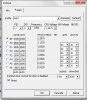
i do de OC and up 7-10 fps in Skyrim and D3 but the micro stuttering dont desapear in this games (have large FPS drops)... in OC i see the clock rate increases more than I set (2700 mhz in boost), after doing some stress tests and play some games I noticed that the core 0 reached 2850mhz in a few short moments (scored 150MHz more than i set), will I have future problems? the system was stable.
The max temperture i see in tests and games was 73º C.
Edit: Crysis go around 79 ºC. i will down to 2.5 ghz
-
Microstuttering is only possible if you have xFire enabled, if you don't you will have only low performance. If you only have iGPU then what's happening is that you need more graphics power, but if you have the 6750m or similar then you're good to go. My brother has a k53ta with an a4-3300 (dual core) and the 6650m, all the games except the frostbyte ones work wonderfully (double channel ram increases speed performance like hell in this processors)
-
You might be able to fix skyrim performance by tweaking the ini or lowering settings.
First you should check anti aliasing in the game launcher, it can be a big performance hit if left at default 4x AA. I recommend turning it off and using FXAA found in advanced I believe, it looks quite good and is not nearly as demanding. While you're there make sure Ansiotropic filtering is at 16x, it enhances texture detail at very minimal fps cost. You may want to consider using the high preset and making the changes I mentioned from there.
Have you turned off v-sync? That helped me quite a bit when first playing skyrim.
MAKE A BACKUP BEFORE CHANGING THESE SETTINGS
To turn it off, you need to go to skyrimprefs.ini found in Documents>MyGames>Skyrim and change ipresentinterval=1 to 0. Lowering shadow resolution also netted me some performance gain. You can either change it in skyrimprefs.ini or simply lower it from the game launcher. (I use 2048 in shadowmap primary and secondary, it can be lowered to 1024 if needed) I've found that using high settings instead of ultra is a good compromise and leaves room for installing graphics mods. While you're in there it is worth changing itreesrecieve shadows=0 to 1 if it isn't already. It makes trees look significantly better at an insignificant performance cost.
Adding these values in skyrim.ini also seemed to help with performance
NOTE: I'm not sure if you are using a quad core so do not use the values under General if your cpu is not a quad core, just leave them the way you found them. (the buse settings are ok to add or change still) You need to add the HAVOK category yourself.
[HAVOK]
iNumThreads=2
[General]
sLanguage=ENGLISH
bLoadLooseFiles = 1
iNumHWThreads=4
iHWThread6=3
iHWThread5=3
iHWThread4=3
iHWThread3=2
iHWThread2=2
iHWThread1=2
iAIThread2HWThread=3
iAIThread1HWThread=2
iRenderingThread2HWThread=1
iRenderingThread1HWThread=0
bMultiThreadMovement=1
bUseThreadedParticleSystem=1
bUseThreadedBlood=1
bUseThreadedMorpher=1
bUseThreadedTempEffects=1
bUseThreadedParticleSystem=1
bUseThreadedTextures=1
bUseThreadedMeshes=1
bUseThreadedLOD=1
bUseThreadedAI=1
bUseHardDriveCache=0
There are also several tweak guides you can search for online to further boost performance and customize your game.
If you have already installed some graphics intensive mods, it may be worth deactivating them and running vanilla game to see if they are the problem. Many mods have lower res versions that can be used if this is the problem. If you have an ENB mod, make sure to uninstall it, they are HUGE performance hogs.
You may be able to gain performance by capping fps at 30. havn't done it myself but its possible.
One last thing to check, make sure skyrim.exe (skse.exe too if modded) is set to high performance in switchable graphics and make sure your aren't accidentally forcing Anti aliasing through CCC. -
If someone could help, I would greatly appreciate it. I currently have the 12.4 drivers installed on my dv6-6135dx, and when I try to install the 12.6 drivers, my screen turns black and never comes back. Restarting the PC brings a black screen again after the boot animation. The only way to fix it is to either restore from a previous backup in recovery mode, or to uninstall the drivers from safe mode. Does any one have any ideas?
-
Newegg has the OCZ Vertex 4 128GB 2.5" Internal SATA Solid State Drive for a low $99.99 Free Shipping after Coupon Code: "EMCNBNC22" (Exp 8/13). Tax in CA, NJ, TN.
Newegg.com - OCZ Vertex 4 VTX4-25SAT3-128G 2.5" 128GB SATA III MLC Internal Solid State Drive (SSD) -
Completely uninstall 12.4 first.
-
Worked great thanks!
-
I am having the same problem and did a complete uninstall of 12.4 using Catalyst Install Manager. I then installed 12.6 and still get the same black screen issue as the other poster. I even use atiman uninstaller, then tried reinstalling 12.6, still getting the black screen issue.
I am able to boot into safe mode and, from device manager, delete the display adapters, or to get the version of the driver off windows update. This lets me boot normally, however this is obviously not a good solution.
I have had awful problems upgrading catalyst drivers everytime a new version comes out. What gives here? This is kinda crazy. -
I don't know if your problem is the same as mine. But, whenever i boot into windows with an EXTERNAL monitor, it will black screen once I get past the boot screen. This problem started with 12.6 and I solved it by unplugging the external monitor every time I boot and plugging it back in once i get to the welcome screen.
If it black screen during installation of catalyst, close all programs and let it install without any interference. Modded bios and overclock may also cause black screen so see if your computer still have problems on vanilla settings. If you have prob. isntalling catalyst everytime, it seems to be a hardware cause. -
I just received my new bezel and the laptop base, to retire this laptop I'm gonna do it in style so it will become my next media center, with 1080p screen (already got the cable) and a 128 gb SSD along with the primary drive, such tribute is just worth of one of the most epic and balanced laptop that I had ever buy in my life, such a bullseye it was
-
Would like to see the shrine when completed.
To the fellow from Brazil (marmotax?):
You need to be damn certain Crossfire is totally off. You need your Catalyst Application Profiles, preferably each pack since 11.11CAP and later. Temperature up to about 80C is fine, no need to lower your clocks. My 6135dx has A8-3500M @2.2GHz, HD 6750M @stock. Skyrim defaulted to 1366x768, High, 8x AF, 8x AA. No FXAA. Lowest FPS was 23 during intro. Your A4 @2.7GHz+ should be OKAY in Skyrim, but if you get short stutters try DXTORY to limit fps and prevent CPU overrun. Try changing certain advanced options individually, especially shadows or physics. Use the tool from AMD's web site to shut down background applications, something periodically running in background may cause stutters because it can't be shunted to the third or fourth core. -
same problem with boot, so don't worry. In fixed mode, if I do extended , half of the screen for extended screen will get cut off. 12.7b that it
-
Yeah I couldn't get 12.6 not to black screen me no matter what. But 12.7b works just fine. I always feel like it's a game a Russian Roulette when I try to upgrade my video drives on this laptop. lol
-
We bited bullet 12.2/12.4/12.5/12.6.
-
First off (long time following this thread, but finally registered to join in)
my dv6-6135dx feels exactly the same way some times. I make backups of all my files/software, and do a clean install of the OS, complete uninstall of CCC + Driver Fusion (formerly driver sweeper) just to avoid the pain of having to deal with all the stupidity pressing the update button brings me.
Also, would anyone mind sending me a copy of their k10stat undervolt settings? I'd just like to compare them to my own. My Oclock's just right, sitting on 2.45 with practically stock temps/voltages, but I can't get my Undervolt to stop BSOD'ing, I'm probably doing something wrong. -
Sure here you go.
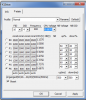
SIGN* still 73C while playing MC
EDIT: Been Using for about 6 months now with no BSOD. -
17/1/2200/1.0625
17/1/2200/1.0625
14/1/2000/1.0125
11/1/1800/0.9500
16/2/1600/0.9375
12/2/1400/0.9000
20/3/1200/0.8375
16/4/0800/0.7000
All voltages bumped up 0.0125 from initial results, this totally cured a minor instability at "cold" temps. -
Whats yours guys Overclock K10STAT settings?
-
so I noticed my screen bezel is cracked =(
Thinking of ordering a replacement , think ebay is the cheapest place?
Should be fairly easy to replace right? -
Catalyst 12.8 whql is out biches
http://www2.ati.com/DriVeRs/mobile/12-8_mobility_vista_win7_win8_64_dd_ccc.exe
time to find out what they broke this time
-
You jump yet? I am waiting
-
It doesn't support switchable graphics?? Well i'm out...

-
As always, my settings even if we have the same make and model might not be suitable for your machine, but my overclock settings are:
.....FID...DID....Volt .....Stock Volt
B0 26 // 1 // 1.3000 < 1.3375
P0 20 // 1 // 1.1375 < 1.1750
P1 24 // 2 // 1.0500 < 1.0250
P2 18 // 2 // 0.9500 < 1.0250
P3 16 // 2 // 0.9250 < 0.9875
P4 14 // 2 // 0.9000 < 0.9750
P5 12 // 2 // 0.8750 < 0.9625
P6 10 // 2 // 0.8500 < 0.9375
dv6-6135 / A8-3500m
1.5GHz > 2.4GHz (2.8GHz Turbo) Stable
As you can see, clocking it from 1.5 to 2.4
with less voltage than the stock 1.5 runs.
I can run it on even slightly less voltage in
some areas, but I got kind of tired of adjusting
(for example) P4 up or down a step and
getting instability from it.
Also thanks for the undervolt settings guys, starting to get mine dialed in. Its kind of nuts how low we can get them. my range is 0.6875-0.8750 at stock P-states.
Maxed out at 56°C under full load. -
it always says that, even with 12.7, which i'm running just fine. -
12.7 beta supports switchable graphics. I tried installing 12.6 whql before which gave me an error after the install.
edit: Ok, just tried the 12.8 mobility drivers from this thread and it works fine. -
Woot, I think the bug with black screen if you start windows with external monitor plugged in is fixed. madvr still behave weirdly under dynamic though.
-
How did you manage to use 1.3000 volts? I cant seem to pass 1.2750 with K10Stat
-
12.8 catalyst works fine for me.
no hdmi issues. no dxva or flash playback issues, and no sticky clocks.
works just like 12.7b -
Ditto here. 12.8 peachy keen so far.
got another thing that's come up tho
For those who haven't tried linux yet, tl he time is coming. Two developments.
1. Linux mint 13 KDE version.
2. Steam is coming out "real soon now" with linux compatibility. First release, will be Left 4Dead 2, and as for performance..news flash. Intel's top i7/ nvidias 680 etc. runs at 370fps under win7. Under linux? 315!!!, and dead stable.
I'm running Mint13KDE as I type and I have to admit, its fast, its clean, and it works right off the bat. The install was cleaner than my win7 on this dv6 (dual boot). With the impending ability to run all the Steam titles directly under linux, and at faster speed...well...things are looking good (and cheap under linux.
As for timing, Valve could release the linux steam any time. Its up its running, its stable, and its wicked fast.
seer -
We can dream for all steam games i think only some that have been /will be ported will available. But still better than nothing.
Maybe one day linux will have most new titles and i can throw windows out.
Me running Arch + KDE. KDE is so nice.
*HP dv6z AMD Llano (6XXX series) Owners Lounge*
Discussion in 'HP' started by scy1192, Jun 22, 2011.


