 Problems? See this thread at archive.org.
The head of valve whose name escapes me at the moment, recently commented that the relative ease in which his team (coupled with engineers from both Nvidia and AMD) managed to get a stable port to linux of lfd2, encourages him to get the majority of major titles ported over through steam. Also, apparently MS is up to their old tricks with Win8 and has apparently done some *things* which will negatively impact providers like steam (vis a vis MS's own impending product) under Win8....soooo Valve has additional incentive to open up the linux gaming market..and if a collateral effect is to bite MS's windows in the azzz at the same time...heythe more the merrier.
LOL
seer
-
My stock setting was 1.3375, which by extension, allows me to use 1.3000. So you'd have to take that up with AMD/HP hehehe. Are you using the A8-3500M? -
a8-3510mx is capped around 1.27 i think
-
amd specifies these chips to take up to 1.4xx volts, but caps each chip differently.
my a6-3400 goes up to 1.4v. But I've seen a6/a8 demos at bestbuy cap out anywhere between 1.2xx to 1.3xx.
luck of the draw.
Higher voltage cap doesn't necessarily mean it's better, because it may mean it needs more juice to sustain higher clock speed in the first place, and that means higher battery draw.
My cpu appears to be a poor undervolter, and my max volts = 1.4v
My laptop will occasionally freeze when 800mhz is undervolted below 0.775v, and it 100% guaranteed locks up bsod every time if under 0.75v.
I can't do 0.6875v at the lowest p-state, like some others can. My battery life seems to suffer a little as a result. -
My current and final voltages are (NO BSODS since 5 or 6 months):
freq FID DID V
3200 16 0 1.3250
3000 29 1 1.3000
2900 13 0 1.2625
2800 26 1 1.2125
2733 25 1 1.1875
2600 23 1 1.1500
2400 20 1 1.0875
2300 30 2 1.0375
2200 28 2 1
1800 20 2 0.9625
1600 16 2 0.9125
1400 26 3 0.8625
1300 23 3 0.8125
1200 20 3 0.7625
800 16 4 0.6750
With max of 1.3250 on a 3410mx. On a side note I really hope steam can popularize Ubuntu as the PC platform for gaming, we have had enough Windows domination until now, and with their current arrogant attitude of "We will do whatever we want with the OS including shoving you a very despicable Start screen just because we are losing power on the mobile market" I really hope they go to hell. -
Hey guys. So I got this weird problem where my CPU and GPU idle temps increase every time I wake up from sleep/hibernation. Right now CPU idling at 55C while GPU idling at 60C. Usually, both idle at mid-high 40's. I can close all applications, having nothing running, reset my low-voltage clocks, set to power-saving mode to force lowest p-state, and CPU/GPU will still idle at 55/60 with noticeable heat at the palm rest. I have no idea what's causing this.
It's getting annoying that every time I go out for a short while, I can't really sleep/hibernate the computer because it will wake up hot. Instead I have to shut it off every time.
EDIT: Well after a while it just fixed itself I guess. Idle temps back to normal. -
Yea i am. I guess thats why my PC froze. I need to figure out better undervolt settings
-
anyone try sleeping dogs? new game GTA style, looks pretty good. wanted to see if anyone ran it on their dv6 yet?
-
Yeah I'm interested in knowing as well.
-
I just received my 6135dx back from HP after having no luck at all trying to fix the BEEP issue on my own and so far all seems to be well.
They claimed the BEEP problem was hard drive related, and swapped it out for another one. My battery release latch had also fallen off, so they replaced the whole back plastic as well.
Only problem I have now is that they may have been too hasty slapping the thing back together so now part of the silver trim underneath the speaker bar is stuck/wedged under the brown top surface.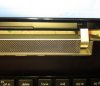
It's only cosmetic, but ugh...eyes keep getting drawn towards it.
Edit: Nevermind. Used a plastic knife to pry it free and it popped back in to place. The gap between the silver trim and brown surface still looks a tad bigger than what I remember it being. Maybe it'll bend back into shape now that it's not stuck. -
Hm my notebook came like that stock. How did you fix it? Do you push the silver tabs down or up? (The silver trim thing, I mean.)
-
that screen bezel looks a lil different than my 6135dx, like the portion around the screen is thinner. maybe its just the picture.
I ended up fixing the crack I was talking about on my bezel, took it off, and epoxy glued it. it is visible since there is some glue on the surface but at least its not broken anymore. Kinda adds character lol . battle damage.
Im on the 12.8 drivers but havent played any games yet, i just got final fantasy xiii-2 and uncharted 3 on my ps3 so those have been taking up my gaming time. -
You did quite a crime... filing it with epoxy glue O_O, anyone interested in parts for the dv6, you can buy them at waresphere, I bought the bezel and the base from them (current base is modded, but I pretend to give its original glory and use it as a media center once I change laptop)
-
Same, you can try reassemble it, but doesn't help on mine ...
-
did some OC cpu testing for chits and giggles, set P0 to 2.6ghz, and the thing throttles like crazy, even after opening up cooling, and keeping temps below 80C. Even at 75C it throttles.
it slams hard on the brakes, throwing it down to lowest p state 800mhz.
i don't think anyone's cpu can sustain high overclocks continuously without throttling.
I challenge people to look at hwinfo64 clock monitoring while doing something cpu intensive for 30 minutes, even something short like cinebench 11.5 -
Thanks for the site. I've been meaning to buy another chassis for mine. -
I flashed the unlocked BIOS and set the throttle temp to 90c (default was 85, iirc). Seems to do ok, and the BIOS settings seem to stick even after flashing to a not-unlocked one.
-
Yep same experience here. Run anything that does line graphing of your CPU speed while gaming and you'll see some massive throttleing. And you're right, it's right down to the slowest setting each time.
Another easy way to test is to run fraps for the fps, and then crysis, crysis wars, or crysis warhead. That whole series is notoriously CPU dependent. With my machine set to 2.4 or above, I could watch the fps go at 45 fps for a few seconds, then down to 15 or so, then back up to 45, and so on. The highest sustained OC I can get is about 2.2GHz. It DOES seem related to voltage, as running at higher voltages at 2.2 would throttle, but when I got them down to something more reasonable throttling stopped.
So to be safe I set 2.2 as my B0 and 2.0 as my P0 and go with that.
Note this is still much better than my Sony SA with 2nd gen core i5 which just gets to 99C and shuts right down, no throttling whatsoever. There I have to use throttlestop to keep it running, and the max sustained speed is 2.2GHz as well. The i5 is only slightly faster at 2.2GHz than the A8 running games like Crysis Wars (I use it for MW:LL greatest total mod ever created) and the difference in frame rates is negligible. -
The throttling has been discussed before, for the dv6z , you can disable cool n quiet or set same pstate all across then any clock you put will stick. The cpu probably can take that, but the board may not to able to take the heat and/or electricity.
-
Oh wow, this is interesting news to me. I thought the throttling was exclusively based on CPU temperatures.
-
ok yeah, i have to set all p states to 2.5ghz to pin it. Then it heats up to 85C without throttling.
good for short tasks. -
Good to see you here! glad to be of help
-
This was discussed before as some others have said, but managed to get 30 min mark with my 3rd mod at 3.0 GHz, no throttling using prime95. (Since then I keep this speed only for emulators, they rarely use at 100% the processor but nevertheless require speed, PCSX2 rans a lot of games very fine at 76° max with 3.0 GHz, tip, memory ddr 1600 also helps)
-
Sorry if it's a dumb question but do I need a custom BIOS to be able to change the cool n quiet feature? I couldn't find on my HP stock BIOS. Thks!
-
Yes, but if you disable it, you must use external clock control , windows clock control will not work any more. I personally would say dun brother as 2.2 -2.4 will not throttle under normal gaming. (and it is buggy, not sure if they fix it yet, but mine used to freeze after resume from sleep)
Switched out my 6300 since intel driver seem to BSOD here and there for no reason(same using a 6200)........... Using the AR9382(killer 1102 reference card, killer driver do not work) now (AR9380 is way too expensive), hope it don't bug me.... -
to disable it you just need to not to install it.
-
the bios cool n quiet is different. It is like intel's speedstep.
-
What drivers are everyone running for Guild wars 2? I dunno If I want to switch from 12.1.
-
I am running 12.7 beta drivers and they seemed to work quite well during the last stress tests.
Can't wait for launch tonight!! -
Are there any significant improvements between 12.7 and 12.5 like stability, speed or aCF?
I'm using 12.5 with aCF all the time and never noted any microstuttering in my games (D3, Skyrim, WoT, LoL). I just can't check the usage of the iGPU, with this driver i can only observe the dGPU on Afterburner.
So should i try to switch on the 12.7 or isn't it really worth? Thanks. -
Hi all and greetings from Greece.
I would like please your help as this thread seems very expert.
I bought locally for 500 euros a DV6 Pavilion with the usual AMD dual Graphics config and 3410 Cpu. Damn bios does not have the option to swap the IDE mode.
When i'm trying to install W7 from USB Stick i got an error message about drivers etc. I've downloaded several files and extracted them while i was trying to find the correct driver but no luck.
Can you please gimme a tip how to solve this ?
Also is it safe to install a modded bios to give a small boost to the GPU ? My current bios is F17 i think. -
don't install windows 7 from USB 3.0 ports, use the 2.0 ports (right ones)
if you have the 6750m dedicated graphics card then yes, you can overclock it with Musho's Bioses, otherwise don't flash it, instead you can use MSI afterburner to do the overclock. -
@Vect
A)Thanks for your speedy reply.
B) Yes i have the DV6 6B07ev with 1GB 6750m. What about cooling ?
I already noticed when i play LOL or COH high temps around 80-85 in the APU.
Can i mount thin/small BGA coolers inside ? And apply new Arctic Silver ceramique ? Or it's a waste of time ? -
@SeasideGR
Read this guide: http://forum.notebookreview.com/hp-...-dv6z-llano-overclock-optimization-guide.html
HTWingNut answers all the first important questions about this notebook. If you don't understand something you can still ask.
But careful with the BIOS mod from Musho, i dont know if you have the same mainboard like our older DV6z and if its compatible with your current bios.
For all other questions just use this thread to find the answer. Post in googlesearch: "site:notebookreview.com dv6z lounge" + a keyword -
Changing the paste for an Artic Silver actually reduces like 5 degrees, if you are going to do a cooling mod, best recommendation that I can give it to you is to buy a base spare part from waresphere.com (ships to all the world) and then mod. APUs get quite hot only if you overclock them, anything above 2.4 GHz reaches 89° easily without mods.
Best performance mod is done when you dig a hole below the main fan, but problem with this is that the fan doesn't remove the heat generated by other components like the GPU Memories (8 modules and they create a lof of heat) and chipset, instead just cools down the APU and the GPU core, to solve this you need another fan that extracts the hot air that is stuck inside the laptop by the other components, see my mod 3-2 in my signature for that. Sustainable speeds of 3.0 GHz are achieved with this mod, but I rarely use this speed except for emulation, like PCSX2 emu, which works wonders with this kind of speeds for most of the games, With PC gamming I like to use 2.6 GHz, seems like a nice sweet spot for them (quad core), the main fan rarely kicks up beyond the 3rd fan speed and for normal work the fan sometimes stays powered off, this is possible using the BIOS option "fan always on".
So, have fun modding, you wouldn't regret it and show results please !!
-
i don't know why but all your pictures need a lot of time to build up. i can't see your mod. am i the only one?
-
Guys thanks all for your answers.
@Vect. Managed to install W7 Ult from 0 with all drivers and all devices properly. Thanks. I had a mouse and an ext.hdd and i didn't tried at all to use the right USB ports by the time i was trying to do that.
Now the only strange thing i notice is when i open the Amd System Monitor.
Reports 6520G + 7690m ? ? How can this be possible.
Device manager shows adapters as 1)6520g 2)Radeon 6600 - 6700 series.
Another strange is when i run the WEI with GPU disabled in CrossFire i get 6.7 in games and graphics. When i enable the GPU i get 6.6 and when i open the latest gpu-z for the GPU shows 600MHZ core and 800 memory but actual run @ 600 and 215 ??
Bad thing with chassis mods is that i'm gonna loose the warranty. So a fresh install of thermal grease and 8 new BGA heatsinks is a good start.
Besides the laptop cooling pad.
@Vect your APU mod seems pro. Unfortunately i do not have a dremel around and also do not have a steady hand. Though it's nice.
@zars
About the bios mods. I tried to install one but the Insyde utility didn't let me go further as said "that my board is difrerent one" from the bios i'm trying to install.
I sold my ITX Asrock Z77 Extreme+3770K+GT 640 and my big rig Asrock XTREME9/3960X/16gb/gtx580 sli because i needed the money so now i have to live with the laptop for a while. First time in my life i'm buying AMD laptop. -
@SeasideGR
the asynchron CF isnt really well optimiced for all games or programes, so it can appear that you get better results without CF as with CF. The 215Mhz its normal gpuz cant read the ramspeed exactly, but dont worry it works at 800Mhz.
Use Msi Afterburner there u get exact numbers if you need it. And you can use afterburner to oc the gpu, too. And dont forget to use a newer driver version. I'm using 12.5 and it works fine. Just read in the guide how you install it correctly.
You can still oc per software like afterburner. Mushos bios just give us a fixed gpu clock.
I have my A6 6755g2 notebook now a year and i am quite happy about what i get for how much i spend. It runs always at 2300Mhz @ 1,05V and the gpu @780/880. -
Installed 12.8 Catalyst drivers with no problems at all.
-
12.8 installs fine. But may give sleep/hibernation problems.
try it. put pc to sleep, wake it up, and see if something isn't working right -
what do you exactly mean? i use the 12.5 the performance, microstuttering is quite good and i have no graphic bugs. just (dont know which problem u mean) if i wake up my notebook sometimes the dGPU stays deactivated. so i have to restart to wake her up again.
-
Has anyone else tried playing Dark Souls : Prepare to die edition??
I am having very bad FPS issues. Both of the .exes are set to high performance, and I also tried manual switching method set to 6750m.
The game is supposed to play at 30fps, however even walking around and during fights, I get many laggy drops to 15-23 fps. I am wondering if it is a problem with my GPU drivers, CCC setup, or if this laptop just is not powerful enough to run it properly. -
i bet it's the drivers.
-
just installed the 12.8 catalyst. All works fine for now, but i mentioned a fps drop in some cases of 33% (~40fps to 25). Before i used the "12.5 beta" driver from this forum. Any tips with the right installation or same conclusions?
-
Yeah it's pretty bad. Have 12.1a drivers. Lots of people are having the same issue. It's a straight port, keyboard controls are clunkly, not optimized. Even Namco themselves said something along the lines of "We're not really good with computers." A shame though, heard it was an awesome game.
-
i hate sh**ty console ports.
I recently tried to play the new amazing spider-man game, and that ran like a slideshow. Terrible port, and there's no graphics settings menu either.
tell tale sign of a bad port. -
I'm about to buy an ssd to install in a dv6-6135dx. My question is if sata3 and ahci mode is enabled by default? I tried to check in the bios (F21), but the only options I see is changing the boot order. I noticed that ahci is on in the windows registry.
Also is it recommended to install a fresh OS on the ssd or I can use the laptop upgrade kits to clone my current drive to the ssd? I assume the latter method won't work if my current drived-used capacity is greater than the ssd size?
If anyone has any experience doing this on this particular model, your advice is appreciated. I also plan on putting the mechanical hd in a hd caddy and replace the bluray drive with it. I'm wondering how to get the faceplate off the bluray drive and stick it on the hd caddy.
Thanks -
@ducky
Right now i have a Vertex 2 (40GB) as boot drive. Pagefile is in the other HDD. Defrag,Indexing,Superfetch and hibernation all disabled. To save 8-10 GB of space and to avoid damaging the SSD. I will change it to Vertex 3 or Vertex 4 (60GB) the following months. The bad thing is that this SSD might be old but when i had it installed on Z68 with 2600K and later on Z77 with 3770K was faster.
I don't know why this is happening but Intel was always faster as we all know.
I get hardly 200-210 mb read on the laptop. While the drive was in the ITX boards i had a clear 270 mb read speed. I test the same Vertex 2 drive on a Lenovo G570 and gave me 245-255 mb read speed. Windows score on the HP Amd laptop is 7.4 on the Lenovo 7.5 and on the ITX boards was 7.6
As you know the speed increase and the behavior of the machine is completely different. The mechanical HDD is already on a caddy and the BluRay went external.
I would recommend a fresh install. The faceplate goes out very very difficult due to the plastic edges which are new and makes the removal a bit pain in the @ss. I used a small straight screwdriver and a lot of patience.
If you remove the faceplate do it with extreme caution. The faceplate of the BluRay is attached to my caddy. -
AHCI and sata3 is default,
the face plate -> you need to open the drive inorder to remove it, it is really easy if you eject the tray first. -
OK Update on Dark Souls:
I managed to get the game much more playable, there are just a few tweaks that need to be done first. (The game have a fps cap at 30 fps, it will never get above 30fps, but it looks fine like this)
1. Go to THIS webpage and download the latest version of dsfix. Move the 2 files into the same folder that contains DARKSOULS.exe and DATA.exe
2. Open up the DSfix.ini file, with notepad or the program of your choice, and change some of these settings :
Render width and height = The resolution you wish to play the game at. Changing it from 1920 and 1080 to 1366 and 768 in my case.
Set dofOverrideResolution to 0
Set filteringOverride to 1
Set disableCursor to 1
3. Make sure DARKSOULS.exe and DATA.exe are BOTH set to "High Performance" in Switchable graphics configuration.
After doing all of that, I am able to get the max 30fps almost 100% of the time, and I have been able to play the game for hours without any problems.
(optional)
4. Set the game process to a higher priority
5. Try a higher CPU clock ( I am always running 2.6ghz)
PS. Use an xbox 360 controller... it makes the game much easier to play.
*HP dv6z AMD Llano (6XXX series) Owners Lounge*
Discussion in 'HP' started by scy1192, Jun 22, 2011.


