 Problems? See this thread at archive.org.
-
Hey can anyone guide me how to get the face plate of the BluRay disk or if there is an easy way to order it from ebay becouse i cant find it.I just got a kingston 90 gb sata3 and put it.It runs like hell by the way.Thanks
-
Hey I'm looking for vect old cooling mod(s) posts, I think it was in the signature but it has changed from the last time i was here. Anyway does someone have a link?
-
Is it possible to install an msata to this? Is there a slot for it?
-
No you can't. There is no msata slot. At least for the AMD model.
-
They may have it in the 7xxx, but definitely not the 6xxx.
-
They are here: http://forum.notebookreview.com/hp-...-amd-llano-6xxx-series-owners-lounge-565.html or at least, that was the best one, doing that with the cooler of my signature leaves 3.0 Ghz at 81° (At maximum load with Prime) you will however require something to regulate the voltage of the fan, otherwise is very noisy, I have a fan mate 2 for that, at minimum setting you cannot hear anything at the laptop rarely turns on it's own fan (I have the option in the bios for "Always On" fan disabled) when working or browsing, when gaming if you go at max speed you rarely hear anything from the laptop fan at 2.6 Ghz.
-
I have a separate notepal u3 that i was just going to position the fans under the drilled holes, so that will work. One more question if i turn the fan to not" always on" when the computer if below a certain threshold it turn off it's on fan?
-
If it's enough cool yes... even the BIOS will notify you that there is an error with the fan because it has been so much time off, lol... but you just press enter and the message goes off.
-
Has anyone installed or yet thinking about installing Windows 8 on their DV6z yet? I've brought an HP desktop the other day from Staples for $279 and it came with Windows 8 and it seems pretty smooth on a A4 w/ 6GB of ram.
What are your guys thoughts? Though I really seem to like the traditional Windows way of the startmenu and all, but Windows 8 looks refreshing. -
I'm having thoughts of putting it on my dv6z. I've installed it on my other laptop/tablet convertible Fujitsu t4020 and I loved it. I just need to do more reading like if the cpu/gpu overclocking stuff would work. On a related note, I've seen some touchscreen panel kit to install to convert a screen into a touchscreen. A 15.6" goes for about $75 on eBay like this, was wondering if anyone has tried it.
-
I'm currently suffering from the no POST, caps-lock blinking issue. I can usually fix it by removing the CMOS battery, but I'm starting to think there's a real issue with the BIOS itself. Removing the battery only fixes it about 50% of the time - it will sometimes reboot into a lit screen with a cursor in the upper left hand corner, but won't POST till I do another CMOS clear.
Has anyone had any success with "fixing" the caps-lock blink issue? I'm currently using the stock F.21 BIOS, though I've tried a custom OC bios in the past. -
That´s interesting!
-
I been running window 8 pro for about a month and it works great I don't really notice any lag. I did come across a AMD vision driver problem when running the Netflix app but no problem in the chrome browser when playing movies, also windows experience when from 5.9 to 5.6 I doubt did it actually matters, so far I haven't experience any issues at all or any that I can tell.
-
I had a similar issue but with a modded bios for overclocking the gpu. Mine wouldn't even get fixed with just doing a cmos reset by taking out the battery. I had to completely remove the battery and both memory modules, then hold down the power button for like 20 seconds with the battery removed. Then i replaced the battery (cmos and laptop) along with the ram and my computer worked again.
not sure if that would help. Try to do that and try to reflash the bios. -
I was wondering if I could post a (rather lengthy) teardown tutorial/guide of my dv6-6188ca I replaced the screen and video cable on the other day. I haven't written it up yet, but I took plenty of notes and loads of pictures through the process. I also tore the rest of the laptop down and put new thermal paste on the CPU and GPU. I had some weird plastic ball type things in the fan that I needed to take out too.
Would it be beneficial to the community here? Should I post it in the general HP Pavilion section? Would it be basically a similar process to all dv6's or the dv6-6xxx line or what?
And suggestions and/or input would be great. Thanks. -
Someone has got to try this with there dv6
-
HPdv6-6135dx running 2x8gb corsair vengeance memory 1600 at only 800mhz?
all of the high-end corsair vengeance memory i've ever had has always ran at half speed. Is there a way to enable the full 1600?
CPUID shows the part number: cmsx8gx3m1a1600c10
HWinfo shows timeing 9-9-9-23 tRC28, also clocking in at 800mhz.
I'm also k10stat'ed up to 2.3ghz, could anyone PM me, or post a table to up this?
Link to the memory:
http://www.newegg.com/Product/Product.aspx?Item=N82E16820233264 -
I've read rumours that the dx6-6135 motherboard does not support dual channel memory. Can anyone confirm this?
-
keep the cmos removed, remove the battery, and power cable when it happens. I do this, and rarely get the bios issue.
-
Has anyone figured out a way to disable IDT Audio's habit of setting bass to -12 if you're not using Beats Audio? It's infuriating and technical support wouldn't help.
-
so I have the HP Pavilion dv6z-6100 CTO Quad Edition and Im on windows 8 64bit pro does anyone know where i can get all the latest drivers that support windows 8 for this pc, also im using fusion tweaker to overclock is there any bios mods i can do and what ones should i do
-
The only drivers you really need from HP are, I believe, the Beats Audio stuff. Without that, you can't really get decent sound out of this thing. The version for Windows 7 64-bit should be fine.
I would get Catalyst 13.1 drivers directly from AMD, and get touchpad driver directly from Synaptics. USB 3.0 and whatever else should be included in Windows 8.
Audio Drivers
Catalyst 13.1
Synaptics Touchpad drivers
I don't think I've had to install anything else, and it's running great. I can't speak to using Fusion Tweaker, but I use K10STAT and it works just fine. If your model has a dedicated graphics card, you can overclock fine with 13.1 Cats using MSI Afterburner, with the caveat that you must first start some application that kicks on the dedicated card. (e.g. Start your game first in high-performance mode, then tab out.) -
Is anyone else having issues running K10Stat on Windows 8? (On DV6-6135dx) I upgraded to Windows 8 a couple days ago and thought everything was going swell, but after setting up K10Stat again, and trying some gaming I quickly noticed gameplay wasn't as smooth as before in Win 7. BF3 has become rather unplayable with FPS dropping to 15-20, where before it was more or less 40+ at the same settings.
It feels like my K10stat settings aren't being applied. And HWinfo...is looking rather strange. (see screenshot) Core clocks jumping all over the place.
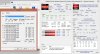
Idle temps also seem to be higher than with my previous Win 7 setup. (7-10 C higher)
Is there anything else I need to install to get things back to normal?
Edit:
Figured out I was testing out BF3 with Dual Graphics enabled...so I think that's what was causing my fps to be so jumpy. Disabled that and it feels better, just not quite where I had it in Win7.
Also running K10Stat and HWinfo in compatibility mode seems to have fixed the crazy clock speeds.
Still tweaking things here and there.
-
Awesome, keep us updated. I have the 6135dx myself but still holding out on upgrading to Windows 8 because of the uncertainty of overclocking with k10stat. Also are you able to overclock the gpu? What version catalyst do you have? I'm even still on 12.1a.
-
Hi, does anyone know how to resolve a frame skipping issue? Is it because of CPU or maybe the hard drive? I've seen the same issue in FFXI online where it would skip frames every few seconds; in STALKER it's not as dramatic, the game would pause for a few seconds like it was trying to catch up every now and then. I've tried defraging and updating the drivers to no avail. Any help is appreciated
System Information
------------------
Operating System: Windows 7 Professional 64-bit (6.1, Build 7601) Service Pack 1
System Manufacturer: Hewlett-Packard
System Model: HP Pavilion dv6 Notebook PC
BIOS: InsydeH2O Version CCB.03.61.09F.1B
Processor: AMD A8-3510MX APU with Radeon(tm) HD Graphics (4 CPUs), ~1.8GHz
Memory: 6144MB RAM
Available OS Memory: 5610MB RAM
Page File: 3814MB used, 7403MB available
Hard Drive: TOSHIBA MK6476GSX SATA Disk Device
Graphics: AMD Radeon 6750M(dedicated) and AMD Radeon HD 6620G -
Are you running hybid crossfire? I think that microstutter is just something that comes with the crossfire territory. You might want to look and see if there is a profile for that game; alternatively you might just want to look into shutting down the integrated gpu and then overclocking the 6750m to near 6770m levels for the best experience (and using a laptop cooler if you can).
I actually installed generic catalyst 13.1, and then checked the box that shut down my 6750m. I (think) I am just running off the APU graphics. It works fine as none of my current games are gpu intensive (mostly crpgs including diablo II, fate, torchligh, legend of grimrock all run clean on the APU), even with the 1080p screen and with no laptop cooler.
Hopefully somebody else is still using these dv6z's, sees the thread, and can give you more specific advice.
Edit - see this post: http://forum.notebookreview.com/gam...amd-radeon-hd-6750m-benchmarking-results.html
In addition to the 6750m, the test machine was an HP DV6z with A8-3510MX APU at 2.4GHz with the 6620G integrated GPU with core speed of 444MHz
Stalker is one of the benchmarks and was noted as having slightly noticeable microstutters. -
I'm on Catalyst 13.1 right now, haven't tried any older versions. Just fired this up after the Windows 8 install.
Tried overclocking the GPU tonight with MSI Afterburner and it really made a difference in Battlefield 3. FPS using my mix of settings + user.cfg tweaks @1366x768 ranged from 50-81 on Firestorm / Conquest w/ 40+ players, but I'll try running it all on HIGH defaults to give a better estimate. Core@750, Memory@900. GPU temps according to MSI afterburner went up to 74C during gaming which seems good to me. (Also using Coolermaster Notepal U2) While CPU temps were between 76-84 in game.
Still needs some tinkering. I had weird fps drops at times down to 15FPS, along with a DirectX10 error/crash of BF3 stating the 6620g had stopped working.
Also need to figure out if I can adjust GPU voltage in Afterburner. Right now it doesn't let me make adjustments at all.
And I need to mess with the touchpad settings. Something feels off.
Cheers.
Edit: Tested BF3 again with overclocked GPU. 750/900. Default High settings at 1366x768 on Firestorm conquest, 40+ players - FPS 39-43. Not bad at all. -
Hey guys,
New here. Been reading this thread for the past month though, and made some mods to my computer based on these threads. But anyway, Resolver1, I had similar problems with my laptop. It wasn't always like that though. So, for like a couple of years now, mine would basically hang every now and then, mostly during games. I play DotA 2 and Counter Strike (the old one), and it tended to freeze for about 2 seconds every now, and then fast forward back into the real-time of the game. It would even do this occasionaly during normal use (typing papers for school, surfing the net). For the longest time, I thought it was one of these things: video card drivers, insufficient RAM, cluttered registry, and other things that I cant think of right now. I tried to fix this problem by doing things like updating Catalyst, using CC cleaner, clearing up space on my HD, defragging, checking the disk for errors, etc. Nothing was working! And I refused to reformat my HD and do a fresh install. I dealt with it for the past couple of years.
Then I made a dramatic change, I upgraded to a Samsung 840 series 500GB SSD plus a fresh minimized install from recovery discs. My problems suddenly disappeared! I don't know if it was the new SSD or the fresh install, but I'm thinking it was the new SSD that did it. I had the 7200RPM Toshiba from when I ordered this PC from HP, and I think it was starting to crap out on me. TBH, I don't know if i ever felt like it was faster than a 5400RPM HD, so I regret doing the upgrade. I don't feel like Toshiba is a reliable brand. But yeah if your problems aren't fixed yet, I'd say go for an SSD and see if that helps. My WEI for "primary hard disk" went from a 5.9 to 7.9, and is no longer the bottleneck of my system. Ever since, my laptops been pretty smooth with everything. Boots up in 30s though, which I think can be improved, but I'll mess with that more some other time.
Hope that helps. I'm glad this forum is still somewhat active. There's a lot of good info here. I can post my 3dMark and Crystal DiskMark if anyone's interested. But my old and current specs are below.
dv6zQE (custom-ordered July 2011)
Windows 7 Home Premium 64-bit
AMD A8-3530MX (2.6/1.9GHz 4MB L2 Cache) (WEI = 6.9 -> 7.2 after OC to 2.6GHz)
1GB GDDR5 6750m (I keep it on crossfire with the 6620)
6GB DDR3 (2 + 4) ==============> 8GB PC3 10600 (replaced the 2GB with a 4GB G.skill) (WEI = 7.0 -> 7.4)
640GB 7200RPM HD ============>500GB Samsung 840 (WEI = 5.9 -> 7.9)
15.6" 1080p Matte display
802.11 b/g/n + Bluetooth
My WEI for graphics actually went from 6.4 -> 6.8 after increasing the RAM. I don't know if this had anything to do with previous posts about synchronous or asynchronous dual channels RAM or not. -
That's something to consider. A couple of days ago I was getting hard error and wasnt able to login to the computer plus im getting some inconsistent hard drive read speeds. Although I did do a clean install so I doubt that might help much but I'm strongly considering an SSD drive.
That's really good thread and even addresses the micro stuttering. It's unfortunate that I can't seem to be able to install any of the custom Bioses to use only dedicated GPU. Much appreciate the post. Btw I dont have the crossfire option in the catalyst controls nor application profile, why is that? -
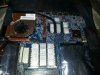
Thread can not die! did this today
-
well guys i screwed it up.. booted up, thought id flash a faster musho overclocked bios.. flashed, rebooted, couldnt get into windows.. Pryed out the cmos battery to clear bios.. didn't realize i broke the cmos battery holder solder contacts.. than tried to flash back the bios.. done.
Pretty depressed now.. being unemployed i shouldnt be messing around. Any advice on where to order a cheap replacement motherboard? -
Before you messed up your bios did you do any testing to see what kind of temperature difference you were getting with the new mods?
-
nah i forgot to lol. I ended up ordering a replacement motherboard on ebay, but sadly this one doesn't like any overclocked bios. Windows won't boot with any of the OC Bios but stock/ Guess it is karma.. I would be tempted to try another replacement motherboard, but I don't have the money. Sucks lol
-
Damn, at least you're up and running again!
-
Wow looking beautiful! Would love to know the results. How did you manage to stick the heat sinks on the copper part of the cpu area? I could only fit them in the silver crevice area where it dips down so the cover can actually fit.
-
JB Weld + some silver heatsink compound that I had
I also was gonna try a heatsink on this chip (I think it would generally be a northbridge chip like on desktop motherboards)
![[IMG]](images/storyImages/fjncx1.jpg)
But before slapping it back together, I just decided to take it off since original design didn't have a heatsink on it (but for some reason they put that tape on it like the gpu and cpu had.
I did make some trimming to the case to clear the heatsinks, like trimming some of the indented areas, but did not have to enlarge any holes in the bottom .
I can run at 3ghz all day now, but sadly that replacement motherboard just does not like any video overclocked bios, so my original setup before all that was better untouched, since I could run musho's 750/950 bios. I'm curious if the heatsinks on the video ram are why I can't run an OC bios, but I can't really take them off now without damaging the board. -
holy , when I original threw this motherboard in, I had ran out of thermal paste, so I went to radio shack and bought Arctic Silver 5, and any custom bios would not boot. I did order mx-4 thermal paste, and tried the overclocked bios again, and it did boot!! Crazy
I also put the heatsink back on that chip, so either that heatsink , or the change to MX-4 did it. Maybe the Arctic Silver is a little conductive and does not play nice with these chips? My original setup I used some mx-2 that worked well.. but it just doesnt like AS5 I guess. Nice, will try some Tomb Raider, that game is awesome btw. -
Hi!
It's great to see all the funky things you guys are doing. I had faced an issue with my dv6z, and I'd appreciate help. A couple of months ago, something on the power ckt of the motherboard died. The laptop was functional on battery power (everything worked) but wouldn't charge. I gave it to a comp repair shop, who made an absolute hash of things, and rather than fixing it, managed to screw things up further. I managed to get the time to replace the board last week, and did so. It refused to boot, and gave me a single flashing capslock light - CPU failure. Ordered a 3500m to replace my 3510mx ( ) . System booted, but told me the cooling wasn't working. I decided to see what happens if I start the system anyway. The screen is artefacting like crazy.
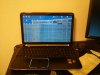
Otherwise, seems to work. Any ideas what the issue is (barring the obvious, cooling)? I tried to check if the display itself was damaged (I don't think it is, but wanted to check anyway) by plugging in an external monitor. The monitor is detected (windows shows it), but has no display. That certainly looks like the display adapter is going nuts. Do you guys think replacing the cooling will remedy the situation? I've already dropped 200 bucks on the replacement mobo and CPU, and I'm not sure when I should just give up. The heatsink assembly isn't too expensive - about 25 bucks, so I'm inclined to order it, but I'd still like an opinion.
Thanks! -
Did you apply new thermal paste? Clean everything up with alcohol, and apply a rice--grain sized dab of thermal compound and reapply the heatsinks. Do this to the cpu and gpu.
I want to upgrade the original 650gb hard drive in mine, I have a stutter when I play games and music. I tried an old ps3 40gb hard drive loaded up with windows 7, and there was no stutter when playing music. Im thinking Seagate Momentus XT 720, since it isnt as expensive as an SSD but should suit me fine. -
I repasted with Arctic silver. And I know there's something wrong - the fan doesn't move at all. I'm just hoping it's not the motherboard, it was a refurb, and with so many parts messed up by that genius comp shop guy (he's accidentally put in an Intel WLAN card in place of the broadcom I had ), I have no clue what's working for sure, and what isn't.
-
well as soon as you turn it on, the fan should spin. I got a hole i drilled out underneath the fan, so I can see it spin. I would check the connectors from the fan to the motherboard to make sure they are in good condition and making contact. They are very thin gauge wiring, so i can imagine them getting messed up when a technician pulls them.
My system would not boot a few times when i was using arctic silver. I would clean the motherboard with alcohol, and slapping it together, but realizing I didnt give the motherboard enough time to dry completely. Now I am using mx-4 and it is rock solid stable. -
I have a HP Pavilion dv6-6135dx that has stopped working properly.
It refuses to turn on most of the time. When it does turn on, I have to boot Windows to safe mode, then restart and it usually works perfectly fine for a couple days or until it goes into any kind of power saving mode or is restarted again. It acts the same whether on battery or AC power.
When it doesn't work, sometimes I get nothing at all and other times it will power on for a second then shut down and the power and charger lights will blink (indicating a power issue), not stopping until all power is removed (then it takes anywhere from a couple hours to a couple days before it will power on again).
I did a bit of searching and concluded that it may be a faulty motherboard, so I replaced it.
I was wrong. It is still doing the exact same thing.
I've also tried all the tricks I could find (different power supply, resetting cmos battery, different RAM configs, no HDD, etc.) with no luck.
Also tried another A8-3500M apu.
Only thing that hasn't been changed is the internal power plug (which I didn't bother with because it acts the same way on only battery power)
What might I be overlooking? Is there a chassis ground somewhere that could cause this? I didn't notice when I had it apart. -
It's definitely not spinning. I'll check the wiring this week. I'm really really hoping it's the wiring. Seems excessive to order a new heatsink assembly without testing that.
I'll repaste it before I finalise the setup. Would the artefacting be indicative of heating though? Or might that be something else?
Thanks! -
Hey, can you pm me.
I can't pm you because you only have 1 post. I think you need 5 posts to get the function.
thx -
Sorry I couldn't get back on sooner. The dysfunctional laptop is my only one currently.
I don't see that it gives me a PM option. Will try to make a few more useful posts. -
Still don't see a PM option on my end. Able to PM me?
-
I see a PM option when I click on your name, so it looks like you have a PM box now.
-
Great little laptop. I have the base config with only the A6-3400m and it still plays the latest games at 1366x768 and acceptable settings at 20+ fps. I have a problem though, I recently tried to burn a dvd. I inserted a DVD+RW and the drive didn't recognize it at all. My config has the Blu-ray combo drive. It reads other dvd+r's and blu-rays just fine and the dvd+rw's get recognized in a different laptop just fine. I tried googling the Blu-ray combo drive's part number and it seems to support DVD+RWs. So, this one has me stumped. Does anybody have any experience with using DVD+RWs on this machine?
-
Does anyone know if its possible to take out the disk reader, and put in another harddrive instead?
*HP dv6z AMD Llano (6XXX series) Owners Lounge*
Discussion in 'HP' started by scy1192, Jun 22, 2011.


