 Problems? See this thread at archive.org.
? Isnt that a NDS?
-
I have a few hopefully quick questions.
I am testing iut the bios from [Unlocked, sp54724] HP Dv6-6135dx [amd].
I was wondering if changing anything under video configuration does anyhting and if so what exactly does each setting do. Also does fusion utility do anything under the acpi table/features control and if so what does it do? Thanks. -
We can hope. Even so it will likely require a BIOS update to properly recognize the chip and not sure if HP will do that.
-
No, it's nowhere near that powerful.
-
after I enable fusion utility, and install fusion utility for desktop(download from AMD). It still cant run.
so, useless atm.
Video options, iirc , you can change one of the option( Powercolor/graphic w.e) to get fix mode switch like the dv6t instead of the dynamic(seamless they call it?)/ or force to boot with dGPU <--- never tested just read off somewhere.T.T
ACPI, I have no clue, never touch it as IDK anything about it.
On top on those : some other stuff that people may like that I tried
AHCI option : doesnt seem to work/save , It stay as IDE some #s AHCI
Fan control : like none ~~
-Fan on temperature : no idea how it work, since fan always on is enable always ( I try disable fan always on, but when the CPU reach 50C, the fan will turn on --> spin mad for 1 sec --> turn off which can get annoying. The fan make less noise when on under 45-50 C compare to a mechanic HDD.
Cool n quite : similar to EIST on intel <-- source of most CPU throttle on this (Some reported that system get unstable when disabled though.)
SATA #1 is on although it have nothing attach to it(6135dx)
Btw: you can change options then flash musho on top of it and the changes stay.
Major thing about this bios is remove whitelist, otherwise a musho with right clock seem to offer more in general. -
Thanks plus rep.
-
I have been using 12.1a drivers and afterburner to oc the gpu again. I have noticed that when ever I oc the dgpu the computer automatically disables xfire. It still shows enable in ccc but the amd system monitor changes from dual graphics to dedicated only and the igpu stops assisting. has anyone else noticed this?
On a side note the newer drives seems to have corrected alot of the xfire stuttering -
Im online now thanks to the intel 6230.. however, bios boot up is slow.. takes a while to get to the HP bios screen, then stays on that for a little bit before loading windows. .upon entering the bios menu, it is slow as well.
In windows, I have a USB Device not recognized message now.. Not sure what it is, I can unplug all usb devices, go to device manager, try to update, uninstall or disable and it still eventually comes up. This is all on camiloml's no whitelist bios.
intel's download center site is either up or down today i think, as I can not access it. I only got to it once to get some drivers and then its down again. -
Anybody has connected a pci-express sound card to the pci-express slot in one laptop? using perhaps this PCI-E 1X to 16X Riser Card Extension Cable (15.5cm-Length) - Free Shipping - DealExtreme?
A real audiophile pci express card can be put in there, perhaps like this http://www.amazon.co.uk/ASUS-Xonar-D2X-XDT-Express/dp/B0011BC1FO/ref=sr_1_5?ie=UTF8&qid=1326423724&sr=8-5 -
I think they prefer a USB DAC AMP setup?
Where is the pci express slot in the dv6 ? -
The wireless card I think is pci-express x1 (the bigger slots normally found at desktops are x16)
-
what do you use to watch your temps with the cpu overclocks?
-
cpuid hwmonitor, i usually leave it open in the taskbar and allow it to run in the background, than when im done gaming or so, i look at the recorded highest temp.
-
I use HWMonitor, but started using MSI Afterburner with the built-in OSD. Works great showing the overlay in game.
-
Seems a good bargain, but are you sure about the 7690m? As far as it seems, the 6750m = 7670m, and the 6770m = 7690m, which would mean, that you're actually getting a 6770m with your llano.
I'd love to see a bios from that combination, and directly compare it to those for our machines. Maybe we can get the voltage adjustment parts from that!
-
i cant get the intel proset wireless software for bluetooth driver package to install, gives a message "there is a problem with this windows installer package. A program required for thsi install to complete could not be run. contact your support personnel or package vendor."
the wifi package works, its just the bluetooth package that I cant get to install. And also the bios boot up is soo slow like i mentioned before... I am tempted to go back to the original card. -
Here is a question for you guys, When i had 740/880 bios video overclock, i could run Fear3, when i add more to the overclock via msi afterburner, i get black screen upon launch, thus having to ctrl alt del close it.
Now i am running the other nowhitelist bios with stock clocks, and when i try to oc to 740/880 before, i get that black screen.. Seems like software here doesn't like software OC??? -
I think is the overlay of MSI afterburner... I remember to have read something about that before.
-
Something isn't right. I have no issue with AHCI. Fan temperature on works. It just kicks in earlier, and ramps up starting with an earlier temperature, but still doesn't go full throttle until 90C, but still some airflow is better than none.
Cool 'n Quiet - I don't even know if it's required since Windows 7 has its own management of CPU. I believe I disabled this but CPU still throttled on idle. If by throttle you mean at high temps, that's implicit in the chip, not Cool 'n Quiet.
Musho's BIOS are just stock BIOS with GPU clock speed change. With 12.1a you can software overclock again. I am using the other BIOS because of the wifi whitelist and fan speed control. -
According to Notebookcheck, the 7690M is the 6770M but with a 100Mhz boost in speed. The 7670M in the dv6 is more like the 6650M (as it comes with DDR3 memory rather than GDDR5), so would be a step down from the 6750M.
As soon as a DV6Z appears in the UK with an MX processor and the 7690M, then my bank balance is suddenly going to feel a bit more empty.
-
Hey guys, first post here. Anyways I have a hp dv6zqe with the AMD A8-3530MX and the one Gigabyte 6750M. I have messed around with trying to update to non hp drivers in the past and ended up having to restore due to even worse performance in games. I have recently bought SWTOR and am wondering if you guys can help me getting it running as good as I can, as well as getting the best(safe) performance on this machine. I have only done a little overclocking in the past, none on this machine for fear of overheating and shortening the lifespan. If you guys could just help me get pointed in the right direction that would be great.
-
Hmm, I've read that one on notebookcheck before, but the test of the envy 15" clearly showed no mhz increase of the 7690m vs 6770m whatsoever.
And are you sure about the DDR3 interface? AMD itself states here that it has GDDR5. Maybe that's the same misunderstanding with our 6750m being read in GPU-Z as DDR3... -
AHCI does work, but I cant change the option to plain AHCI.
If CnQ is off , window CPU control doesnt work anymore.
The fan on temperature is kind of not sure, I dun feel it have effect as my fan kick in at 50C (not max but start hear the fan noise) no matter what I set.
Afterburner every boot up seem to be annoying though. Does the auto overclock work? -
Will check AHCI again.
I turned off CnQ and CPU control was working for me. But will verify again.
Fan definitely starts up sooner, but it still doesn't ramp up as quickly as I'd like. -
About 3.5 hours here, too, without any undervolting yet (been lazy about redoing profiles since I redid the install). I vaguely recall it being in the 4/4.5 hour range with my first undervolt, though.
-
Any news on backlit keyboard, cant type in dark is painful (more so on a squeezed keyboard. yes numpad on 15" is great , but at a cost. Finding the right fn key/page up/down/delete/arrow keys. ehhhhhh Why fn f1 is help !!! I dont need help LOLs)
-
this is what is stopping me from enjoying this intel 6230, any idea?
![[IMG]](images/storyImages/20rns7m.jpg)
-
trying to install the older version of the bluetooth package, getting this
![[IMG]](images/storyImages/ea0e28.jpg)
Edit: went back to the original ralink card for now. -
Try to install it from the device manager, check if it's even recognized by the laptop...
-
i got the ralink installed now. Intel released new wireless drivers today, which I didnt have problems with that part, its just the bluetooth package is separate and that was the one I was having trouble installing.
Procedure is to install the wireless and bluetooth package before installing the card otherwise windows can not detect it. I had the wireless drivers installed, which would allow the card to function and be used, which was ok. I still had an unknown usb device message keep popping up, as well as not being able to install the bluetooth software, (nothing for bluetooth would come up in device manager). I think it is just a software installation issue. But still initial boot up with the 6230 makes the bios boot up slower. -
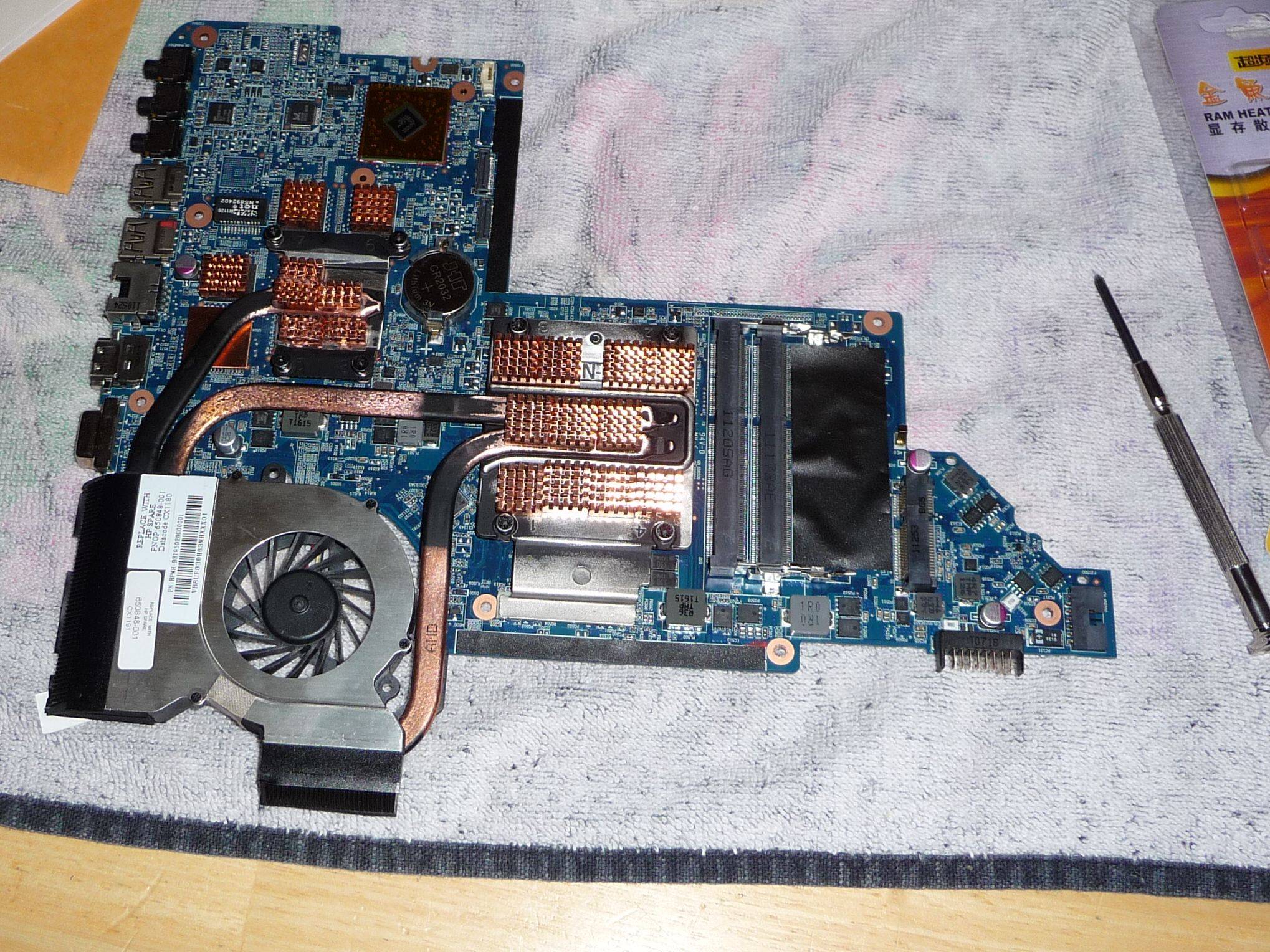
HOLY COW! I just added copper heatsinks to my new cooling assembly and now it runs 2.7GHz at 78C after 15 minutes! Prior to that it would run at 89-92C!!! Difference is too the temps rise slowly instead of rapidly. This is sitting on a laptop cooler too, but will test without cooler later.
So far so good.
-
You probably can reach 2.8 GHz now, congrats!
-
nice piece of work
I'm guessing your dgpu may very well o'clock a bit higher now too.
seer -
very nice, I am thinking about that too, did you put heatsinks on the backside of the gpu ram?
-
I'm running 800/900 GPU/vRAM without issue. Temps were never much of an issue with my GPU. I can reach like 815/905 before it fails on me. I run it at 790/890 just to be safe. But good enough!
I can run 2.8GHz too, have to bump voltage up a bit. I'll test it to see how well it performs. Although playing BF3 now, CPU temps stay < 75C @ 2.7GHz and GPU < 70C @ 790/890. And with a recent find, I can play 1080p at med/low (shadows low, HBAO off, no AA) 30-35FPS!
For the record just either input this in a user.cfg file in your main bf3 folder or just open the console in-game and type it:
WorldRender.DxDeferredCsPathEnable 0
Got this from the FXAA Injector tool as well as through the BF3 thread here at NBR. The full user.cfg I have is:
but just the WorldRender.DxDeferredCsPathEnable 0 will boost your fps 5-8fps. Huge outdoor levels like Caspian Border it can run 25-30 at times, but not 16-20 like it used to. Otherwise typically > 30FPS.Code:WorldRender.SpotLightShadowmapResolution 256 WorldRender.SpotLightShadowmapEnable 0 RenderDevice.TripleBufferingEnable 0 RenderDevice.ForceRenderAheadLimit 0 WorldRender.DxDeferredCsPathEnable 0 PostProcess.DynamicAOEnable 0 WorldRender.TransparencyShadowmapsEnable 0 WorldRender.MotionBlurEnable 0 render.drawfps 1
----------------
yeah I bought some RAM sinks and put them on the ram. I had a copper shim that I put on the one RAM sink because it was right below the GPU heatpipe, just wanted something additional there to help dissipate heat. Also, I had to cut clearance holes underneath my laptop, pretty much required for the CPU.
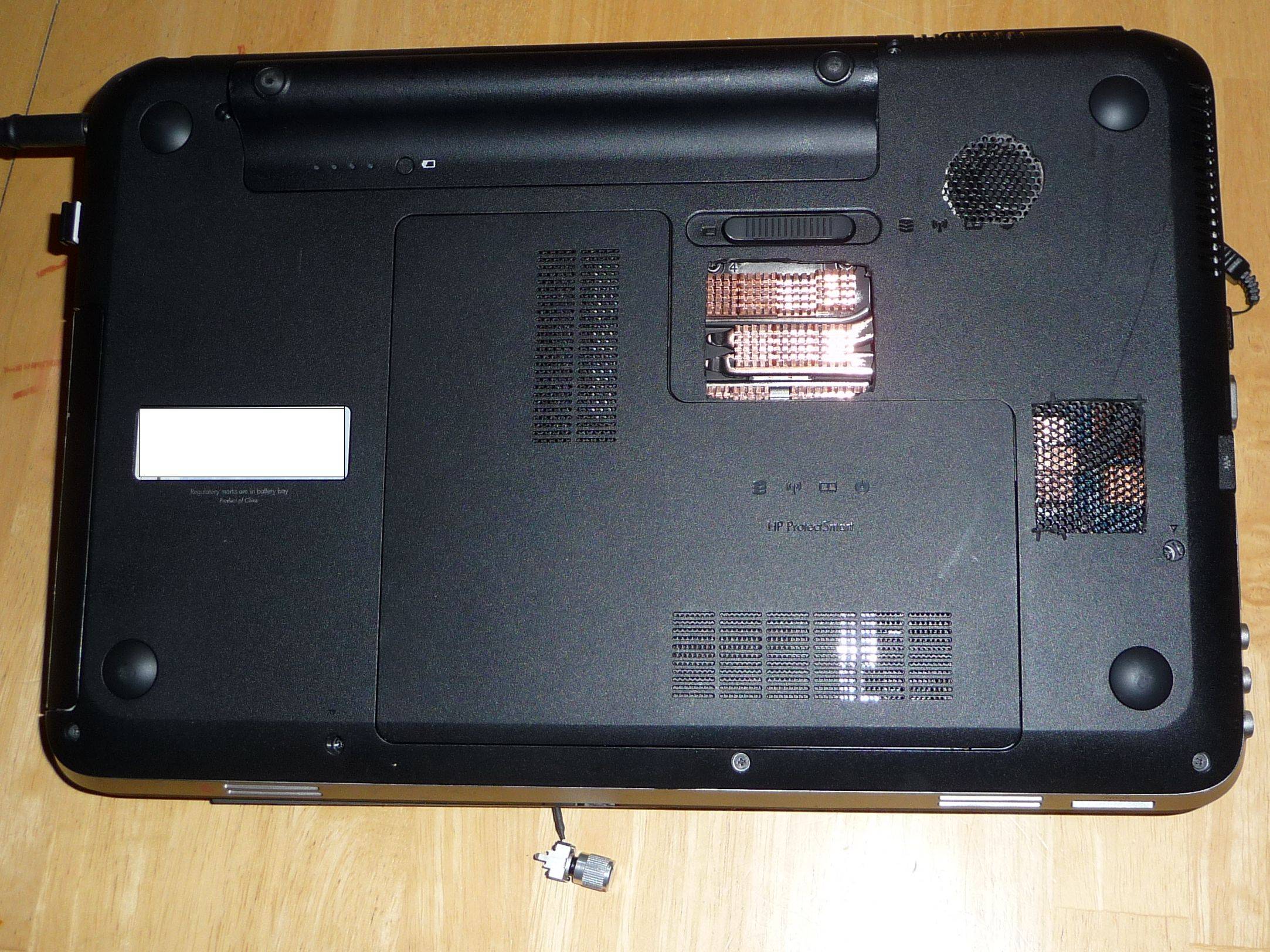
I bought heatsinks like this: http://www.amazon.com/Cosmos-Copper-Cooling-Heatsinks-cooler/dp/B00637X42A
I ordered mine from eBay though, a little bit cheaper (I think $6 instead of $8 and bought 3 packs), as well as thermal tape mainly for the ones I had to cut with the dremel to fit on the GPU. Just ordering from eBay came from China and took like 3 weeks or so to get here.
Sanding off the paint was the worse part. Messy. I got some super fine grit sandpaper from a hobby site, soaked it in alcohol and scrubbed the paint off, then rinsed it thoroughly with alcohol using a soft toothbrush making sure to get all the paint, but more importantly any possible remnant loose copper or aluminum.
Oh yeah, one more thing. This time I used MORE IC Diamond than I did in the past. I might have gone a little light on the paste last time too. -
The motherboard itself is asking that when the laptop is replaced, the very same can become a nice htpc
-
We'll see how Trinity and/or Ivy Bridge perform, then if I go with one of those this will definitely become an HTPC. May even remove the LCD and sell it or use it elsewhere. My current HTPC is having issues. occasional reboots. Can't pinpoint the issue, I just think the thing is getting old (it's an Althon64 X2 939 pin not even AM2).
-
Would there be a slight chance I can pop a radiance screen on the dv6?
Just asking out of curiosity. -
15 inch radiance like in the new Envy 15?
-
Just ran 20 minutes at 2.7GHz Prime95 without cooler and bounced between 87-88C. So cooler has a 10C effect!
What I would ideally like to do is find a 12mm thin 140mm fan that I can power off usb. I would mount it directly to the underbody, because with the 9V battery it's up at an angle. Or perhaps just a 60mm thin fan USB powered over the CPU because that seems to be the worse heat problem. -
nice, i meant on the underside of the motherboard like this, http://i52.tinypic.com/2ps2jxu.jpg
-
It's very possible that you can use the radiance panel from the Envy 15 in the dv6 but nobody has tried yet so there's no guarantee it'll work. I see no reason why it wouldn't, though.
-
here is pics of the cooling stand I made around the 6135dx. out of scrap metal (a friend gave me an old filing cabinet for a car project I was planing to do), cut it up and some fiberboard from a stand that attaches to my desk, just cut it up. used gorilla glue to mount it.. old 140mm case fan wired for usb..
I made it to hit the best parts of the computer..
![[IMG]](images/storyImages/24kz47b.jpg)
![[IMG]](images/storyImages/111jtyt.jpg)
![[IMG]](images/storyImages/2zxqdc8.jpg)
-
Ah nope. I see now. I don't believe there is room at all. Maybe some copper shims might do. I'll take a peek next time I'm inside there.
-
yeah, the new envy 15 screen and cable come together as 1 part on part surfer though.
envy people may have a picture of the connections.
But the parts wont be available soon. Probably wont brother xD. -
Excellent stand, that thing surely will drop a lot of degrees.
-
Did you test the fan yet? I wired up a few PC fans, some that required 12V, but with a little push would actually start, but it didn't move a whole heck of a lot of air with USB. I even bought a 5V fan that I wired to USB and it just didn't push that much air. I ended up with one of these: http://www.amazon.com/Thermaltake-Mobile-External-Cooling-AF0007/dp/B002OJN250/ref=pd_sim_sbs_hg_3 66.5 CFM, adjustable speed control.
It actually moves a lot of air. Mounted it under my Notepal U2 in about the same location as your fan. 140mm would be ideal because it would hit the laptop fan opening at the bottom, GPU, and CPU directly. But 120mm does the trick.
There's also this one I'm considering trying, but still want a 140mm. Amazon.com: Coolerguys 120x120x25mm USB Fan with Grill: Electronics -
yeah, 1 dynex (bestbuy brand) 120mm 12v fan... when i tested it on a usb wire, 5v at .1 amp and still pushes a good amount of air.. I took one apart before and it has ball bearings. It was a loud fan at 12v so that is why i pulled them from my desktop, but they seem to work perfectly for this. Not bad for stuff I had laying around. All I spent was for paint and furniture grip pads to sit the laptop on.
-
Quick question on using k10stat to overclock and undervolt my amd a8 3530mx, is the profile I make permanent or will it default to factory settings after I exit out of k10stat?
-
Hmmmm...if Apple goes with Trinity this year (and, really, they should, given that AMD and Apple's mission is one and the same), then, for the first time since PCs began...I'll go MacBook.
...but not before.
Was at a friend's house this last week, and he has two MacBook Pro's running Lion OS...I was absolutely impressed.
*HP dv6z AMD Llano (6XXX series) Owners Lounge*
Discussion in 'HP' started by scy1192, Jun 22, 2011.


