 Problems? See this thread at archive.org.
I can verify mine, if there is a guideline of how to do that.
I personally suffer from PWM on my TPY a lot =(
-
They just renamed the panels Lenovo. It's LG.
-
But at least now they are taking responsibility..
-
How do you know? What's the source?
When did they started shipping with different ID? And how to check it? -
There is no different ID. I got my TPY in december and it's also "LENOVO" Panel (with a lot of ghosts
 ). Use for example AIDA64. There you find the panel code. My ID is LEN40E4 LP125WF2-SPB1. That's from LG and is similar to the one used in the dell XPS 12.
BugFreeWin likes this.
). Use for example AIDA64. There you find the panel code. My ID is LEN40E4 LP125WF2-SPB1. That's from LG and is similar to the one used in the dell XPS 12.
BugFreeWin likes this. -
Hi all,
I received my TPY (manufactured Mar 2) on Tuesday and it's been great so far. After a day of making sure I didn't have any obvious hardware problems, I replaced the Hybrid Drive I was able to order it with for a Samsung Evo. The performance improvement is phenomenal (my first SSD). Another thank you for everyone who posted tips and instructions for switching out the HDD. It was all really helpful.
I wanted to let you know two things.
1) Maybe it's just the HDD I ordered the TPY with, but it looks like the manufacturing process has changed a bit. The case for the HDD looks to have changed (at least based on the pictures supplied by Lead_Org) and some blue foam padding has been added. You can see some pictures of the foam, etc here. Just some quick pictures I took. I was also surprised at all the tape in place to secure the ribbon connections.
2) Last night, several hours after installing the SSD with no problems, the TPY crashed going to sleep. I figured it was just a bug, so I restarted it, used it for a minute, and put it to sleep. Crashed again. This time on reboot I received four errors. The Lenovo flash screen would appear briefly (but I couldn't access BIOS, etc) and then five or six beeps as I got the following errors:
Thermal sensing error.Note that I don't have anything installed in the M.2 slot. The system would shutdown about 1 second after the final error appeared. The same was true if I connected the TPY to AC power. However, when I attached it to the OneLink, the error changed to something about it attempting to boot from LAN. No beeps, no shutdown. Unplugged it from OneLink and the four errors returned. I was able to fix it by, while it was connected to OneLink, resetting it with the reset pinhole. Since then, it seems to be fine, after a few test standbys and reboots. Anyone else had a similar problem?
Fan Error.
2102 Detection error on SSD1 (M.2)
2101 Detection error on SSD2 (M.2)
Again, so far, besides that error, everything seems to be great, even with the OneLink Pro. Thanks for all of your contributions! -
Visited Microsoft store yesterday and they had two TPYs with digitizer on display.
Didn't get a chance to run the checkerboard test but there was no ghosting visible on any of those machines in normal use.
I don't know how long were they being put on display, as some people have said ghosting takes some time to be problematic -
All TPYs have the same LG panel - LG is the only manufacturer producing 12.5" FHD IPS panels.
My TPY suffers from an arguably substantial ghosting, but mostly that does not bother me too much. I do spend a fair amount of time with TPY docked working on external monitors, but during the meetings I use TPY's own screen and while ghosting is sometimes visible it's not too problematic for me. I wouldn't want to do presentation for customer on it and if I need to do some fine-detailed Photoshop work I make sure to do it on my desktop monitors. -
Nice - either my TPY suffers from a bad case of crappy build quality or i5 suits TPY much better than i7. Were you running on AC under high performance profile? Did you lock the clock to 100%?
-
Hey guys anyone know how to get a replacement computer? Cuz there is somewrong with my tpy and its under warranty
-
Where did you buy it? If directly from Lenovo – look for support contacts on their web page, otherwise bring it to the dealer/shop you bought it from.
-
I have my "On Battery" profile set to maximum of 80% as the chip is more then fast enough for my on battery tasks etc.
The AC profile is set to a maximum of 100% and this test was while the AC was plugged in. For some reason the speed didn't go to the 2.6Ghz the i5-4200U is capable of, maybe my 80% battery profile got stuck. Still it was happy to run at 2.3Ghz which allows me to comfortably play a few games etc. without getting too hot or noisy.
The minimum clock is set to 5% for both Battery and AC profiles so the CPU was allowed to throttle around but it didn't at all during the Prime95 test.
Have you tried maybe cleaning the cpu and sticking some fresh thermal paste on? Maybe your builder applied the thermal paste poorly, or you might have a slightly dodgy fan?
Then again it is possible that the i7 just runs hotter, but seeing as the i7 is just an i5 with some extra cache and a higher clock I can't imagine it running so much hotter that the TPY cannot cope with it. :slazat likes this. -
Hi,
i've recently gotten a different pen, because the one that is on the Yoga by default is too small for me. The one i use now is this one: http://shop.lenovo.com/ISS_Static/ww/ag/merchandising/options/images/large/_460_0_41U3143_V1.jpg
My problem now is, that the button is kind of annoying, and interfering with the way i write. Sometimes when i write, i trigger the button, which stops the writing completely. Now in the Control pannel i disabled the "right click" option of the pen. But this didn't help, because now it still stops my writing as soon as i press the button.
Is there a way to completely disable the functinality of this button?
Greetings -
When running Prime95 on my i7 4500U I see the following CPU speeds and temperature readings for the cores.
Running on 1 logical processor CPU @ 2.59 GHz core0 83°C, core1 73°C
Running on 2 logical processor CPU @ 2.45 GHz core0 83°C, core1 73°C
Running on 3 logical processor CPU @ 1.92 GHz core0 80°C, core1 78°C
Running on 4 logical processor CPU @ 1.92 GHz core0 80°C, core1 78°Clazat likes this. -
I don't think Windows is showing the max clock correctly. Mine says 2.4GHz, although i7 can turbo boost to 3GHz, and indeed HWiNFO shows both cores "visiting" 2.99 for a short while. Still, with 4 threads running prime I cannot get sustained clock higher than 1.8, maybe 1.9 (as reported both by windows and HWiNFO), so your i5 is definitely hitting higher clocks. I have not tried repasting it myself and I do not think I would go there - it's expensive enough to just call on-site support and let the technician fiddle with it...
EDIT: Apparently Windows is showing the HFM clock as the maximum speed - no idea why...lazat likes this. -
Yep - that's pretty much what I am seeing... Under 4 threads it hits higher clocks for a short while and then temps goes up to 80 something and it throttles to 1.8-1.9 and temp goes down to around 70lazat likes this.
-
Thanks all for running some tests! I went for the i7-4500u and are praying to the Gods that i will get a tpy with good thermal construction
if so then I think a i7 is worth it. But if there's bad thermal paste on mine like on rabramovs then i just wasted 125 CAD xD
Sent from my Nexus 5 using Tapatalk -
Hi, still waiting on some of the older users of tpy to weigh in on the ghosting - is it prohibitive for regular work - I'm not too picky about the display -need a workcentre with hybrid capabilities and a digitiser for taking notes. Really need a new laptop for work..... HELP!
-
I personally haven't suffered from ghosting. But from what I have read, the few who have gotten ghosting issues within a week of owning their TPY it has been unusable for them. Some mentioned they are particularly picky about it and others seemed to not mind too much.
It really depends on whether your screen starts showing symptoms within the first two weeks, if it does your probably going to find it very irritating. As well as whether you use solid gray backgrounds for wallpaper and such. I mean image retention wouldn't bother me if it cleared away in a few seconds, but minutes would **** me off. Neither would stop me being productive though, as word documents and emails shouldn't be affected by the start menu icon being stuck on the screen etc.
Best thing would be to take out an onsite warranty and that way while your travelling you can arrange them to come out to you and replace the panel if you do experience ghosting badly, its currently seeing like there's an 80% chance you'll get a decent screen. I made that percentage up to give you an idea from my observations on peoples reports.
Sent from my HTC One using Tapatalkthewish likes this. -
I've had mine for nearly 3 weeks now, and the only thing I've noticed is that when switching from a dark screen, like a netflix movie, to a white desktop or internet browser, it takes about 1.5 seconds to ramp up to full white. I haven't specifically tested with the checker board pattern, because: 1. Frankly I don't want to stress the screen to the point where it could fail and 2. If there is an issue with it, I will be watching for it constantly.
I have been keeping an eye on it though, (and after years of owning a plasma TV I know what ghosting looks like), I have yet to see anything similar to what the others are describing. Even running netflix for 2-3 hours with the TV black bars on the sides, then switching to chrome there is no marks where the bars were (my TV has these burned in due to my family watching netfix on the ps3 without the full screen scaling..)
I ordered mine directly from Lenovo.ca, i7-4500U 8gb with pen. -
That's not quite right. On my previous machine (XPS 12 with a similar panel) i noticed the ghosting only after 6 month. But from some point of time it was rapidly getting worse. So I fear there ist no easy way to say if and when it will occur.
-
I just picked up an i5 128SSD 4GB with digitizer at the Microsoft Store for $990 with student discount! I had been wanting to get one of these since it was announced but was out of my price range. I settled on a Surface Pro 2 a couple weeks ago and exchanged it today. It's odd that the MS store had the non-digitizer version for $1200 a few months ago and now they have the digitizer version for $100 less.
-
Hi
has anybody heard any announcements regarding new thinkpad yoga variants or new features in it at Cebit 2014 Exhibition last week in Hannover, Germany?
Still dreaming of having UMTS/LTE in thinkpad yoga...
bcause I really do not like the glossy screen on T904 -
Just an FYI - the checkerboard pattern test does not stress the panel - it simply shows a static image for 10 minutes and then switches to a uniform gray background. Technically, it's no different than leaving you computer at the desktop or start screen for 10 minutes. The test just makes it easier to notice the retention and provides some common grounds for comparison.
If you are trying to avoid this kind of "stress" then you should probably only use external monitor and stop using TPY's screen all together ;-) That said, based on the information available on the forums, retention severity might actually be related to panel's age (i.e. - time passed since it was manufactured) and not how much it was used... -
BUMP.
In addition to that, i have another issue:
Sometimes when open my laptop from sleep, the mouse (trackpoint and touchpad) doesn't work. I then have to put the laptop to sleep and awake it again for the mouse to work again. This is kind of annoying, does anyone know how to make this bug go away? (FYI: when connecting an external mouse, this external mouse works. So it is really a problem of the track point and touch pad). -
New 64/128 M.2 SSDs emerged in UK which could be suitable for TPY – ZTC Armor: http://www.amazon.co.uk/dp/B00IZNYDBG. Has anyone tried one of these already?
-
The question though which I still have is will ALL panels eventually get image retention? Do I have a chance of getting one with a panel which will only get noticeable image retention in 5 years?
-
Hi, I think you can disable the buttons if you install the Wacom Feel driver. Once installed, go to the "Pen Tablet Properties" Control Panel, where you can select the function of the buttons, including a disable option:
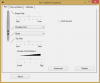
-
I think its definitely possible, I mean some people get it within 2 weeks and I haven't seen any ghosting after 2 months of constant use everyday. So based on that there's a very good chance I won't see any ghosting for a year maybe more. I mean nothing can happen to the panel that hasn't already (heat up cycles etc.) So I can't imagine what could change the screens behaviour etc. Besides some kind of degradation within the screen but that seems a bit extreme.
Sent from my HTC One using Tapatalk -
Hmm, they would fit and work. I wonder if they are any good? By nice to install some games on a desperate SSD to keep my main one free. Games are big
Sent from my HTC One using Tapatalk -
This is an interesting question. I wish I could find a solid resource describing how the image retention (IR) problem manifests and which screens are likely to suffer, and to what extent.
Let's be aware that this problem transcends Lenovo. IPS technology seems to inherently develop some amount of image retention [1] [2] [3]. What's unclear is why some panels exhibit it so much worse than others, and why it sometimes starts to show up late in a device's life while on other devices it becomes noticeable almost immediately. Do there exist IPS devices that never get any image retention?
Apple Macbook Pro-Retina laptops are sold with either Samsung or LG screens, both IPS, but customers noticed IR with some of the LG devices, and never the Samsungs (as far as I can tell). Apple would replace peoples' LG screens with Samsung ones IF the retention was bad enough. Then sometime in 2013 their LG screen models were upgraded and reports of IR stopped. (I don't know if there is any slight IR in any of them, and who knows if people might start experiencing IR in these products someday!)
LG seems to be the biggest provider of IPS panels and also very frequently have IR problems. But when there is a force strong enough to complain, they fix them on select models but then still continue to sell other displays/sizes with bad IR.
It happened on the Lenovo ThinkPad X220 [4], that was an older lower-res display than the latest batch of 12.5" 1920x1080 IPS touchscreens that LG is selling. These screens (and IR issues) have been reported in the Dell XPS 12, Lenovo ThinkPad Yoga, and Fujitsu Q904. I am very sad because I was about to import an expensive Panasonic MX3, but it also has a 12.5" 1920x1080 IPS touchscreen which very probably comes from LG as well!
The problem is IPS is everywhere. If you want to avoid IR then it's not clear what products are safe. But these 12.5" LG screens seem to be the worst, everyone seems to complain about them but I don't see (m)any complaints for 11.6" or 13.3" products (except the early MBP-Rs).
Maybe I'll get a Fujitsu T904 (13.3" IGZO tablet-hybrid) but it looks like its keyboard and touchpad are sad compared to, hilariously, all the 12.5" alternatives I've mentioned (XPS12, TPY, Q904, MX3). I might just have to avoid buying a laptop at this time
[1] Avoiding image persistence on Apple displays
[2] IBM Displays: Image Burn and Screen Savers - United States
[3] Dell LCD Monitor exhibits image retention (similar to monitor burn-in)
[4] Faint Ghosting on X220 IPS screen - Page 47 - Lenovo CommunityBugFreeWin likes this. -
Thanks for that detailed response. The T904, based on the thread over the tablet forum though has a noisy fan and for the cost is not worth it for me. I can get though the TPY with digitizer on the microsoft store though for cheap enough where even if I do get the retention, it won't bother me. The other option is going with the SP2 but that is a waste as the 10 inch screen is simply too small. I also would not be surprised if this November we see a 12+ inch SP3 thus it might be better to just hold out for a little longer and settle on the TPY.
-
Hi! Did you order it or did you go to a physical store? I just chatted with somebody from the MS Store (none in close proximity to me) and they claim that none of their Yogas have a digitizer. Would you mind sharing the product number and/or whatever number MS chose to to identify it in their system (maybe it'll say on your invoice).
I recently ordered a i5 128SSD 8GB from Lenovo directly, but it's hard to ignore a 25% discount for 4GB RAM less. What do you guys think?
Thanks a lot! -
The model number is 20CD-00B4US. I got it from a physical store (Costa Mesa, CA) but it should be the same as this one here
The link even shows digitizer support in the description. So that's either an error or the chat reps don't know what they're talking about. It's a 30 day return from the MS store online. If it isn't a giant hassle to cancel through Lenovo and it's enough of a price difference, it might not hurt to order one.
Edit: I Googled the model number and it comes up on newegg.com as having 8GB RAM and digitizer support, but on a 768 screen. The 768 and digitizer is clearly an error since digitizer support is only available on FHD screens. Mine only has 4GB of RAM, so the 8GB on new egg might be another error or it's just a generic model number. Amazon also has the same model number, but doesn't mention digitizer support. -
Is this the Microsoft Store model:
Buy Lenovo ThinkPad S1 Yoga Touchscreen 2 in 1 - Microsoft Store
?
If so, that seems like a really good deal. I may go by tomorrow and check it out.
You can replace the RAM and SSD in this, right? I have a 256 EVO SSD and an 8gig RAM stick that's waiting for a home. This would be the perfect fit... -
I was in a Microsoft store in Overland Park, KS on Friday looking at the Thinkpad Yoga. They only had one in the store and it was an i5 model with 4GB RAM and 128GB SSD. I "ordered" one with i7, 256GB SSD and 8GB RAM (the order is for the store and I am not obligated to buy it). Both models have the digitizer and the 1920 x 1080 display. It didn't look like the Microsoft store can even order the models without a digitizer. Even though the spec sheet on the store website does not mention the digitizer, I can confirm that the unit on the floor did have one. I'm not sure why they are leaving that out of the description. I would think it would be a pretty big selling point!
-
I gather that the RAM is soldered on the board. So the 8GB stick might need another home.
-
While there's no model number online, that should be the one. $1099 was the original price before student discount. I'm unsure about the SSD and RAM upgrades.
-
Disregard this post. It was for a different model.
So the RAM is soldered and the SSD is an mSATA? Is that right? If so, that makes the MSFT deal look that much worse. It's a good price, but I'm not interested in being limited to 4gigs of RAM forever. I suppose you could rip it open and install a Crucial mSATA but if the RAM is a no-go, guess the only option is $1400 on Lenovo.com. -
Can you check with your receipt if the Product ID's matches "295784300" which is the one on the MS Store? Also, How's the screen (re; ghosting)? Do you notice any performance issues with only 4gb ram while e.g. watching/streaming HD movies (which is probably the most CPU/RAM intensive thing i do regularly... )? Thanks a lot!
May I ask how much the i7/256GB/8GB was? (and if that was with or without tax and or student discount) Thanks!!! -
That is my understanding: the SSD can be upgraded (voiding warranty) but the RAM is soldered on. Still, the MS deal looks pretty good to me. The i7 model is 1399 for the digitizer, 8GB RAM and 256GB hard drive. Last I looked, Lenovo's website had the same specs for $1,574.32 (and that was after their "discount").
Also, FYI, the MS Store website says this model is out of stock, but the rep at the store said they had some they could get for the store. -
The only other number on my receipt, besides the serial number, is CWF-01673.
I don't do any memory intensive things. My main purpose is to take notes at school with OneNote. As mentioned, I was using a SP2 with 4GB and a 4300U and didn't have any issues. I've been watching HD Youtube streaming, but not an actual file. No issues with that either.
As far as the ghosting, I haven't noticed anything at all with normal use. I did the checkerboard test for about five minutes and it was extremely faint. I'm just going to use it as I normally would and see if it happens within the return period. -
Hello everybody. My computer is rapidly dying, and I'm looking at getting a Thinkpad Yoga. From what I gather, ghosting is the only real problem with this model, correct? Other than that, you guys would recommend the Thinkpad Yoga, in general? I'm a student and basically just want a smaller, quiet computer to bring to class and take notes with, as I'm currently using a 15" laptop. I do like to run a ton of tabs on Chrome at one time (50+, yes it's silly), but nowadays most computers shouldn't really have a problem with that, right?
One other thing: I'm seeing two models on the Microsoft Store, one is $999 after a $200 discount, and the other is $1,099, but I can't tell the difference between them. Maybe I'm being dumb, but if someone could tell me if they are the same or not, that would be great.
Here are the links:
Buy Lenovo ThinkPad Yoga Touchscreen 2-in-1 - Intel Core i5 - Microsoft Store
Buy Lenovo ThinkPad S1 Yoga Touchscreen 2 in 1 - Microsoft Store
Thanks everyone. -
The $1,099 has the Wacom Digitizer.
The other one does not. -
The TPY does not have an mSATA SSD. It takes a 2.5 in SSD & an M.2 form factor 42 mm SSD.
Sent from my iPad using Tapatalk -
Just thought I'd weigh in briefly on my new TPY. I'm happy to report that the TPY solves most of the issues I had with the Y2P that I owned for a brief period before returning. High points are a better overall build quality, far better touchpad, matte screen, tighter hinges = much less screen wobble, and I actually like the lift-and-lock keyboard more than I expected despite the fact that the Y2P's moving keys didn't really bother me in tablet mode. Biggest downside so far remains the cost. Some of that was mitigated by going with the hybrid HD. Planning on putting a Samsung EVO 750GB SSD in at some point- has anyone tried swapping the HDD for a SSD in the EVO line and can confirm that it fits?. One strange thing that I've run across is that Windows reports an incorrect maximum clock speed for the 4600U processor. It shows up as 2.10ghz/2.70ghz. I've watched the clock speed on the Performance tab of task manager and it regularly exceeds 2.7ghz, so I'm not sure why the mismatch. Has anyone else experienced this or understand why it happens?
-
1. Samsung SSD fits just fine - it's the same physical size as HDD. There have been some reports about issues with the digitizer after the swap, though - apparently HDD has a magnetic field which needs to be accounted for in digitizer and swapping it for SSD might produce a black-hole effect. YMMV though, as I haven't seen a definitive problem description confirmed by several users.
2. Task manager in windows is kind of a mess when it comes to showing the clock speed. The maximum speed that you are seeing there is a high frequency mode (HFM) clock speed of the CPU which, for the lack of a better description, is a "standard" CPU clock. However, most of the time your CPU will run at lower clock speeds - thanks to the Intel SpeedStep feature, which reduces clock speed/voltage to save power when CPU is underutilized. Newer Intel CPUs have another feature, called TurboBoost - it'll actually increase the clock speed above the HFM for a short period of time (if thermal and power limits allow this) when there is a high demand for CPU processing power. In those cases CPU clock will go above the "maximum speed". I guess MS had a hard time conveying all of this to the user in their task manager interface, so they decided to provide a somewhat simplified version. -
And to elaborate a bit more on this - the drive bay accept regular 7mm drives (SSD or HDD or hybrids), although you might be able to stuff 9mm in there too. This is actually a good thing - 2.5" SSDs are cheaper than their mSATA counterparts and there are much more options to choose from.
The 42mm M.2 slot is kind of useless - it's a SATA port (not PCIe), so you can only use it for SSD, nothing else and AFAIK all M.2 SATA SSDs that'll fit there currently available on the market are small, slow, power hungry and generally not worth the hassle. -
An FYI to those suffering from the OneLink docks disconnect issues - if you are feeling adventurous there is a beta firmware update available for download here Re: OneLink network port flapping - Page 26 - Lenovo Community that apparently fixes the problem.
Or you can wait a bit - most likely it'll be generally available in a week or so... -
I've had my yoga for 2 months strong now and I can recommend this machine. The computer does run quiet for office applications, web browsing, etc. The only time I only hear the fan is when I play a game with 3D graphics and anything else that puts a bit more load on the processor. You should have absolutely no problems running a lot of tabs on a web browser. I am using the 4GB RAM model and it has been running like a champ, no hiccups and runs smooth as butter.
I'm also happy to report I have not seen even a hint of ghosting until now.
Lenovo ThinkPad Yoga
Discussion in 'Lenovo' started by Bloody Nokia Adept, Sep 5, 2013.


