 Problems? See this thread at archive.org.
As others have said, any Wacom tablet PC pen should work. I've been using this, and it works great, though it lack and eraser.
As for the eraser functionality, the basic Windows Pen and Touch control panel allows you to enable the eraser, which should be on by default:
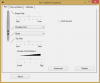
-
Alternatively, you can install the Wacom Feel Driver. This allows more advanced customization. For instance, since my pen lacks a physical eraser, I have the side button configured to erase:
-
does an sd card sit totally flush in the yoga?
-
Have you confirmed that this works with a pen with an eraser? I am using the old ThinkPad pen, which has an eraser, and it does not erase. As far as I know other people have reported the same...
Mine sticks out by about 1 to 2 millimeters. -
My Yoga has worked with a Fujitsu pen with its two buttons and eraser perfectly out of the box - the Wacom UP-818E (two buttons and an eraser, again) that I have now is more of the same. No need to toy with any settings.
Can you play around with some other pens to check eraser functionality? -
What is the update on the screen ghosting issue? I am keen to get one but not sure whether this is a widespread problem or not?
-
So far the best stylus I have used is the Wacom Bamboo Stylus Feel. It's weighted like a proper pen has very good accuracy even at angles and is very comfortable to use. It basically looks and feels like a decent normal pen but with a Wacom tip

Sent from my HTC One using Tapatalk -
Lenovo have been able to replicate it and they have said their suppliers have a revised panel that is fixed. So the new panels should slowly trickle into the supply chain soon. Just waiting on an update now from Lenovo as to when the new panels are available
Sent from my HTC One using Tapatalk -
Not sure if this was brought up on here about the StorageConnector application causing massive network issues.
But Lenovo has already released a new version to fix this critical bug that users experienced. I personally didn't experience this but i'm just letting people know that they can check the Lenovo updater and download the fixed version now. -
Should we go about opening a service request with them now? Or is there no point until the new panels are available?
As for other items...
I also chatted with a Lenovo rep because I was planning to get an extended warranty. But he indicated that it's a sealed system, so replacing the HD would void the warranty. That doesn't sit well with me, since that would mean I'm prevented from upgrading my HD for 3 years. However, they have a "sealed battery" warranty, which seems like it might be a good idea since these batteries are bound to lose their ability in that time. Anyone deal with a sealed battery warranty before? Can we just get it replaced at the 3-year mark to get a fresh battery? Or do we have to demonstrate a certain value of remaining battery life to take advantage of that?
As for the person who asked about the SD card, indeed, the SD card sticks out 1-2mm like others have said. I keep a 32GB in there as a secondary storage and accidentally ejected it in my bag twice. Not a big deal though since I just push it right back in. -
There's no point atm, wait till they confirm that the new panels are available and stuff.
Sent from my HTC One using Tapatalk -
I'm not sure if it was necessary for the eraser or not, but I did install the Wacom Feel Drivers.
-
I wonder if ordering from the Lenovo site vs getting one from a bricks and mortar may mean you do get the new panels sooner.
-
So now my screen will not auto-rotate even though that feature is turned on. In addition, I have lost all touch capability in my screen. The trackpad and pen still work, but the screen does not respond to my fingers when I touch the screen. Is there a driver that I need to reinstall or adjust the settings for?
-
System restore as you have either screwed with something. Or you have a hardware fault.
Sent from my HTC One using Tapatalk -
Not just yet it won't as Lenovo are still in the process of getting the new panels in their supply chain but feel free to buy one then just take it in for a replacement panel IF yours experiences image retention.
The term ghosting is incorrect, not sure why people call it ghosting when it's really image retention. Ghosting is to do with fast moving objects and slight blur where the screen doesn't react fast enough
Sent from my HTC One using Tapatalk -
i7-2620 2,70Ghz
8Gbyte -
no, the overall experience. Anyway, I don't use the digitizer pen so much
-
battery life is a good point for me. Beside my x220t battery with 9 cell is almost dead and need replacement. So instead of replacing the battery I was looking around, overall I am happy with my x220T, maybe it weights little much
-
I've tried all different settings, but the touchpad is still not recognizing all my clicks. The success rate is close to 50%. Any suggestions?
Thanks -
Running the latest drivers??
Sent from my HTC One using Tapatalk -
So, just wanted to post an update here. The mainboard replacement that was ordered almost two months ago FINALLY came in and I was able to get my TPY repaired; so much for my "next-day" on-site warranty! But anyway, the frozen throttle issue is fixed, and this thing is sooo much faster. Man, it's really nice.
Unfortunately, I'm now suffering from something that a few other posters have noted after getting their mainboards replaced. Namely, the screen auto-rotation no longer works, and when I fold the screen all the way back the trackpad does not disengage (I'm guessing the keyboard is also still active, but since it physically locks it's hard to tell). This seems to be due to the "HID Sensor Collective" driver now having an error, but I've been unable to fix it. Disabling/re-enabling, uninstalling/re-installing/rebooting, and even disabling/re-enabling via the BIOS all have no effect (but seemed to fix it for other folks in the Yoga 2 Pro Lenovo forum). And I've found nothing useful via Google or forum searching. Have any of the previous posters that had this problem been able to fix it? @eljer or @ground_state? Pretty annoying, since the ability to go into "tablet mode" is one of the main reasons I bought this thing! -
I tried system restore and the touch screen is still unresponsive to anything other than the pen and trackpad. I searched around online and someone pointed towards the Human Interface Devices section in the Device Manager. There should be a device that is "HID-compliant Touchscreen", but that is missing from my list. Can I download this missing file from somewhere?
And perhaps related to @grassman77's auto-rotation issue, I also don't have the "HID-compatible Sensor Collective" driver. Could someone post the full list of HID devices from a working computer? -
Sure thing, here is all my HID devices
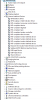
http://puu.sh/8c0Ge.png -
I wouldn't go as far as calling my TPY "working", but the touchscreen is ok... (ignore the disabled wacom device it is to prevent cursor jumps to the lower right corner issue)
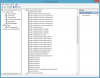
-
Hmm, after looking at the screenshot it suddenly seems pretty useless to me, so if you want me to send you full report with device IDs and such PM me.
-
Does your screen auto-rotate? One thing to do is, in the Device Manager window, go up to the View menu and enable "Show Hidden Devices." It could be that some of the items you're looking for are hidden.
Are you in the US or elsewhere? I've seen some issues where European Win8.1 versions (8.1 Pro N or NK) don't come with Windows Media Player, and for some reason installing the media package from Microsoft fixes the auto-rotate issue (for some people). As for myself, I'm in the US, and it won't even let me install. Additionally, take a look at the Lenovo support website, I'm pretty sure I've seen drivers for the TPY monitor (might be for Win7, though, I can't recall), but it sounds like that might be worth a try.
I'll note that I I haven't tried a Windows "Refresh" yet... and I'm not about to do a full reinstall at this point unless I absolutely have to. But both would certainly be options if all else fails. -
@grassman77
I went to a local Authorized Lenovo Warranty Center and after looking at my computer, they ordered a replacement main board. Unfortunately, after they installed it, the autorotate and touchpad disable still weren't fixed. I'm almost ready to just tell Lenovo to send me a new TPY and I'll ship the old one back to them. I don't want to have to sit around for another two weeks waiting to get mine back. Also, doing a "Refresh" didn't work for me.
@godofwar424
What devices do you have under the "Sensor" category? I seem to be missing that in my Device Manager, even when I show hidden devices. Does everyone with a functioning TPY have the "Sensor" category? -
Anyone tried a portable external battery with the device? What brand / product would be good?
I feel battery life is one of the devices few weaknesses that the thinkpad yoga has. -
So I found the HID-compliant touchscreen as a hidden device. I uninstalled it and reboot the computer, then scanned for hardware change and it hasn't come back. Is there some other source where I can find the driver? Sorry for the noob questions!
-
Look a few pages back as I posted the same question, I got a reply with a perfect solution. Can't remember the name of it though
Sent from my HTC One using Tapatalk -
I have two sensors.
HID Sensor Collection
Simple-Device Orientation Sensor
Sent from my HTC One using Tapatalk -
Lenovo ThinkPad Yoga Clickpad: Lenovo ThinkPad Yoga Clickpad - YouTube
-
I wonder if the screen issues are due to the W8.1 update. I didn't have touchscreen issues until after I installed the W8.1 update (I think), and according to other forums many people are also experiencing unresponsive touchscreens after installing the update - and not just on Lenovo computers but other manufacturers as well.
-
Does anyone know if there is somewhere to download and install these devices? Missing these might very well be why the autorotate and touchpad disable do not work.
-
In my case (and at least some others'), it's not that they're missing, it's that they aren't working... i.e. the yellow exclamation point in device manager, with a "This device cannot start (code 10)" error. According to the device manager entry, these are actually Windows drivers. Lenovo has something along these lines to download for Win7, but for Win8 they seem to be built in. So, I've been unable to actually uninstall them entirely in order to freshly install them. I'm curious if our replacement mainboards just have a slightly different HID chipset or something and the drivers just aren't picking that up? No clue, but it's not an isolated case. I'm curious as to whether anyone has had their mainboard replaced and has not had this problem.
-
Can you try this:
Right click on both of these and press Uninstall.
HID Sensor Collection
Simple-Device Orientation Sensor
Now once they have uninstalled and are no longer visible. Go to the top bar (where File, Action and View are)
Press Action and then Scan for Hardware Changes
With a bit of luck, your drivers should re-install.
Do a restart after this and see if it works
-
I've turned off the adaptive brightness, but i still feel like it changes the brightness level automatically. Also, the brightness level when it is plugged in is higher. Any way I can disable the driver for this?
Thanks -
Mine are simply not there, even after doing a reinstall of Windows 8 (the "Remove Everything and Reinstall Windows" option). Even if they did come "built in" to Windows 8, it seems to me that they are still simply drivers, and as such there should be a standalone version of them.
-
No, they are but not available as they are built into Windows itself when the image is baked by the manufacturer. Reinstalling Windows will definitely cause this issue as I have seen people report this on other laptops after reinstalling. You need to restore using Lenovo recovery instead of a stock Windows reinstall.
Sent from my HTC One using Tapatalk -
As I mentioned in a previous post, I've tried this... Many, many times... No dice. Additionally, with note to your other post, previous to the replacement of my mainboard (in an attempt to fix the problem that was, ultimately, a hardware issue), I had reinstalled Windows using a pure Microsoft source (i.e. not manufacturer "tainted") and had no trouble with the screen rotation or anything... So, it seems to me these drivers are pure MS, and I'm not sure why a reinstall of this sort would be causing other people trouble (maybe on Win7 or something, or for some sensor chipset that isn't compatible..?).
-
Hey,
I had the same problem concerning screen rotation on the Thinkpad Yoga and was finally able to solve it - see here:
Thinkpad Yoga won't rotate? - Page 2 - Lenovo Community
Regards,
Davidlazat, godofwar424, jcil4ever and 1 other person like this. -
I am unable to install the driver you mentioned due to windows versions.. how did you get it to work on windows 8?
I'd ask on the lenovo forum but they're apparently having captcha issues and I can't register. -
I've turned off the adaptive brightness, but i still feel like it changes the brightness level automatically. Also, the brightness level when it is plugged in is higher. Any way I can disable the driver for this?
Thanks -
Hi guys,
A new owner of the Yoga. So far so good!
Just a question - my battery charges up to 98%. I assume this is to do with battery calibration. Is the best solution is charge it up to full (or 98% in my case), use it up until it reaches 0%, and then fully charge up again? -
First make sure it runs down below 90% or so before recharging, otherwise the logic doesn't necessarily top off the charge. If it still doesn't charge to 100% then you can perform a battery calibration using the energy manager app. It takes a number of hours to run so set aside the time appropriately. The laptop is plugged in during the calibration process.
-
Have you seen the following?
http://forums.lenovo.com/t5/Idea-Wi...re-and-how-to-disable-in-Windows/ta-p/1294763
Re. The levels, you change change the defaults to be the same under the power settings in the control panel for the profile you have selected. -
Go into where you turn off adaptive brightness and check the "Display Brightness" then make sure the values for Plugged in and Battery are the same. Voila!
There is no driver for this and if Adaptive brightness is off, then its off. This is built into windows not some third party Lenovo thingy, so no driver. If its off its off
-
Where is this app? I dont see it in the store or lenovo tools.
Sent from my SM-N900V using Tapatalk -
My mistake, thinkpads man not have this lenovo software. Not sure how to recalibrate the battery then. Perhaps someone else can chime in.
Lenovo ThinkPad Yoga
Discussion in 'Lenovo' started by Bloody Nokia Adept, Sep 5, 2013.


