Problems? See this thread at archive.org.
I purchased my TPY i74600, 1080p, 8G ram, 256G SSD on Amazon from a 3rd party vendor as a refurb for $598 and it looks brand new with zero issues. I'm pretty savvy about upgrading laptops and opened it up out of curiosity. I did order a 840 EVO 500G SSD for more space but other then that it's a pretty decent machine. I like it better then the Asus I replaced it with. BTW...This is my 3rd Refurb laptop I purchased from an Amazon seller and all were good experiences.
-
-
So, I have two options in my hands.
Thinkpad Yoga i5 / 8g / 128g ssd : $900 @ Microsoft store with student discount
Thinkpad T440s i5 / 12g / 256g ssd : $1333
T440s wins over TPY in terms of screen size, and that's it. TPY is winning in terms of price efficiency. I don't think I will find much value in the digitizer.
Is one option a no-brainer over the other? What do you think?
Should I just go for the Thinkpad Yoga 14? Argh it's just so hard while it doesn't seem like a significant difference... -
No active digitizer on the TPY 14 if that means anything to you. But that was one of the reasons I picked up the TPY in the first place and I assume that's why a lot of people consider the TPY as well. There's only like 2 or 3 laptops like this with an active digitizer and the TPY is by far the most affordable.
-
TPY 14 has a dedicated graphics card in a reasonable form factor. That alone makes it worth the money, not to mention the ThinkPad build quality.
-
TPY 14: no digitizer but has a discrete GPU
in terms of upgradeability, T440s > TPY 12; u can't upgrade the ram on the TPY 12 yourself since it is soldered in both versions of the TPY and the T440s has a longer battery life thanks to an external swappable battery & lenovo's power bridge tech
u should consider the x240 if the hybrid/convertible form factor doesn't matter to u; it has the same screen size and the same price point as the TPY 12 and has power bridge
or wait a little bit longer for x250 if u're a thinkpad trackpad purist as the traditional thinkpad track buttons will make a comeback -
I think I will pull the trigger on the TPY 14.
However, I have checked on Best Buy today and both displayed models have that awful creaking sound on the right palmrest. I guess I have to unpack it right after the purchase and check whether mine will be okay. I won't be able to buy this machine online...
The current pricing is $1,099 but I hope it will go down to $999 again within 30 days so that I can get the price matched. -
How can I stop the screen from rotating when in laptop mode but still let it rotate in tablet mode?
-
Looks like I will be sending in my laptop for repair next week. The volume up button is not working well, it looks like its stuck. So no it only turns the volume down. Any tips before I take it in?
I have never worked with Lenovo support before. Do i need to take out my SSD? I was gonna make an image backup of everyhting on the computer before I send it in -
Hello. I am a new ThinkPad Yoga owner. I bought the laptop at a Microsoft Store yesterday, and am very excited about it. However, there are a couple of things I've noticed in the physical build, and I am wondering if they're normal and expected, or if I got a slightly defective unit.
- The bezel under the screen has a little give in it, especially in the center around the Windows button. When I apply a little pressure to the bezel under the screen, it flexes in a little, and does not seem to be connected to the glass of the display. Is this normal?
- When folding the screen from tablet mode to laptop mode, I hear a small click. The click happens somewhere at the 50% point between tablet and laptop mode.
- Last night, when folding the screen back into laptop mode, I heard a distinct spring noise from the left side of the laptop. Like, a SPRONG. But I have only heard it that one time, and can't seem to reproduce it.
- There's a creak in the palmrest to the left of the touchpad.
Are these things to be worried about? Should I try to pursue an exchange, or is this just all normal stuff?
Thanks!! -
I'd make the image backup. I didn't have to take out my SSD. If you're in the US, they'll give you very good instructions on what you'll need to do or not do with the box they send you that you are to use to ship your laptop to their repair service. They were surprisingly fast with me too. Less than 2 weeks but I only needed software fixes I think.
-
I don't have those issue except one. My screen does seem to stick slightly out of the bottom bezel though for about an inch with some give. I'm worried about that myself. But I have a 2 year accidental damage warranty on mine so I'm just going to stick with it for now and see if it gets worse.
Plus I had that screen ghosting issue though it currently appears fixed after I sent the laptop in for repair (don't know if it's really fixed yet still testing). I feel like you really need a decent warranty with this laptop. -
I had issue #4 on my right side of the palmrest. Exchanged it and it came back with an uneven backlight on the keyboard. I am quite disappointed at Lenovo's build quality at its price. I just grabbed a Dell Latitude E7440 at below $600 from eBay... at least the price is more compelling.
-
Are you sure you don't hear a slight click when folding from tablet to laptop mode? I have had other people online tell me this is normal.
-
This is what makes me hesitate to try an exchange at the store. I could end up with a unit with even worse issues... I might just try to convince myself that the issues I have are no big deal.
-
How quiet is this click? I don't get a click at the half way point. I do get some of the tiniest sounds when rotating the screen that vary each time I rotate it. The sounds are so quiet I don't think anything of them.
If build quality is really poor, maybe people should think about getting something else? I would if I hadn't bought it used for a great price and with a 2 year accident warranty. -
Well, the click was pretty quiet. I think it is normal behavior, I just get weird and paranoid about these things.
One real issue that is bugging me, though, is disabling the tap-to-click on the touchpad. I am not a fan of tap-to-click. I would rather have the physical feedback when I click so I don't make accidental clicks. However, whenever I disable tap-to-click in the trackpad options, it re-enables itself after the laptop comes back from sleep. It's very annoying. I tried updating the drivers and reinstalling the driers, but it keep happening. -
I use AutoHotkey to change the PrtScr key to Pause:
; AHK Script for pausing media player
; Re-assigns the PrtSc key to pause/play
; Platform: Win 8.1 / 64 bit
; 03.04.2014
; play/pause
PrintScreen::Send {Media_Play_Pause}
return
-
I recently bought this laptop with 128 GB ssd installed in it. Can some one please help me with the harddisk upgrade?
1.) Does the laptop have second slot for ssd?. If yes what type of ssd can I buy?
2.) Is there a link of how to do the upgrade?
thanks in advance. -
Hey Guys
I just got my second Thinkpad Yoga 14, the second one had the battery problem.
Its a great machine but I really want to swap in a Samsung ssd.
Will it void the warranty or can I do it on my own?
Thanks
Evan. -
Any part that is customer replaceable can be replaced without voiding the warranty. I'm thinking the answer to your question is yes.
-
This laptop can support 1 2.5" 7mm SSD/HDD and one 42mm 2242 model m.2 Sata ssd (takes place of the 3g/mobile data card)
if using the m.2 , some ssd's in the 2.5" slot MAY disable the ssd from showing , its rare but on some model laptops this happens.
i will test it for you tonight as i have m.2 ssd in my yoga with a 512gb 2.5" also.
should you be interested in m.2 ssd i recommend the adata sp900 42mm m.2 (avail in 128 or 256gb) -
Thank you for helping out, please let me know the result If you are able to test it.
Regards -
my samsung SSD + adata SP900 (42mm m.2) work great together , both are bootable
im running windows 8.1 / ubuntu 12.04 and Android 5.0 across those ssd's -
Hi,
I bought the Hard Disk version with Wifi N card.
I'm also interested in changing the hard disk and wifi card.
For the hard disk, which option should I consider ?
- Leave the hard disk inside, change the m.2 ssd and install windows 8.1 on the ssd ?
- Remove hard disk and install a traditional ssd inside ?
I'd like to have 512 GB space on the ssd but don't know if it's really useful.
I found this one for m.2 format : http://www.amazon.fr/Transcend-TS256GMTS400-interne-Type-2242/dp/B00KLTPUG4/ but seems like there's no 512GB m.2 ssd
I also would like to change wifi card for an AC, possibly compatible with an hackintosh.
Would you have any reference ?
And last question, is there any guide to install the system from scratch ?
Many thanks for your help ! -
256gb is the biggest so far in 42mm form factor.
wifi can be changed with any mini pcie wireless card(check for lenovo blacklisted wireless cards). For hackintosh im not sure as i have not done it in years but i would assume a broadcom chipset would be required.
i would consider using a 256 m.2 and a larger hdd or ssd (i used ssd in my case)
there are lots of options open to you , i would stay far away from transcend and go for the intel / adata variants of the 2242 ssd.Cygnust likes this. -
Thanks for helping out. I am deciding what to buy for the new ssd. Any particular reason for the advise on why to stay away from transcend?
Will this fit my need for the secondary ssd -
http://www.amazon.com/MyDigitalSSD-...id=1422318752&sr=1-1&keywords=mydigital+256gb
Thanks heatlessLast edited: Jan 26, 2015 -
Hey everyone,
So i just bought thinkpad yoga and I'm pretty excited for it but I've seen a lot of stuff while looking around as far as various downloads, bloatware to remove, accessories and the like to get the best experience out of it. Could anyone point me toward a 'guide' if you will for all of these little things, otherwise, I'm happy to hear all suggestions.
(And i realize I'm sitting on a huge pile of knowledge here but 204 pages is slightly daunting to look through) -
I hope you were able to get a good deal on it. Lenovo looks to be having a blowout sale on it right now, maybe (hopefully) making way for the new model soon.
-
Yes, I agree the trackpad sucks. I have had the laptop for a month now still finding it difficult to use the trackpad sometimes.
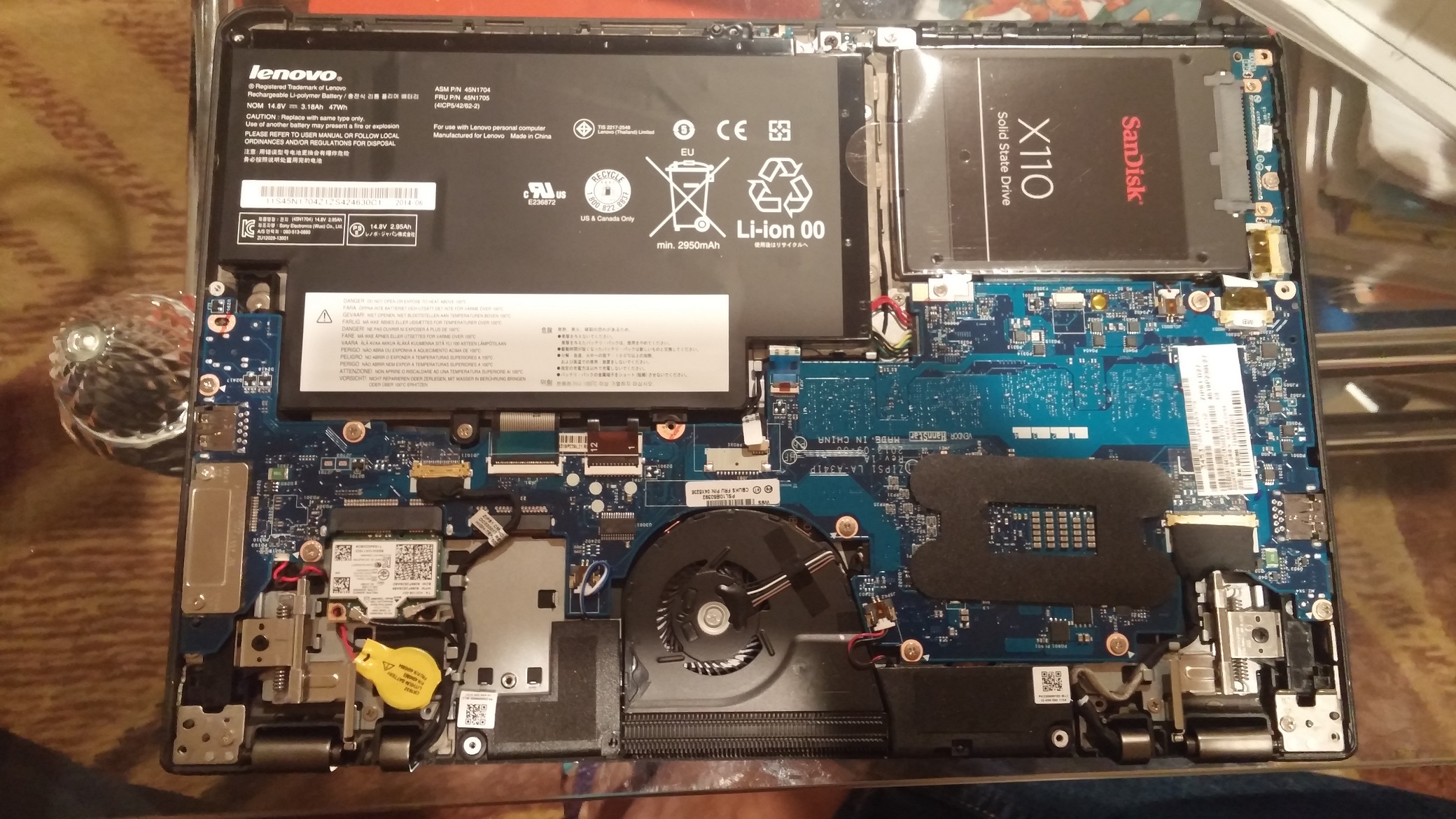
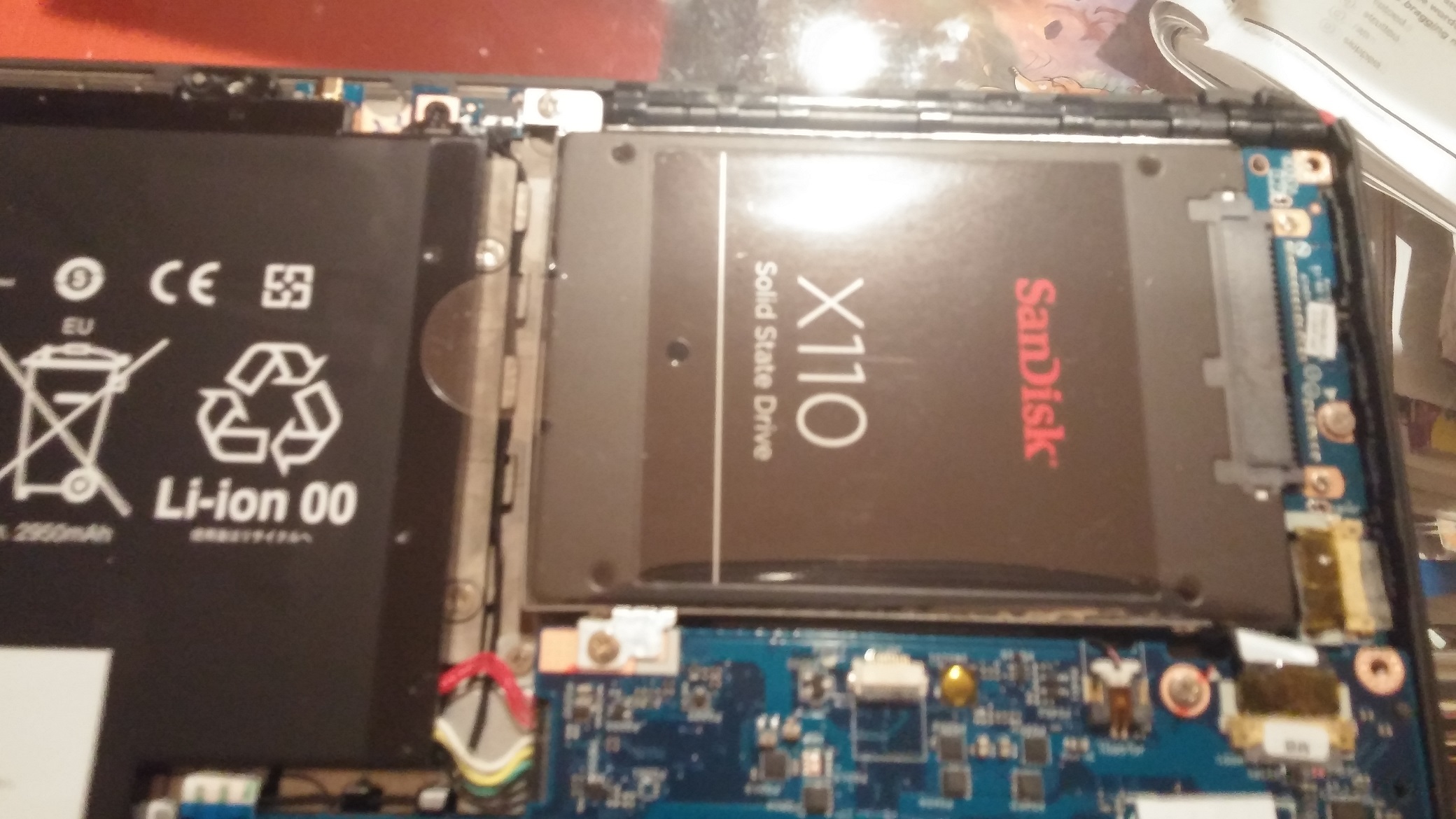
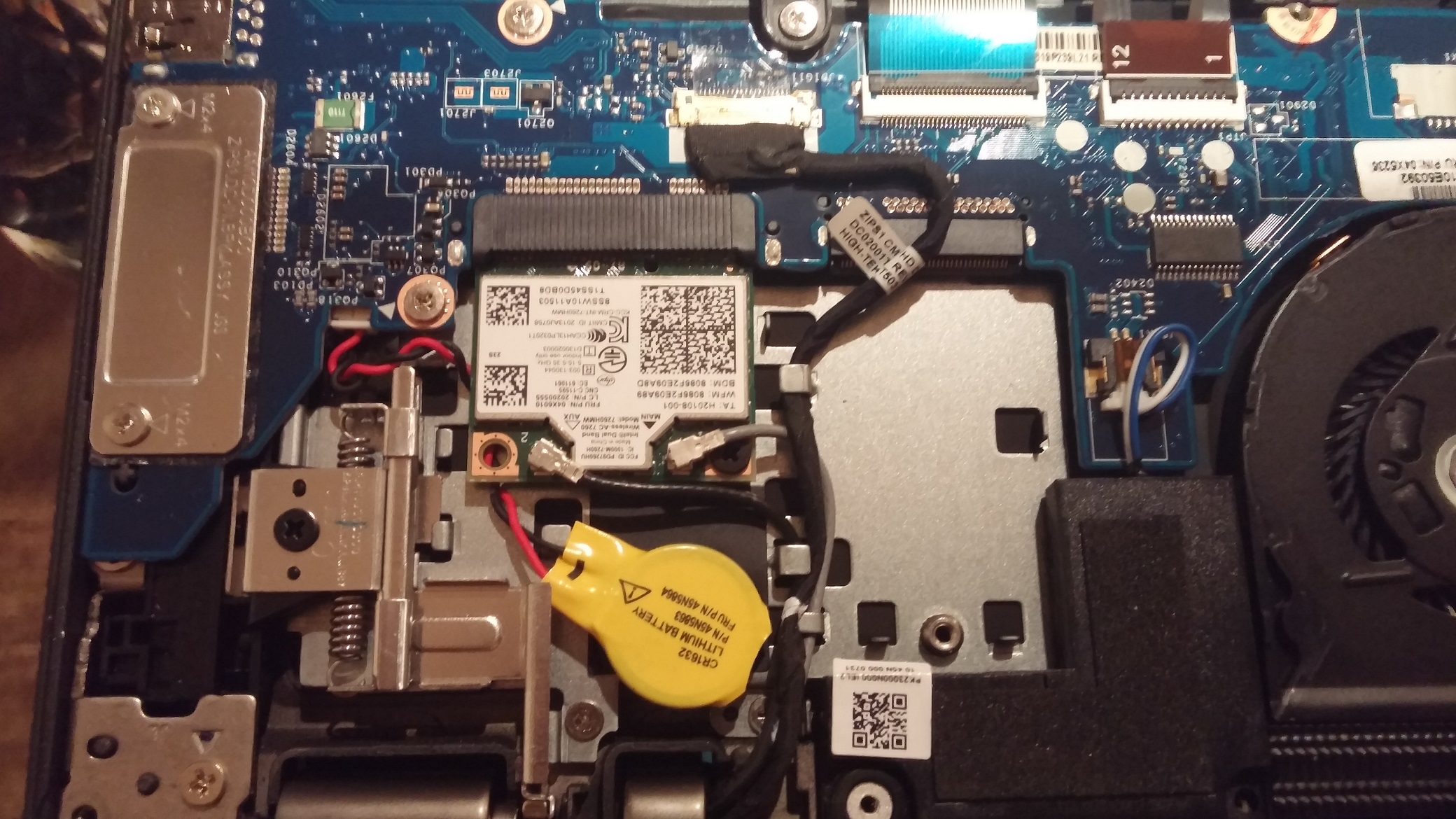
here are some pictures inside Lenovo Thinkpad Yoga. I recently upgraded the primary SSD to Samsung EVO 850 and took these pictures. They might be helpful to some one.Attached Files:
-
-
I recently upgraded my SSD and lost my OKR partition which was kind of expected.
I do have a recovery USB drive built before upgrading the SSD and also the original SSD. Is there any way to restore the lost OKR partition? -
I just bought a new Lenovo ThinkPad Yoga S1 Signature Edition (i5 4200u, 8gb ram, 128gig ssd with digitizer pen), from amazon. I'm only getting about 4 hours of battery life just browsing the web on wifi at half brightness with occasional youtube. This seems extremely lackluster to me. It says eight hours so Id assume 6.5 to 7.5 hours, but 4 is just bad. Anyone have any suggestions to see figure out what's going on? I might just get another laptop altogether.
I keep it on Balanced because on Power Saver it lagged on 1080p youtube videos (really?) so I'm not sure if that's why, but it still seems way too low.Last edited: Feb 15, 2015 -
I just got new 2 Lenovo Thinkpad 12 gen 2's in this morning and they have made quite a few upgrades over the S1. Better speakers, better mic, better touchpad and finally uses wacom stylus drivers.
-
In what ways did the trackpad improve?
-
Added the trackpoint buttons back in, and uses a hinged click mechanism now.
-
Any other change? Weight and thickness are the same?
I like the design, but it looks a little bit too bulky for me. -
Any changes to the included pen / stylus slot?
-
With the new baytraill chip, they could use a smaller heatsink, other than that it has not changed much
the pen now uses the wacom driver, but still does not have an eraser. The slot and pen have kept the same design.Last edited: Feb 19, 2015 -
They finally put it on sale, too hard to pass up now...
Really difficult choice between this and the new Helix with Keyboard. -
I will never buy another helix. After having to manage over 100 Gen 1's and almost every sing one going in for repair and sometimes more than once. They are not a good product. The yoga line has been far more reliable and superior to the helix laptops.
-
ThinkPad Yoga 12 uses Broadwell, not Bay Trail.
-
Hi!
Bought a brand new Lenovo ThinkPad Yoga with standard 2.5" 256GB Samsung EVO. Client wished for M.2 256GB SSD and 1TB 5400rpm HDD. Installed Adata SSD Premier Pro SP900 256GB M.2 2242 and Hitachi 1TB Z5K1000 5400rpm HDD. Now system crashes with BSOD and after restart no M.2 SSD in BIOS. Only HDD is visible. After turning off and back on M.2 SSD reappears and works until next crash.
There is no problem with motherboard. Local Lenovo Warranty service put in the new mobo reinstalled system completely and the problem is still there. They also mentioned that M.2 SSD larger than ~30GB is not supported by the system as M.2 is for cache only. Is it true somehow? Or I just lucky with this particular M.2 SSD?
PS: I will wait for warranty replacement of Adata SSD Premier Pro SP900 256GB M.2 2242 and try again. -
thank you, i missed typed.
-
I also got the helix gen1, and requested a service to change the motherboard. After that, everything works perfectly. I think that the early batches got bad hardware design or component but they improved it in the latter batches.
Hopefully, the Gen 2 doesn't have such problem. -
Hello everyone.
I'm having serious problems with my Thinkpad S1 Yoga touchpad. Very often it doesn't move the cursor when I use it but I can still scroll with two fingers and swipe from left or right to access the charmsbar or the app bar. I have the newest drivers installed. When I start synaptics moodpad it shows how it registers touch but the cursor just doesn't want to move. There are also no indications of faulty hardware anywhere in the device manager or with diagnosis tools. I am trying to solve this problem for over a year now and replacing the touchpad didn't even solve it. -
Hello all,
I've finally made my decision and purchased the Thinkpad Yoga last May of 2014 -- That Thinkpad Yoga ( http://tinyurl.com/kornr3q) to be exact. However, a few months ago, the screen retention sadly started to become an issue, and weirdly enough, my USB slots are acting funny whenever I have a "detectable" device connected (such as phone, storage, camera, etc). I still have about 180 on my Lenovo original warranty, which I still can extend to another 2-3 years if I wanted to. and I also have purchased another 3-4 years 3rd party warranty from amazon. Both still valid to this date.
I'm wondering, am I still eligible for a return? If yes, is there a chance for me to get the improved 2nd gen Yoga? if yes, would you guys be so kind and guide me through the process if you're familiar/experienced.
If not, what would you guys advise me to do? What would you do in my situation? If you don't know, can you direct me to someone who might know and and maybe willing to help?
That'll really mean a lot, and I'd very much appreciate any help I could get.
Thanks a lot in advance! -
Wait... does the TPY really not support eraser? Lenovo seems to say the pen has eraser functionality: http://support.lenovo.com/us/en/documents/pd030464
-
Well, you are mixing things together here.
Yes, the TP Yoga support "pens" with erasers.
Not all pens have erasers.
The "Built-in" little itty bitty pen in the silo does not have eraser. It does have a side click button (usually for select or right click that might be reprogrammable to erase, but not sure.
The Pen you link to above does have an erase, but that's not the one that shipped with my TP Yoga. I've seen that type of pen ship with the Helix and the newer tablets, but not the Yoga. -
Hi, recently got the signature edition of thinkpad yoga (i5 4200U,8gb Ram,128gb SSD,1080p with digitizer) from Amazon. Track pad is just awesome but there is a bug. The tap and drag option in track pad settings is unchecked automatically after every few hours of use. Has any one experienced this problem?
-
Hi guys! I used to have the Thinkpad Yoga 12,5" Gen 1 with i7-4500U. I recently broke it and can get a comparable replacement by my insurance company. I've seen that there is a Gen2 out and wondering if the gen2 i5-5200U would be a step down in performance and battery life for me compared to gen1 i7-4500U?
is there someone with the gen2 i5-5200 that could make a review? Atleast just batterylife and performance. Ive searched the net but cant find anything.
The same goes for someone with gen2 i7-5500U.
Thanks a lot in advance
Joel
Lenovo ThinkPad Yoga
Discussion in 'Lenovo' started by Bloody Nokia Adept, Sep 5, 2013.